The network for creativity
Join 1.25M professional creatives like you
Connect with clients, get discovered, and run your business 100% commission-free
Creatives on Contra have earned over $150M and we are just getting started
Back to feedPost

QuickBooks Bookkeeping & Financial Cleanup
I completed a full bookkeeping project using QuickBooks, ensuring the client's financial records were accurate, organized, and up to date.
Work Completed:
Categorized and recorded business transactions
Reconciled bank and credit card accounts
Managed invoices, bills, income, and expenses
Reviewed and corrected bookkeeping errors
Organized the Chart of Accounts
Prepared Profit & Loss and Balance Sheet reports
Completed catch-up and cleanup bookkeeping
Ensured books were accurate and ready for financial reporting
Tools Used: QuickBooks Online, Excel
Result: Clean, organized, and reliable financial records that gave the client a clear view of their business performance.

The network for creativity
Join 1.25M professional creatives like you
Connect with clients, get discovered, and run your business 100% commission-free
Creatives on Contra have earned over $150M and we are just getting started


Related posts

A designer asked me: “I only send invoices. Do I really need a bookkeeper?”
Fair question. Most designers think bookkeeping is only for big companies.
But the moment you take client money, you run a business.
Say you earned 60,000 this year. It feels like profit. Now look closer:
Income: 60,000
Software: 6,000
Equipment: 8,000
Contractors: 5,000
Fees: 3,000
Tax to set aside: 10,000
Real money left: 28,000
Without records, you think you have 60,000. You have less than half.
A bookkeeper helps you:
Track every invoice
Record every expense
Keep personal and business money apart
See your real profit each month
You focus on the design. We make sure the numbers behave.
This is part of my contra series, where I explain accounting without the jargon.

A client asked me last week: “I paid my insurance in full in October. Why is the whole amount not showing in my expenses?”
Fair question. Honestly, this is one of the most common things business owners ask me.
Here’s how I explained it. When you pay for a full year of insurance, the money leaves your bank on day one. But the insurance company protects you for 12 months, not one day. So you only use a small part of it at the start. The unused part isn’t an expense yet. It’s cover you have already paid for and still have.
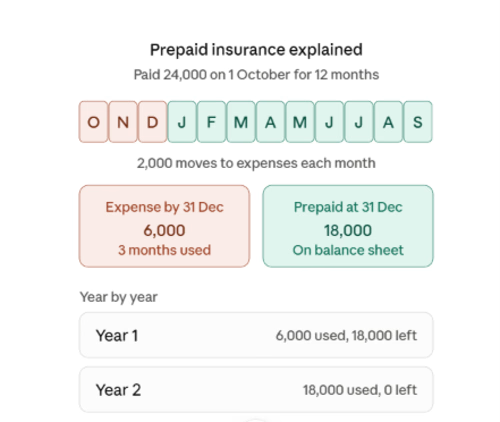
Say you pay 24,000 on 1 October for a 12 month policy. Each month, 2,000 moves into expenses.
By 31 December, you have used 3 months:
Expense so far: 6,000
Still unused: 18,000
That 18,000 stays on the balance sheet as prepaid.
The client still wasn’t fully sure from the numbers alone, so I showed them year by year:
Year 1 (Oct to Dec): 6,000 used, 18,000 still prepaid
Year 2 (Jan to Sep): 18,000 used, 0 left
By the end of the policy, the full 24,000 has moved into expenses. Nothing is lost. It just moves a little each month, as you use the cover.
That’s when it clicked for them.
Rent paid in advance, software subscriptions, annual membership, visa fees and licence fees all work the same way. Pay now, use over time, expense a little each month.
If your bookkeeper says “prepaid” and you just nod, ask them for a schedule like this. It’s your money, you should be able to see where it is.

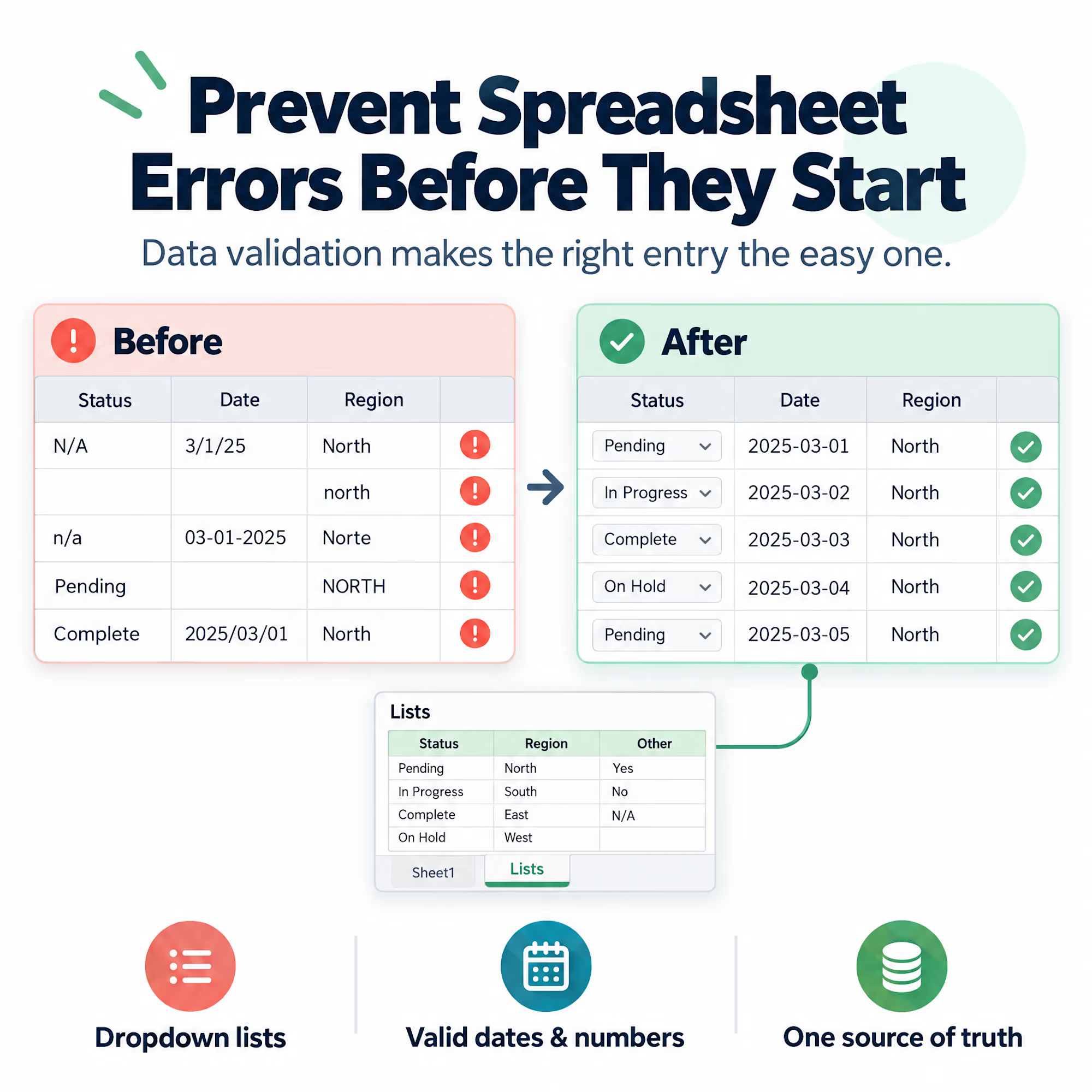
Most spreadsheet errors don’t come from bad formulas. They come from bad entries.
One person types “N/A”, another leaves the cell blank, a third writes “n/a “ with a trailing space. A date arrives as text. A region shows up as “North”, “north”, and “Norte”. Every formula downstream is correct, and the totals are still wrong.
Cleaning that up afterward works, but it’s the expensive way. It’s cheaper to stop the bad entry from getting in:
-- Use dropdown lists (Data Validation) for any field with a fixed set of values
-- Restrict date and number columns to valid formats
-- Add a short input message that explains what the cell expects
-- Keep a separate “lists” sheet so the allowed values live in one place
The goal isn’t to lock people out. It’s to make the right entry the easy one.
A spreadsheet that’s hard to fill in wrong rarely needs a cleanup project later.
Which field in your own reports causes the most cleanup work?