The network for creativity
Join 1.25M professional creatives like you
Connect with clients, get discovered, and run your business 100% commission-free
Creatives on Contra have earned over $150M and we are just getting started
Back to feedPost

This ones a bit meta , if your running low on time to make a presentation video for your FLORA technique, #FLORATechnique.
I made one to quickly make an explainer vid by providing it some screenshots and a description of your technique / software.
Give it an overview screenshot and 4 supplementary screens.
And you get 30 seconds of 5 separate 6 seconds videos with narration you can download and merge or edit.
See attached compiled video few sample of what it outputs, the last bit on the compiled video is seedance being seedance 🤪
Try it here: https://app.flora.ai/techniques/explainer
Here's an example process with ffmpeg command to do that last part quickly:
Create an input file list (inputs.txt) listing all video clips names in order , note the file prefix is literal as are the quotes:
file 'clip1.mp4'
file 'clip2.mp4'
file 'clip3.mp4'
Then this ffmpeg command:
ffmpeg -f concat -safe 0 -i inputs.txt -i audio.mp3 -c:v copy -c:a aac -map 0:v:0 -map 1:a:0 -shortest output.mp4
Parameters Explanation,
-f concat -safe 0 -i inputs.txt: Uses the concat demuxer to read the list of files.
-i audio.mp3: Inputs the single audio file.
-c:v copy: Stream copies the video (fast, no re-encoding).
-c:a aac: Re-encodes audio to AAC for better compatibility with MP4.
-map 0:v:0 -map 1:a:0: Takes the video from the first input (concat) and audio from the second input.
-shortest: Ends the output file when the shortest input (likely the audio) finishes.

The network for creativity
Join 1.25M professional creatives like you
Connect with clients, get discovered, and run your business 100% commission-free
Creatives on Contra have earned over $150M and we are just getting started
Related posts

Title:
I built a design system generator inside Figma Make. Here's the workflow.
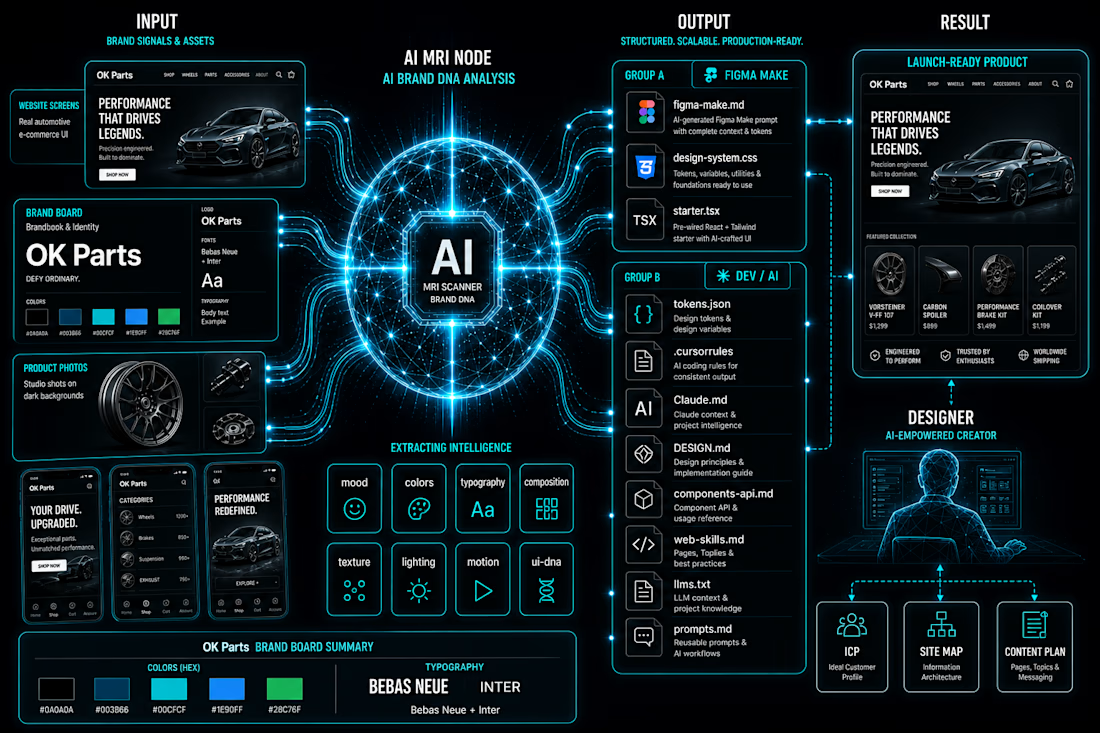
The problem I kept running into: every new client project meant re-explaining the brand to every AI tool from scratch. Figma Make didn't know the colors. Cursor didn't know the tokens. Claude didn't know the rules. I was the shared memory — and I kept losing things.
So I built Design System Gen. Entirely inside Figma Make. Powered by Claude API.
The workflow:
Upload brand references → Claude API analyzes them across 8 dimensions (palette, mood, typography, composition, lighting, texture, motion, UI DNA) → structured data, not vibes → generates 11 files, each formatted for a specific tool in your stack.
figma-make.md → paste once, Figma Make knows your entire design system
design-system.css → all tokens as CSS custom properties
tokens.json → W3C format, imports directly into Figma Variables
starter.tsx → React starter with tokens already bound
.cursorrules → Cursor knows your system from root
Claude.md → Claude reads it automatically every session
+ 5 more for docs, LLMs, prompts, components
Every tool gets its own context file. All consistent with each other.
The part I'm most proud of: I'm a designer. I don't write code. The entire tool — UI, API integration, file generation logic — was built and shipped inside Figma Make. No external hosting. No separate codebase.
Live at: vibecodingdsgen.figma.site
Add your Claude API key and try it with your own moodboard.
#FigmaMake #DesignSystem #VibeCoding #AI #Claude #UXUI #DesignSystems #ConfigMakeathon

As someone who constantly jumps between Figma, Claude, ChatGPT, Cursor, Lovable, and other AI tools, this problem feels very familiar 😅
The tools are getting smarter, but keeping context consistent is still surprisingly manual. Love seeing people tackle that gap.

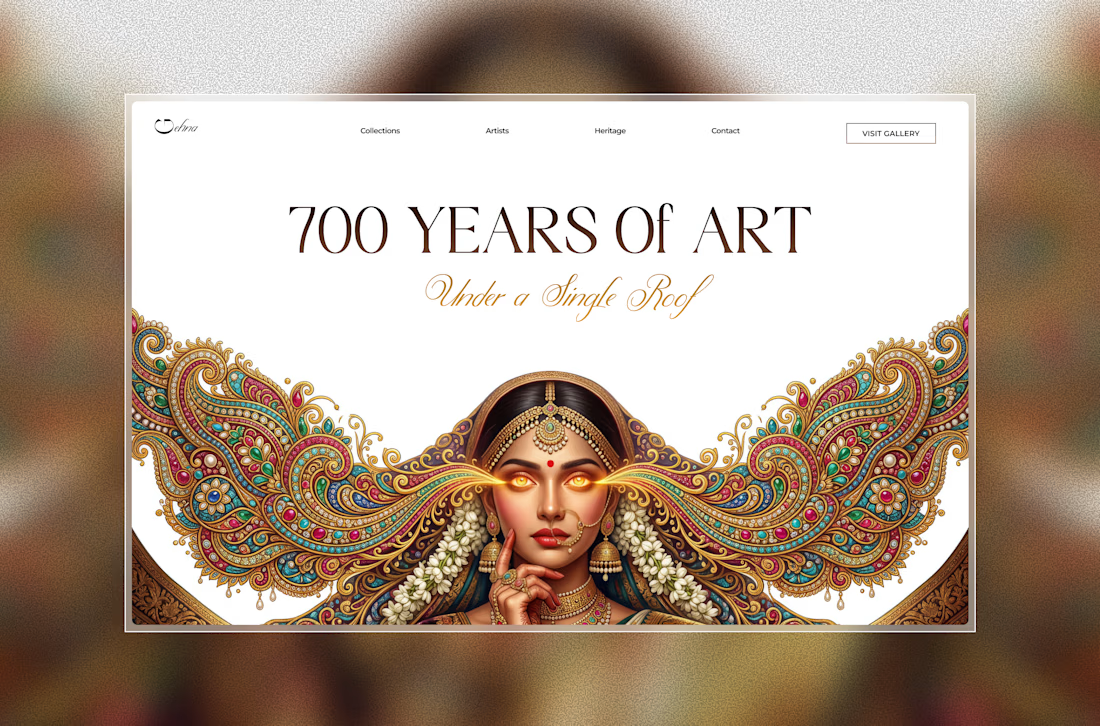
After a long time, I explored a new hero concept inspired by Indian craftsmanship and editorial luxury. ✨
Still early, but I loved blending ornate details with a modern web experience.
Should i turn this into a full landing page? ✨
framerdevelopercontralabsFramer Website DesignFramer Website DevelopmentEditorial DesignFigmaFLORAFramer


Love this!

Zarfam Kala | TV Commercial Production
I created a cinematic TV commercial for Zarfam Kala, a motorcycle spare parts supplier. The concept was built around dynamic motorcycle visuals, mechanical part assembly, and a premium commercial look to communicate the brand’s role in keeping riders moving.
My work included visual concept development, AI-assisted production, cinematic scene direction, editing, motion design, and final commercial presentation.



The cinematic tunnel shot with the motorcycle is a strong opener. Using AI-assisted production for a commercial brief like this while maintaining that premium, motion-heavy feel is a solid approach for a parts supplier that isn't typically glamorous to market.
















Trending

Claude
Claude has entered the design space. How are you using Claude Design?

Contra University
Learn from expert creatives how to earn more using next-gen AI tools.

MagicPath
The canvas is infinite, and exploration is becoming the workflow. How are you using MagicPath?
creativeaiflow
Creative AI workflows are evolving. What tools do you use, and what are their strengths and weaknesses?
freelancerlife
Freelancer life is wins, pivots, and everything in between. What’s yours right now?