
Natalia Trusova
Ai driven Ui/Ux & graphic designer
New to Contra
Natalia is ready for their next project!
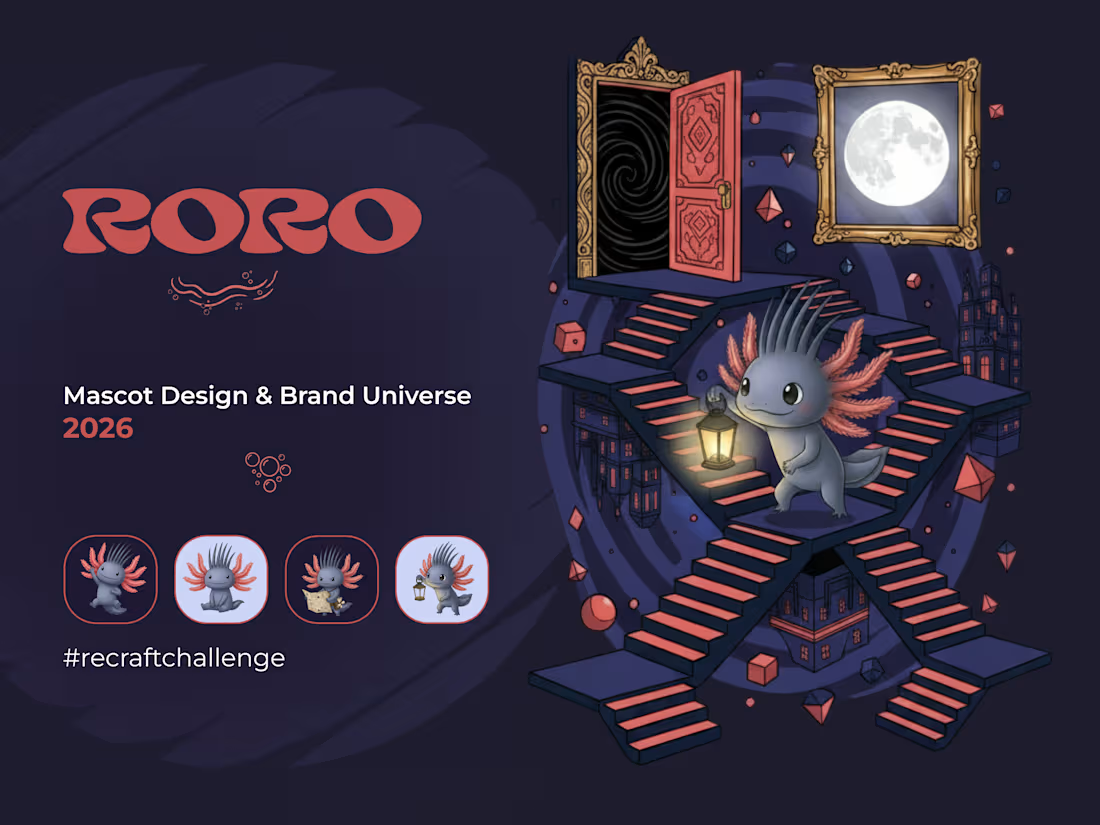
Meet RORO — my entry for the Recraft × Contra Mascot Challenge.
A small axolotl-like creature from the underground world. Curious, fearless, always moving between dimensions.
Voting is still open — if you like the project, your support means a lot 💜
🔗 Project #recraftchallenge →
https://on.contra.com/jR9qj9
🔗 Full case on Contra →
https://contra.com/p/b6PQvqXN-roro-mascot-for-recraft-challenge?referralExperimentNid=DEFAULT_REFERRAL_PROGRAM&referrerUsername=natalia_trusova_UIUX_graphic_ds
11
19
713
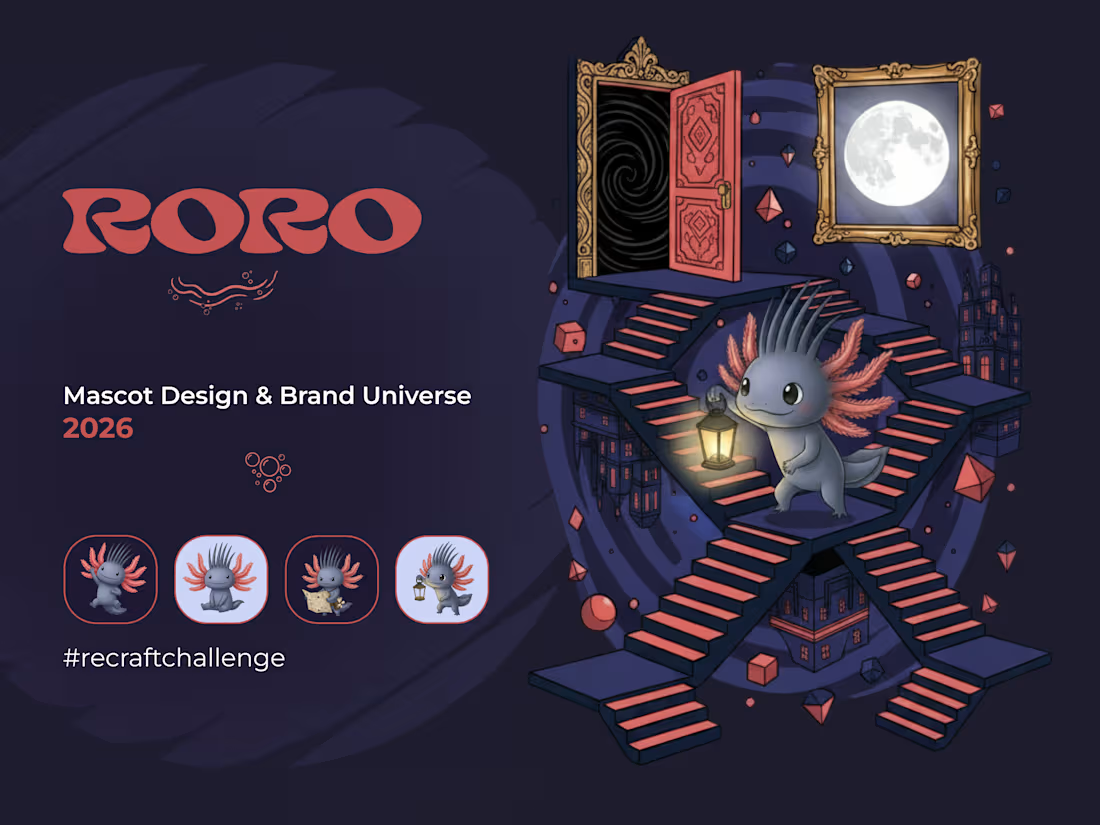
RORO mascot for recraft challenge
13
18
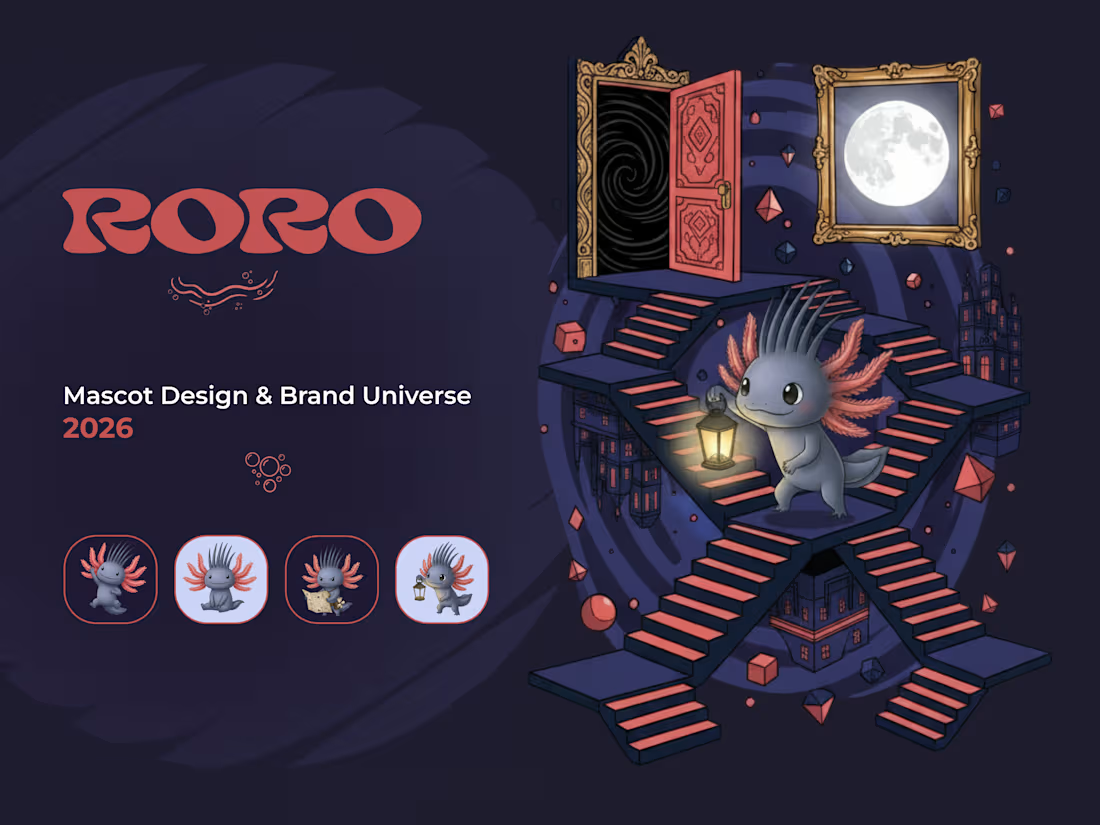
Recraft Challenge
3
1
165
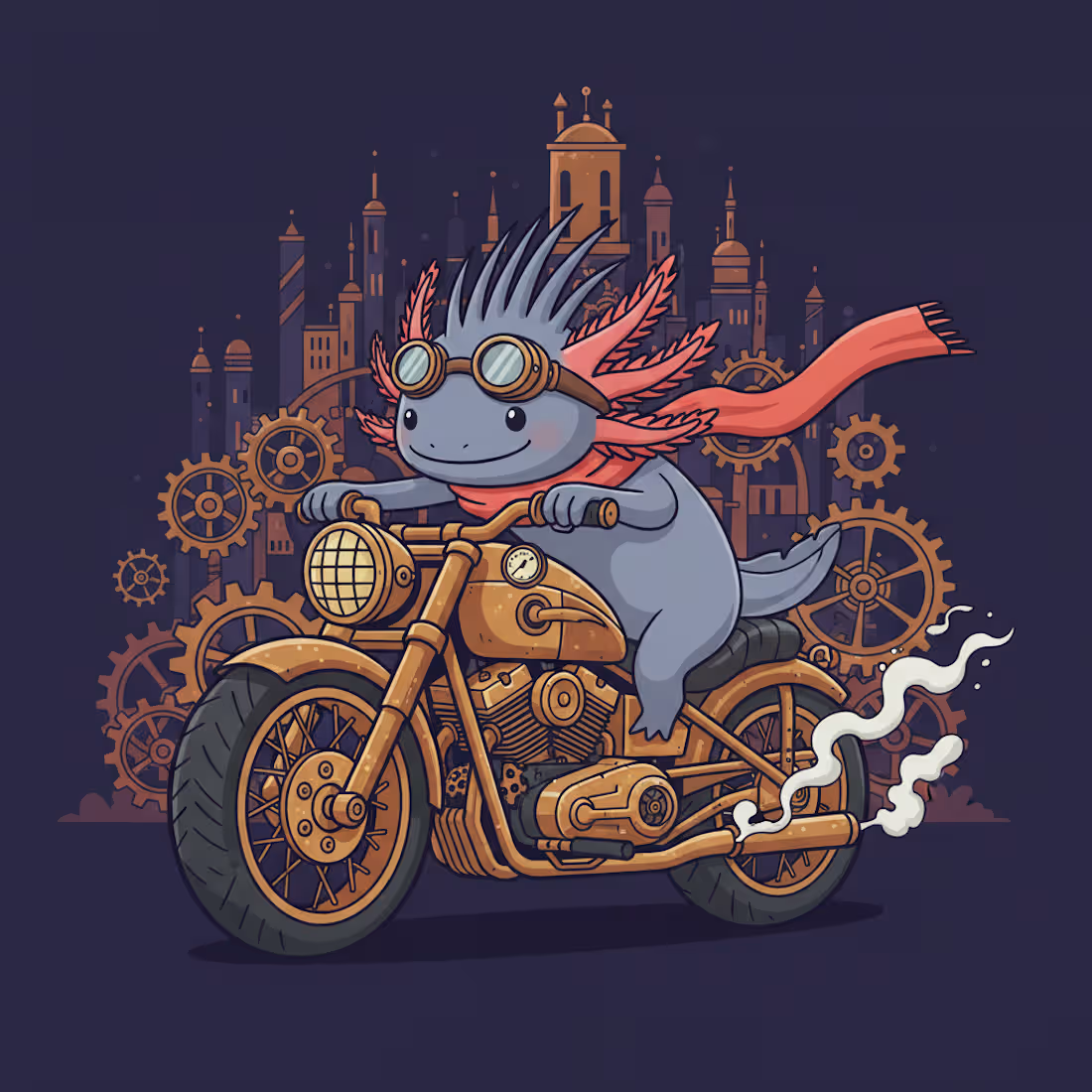
RORO is a small axolotl-like creature born in the underground world — curious, fearless, and always searching for what lies beyond the next doorway.
Armed with a lantern and endless wonder, RORO travels between dimensions without ever losing itself. That's the whole point.
This is the mascot for RORO — an imaginary t-shirt brand built around one character and infinite worlds.
THE CHARACTER RORO is slate blue with coral-red feathery gills and dark sharp spikes. Slightly mysterious. Slightly mischievous. Completely unafraid. The kind of character you'd recognize on a poster, a sticker, a packaging label, or a tiny thumbnail — and know immediately who it is.
TWO SERIES RORO BRAND:
1. WORLDS — each print places RORO inside a different dimension: ocean depths, crystal caves, alien landscapes, surrealist architecture. The world changes. The character never does.
2. RORO STATES — each print captures RORO mid-adventure: steampunk biker, monster fighter, underground cartographer, volcanic onsen dreamer. One character. Infinite sides.
Together the two series create a brand universe that can expand forever without losing coherence.
Every world has a story.
https://www.recraft.ai/project/717aa776-811d-4872-b9d7-9239bddfcbac
Instagram https://www.instagram.com/reel/DaTMfNINiRQ/?igsh=a2Z0cjkwZXBiMnRp
25
27
1.6K
Lens & Link is a mobile app for finding and booking photographers. It connects clients with photographers based on city, date, and shooting genre.
There are two registration paths. A photographer creates a profile with their name, genre, city, hourly rate, and portfolio. A client registers with just a name and email. The same account can function as both — a photographer can also book other photographers through the platform.
Each user has a personal dashboard split into two views: their incoming or outgoing bookings, and their profile. Bookings have statuses — pending, confirmed, cancelled, completed — and both sides receive email notifications at each stage.
Search works by city, date, and genre. The app has a bottom navigation bar for smooth movement between sections.
Category
Marketplace / Services — connecting creatives with clients.
How it was built
I'm a designer, not a developer. I used Claude to generate the full app architecture from a text prompt — database structure, data types, workflows, and page logic. That became my starting point inside Bubble.
From there I worked through the bindings and workflow connections myself, using Bubble's built-in AI agent and the Claude browser extension as support. When something wasn't clear, I asked the agent directly. When I could figure it out — I did.
The UI and design decisions were mine throughout. The AI handled the logic foundation; I handled how it looks, feels, and flows.
link https://bubble.io/live_not_supported?appname=trusovanatadesign-66181
Instagram https://www.instagram.com/reel/DaJFHeAtw3Y/?igsh=N3NicWVid3Y5MnAy
For the judges:
This is my first experience with Bubble. During submission I discovered that the starter plan doesn't generate a shareable live link for mobile apps — something I wasn't aware of going in. I'm attaching an alternative link to the app preview below.
Thank you for your understanding.
21
21
2.1K
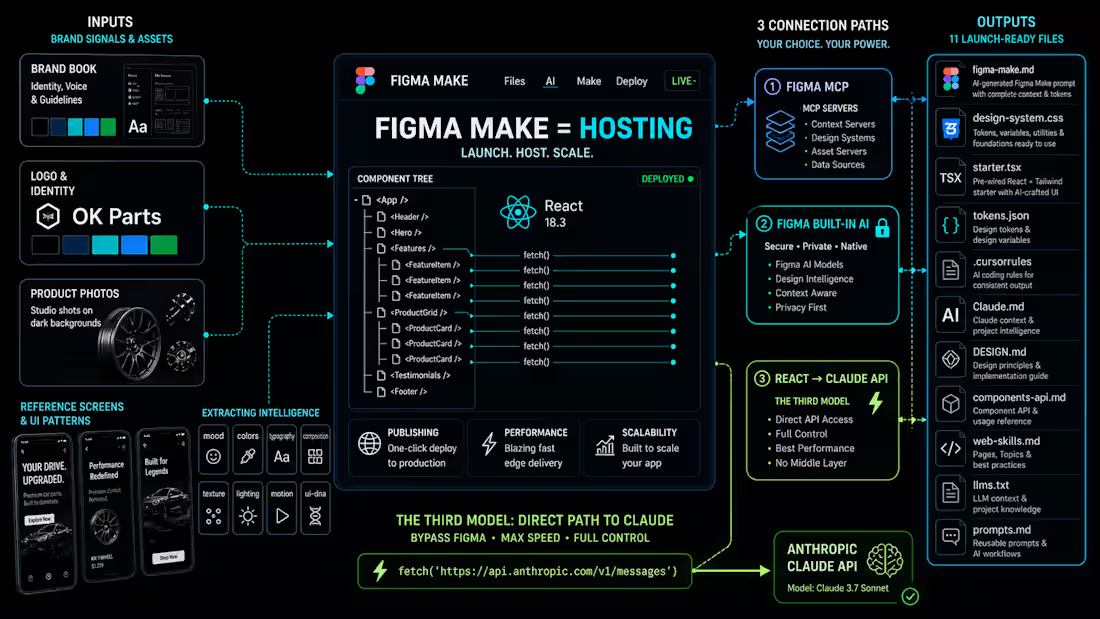
Figma Make isn't just a prototyping tool. I used it to ship a Claude-powered design system generator.
Most designers treat Figma Make as a quick vibe-coding sketchpad. I wanted to show it's something deeper — a full vibe-coding platform that integrates with external APIs.
The connection nobody writes about
There are three ways Claude connects to Figma today. Figma MCP — Claude reads and writes Figma files via MCP server. Figma's built-in AI — Figma calls its own models internally. And mine — a React app inside Figma Make that calls Claude API directly from the browser. Claude responds to the code, not to Figma. Figma Make is the hosting.
The new pipeline
Old approach: get brandbook and references from client → generate moodboard → align → write prompts for UI Kit. Separate steps, human in the center every time.
My approach: collapse all of that into one step. Run an AI analysis and output structured data — input for machines, not a result for humans.
We don't ask AI how the brand looks. We run an MRI on it and get structured data that machines use to build code.
What gets generated
11 files, all consistent with each other because they share one analysis. For Figma specifically:
tokens.json — W3C DTCG 3-tier format (primitive → semantic → component), imports directly into Figma Variables via Tokens Studio or Figma Make prompt
design-system.css — all tokens as CSS custom properties, ready to import
starter.tsx — paste into Figma Make, full design system renders instantly
figma-make.md (http://figma-make.md) — session context, paste once and the AI knows the entire design system
Add a content plan on top — generate a full design in one run with minimal token spend.
The entire tool was built and shipped inside Figma Make. No external hosting. No separate codebase.
→ vibecodingdsgen.figma.site (http://vibecodingdsgen.figma.site)
#ConfigMakeathon #FigmaMake #DesignSystem #VibeCoding #ClaudeAPI #BuildInPublic
1
15
441
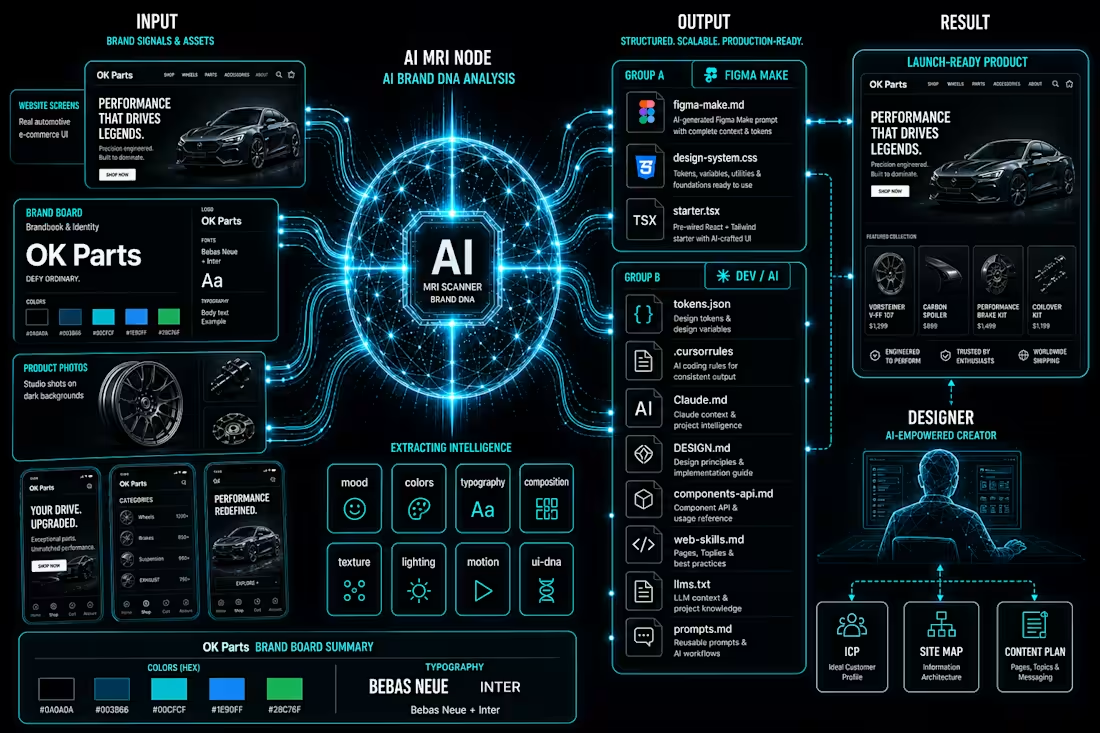
Title:
I built a design system generator inside Figma Make. Here's the workflow.
The problem I kept running into: every new client project meant re-explaining the brand to every AI tool from scratch. Figma Make didn't know the colors. Cursor didn't know the tokens. Claude didn't know the rules. I was the shared memory — and I kept losing things.
So I built Design System Gen. Entirely inside Figma Make. Powered by Claude API.
The workflow:
Upload brand references → Claude API analyzes them across 8 dimensions (palette, mood, typography, composition, lighting, texture, motion, UI DNA) → structured data, not vibes → generates 11 files, each formatted for a specific tool in your stack.
figma-make.md → paste once, Figma Make knows your entire design system
design-system.css → all tokens as CSS custom properties
tokens.json → W3C format, imports directly into Figma Variables
starter.tsx → React starter with tokens already bound
.cursorrules → Cursor knows your system from root
Claude.md → Claude reads it automatically every session
+ 5 more for docs, LLMs, prompts, components
Every tool gets its own context file. All consistent with each other.
The part I'm most proud of: I'm a designer. I don't write code. The entire tool — UI, API integration, file generation logic — was built and shipped inside Figma Make. No external hosting. No separate codebase.
Live at: vibecodingdsgen.figma.site (http://vibecodingdsgen.figma.site)
Add your Claude API key and try it with your own moodboard.
#FigmaMake #DesignSystem #VibeCoding #AI #Claude #UXUI #DesignSystems #ConfigMakeathon
7
23
666
Design System Gen
A tool for rapid client project kickstart — built with Figma Make + Claude API
The Problem
Every new client project starts the same way.
You receive a moodboard, some references, maybe a Pinterest link. You're expected to build something consistent — across Figma Make, Cursor, Claude — but there's no real foundation yet. No tokens. No rules. No shared context between tools.
Most designers spend hours on setup before writing a single prompt. I got tired of doing that. So I built a tool to eliminate that stage entirely.
What It Does
Design System Gen turns a client moodboard into a ready-to-use design system foundation — in one click.
Upload the client's references → the tool analyzes them across 8 dimensions:
Palette / Mood/ Typography/ Composition/ Lighting/ Texture/ Motion/ UI DNA
Hit "Apply all to form" — the entire design system form fills automatically.
Then generate. You get 11 files, each tailored to a specific AI tool:
File:
figma-make.md (http://figma-make.md) For Figma Make Full design system context — paste once, build everything in Make
design-system.css Any project All tokens as CSS custom properties, ready to import
tokens.json Figma Variables W3C Design Tokens — import directly to Figma Variables
starter.tsx React / Next.js React component starter with all tokens already bound
cursorrules Cursor Cursor AI rules — drop in root, it knows your design system
Claude.md (http://Claude.md) Claude Projects Claude reads it automatically every session
DESIGN.md (http://DESIGN.md) Documentation Human-readable design decisions and rationale
llms.txt Any LLM Machine-readable brand context, like robots.txt but for AI
components-api.md (http://components-api.md) Dev reference Component props, variants, and usage documentation
prompts.md (http://prompts.md) All AI tools Ready-made prompts for every AI tool in your stack
web-skills.md (http://web-skills.md) Component library in vanilla HTML/CSS — buttons, cards, modals, nav
Every tool gets its own customized kit — tokens, rules, prompts — all consistent with each other. Not one generic output. A separate file per tool.
Figma Make Integration
In Figma Make: add two files at the start of a session and you're ready to build immediately.
Because the design system context is already loaded — Figma Make knows your colors, tokens, spacing, component rules — your prompts stay minimal. No need to re-explain the design system every time. You spend a fraction of the tokens you normally would.
A full landing page — generated in a single run, with remarkably few tokens spent per prompt.
No back and forth. No prompt engineering from scratch. The context file already did that.
How It Was Built
Built entirely in Figma Make + Claude.
Published as a live web app via Figma Make publish → vibecodingdsgen.figma.site
(http://vibecodingdsgen.figma.site)Powered by Claude API.
Claude processes the uploaded moodboard and returns structured output — design parameters, tokens, and prompt sets — all formatted specifically for each target tool.
Output connects directly to Figma Variables.
W3C Design Token format and can be imported into Figma Variables in three ways: via Tokens Studio plugin, through a Figma Make prompt, or using a custom Figma plugin — for teams who want full control over the import flow or one special file
The entire tool — UI, logic, API integration, file generation — was built and shipped inside Figma Make. No external hosting. No separate codebase.
Why I Built This
Speed — rapid kickstart for every new project, starting from the client's own references, not templates.
Consistency — every AI tool in your stack speaks the same design language from day one.
Predictable output — a base that only needs refinement, not rebuilding.
Token efficiency — a full landing page was generated in a single run.
The tool is fully live — you can explore the demo without any setup.
→ vibecodingdsgen.figma.site (http://vibecodingdsgen.figma.site)
Want to generate your own design system? Add your Claude API key directly in the tool and try it with your own moodboard. The full generation takes 3–4 minutes and produces all 11 files ready to use.
Instagram
https://www.instagram.com/reel/DZv662GCONK/?igsh=MTAzbWhwZHFnem1lMQ==
Linkedin
https://www.linkedin.com/posts/nataliatrusova_config-figma-share-7473584710724808704-YUVK/?utm_source=share&utm_medium=member_android&rcm=ACoAAAvbQN8B6uwRcvk-lCjSLHX3BLh7LL2LS0Y
#ConfigMakeathon #FigmaMake #DesignSystem #VibeCoding #ClaudeAPI
34
31
1.1K
Design System Gen
A tool for rapid client project kickstart — built with Figma Make + Claude API
The Problem
Every new client project starts the same way.
You receive a moodboard, some references, maybe a Pinterest link. You're expected to build something consistent — across Figma Make, Cursor, Claude — but there's no real foundation yet. No tokens. No rules. No shared context between tools.
Most designers spend hours on setup before writing a single prompt. I got tired of doing that. So I built a tool to eliminate that stage entirely.
What It Does
Design System Gen turns a client moodboard into a ready-to-use design system foundation — in one click.
Upload the client's references → the tool analyzes them across 8 dimensions:
Palette / Mood/ Typography/ Composition/ Lighting/ Texture/ Motion/ UI DNA
Hit "Apply all to form" — the entire design system form fills automatically.
Then generate. You get 11 files, each tailored to a specific AI tool:
File:
figma-make.md (https://figma-make.md) For Figma Make Full design system context — paste once, build everything in Make
design-system.css (https://design-system.css) Any project All tokens as CSS custom properties, ready to import
tokens.json (https://tokens.json) Figma Variables W3C Design Tokens — import directly to Figma Variables
starter.tsx (https://starter.tsx) React / Next.js React component starter with all tokens already bound
cursorrules Cursor Cursor AI rules — drop in root, it knows your design system
Claude.md (https://Claude.md) Claude Projects Claude reads it automatically every session
DESIGN.md (https://DESIGN.md) Documentation Human-readable design decisions and rationale
llms.txt (https://llms.txt) Any LLM Machine-readable brand context, like robots.txt but for AI
components-api.md (https://components-api.md) Dev reference Component props, variants, and usage documentation
prompts.md (https://prompts.md) All AI tools Ready-made prompts for every AI tool in your stack
web-skills.md (https://web-skills.md) Component library in vanilla HTML/CSS — buttons, cards, modals, nav
Every tool gets its own customized kit — tokens, rules, prompts — all consistent with each other. Not one generic output. A separate file per tool.
Figma Make Integration
In Figma Make: add two files at the start of a session and you're ready to build immediately.
Because the design system context is already loaded — Figma Make knows your colors, tokens, spacing, component rules — your prompts stay minimal. No need to re-explain the design system every time. You spend a fraction of the tokens you normally would.
A full landing page — generated in a single run, with remarkably few tokens spent per prompt.
No back and forth. No prompt engineering from scratch. The context file already did that.
How It Was Built
Built entirely in Figma Make + Claude.
Published as a live web app via Figma Make publish → vibecodingdsgen.figma.site (http://vibecodingdsgen.figma.site)
Powered by Claude API.
Claude processes the uploaded moodboard and returns structured output — design parameters, tokens, and prompt sets — all formatted specifically for each target tool.
Output connects directly to Figma Variables.
W3C Design Token format and can be imported into Figma Variables in three ways: via Tokens Studio plugin, through a Figma Make prompt, or using a custom Figma plugin — for teams who want full control over the import flow.
The entire tool — UI, logic, API integration, file generation — was built and shipped inside Figma Make. No external hosting. No separate codebase.
Why I Built This
Speed — rapid kickstart for every new project, starting from the client's own references, not templates.
Consistency — every AI tool in your stack speaks the same design language from day one.
Predictable output — a base that only needs refinement, not rebuilding.
Token efficiency — a full landing page was generated in a single run.
The tool is fully live — you can explore the demo without any setup.
→ vibecodingdsgen.figma.site (http://vibecodingdsgen.figma.site)
Want to generate your own design system? Add your Claude API key directly in the tool and try it with your own moodboard. The full generation takes 3–4 minutes and produces all 11 files ready to use.
Instagram post https://www.instagram.com/stories/trusovanata.design/3922621806816713616?utm_source=ig_story_item_share&igsh=aHd3aWEyMG9obHdq
#ConfigMakeathon #FigmaMake #DesignSystem #VibeCoding #ClaudeAPI
1
12
442