The network for creativity
Join 1.25M professional creatives like you
Connect with clients, get discovered, and run your business 100% commission-free
Creatives on Contra have earned over $150M and we are just getting started
Back to feedPost

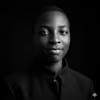
Creating realistic AI portraits isn't just about writing a prompt—it's about finding a model that consistently delivers natural results.
For this project, I used Recraft V4.1 to generate a series of realistic female portraits. My goal was to achieve clean skin textures, natural facial proportions, soft lighting, and a consistent style across multiple images.
What worked well:
Realistic facial features without an overly artificial look.
High-quality skin details and natural lighting.
Consistent results across different generations.
Strong foundation for branding, advertising, social media, and creative projects.
As someone who enjoys exploring AI creative tools, I like comparing models to understand where each one performs best. Recraft V4.1 impressed me with its ability to create polished, photorealistic portraits while keeping the overall aesthetic consistent.
I'm always experimenting with new workflows and AI models to create visuals that look less like AI and more like professional photography.
Tool used: Recraft V4.1


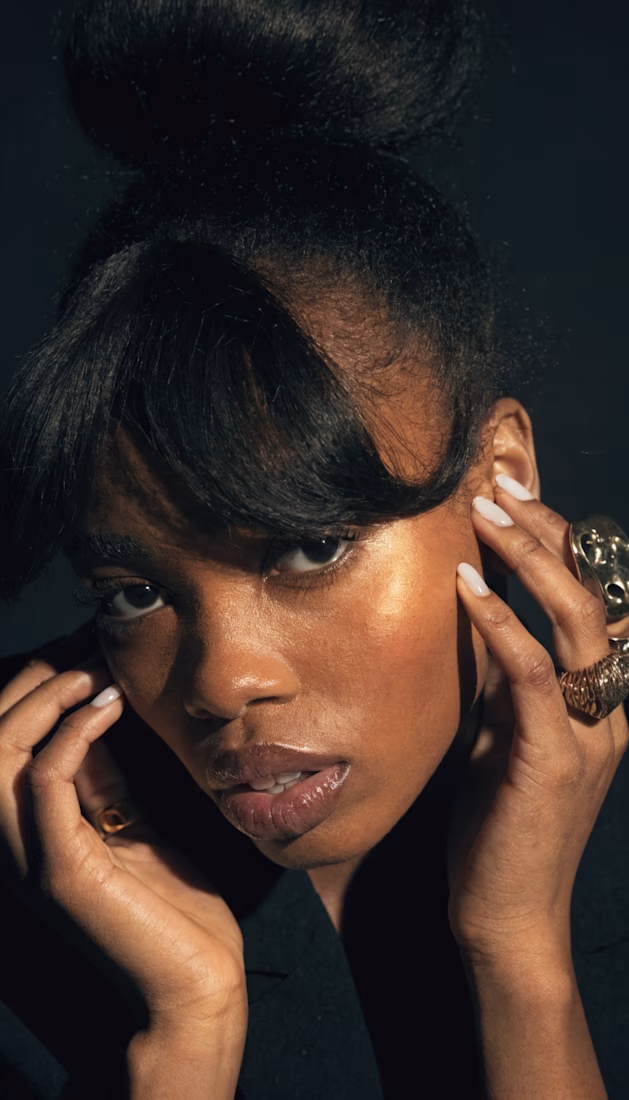
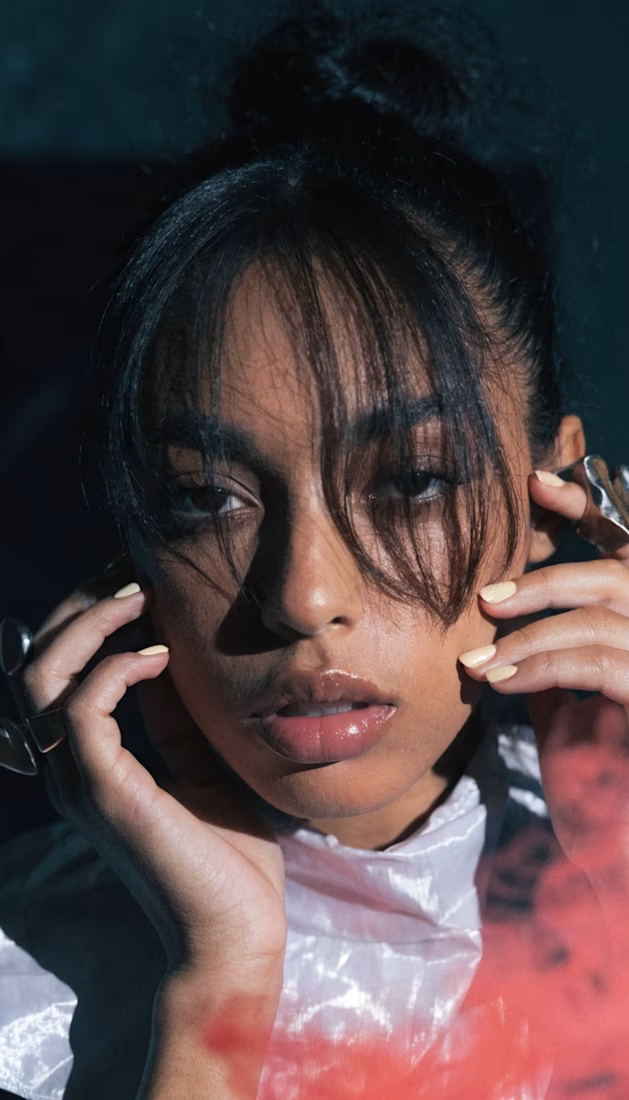

The skin texture and catchlights in the eyes are what usually give away AI portraits, and these actually hold up. How many generations did it typically take with Recraft V4.1 before you got a face that read as fully natural?
The network for creativity
Join 1.25M professional creatives like you
Connect with clients, get discovered, and run your business 100% commission-free
Creatives on Contra have earned over $150M and we are just getting started
Related posts

Turn on the lights
Prompt on Seedance 2.0:
A single continuous handheld handycam shot in slow motion, VHS-grain texture, drifting and weaving organically through a massive underground party of hundreds of people, completely frozen in time — a converted subway tunnel or industrial warehouse turned nightclub, with exposed concrete pillars, sweating brick walls, a low corrugated-metal ceiling, and tangled cabling hanging overhead. The space is saturated with crisscrossing green, magenta, and cyan laser beams, flickering LED panels, sweeping festival moving-head lights raking across the crowd, and motionless artificial fog hanging in the air, pierced by light beams frozen mid-path.
The crowd — hundreds of bodies deep — is suspended mid-movement like a wax diorama: arms raised mid-wave, bodies frozen mid-jump, drinks caught mid-splash but hanging motionless, confetti frozen mid-fall. Scattered through the crowd: a DJ frozen mid-gesture over a glowing mixing deck, headphone cable still caught in a mid-swing arc; an android with exposed chrome joints and glowing blue circuitry frozen mid-glitch, one panel of synthetic skin peeled back; a hulking service robot frozen mid-stride, carrying a tray of drinks hovering unspilled above it. On raised platforms, dancers are frozen mid-spin, hair and clothing rigid in the air as if made of glass.
The handheld camera weaves low and close at first, nearly brushing past suspended bodies, then rises and floats up and over the crowd, banking slowly around a chrome support pillar to reveal the full depth of the party — hundreds of silhouettes fading into the neon haze. Natural handheld sway and micro-shake throughout, slight motion blur on the lights only, everything else tack-sharp and still. Single unbroken slow-motion take, no cuts.


I chose PRYZM, a real AI background generator that already had a solid concept but lacked personality, discoverability, and an engaging creative experience.
(You'll notice the logo is intentionally removed in my version. That's to avoid any copyright issues not a missing asset )
Instead of redesigning just the UI, I completely reimagined the experience into an interactive AI creative studio.
✨ What I built:
- 3 dedicated creative builders: Social Media / Portfolio /AI Image Mixing
- Each builder has its own custom workflow and tools designed for that specific use case.
- Unlimited AI background generation: Generate backgrounds manually or instantly with Randomize.
- AI-powered animated experience: Both landing page backgrounds are AI-generated and animated. Even the custom cursor is AI-generated and animated.
(If anyone wants the prompts I used for the backgrounds , just let me know in the comments.)
✨ Creators can:
- Share their work publicly or privately
- Explore creations from the community
- Remix any background in seconds
- Export as image or video in custom resolutions
✨ Automation:
I implemented an AI-powered onboarding flow that personalizes the experience from the very beginning. Users answer a quick interactive quiz and are automatically taken to the builder that best matches their creative goal, making the app faster and easier to use.
✨My goal:
I wanted to transform PRYZM from a simple background generator into a product people genuinely enjoy spending time in....not just generating assets, but discovering, creating, remixing, and sharing them.
Now it's your turn. Create something amazing and share it in the comments 💛


Good Work!





Trending

Claude
Claude has entered the design space. How are you using Claude Design?

Contra University
Learn from expert creatives how to earn more using next-gen AI tools.
fifaworldcup2026
The World Cup is here and the whole world's watching. How are you designing for the world stage?
creativeaiflow
Creative AI workflows are evolving. What tools do you use, and what are their strengths and weaknesses?
freelancerlife
Freelancer life is wins, pivots, and everything in between. What’s yours right now?