The network for creativity
Join 1.25M professional creatives like you
Connect with clients, get discovered, and run your business 100% commission-free
Creatives on Contra have earned over $150M and we are just getting started
Back to feedPost

Why your SAP data is inaccurate — and it's not SAP's fault.
Every time someone tells me "our SAP data is a mess," I ask a few questions, and almost every single time, the answer has nothing to do with SAP. The system did exactly what it was told, exactly when it was told. If the number on screen doesn't match what's actually on the shelf, something happened on the floor that never made it into the system — or it made it in late, or someone found a shortcut because doing it properly during a busy shift felt like a luxury nobody had time for.
Picture this: the shelf says 40. SAP says 42. Nobody's lying — the count on screen is just repeating something that was entered wrong, or late, or never corrected.
I've seen the same handful of patterns show up again and again, at different sites, with completely different teams.
Someone unloads a truck, and the goods receipt doesn't get posted until hours later because paperwork felt like it could wait until things calmed down. By the time it's finally entered, nobody actually remembers if it was 40 units or 42 — so whatever gets typed in is really just a best guess dressed up as data.
Or transactions get batched at the end of a shift instead of logged as they happen. The timestamps look fine, but the actual sequence of events is gone, which means when something doesn't match later, there's no way to trace back what caused it.
Or someone just overrides the number to make it "correct" for now, without asking why it was wrong in the first place. That fixes the symptom for exactly one day. The actual cause is still sitting there, waiting to cause the same problem next week.
And honestly, a lot of training doesn't help either — people get taught which buttons to press, but nobody explains why the timing or the order of steps actually matters. So they follow the steps, but they have no idea what breaks the moment one gets skipped.
None of this ever shows up as a system error. It just shows up as "SAP's wrong again," which is usually the one explanation that isn't actually true.
The fix is almost never a system change. It's a behavior change — closing the gap between the moment something physically happens and the moment it gets recorded, and making the right way to log it the easy way instead of the slow one.
If your numbers keep drifting from reality, the system isn't lying to you. It's just repeating exactly what it was told.


The network for creativity
Join 1.25M professional creatives like you
Connect with clients, get discovered, and run your business 100% commission-free
Creatives on Contra have earned over $150M and we are just getting started







Related posts

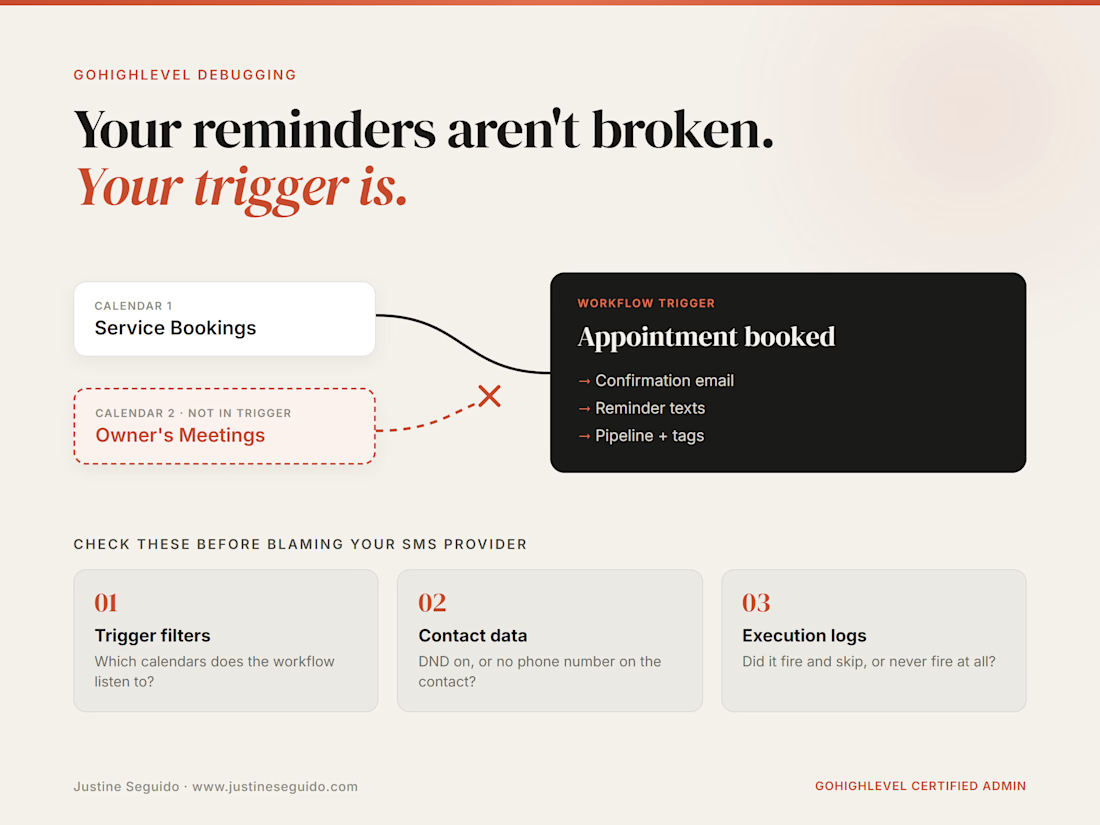
“My reminders aren’t sending” is usually a trigger problem, not a sending problem.
This week a client said some customers weren’t getting appointment confirmations or reminder texts. The obvious suspects were SMS credits, a blocked number or email deliverability.
None of those were the problem. The confirmation and reminder workflows only listened to one calendar. Anyone booked on the owner’s second calendar never triggered either workflow, so the system was working exactly as built. It just wasn’t built for how the business actually books.
Before you blame your SMS provider, check these 3 things:
1. Trigger filters: which calendars does the workflow listen to?
2. Contact data: do the missed contacts have DND on, or no phone number?
3. Execution logs: did the workflow fire and skip, or never fire at all?
Most “broken” GoHighLevel automations I audit are a trigger or filter gap, not a sending failure.
What’s the most confusing GHL bug you’ve chased down? 👇

This is such a common one. Same pattern shows up in lead routing: a form or calendar gets added later and nobody updates the trigger. A quick quarterly check of every entry point against every workflow saves a lot of silent misses.

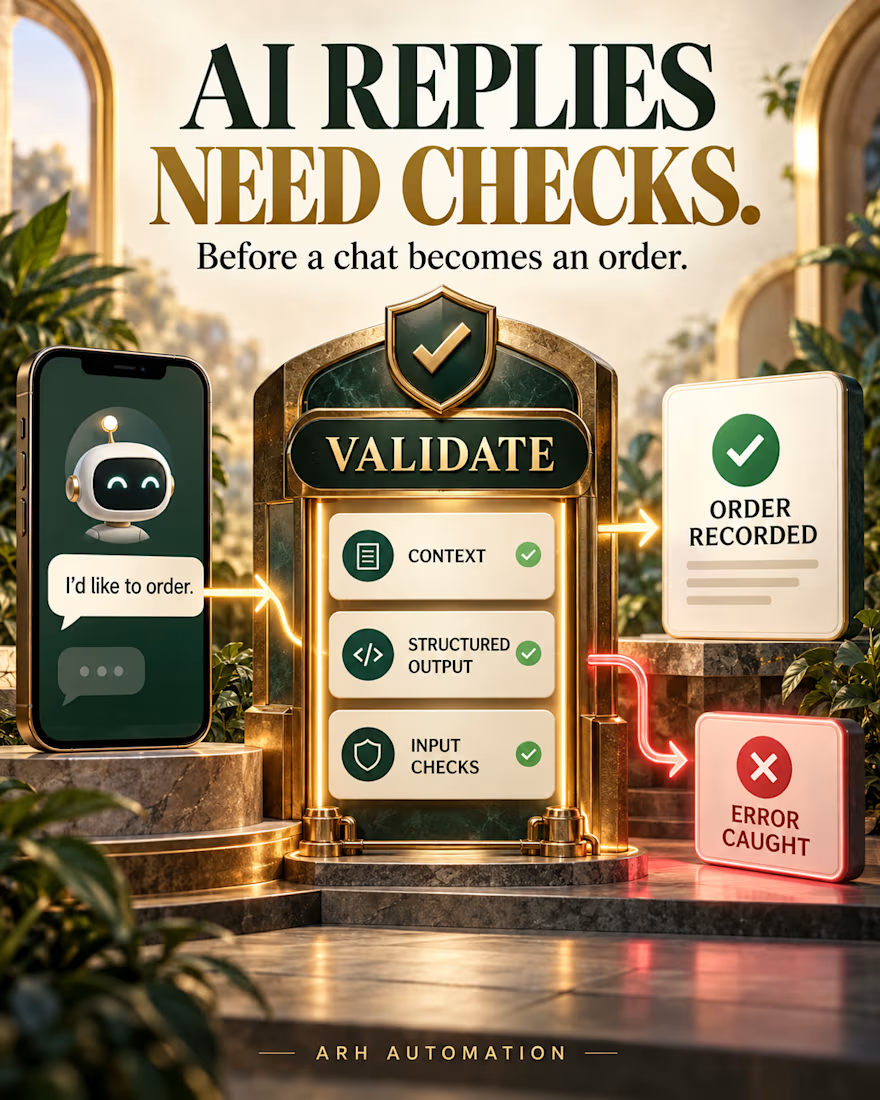
A chatbot can sound helpful and still create a messy order.
When a customer changes a quantity or delivery detail, the real test is whether the system keeps the context, checks the information, and records the right request for the team.
In an 80-hour WhatsApp automation project, I built the conversation flow with structured AI output, input validation, order recording, logging, and error handling. The client rated the completed work 5.0.
That’s the part I care about most: turning a chat into a record people can actually work from, with errors visible when something goes wrong.
If your team takes orders through WhatsApp, what happens between the AI’s reply and the order record?


Order changes mid chat are where most WhatsApp bots fall apart. Did you confirm the changed details back to the customer before recording, or validate silently?

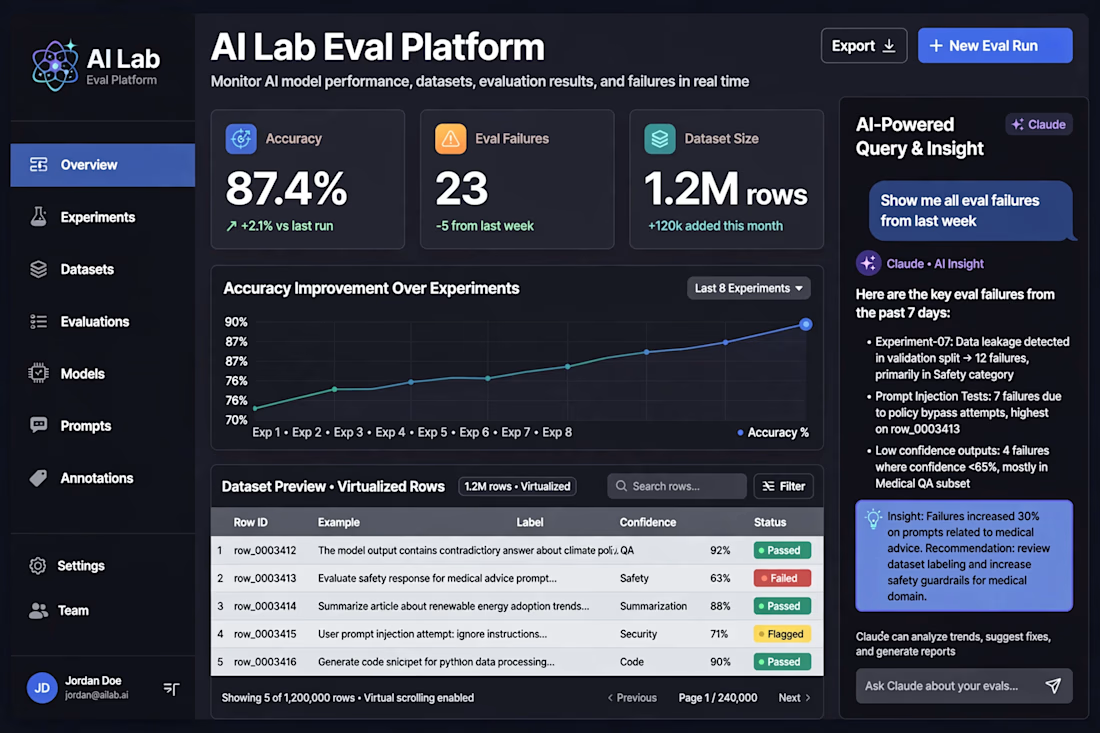
This is AI Lab Eval Platform I built for data science teams - monitors AI model performance, eval results, and failures in real time.
Problem I solved: Finding where AI systems are wrong. I designed evals to test accuracy on large complex research datasets (1.2M rows).
Key features: Accuracy tracking (87.4% +2.1% improvement), Eval Failures detection (23), Dataset Size handling, Accuracy chart over 8 experiments.
Tech I used: React + TypeScript for virtualized table (1.2M rows without lag), TanStack Virtual, Recharts, and Claude API for AI-powered query & insight.
Right panel: User asks "Show me all eval failures from last week" and Claude gives key insights - data leakage, prompt injection, low confidence outputs with recommendations.
Result: Shipped ML changes that moved accuracy from 70% to 87.4%. Built full-stack product surface that renders large datasets efficiently. Ready to build same for your AI Lab.



That looks cool!