The network for creativity
Join 1.25M professional creatives like you
Connect with clients, get discovered, and run your business 100% commission-free
Creatives on Contra have earned over $150M and we are just getting started
Back to feedPost

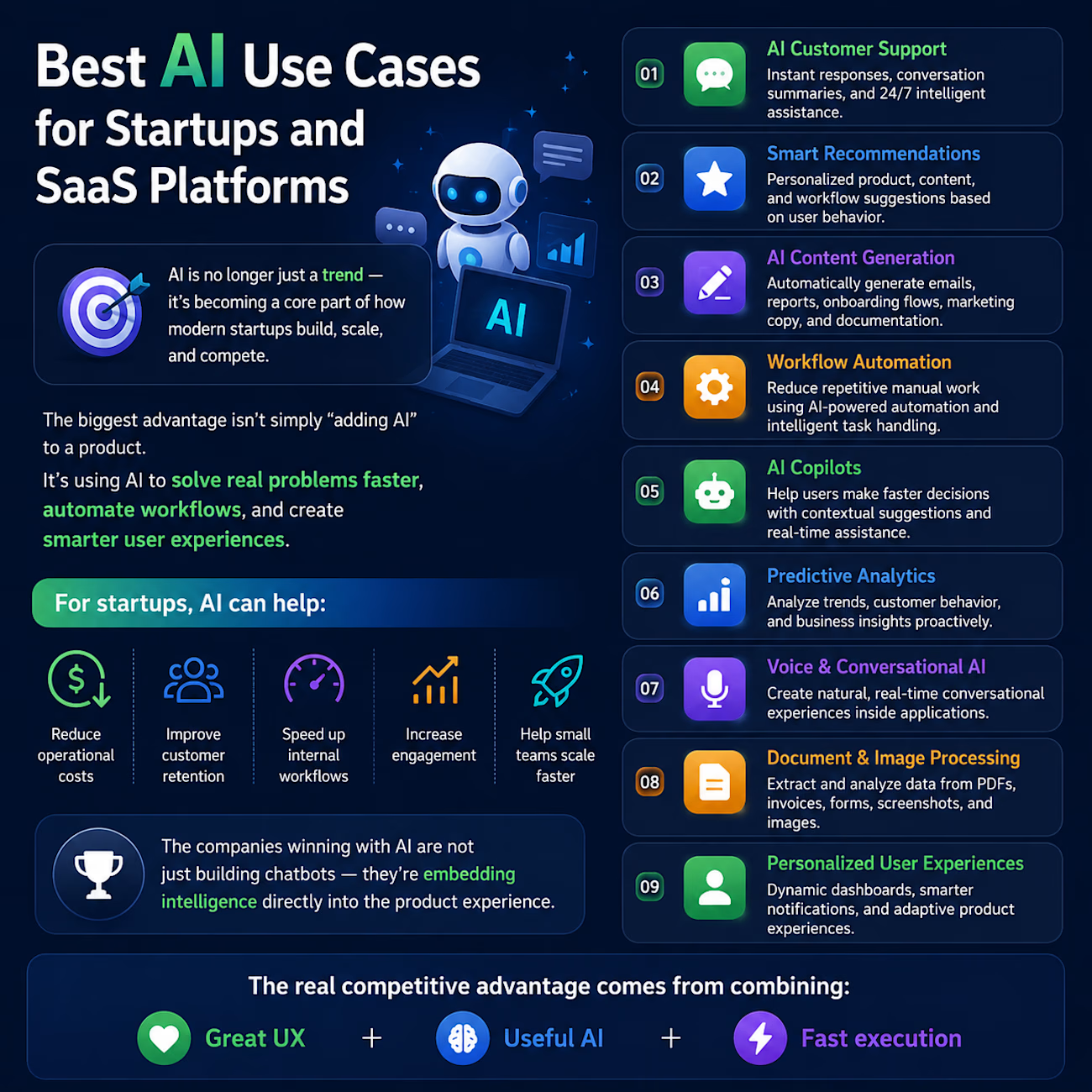
🚀 Best AI Use Cases for Startups and SaaS Platforms
AI is no longer just a trend - it’s becoming a core part of how modern startups build, scale, and compete.
The biggest advantage isn’t simply “adding AI” to a product.
It’s using AI to solve real problems faster, automate workflows, and create smarter user experiences.
Here are some of the most impactful AI use cases for startups and SaaS platforms today:
✅ AI Customer Support
Instant responses, conversation summaries, and 24/7 intelligent assistance.
✅ Smart Recommendations
Personalized product, content, and workflow suggestions based on user behavior.
✅ AI Content Generation
Automatically generate emails, reports, onboarding flows, marketing copy, and documentation.
✅ Workflow Automation
Reduce repetitive manual work using AI-powered automation and intelligent task handling.
✅ AI Copilots
Help users make faster decisions with contextual suggestions and real-time assistance.
✅ Predictive Analytics
Analyze trends, customer behavior, and business insights proactively.
✅ Voice & Conversational AI
Create natural, real-time conversational experiences inside applications.
✅ Document & Image Processing
Extract and analyze data from PDFs, invoices, forms, screenshots, and images.
✅ Personalized User Experiences
Dynamic dashboards, smarter notifications, and adaptive product experiences.
For startups, AI can help:
• Reduce operational costs
• Improve customer retention
• Speed up internal workflows
• Increase engagement
• Help small teams scale faster
The companies winning with AI are not just building chatbots — they’re embedding intelligence directly into the product experience.
The real competitive advantage comes from combining:
💡 Great UX + Useful AI + Fast execution
#Flutter #ReactNative #CrossPlatform #MobileAppDevelopment #AppDevelopment #SoftwareEngineering #TechLeadership #StartupTech #ProductDevelopment #UIUX #figma


The network for creativity
Join 1.25M professional creatives like you
Connect with clients, get discovered, and run your business 100% commission-free
Creatives on Contra have earned over $150M and we are just getting started











Related posts

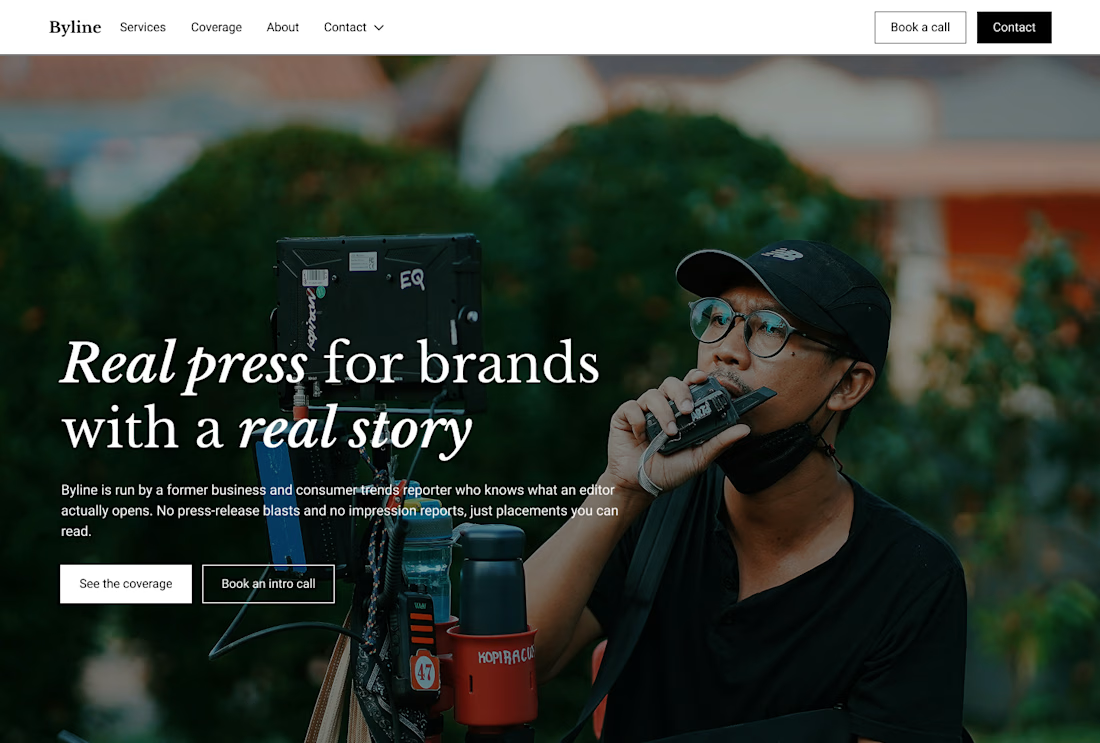
Built this in Framer as a concept project. Goal was to make it feel run by ex-journalists. Choices: editorial serif (Libre Baskerville), a dark photo with one color accent, and copy that positions against blast-style PR.
Where I’m unsure: text legibility over the photo and whether the two CTAs compete. What would you change?


That's great design it feels professional I like how the background mixed with interface ❤️❤️
Great job Cheree🎉🎉

Same design. Which palette? 👀
You picked your favorite preview last time. This time, I’m putting the colors to the vote.
One body-care packaging concept, with the same typography and composition:
A · Rose Cream, Strawberry Sorbet + Plum Jelly
B · Lime Mousse, Coconut Cream + Plum Jelly
Which would you choose and what does it make you feel about the brand?
Both palettes use colors and matching ingredient textures from DCS 654, my library of 654 dessert-inspired colors.
Take a closer look: dcs.mariya.design
7 voted
44%
9 voted
56%
16 votes
Closed
B is absolutely stunning 🎉🎉🎉🎉
Great job Mariya❤️

sentences
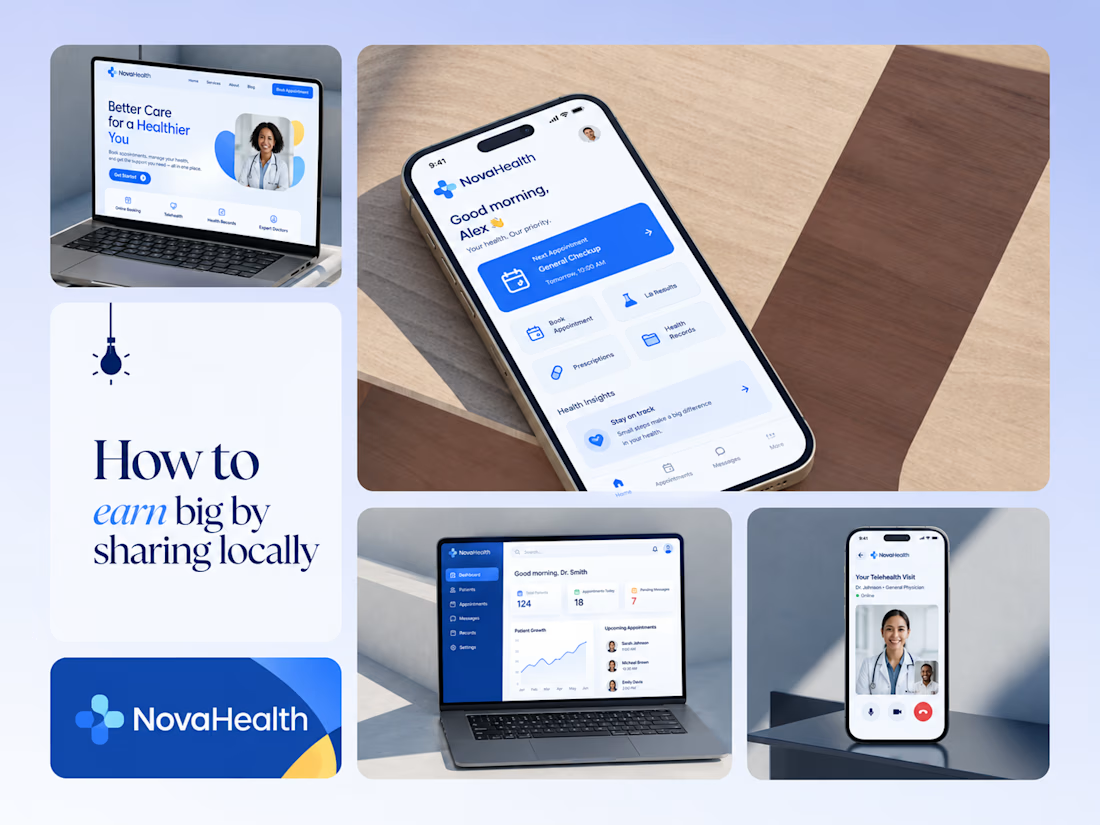
One brand, three screens: patient, doctor, and the video call between them.
NovaHealth is a healthcare brand and product system I designed from logo to apps. Healthcare software tends to feel either cold and clinical or too cluttered to open. I wanted something calm for a worried patient and quick for a doctor between appointments.
The logo breaks the classic medical cross into soft, rounded blocks in two blues, so it reads as “health” without feeling sterile.
The patient app opens with one thing: a solid blue card showing your next appointment. It’s the only fully saturated block on the screen, so nothing competes with it.
The doctor dashboard is built for a glance. Total patients, today’s appointments, and pending messages come first, in the same blue and rounded style as the patient app.
The telehealth screen has almost no UI. The doctor’s face fills the screen, with just three controls: mic, camera, and a red end-call button, the only red in the whole system.
One rule ties it together: blue means action, white space means calm, and yellow is a small spark of warmth.
Which screen should I break down next? 👇

Great medical brand design specially the phone app UI and top left laptop dashboard 🔥🔥🔥
great job Joshua ❤️🎉