
Temitope Oyarinu
Customer Support Specialist | Helping Retain Customer
New to Contra
Temitope is ready for their next project!
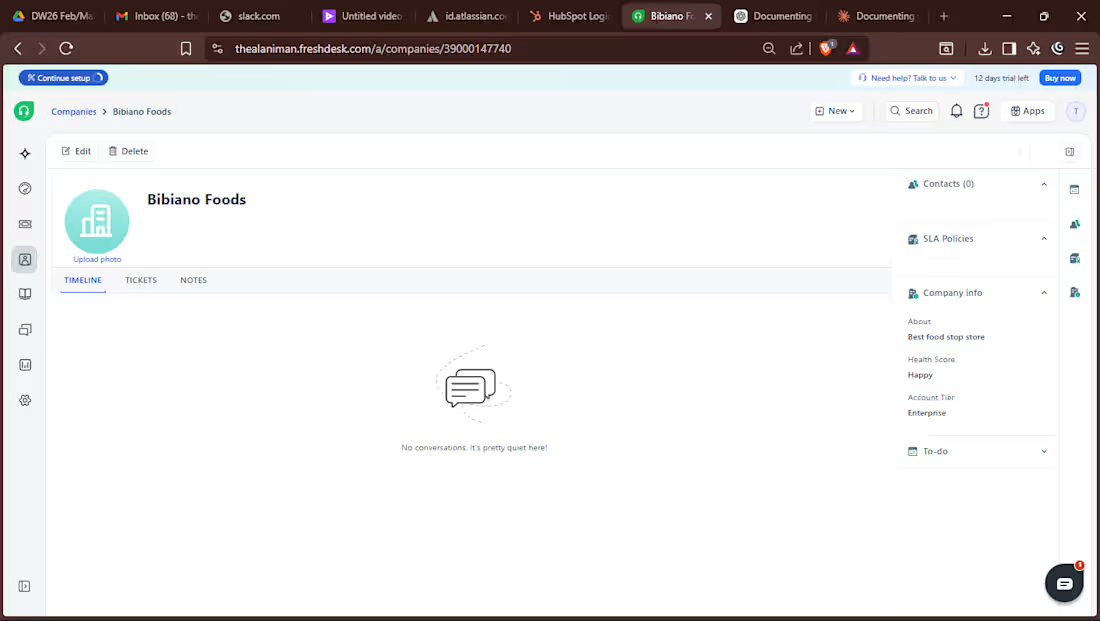
🚀 Documenting My Learning Journey: Freshdesk (Customer Support System) Digital Witch Support Community
(https://www.linkedin.com/company/digital-witch-support-community/)I explored how to manage customer support operations using Freshdesk.
🔧 What I worked on:
Created and managed support tickets
Set up ticket categories and priorities (Low, Medium, High)
Assigned tickets to agents based on issue type
Practiced resolving customer complaints efficiently
📊 Key Features I Learned:
Ticketing system for tracking customer issues
SLA (Service Level Agreement) management
Automation rules for faster response
Customer communication via email integration
💡 Key Takeaways:
Fast response time improves customer satisfaction
Proper ticket categorization reduces resolution time
Automation helps scale support without chaos
📌 Scenario I Practiced:
Handled a delayed delivery complaint:
Acknowledged the issue
Checked order status
Provided resolution timeline
Followed up after closure
🎯 Skills Gained:
Customer Support | Ticket Management | SLA Handling | Problem Solving
hashtag#CustomerSuccess (https://www.linkedin.com/search/results/all/?keywords=%23customersuccess&origin=HASH_TAG_FROM_FEED) hashtag#Freshdesk (https://www.linkedin.com/search/results/all/?keywords=%23freshdesk&origin=HASH_TAG_FROM_FEED) hashtag#CustomerSupport (https://www.linkedin.com/search/results/all/?keywords=%23customersupport&origin=HASH_TAG_FROM_FEED) hashtag#LearningJourney (https://www.linkedin.com/search/results/all/?keywords=%23learningjourney&origin=HASH_TAG_FROM_FEED) hashtag#TechSkills (https://www.linkedin.com/search/results/all/?keywords=%23techskills&origin=HASH_TAG_FROM_FEED)
0
5
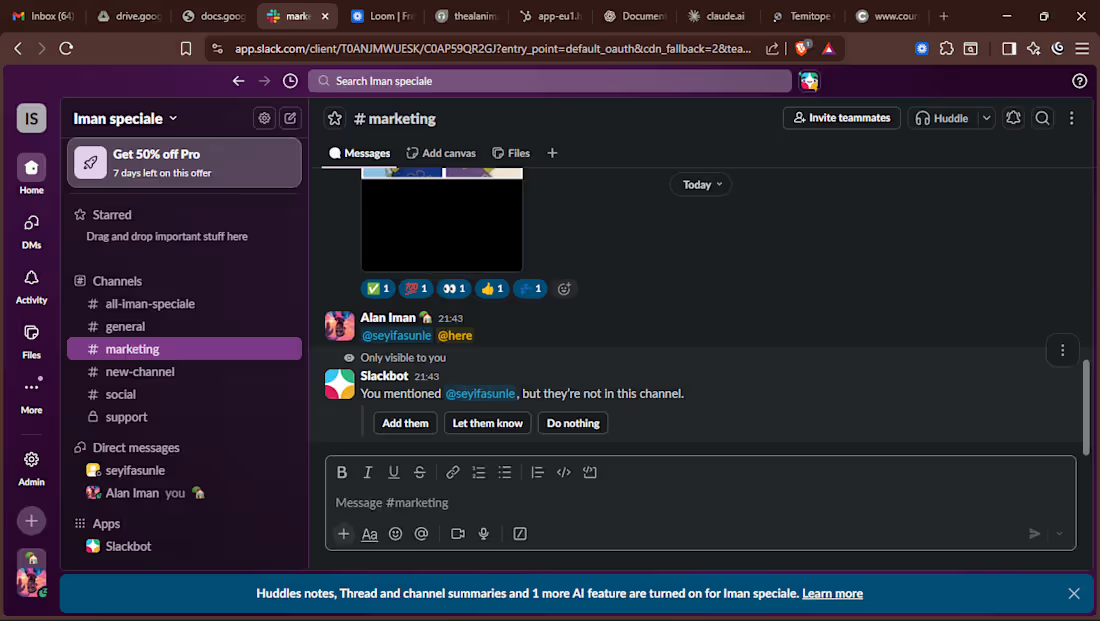
🚀 Learning in Public | Hands-On Experience with Slack
I Temitope Oyarinu (https://www.linkedin.com/in/temitope-oyarinu/) recently deepened my practical knowledge of Slack — a powerful workplace communication and collaboration platform. Here is what I learned:
📚 What I Learned Slack is more than a messaging app. It is a communication hub that keeps teams aligned, whether in one office or across time zones — centralizing conversations and updates in one place.
🔑 Key Features I Practiced
✅ Channels — Topic-based spaces (e.g. hashtag#customer (https://www.linkedin.com/search/results/all/?keywords=%23customer&origin=HASH_TAG_FROM_FEED)-support, hashtag#escalations (https://www.linkedin.com/search/results/all/?keywords=%23escalations&origin=HASH_TAG_FROM_FEED)) that keep conversations focused
✅ Direct Messages — Private conversations for quick, sensitive discussions
✅ Threads — Organized replies that reduce channel noise
✅ File Sharing — Sharing screenshots and documents for faster problem-solving
✅ Mentions (@) — Tagging teammates to ensure critical updates are seen instantly
✅ Notifications — Customizing alerts to maintain clear communication boundaries
🎯 Practical Scenario — Customer Issue Resolved via Slack A customer reports a login issue post-update. The support agent posts in hashtag#customer (https://www.linkedin.com/search/results/all/?keywords=%23customer&origin=HASH_TAG_FROM_FEED)-support, tags @techteam, and a thread begins. The technical lead shares a fix. Billing is looped in via @mention to rule out account suspension. Issue resolved — no email chains, just fast team collaboration.
🛠️ Skills Demonstrated
✔ Team Communication
✔ Cross-functional Collaboration
✔ Internal Support Coordination
✔ Remote Workflow Management
💡 Takeaway Tools like Slack are essential for modern teams. They reduce response time, improve accountability, and keep everyone aligned — making them a must-have skill for anyone in Customer Support or Success.
🙏 Thanks to the learning resources and community support from Digital Witch Support Community (https://www.linkedin.com/company/digital-witch-support-community/) and Ayodele Oluwatobi Bamidele (https://www.linkedin.com/in/superayodelebamidele/)💙
hashtag#CustomerSupport (https://www.linkedin.com/search/results/all/?keywords=%23customersupport&origin=HASH_TAG_FROM_FEED) hashtag#CustomerSuccess (https://www.linkedin.com/search/results/all/?keywords=%23customersuccess&origin=HASH_TAG_FROM_FEED) hashtag#SlackForTeams (https://www.linkedin.com/search/results/all/?keywords=%23slackforteams&origin=HASH_TAG_FROM_FEED) hashtag#WorkplaceCommunication (https://www.linkedin.com/search/results/all/?keywords=%23workplacecommunication&origin=HASH_TAG_FROM_FEED) hashtag#LearningInPublic (https://www.linkedin.com/search/results/all/?keywords=%23learninginpublic&origin=HASH_TAG_FROM_FEED) hashtag#RemoteWork (https://www.linkedin.com/search/results/all/?keywords=%23remotework&origin=HASH_TAG_FROM_FEED) hashtag#ProfessionalDevelopment (https://www.linkedin.com/search/results/all/?keywords=%23professionaldevelopment&origin=HASH_TAG_FROM_FEED) hashtag#Collaboration (https://www.linkedin.com/search/results/all/?keywords=%23collaboration&origin=HASH_TAG_FROM_FEED) hashtag#CareerGrowth (https://www.linkedin.com/search/results/all/?keywords=%23careergrowth&origin=HASH_TAG_FROM_FEED) hashtag#HandsOnLearning (https://www.linkedin.com/search/results/all/?keywords=%23handsonlearning&origin=HASH_TAG_FROM_FEED)
1
10
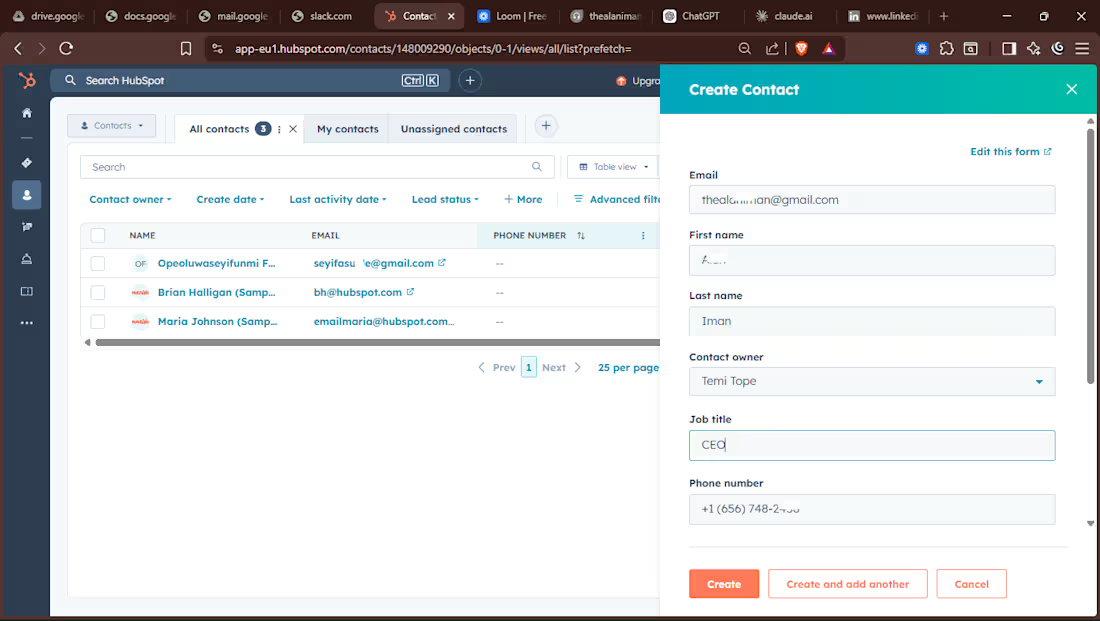
📊 Documenting My Hands-On Learning with HubSpot CRM Digital Witch Support Community
(https://www.linkedin.com/company/digital-witch-support-community/)Recently, I spent time exploring the CRM features of HubSpot to better understand how businesses organize customer information, track interactions, and manage relationships throughout the customer lifecycle.
This hands-on practice helped me see how a structured CRM system supports both sales teams and customer success teams by keeping customer data organized and ensuring no opportunity or support request is overlooked.
🔍 Key CRM areas I practiced:
• Contacts – Creating and managing individual customer profiles
• Companies – Linking contacts to their organizations for better account tracking
• Deals – Managing opportunities within the sales pipeline
• Tickets – Tracking and resolving customer support requests
• Orders – Monitoring transactions and purchase history
• Segments (Lists) – Grouping contacts based on behavior or criteria
• Inbox – Managing customer communication in one place
• Calls – Logging conversations with customers
• Tasks – Scheduling follow-ups and reminders
• Message Templates – Creating standardized responses
• Snippets – Saving frequently used replies for quick communication
📌 Scenario I practiced:
A customer sent an inquiry asking about a product. Inside the CRM, I created a new contact, linked the contact to their company, and logged notes from the conversation.
I then tracked the communication through the Inbox, logged a call, and created a deal in the pipeline to manage the opportunity. To stay organized, I scheduled a follow-up task and used a message template with saved snippets to respond quickly and consistently.
This process ensured that every interaction with the customer was documented and easy to track.
💡 What I learned about CRM management
CRM systems provide a centralized place to manage customer data, track communication history, and monitor opportunities. When used effectively, they help teams stay organized, collaborate better, and maintain strong customer relationships.
🎯 Skills demonstrated
CRM Management
Customer Success Support
Pipeline Tracking
Customer Communication Tracking
Customer Data Organization
🚀 Key takeaway
A well-managed CRM system is more than just a database—it’s a powerful tool that helps businesses understand their customers, improve communication, and deliver better customer experiences.
I Temitope Oyarinu (https://www.linkedin.com/in/temitope-oyarinu/) is grateful for the opportunity to continue learning and growing in this space. Thanks to the learning resources and community support from Digital Witch Support Community
(https://www.linkedin.com/company/digital-witch-support-community/)hashtag#CRM (https://www.linkedin.com/search/results/all/?keywords=%23crm&origin=HASH_TAG_FROM_FEED) hashtag#HubSpot (https://www.linkedin.com/search/results/all/?keywords=%23hubspot&origin=HASH_TAG_FROM_FEED) hashtag#CustomerSuccess (https://www.linkedin.com/search/results/all/?keywords=%23customersuccess&origin=HASH_TAG_FROM_FEED) hashtag#CustomerSupport (https://www.linkedin.com/search/results/all/?keywords=%23customersupport&origin=HASH_TAG_FROM_FEED) hashtag#LearningInPublic (https://www.linkedin.com/search/results/all/?keywords=%23learninginpublic&origin=HASH_TAG_FROM_FEED) hashtag#CustomerExperience (https://www.linkedin.com/search/results/all/?keywords=%23customerexperience&origin=HASH_TAG_FROM_FEED) hashtag#CRMManagement (https://www.linkedin.com/search/results/all/?keywords=%23crmmanagement&origin=HASH_TAG_FROM_FEED)
0
9
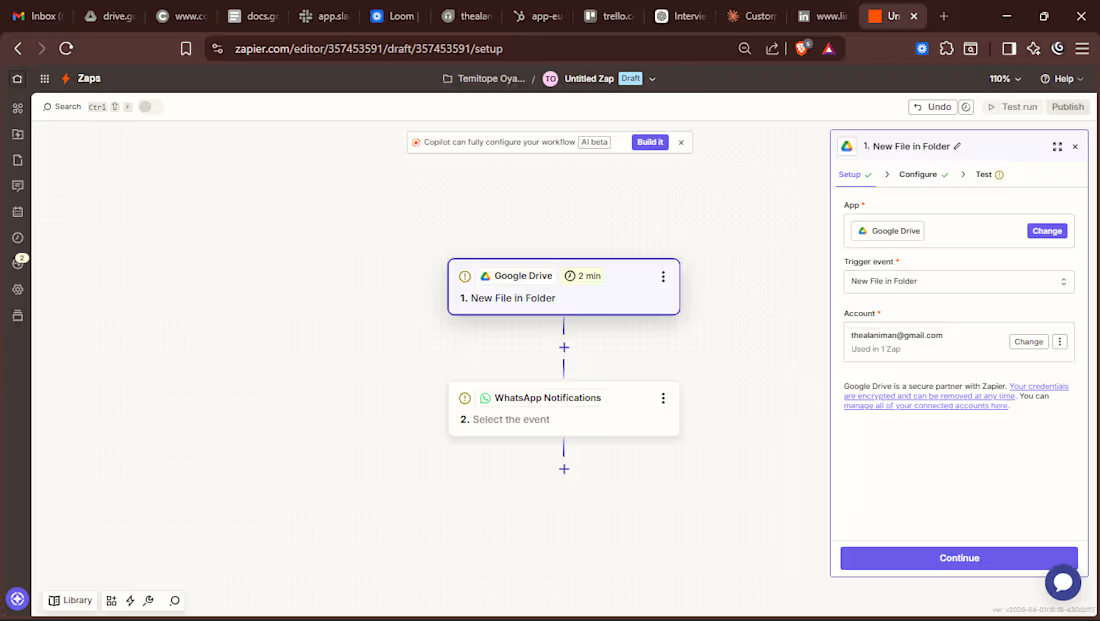
Over the past few weeks, I've been quietly learning something that I think every ops or customer-facing professional should understand workflow automation.
I started exploring Zapier, and honestly, it's changed how I think about repetitive work.
For anyone unfamiliar, Zapier is a no-code tool that connects your apps and automates the tasks that happen between them. Think: a new form response automatically creates a row in Google Sheets, sends a Slack notification, and logs a contact in your CRM without you touching anything.
Here's what I actually practiced:
🔗 Connecting apps like Gmail, Google Sheets, Slack, and Trello to work together
⚙️ Building simple Zaps trigger-and-action workflows that run on their own
📋 Automating small but time-consuming tasks like data entry, follow-up alerts, and task creation
📂 Setting up a Zap that connects Google Drive and WhatsApp so whenever a new file is added to a specific folder, a WhatsApp message goes out automatically. No manual sharing, no forgetting to notify people
🧪 Testing and troubleshooting flows to understand why something breaks, not just that it broke
That last one felt like a real lightbulb moment. Something as simple as "file uploaded → team notified" sounds obvious but before automation, that was someone's manual job. Every Single Time.
What stuck with me most wasn't the tool itself it was the mindset shift. Automation forces you to think in systems. You start asking:
Why am I doing this manually?
What triggers this task?
What should happen next?
That kind of thinking is valuable far beyond Zapier.
I can see how this directly applies to roles in Customer Success, Support Operations, CRM management, and Data workflows anywhere teams are moving information between tools and losing time doing it.
I'm still learning. But I'm building, not just reading about it.
If you're a team that values people who take initiative to understand how things work I'm actively looking for internship or entry level opportunities in operations, customer success, or anything at the intersection of people and process.
Let's connect. 🤝
hashtag#Zapier (https://www.linkedin.com/search/results/all/?keywords=%23zapier&origin=HASH_TAG_FROM_FEED) hashtag#WorkflowAutomation (https://www.linkedin.com/search/results/all/?keywords=%23workflowautomation&origin=HASH_TAG_FROM_FEED) hashtag#GoogleDrive (https://www.linkedin.com/search/results/all/?keywords=%23googledrive&origin=HASH_TAG_FROM_FEED) hashtag#WhatsApp (https://www.linkedin.com/search/results/all/?keywords=%23whatsapp&origin=HASH_TAG_FROM_FEED) hashtag#LearningByDoing (https://www.linkedin.com/search/results/all/?keywords=%23learningbydoing&origin=HASH_TAG_FROM_FEED) hashtag#CustomerSuccess (https://www.linkedin.com/search/results/all/?keywords=%23customersuccess&origin=HASH_TAG_FROM_FEED) hashtag#OperationsManagement (https://www.linkedin.com/search/results/all/?keywords=%23operationsmanagement&origin=HASH_TAG_FROM_FEED) hashtag#OpenToWork (https://www.linkedin.com/search/results/all/?keywords=%23opentowork&origin=HASH_TAG_FROM_FEED) hashtag#EntryLevel (https://www.linkedin.com/search/results/all/?keywords=%23entrylevel&origin=HASH_TAG_FROM_FEED) hashtag#Productivity (https://www.linkedin.com/search/results/all/?keywords=%23productivity&origin=HASH_TAG_FROM_FEED)
1
21