
Suchi Roy
UI/UX Designer for SaaS, Websites and Web Apps
- 1
- Followers

Radius: A Landing Page for an AI Product Storytelling Tool
Overview
Radius is an AI tool that helps teams turn their product into interactive demos and videos in minutes. I designed the full landing page in Figma, from layout and structure to the final UI. My goal was to explain a technical product in a simple, friendly way and get visitors to sign up.
The Problem
AI and SaaS products are often hard to explain. Visitors land on the page, don’t understand the value quickly, and leave. The page had to say what Radius does in seconds, show it in action, and prove it works for people like them.
My Approach
I treated the page as a guided story. It starts with the promise, shows how the tool works, speaks to different team needs, backs everything with proof, and ends with a clear next step. Every section answers one question a visitor is likely to ask.
Key Design Decisions
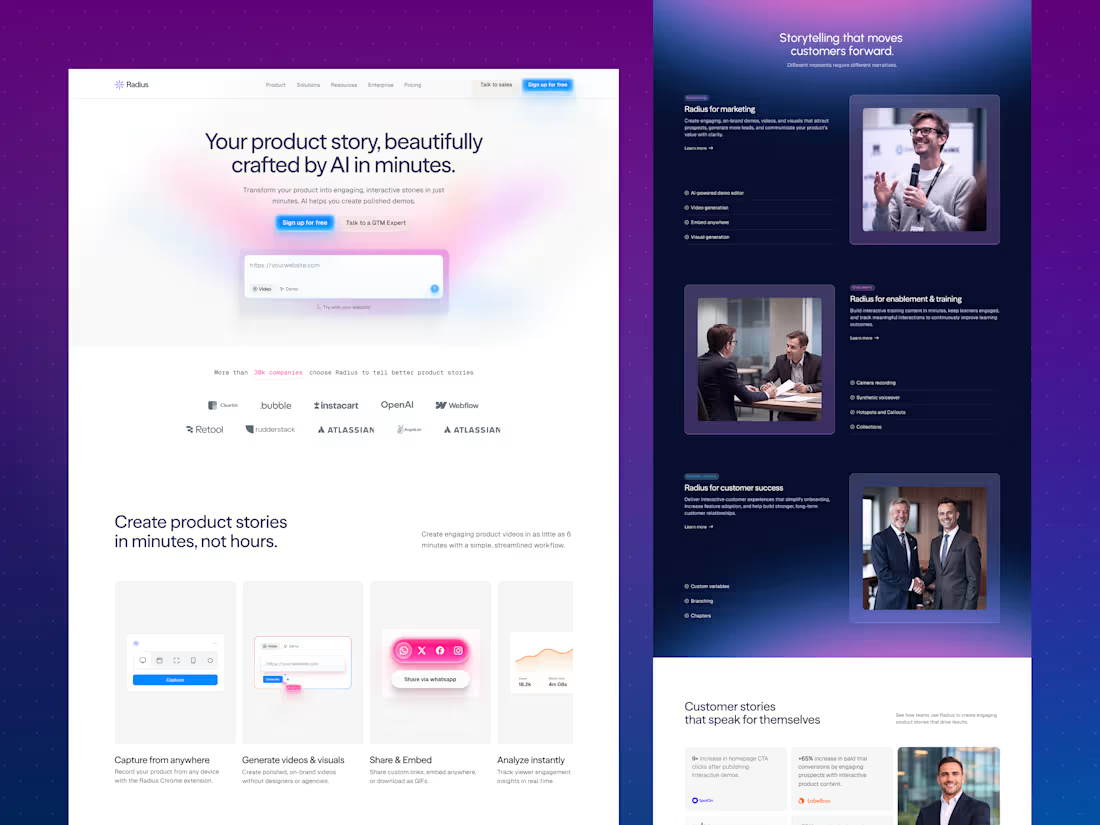
1. A hero that explains and lets you try. The headline “Your product story, beautifully crafted by AI in minutes" states the benefit right away. A soft pink and purple gradient gives it a modern AI feel without making it cold. An input box (“Try with your website!”) lets visitors start immediately, and two buttons serve two types of visitors: “Sign up for free” for those ready to act and “Talk to a GTM Expert” for those who want guidance.
2. Social proof in the first scroll. A line about companies using Radius, followed by a clean row of logos, builds trust before visitors need to read more.
3. A simple four-step feature slider. “Capture from anywhere,” “Generate videos & visuals,” “Share & Embed,” and “Analyze instantly” each get a small visual and a short line. Visitors understand the whole workflow without reading a long explanation.
4. A dark, immersive section for use cases. The switch to a deep navy gradient breaks up the page and gives "storytelling that moves customers forward” a focused feel. Each use case (marketing, enablement and training, and customer success) has a clear label, a short description, a feature checklist, and a photo. The layout alternates left and right, so the section stays interesting while scrolling.
5. Proof with real numbers. The “Customer stories” section uses a card grid to highlight results like faster content creation and higher conversions, each paired with a company logo. Big numbers are easy to scan and make the benefits feel concrete.
6. Integrations made visual. The “Connected Workflows” section shows integrations in an orbit-style graphic around the Radius logo, with simple categories listed beside it. It shows that the tool fits into what teams already use.
7. A strong ending. The page closes with a bright “Create AI-powered content that converts"—a call to action, then an email signup and an organized footer—so visitors who scroll all the way down still have a clear next step.
8. A consistent visual style. A glowing blue primary button stands out on every section, with a softer secondary button next to it. Soft shadows, rounded cards, and generous white space keep the page clean and easy to read. The palette of deep navy, electric blue, and soft pink-purple feels modern, trustworthy, and a little playful.
The Result
A clean, modern landing page that explains an AI product in plain language, shows the workflow step by step, builds trust with proof, and keeps the sign-up action visible throughout the page.
Tools Used
Figma
Let’s Work Together
Have a product that’s hard to explain? Message me and let’s turn it into a clear, engaging website.
0
11
Lights: A Travel Planning Landing Page That Makes Trip Planning Feel Easy
Overview
Lights helps people plan trips with personalized itineraries, curated stays, and stress-free bookings. I designed the full landing page in Figma, from layout and structure to the final UI. My goal was to make planning a trip feel exciting and effortless instead of overwhelming.
The Problem
Planning a trip can take hours of research across many tabs. People worry about picking the wrong place, missing something, or managing too many bookings. The page had to show that Lights takes the stress away and guides visitors to start planning.
My Approach
I started by thinking about how a traveler feels when planning: excited at first, then overwhelmed. I designed the page to keep the excitement and remove the stress. It opens with a dream destination, explains the process in four simple steps, and ends with real traveler stories.
Key Design Decisions
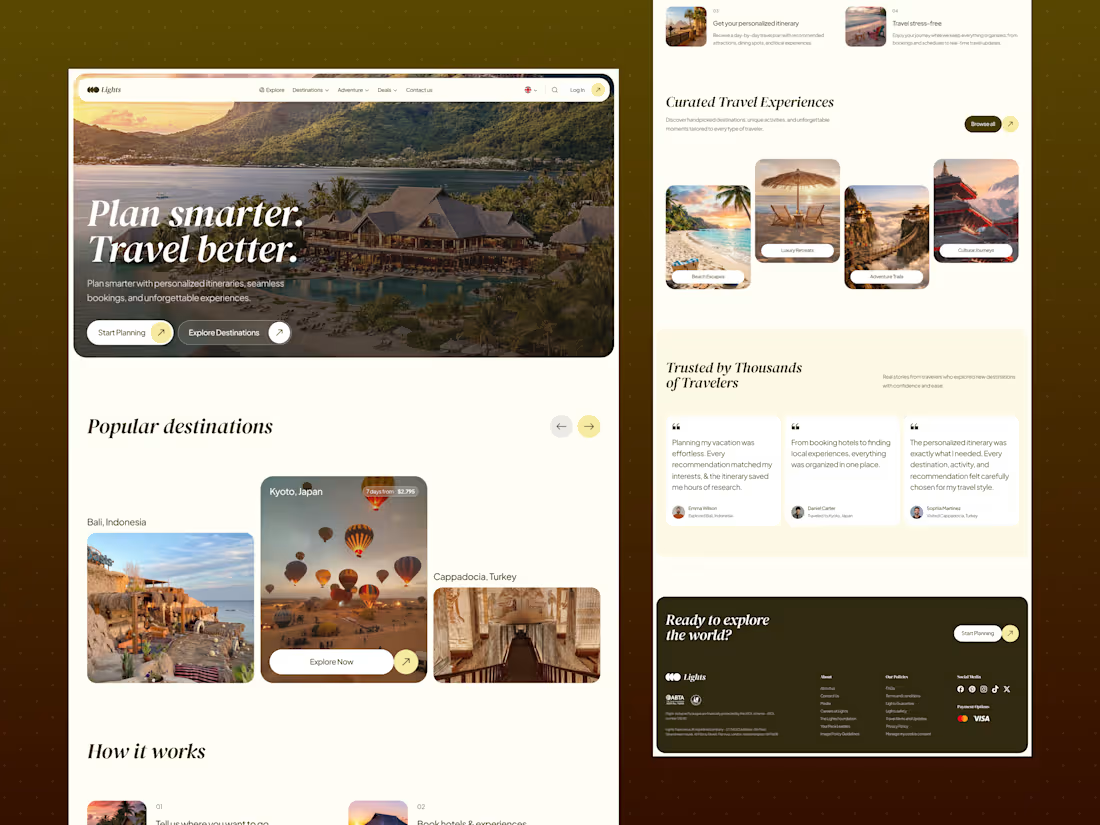
1. A bold, emotional hero. A full-width photo of a resort at sunset sets the mood right away. The headline “Plan smarter. Travel better" is short and clear, and the italic serif style adds a premium, personal feel. Two buttons, “Start Planning” and “Explore Destinations,” give visitors two ways in.
2. Popular destinations in a carousel. Large photo cards for places like Bali, Kyoto, and Cappadocia let people get inspired quickly. The center card is highlighted with trip length and price, so visitors see the most important details first.
3. “How it works” in four easy steps. Each step has a small photo, a number, and one or two lines of text: tell us where you want to go, book hotels and experiences, get your personalized itinerary, and travel stress-free. The two-column layout makes it easy to scan.
4. Curated experiences by travel style. Beach Escapes, Luxury Retreats, Adventure Trails, and Cultural Journeys help visitors choose by mood instead of searching. The staggered card layout adds movement and keeps the page interesting.
5. Trust through real voices. The “Trusted by Thousands of Travelers” section shows traveler quotes with names and the places they visited. Large, readable text makes the stories feel genuine.
6. A warm, premium color palette. Cream backgrounds, deep olive-brown, and soft yellow accents feel calm, natural, and travel-friendly. It’s different from the usual blue travel sites, so it feels more personal and memorable.
7. Consistent button style. Every button uses a rounded pill shape with a small arrow circle. This makes actions easy to recognize across the page.
8. A clear closing section. “Ready to explore the world?” gives one last call to action. The footer is organized into About, Policies, Social Media, and Payment Options, and it includes travel-protection badges that build trust.
The Result
A warm, inspiring landing page that explains the service in seconds, helps people choose a trip style, builds trust with real stories, and keeps the next step visible all the way down the page.
Tools Used
Figma
Let’s Work Together
Need a website that feels clear, friendly, and easy to use? Message me and let’s design something your customers will love.
1
1
23
Roamly: A Landing Page that turns solo travelers into a community
Overview
Roamly helps solo travelers join small group trips and meet people their age. I designed the complete landing page in Figma, from structure and layout to the final UI. My goal was to make visitors feel welcome, safe, and excited to book.
The Problem
Traveling alone is exciting, but it comes with worries: Will I be lonely? Is this trip right for me? Can I trust this company? The page had to answer these questions as people scrolled and guide them to a trip without pressure.
My Approach
I designed the page like a conversation. It opens with an emotional hook, explains how it works, shows trips, and builds trust with real stories. Each section answers the next question a visitor is likely to have.
Key Design Decisions
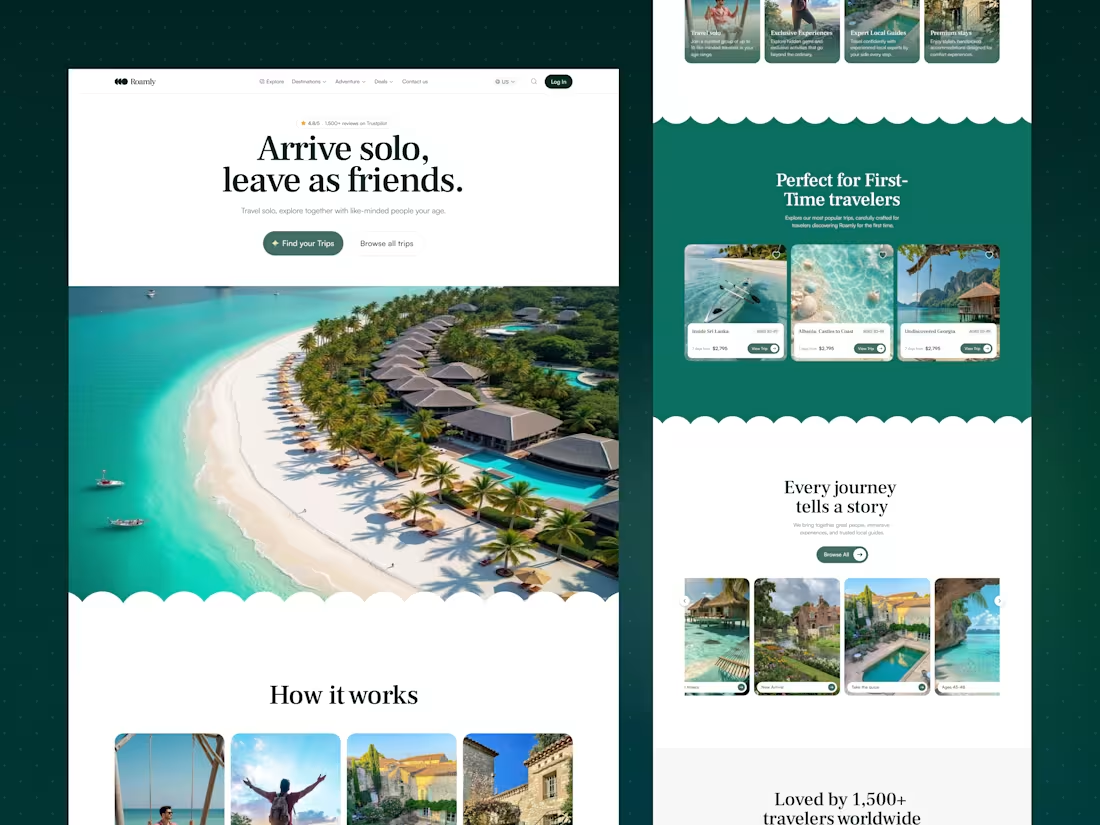
1. A friendly hero. The headline “Arrive solo, leave as friends" says the whole promise in one line. A 4.8/5 Trustpilot rating sits right above it, so trust comes first. Two buttons serve two kinds of visitors: “Find your Trips” for people ready to act, and “Browse all trips” for people who want to look around.
2. “How it works” in four simple cards. Photos and short text explain the idea quickly: travel solo, exclusive experiences, expert local guides, and premium stays. People understand the offer without reading long paragraphs.
3. Trips made for first-timers. The “Perfect for First-Time Travelers” section shows popular trips with the age group, trip length, and price. These are the three things people check first. A heart icon lets them save trips for later.
4. Easy browsing. The “Every journey tells a story” carousel includes filters like age range and a quiz, so visitors can find a trip that fits them instead of feeling lost.
5. Real stories for trust. The “Loved by 1,500+ travelers” section uses colorful testimonial cards with a photo of happy travelers in the middle. It shows real people and feelings, not marketing claims.
6. A soft, memorable style. Wavy section dividers add a playful, relaxed feeling that suits travel. Deep green keeps the page calm and trustworthy. Burgundy and blue cards add warmth and variety. A serif headline font adds personality, and a clean sans-serif keeps the body text easy to read.
7. A clear ending. The page closes with “Your Next Adventure Awaits” and one more button, so visitors who finish scrolling have an obvious next step. The footer is organized into About, Policies, and social links for quick access.
The Result
A warm, easy-to-scan landing page that builds trust early, helps visitors explore trips with confidence, and keeps the next action visible all the way down the page.
Tools Used
Figma
Let’s Work Together
Need a website that feels clear, friendly, and human? Message me and let’s design something your users will enjoy.
0
19
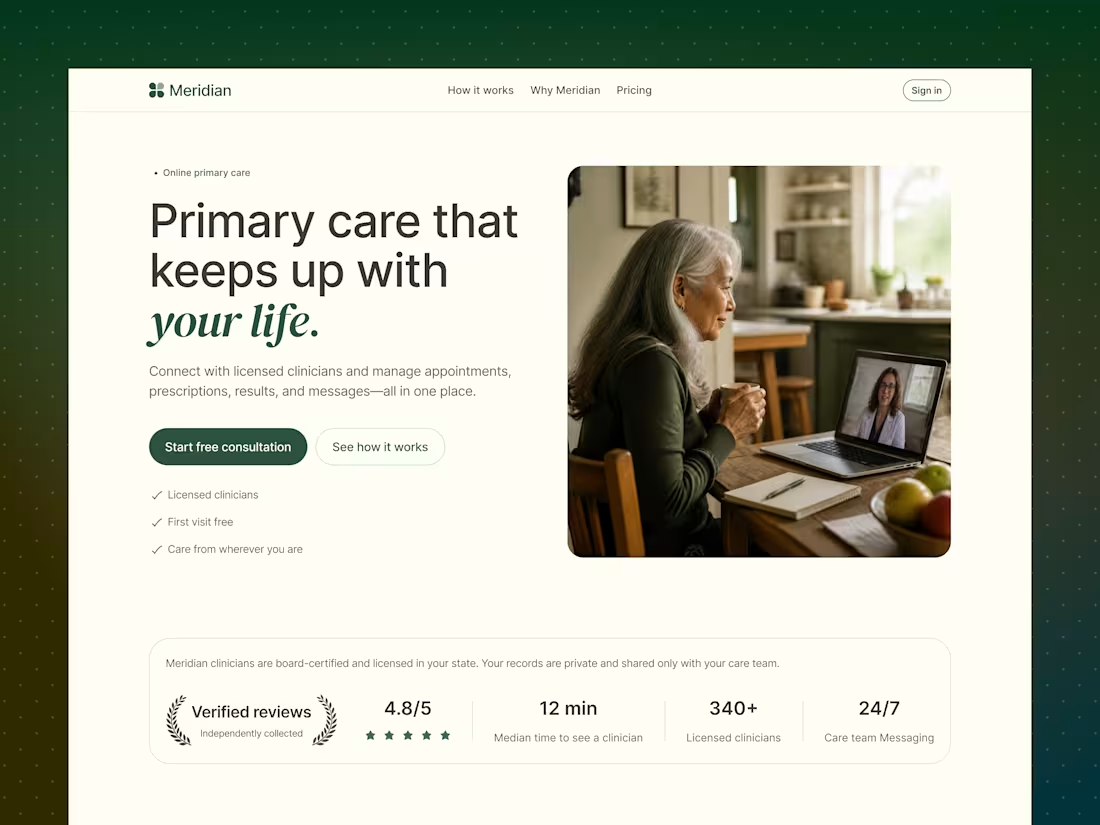
Meridian—Online Primary Care Platform
The Problem:
Healthcare is inconvenient by design—long wait times, rigid office hours, and clinicians who don’t know your history. For people managing chronic conditions, mental health, or everyday concerns, getting quality primary care often means taking time off work just to sit in a waiting room.
The Solution:
Meridian brings licensed primary care online—appointments, prescriptions, results, and messaging all in one place. The design leads with warmth and trust: a real, human hero image (not a sterile stock photo), a soft sage-and-cream palette instead of clinical white, and social proof (4.8/5 rating, 340+ licensed clinicians, 12-min median wait) placed right where visitors need reassurance before booking.
The “Areas of Care” section breaks down services—chronic condition care, urgent care, mental health, and women’s health—so visitors instantly see themselves in the platform. A clean 3-step “What Happens Next” section (Request → Visit → Follow-through) removes any uncertainty about how the process works.
The Challenges:
→ Making telehealth feel personal and human, not transactional
→ Building instant credibility for a healthcare brand (licensing, privacy, trust signals) without overwhelming the hero section
→ Designing for multiple care categories while keeping the page scannable and calm
#WebDesign #HealthTech #ProductDesign #Freelance
1
32