
Department Workguides — AI Onboarding Build, 2 WeeksBrandin Gudmundson
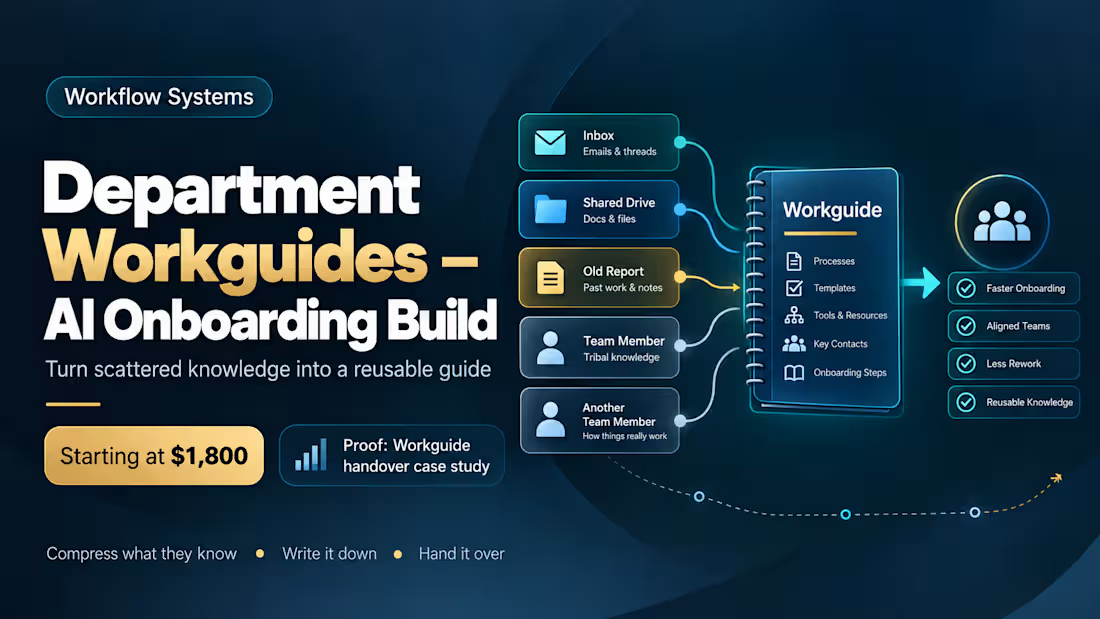
Turn what your department already knows into a Workguide people can actually follow — and get your staff running on AI while we do it.
Most teams don't have an onboarding problem because nobody wrote a manual. They have one because the real knowledge is scattered across inboxes, shared drives, old reports, and two people's heads — and nobody has the time to compress it into something usable.
That compression is the work. Everything else follows from it.
What actually happens
Week one — compress. We take your department's existing material: reports, forms, procedures, the email threads where decisions actually got made. That gets compressed into the real workflows your team runs, and those workflows become a Department Workguide — the document a new person could follow on day one without shadowing someone for a month.
Week two — enable and hand over. I set 2–4 staff up on their own machines, working the Workguide against live tasks, with guardrails in place from the start rather than bolted on after. We fix what breaks. You keep the Workguide, the setup, and the method.
Why the Workguide is the point
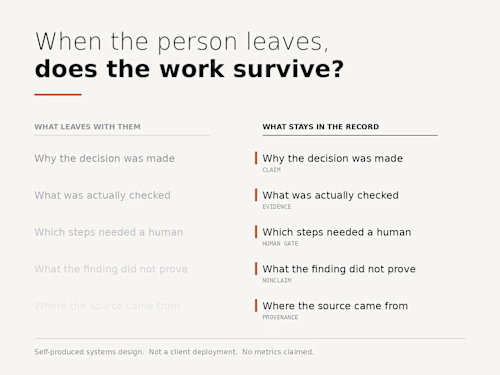
An AI deployment that lives in one person's head is a dependency. A Workguide is an asset — it survives turnover, it onboards the next hire, and it gives a manager something to actually review. Every department gets its own, because a housing team and a finance team do not have the same Tuesday.
Tool-agnostic, and deliberately so
This is not tied to any vendor. ChatGPT, Claude, Copilot, Gemini, self-hosted — the compression method and the Workguide are the same. If your organization already has a platform, we use it. If you're on a nonprofit grant program, we work inside it. If you have nothing, we start with what's free.
What "guardrails" means here
Concrete rules, written for your context: what staff may use AI for, what must never be entered into an unmanaged tool, what requires human review before it leaves the building, and what gets escalated. One page. Plain language. Readable on day one.
Who this is for
Small teams in nonprofits, community services, clinics, and human services — where the work is sensitive, the budget is real, and there is no internal AI function. If your IT is one person who is already fully committed, this is built for you.
Where this comes from
Fourteen years frontline in mental health, addictions, and crisis response. I've deployed this pattern to colleagues' workstations under employer clearance: non-technical staff producing usable work by day two, and teaching other people the standard shortly after. I'm not bringing you a framework I read about.
FAQs
Example work
Starting at$1,800
Duration2 weeks
Tags
AI Governance
Workflow Design
Business Workflow Automation
Operations Lead
Process Improvement
Project Manager
Healthcare
Nonprofit
Service provided by
Brandin Gudmundson Surrey, Canada
- 3
- Followers
Department Workguides — AI Onboarding Build, 2 WeeksBrandin Gudmundson
Starting at$1,800
Duration2 weeks
Tags
AI Governance
Workflow Design
Business Workflow Automation
Operations Lead
Process Improvement
Project Manager
Healthcare
Nonprofit
Turn what your department already knows into a Workguide people can actually follow — and get your staff running on AI while we do it.
Most teams don't have an onboarding problem because nobody wrote a manual. They have one because the real knowledge is scattered across inboxes, shared drives, old reports, and two people's heads — and nobody has the time to compress it into something usable.
That compression is the work. Everything else follows from it.
What actually happens
Week one — compress. We take your department's existing material: reports, forms, procedures, the email threads where decisions actually got made. That gets compressed into the real workflows your team runs, and those workflows become a Department Workguide — the document a new person could follow on day one without shadowing someone for a month.
Week two — enable and hand over. I set 2–4 staff up on their own machines, working the Workguide against live tasks, with guardrails in place from the start rather than bolted on after. We fix what breaks. You keep the Workguide, the setup, and the method.
Why the Workguide is the point
An AI deployment that lives in one person's head is a dependency. A Workguide is an asset — it survives turnover, it onboards the next hire, and it gives a manager something to actually review. Every department gets its own, because a housing team and a finance team do not have the same Tuesday.
Tool-agnostic, and deliberately so
This is not tied to any vendor. ChatGPT, Claude, Copilot, Gemini, self-hosted — the compression method and the Workguide are the same. If your organization already has a platform, we use it. If you're on a nonprofit grant program, we work inside it. If you have nothing, we start with what's free.
What "guardrails" means here
Concrete rules, written for your context: what staff may use AI for, what must never be entered into an unmanaged tool, what requires human review before it leaves the building, and what gets escalated. One page. Plain language. Readable on day one.
Who this is for
Small teams in nonprofits, community services, clinics, and human services — where the work is sensitive, the budget is real, and there is no internal AI function. If your IT is one person who is already fully committed, this is built for you.
Where this comes from
Fourteen years frontline in mental health, addictions, and crisis response. I've deployed this pattern to colleagues' workstations under employer clearance: non-technical staff producing usable work by day two, and teaching other people the standard shortly after. I'm not bringing you a framework I read about.
FAQs
Example work
$1,800