
Mobile App UI — 3 Core ScreensMonodeep Samanta
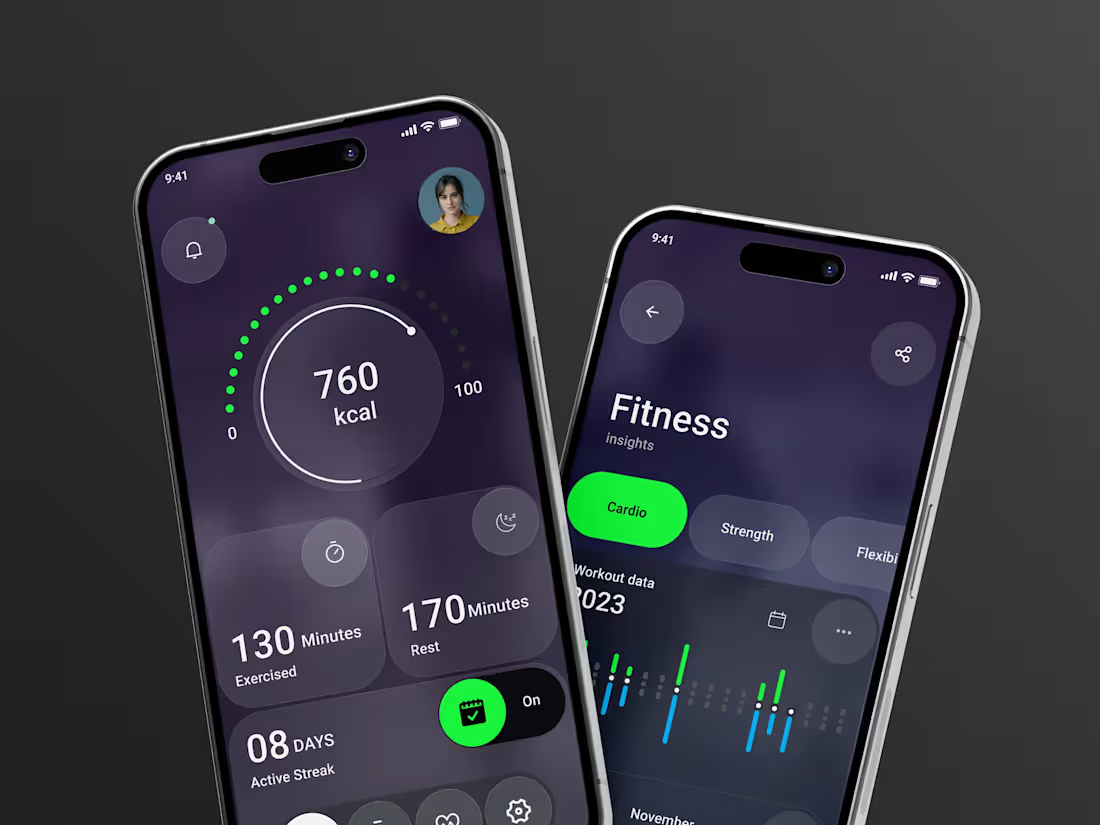
Three screens that show investors the product actually works
Before anyone commits budget to a build, they need to see how the thing behaves — not a description of it. Slides don't do that. A screenshot of a real interface does.
I design the three screens that carry the most weight in your pitch: usually onboarding, the main screen, and the one feature the whole product hangs on. The flow has to make sense to someone reading it cold in a meeting, because that's the situation it will be judged in.
16+ years, London-based, mostly B2B products where the interface has to survive scrutiny.
What's included
Three core screens, chosen with you based on what your product needs to prove
Screen-to-screen logic, not decoration — the sequence should read as a working flow
Layered Figma file, ready to present and to hand to a developer
Two rounds of revisions
Export-ready assets for your deck
How it works (about one week)
Day 1 — Discovery. Who's seeing these, what they need to believe, and which three screens carry that.
Days 2–4 — First direction. Layout, flow and hierarchy across the set.
Day 5 — Review. Feedback tested against whether the flow reads clearly to someone who's never seen it.
Days 6–7 — Delivery. Refined screens, consistent components, files for presenting and for build.
Assumes you know roughly what the product does and can describe the core flow. Excludes user research, prototyping, full app design systems, and development. If the product direction isn't settled yet, tell me before we start — three screens won't fix an unresolved concept, and I'd rather say so upfront.
Need the full app, or design plus build? Message me with scope and I'll quote a fixed price. Development can be handled through our build team.
FAQs
Example work

Monodeep's other services
Starting at$650
Duration1 week
Tags
Figma

Jitter

ProtoPie

UI Designer
UX Designer
Mobile App
Service provided by
Monodeep Samanta proLondon, UK
- 1
- Followers
Mobile App UI — 3 Core ScreensMonodeep Samanta
Three screens that show investors the product actually works
Before anyone commits budget to a build, they need to see how the thing behaves — not a description of it. Slides don't do that. A screenshot of a real interface does.
I design the three screens that carry the most weight in your pitch: usually onboarding, the main screen, and the one feature the whole product hangs on. The flow has to make sense to someone reading it cold in a meeting, because that's the situation it will be judged in.
16+ years, London-based, mostly B2B products where the interface has to survive scrutiny.
What's included
Three core screens, chosen with you based on what your product needs to prove
Screen-to-screen logic, not decoration — the sequence should read as a working flow
Layered Figma file, ready to present and to hand to a developer
Two rounds of revisions
Export-ready assets for your deck
How it works (about one week)
Day 1 — Discovery. Who's seeing these, what they need to believe, and which three screens carry that.
Days 2–4 — First direction. Layout, flow and hierarchy across the set.
Day 5 — Review. Feedback tested against whether the flow reads clearly to someone who's never seen it.
Days 6–7 — Delivery. Refined screens, consistent components, files for presenting and for build.
Assumes you know roughly what the product does and can describe the core flow. Excludes user research, prototyping, full app design systems, and development. If the product direction isn't settled yet, tell me before we start — three screens won't fix an unresolved concept, and I'd rather say so upfront.
Need the full app, or design plus build? Message me with scope and I'll quote a fixed price. Development can be handled through our build team.
FAQs
Example work
Monodeep's other services
$650