Verdant: A Calming Digital Workspace

Abdullah Eroğlu


The Problem
One of today's biggest problems, even among the youngest, is phone and dopamine addiction. Feeling lonely even in a crowd. Not being able to open up. Not being able to check those to-do boxes, or take steps toward a dream.
I've lived this.
And I thought: what if we could note our tasks and problems freely, knowing we can get help from others? So the user has motivation, and a reason to take the first real step.
That's when Verdant was born: a website that blends notebook and to-do list functionality into a soft, highly aesthetic, and deeply calming digital environment. Built in 6 days for the Figma Config Makeathon.
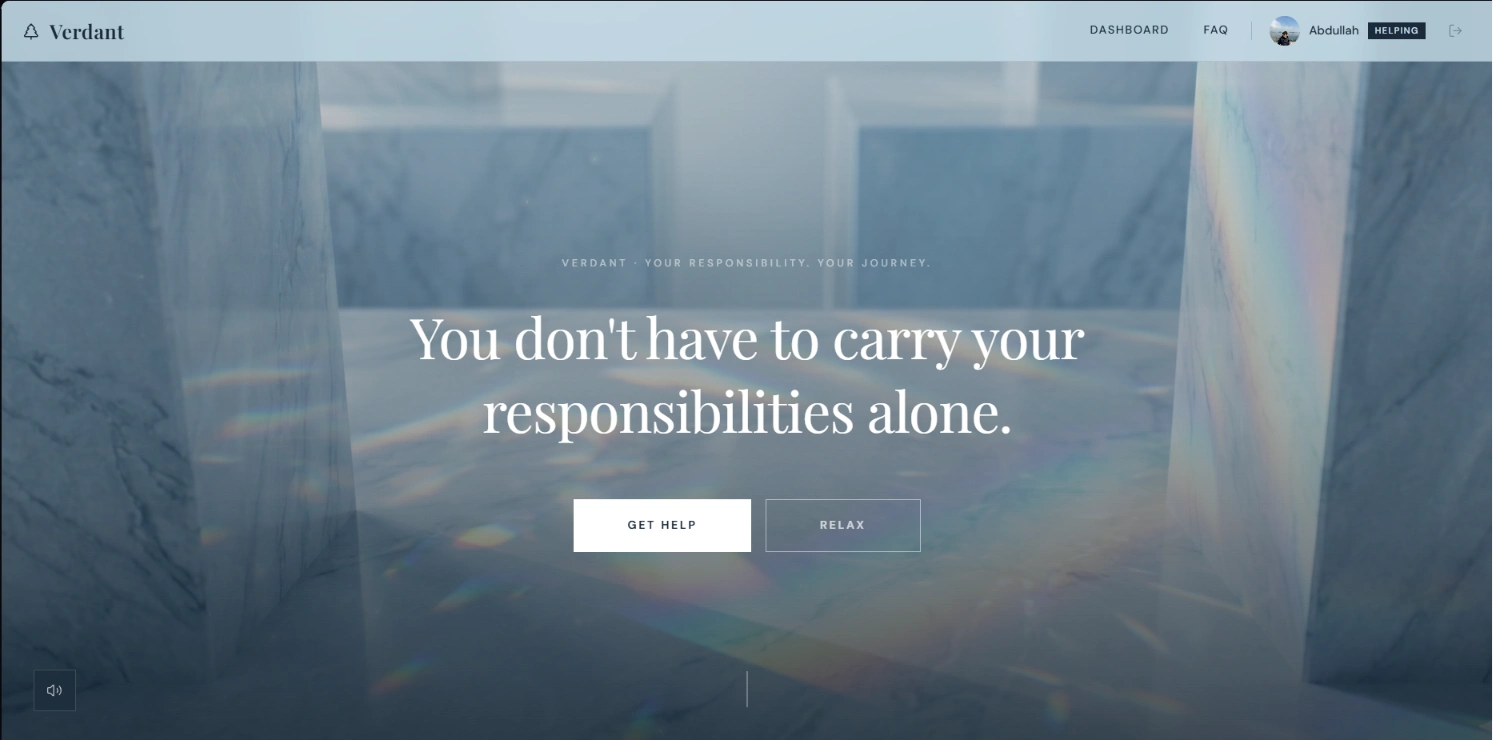
Verdant hero section
The Journey: Two Failed Concepts, Then Clarity
Verdant wasn't the first idea. Before finding the "human core," I built and scrapped two full concepts over 4 days.
Concept 1: Bolluni — Luxury Automotive Experience
A dark, cinematic luxury car website with an interactive engineering test panel. I built the panel from scratch: chassis deformation, throttle, weight distribution to individual wheels, road view, Sport Mode and Engine On/Off toggles, and full WASD driving controls with Space for the handbrake.
The engineering "muscle" was a JavaScript sound generator using Web Audio behavior that changed dynamically based on your driving inputs and live panel parameters. Every throttle press, every turn, every brake altered the sound in real time.
Here's the engineering test panel in action:
After the panel, I designed the main website. Figma Make handled the layout fast. I used Figma Weave to generate bespoke car visuals from reference images and refined prompts. Then I pushed the atmosphere further: particles to amplify the dark vibe, scroll animations, darkening and hover effects, and a JavaScript face recognition system that detected your face and told you if you were "worthy" of Bolluni (got it to roughly 70% accuracy).
Here's the full Bolluni site by the end of Day 3:
Technically impressive. But when I woke up and tested it the next morning, it lacked human core. I didn't feel like I'd used the full power of Figma Make for something that actually mattered. So I took the loss and moved on.
Concept 2: Browser MMORPG
I tried building a full MMORPG with fight, market, quest, and story mechanics, playable directly in the browser. I gave Figma Make an end-to-end detailed prompt and built almost the entire thing from a single prompt.
But it wasn't new. The competition was flooded with games, and I'd already executed this concept with my project Brolheim (a full browser-based MMORPG with 3-4 hours of gameplay, class selection, combat, fishing, mining, crafting, boss fights, and online chat).
Two concepts built. Two concepts scrapped. After that, final exams and university life hit hard. I went to sleep setting my alarm early, determined to find something with real human core.
Day 5: The Breakthrough
The idea hit me while drinking coffee with my grandmother. I know from my own life what dopamine addiction and digital isolation feel like. And I realized: what if the tool itself could be the first step toward feeling better?
That's when Verdant became the one: the one with human core, the one that carried a part of me, the one where I could show both my design and engineering muscles proudly.
Building Verdant
Design System + Figma Make
I started by creating the color palette: soft greens, warm neutrals, and gentle gradients that feel like exhaling. Then I designed the overlay structure in my head and gave Figma Make an end-to-end detailed prompt.
The first working version of the entrance and dashboard came together in just two prompts. Figma Make placed things almost exactly how I imagined them, sometimes even better, and extremely fast.
I used Figma Weave to generate visuals for the entrance, refining prompts with Figma Make's AI to get exactly the look I wanted: luxury, smooth, and peaceful. When the initial landing page background didn't feel right, I regenerated it with Weave until it matched the calm I was going for.
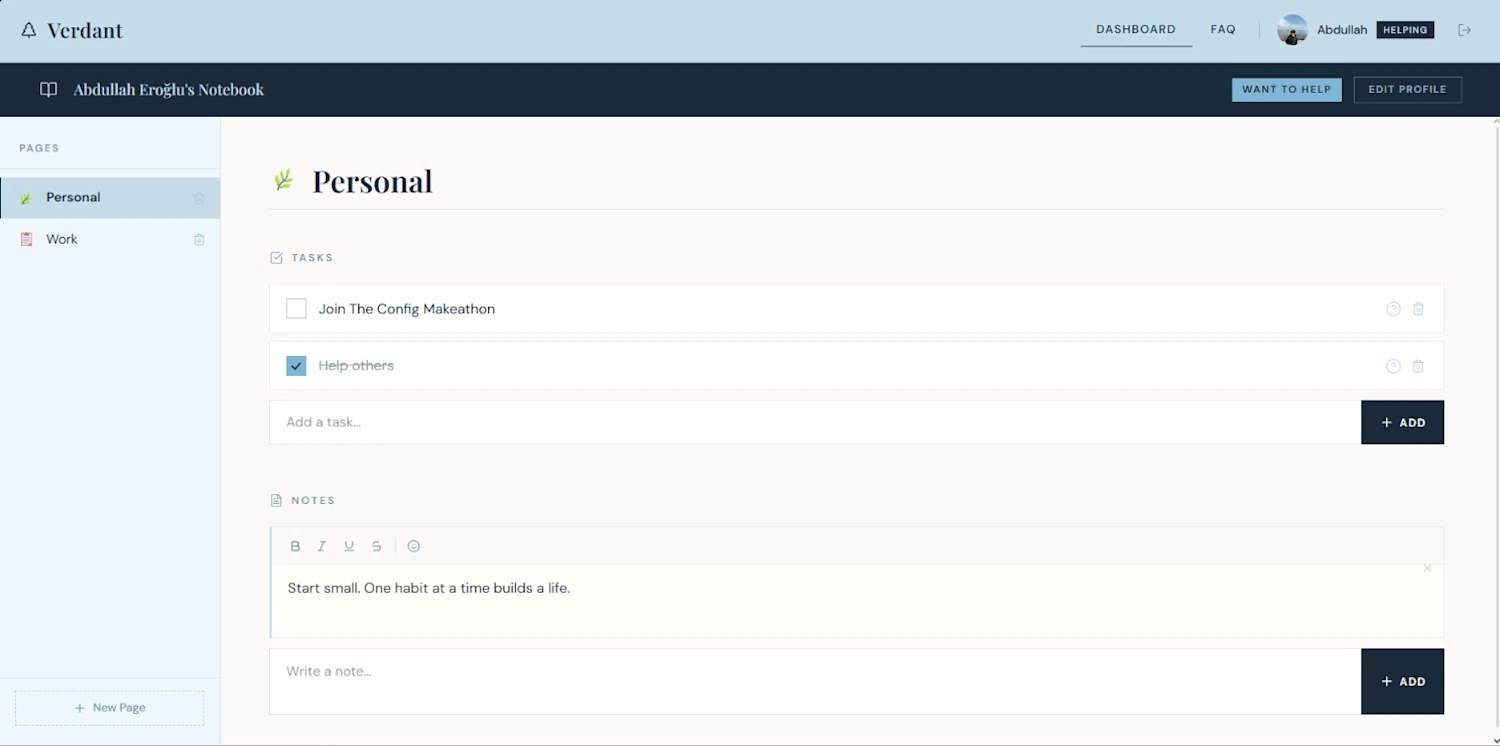
Verdant dashboard
Auth + Backend
Supabase integration was fast and clean. I added a full account system with authentication, so users can persist their notebooks and to-do lists across sessions. I also built a tutorial section for the dashboard's first-time opening, so new users aren't dropped into the interface cold. The onboarding walks you through every feature before you start using it.
The Engineering Layer
The question I kept asking myself: how do I put my engineering muscles into this without distracting the user, and while building a bond?
Face-tracking parallax: A parallax system that detects and tracks your face through your camera, so it feels like you're actually looking "into" the environment with real depth and movement. The landing page responds to where you are, not just where you click. On mobile, I swapped to the phone's gyroscope sensors instead (because holding the phone still and moving your head didn't make sense). The result: the environment breathes with you regardless of device.
Vocal Release: I added a "Relax" button on the main entrance, but I didn't want a generic "just breathe" section. I needed something that could show the power of Figma Make properly and actually help someone in a hard moment.
Vocal Release measures your voice level through your microphone with a real-time dB parameter. It helps you release negative tension with small advice prompts timed to your vocal output. The idea is simple: sometimes you just need to let it out, and this feature makes the user feel like someone is actually listening. The dB visualization responds live, so there's a tangible feedback loop between your voice and the interface.
Alongside Vocal Release, I built 3 guided breathing exercises into the relaxation section, each with different pacing and visual cues.
Responsive + Final Polish
Everything was implemented to be as responsive and innovative as possible on mobile. The face-tracking gracefully degrades to gyroscope. The dashboard adapts its layout. The breathing exercises work in portrait and landscape.
Final touches: custom favicon, polished landing page background (regenerated with Figma Weave for a more peaceful feel), and a full submission video walking through every feature.
Open Development
Throughout the build, I documented the entire process publicly. I created videos helping other participants with their submissions, shared detailed Figma Make settings and tips I noticed many people were missing, and published a full developer diary on Notion covering every pivot point, technical detail, and raw thought behind the 6-day journey.
I also created content specifically to help others make bigger impact with their own submissions, sharing what I learned about Figma Make's capabilities in real time.
As I said in one of my videos: I submitted, but never "finished." Because as much as design matters, your ideas, thoughts, and experiences matter too, maybe even more in this modern era of development.
Key Features
Notebook + to-do list with a calming, aesthetic UI
Supabase-powered auth and data persistence
Face-tracking parallax (camera on desktop, gyroscope on mobile)
Vocal Release: real-time microphone dB measurement for tension release
3 guided breathing exercises with visual pacing cues
First-time onboarding tutorial
Fully responsive across devices
Visuals generated with Figma Weave, layout built with Figma Make
Technical Stack
Design + Prototyping: Figma, Figma Make, Figma Weave
Frontend: HTML, CSS, JavaScript
Backend: Supabase (auth + database)
APIs: Web Audio API, MediaDevices API (microphone), Face Detection API, DeviceOrientation API (gyroscope)
Hosting: Figma Sites
Like this project
Posted Jun 27, 2026
A calming digital workspace blending notebook and to-do list functionality with face-tracking parallax, vocal release, and breathing exercises. Built in 6 days for the Figma Config Makeathon using Figma Make, Weave, and Supabase.