HOW TO CLEAN A GPU?

Abdul Haseeb
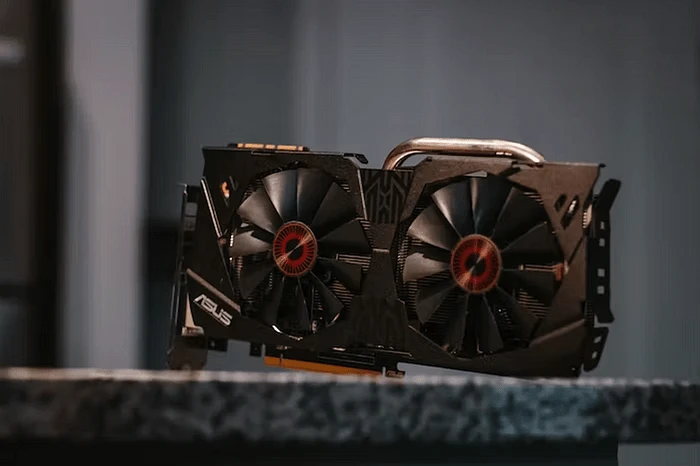
This article is set to provide you with an easy to follow step by step guide on how to clean a GPU. As a gamer I understand the importance of cleaning your GPU. I also understand how the online articles make this process appear so complicated. Therefore, I am going to provide you easy to follow through information.
TOOLS REQUIRED TO CLEAN A GPU
I wanted the list of tools to be easily accessible and efficient at the same time, so this is what I came up with:
· Screwdriver
· Air blower/ Can of Compressed Air (and if you can’t get either of these you can try a hair blower or a vacuum machine)
· Q-Tips
· Cleaning Cloth
· Isopropyl Alcohol
· Thermal Paste
METHODS OF CLEANING A GPU
There are two ways to clean your GPU
· Cleaning the GPU without taking it apart ( Mounted GPU clean)
· Cleaning the GPU after taking it apart (Unmounted GPU clean)
MOUNTED GPU CLEAN
Following are the easy to follow steps:
1. Shut your PC down through the OS
2. Turn your PSU off through the Power Switch
3. Open the Casing of your CPU
4. Aim the Blower at the GPU fan and use it in bursts to get rid of all the dust. Gradually go around the GPU to clean it properly
5. Gently use the cleaning cloth to remove any beddings of dust on the GPU
6. Blow into the card one more time to get rid of any excessive dust
7. Close the Casing and plug in your computer
UNMOUNTED GPU CLEAN
1. DISASSEMBLING
o Remove the screws of the Metallic Back Plates
o Take care of the screws holding the heat sink and remove their connection with the cooling fan
o Carefully remove the GPU as it is covered in thermal adhesive
o Use steady force to remove the reinforcement chip
o Use the same technique in previous step to take apart heat sink and the fan cover
o Detach the Fan from the PCB port
1. CLEANING
o First use your blowing device to get rid of the dust
o Soak your cleaning cloth in isopropyl to clean the bedded dust. And use the q-tips soaked in isopropyl to take care of nooks and crannies
2. ASSEMBLING
o Apply a thin layer of thermal paste in all the points the GPU was attached at
o Put the heat sink back on the GPU
o Screw the fan cover back
o Reassemble the back plate
NOTE: Do not clean your Hard drive or PSU to prevent any unwanted damage.
CONCLUSION
I hope that the casual and easy to follow guide was helpful to you. So many people damage their precious machines just because they were not correctly guided. The scope of this article was to help even a layman understand the mechanics behind cleaning a GPU. If you liked this article then do share it with your friends as well. Don’t let them fall prey to misguidance and complicated steps. And don’t forget to share your opinion with us in the comment section.
Take a look at this video for more help:
Like this project
Posted Mar 21, 2023
A step by step solution guide on how to clean your GPU.
Likes
0
Views
25