
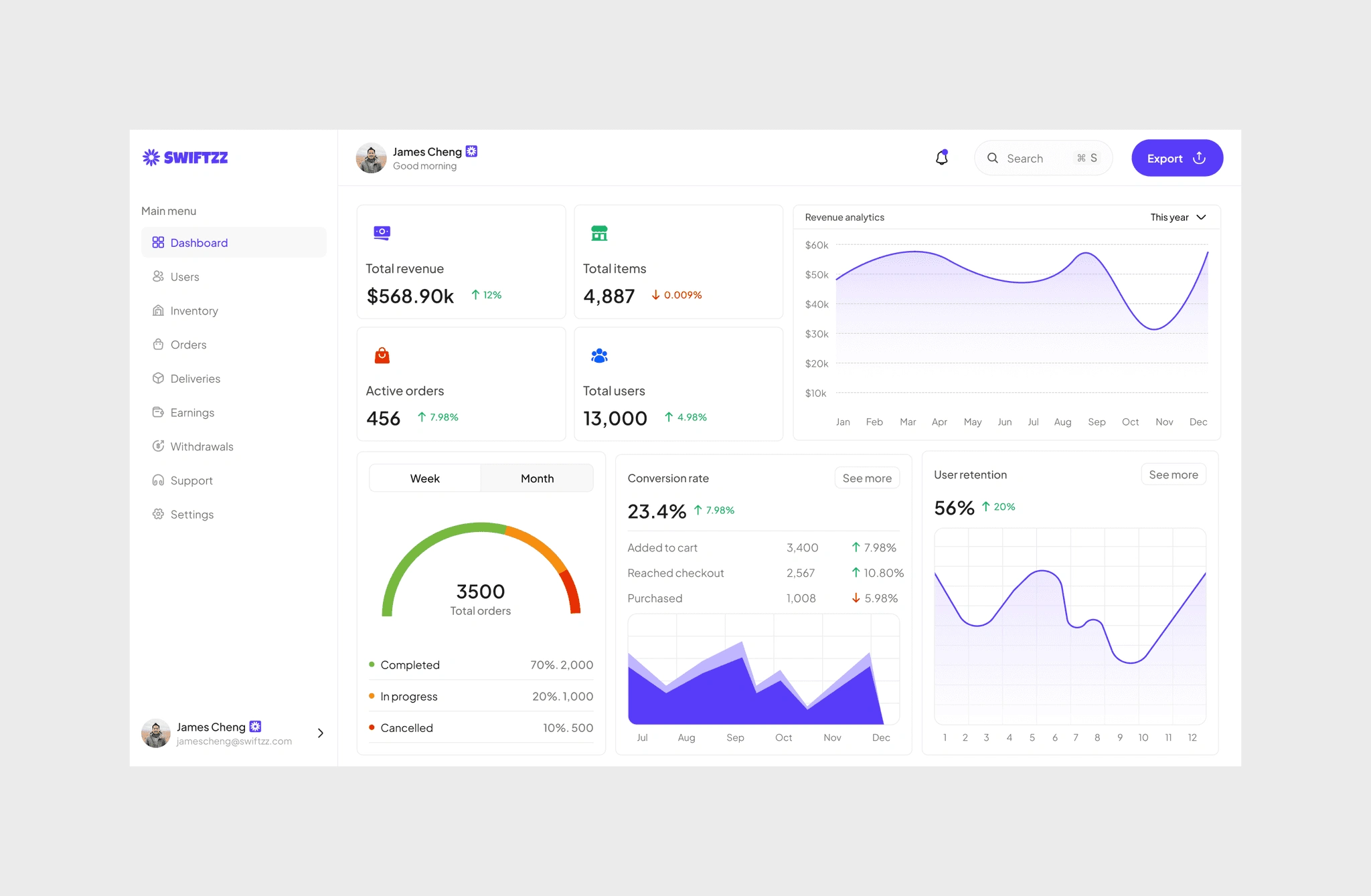
Swiftzz admin: A powerful groceries management platform that helps admins oversee orders, drivers, inventory, and customer support seamlessly.
Case study
Admin dashboard design
Swiftzz
25 Oct, 2025
The objective was to create an intuitive admin dashboard that makes it easy to manage groceries across multiple branches, keep track of drivers, process customer orders, and provide fast support, all within a single platform.
Full design journey ahead, grab a snack 🍿 (13 min read)

Jump to the finished design
Team
Giwa Abdullahi (Me)
UI/UX designer, UX researcher
Duration
8 weeks
August 2025
Tools
Figma
Miro
Google docs, drive, spreadsheet
Meet
Visuals
Colour palette
Brand (Primary), secondary, and tertiary colours
#593DFA
#17B26A
#FFFFFF
#1F1F1F
Typography
Plus Jakarta Sans
ABCDE
abcde
12345
Brief
Running a grocery delivery platform isn’t just about customers ordering and drivers delivering , behind the scenes, there’s a complex ecosystem that needs to stay in sync. Stores must update inventory, drivers must stay verified and reliable, customers need timely support, and the business itself needs visibility into earnings, growth, and performance.I designed the Swiftzz Admin Dashboard as the all-in-one control center that powers this ecosystem. From tracking live deliveries to managing payouts, reviewing driver performance, monitoring customer satisfaction, and handling support tickets , the admin panel brings everything into one clean, easy-to-use system.The goal was simple:
Unify operations across stores, drivers, and customers.
Simplify decision-making with clear dashboards and data visualization.
Reduce friction for admins by making every action , from approving a driver to resolving a delivery issue , just a few clicks away.
Project snapshot
Swiftzz Admin is a web platform designed to give administrators full control over the Swiftzz ecosystem. It enables managers to oversee branches, monitor drivers and customers, track orders, and manage finances all in one place. The dashboard makes it easier to ensure smooth operations and maintain transparency across the entire grocery delivery system.The design challenge was to create an experience that is:
Organized → Clear navigation across orders, earnings, inventory, and support.
Scalable → Built to handle multiple branches, drivers, and customers without clutter.
Efficient → Streamlined workflows so admins can act quickly when issues arise.
Transparent → Detailed reporting on performance, withdrawals, and delivery history.
The problem
Managing a grocery delivery platform at scale is complex. Admins often struggle with scattered tools that make it hard to track orders, manage drivers, handle payouts, and oversee customer support. Without a centralized system, small inefficiencies quickly add up , late deliveries, missing payments, and poor oversight all directly impact customer trust and platform growth.
The solution
The Swittzz Admin Dashboard was designed as a single source of truth for the entire platform. It consolidates all critical functions , from managing orders and monitoring drivers to handling payments, inventory, and support tickets , into one streamlined system. This ensures admins have real-time visibility, clear oversight, and the tools to act quickly. By unifying workflows, the dashboard reduces operational friction, improves accountability, and strengthens both customer and driver confidence in the platform.
Impact highlights

Operational clarity
Reduced operational errors by giving admins a clear, real-time view of platform activities

Delivery accuracy
Improved delivery accuracy and timeliness through better oversight of drivers and orders

Financial efficiency
Simplified payout and withdrawal management for smoother financial operations

Trust and transparency
Increased trust across customers, drivers, and platform managers with a transparent system
Research
Understanding the problem
Admin dashboards in grocery delivery platforms often lack clarity and efficiency. According to industry studies, over 60% of delivery businesses struggle with managing both drivers and customer operations in one place. Issues like delayed payouts, poor visibility into orders, and scattered support tools create bottlenecks that affect growth.
Market context
The U.S. online grocery market is large and expanding , projected at about $220 billion by 2025, with continued growth expected. MarketWatch
Grocery delivery adoption is high: surveys show roughly 40 percent of U.S. consumers used grocery delivery in a recent week, indicating frequent, repeat usage for many customers. McKinsey & Company
Gig work remains a meaningful part of the U.S. labor pool: past Pew Research estimates show around 9–16 percent of Americans have done gig work via online platforms, underlining a sizeable pool of potential drivers and flexible workers. Pew Research Center+1
What this means for Swiftzz Admin (design implications)
Scale and multi-branch support are essential With a big and growing market, admins need tools that handle many stores and high order volumes without clutter. Make branch filters, quick branch-switch, and aggregated metrics first-class features. MarketWatch+1
Real-time operations matter High customer expectations for delivery and frequent usage mean admins must see live order states, driver locations, and exceptions immediately to reduce friction and resolve issues fast. McKinsey & Company
Financial transparency and automation pay off Given frequent payouts and many microtransactions (tips, trip fees), the admin needs clear earnings breakdowns, automated payout queues, and reconciliation tools to reduce disputes and manual work. MarketWatch
Support and SLAs should be streamlined When usage is frequent, support volume rises. The admin dashboard should surface high-priority tickets, let admins jump to order context, and provide canned responses or escalation flows to keep resolution time low. McKinsey & Company
Operate for a flexible workforce With a sizable gig workforce, support features for onboarding, re-verification, and payout preferences are important. Admins need quick controls to approve/verifiy users and manage withdrawal requests. Pew Research Center+1
User research
Secondary research from operator forums, product reviews, and industry reports highlights recurring admin pain points:Admin Pain Points
Fragmented tools → Switching between multiple systems for orders, inventory, and payouts.
Limited visibility → Delayed updates make it hard to spot and fix issues in real time.
Manual finance work → Refunds and payouts require extra checks, leading to errors.
Support overload → Tickets lack context, slowing down resolution.
Inventory sync issues → Stock mismatches at branches cause failed orders and refunds.
Weak audit trails → Hard to track actions for compliance or disputes.
Scaling friction → Processes that work for one store fail across many locations.
Persona

Maria Johnson (38)
Operations Admin at a mid-sized grocery delivery platform
Goals
Monitor daily delivery operations and driver activity
Quickly resolve order or customer issues
Keep the system organized without jumping across multiple tools
Frustrations
Limited visibility into real-time delivery updates
Difficulty managing multiple drivers at the same time
Time wasted reconciling operations manually

David Carter (42)
Finance Administrator for a digital logistics platform
Goals
Track revenue and expenses accurately
Process driver withdrawals safely and on time
Ensure financial transparency across the platform
Frustrations
Manual handling of payouts leading to errors
No clear breakdown between platform revenue and driver earnings
Difficulty settling disputes over payments
Research insight summary
Our research revealed that admins managing grocery delivery platforms need a single source of truth to oversee operations. Real-time visibility into orders, drivers, and branches reduces firefighting, while financial clarity helps prevent disputes. Support volumes grow with scale, making triage and quick response tools essential. Verification logs and audit trails build trust, and actionable summaries are more valuable than raw reports. Finally, route and resource optimization directly impacts efficiency and costs, underscoring the need for branch-specific data views and smart assignment tools.
Define
Design goals
– Efficient platform management (orders, drivers, customers, stores) – Transparent financial oversight (earnings, withdrawals, payouts) – Scalable control (ability to manage growth without chaos) – Accurate reporting (real-time analytics for decision-making)
Success metrics
– Faster resolution time for order/driver issues – Reduced withdrawal/payment errors – Improved operational efficiency (track with reduced manual interventions) – Higher overall platform reliability and user trust
Design
Login and authentication
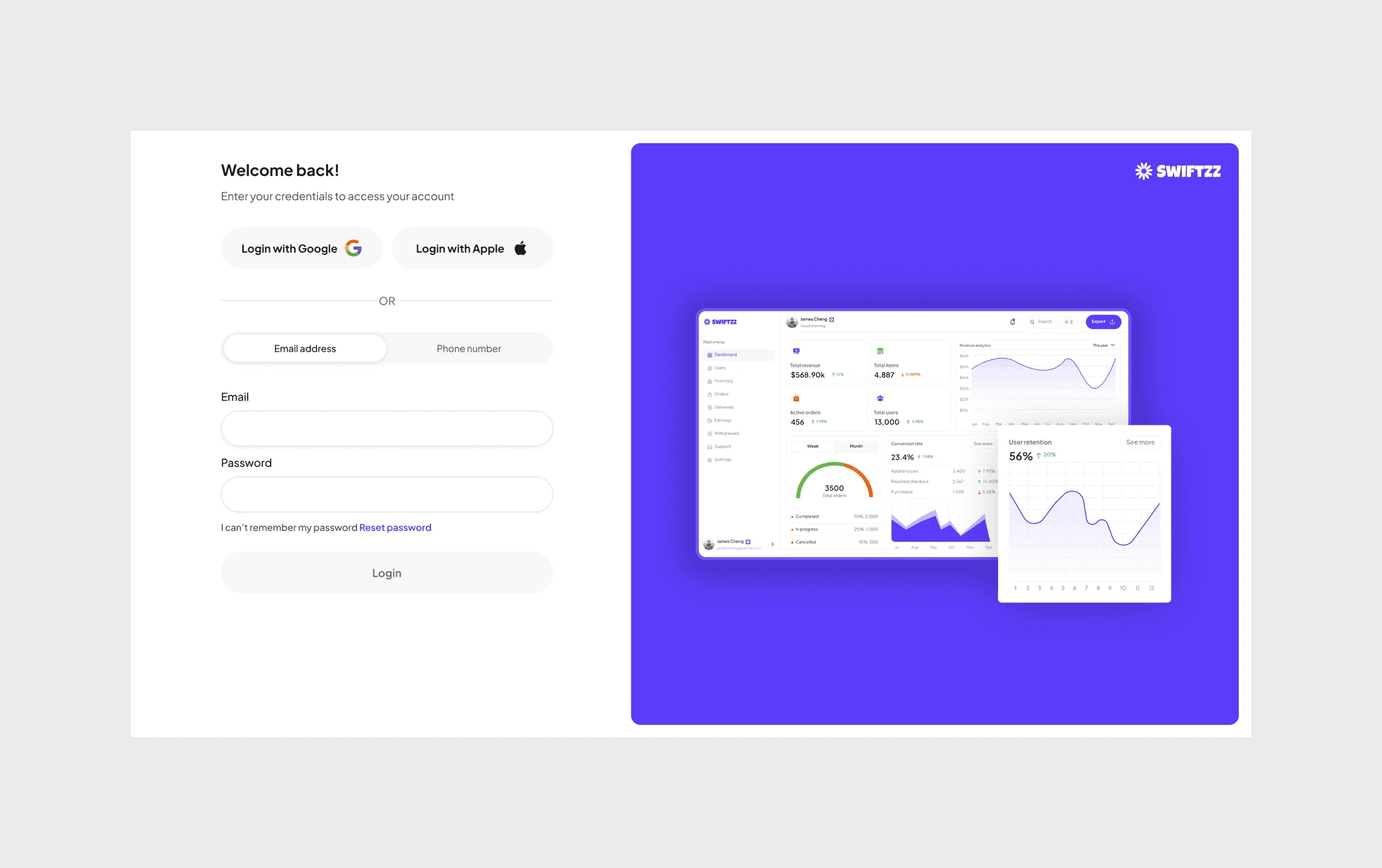
The admin dashboard begins with a simple and secure login flow. To reduce friction, multiple sign-in options were included: Google and Apple for one-tap access, alongside traditional email and phone number entry. Clear feedback messages guide admins in real time, making errors easy to spot and correct. Password reset is also built in, ensuring admins can quickly recover access without external support.
This design ensures accessibility, minimizes failed login attempts, and gets admins into the dashboard quickly, so they can focus on managing operations rather than struggling with entry points.
Dashboard overview
The admin dashboard serves as the control center for the entire platform, combining revenue insights, user activity, and order status into one streamlined view. At a glance, admins can monitor total revenue, conversion rates, active orders, and user retention trends.
Interactive charts break down monthly and yearly revenue growth, while detailed funnel analytics show how users move from adding items to carts, reaching checkout, and completing purchases. Order statuses are segmented into completed, in-progress, and canceled, helping admins quickly identify where bottlenecks or inefficiencies may exist.
By surfacing these key performance metrics in real time, the dashboard empowers admins to make informed decisions that drive operational efficiency and long-term growth.
User management
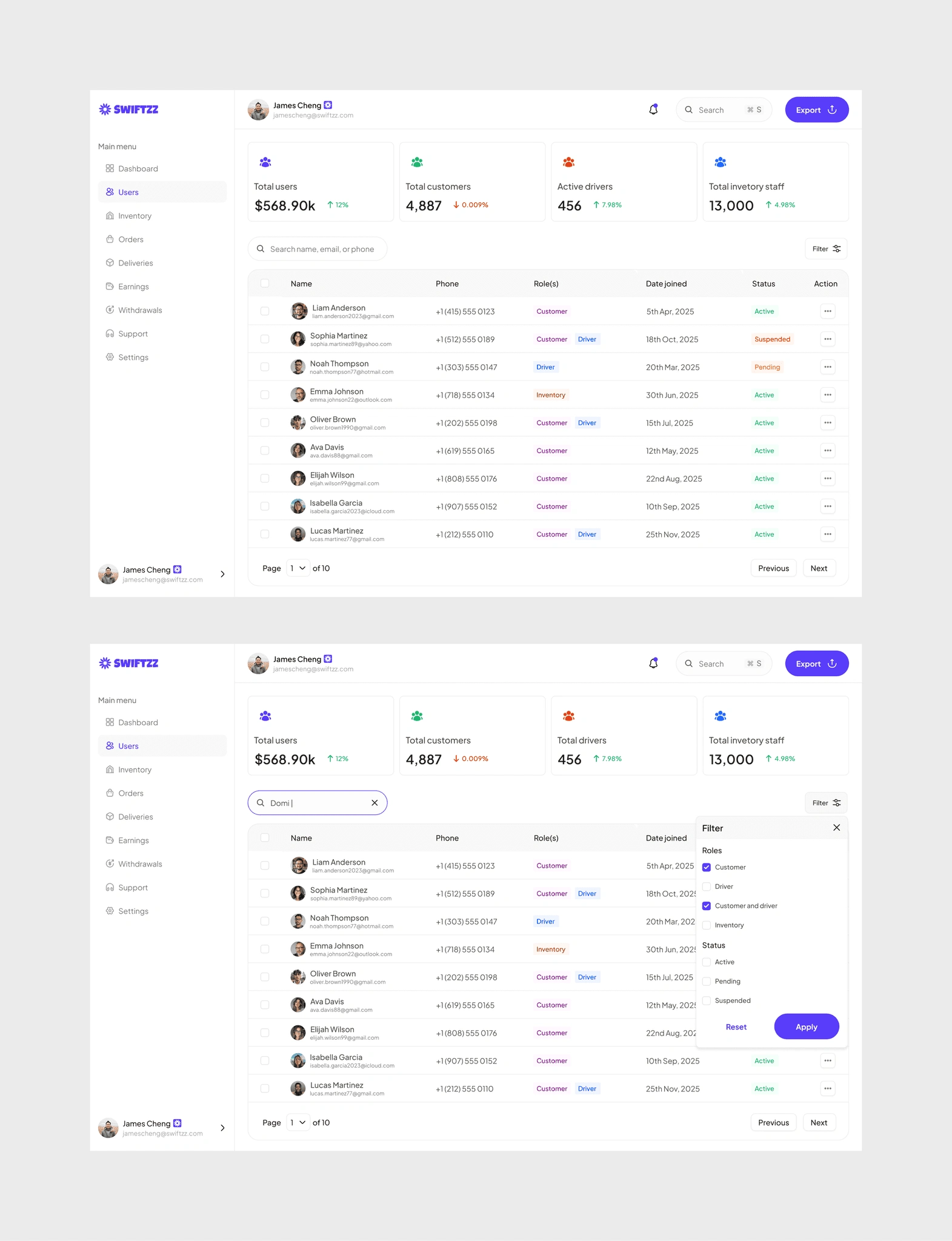
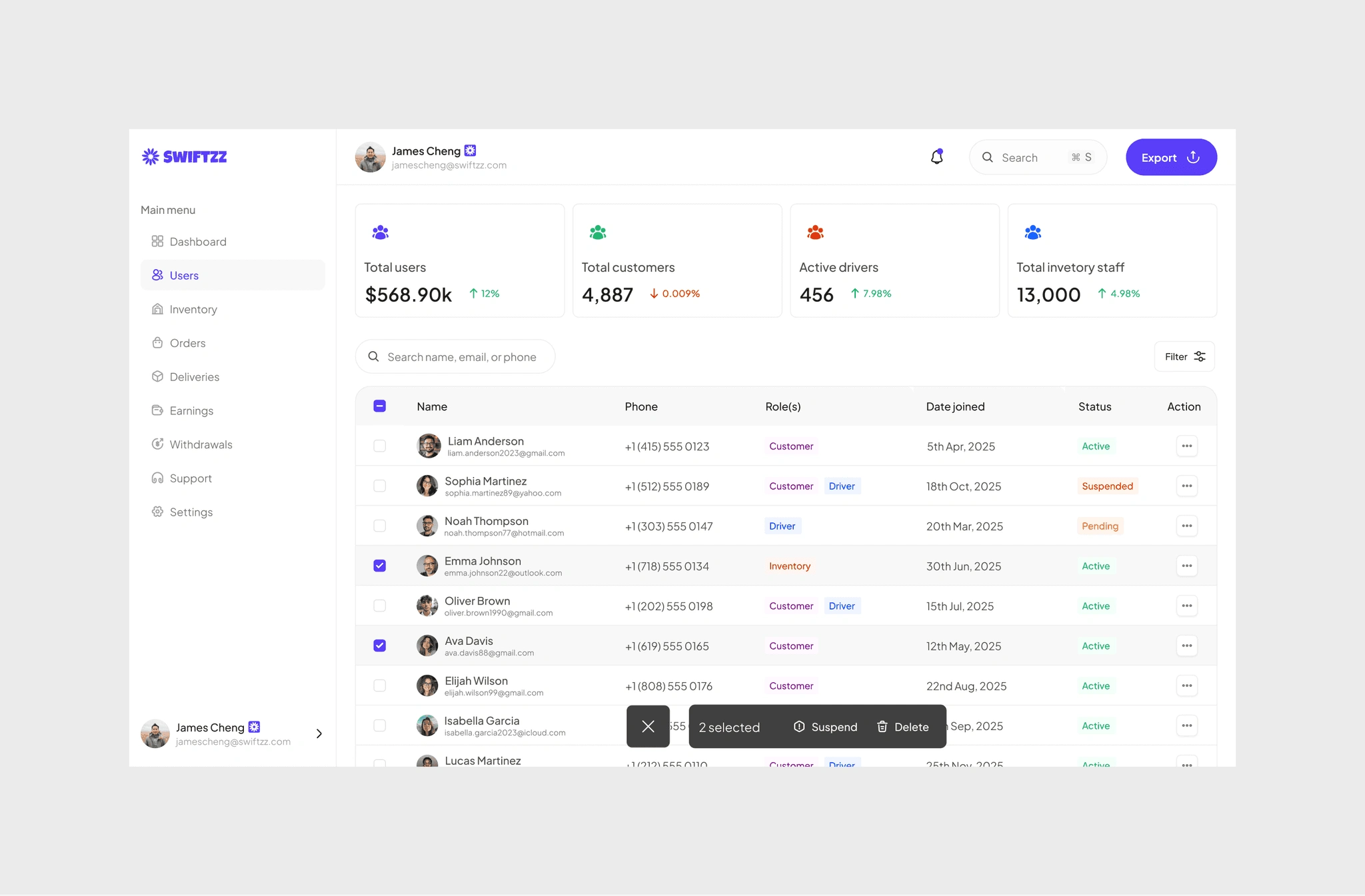
Every account tells a story: Liam the loyal customer, Sophia balancing roles as customer and driver, Noah waiting on approval. The dashboard makes it simple to track them all , who’s active, suspended, or pending. Filters, feedback, and bulk actions give the admin control at scale, turning a long list of names into a system that’s easy to manage.
User profile (Customer)
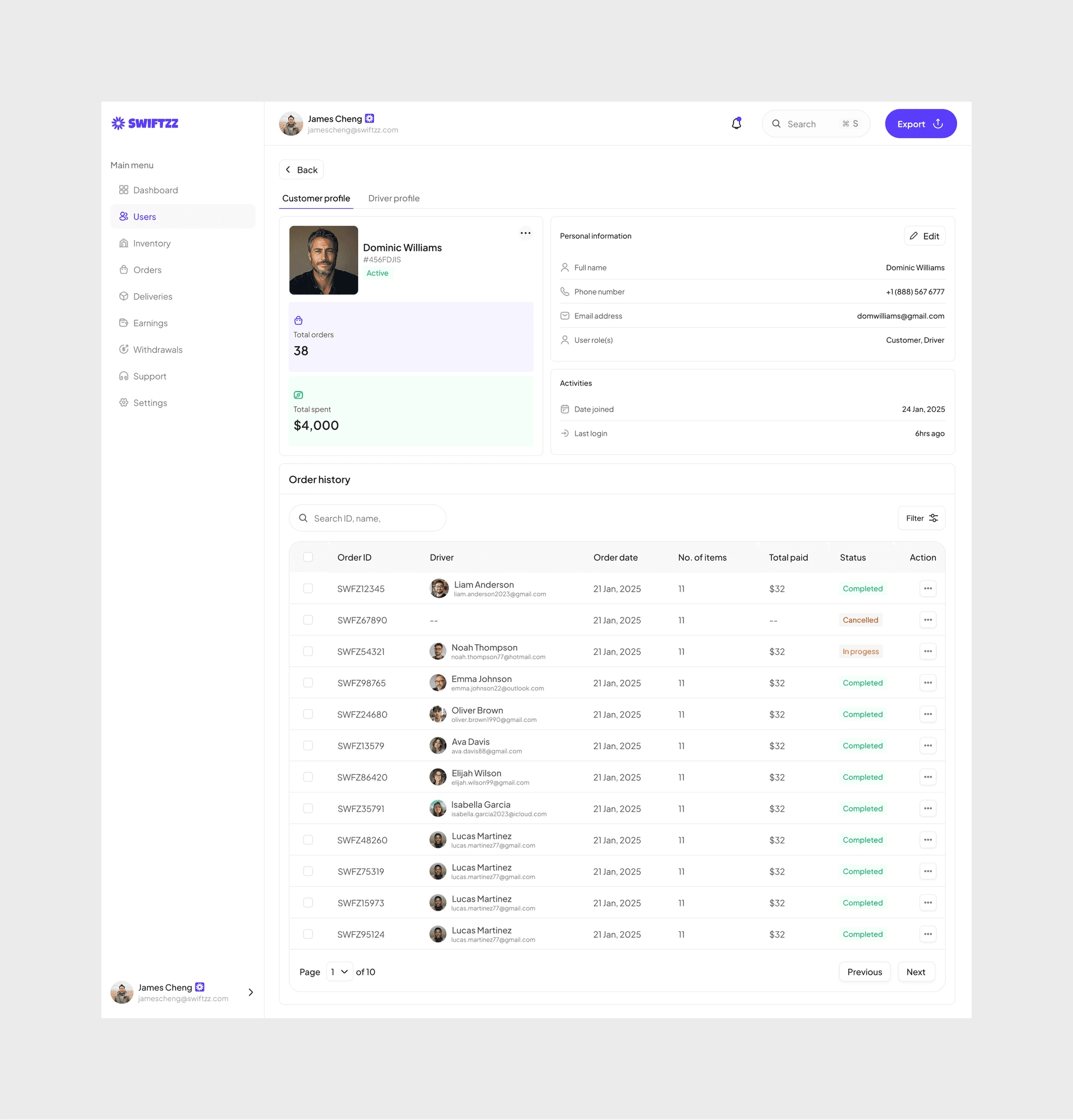
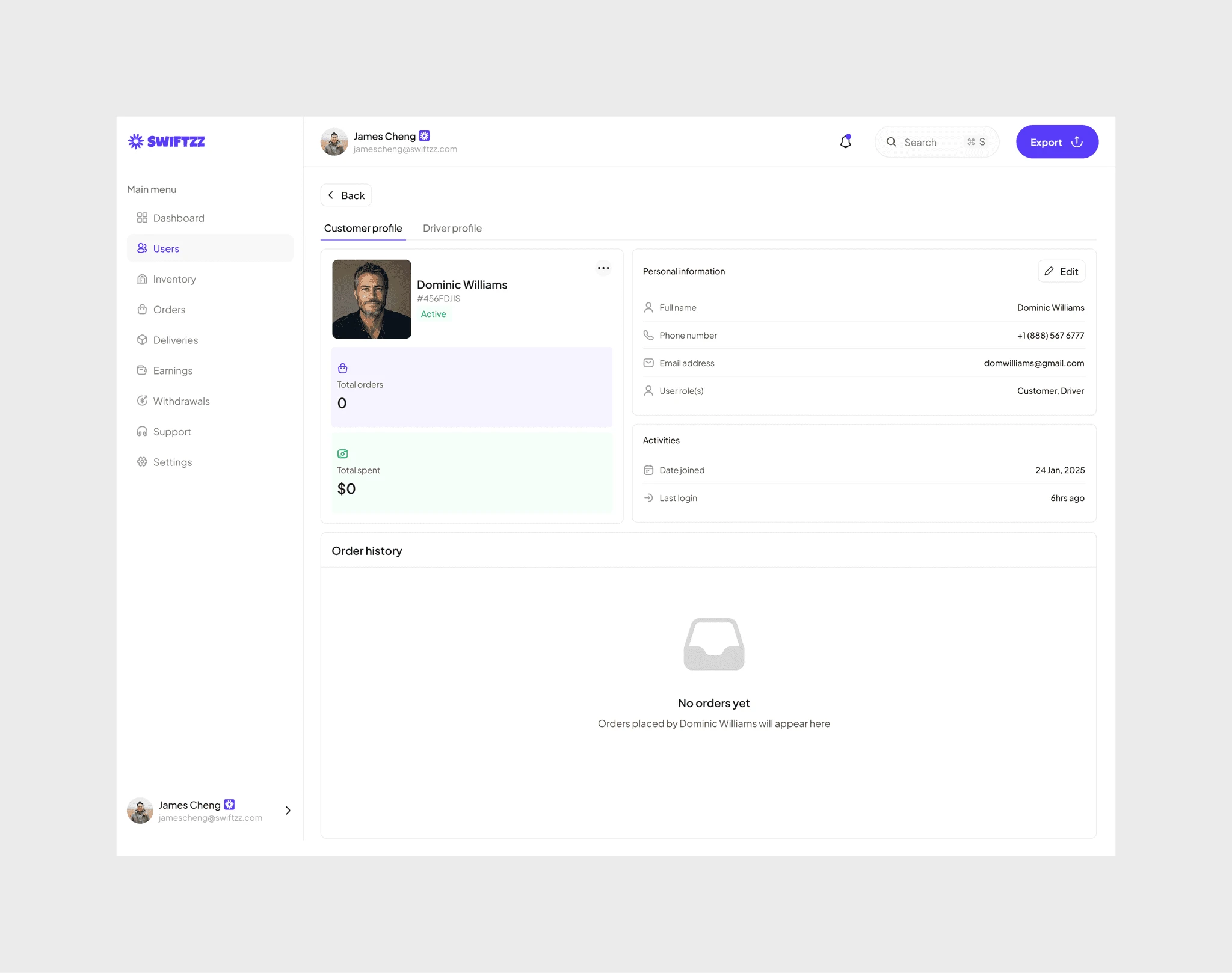
For customers, the profile page offers a snapshot of their journey on Swiftzz. It captures essentials like orders placed, money spent, and account status, but it doesn’t stop there. Order history becomes the timeline of trust: showing frequency, loyalty, and spending patterns. This helps admins understand who the high-value customers are, who may need support, and who might churn.
User profile (Driver)
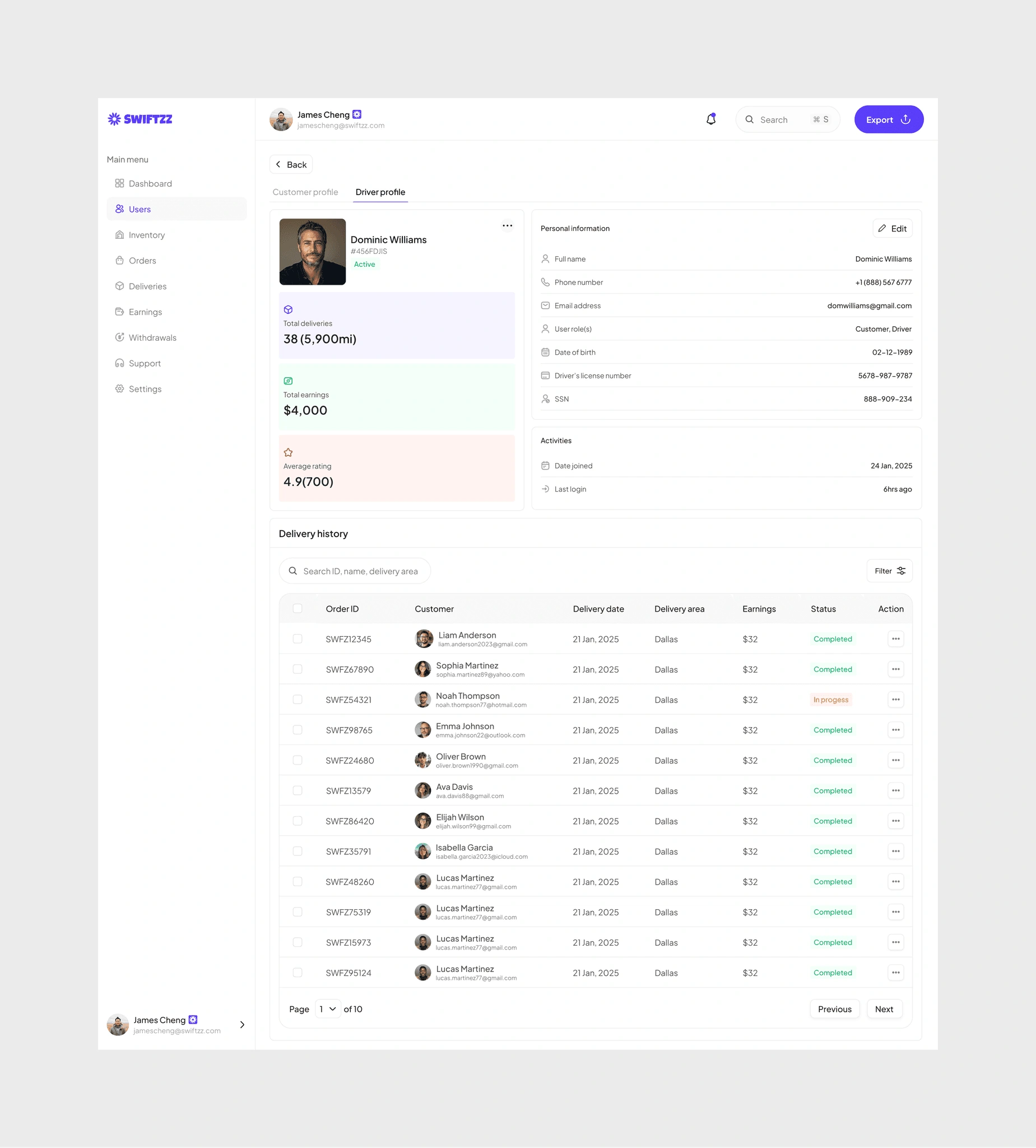
For drivers, profiles highlight performance and reliability. Metrics like total deliveries (38, covering 5,900 miles), earnings ($4,000), and average rating (4.9 from 700 reviews) tell a story of consistency and professionalism. Paired with delivery history, the data allows admins to identify top performers, resolve disputes fairly, and reward excellence.
Inventory management
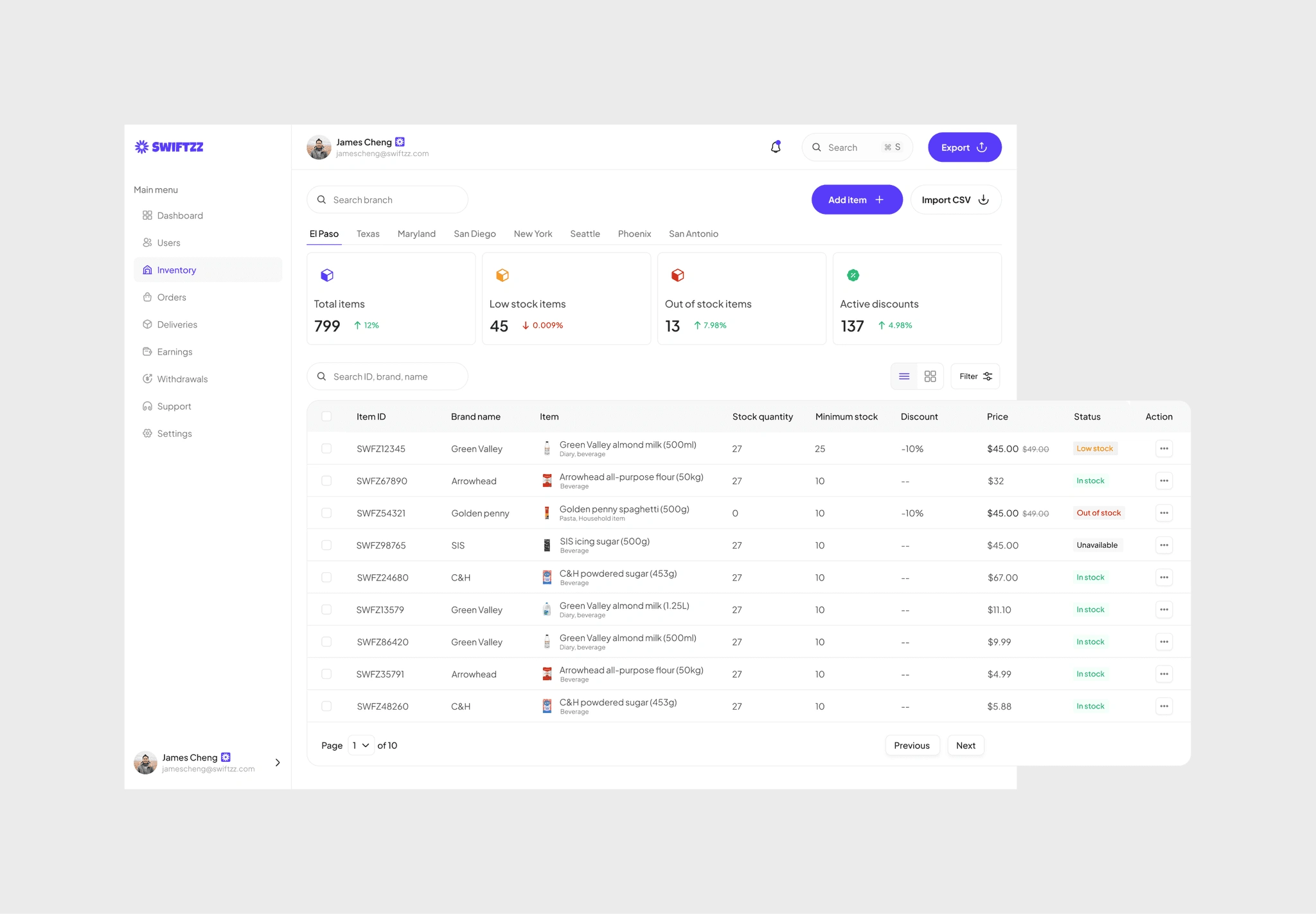
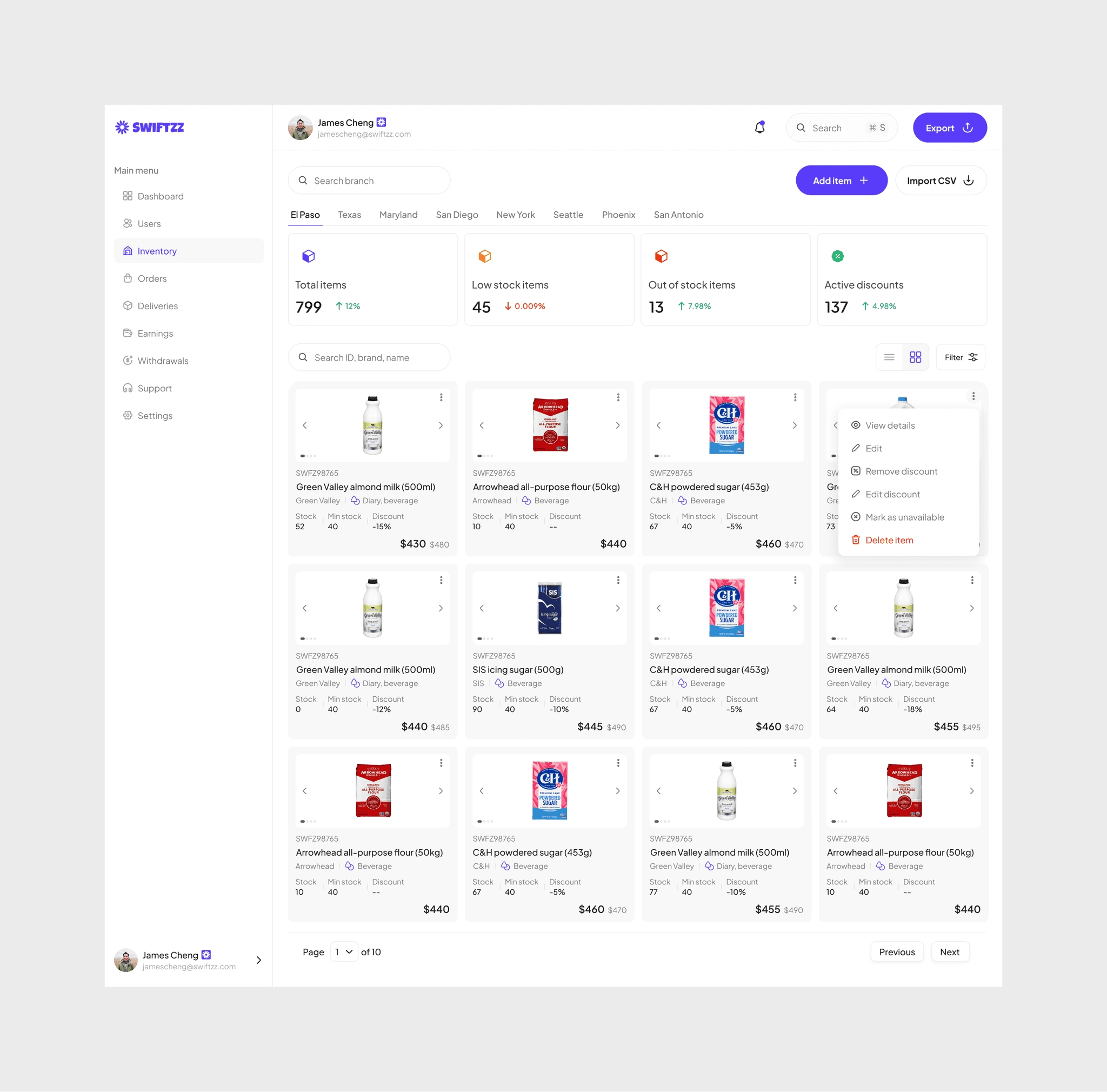
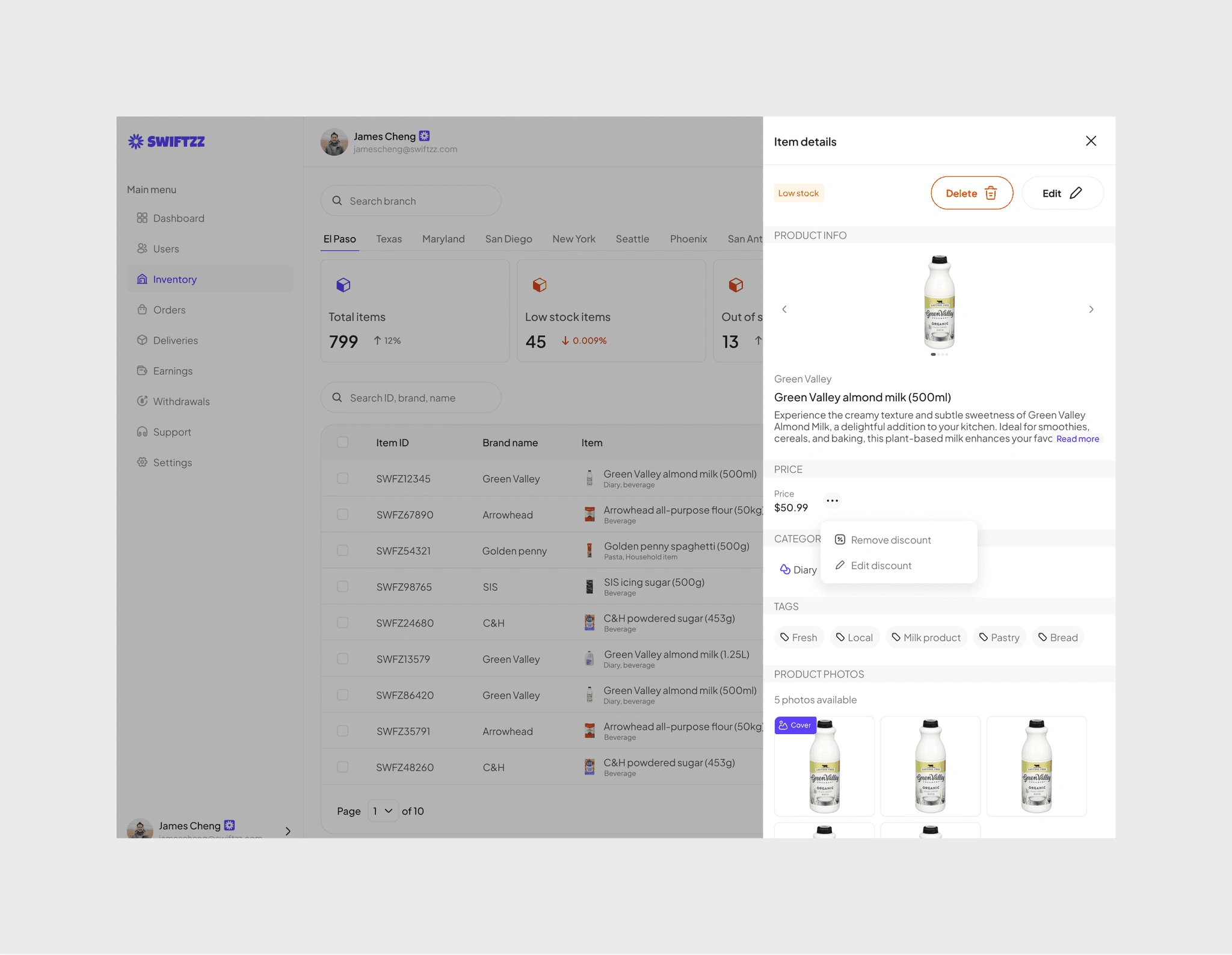
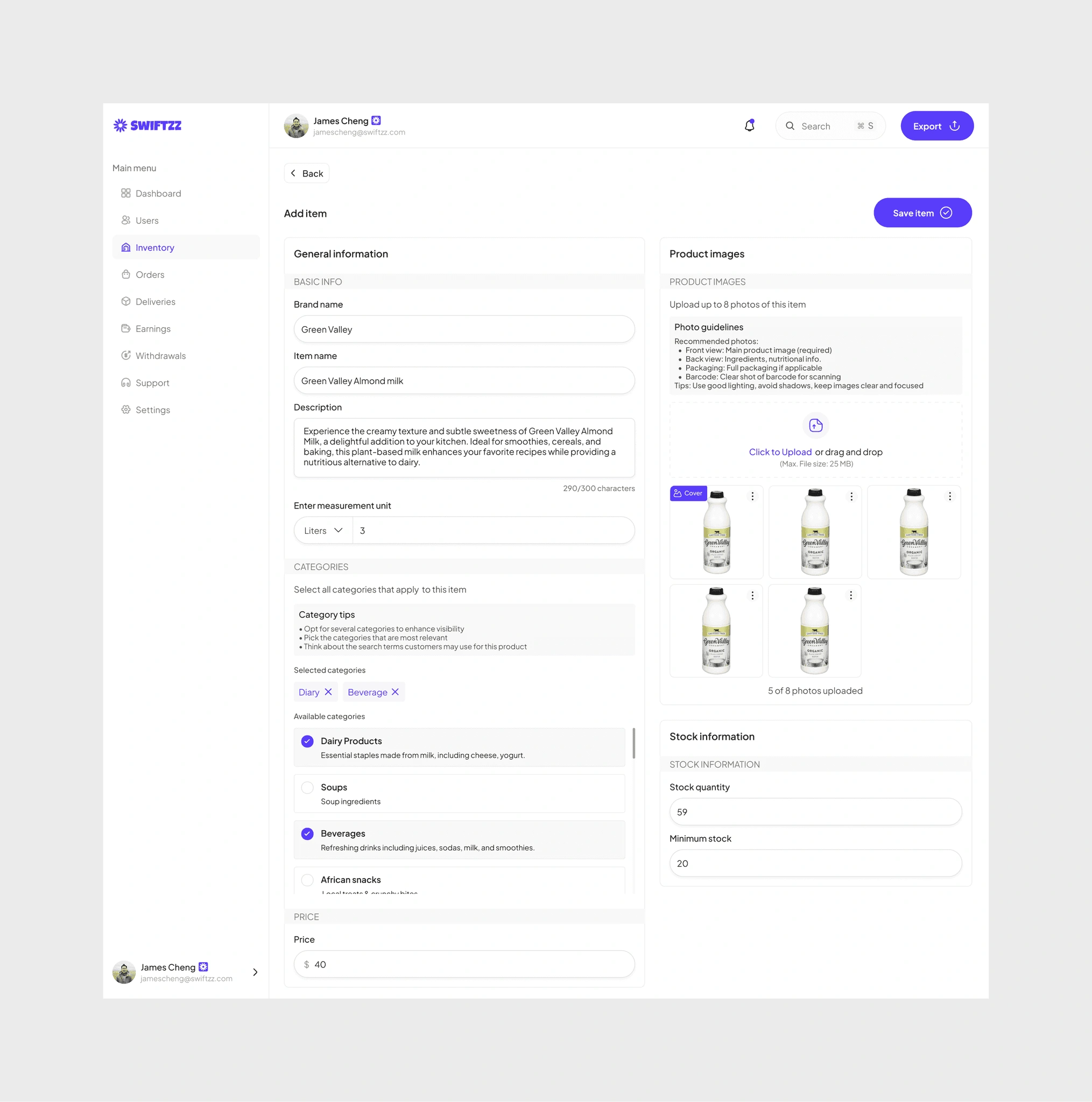
The inventory dashboard was designed to give admins full control and visibility over stock in real time. At a glance, they can see total items, low stock alerts, out-of-stock goods, and active discounts. Each entry surfaces key details , brand, item type, price, stock quantity, and status , so decision-making is fast and informed.
To adapt to different workflows, the system allows admins to toggle between list view (for precision and data-heavy management) and grid view (for quicker scanning and visual browsing). Bulk actions like adding new items, importing CSVs, and applying discounts streamline repetitive tasks. Status indicators such as low stock or out of stock make it easier to act before problems disrupt fulfillment.
This balance of flexibility and clarity ensures that managing thousands of products feels seamless rather than overwhelming, keeping operations both responsive and efficient.
User profile (Inventory staff)
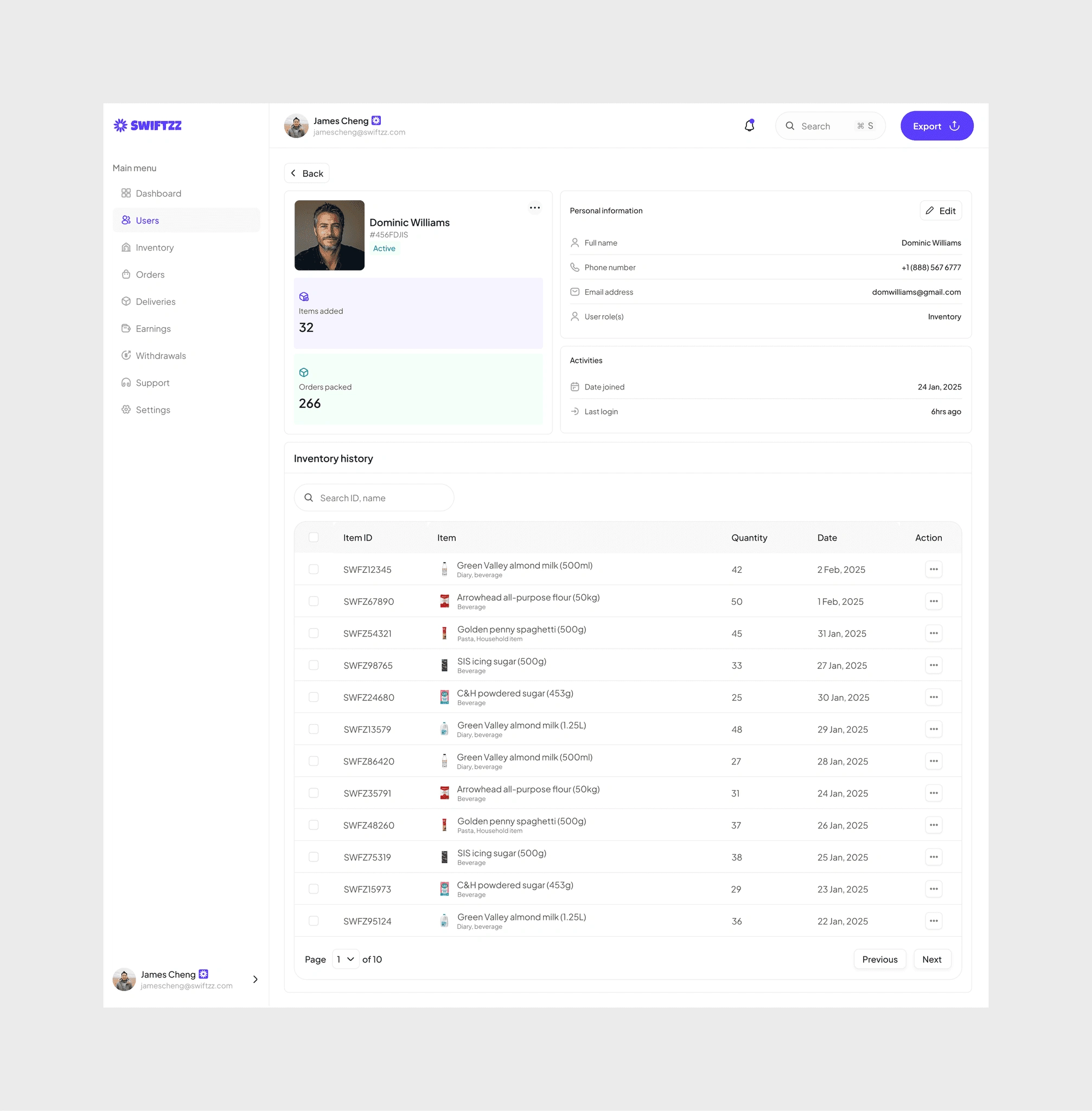
For inventory staff, the focus shifts to operational efficiency. Profiles display how many items have been added, how many orders packed, and their complete inventory history. These insights help admins track productivity, spot errors quickly, and ensure fulfillment flows smoothly. It transforms staff activity into measurable performance, ensuring stock is managed and orders are dispatched without friction.
Orders management
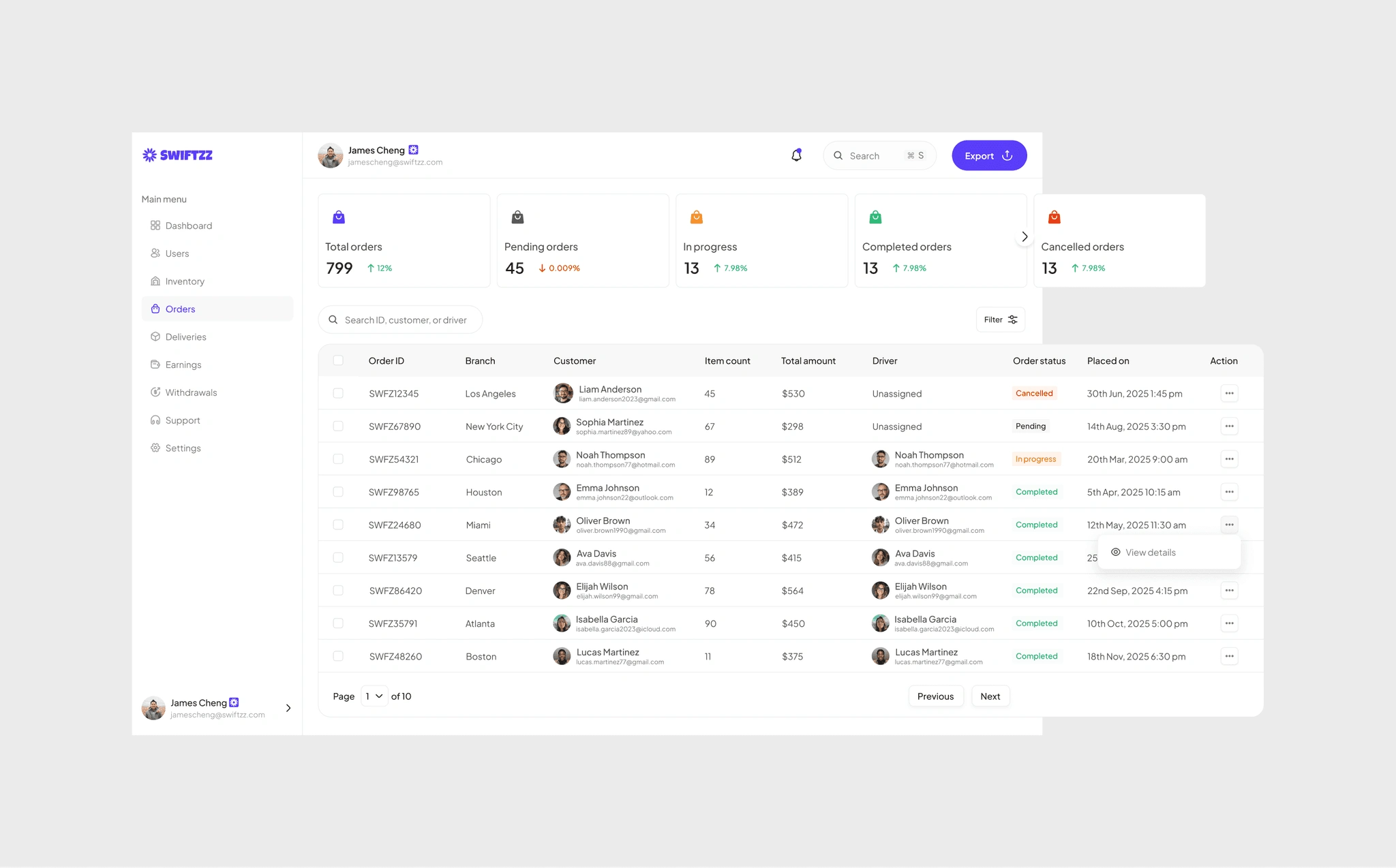
The orders dashboard was built to give admins clear visibility into the entire fulfillment pipeline. At the top level, metrics like total orders, pending, in progress, completed, and cancelled provide a snapshot of performance, helping teams spot trends and bottlenecks quickly.
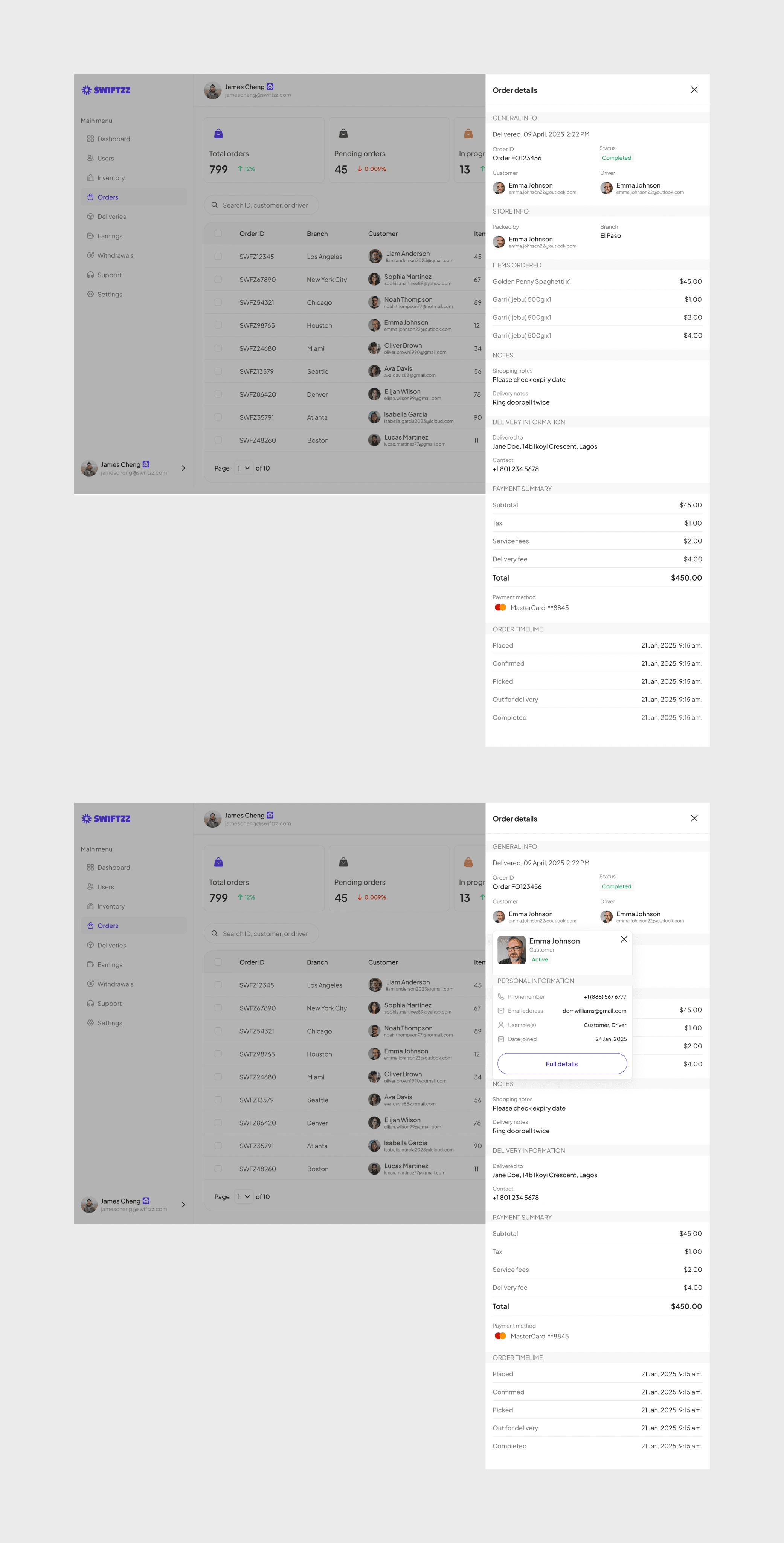
Each order record surfaces key details, order ID, branch location, customer name, item count, total value, assigned driver, and current status, creating a single source of truth for operations. Whether it’s a cancelled order in Los Angeles, a pending one in New York, or a completed delivery in Houston, admins can drill into the data with ease.
To keep workflows efficient, the design also supports search, filters, and bulk actions, enabling admins to manage hundreds of orders without friction. By combining transparency with control, the system ensures that no order slips through the cracks, and both customers and drivers benefit from smoother fulfillment.
Deliveries
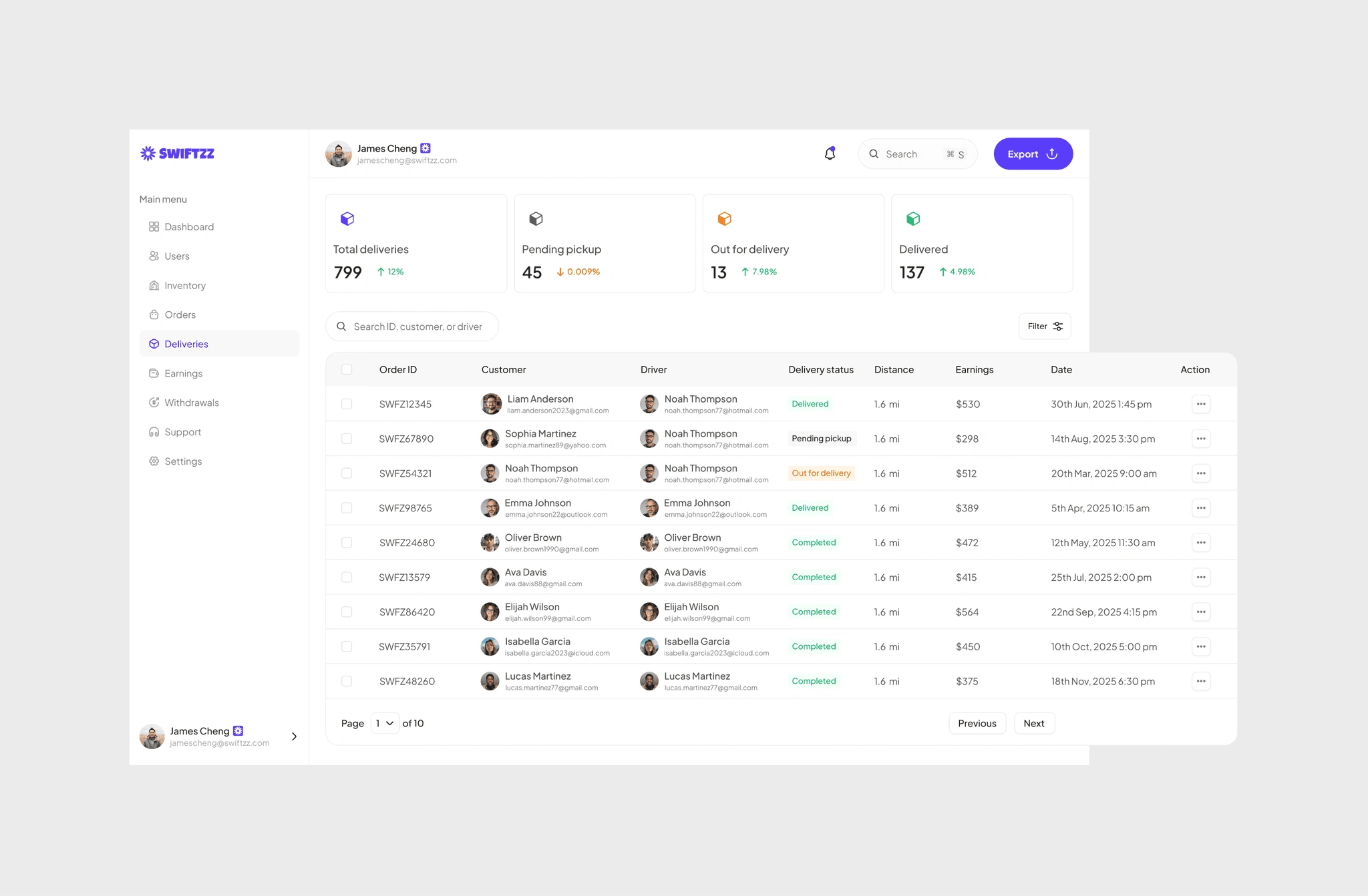
While orders cover the full lifecycle, the deliveries section zeroes in on the last mile of fulfillment. Admins can track each delivery’s status, driver assignment, route details, and completion time, making it easy to monitor performance in real time.
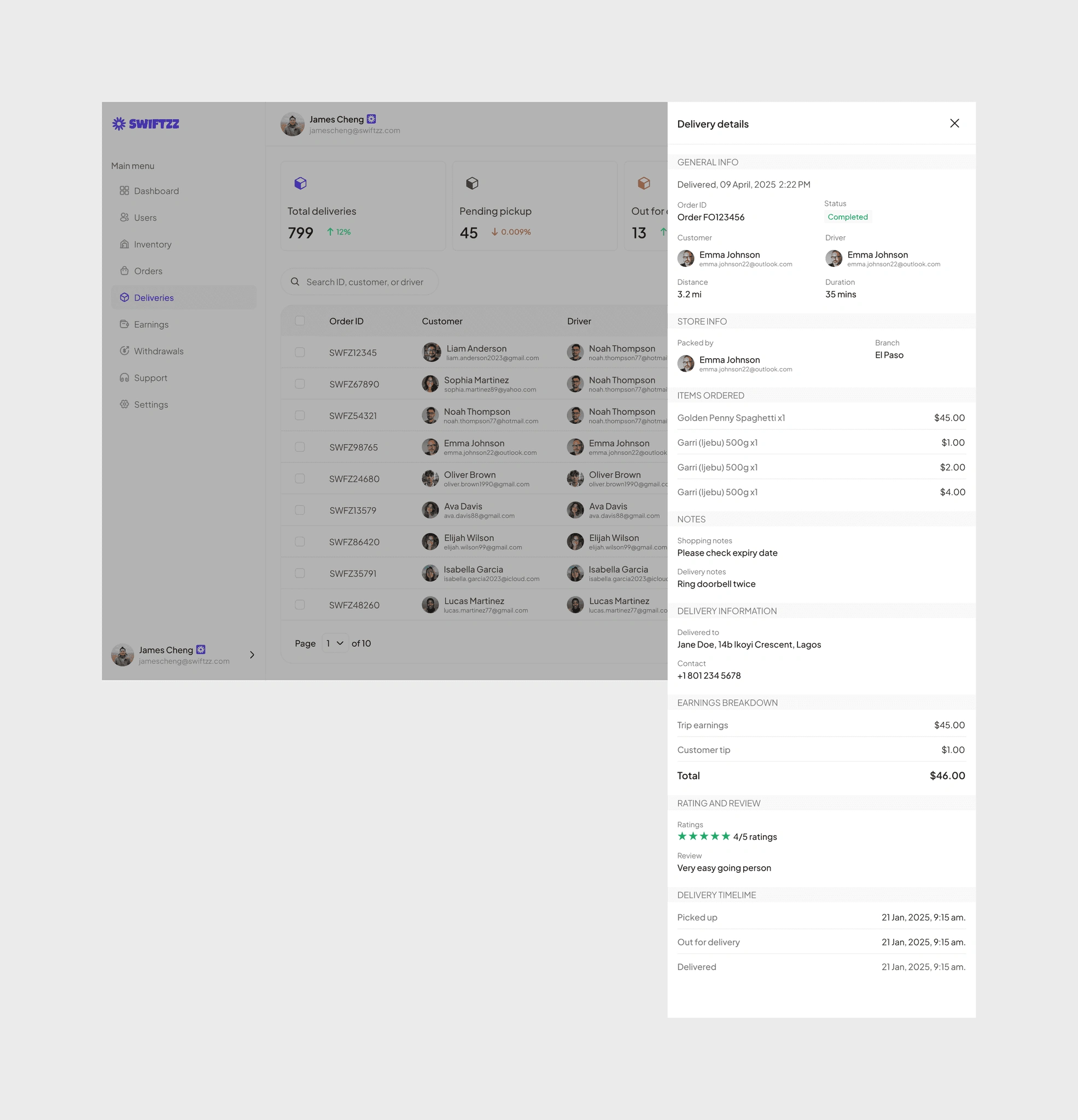
The interface surfaces metrics such as total deliveries completed, and in progress, while giving admins tools to step in if issues arise. Each delivery record shows who delivered, what was delivered, where it went, and how it was received, ensuring full transparency.
By consolidating delivery history and live updates, the system reduces disputes and builds trust. For admins, this means fewer blind spots. For customers, it translates into on-time, accurate grocery deliveries backed by clear proof of service.
Earnings
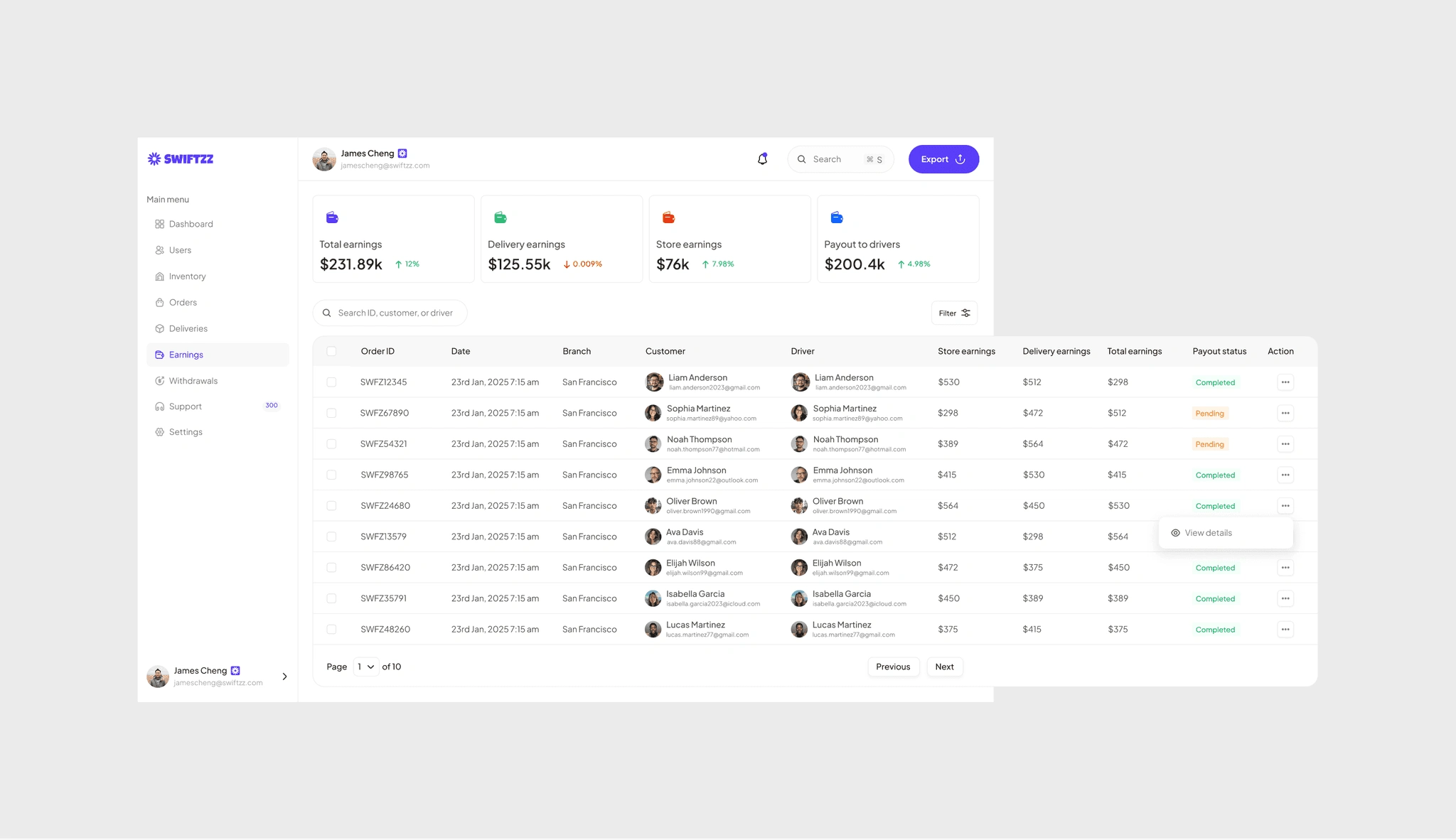
The earnings module gives admins a clear view of how money flows across the platform. At a glance, they can track total revenue, store earnings, delivery earnings, and payouts to drivers, making it easy to understand both the platform’s performance and its obligations.
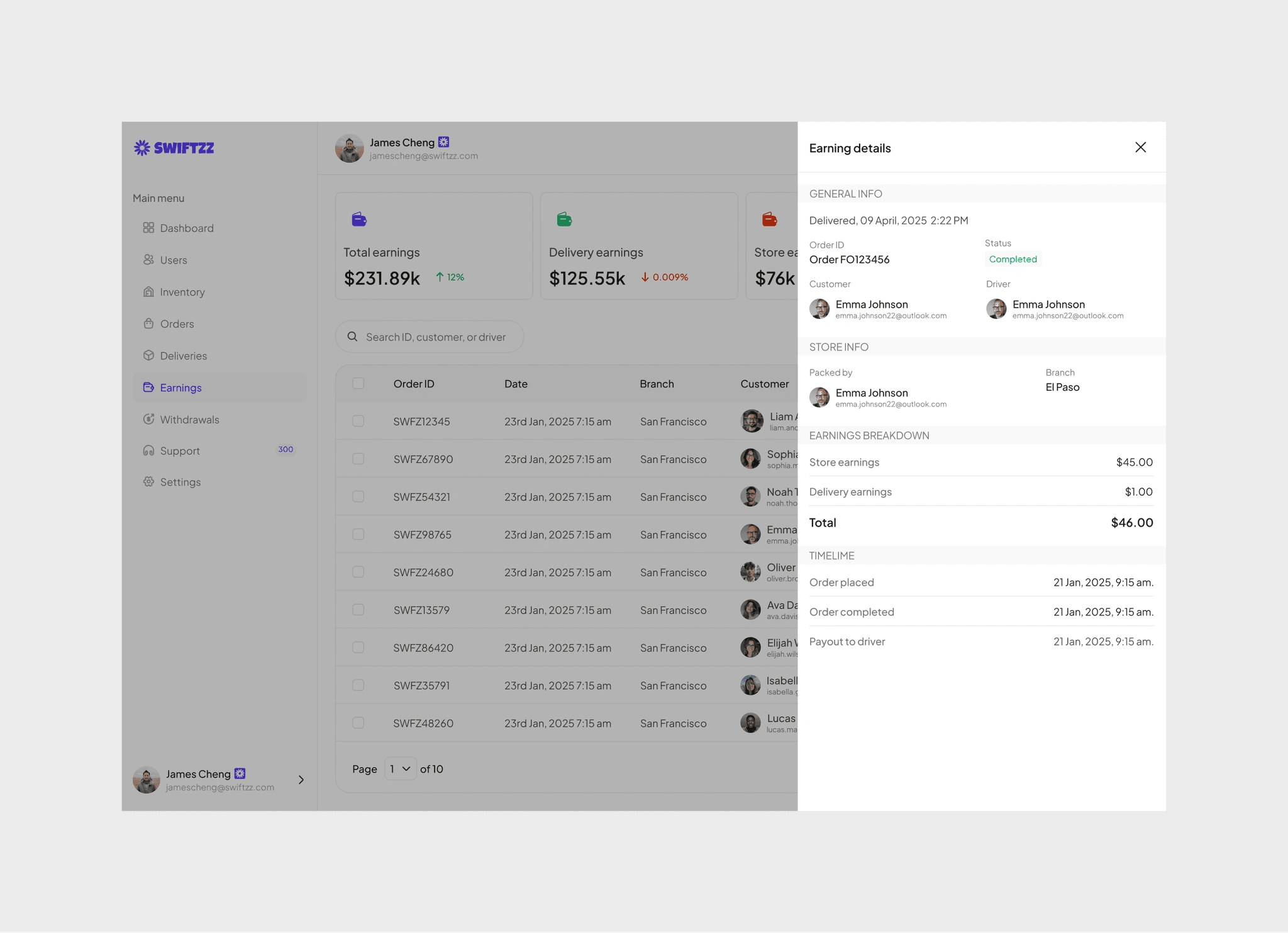
Each order ties earnings back to the customer, driver, and store branch, ensuring there’s no ambiguity about who contributed to the transaction and who should be paid. Admins can filter earnings by date, branch, or user, and drill into detailed breakdowns that show store share, delivery fees, and driver payouts.
To maintain trust, every earning entry comes with a timeline of events , from when the order was placed to when it was delivered and when the payout was processed. This creates a transparent financial trail that reduces disputes and ensures drivers and store staff are compensated accurately.
By consolidating earnings into one hub, Swittzz Admin makes it easier for management to keep the business profitable while ensuring all contributors are fairly rewarded.
Withdrawals
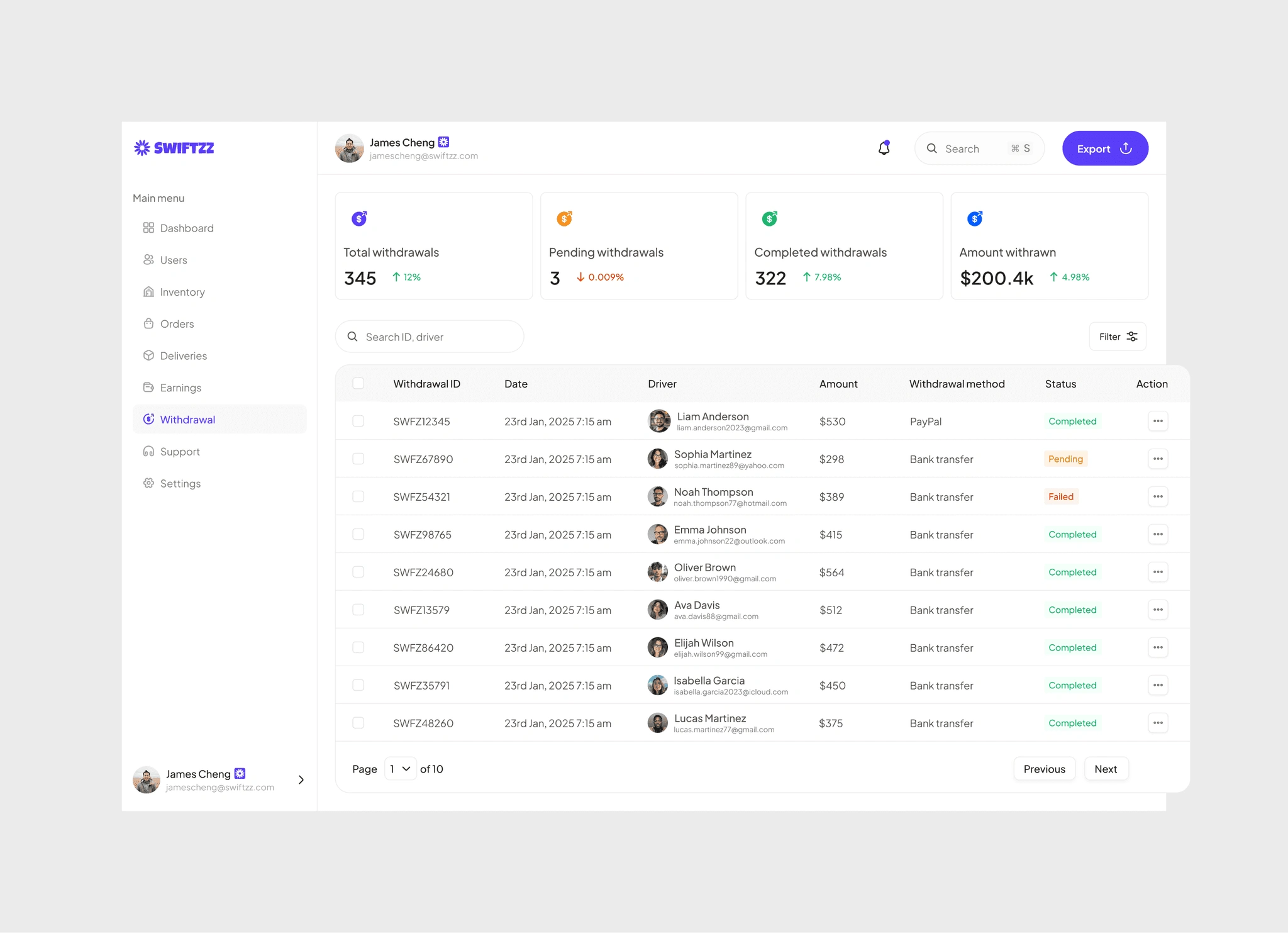
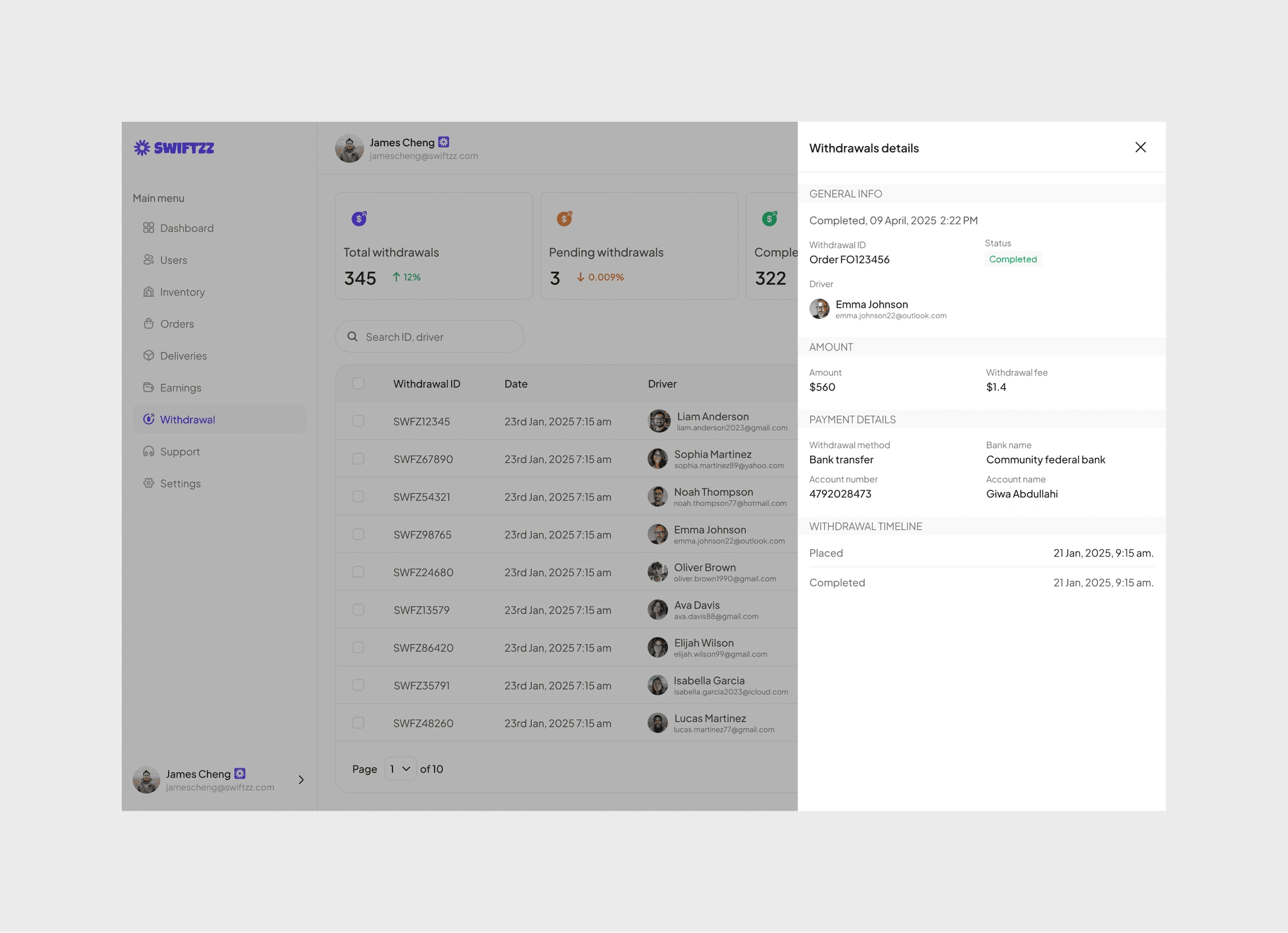
Managing payouts is one of the most sensitive parts of running a delivery platform, and the withdrawals module was designed to ensure speed, accuracy, and transparency. Admins can instantly see the total number of withdrawals, pending requests, completed payouts, and the total amount disbursed to drivers.
Each withdrawal request is logged with key details , driver name, amount, withdrawal method, and status , so admins can quickly verify and act on payments. Failed or pending requests are clearly highlighted, allowing issues to be resolved before they escalate.
Support (Live chat, FAQ management)
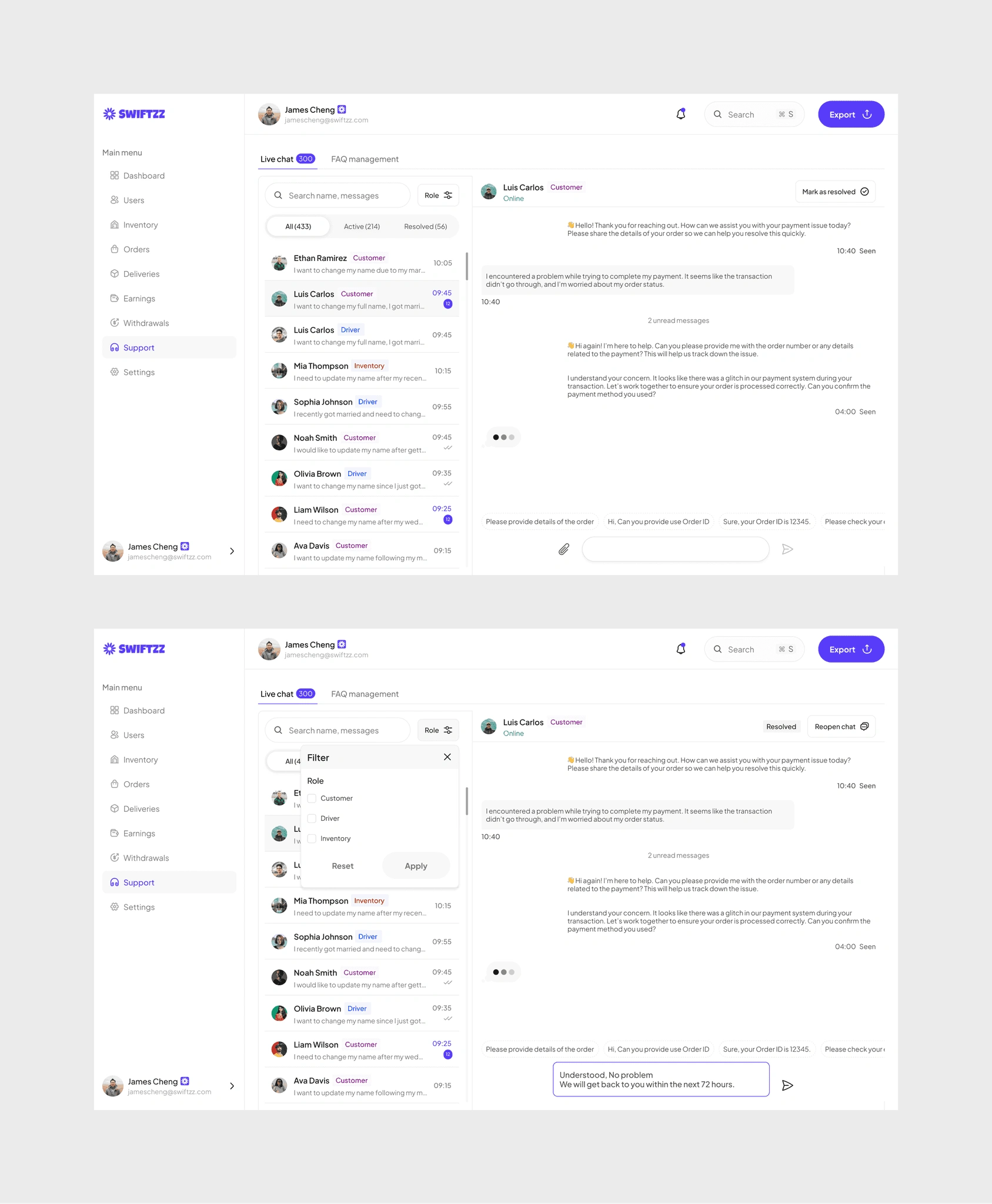
A platform at scale cannot thrive without strong support systems, so we designed the Support module to give admins full visibility and control over user issues.
The live chat feature allows admins to filter conversations by role (customer, driver, or inventory staff) and by status (resolved or unresolved). This makes it easy to prioritize urgent tickets, follow up on pending requests, and ensure no message slips through the cracks.
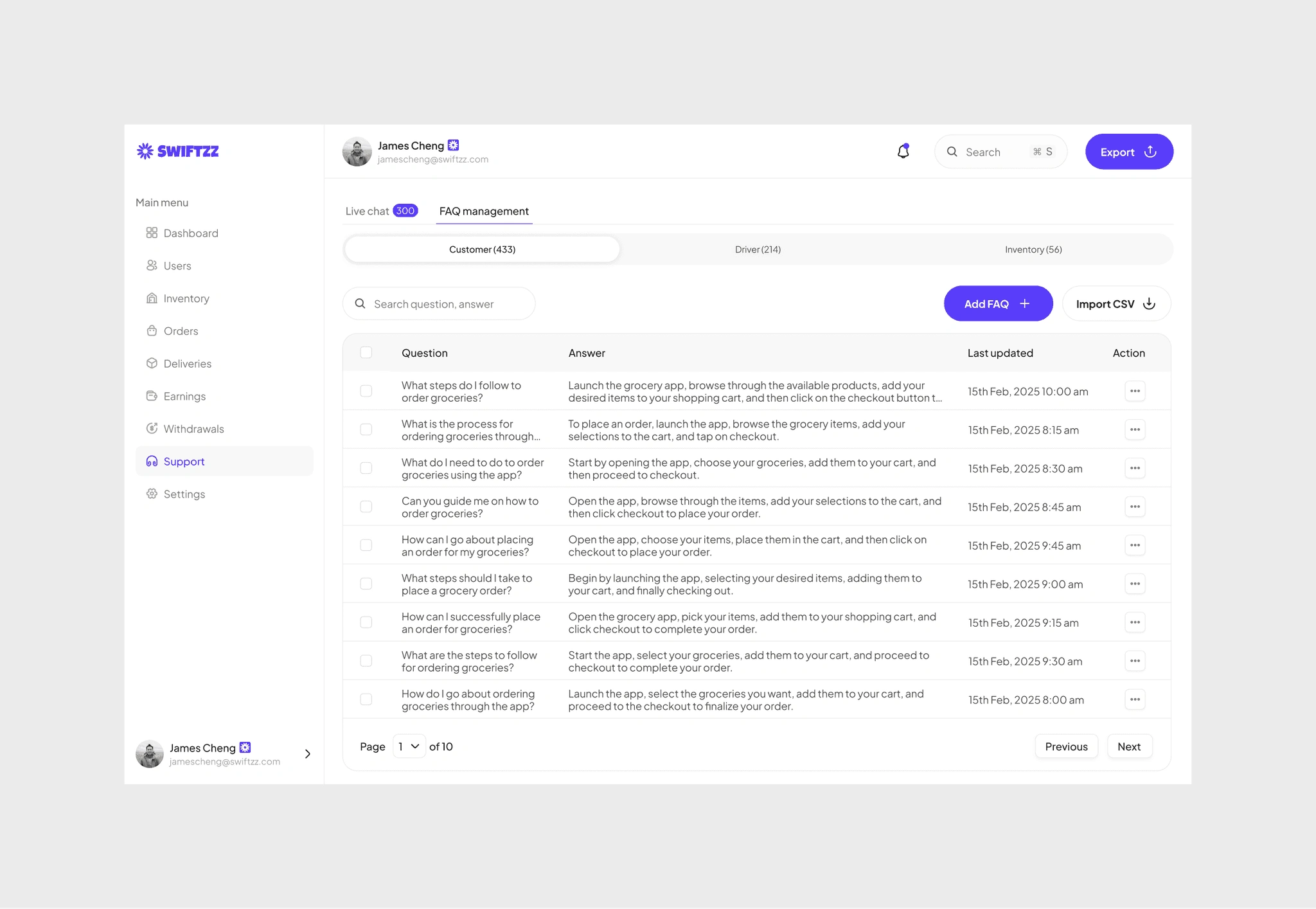
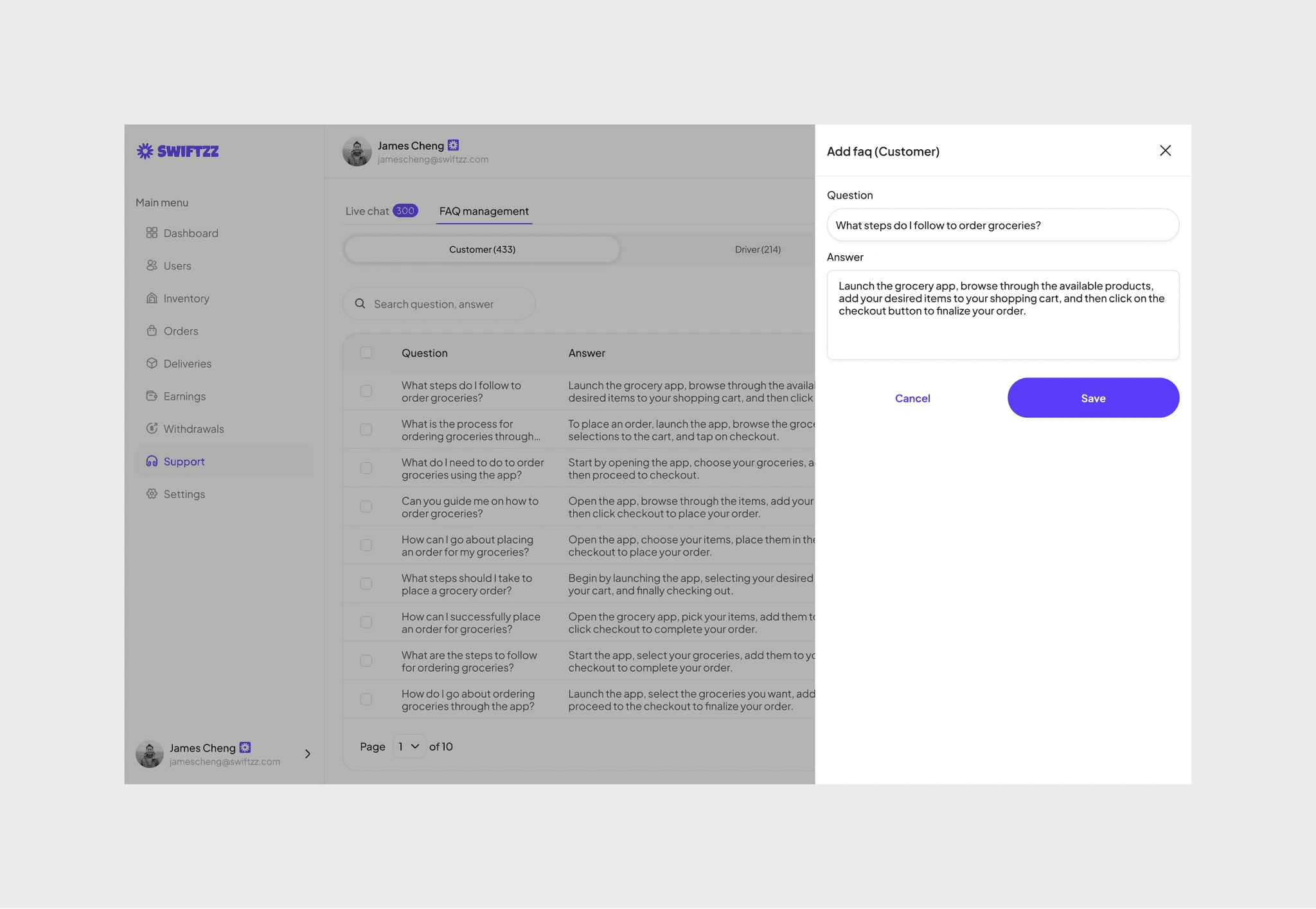
Alongside real-time conversations, the system also includes FAQ management. Admins can add, edit, or remove frequently asked questions for each user role, ensuring that customers, drivers, and inventory staff always have access to relevant self-service answers. This reduces repetitive inquiries and frees up time for live agents to focus on complex issues.
Together, these tools create a balance of instant support and proactive knowledge sharing, building trust and reducing friction across the entire platform.
Company and branches
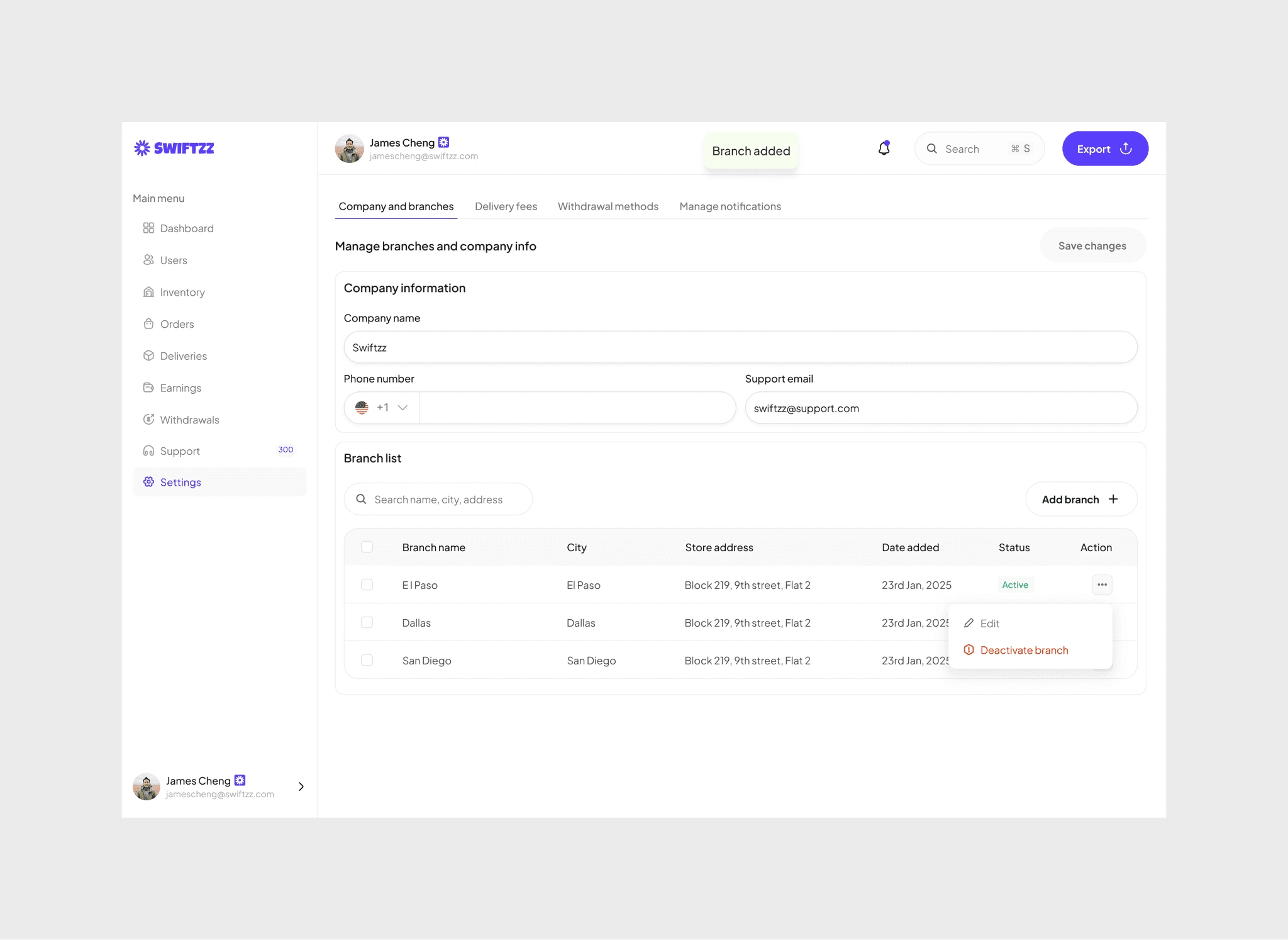
At the very top sat the identity of the business, the company itself. In the Company & Branches panel, admins could keep the brand’s foundation tidy, from updating the official name and support contacts to managing the network of branches across cities.
Each branch told its own story, El Paso, Dallas, San Diego, listed with their addresses, dates of creation, and current status. One glance showed which locations were active, which needed attention, and where growth was happening.
Manage notifications
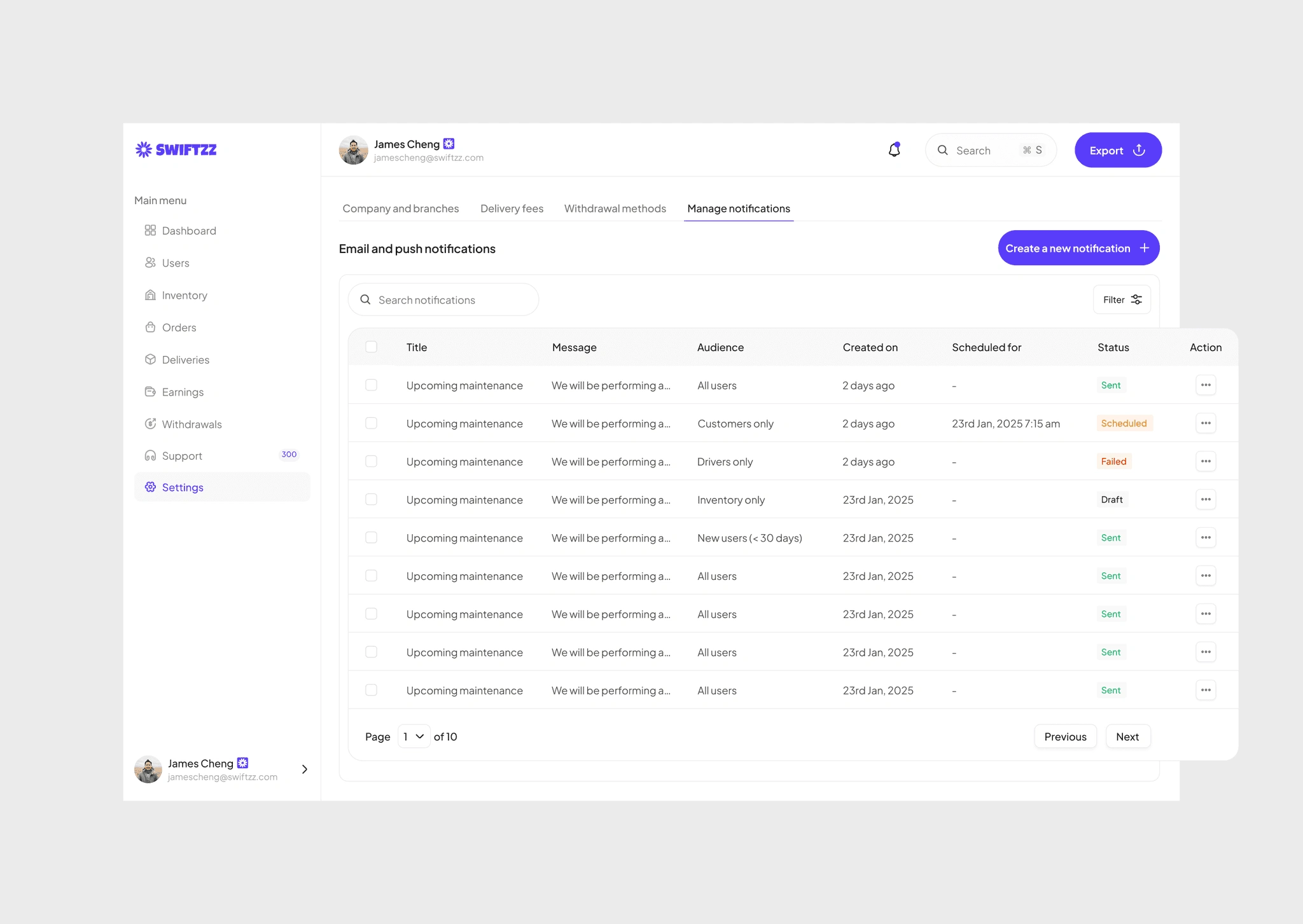
Keeping users in the loop is one of the most critical aspects of managing a platform at scale. The Notification Management system gave admins complete control over how, when, and to whom messages were sent.
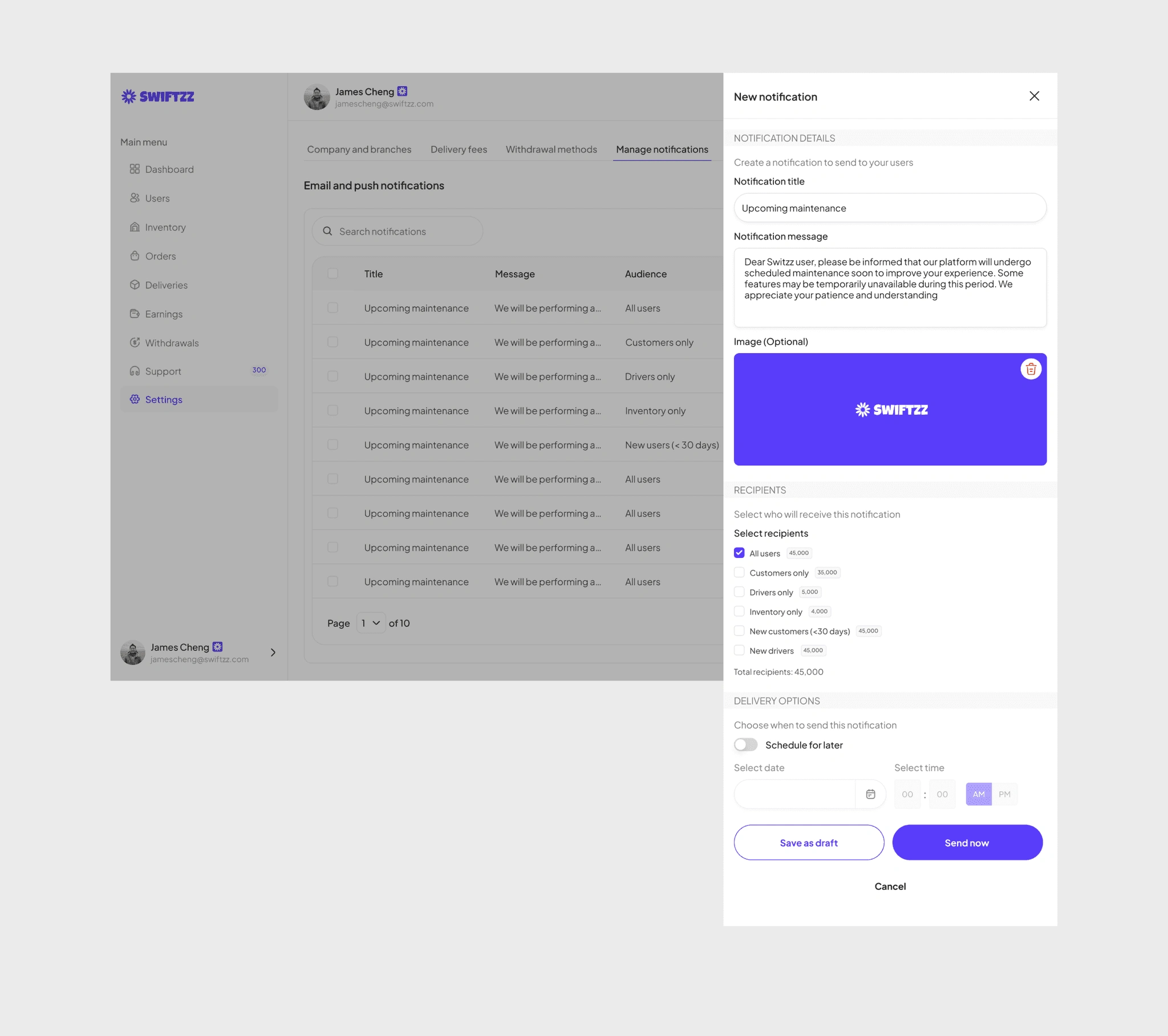
From the dashboard, the admin could create a notification with a clear title, message, and optional image, and then decide on the audience, whether it was all users, only drivers, only customers, inventory managers, or even new users who had just joined within the last 30 days. This segmentation allowed for targeted communication, avoiding unnecessary spam while ensuring the right people got the right message at the right time.
Scheduling was another important piece. Admins could either send immediately for urgent updates (like delivery disruptions) or schedule for later (such as planned maintenance). Each notification carried a status marker, sent, scheduled, draft, or failed, helping the admin monitor what was delivered and what needed follow-up.
The system also worked seamlessly across email and push notifications, ensuring no user missed critical updates. For example, when a scheduled maintenance was planned, admins could push the message instantly to drivers and customers, while saving a draft version for inventory staff to receive later.
This wasn’t just about broadcasting, it was about managing trust. By giving admins the ability to filter, schedule, and track notifications, the platform made communication transparent, reliable, and tailored to each user group.
Withdrawal methods
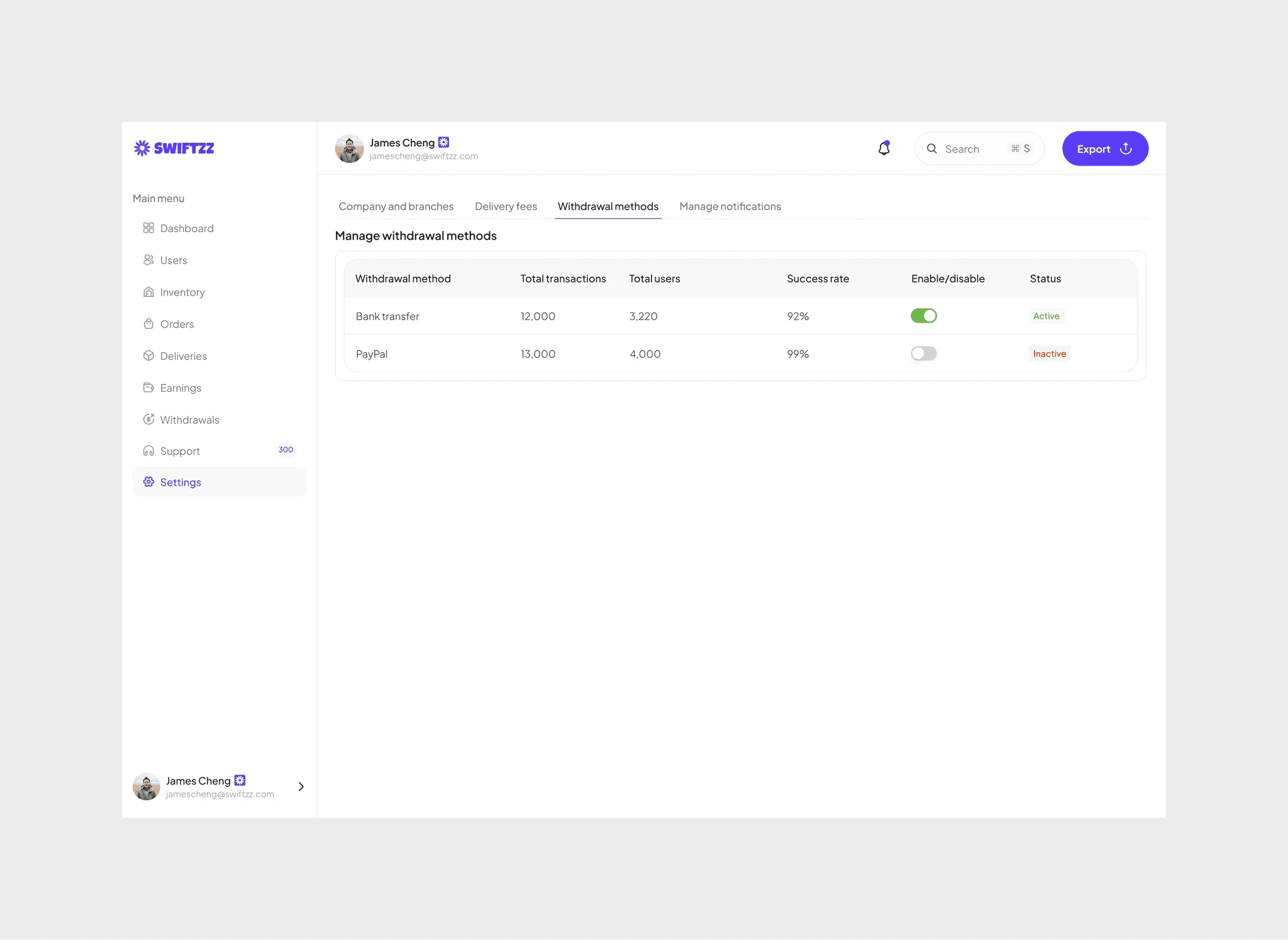
For the admin, payout flexibility was as important as delivery speed. The Withdrawal Methods dashboard became their switchboard, where every payment option lived side by side.
Bank transfer? Thousands of users relied on it, but its success rate sometimes dipped. PayPal? A favorite for freelancers, boasting near-perfect reliability. With one toggle, the admin could activate or deactivate a method, instantly shaping how money flowed across the platform.
The table told its own story, total transactions, number of users, and success rate, giving the admin the clarity to decide which methods stayed live and which needed review. Adding a new branch or tweaking an existing one was just as seamless.
Managing withdrawals wasn’t just about numbers, it was about trust. The right options meant users got their earnings quickly, reliably, and with confidence.
Delivery fees
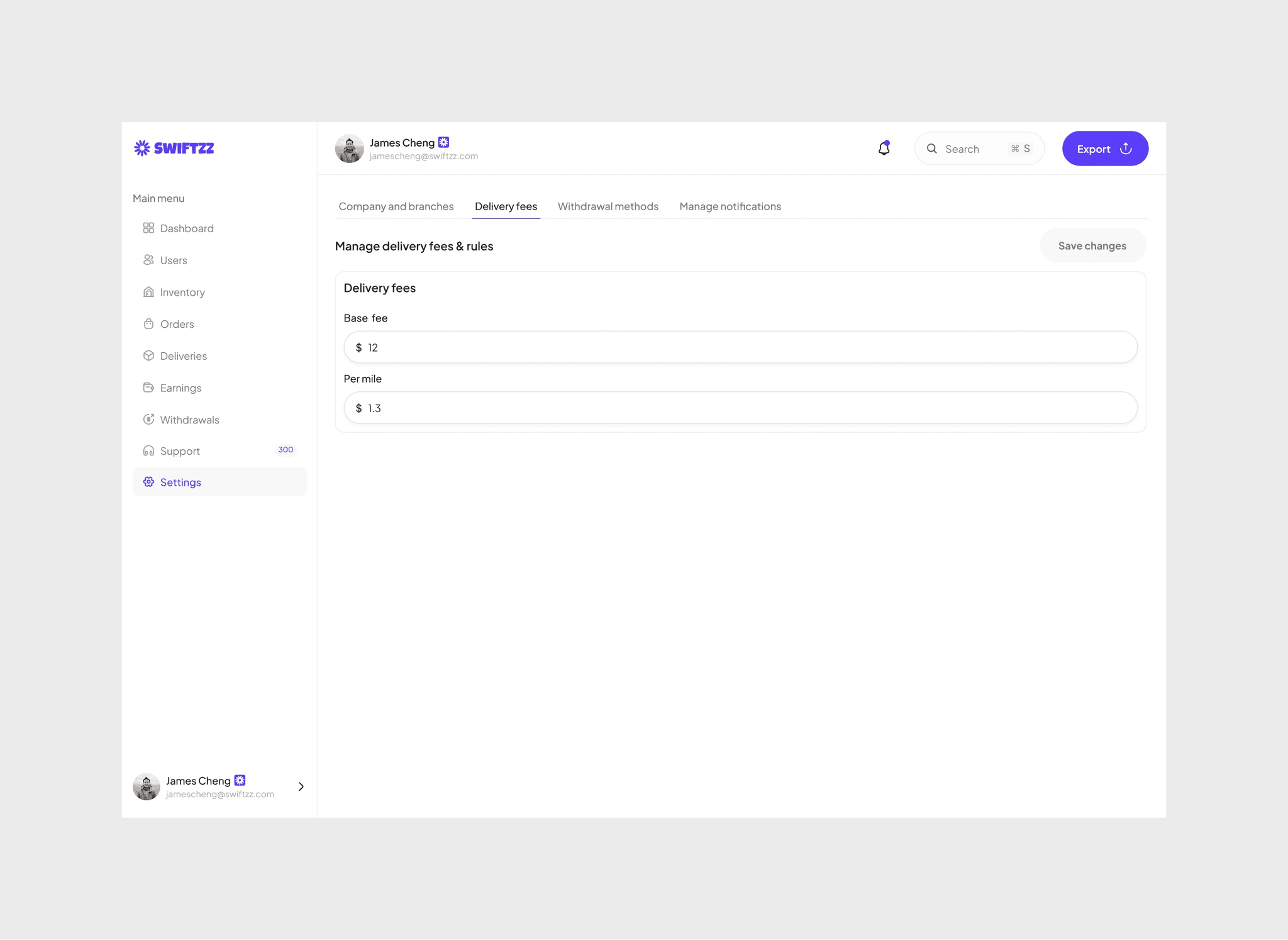
Every delivery had its price, and the admin held the levers. With the Delivery Fees & Rules panel, they could fine-tune how costs were calculated, setting a base fee and adjusting the per-mile rate.
It wasn’t just numbers on a form; it was a balance between keeping customers happy and ensuring drivers were fairly rewarded. A few tweaks here, a quick save there, and the platform adapted instantly, shaping the economics of every trip taken.
In this space, admin decisions became invisible rules guiding the entire system, ensuring affordability for customers, fairness for drivers, and sustainability for the business
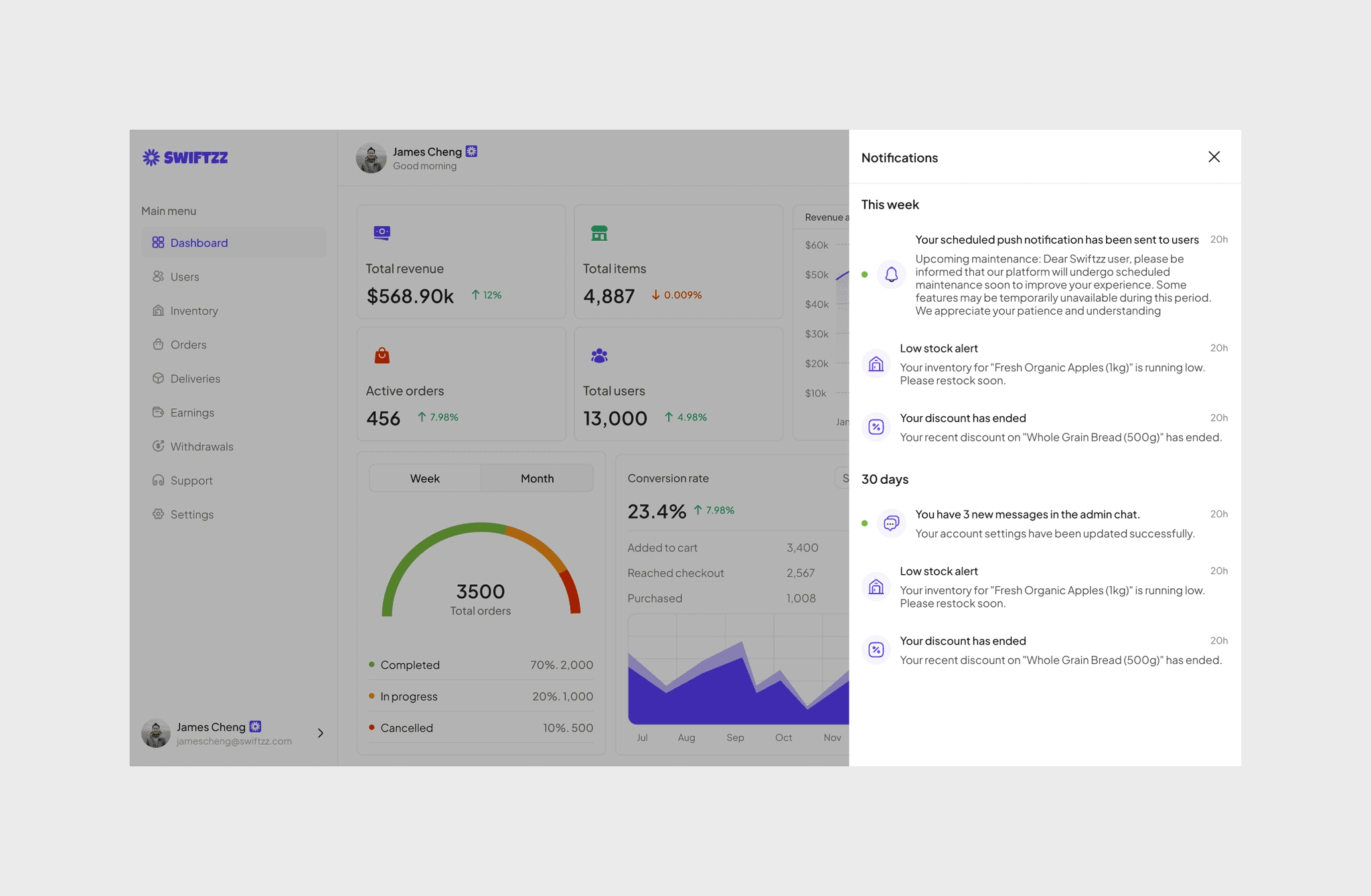
Admin notification
System alerts, inventory updates, account changes, discounts, and scheduled push confirmations all appeared here. With clear timestamps and categories, they never missed a critical action or reminder.
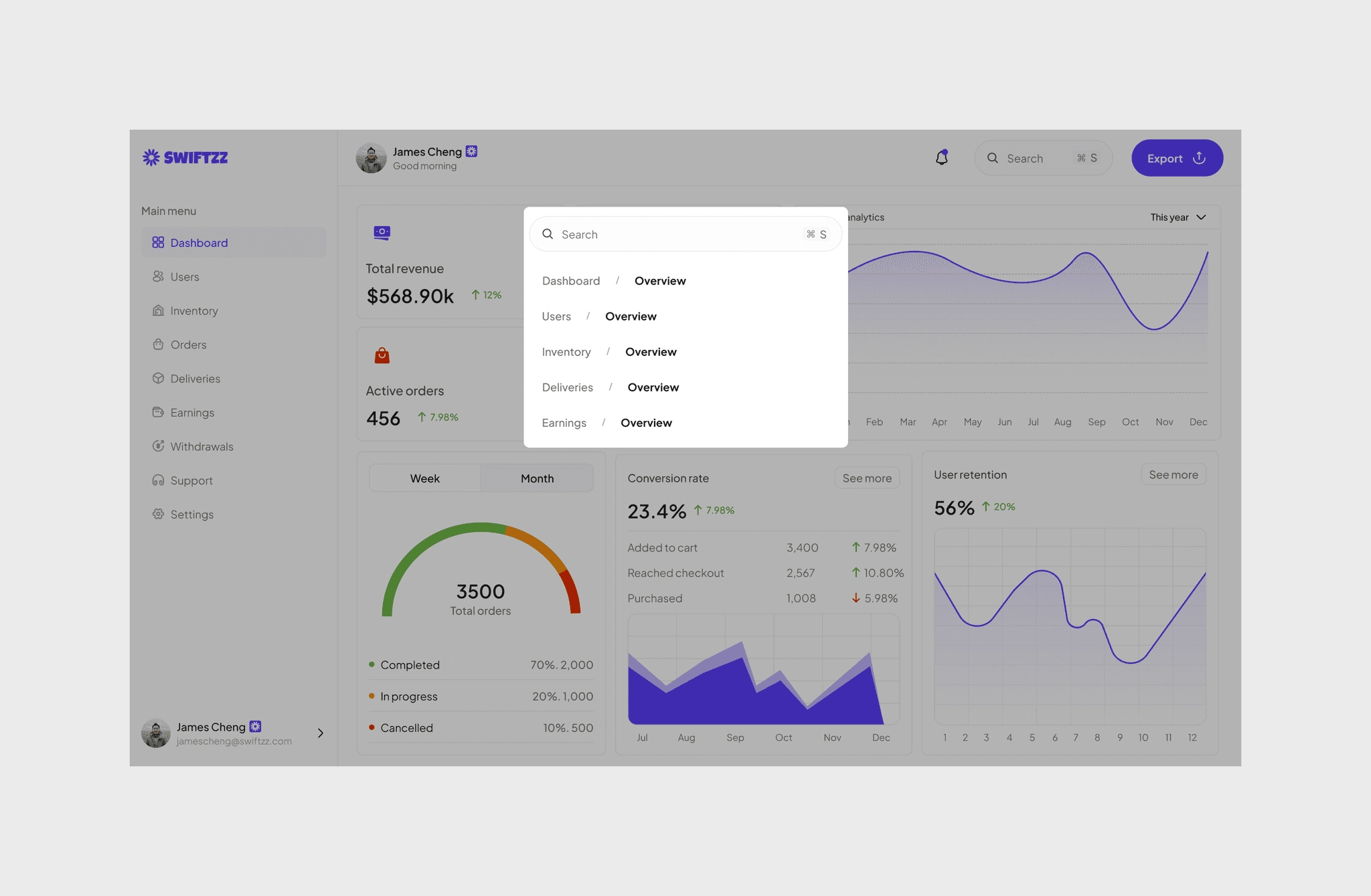
Universal search
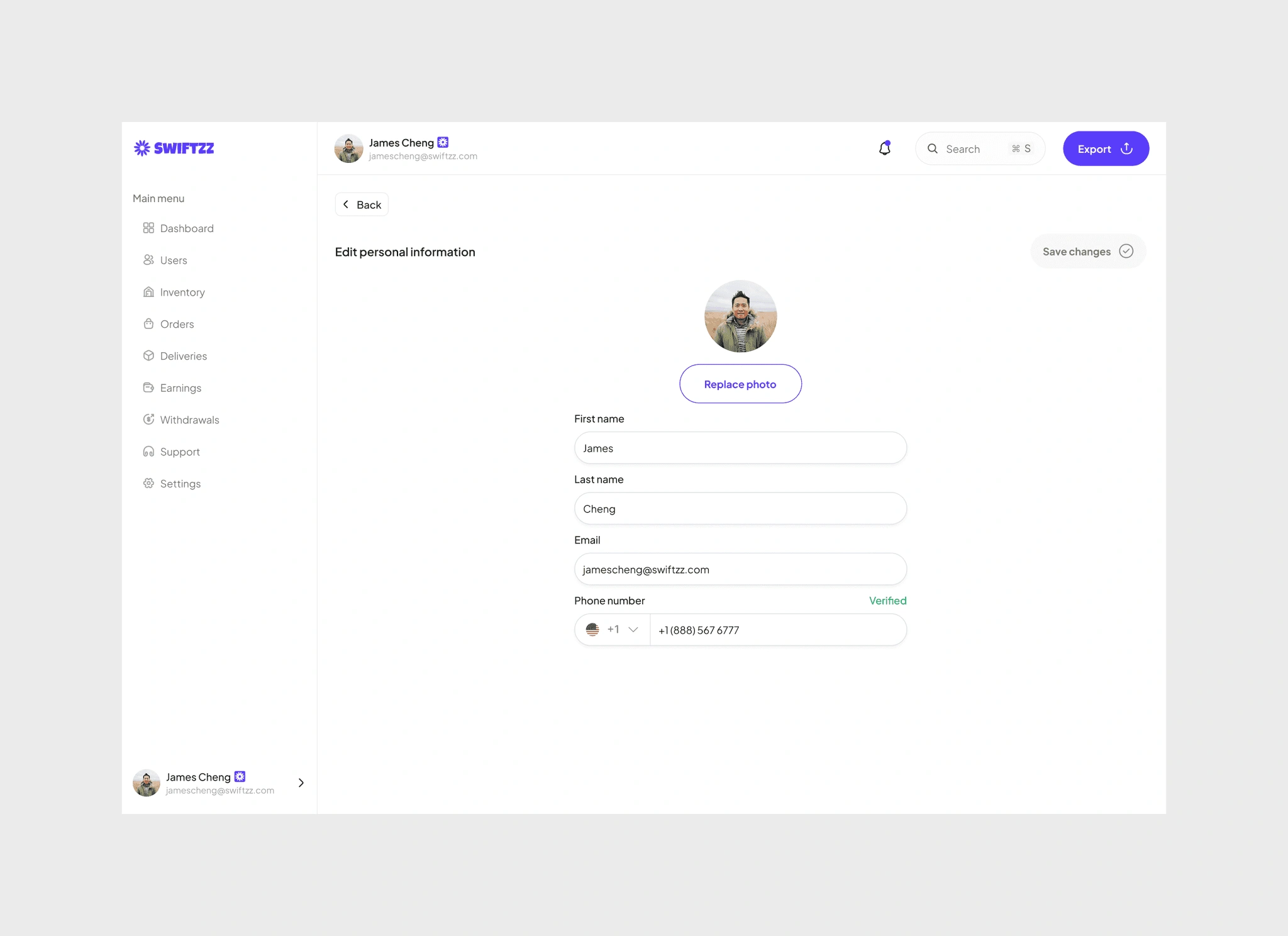
Admin profile
Admins could manage their personal details easily, update photo, name, email, and phone number, with verified contact info ensuring secure communication.
Outcomes and learnings
Visibility and single source of truth - What we built: a unified dashboard that brings orders, drivers, branches, inventory, payouts and support into a single view. - Why it matters: admins stop switching between tools and can act from one place when issues surface. - What to measure: time to identify incidents, number of tools used per workflow, mean time to resolution for order issues.
Actionable real-time insights
What we built: live order states, driver locations, and high-priority alerts surfaced in a prominent area.
Why it matters: faster detection of exceptions and fewer escalations to manual intervention.
What to measure: percent of incidents detected via dashboard alerts, time from alert to action.
Financial clarity and auditability
What we built: itemized earning views, withdrawal queues, and an auditable timeline for refunds and payouts.
Why it matters: admins can reconcile disputes quickly and maintain accurate records for finance and compliance.
What to measure: reconciliation time per dispute, refund turnaround, percent of payouts requiring manual intervention.
Efficient support triage
What we built: a triaged live chat and ticket queue with contextual links to orders, users, and deliveries plus canned responses.
Why it matters: support agents spend less time gathering context and more time resolving issues.
What to measure: first response time, average handling time, ticket reopen rate.

0 likes · 2 views · Oct 9, 2026
Admin dashboard for managing orders, drivers, inventory, payouts, and support across a grocery delivery platform.


