Magazine Ad Builder with Salesforce & Print-Ready PDFs

Marcel Stredak
Verified


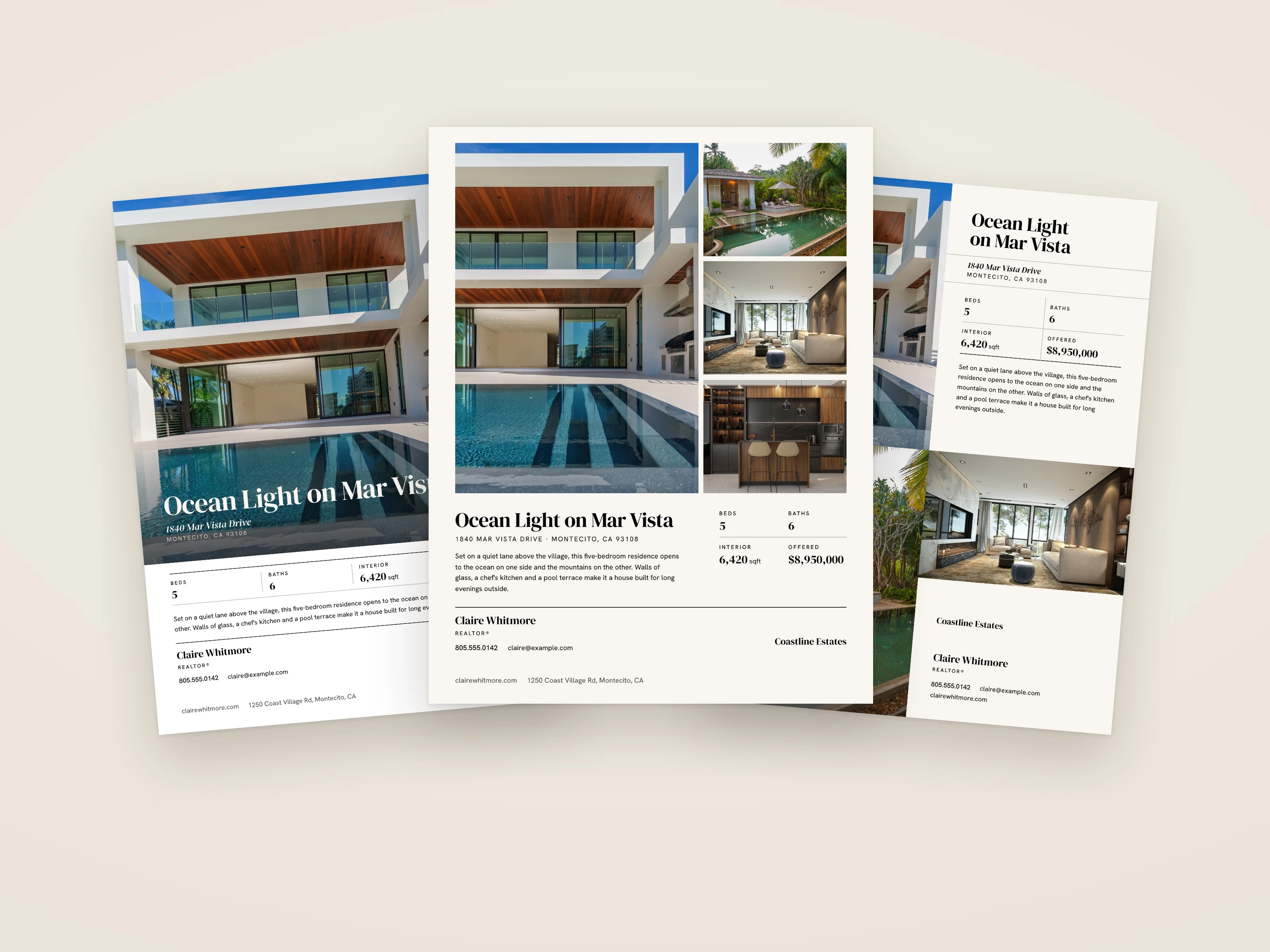
From Listing Link to Print-Ready Magazine Ad
The Mission
Haven Lifestyles publishes a US luxury real estate magazine with regional editions. Real estate agents buy ad space in it, and until now every one of those ads was built by a designer in InDesign. The agent filled in a web form, a designer laid out the page, and a proof went back and forth until it was approved. That works, but it does not scale, and every edition it kept designers busy with pages that mostly follow the same pattern.
Haven wanted agents to build the ad themselves: enter the listing, choose a layout, approve a proof that is ready for print, and only bring in a designer when a page needs one. Most of the agents are not technical, so the form had to work for someone who has never thought about templates, file sizes or print margins.
I was brought in to build that system, from the form to the file that goes to the printer.
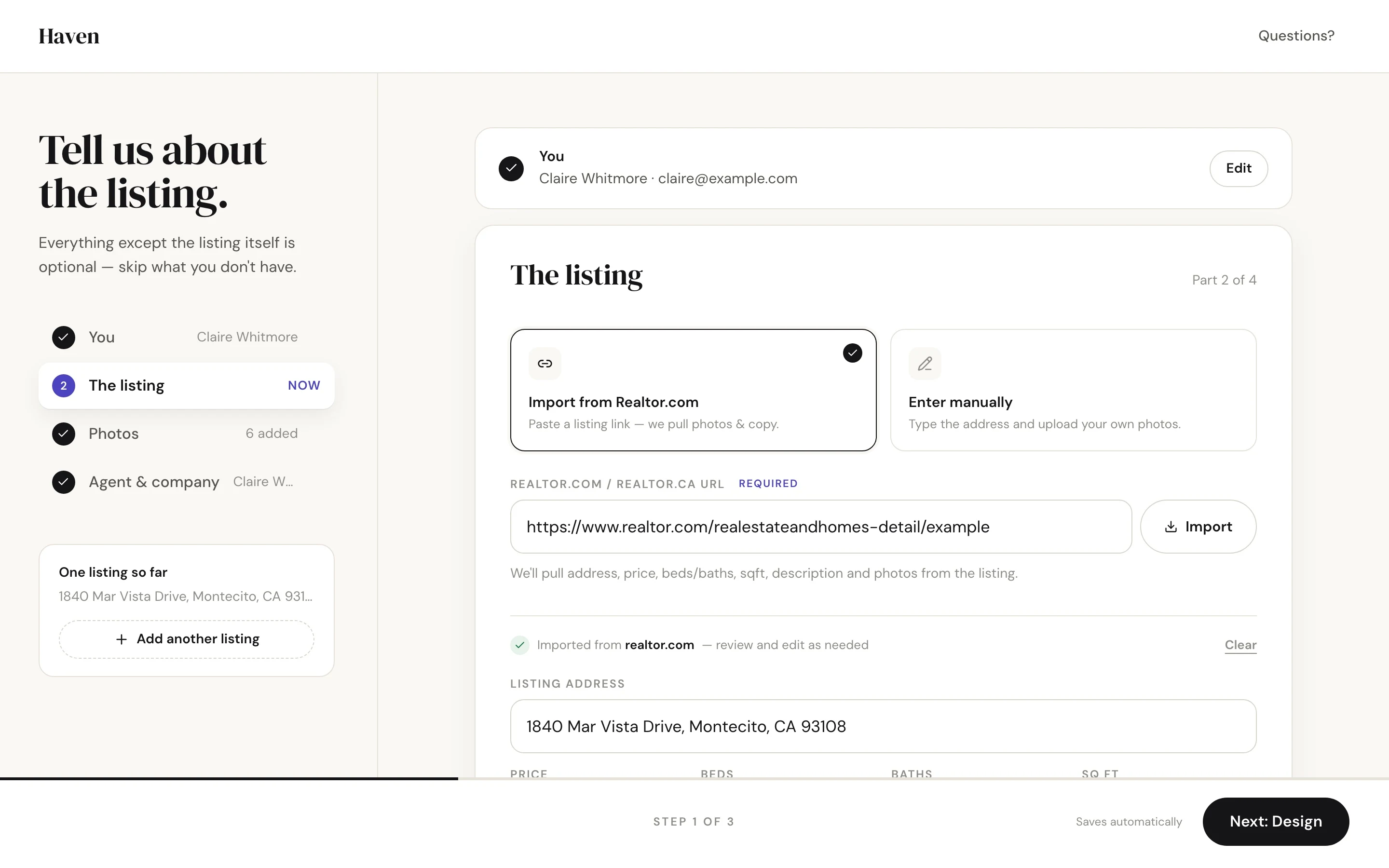
The Solution: One Form, Eight Layouts, One Print File
The agent goes through three steps.
Details. The agent pastes a Realtor.com or Realtor.ca link, and the system pulls the address, price, beds, baths, square footage, description and photos from the listing. Agents without a link type the details in and upload their own photos. Headline and description come back as suggestions the agent can edit.
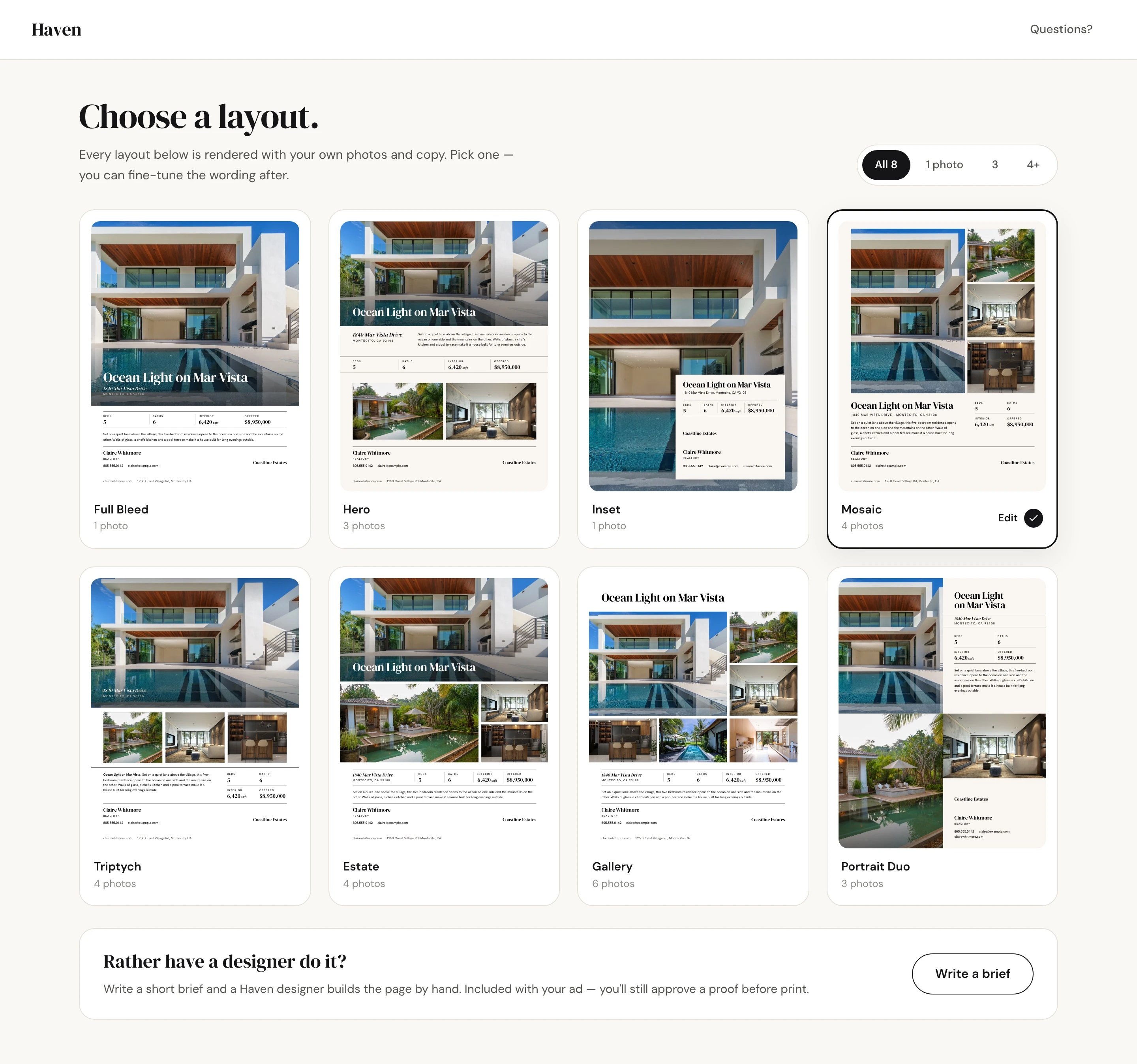
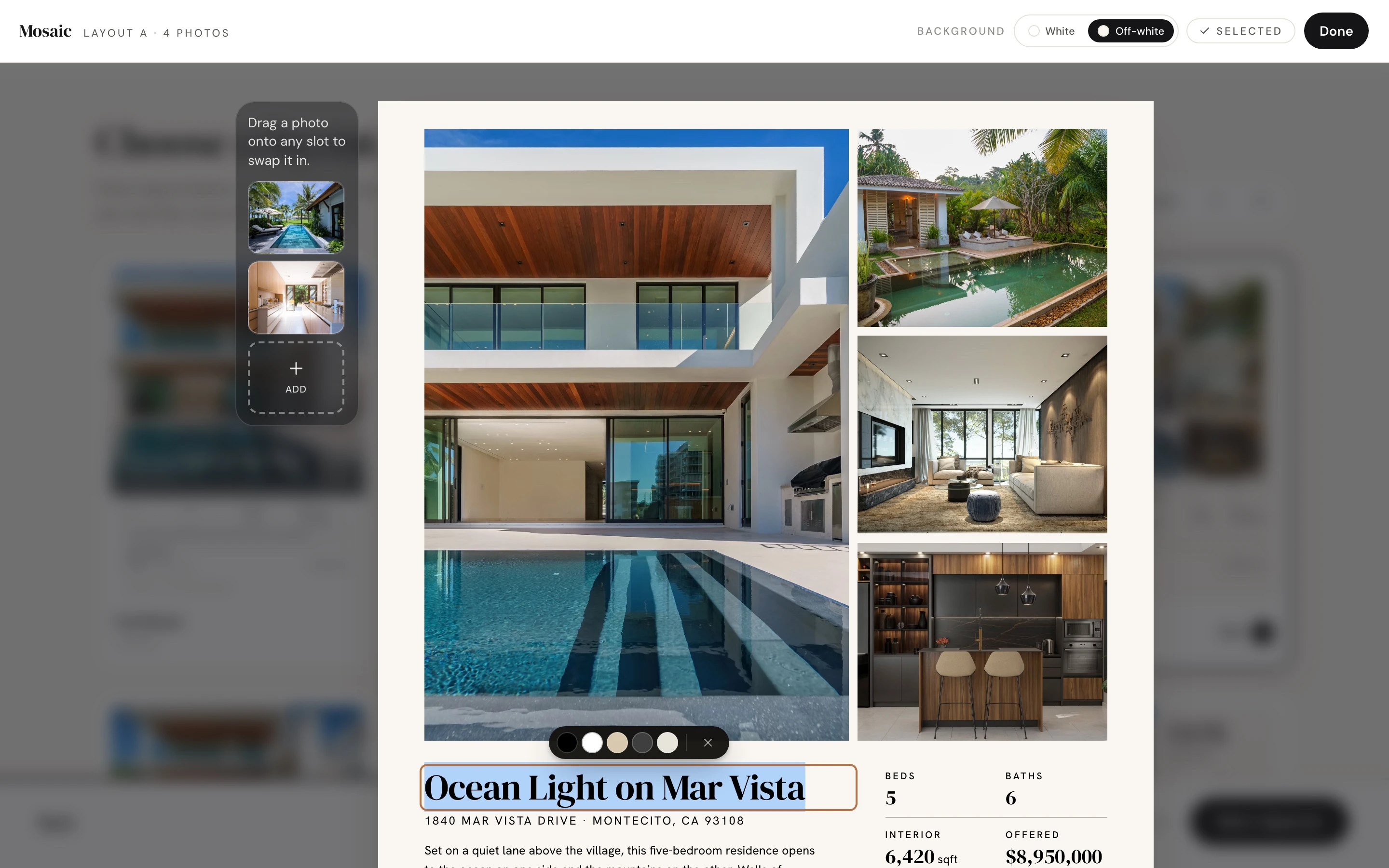
Design. Every layout is rendered live with the agent's own photos and copy. Layouts that would not work are hidden before the agent sees them, either because there are too few photos or because the text would run past its space on the printed page. The agent can then change text, colors and photos directly on the page. Agents who prefer a designer write a short brief instead.
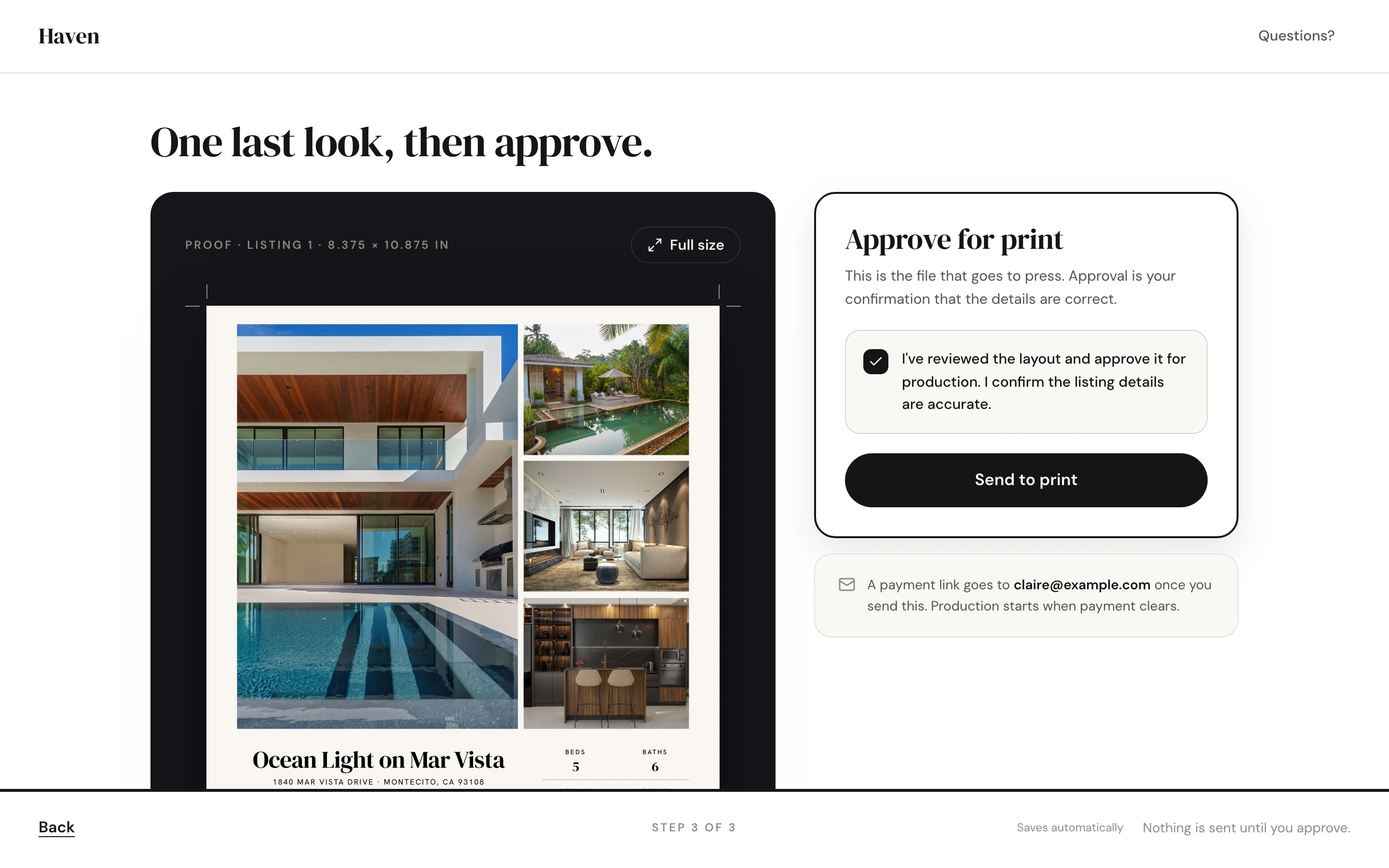
Approve. The agent sees the proof at the real page size, confirms it and sends it to print.
Ryan designed the eight layouts and the final look of the form. I built the system that renders them, the rules that decide which layouts fit, the editor, the print pipeline and the integrations behind it.
Print Files a Print Shop Accepts
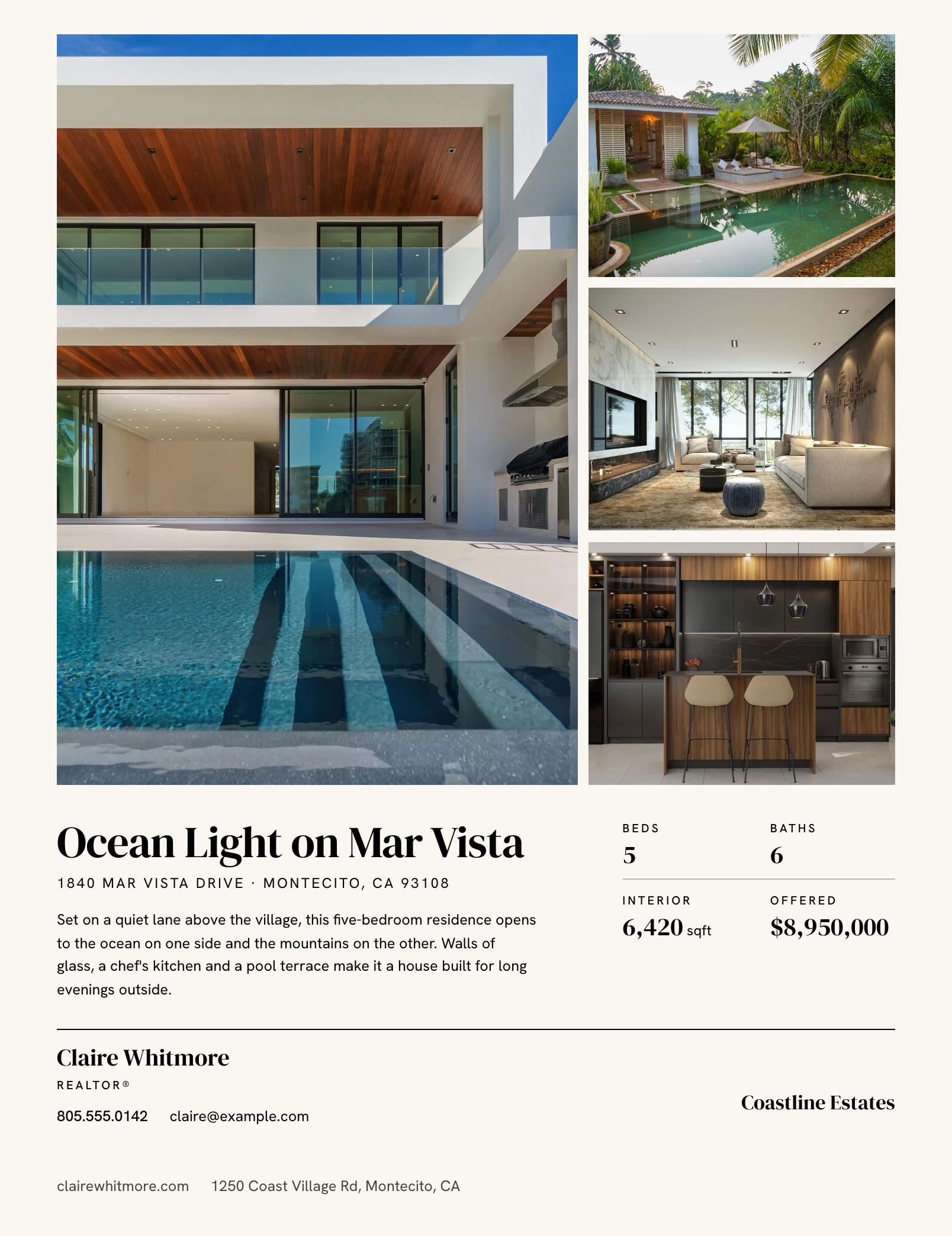
Most of the work went into the file that goes to press. Each approved ad is rendered as a PDF to Haven's print spec. The page is rendered in a headless Chromium, converted with Ghostscript and finished with pdf-lib, so the page the agent approved in the browser is the page that gets printed.
Every photo that runs to the edge of the page has to extend past the trim, or the cut leaves a thin white line. A smoke test renders all eight layouts before each push and checks the page edges for exactly that. The text limits behind the layout filter were measured against the actual print font.
Salesforce and Drive, the Way Haven Already Works
Haven runs its sales process in Salesforce and keeps every ad in a Google Drive folder per customer. The system had to fit into both without creating extra work for the team.
Existing contacts. Most agents are already in Salesforce. The system finds them by email, including a secondary address, and never overwrites a contact's name, phone or email from the form.
Order record. Each order creates a submission record with the address, add-ons, SMS consent and design instructions. Haven's existing Salesforce automation then opens the design task, as it did before.
Drive folder. The PDF, a cropped copy, the photos and a short brief for the designer land in the customer's existing Drive folder, named the way Haven's designers already name them.
The brief lists what a designer should look at before print, for example a low-resolution photo, a missing logo or a missing edition name.
Using Haven's Own Archive
Haven already had agent headshots and brokerage logos in Drive, mixed in with everything else from past ads. I sorted 64k+ files into headshots, logos and the rest, removed 1,5k duplicates and graded each image by resolution. Matched to the contacts in Salesforce, that archive lets a returning agent find their headshot and logo already filled in.
AI Where It Helps
The form uses Claude for two things: turning a raw listing description into magazine copy, and suggesting a headline that fits the layout. The agent always gets the result as an editable suggestion.
Listing text comes from outside, so it is treated as untrusted input. It is length-capped and stripped of hidden characters and anything that looks like an instruction tag before it reaches the model.
Protecting the Paid Services
The form is public, and every listing import or AI call costs money on a third-party service. API routes carry their own rate limit, stored in Supabase so it holds across serverless instances. Requests from other sites are rejected, every request is logged, and a scheduled check sends an email and Telegram alert when traffic looks like abuse or a provider goes down.
Technical Architecture
Framework: Next.js 16 with React 19 and TypeScript
UI and forms: Tailwind CSS v4, shadcn/ui, React Hook Form with Zod
Layouts: 8 magazine layouts as React components with a shared slot system
Print pipeline: Puppeteer with @sparticuz/chromium, Ghostscript for the CMYK conversion, pdf-lib
Listing import: Apify for Realtor.com and Realtor.ca
AI: Anthropic Claude for description and headline, with input neutralizing against prompt injection
CRM: Salesforce REST API for contact lookup, submission records and deal updates
Storage: Google Drive API with domain-wide delegation, AWS S3 for uploads and assets
Address search: Mapbox
Protection and monitoring: Supabase for rate limits and telemetry, Vercel Cron checks, Resend and Telegram alerts
Hosting: Vercel
Quality: Vitest suite with around 600 tests, print-bleed smoke test before every push via Husky
The Outcome
Agents build their own magazine ad in 3 steps, from listing link to approved proof
8 layouts, each checked against the agent's photos and copy before it is offered
Print files to Haven's spec, with bleed checked automatically for every layout
Orders land in Salesforce and in the right customer folder in Drive, and the design task opens through Haven's existing automation
Designers get a brief that says what to check, and only build a page by hand when an agent asks for it
The system is live, and Haven reports that many of their clients have responded well to it
Like this project
Posted Sep 15, 2026
I built Haven Lifestyles' magazine ad system. Agents submit a listing, pick a layout and approve it, and a print-ready PDF lands in Salesforce and Drive.
Likes
0
Views
6
Timeline
Jun 20, 2026 - Aug 12, 2026
Clients
Haven