School Platform - AI Engineering & Full-Stack Development

Fedor Dorodnov


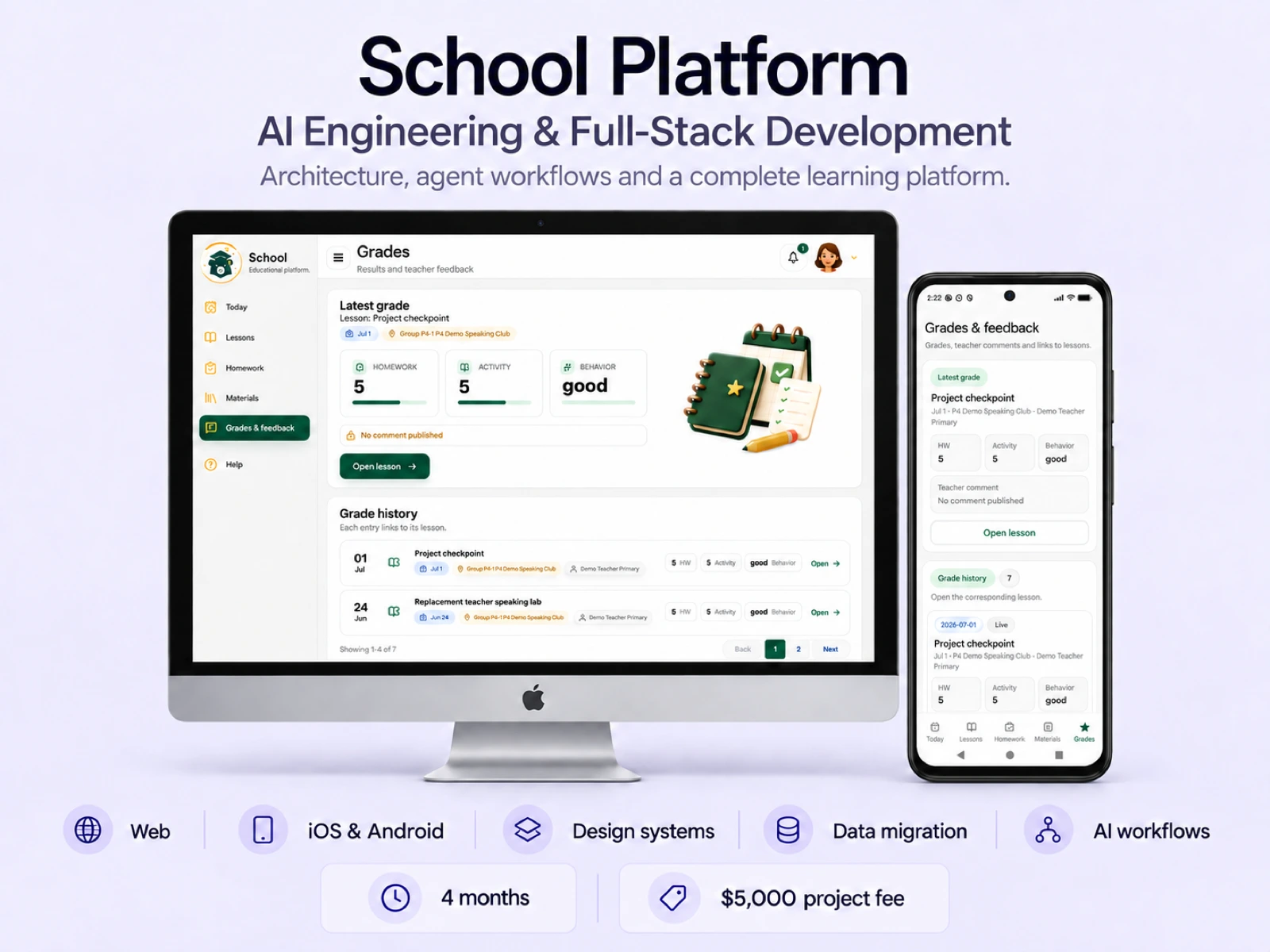
Role: AI & Full-Stack Engineer. I designed School Platform's architecture and the AI development system behind it, connecting client requirements, task coordination, quality checks and production releases.
I built the platform's backend and frontend, working student apps for iOS and Android, the design system and Figma components, and AlfaCRM export and import tooling. I also created the documentation, agent instructions, workflows and tools for managing project context and task state.
Duration: 4 months (April-July 2026). Project fee: $5,000.
The client was moving an online school from an existing platform to a new one. The work covered data migration and dedicated interfaces for students, parents, teachers, administrators and the student support team. The product supports group and individual learning, scheduling, lessons, attendance, homework, learning materials, feedback and notifications.
AI engineering: from client requests to production
I built an agent system in Codex with specialist roles, instructions, workflows and coordination scripts. It covered requirements analysis, documentation, architecture, backend, frontend, mobile, Figma, components, Storybook, testing, code review, optimization and refactoring.
The delivery flow: client voice message in Telegram -> technical brief -> audits and task breakdown -> parallel implementation -> tests and code review -> approval -> release.
For each task, I defined the relevant sources, change boundaries and acceptance criteria. Agents received a specific scope: which files to change, which rules to follow and how to verify the result. Coordinators assigned work and integrated changes; a watchdog tracked task state and supported the resumption of unfinished work.
A feature change could span Figma components, backend APIs and domain logic, and frontend integration. Development and QA agents worked in parallel, adding backend and frontend tests and checking the result. I retained responsibility for architectural decisions, requirements clarification, approval of significant changes and final acceptance.
By the later stages of the project, this workflow reduced time spent breaking down tasks, repeating approvals and completing QA, helping us ship finished features and updates to production quickly.
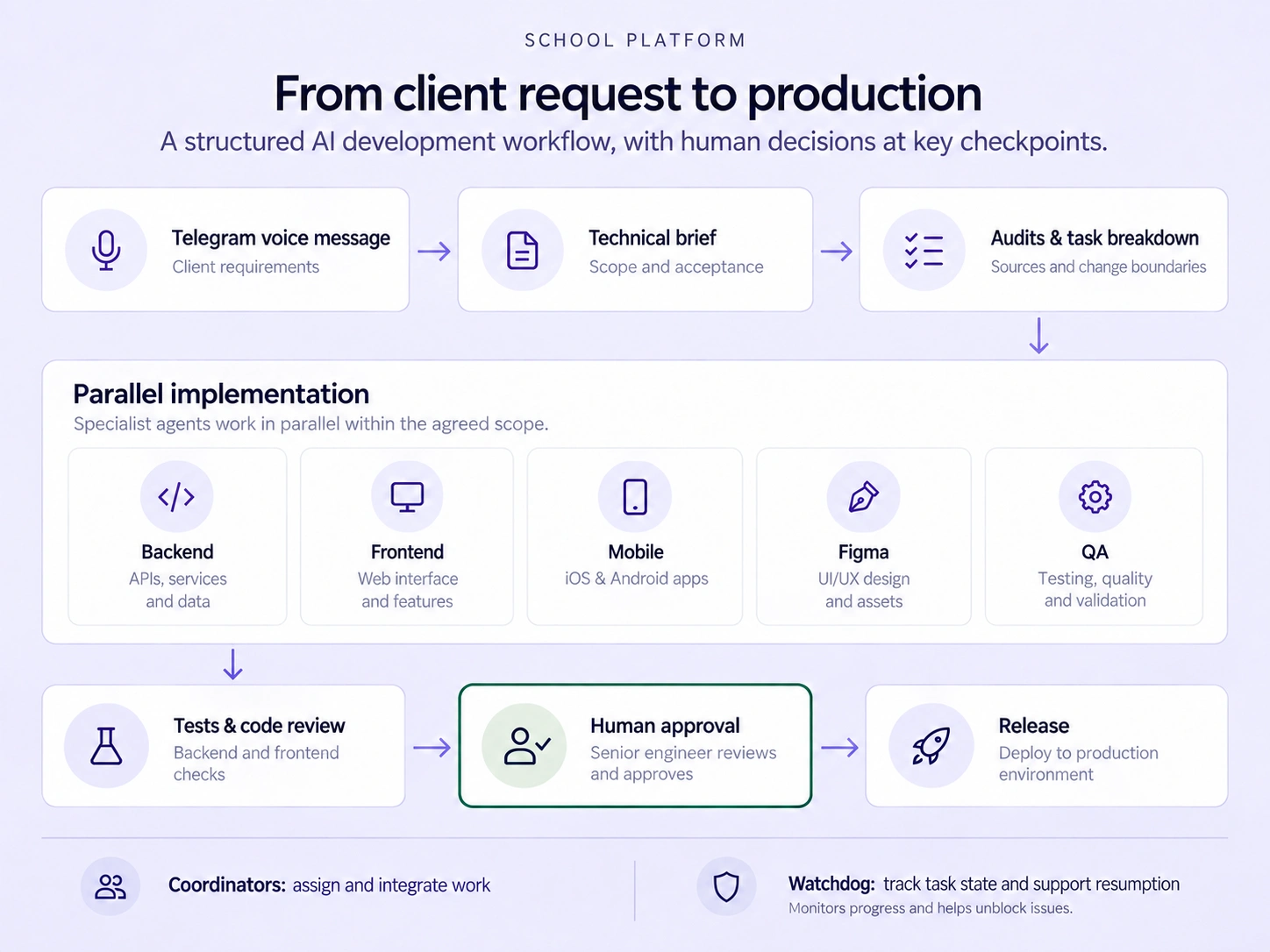
Client requirements became scoped tasks, parallel implementation, tested changes and approved releases.
Two repositories and persistent project context
I organized the project across two connected repositories with distinct responsibilities. The first held requirements, product and architecture documentation, design materials, and AlfaCRM export and data preparation tools. The second contained the backend, frontend, mobile apps and the importer that applied prepared data to the platform. Both had agent instructions and rules for handing off tasks and results.
I connected three context and retrieval mechanisms: an MCP memory graph for accepted decisions, MemPalace for context recall, and SQLite FTS search across documentation and code. Agents could retrieve decisions and sources across tasks and sessions, while the documentation retained requirements, acceptance criteria and architectural decisions.
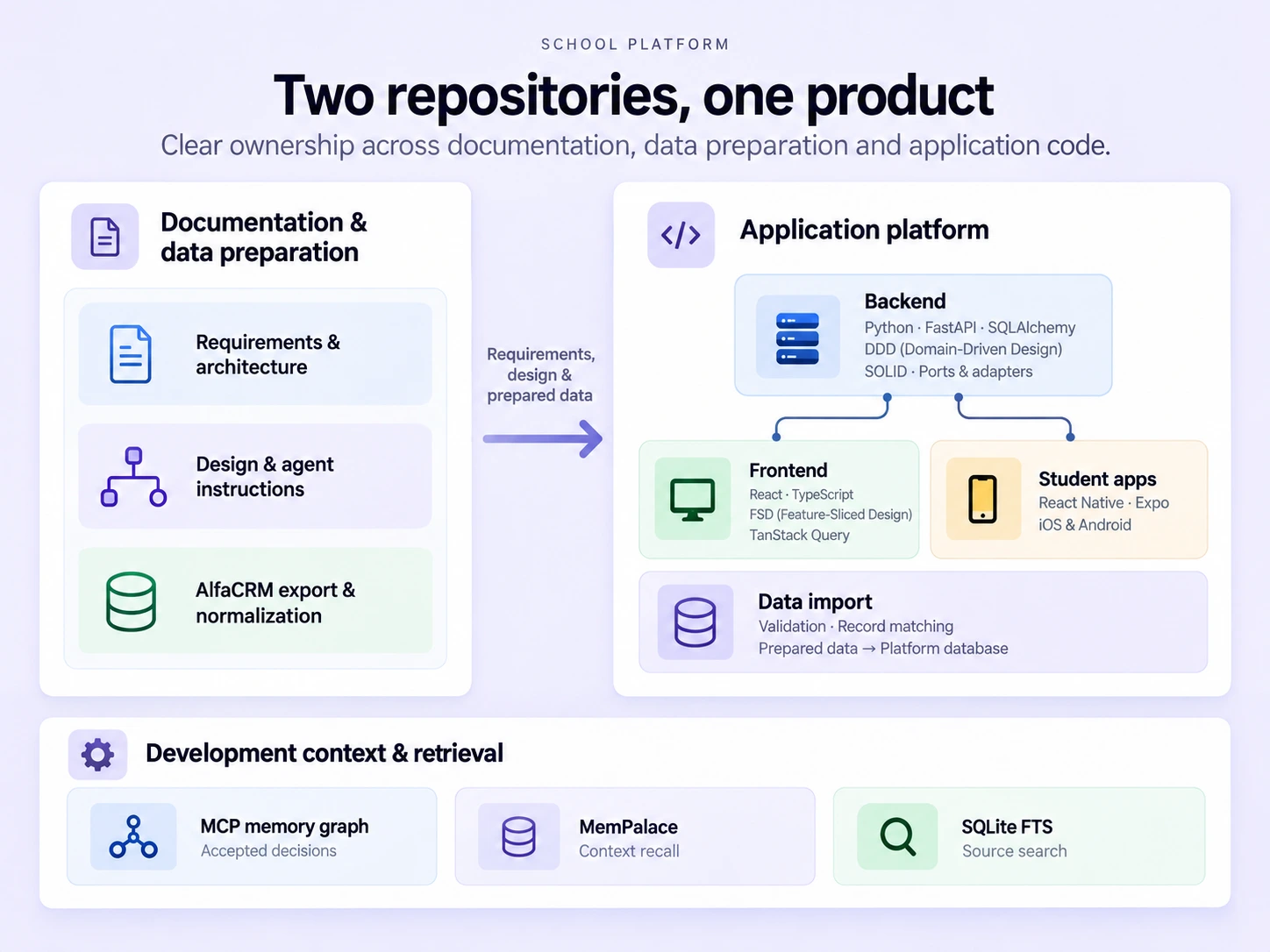
Two repositories connected product documentation, design, data preparation and web/mobile implementation.
Backend: FastAPI, DDD (Domain-Driven Design) and SOLID
I designed the API with Python and FastAPI and the data model with SQLAlchemy. DDD helped organize the backend around the school's business rules and workflows. I separated domain logic, application use cases, data access and integrations, using ports and adapters. During reviews and refactoring, I applied SOLID principles to clarify service responsibilities and reduce coupling.
This structure helped divide changes among specialists and test individual use cases. A shared backend serves web and mobile, handling access control, academic and administrative operations, schedules, portals, communications and notifications. Backend rules, APIs and integration scenarios were covered by pytest tests.
Frontend: React and FSD (Feature-Sliced Design)
I built the interfaces in React and TypeScript using FSD, which organizes frontend code into layers and functional slices. Pages compose screens, features handle user actions, entities define domain data, and shared contains reusable primitives. This gave new functionality a clear place in the codebase; reviews and refactoring maintained those boundaries.
State management: I used TanStack Query for server data, loading, caching and updates after user actions. Form and other local UI state stayed in the relevant components or features. React optimization included lazy-loaded pages, cache management and image preparation for the web.
I built a reusable UI component library and documented its variants and states in Storybook. Component behavior and user flows were tested with Vitest and Testing Library.
Mobile: working iOS and Android apps
Teachers, administrators and the student support team use the web interface on desktops and laptops. Students also frequently join online lessons from their phones, so I built two working student apps with React Native and Expo, for iOS and Android.
The apps include authentication, a student account, notifications, lessons, learning materials, homework and links to online sessions. The Android app is the version currently in use.
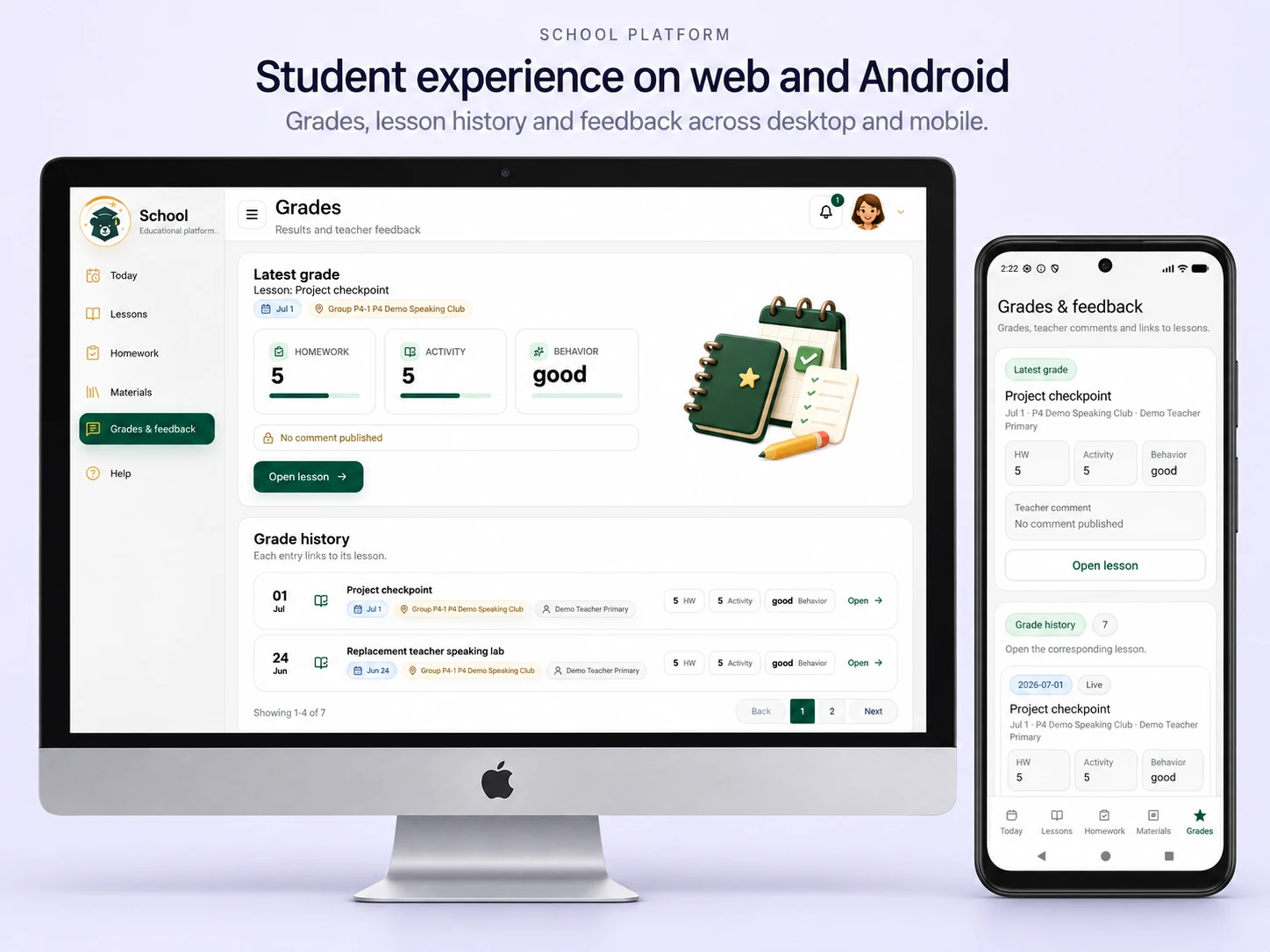
An English presentation adaptation of the student workspace on desktop and Android, based on local demo screens.
Figma and the visual system
I created Figma designs for five portal types: student, parent, teacher, administrator and student support, alongside the iOS and Android interfaces. I built UI kits, component libraries, complex components and their states.
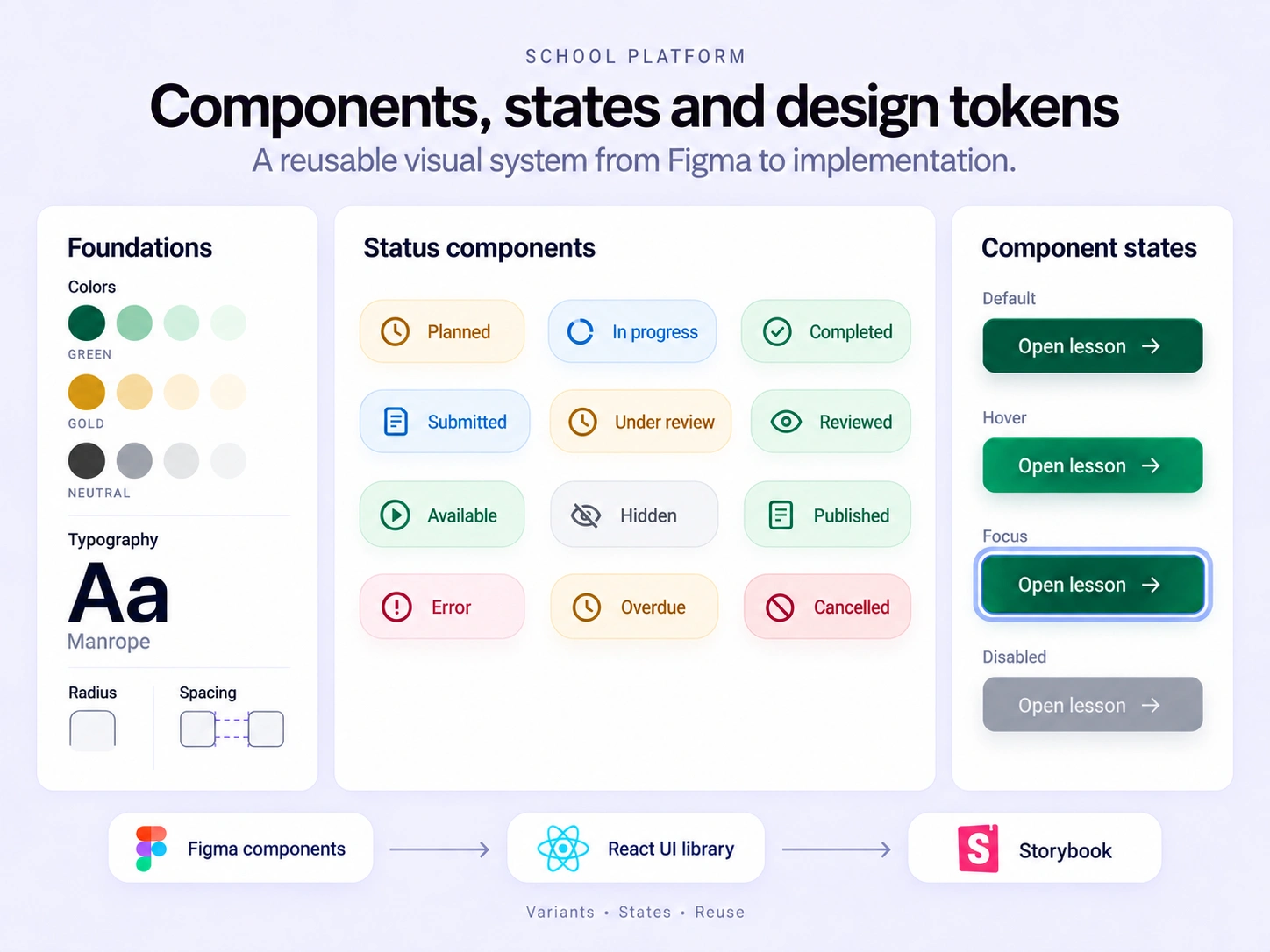
Design tokens, reusable Figma components and explicit interface states supported consistent implementation. Illustrated presentation.
I developed agent workflows for working with Figma tokens and components, accounting for quality and tool-call budgets. I also created prompt-development workflows for banners, characters, colored SVG icons, responsive images and coordinated image series, connecting image generation to editable Figma designs and frontend implementation.
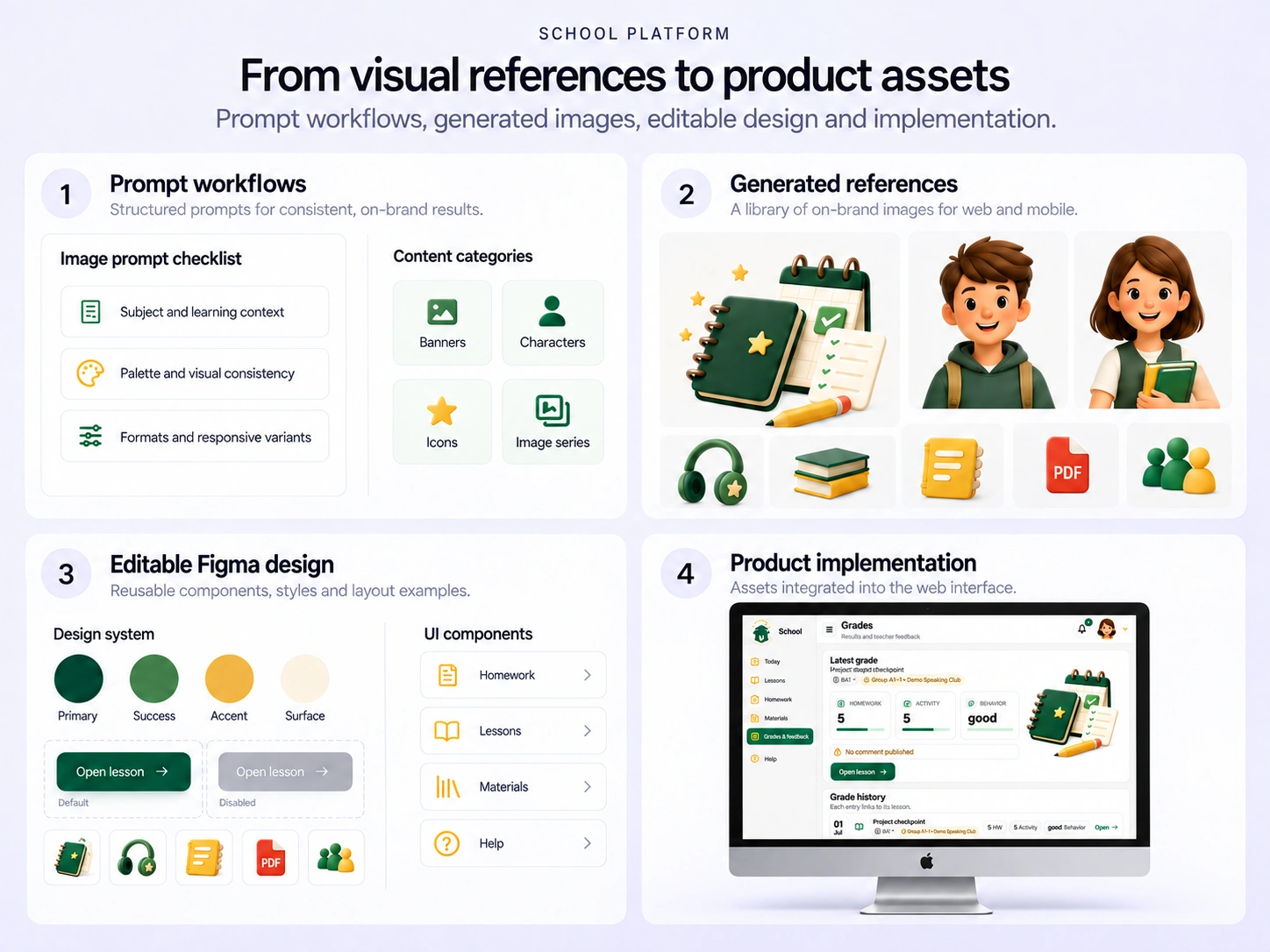
Prompt workflows, generated references, editable design and implementation formed the visual development process. Illustrated examples.
AlfaCRM data integration and migration
I built AlfaCRM export, normalization, validation and import tooling for the new platform. The data scope covered students, parents, teachers, lessons, schedules, cancellations, learning materials and payment status, preserving relationships as the school moved platforms. I designed the pipeline to accommodate additional CRM datasets, including payment records and marketing data.
I separated source-data collection, package preparation and database import, adding record matching, readiness checks and repeat-import handling.
I optimized the AlfaCRM API export. Recorded runs went from 65 minutes 33 seconds to 18 minutes 44 seconds.
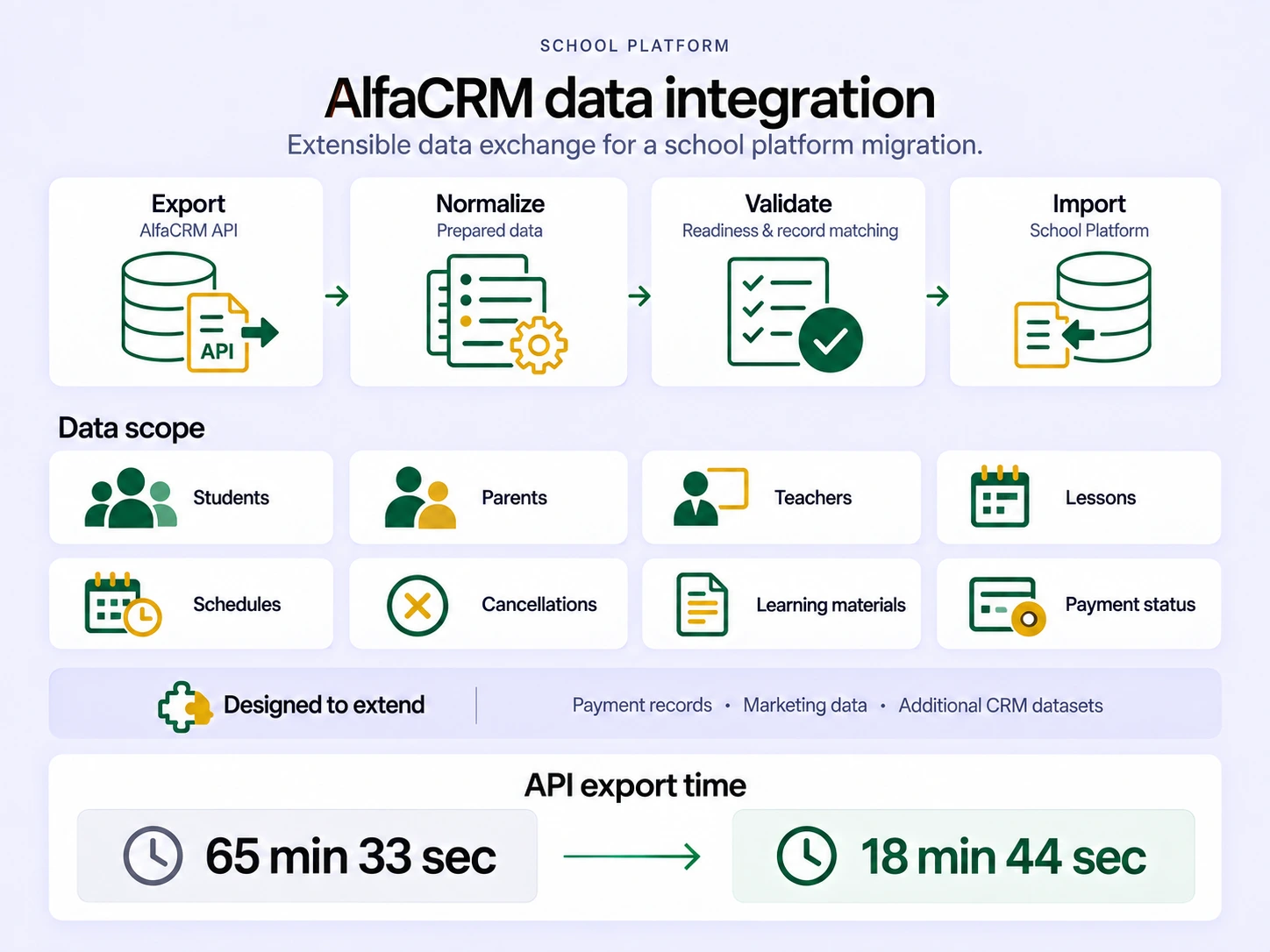
An extensible AlfaCRM pipeline covered school records, scheduling, learning materials and payment status, with room for additional financial and marketing datasets.
What the client gained
The client received a new platform, data migration tools and an established process for releasing updates. By the later stages, clarifications could move quickly from a client request to a finished feature in production. The AI system handled agreed implementation work, while I remained responsible for architecture, significant changes and acceptance.
This is a confidential project. The visuals shown here are presentation adaptations; source code and access to the live product remain private.
Core stack: Python, FastAPI, SQLAlchemy; React, TypeScript, TanStack Query; React Native, Expo; Figma, Storybook; pytest, Vitest, Testing Library; Codex, MCP, MemPalace, SQLite FTS. Architecture: DDD, SOLID, FSD.
I can help design your product architecture and AI development workflows, build web and mobile applications and integrations, and migrate data from an existing system. Let's discuss the work and how I can contribute.
Like this project
Posted Sep 14, 2026
AI engineering, backend/frontend, iOS/Android, design systems and AlfaCRM migration - from client requirements to production updates.