HeroVPN - Secure VPN App Design

Damir Cosic

Overview
HeroVPN is a modern, secure, and performance-driven VPN application designed to help users protect their privacy and enjoy unrestricted browsing. The project focused on creating a clean, intuitive, and visually appealing design system that works seamlessly across mobile, desktop, and tablet platforms. The goal was to combine advanced functionality with an approachable user experience, ensuring both tech-savvy and everyday users could benefit from HeroVPN’s features without friction.
Objectives
The primary objectives for HeroVPN’s design were:
Communicate security, trust, and speed through a modern visual identity.
Simplify the process of connecting to servers and switching locations.
Ensure consistent usability across devices, including iOS, Android, Windows, macOS, and tablet experiences.
Balance advanced features (kill switch, protocol selection, multiple server options) with a streamlined user interface.
Position HeroVPN as a premium VPN solution while remaining accessible to a broad audience.
Process
I approached the HeroVPN project with a user-first mindset. The design process began with competitor research to analyze what users expect from VPN apps, as well as areas where competitors often fall short—such as cluttered dashboards, confusing navigation, or inconsistent branding across devices.
From there, I mapped out user flows that focused on the two core actions:
Connecting quickly to a secure server.
Managing account and security settings without overwhelming the user.
Once flows were established, I built wireframes to define structure and layout. These wireframes then evolved into high-fidelity designs in Figma, where I refined the visuals, colors, typography, and interaction details. Special attention was given to scalability, so that the UI worked equally well on a smartphone screen, a large desktop monitor, and in between on tablets.
UI Design Contributions
I created a visual system that feels modern, professional, and trustworthy while remaining approachable:
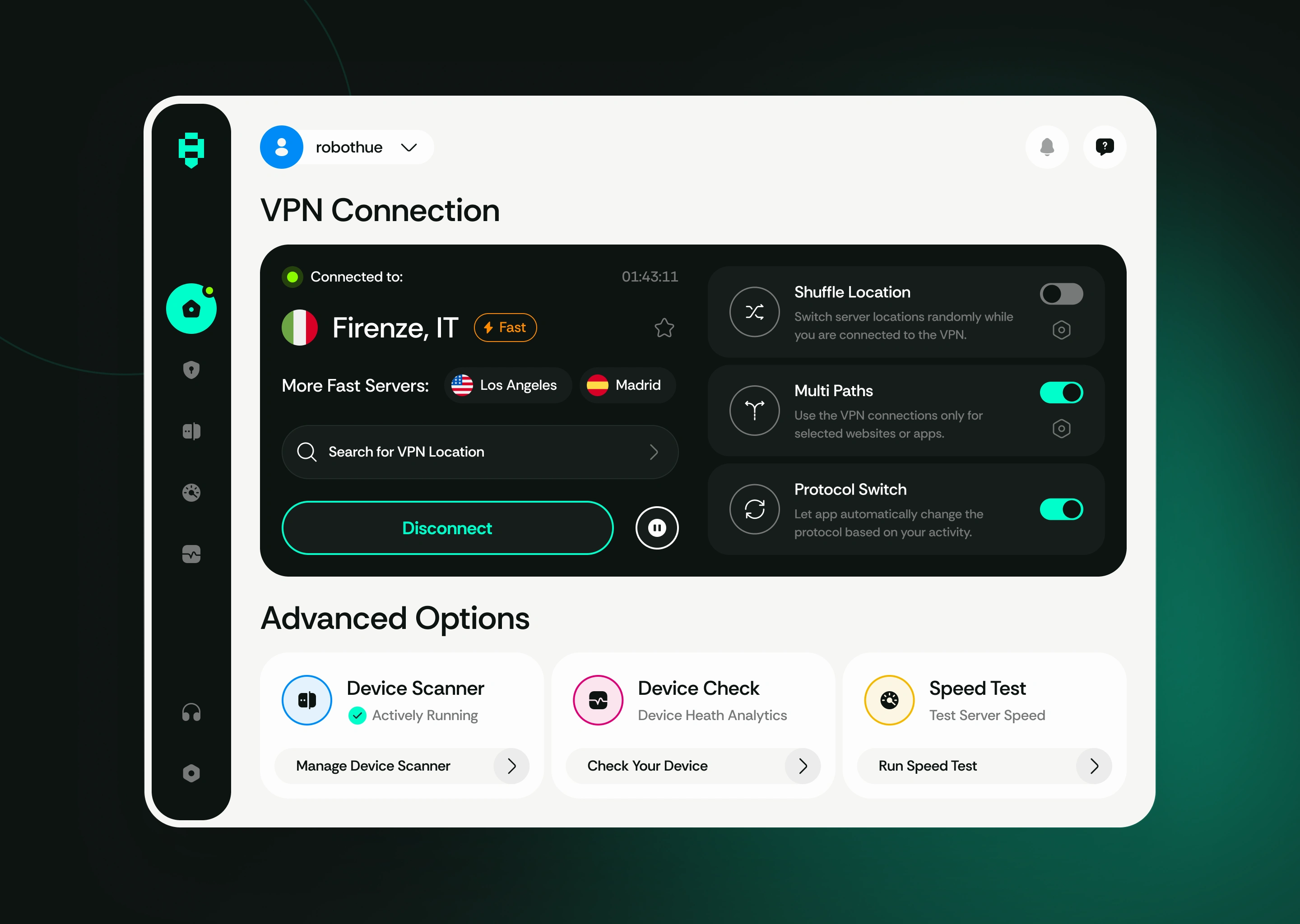
Dashboard UI: A clean, centered connect/disconnect button with real-time server status and connection speed indicators.
Color Palette: Calming deep blues and greens combined with accent highlights for active states, reinforcing themes of trust and protection.
Typography: Inter and Open Sans for clear readability across all screen sizes.
Iconography: Minimal, consistent icons that align with the logo’s geometric style, ensuring visual harmony.
Multi-Device Layouts: Adaptive grid systems tailored for mobile (vertical stacking), tablet (split views), and desktop (expanded panels).
UX Design Contributions
On the user experience side, my role was to ensure that every interaction felt simple, predictable, and smooth:
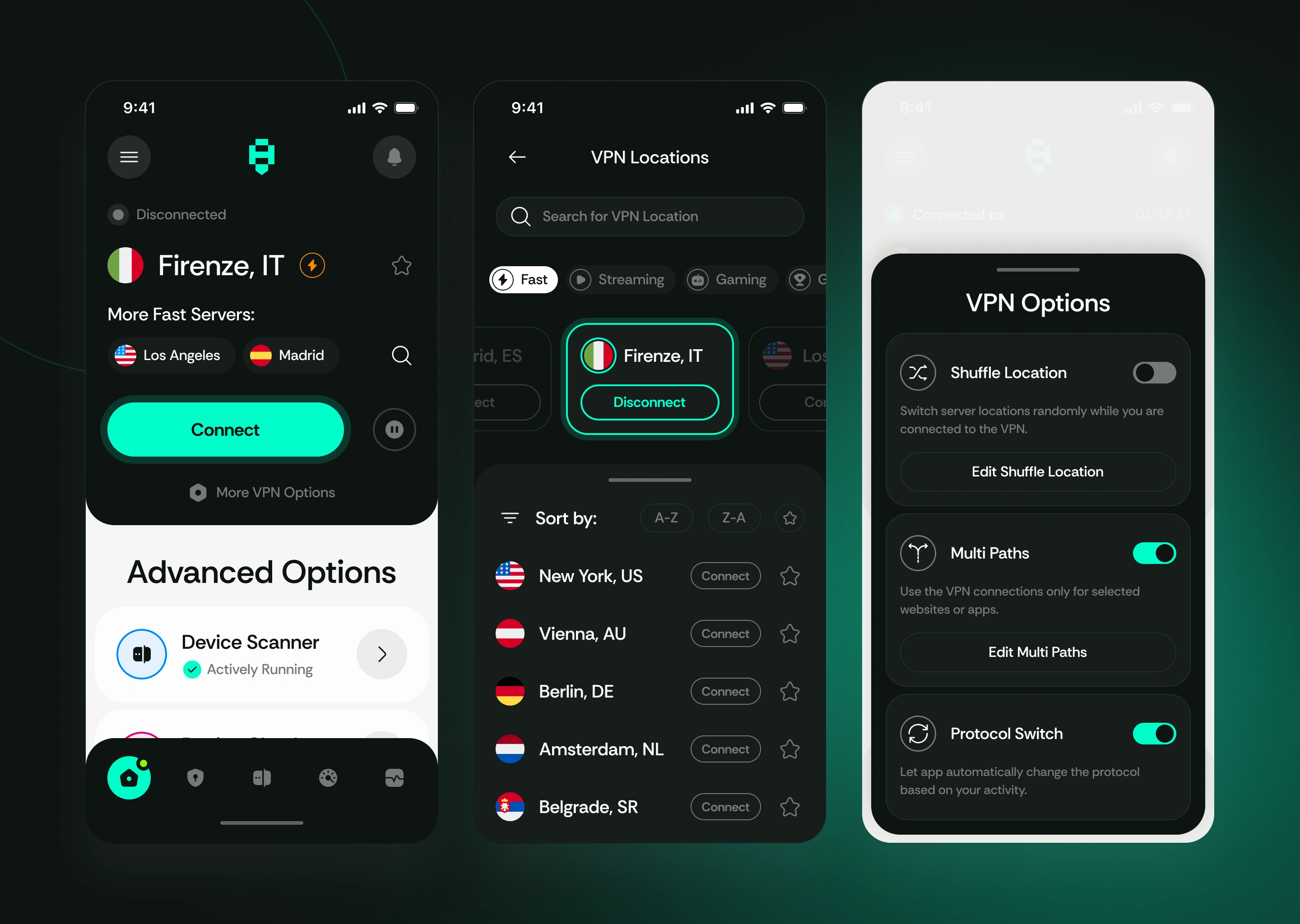
One-Tap Connection: A central button to connect to the fastest available server instantly.
Effortless Server Switching: A country list with search, favorites, and recent connections for quick access.
Onboarding Flow: A simple walkthrough introducing security benefits and showing users how to connect in seconds.
Settings Architecture: Categorized preferences for security features, account management, and protocols without overwhelming menus.
Error States & Feedback: Clear notifications and error messages designed to guide users back to a secure connection without confusion.
Cross-Device Consistency: Unified experiences across mobile, tablet, and desktop—users instantly recognize the interface regardless of platform.
Mobile, Desktop, and Tablet Design Highlights
Mobile (iOS & Android): A sleek, minimal interface optimized for single-handed use. The “Quick Connect” button dominates the screen, while navigation remains thumb-friendly.
Tablet (iPad & Android Tablets): Split-screen support with side navigation for quick server selection while maintaining the connection overview in view.
Desktop (Windows & macOS): Expanded layouts with additional details—real-time connection graphs, server load indicators, and advanced settings—while keeping the interface uncluttered.
Outcome
The final HeroVPN design successfully balanced strong branding with usability. The interface communicates trust, while the UX reduces friction, allowing users to focus on secure browsing rather than complex configuration. The design system’s adaptability ensures that HeroVPN feels natural whether used on a smartphone during travel, a desktop at home, or a tablet on the go.
HeroVPN’s polished design not only reflects the app’s technical strengths—fast, reliable connections and strong encryption—but also creates a premium impression that builds long-term trust with users.
Like this project
Posted Sep 3, 2025
Designed HeroVPN, a fast and reliable VPN app focused on privacy, strong encryption, and effortless server switching for secure browsing anywhere.
Likes
2
Views
47