Jira Visual Dependencies Plugin Development

Ostap Pyrih


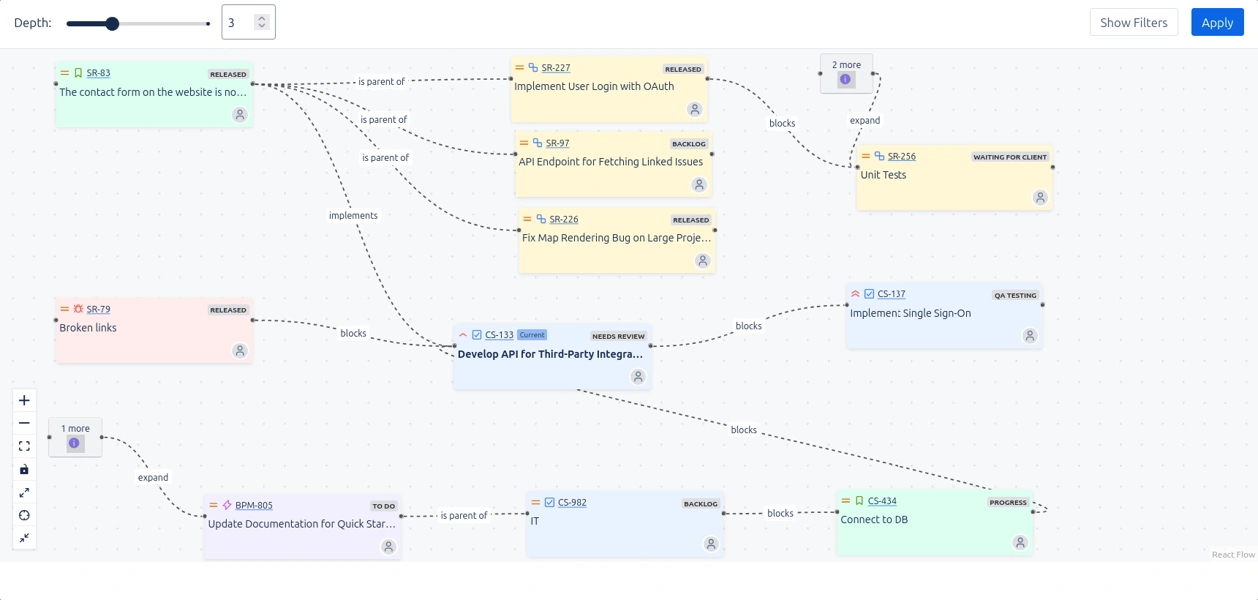
Visualize complex Jira work item dependencies in a clear interactive map. Reveal blockers across planning levels
More details
Transform chaos into clarity. The app provides a smooth, intuitive experience for project managers, team leads, and anyone who collaborates through related work items.
Visual Dependencies maps out how work items are linked, what’s blocked, and where bottlenecks might form right inside work item view.
Be aware of how your work items are connected in real time
View the full link chain, not just direct connections. Spot upstream blockers and downstream impact in one place.
Reorganize your workspace in seconds. Just drag, drop, and adapt instantly.
Multi-project support. Outline the full picture even when work spans different projects.
Explore work items across projects, track dependencies, and fine-tune priorities
✨ Where to find it:
After installing, go to any Jira work item and click the Apps button. The visual graph will appear inside the work item view, typically below “Linked work items.”
Support (First Response Time ≤ 4 hours)
Like this project
Posted Aug 27, 2026
Developed a Jira plugin to visualize work item dependencies and blockers in real time.
Likes
0
Views
1