
A strip-by-strip technical breakdown of Aura: why I built a fire that wraps a 3D model, and how each technique works, with the code behind it.
Try it for yourself https://www.lucerra.co/labs/aura
technical breakdown - scroll down to part 2 in this article
Part 1. Why
A phoenix that never caught fire
This fire started months before the code did.
When we were designing the first version of LUCERRÁ website, [mid 2026] there was a phoenix at the heart of the fire aura, I wanted it to burn. I didn’t want a soft glow or a few sparks drifting off a wing. I wanted real flame wrapped around the bird.
It failed miserably. The fire never sat right on the form, and we were juggling so many projects that there was no time to stay with the problem and experiment until it gave way. The phoenix shipped without its flames, and I never quite made peace with that.
The idea stayed on my mind, though, waiting for its moment.
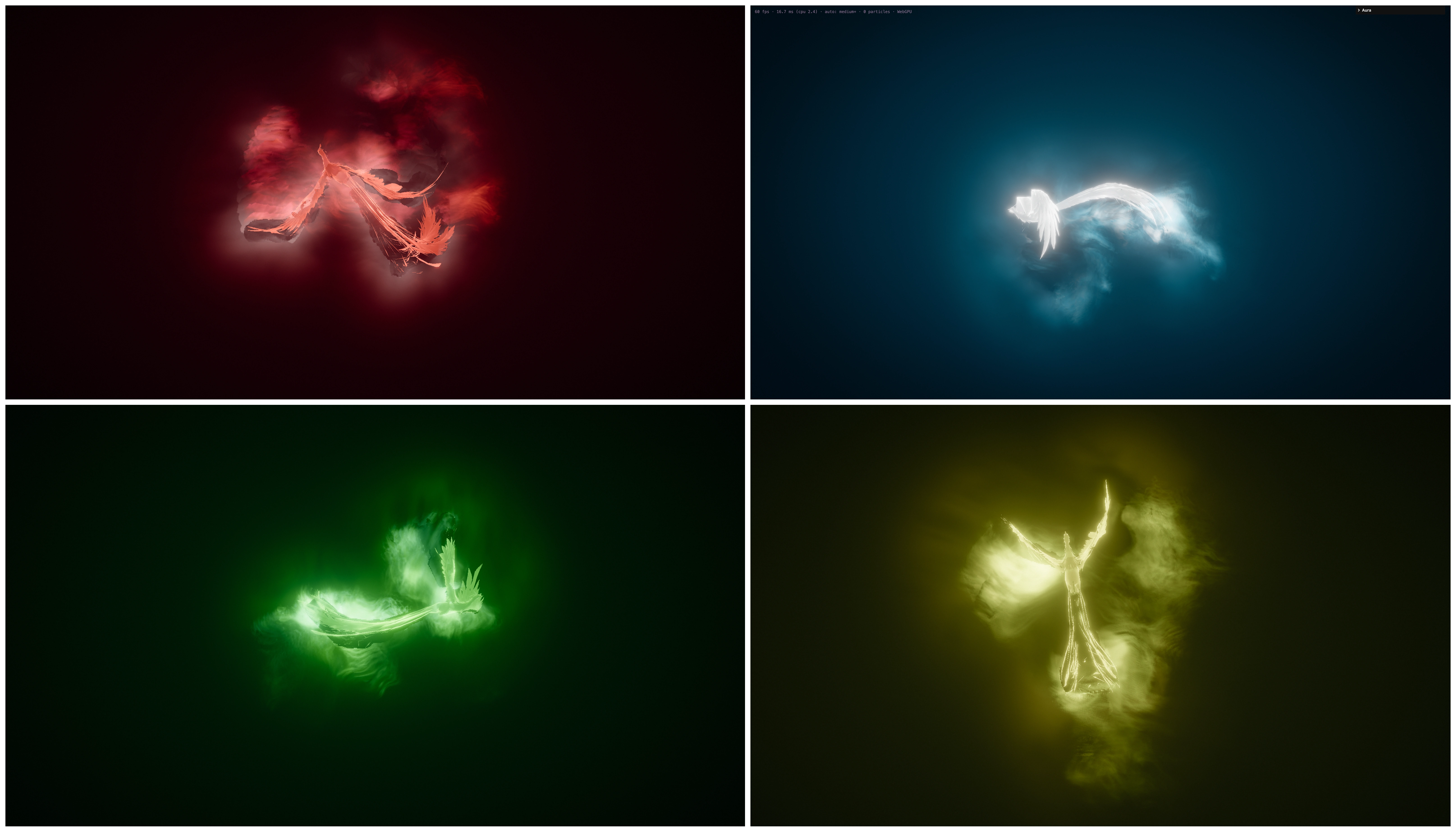
phoenix now perfected in Aura
The box
When three.js released its volumetric fire example, webgpu_volume_fire, I went straight to it. It’s good work: it solves a fluid on a 100 by 100 by 200 grid, with a teapot feeding the source.
The fire lives inside a box, though. It’s confined to that container, and the moment you imagine it around a body, the box shows. The flame knows nothing about horns, shoulders or wings, and it can’t hug an edge or follow a limb. A lot of what makes fire on a figure feel alive is simply missing. It didn’t sit well with me, and it wasn’t what my phoenix needed.
An aura, not a fire
That changed the question I was asking. What if the flames could form a proper aura around a character, the kind you see in VFX work, clinging to the body and reading as part of it, but running live in a browser?
That means fire that belongs to a shape. I pictured a dark body with a burning outline, backlit and legible, and tongues of flame that rise from the silhouette and cool as they climb. The wind would bend them without tearing them off the surface, a moving limb would leave a short wake, and you could blow on the flame and watch it flicker and then settle, like a candle taking a moment to recover.
Why now
For a long time, that look belonged to offline renderers. Then WebGPU kept getting better with every release, bringing compute on the GPU, TSL for writing shaders inside three.js, and a fallback to WebGL2 for browsers that aren’t ready yet.
It felt like the right moment to stop waiting and try.
The answer turned out to be smaller than a simulation. If I already knew how far every point around a model was from its surface, I didn’t need to invent a flame and then contain it. I could look at the shape from slightly the wrong place, and the silhouette would smear into tongues. The fire would be the model itself, read from somewhere else.
I never move the flames. I only move where I look.
The rest of this article covers how I got there, in the order I built it, with the code that carries each step.
Part 2. The build, strip by strip
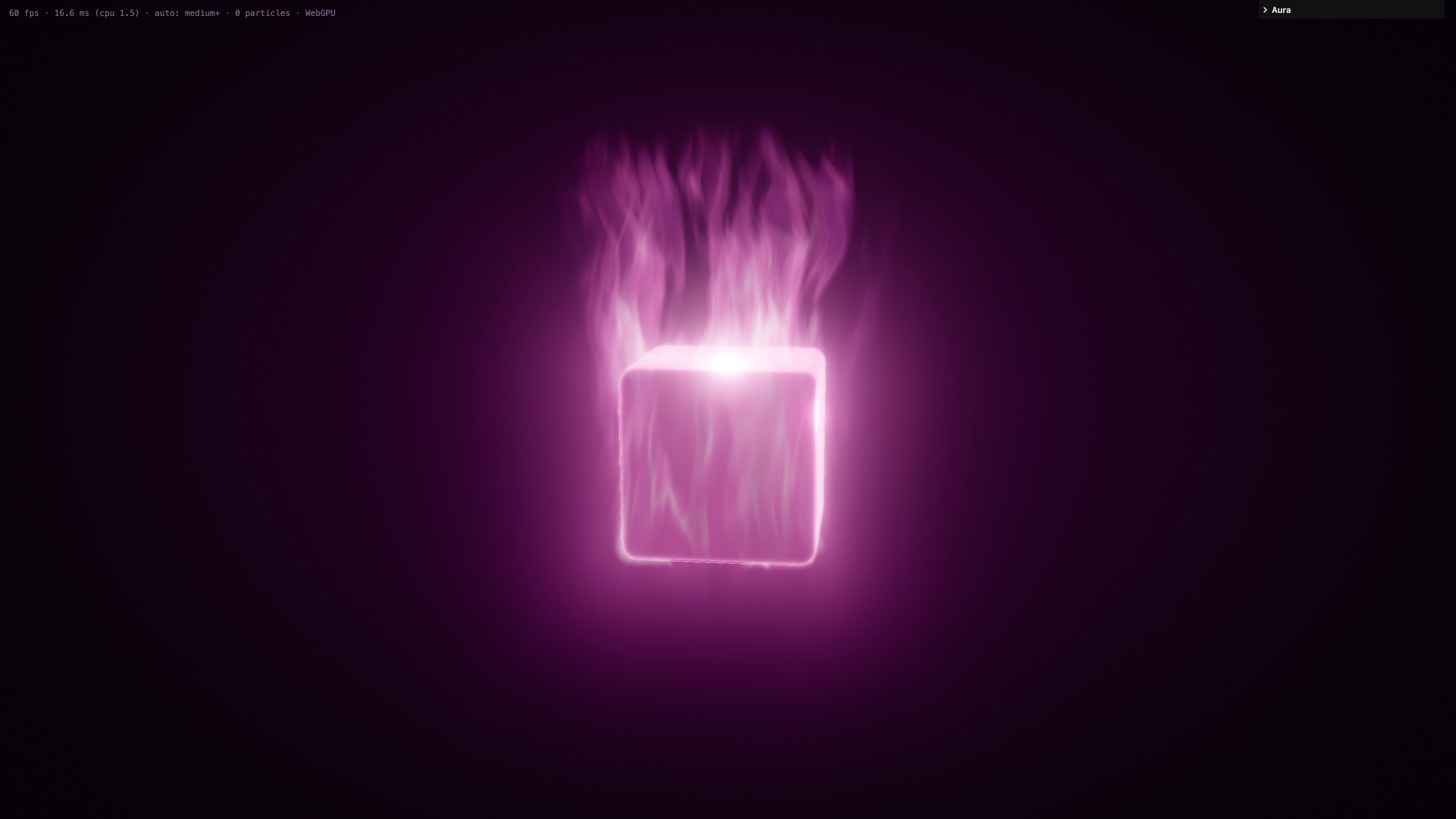
I began with a narrower plan: a WebGL and GLSL fire around a cube, and nothing else. I dropped that almost at once, because a cube was only a box by another name. What I actually wanted was a fire that could wrap any mesh in the browser, built on three.js with WebGPU and TSL, and falling back to WebGL2 when it had to.
Getting from a cube on a dark screen to a burning, animated model took about a day. What follows is that day, technique by technique. The clock times don’t matter, but the order does.
Measuring the shape
The first real problem wasn’t how to draw fire but how to know the form.
When a model loads, the page measures how far every point in a grid around it is from the surface. That measurement is a distance field, 48 cells along the long side, stored as a half-float 3D texture. Closest-point queries from three-mesh-bvh fill the grid. Overlapping parts union cleanly, because the distance at each cell is the minimum over the whole mesh.
A bake like this can make a page hitch if it runs in one go, so the work is written as a generator. It yields after each slice, and the async path hands control back to the browser whenever a slice has used up its 8-millisecond budget, the page stays responsive while the fire learns the form, and when you drop something in, the interface doesn’t freeze.
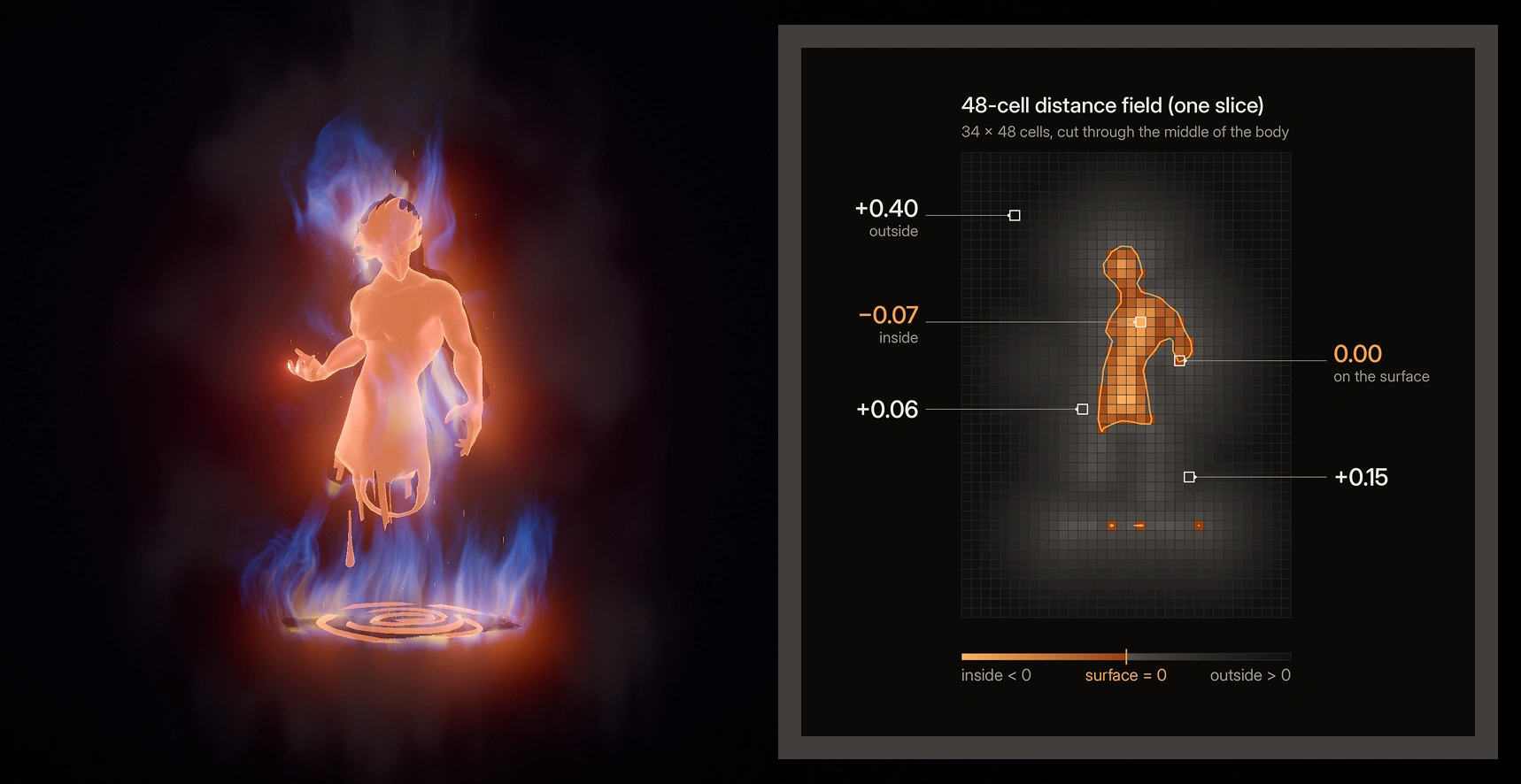
The default resolution is 48 cells along the longest axis. Each cell asks the BVH for the nearest point on the surface, and the distances are then packed into a half-float 3D texture that the shader can sample later.
Once that field exists, everything else is a way of reading it.
A vote for messy models
A distance is only useful if you also know which side of the surface you’re on. Real models are messy, and their parts overlap. A simple count of surface crossings would mark those overlaps as outside, letting the fire leak through the body.
Aura decides inside or outside with a nonzero winding test rather than a parity count. A ray is sent along each row of voxels, and each hit adds or subtracts a winding, depending on whether the ray enters or leaves the surface. The sweep runs along X, then Y, then Z, and a voxel counts as inside when at least two of the three axes agree. A grazing ray or a stray hole can flip one vote at most, so a single bad axis can’t overturn the other two.
Open or broken meshes are a different problem, because they have no trustworthy inside. Those files fall back automatically to an unsigned thin shell: the absolute distance, offset slightly, so that the surface becomes a thin closed band the flame can still hug.
This is unglamorous work, but it’s also why a character you actually use, rather than a perfect primitive, can burn without the field falling apart.
The vote itself comes from a running winding along each axis. As the sweep crosses a surface, the winding changes, and wherever it isn’t zero, that axis casts a vote for the cell.
I never move the flames
Once the field was ready, I could finally make fire.
The first renders showed a magenta energy around the form, then smoke, then a warmer flame, but the method never changed. The fire is the distance field, sampled from slightly below each point and pulled upward by scrolling noise. Where the noise is strong, the silhouette stretches into long tongues, and where it’s weak, the flame stays close. The tongues cool as they rise.
In TSL, that idea takes three lines. Noise decides how far the current point is pulled up, and then I ask how far the point beneath it is from the surface. If that point is close, there’s fire.
[CODE SNIPPET: the three core TSL lines from volume.js]
The lift itself isn’t a straight hop along world up. It already leans with the wind, which I’ll come back to. For a travel distance s, the displacement is rooted at the surface and bent along the flow, which is why the tongues stay attached when the weather changes.
Glow, smoke, and a ray through the field
The fire you see isn’t a sprite or a mesh of flames. For each pixel, a ray steps through the space around the model and adds up glow and smoke. Empty space is skipped by distance, so a ray that’s still far from the surface can jump ahead. Inside the flame region, each step reads the field and the noise, then accumulates colour and opacity.
Smoke works the same way, only taller and softer. It uses a higher lift, a wider shell and a slower mask from the large-scale noise, so it rises above the tongues without replacing them.
[CODE SNIPPET: the smoke field, from volume.js]
The volume is drawn at a reduced resolution and composited back over the model, so the expensive walk through the field doesn’t have to run at full-screen resolution. None of that changes the idea. The ray is still asking the shape how close it is, again and again, from a little below where it stands.
Burn the edge, not the face
A glowing blob is easy to make. A dark body with a burning outline is what real backlit fire looks like, and it’s what keeps the form legible.
The test depends on the view. Where a ray grazes the surface, the distance changes slowly from step to step, and the flame brightens. Where a ray meets the surface head-on, the distance changes quickly, and the flame is dimmed. Faces stay calm while edges catch, so you can still read the figure inside the fire instead of losing it to a bright shell.
The derivative doesn’t cost an extra fetch. Each step already has a distance, so I keep the previous step’s value and subtract it. The silhouette weight falls out of work I was already doing.
[CODE SNIPPET: grazing weight from the previous step’s distance, from volume.js]
Wind that bends but never tears
Wind arrived early, almost as soon as there was a flame to lean. The danger with wind in a volume is stretching. If you simply add a sideways force, the tongues elongate and then tear, and the fire loses its root.
The whole wind system rests on one line of maths. For a travel s along a flame of height H, the displacement is s times the direction of up plus the wind scaled by s / H. The root stays on the surface and the length stays s, while the tip leans further as the wind grows stronger, reaching about 72 degrees at a strength of three. The flame bends without getting any longer.
Flames, smoke, sparks and light all read one shared flow, computed once on the CPU and fed to everything else, so they move as a single weather system rather than four effects arguing with each other. The gusts are made of three smooth sine waves, never random jumps.
The gusts that breathe through that vector are deliberately boring, in the best way. They come from three incommensurate sines, with no jitter at all.
[CODE SNIPPET: the three-sine gust, from wind.js, smoothNoise]
When the body moves
A field baked once is useless the moment a body starts to move. The surface has shifted, and last frame’s distances become a costume for a body that’s no longer there. Re-baking the full mesh from scratch every frame would solve that, but it’s the expensive answer.
Instead, each bone carries a soft rounded box, up to forty of them in all. Every frame, a small pass on the GPU redraws a 48 by 48 by 48 distance grid from those boxes, so the fire keeps up with the pose without measuring every triangle again.
Limb trails come from a delay. Flames near a swinging arm are drawn from where that limb was a split second earlier, about 0.12 seconds before, so the motion leaves a short wake. Sparks leave the body at 30 percent of its speed, then fly free and streak behind it. The relative cost of all this is about seven percent.
The fire still reads the shape, only now the shape is rewritten as it moves.
[CODE SNIPPET: proxy budget and grid size from body.js, then the trail and spark inheritance from index.js, updateTrail]
The 0.12 also appears in the smoothing of each box’s own velocity, so a limb’s trail doesn’t jerk from one pose to the next.
[CODE SNIPPET: per-box velocity, from body.js, updateProxies]
Ten thousand sparks, a hundred of them
The sparks are there to finish the air around the volume, not to replace it. Ten thousand particles are allocated once, and the slider only decides how many of them run, so changing the count is instant. There’s no buffer to rebuild and no shader to recompile. The rest wait, parked, and come back to life at the surface when you raise the count.
Twenty-four percent of them are embers, and the mix isn’t a random roll. Every index whose remainder by 25 is at least 19 is an ember, so any prefix of the list, whether a hundred or ten thousand, keeps the same mix of wisps and embers. Wisps stretch along their motion, while embers stay rounder, live a little longer and lean more in the wind.
The default ships with a hundred, because I prefer less. A thinner spark field leaves the flame volume in charge, and the fire reads brighter for it.
[CODE SNIPPET: preallocated count from quality.js, and the ember mix from particles.js]
When a particle is born on a moving body, it inherits that 30 percent of the body’s velocity, then follows the same shared flow as the flames, with curl noise and a little buoyancy.
Blow on it
The microphone came from a simple wish: I wanted the fire to feel as if it were in the room with you.
It stays off until you turn it on. Loudness above an adaptive room-noise floor becomes a breath level, with a fast attack and a slow release. The flame flickers and roughens, the light around it brightens, and then everything settles. Pasting someone else’s settings will never switch the microphone on for you, because the snapshot stores colours, sliders and a few extras, and nothing that starts the mic.
[CODE SNIPPET: adaptive floor, fast attack and slow release, from blow.js, update]
Colour, and a look you can copy
Once the fire had a body, it needed a palette that could be tuned without opening a shader. Every layer has its own colour: the hot core, the body of the flame, the outer tips, the smoke, the surface glow, the wisps, the embers, the bounce on the model and the light itself. Some of these start out derived from the four base colours and keep following them until you pick a colour of your own.
You tune it by eye, copy the whole look as a block of JSON, and paste it back later or send it to someone else. The fire you see when the page loads is exactly that: I sat with the sliders, copied the result, and that snapshot became the default.
[CODE SNIPPET: the settings snapshot from main.js, serializeSettings and the start of copyAllSettings]
There’s no microphone flag in that object. Applying it can restore a palette, the sliders and a pause state, but it can’t turn the mic on.
Bring your own model
If the fire comes from the shape, the page has to accept shapes that aren’t mine.
You can drag a .glb onto the page or pick one with a button. The file is parsed entirely in the browser, nothing is sent to a server, and the loader doesn’t create object URLs for this path. Draco and meshopt files work. Files over 100 MB, or with more than 300,000 triangles, are refused. A file with animation clips plays its first clip and is treated as a moving body, so the bone boxes and trails apply to it as well.
The fire wraps whatever you give it, following the silhouette that model actually has.
[CODE SNIPPET: in-browser parse with Draco and meshopt enabled, from model.js, makeLoader and parseModelGeometry]
A light that stays still
Late in the build, the fire began to light the model. Three point lights without shadows sit on the flame mass. They’re placed each frame and lean on the same lift curve as the tongues, so the light and the fire share one weather. Their count never changes, which means toggling them never recompiles a shader.
I built two flickering versions first and compared them carefully with a steady one. The flicker felt alive, but it was also busy, and it competed with the edge I’d worked so hard to keep legible. I kept the light still and tuned its levels to the flicker’s average warmth, so the scene didn’t go dim when the fidgeting stopped.
The microphone can still brighten that light for a moment, but the base level never pulses.
[CODE SNIPPET: the steady levels, from fireLight.js]
Part 3. What I cut
Getting from a cube on a dark screen to a burning Ifrit took about a day, and a lot of that day went into deciding what not to ship.
I built a finger that pushed the flames, then took it out. It was a clever contact that made the volume feel like a soft object, but it asked a gesture to compete with the silhouette. The fire looked better when nothing poked it.
I built a glowing floor and removed it. A disc under the figure grounded the scene, but it also turned the fire back into something that lived in a room. I wanted the body to carry the light by itself.
I built a fire beam, tested it and cut it on purpose. Whether you read it as a weapon, a tool or a second effect, it pulled the eye away from the outline.
I also built a flickering light, as I mentioned, and kept the light still instead. The warmth stayed while the fidgeting went.
Restraint is part of the look. The fire is already doing enough, and it doesn’t need a floor to land on, a beam to fire, a light that fidgets or a finger to shove it. All it needs is a body, an edge, a little wind and the option of a breath.
Try it for yourself. https://www.lucerra.co/labs/aura
A LUCERRÁ Labs experiment. Built with three.js.
1 like · 2 views · Nov 17, 2026

