Aether — AI Wellness & Productivity App

Olufemi Tofunmi

Aether — AI Wellness & Productivity App
UI/UX Case Study
Overview
Aether is an AI-powered wellness and productivity mobile application designed to help users achieve deep focus, balanced routines, and sustainable high performance through biometric insights and intelligent habit optimization.
The concept combines mindfulness, neuroscience-inspired interactions, and futuristic AI experiences into a minimal mobile interface that feels calm, premium, and immersive.
This project explores how artificial intelligence can support users in improving focus, sleep, productivity, and digital wellness without overwhelming them with data-heavy dashboards.
Project Information
Category Details
Project Type Mobile App Concept
Industry Wellness / Productivity / AI
Platform iOS Mobile Application
Role Product Designer, UI/UX Designer
Tools Used Figma, Photoshop, AI Tools
Duration Concept Project
The Problem
Modern productivity apps often create more stress instead of reducing it.
Users are constantly switching between:
1. Focus apps
2. Habit trackers
3. Sleep monitoring apps
4. Calendar systems
5. Meditation tools
6. Health analytics dashboards
Most wellness experiences feel fragmented, overly clinical, or visually exhausting.
Users need a system that:
1. Feels emotionally calming
2. Encourages consistency
3. Simplifies complex biometric insights
4. Creates a premium and intelligent experience
5. Supports both wellness and productivity together
The Goal
Design a futuristic AI wellness platform that:
1. Helps users achieve focus and balance
2. Uses AI to personalize productivity states
3. Feels visually immersive and emotionally calm
4. Simplifies wellness data into meaningful insights
5. Creates an onboarding experience users actually enjoy
Design Direction
The visual direction was inspired by:
1. AI-native interfaces
2. Ambient lighting systems
3. Futuristic operating systems
4. Digital mindfulness experiences
5. Minimal luxury aesthetics
The goal was to create an interface that feels:
1. Intelligent
2. Premium
3. Calm
4. Human-centered
5. Futuristic but accessible
Brand Identity
Brand Name
Aether
The name “Aether” represents clarity, elevation, energy, and flow.
It aligns with the app’s mission of helping users optimize their mental and physical state through intelligent guidance.
Visual Identity
Color Palette
The interface uses a dark immersive base combined with glowing accent colors.
1. Primary Colors
2. Deep Charcoal Black
3. Electric Blue
4. Neon Green
5. Warm Orange
6. Soft White
Why This Works
The dark interface creates a cinematic atmosphere while the glowing accent colors guide attention toward important actions and metrics.
This contrast also improves visual hierarchy and makes the app feel modern and high-end.
Typography
A bold geometric sans-serif typeface was used to communicate clarity and confidence.
Typography hierarchy was heavily emphasized through:
1. Large headlines
2. Strong contrast
3. Minimal body copy
4. Strategic keyword highlighting
Examples:
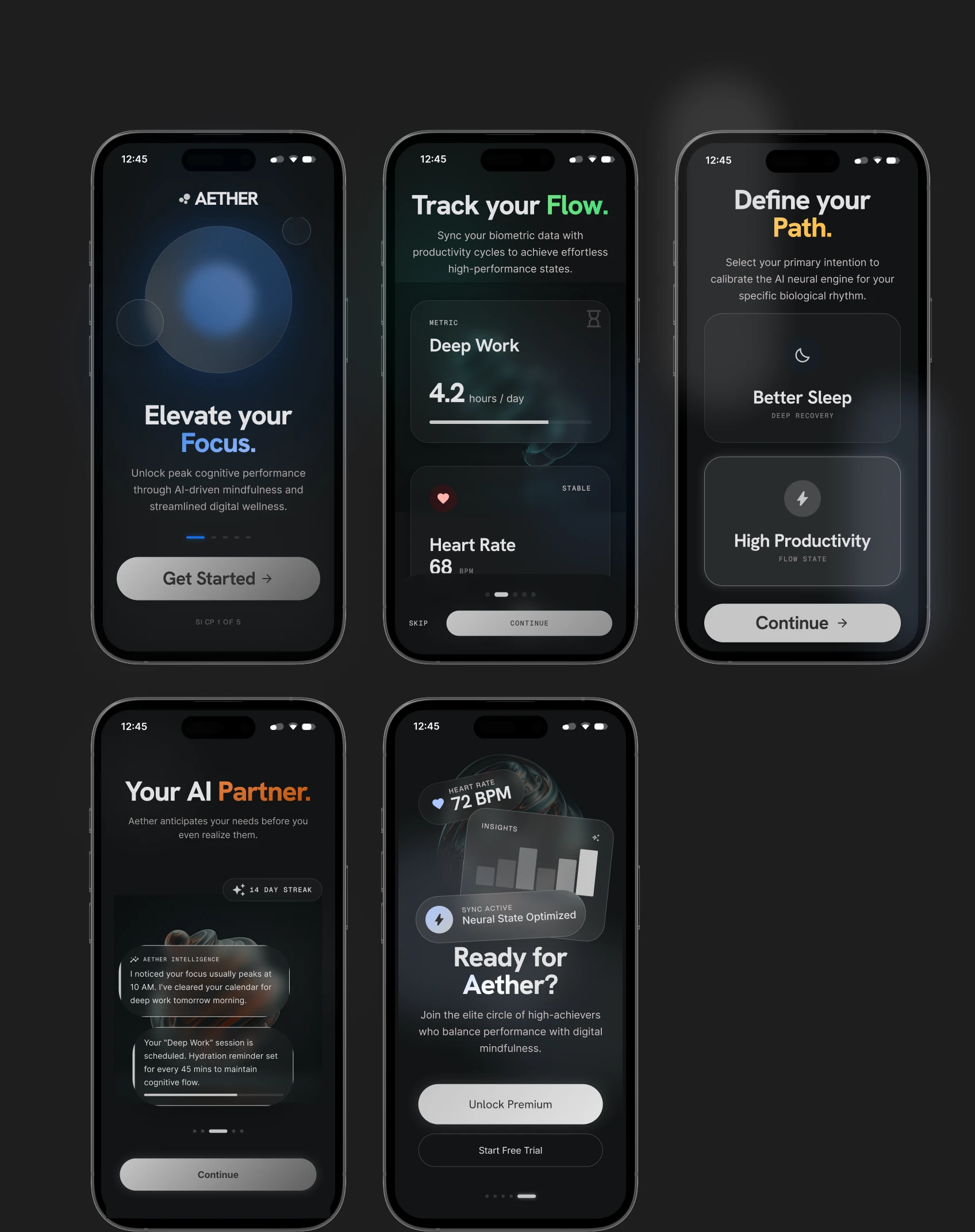
1. “Flow” highlighted in green
2. “Path” highlighted in yellow
3. “Partner” highlighted in orange
This creates stronger emotional emphasis and improves readability.
UX Strategy
The onboarding experience was intentionally designed to feel lightweight and motivational.
Instead of overwhelming users with setup forms, the app introduces:
1. Emotional messaging
2. Personalized guidance
3. Visual storytelling
4. Quick intention selection
5. AI-assisted wellness setup
The flow progressively introduces users to the product’s intelligence.
User Flow
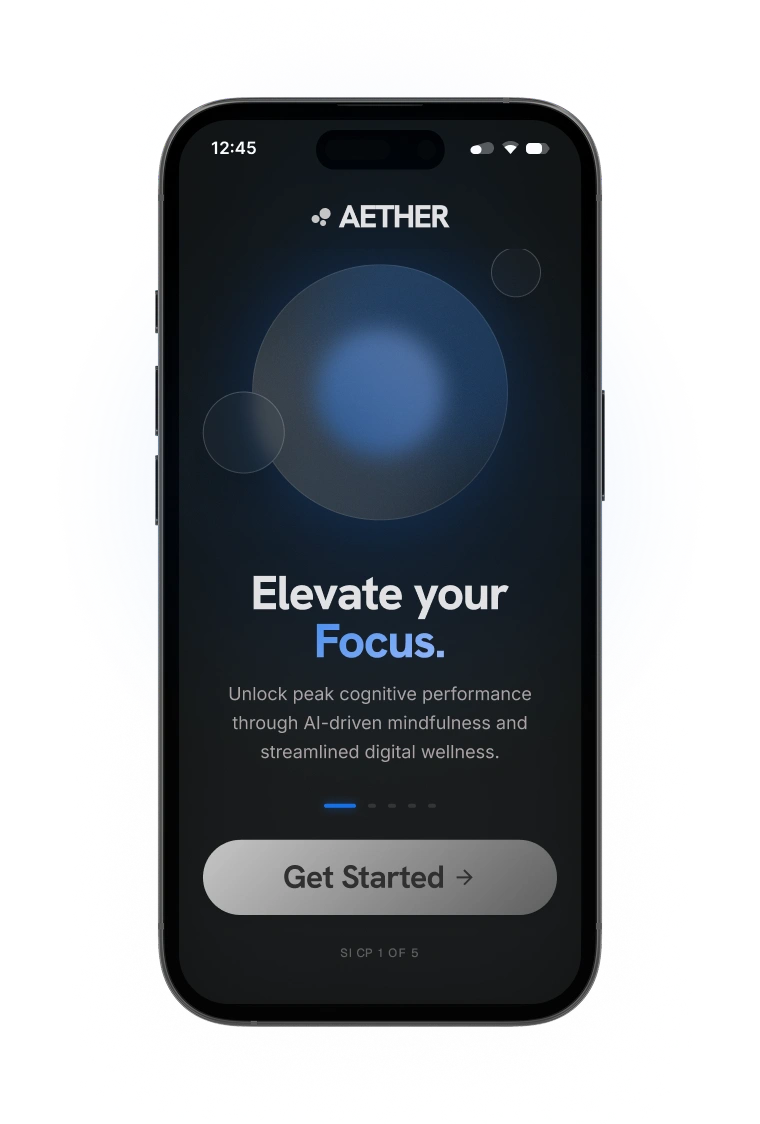
Step 1 — Introduction
Users are welcomed with a calming hero screen introducing the core promise:
“Elevate your Focus.”
The glowing orb visual symbolizes clarity and mental energy.
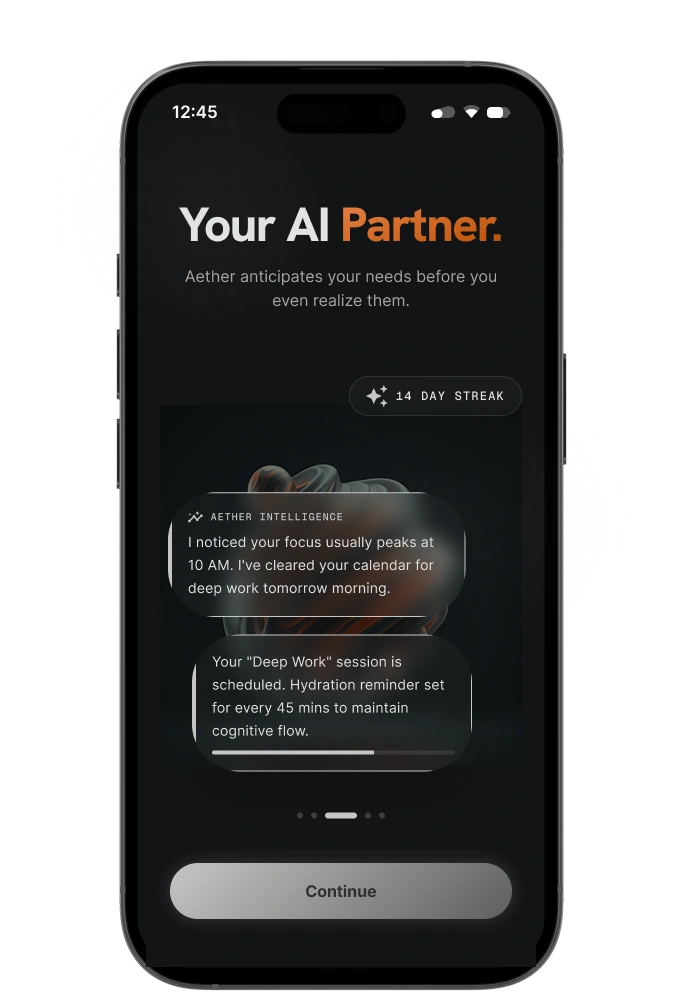
Step 2 — AI Assistant Introduction
The onboarding introduces the AI partner as a proactive assistant.
The AI:
1. Predicts focus periods
2. Optimizes schedules
3. Sends intelligent reminders
4. Creates healthier work patterns
This screen helps establish emotional trust between the user and the product.
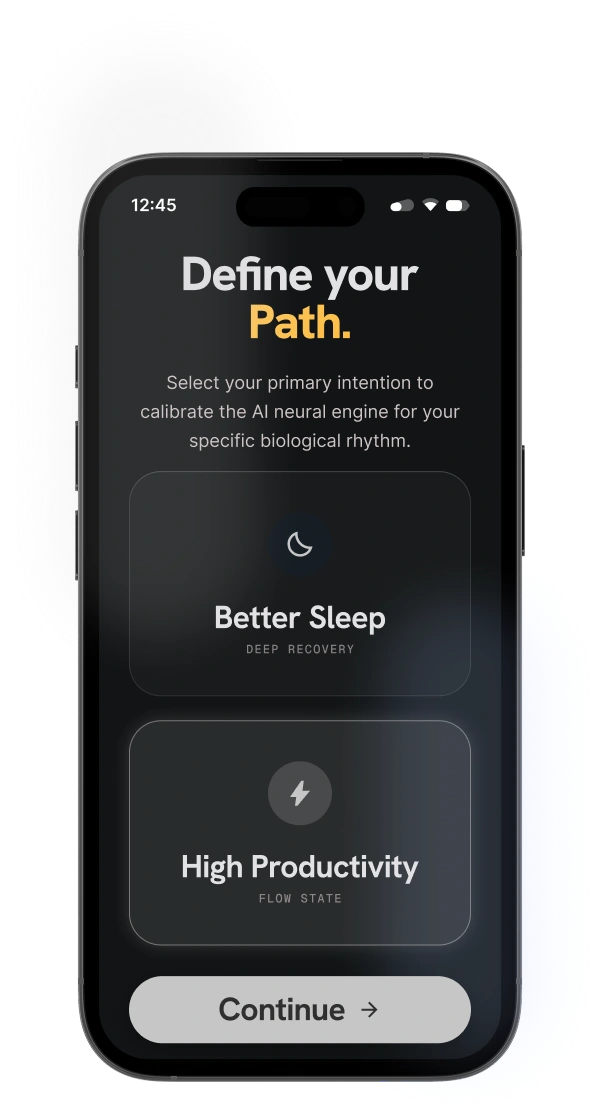
Step 3 — Intention Selection
Users select their primary goal:
1. Better Sleep
2. High Productivity
This helps personalize the AI experience.
The selection cards use glassmorphism-inspired visuals to create depth while maintaining simplicity.
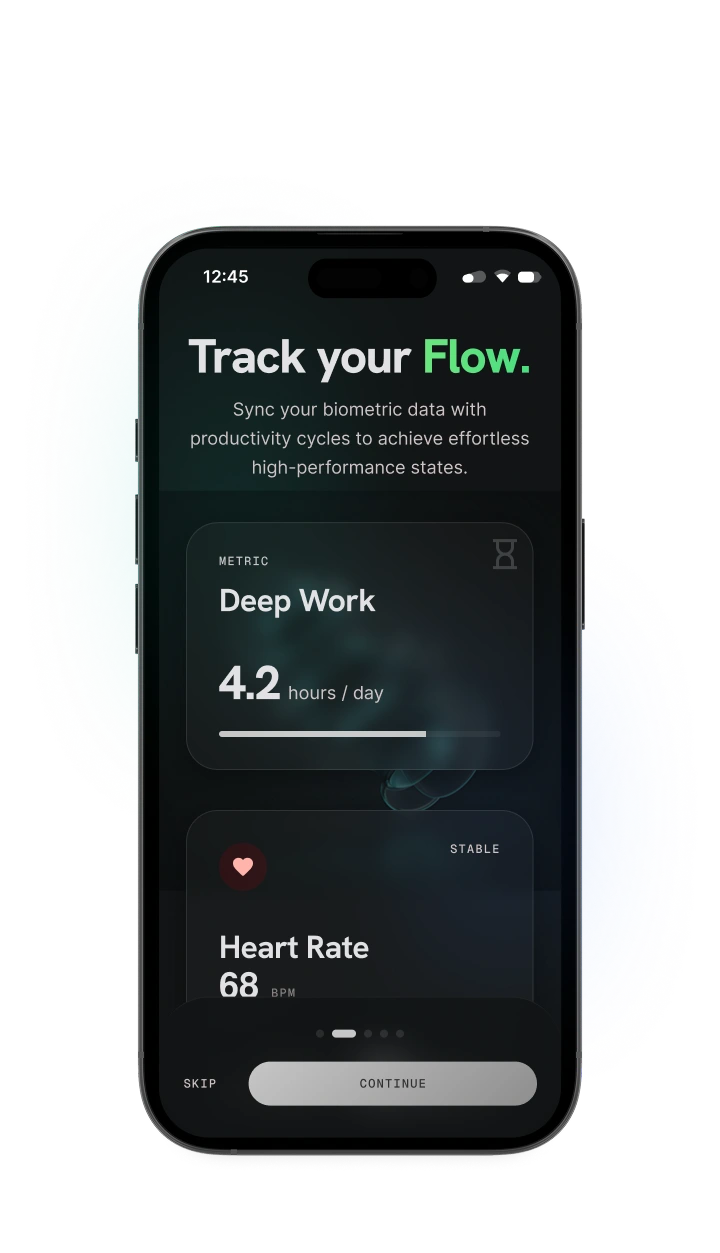
Step 4 — Data & Metrics
The app introduces productivity tracking through biometric-inspired metrics.
Examples include:
1. Deep Work Hours
2. Heart Rate
3. Stability Levels
The dashboard cards were designed to feel soft, layered, and futuristic instead of clinical.
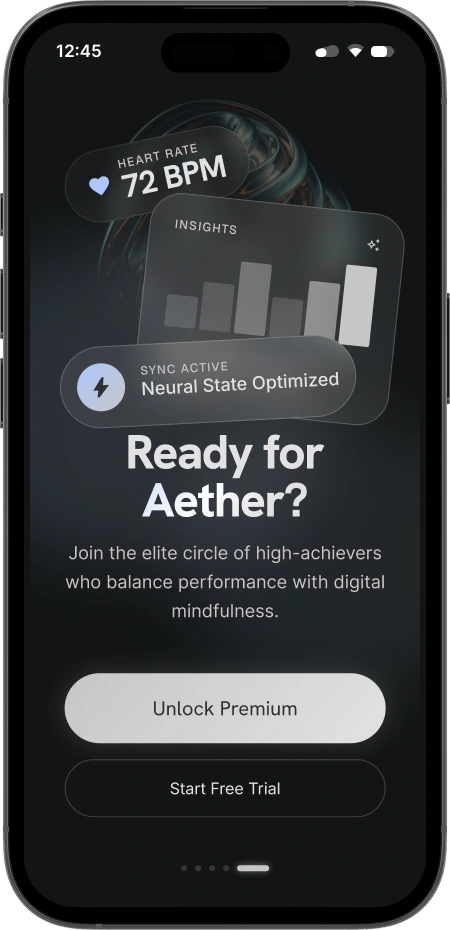
Step 5 — Premium Conversion
The final onboarding screen transitions users into premium membership.
The design focuses on:
1. Exclusivity
2. Aspiration
3. Performance culture
4. Digital wellness identity
The goal was to make the premium offer feel motivational instead of sales-focused.
UI Design Breakdown
1. Dark Ambient Interface
The dark UI reduces visual fatigue and enhances immersion.
Subtle glow effects create:
a. Focus points
b. Depth
c. Emotional atmosphere
d. Premium visual quality
2. Glassmorphism Elements
Soft translucent cards create layered interfaces without clutter.
Benefits:
a. Better visual hierarchy
b. Modern futuristic aesthetic
c. Lightweight appearance
d. Enhanced depth perception
3. Minimal Navigation
The onboarding experience minimizes distractions by:
a. Reducing unnecessary UI
b. Limiting decisions per screen
c. Using progressive disclosure
d. Focusing attention on one core action
4. Emotional Copywriting
Instead of technical language, the interface uses emotionally driven messaging:
Examples:
a. “Elevate your Focus”
b. “Define your Path”
c. “Your AI Partner”
This creates a stronger emotional connection with users.
Accessibility Considerations
To improve usability and readability:
1. High contrast typography was used
2. Large headings improve scannability
3. Buttons maintain clear visual hierarchy
4. Minimal clutter reduces cognitive load
5. Accent colors help guide user attention
Key Features
A. AI Productivity Assistant
An intelligent assistant that predicts high-performance periods and recommends optimal work schedules.
B. Focus Analytics
Tracks deep work sessions and wellness-related productivity insights.
C. Sleep Optimization
Encourages healthier recovery cycles and balanced routines.
D. Personalized Wellness Paths
Custom onboarding based on user goals and lifestyle intentions.
E. Premium Wellness Experience
A luxury-inspired digital wellness ecosystem focused on elite performance.
Challenges
A. Balancing Futuristic UI with Usability
One major challenge was ensuring the interface felt advanced without becoming confusing.
To solve this:
1. Visual hierarchy was simplified
2. Typography was prioritized
3. CTA buttons were made highly visible
4. Complex metrics were reduced into digestible cards
B. Maintaining Visual Consistency
Because the interface relies heavily on glow effects and gradients, maintaining consistency across screens required careful spacing, lighting balance, and component structure.
What I Learned
This project reinforced the importance of:
1. Emotional interface design
2. Simplicity in futuristic products
3. Strong typography systems
4. Designing experiences instead of just screens
5. Balancing aesthetics with usability
It also helped improve my ability to create cohesive product storytelling across multiple onboarding screens.
Final Thoughts
Aether explores the future of AI-powered wellness through a visually immersive and emotionally intelligent mobile experience.
The concept combines:
1. Productivity
2. Wellness
3. Artificial intelligence
4. Minimalism
5. Human-centered design
into a single seamless ecosystem.
The project demonstrates how modern UI systems can feel calm, aspirational, and functional at the same time.
Thanks for Viewing
Designed by Olufemi Jesutofunmi (O.J)
Available for:
- Freelance Projects
- UI/UX Collaborations
- Product Design Opportunities
- Creative Partnerships
Like this project
Posted May 28, 2026