LibraryOS UX Design Project

Anshul Raina

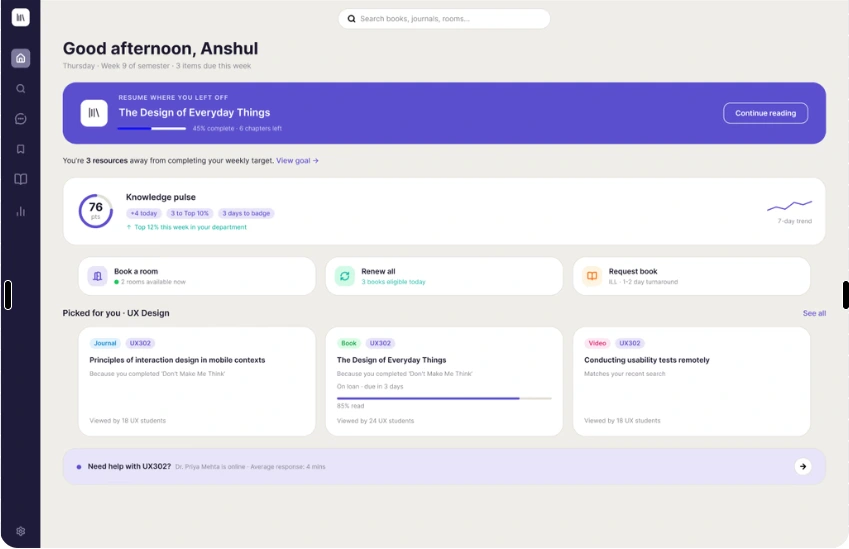
Screens designed to support the entire student journey
Each screen supports a different part of the library experience—from finding useful resources and managing loans to getting help with research.
Expected Impact
These are the outcomes I designed LibraryOS to support. They would need to be validated through user testing.
Students
Find relevant academic resources more easily.
Keep track of loans, tasks, and due dates.
Feel more confident while doing research.
Librarians
Make research support easier for students to find.
Reduce common administrative questions.
Spend more time helping students with complex research needs.
Universities
Help students make better use of existing library resources.
Create a more connected digital library experience.
Better support students who are learning and researching independently.
What I Learned
Designing LibraryOS changed how I think about improving a product.
At first, it was easy to look at the library as a collection of separate screens—search, loans, recommendations, and research help. But improving one screen at a time would not solve the larger problem.
The real opportunity was to make the whole journey feel connected, from finding a resource to actually using it.
I also learned that good UX isn't only about helping people complete tasks faster. It's about helping them feel confident about what to do next.
Clearer language, visible information, and guidance at the right moment can make a complicated system feel much simpler.
The biggest lesson: Don't just improve individual screens. Improve the journey between them.
What I'd Do Next
LibraryOS is a concept, so the next step would be to test whether these ideas actually work.
01 — Test with students
Run task-based usability sessions with university students to see where they succeed, hesitate, or get stuck.
02 — Improve accessibility
Test keyboard and screen-reader navigation and evaluate the experience against WCAG guidelines.
03 — Connect university systems
Explore integrations with learning platforms and library systems so recommendations can better match a student's courses and needs.
04 — Measure what works
Track whether students find resources successfully, use recommendations, complete important library tasks, and seek research support.
05 — Explore collaboration
Test ideas such as shared reading lists and study groups to understand whether they make the library more useful for collaborative learning.
LibraryOS taught me to look beyond individual screens and design the journey around them.
Thank you for reading.
Like this project
Posted Aug 21, 2026
Designed LibraryOS screens to enhance student and librarian experience.
Likes
0
Views
0