Automated Blog Content Migration to Elementor

Gaurav Shukla


Migrating 125 blog posts without touching one by hand
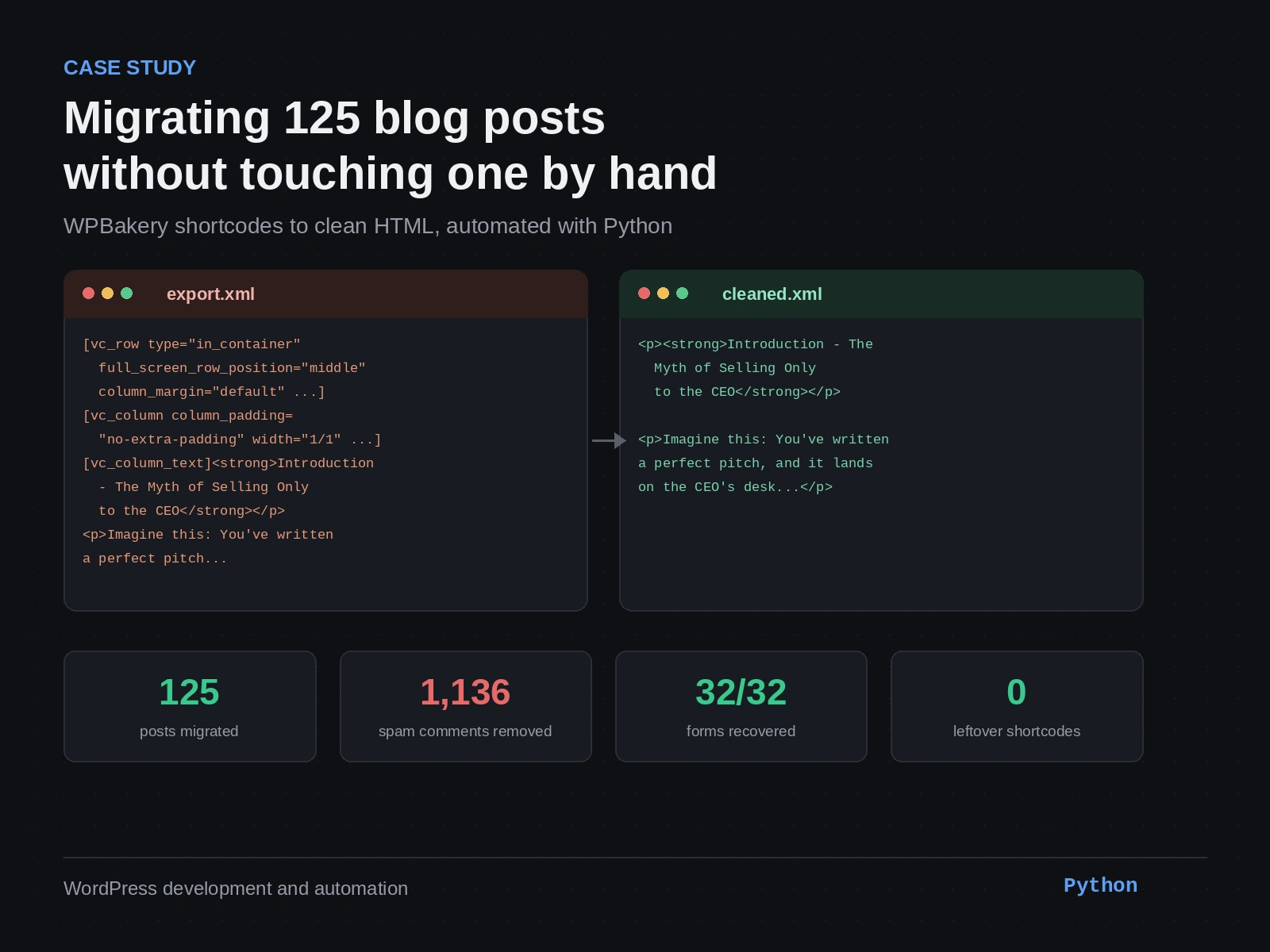
Client: B2B intelligence and media platform (supply chain, procurement, and CFO-focused publications) Stack: WordPress, WPBakery Page Builder, Classic Editor, Elementor, Python Scope: Full blog migration from a legacy WordPress install to a new site
The problem
The client was moving their blog — 125 posts built up over years — from an old WordPress install to a new one. The new site was built on Elementor. The old content wasn’t consistent: 79 posts had been built with WPBakery Page Builder, the remaining 46 were plain Classic Editor posts.
The first attempt used WordPress’s standard export/import (WXR file). Two things went wrong immediately:
The import kept timing out. Cloudflare’s proxy timeout combined with a 120-second PHP execution limit meant the import died partway through on a file this size.
The posts that did come through were broken. WPBakery stores its layout as shortcodes —
[vc_row], [vc_column_text], and so on — inside the post content. The new site had no WPBakery installed, so Elementor had no idea what to do with that text. It just rendered the raw shortcode syntax on the page.Here’s what that actually looked like, pulled directly from the export file for a real post on the site (“Why B2B Success Requires Targeting Multiple Audiences”):
That’s what would have shown up on the live page — visible to readers, un-styled, full of attributes nobody was ever meant to see.
The decision
Re-installing WPBakery on the new site would have brought the layout back, but also brought back every reason the client wanted to move off it. The cleaner call was to convert everything — both the WPBakery posts and the already-clean Classic Editor posts — into plain HTML, so the whole blog ended up in one consistent, portable format with no page-builder dependency going forward.
Doing that by hand across 125 posts wasn’t realistic. It also wasn’t necessary — the problem was entirely mechanical and pattern-based, which is exactly what a script is good at.
The build
I wrote a Python script that read the WXR export directly and processed every post’s
<content:encoded> block:Stripped the WPBakery wrapper shortcodes (
vc_row, vc_column, vc_column_text) and kept the actual content inside themConverted
[nectar_btn] shortcodes into real HTML links — text and URL pulled from the shortcode attributesConverted
[vc_custom_heading] into proper <h2> tagsRemoved 1,136 spam comments (unapproved casino, crypto, and adult-content bot spam) that had accumulated on the old site — left alone, they’d have shown up as 1,136 pending items in the new site’s comment queue
Left the 46 already-clean Classic Editor posts untouched
Preserved featured image references (
_thumbnail_id) so images wouldn't break on importThat same post, after the script ran:
Clean, semantic HTML — no brackets, no leftover attributes, nothing for Elementor or Classic Editor to misinterpret.
The part that needed a second pass
32 of the posts had newsletter signup forms embedded through
[vc_raw_html] shortcodes. WPBakery doesn't store raw HTML as raw HTML — it stores it base64-encoded, and then URL-encoded on top of that. A form embed on the actual site looked like this in the export file:First pass through the script missed this entirely — it doesn’t look like a shortcode with readable attributes, so nothing flagged it for cleanup. It also missed a second shortcode type,
[fancy-ul], used for styled bullet lists, because it doesn't carry the vc_ prefix the rest of the script was keying off.Second pass added base64 decoding followed by URL decoding, which unwrapped the form embeds back into real markup:
That pass also introduced a new bug: it re-processed the
[fancy-ul] blocks as if their contents were plain text needing markdown-style list conversion, which mangled lists that were already valid HTML. Third pass fixed that by checking whether a [fancy-ul] block already contained proper <ul>/<li> tags — if so, just strip the wrapper and leave the list alone.Result
Posts processed 125 WPBakery posts cleaned 79 Spam comments removed 1,136 Newsletter forms recovered 32 / 32 Featured images preserved 123 / 125 Leftover shortcodes after final pass 0
The cleaned WXR file imported into the new site through WordPress’s standard import tool — no custom import code needed, since the output was still a valid WXR file, just with clean content inside it. Every post landed in the Classic Editor in the same consistent format, regardless of which builder it started in.
Why it matters
The alternative was 125 posts, each opened and fixed by hand, with no guarantee of catching every edge case a human reviewer might skim past — a stray shortcode bracket, a form that silently stopped working, a spam comment queue nobody noticed until a client did. Writing the cleanup as a script meant every post got the same treatment, the process was repeatable if the client added more posts later, and the final verification pass could prove — not just assume — that the count of leftover shortcodes was zero.
Like this project
Posted Aug 19, 2026
Automated migration of 125 blog posts from WPBakery/Classic to clean HTML on Elementor.
Likes
0
Views
10