Playwright E2E Test Automation Framework with TypeScript

Faisal Iqbal


Playwright E2E Test Automation Framework
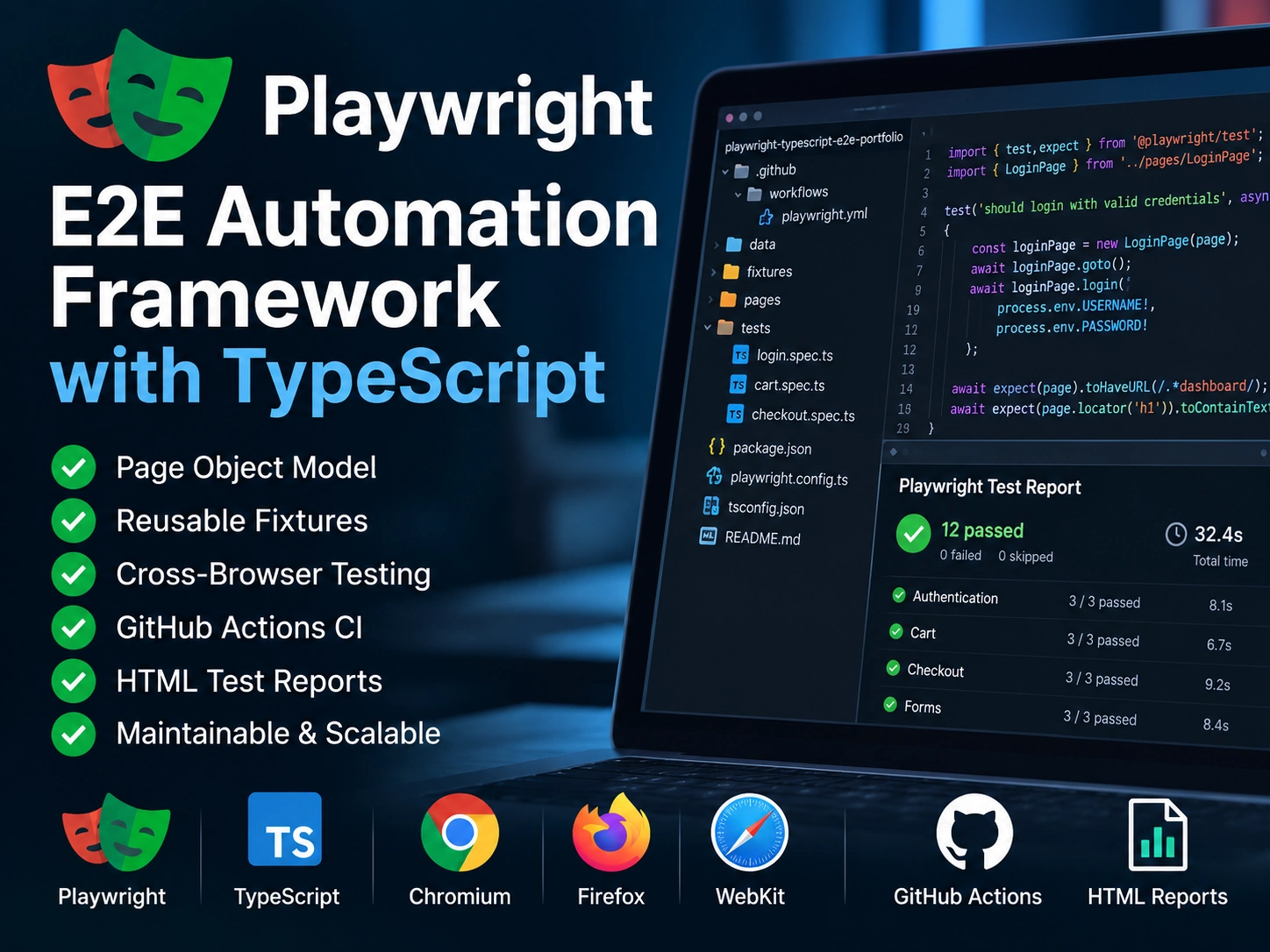
I built this end-to-end test automation framework using Playwright and TypeScript to demonstrate a structured, maintainable approach to web application testing. The framework covers realistic user workflows, uses reusable automation components, supports cross-browser execution, integrates automated testing with GitHub Actions, and produces clear test reports for execution analysis.
Project Overview
This project is a portfolio-based end-to-end automation framework built to demonstrate how I design and implement maintainable web UI automation. It uses Playwright with TypeScript and applies the Page Object Model to separate test logic from page interactions. The framework includes reusable fixtures and test data, realistic end-to-end workflows, cross-browser execution, continuous integration, and automated test reporting.
Framework: Playwright with TypeScript
Design Pattern: Page Object Model
Test Coverage: Authentication, inventory, shopping cart, and purchase workflows
Cross-Browser: Chromium, Firefox, and WebKit
CI/CD: GitHub Actions
Reporting: Playwright HTML Report
The Challenge
The goal was not simply to automate a few test cases, but to build a framework that could support realistic end-to-end workflows while remaining readable, reusable, and easy to extend. As test coverage grows, UI automation can quickly become difficult to maintain when selectors, page interactions, test data, and test logic are tightly coupled.
I designed the framework around several key objectives: keep page interactions separate from test scenarios, minimize duplicated automation code, support consistent test setup through reusable fixtures, validate complete user journeys, execute the same tests across multiple browser engines, and make automated execution suitable for CI.
Separate test logic from page-specific interactions
Build reusable components instead of duplicating automation code
Cover complete business workflows rather than isolated UI actions
Run the suite consistently across Chromium, Firefox, and WebKit
Execute tests automatically through GitHub Actions
Produce reports that make execution results easy to review
Framework Architecture & Design
I structured the framework so that test scenarios, page interactions, test data, and execution configuration have clearly defined responsibilities. This keeps the test cases focused on user behavior while reusable components handle the underlying browser interactions.
Page Object Model
Page-specific selectors and interactions are encapsulated within page objects instead of being repeated throughout the test files. Tests can therefore describe the workflow at a higher level while implementation details remain centralized, making the suite easier to maintain when the application changes.
Reusable Fixtures and Test Data
Reusable fixtures provide shared setup and application state where needed, while test data is kept separate from the test logic. This reduces duplication and keeps individual test scenarios focused on validation rather than setup mechanics.
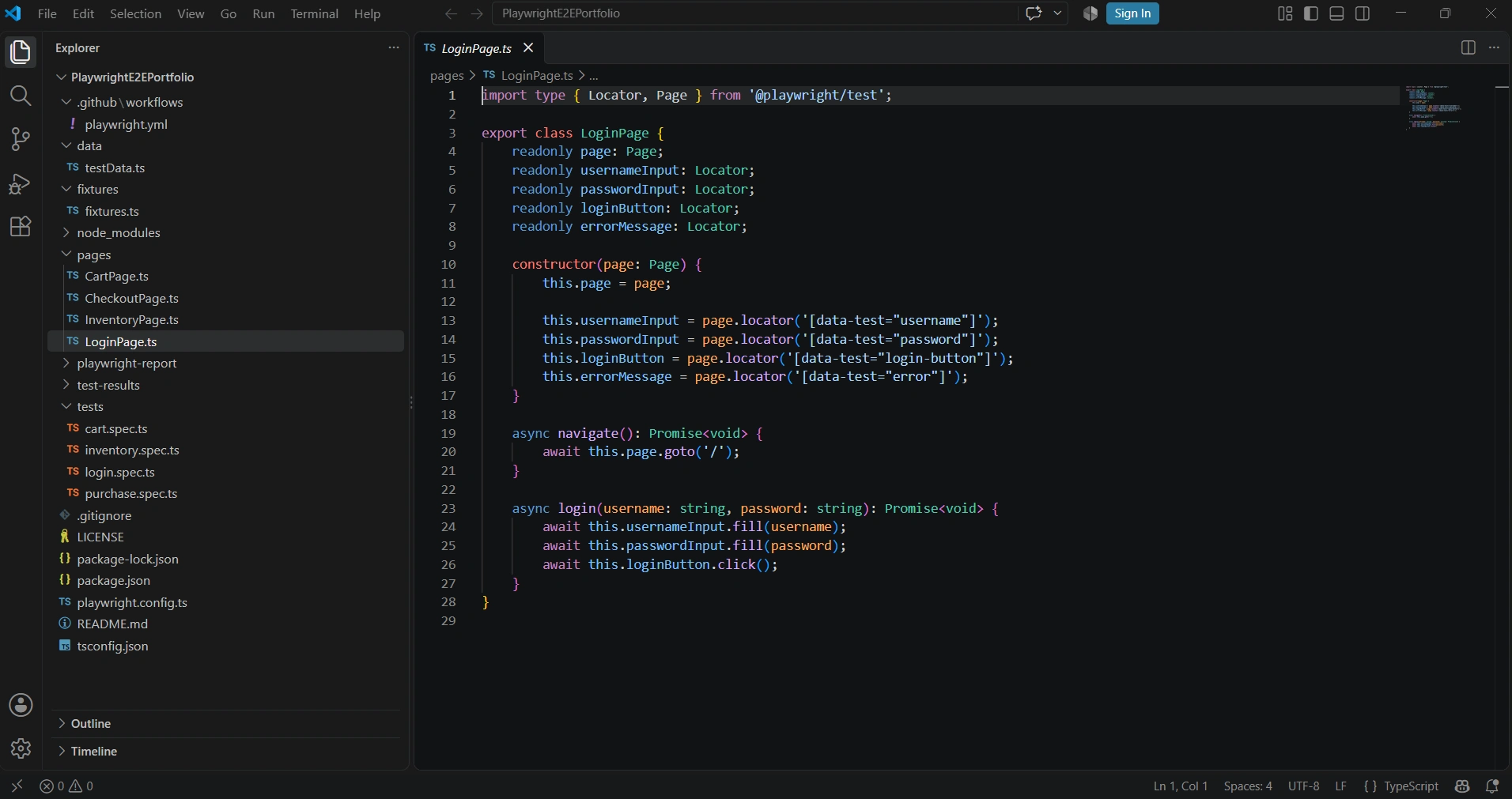
Framework architecture showing the separation of page objects, fixtures, test data, test specifications, configuration, and CI workflow. LoginPage.ts demonstrates the Page Object Model by encapsulating selectors and reusable page interactions.
Framework Architecture & Design
I designed the framework with a clear separation between test scenarios and implementation details. Page objects contain application-specific locators and reusable interactions, while test specifications focus on user behavior and validation. Reusable fixtures provide consistent setup, and test data is maintained separately from the test logic.
This structure reduces duplication and makes the suite easier to maintain as coverage grows. If an application element or interaction changes, the implementation can be updated in the relevant page object without rewriting the tests that depend on it.
Page Objects — Encapsulate locators and reusable application interactions
Test Specifications — Define scenarios, workflow steps, and assertions
Fixtures — Provide reusable test setup and shared dependencies
Test Data — Keep input data separate from automation logic
Configuration — Centralize browser and execution settings
CI Workflow — Execute the automation suite through GitHub Actions
End-to-End Test Coverage
Rather than automating isolated UI actions, I designed the test suite around complete user journeys. The purchase scenario validates the application state throughout the workflow—from product selection and cart verification through checkout, order review, purchase completion, and post-purchase state validation.
Assertions are applied throughout the journey so failures can be identified at the point where application behavior diverges from the expected result.
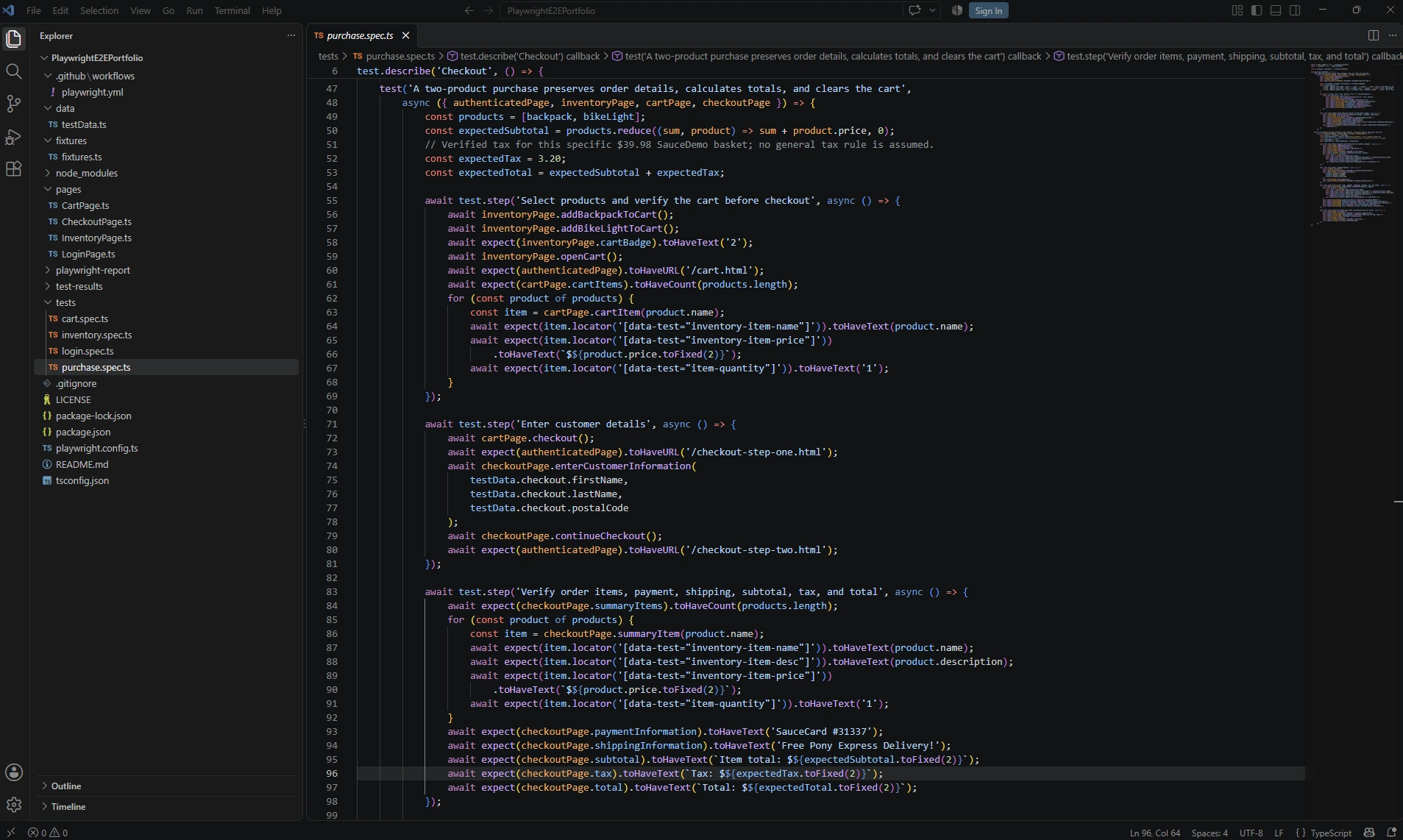
End-to-end purchase scenario validating product selection, cart contents, checkout navigation, customer information, order details, pricing, and calculated totals.
Product selection and cart badge state
Product name, price, and quantity validation
Checkout navigation and customer information
Order item and product description validation
Payment and shipping information
Subtotal, tax, and total verification
Successful order confirmation
Cart reset after purchase
Validation & Negative Testing
A reliable automation suite should validate failure behavior as well as successful workflows. I included negative checkout scenarios to verify that required customer information is enforced correctly and that the application remains in a consistent state when validation fails.
The test exercises each required field independently, verifies the exact validation message, confirms that previously entered values are preserved, and ensures the cart remains intact. It then supplies valid information and verifies that the user can recover from the validation state and continue to order review.
Required first-name validation
Required last-name validation
Required postal-code validation
Exact error-message verification
Entered-value preservation after validation failure
Cart-state preservation
Recovery from invalid input to successful checkout
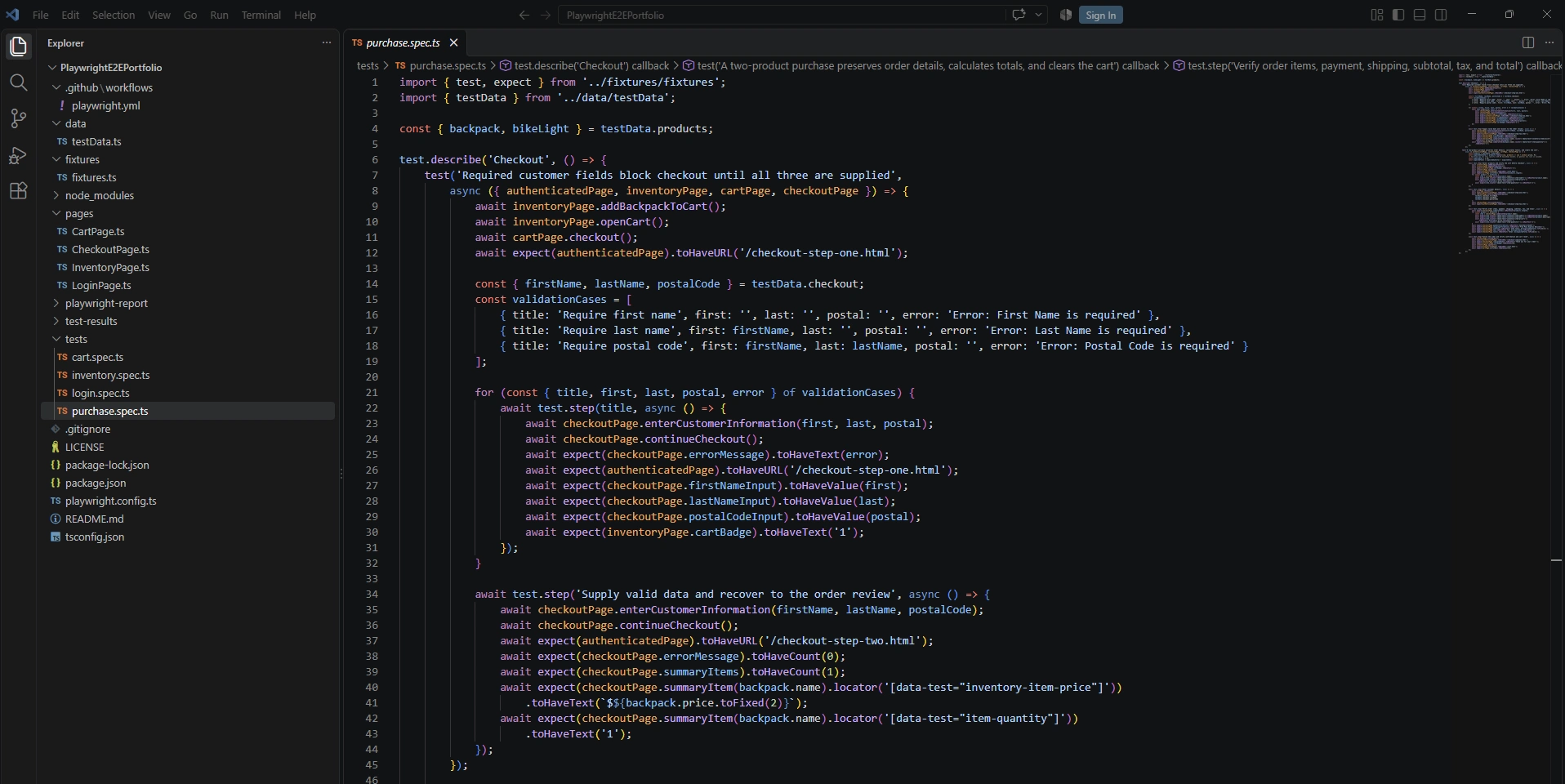
Data-driven checkout validation covering required fields, exact error messages, preserved form and cart state, and successful recovery to order review after valid information is supplied.
Cross-Browser Testing
The framework is configured to execute the same automated test suite across Chromium, Firefox, and WebKit. This provides broader browser coverage without maintaining separate test implementations for each browser engine.
Running identical scenarios across all three projects helps identify browser-specific behavior while keeping the test architecture and assertions consistent. Cross-browser execution is built into the framework configuration rather than handled as separate test suites.
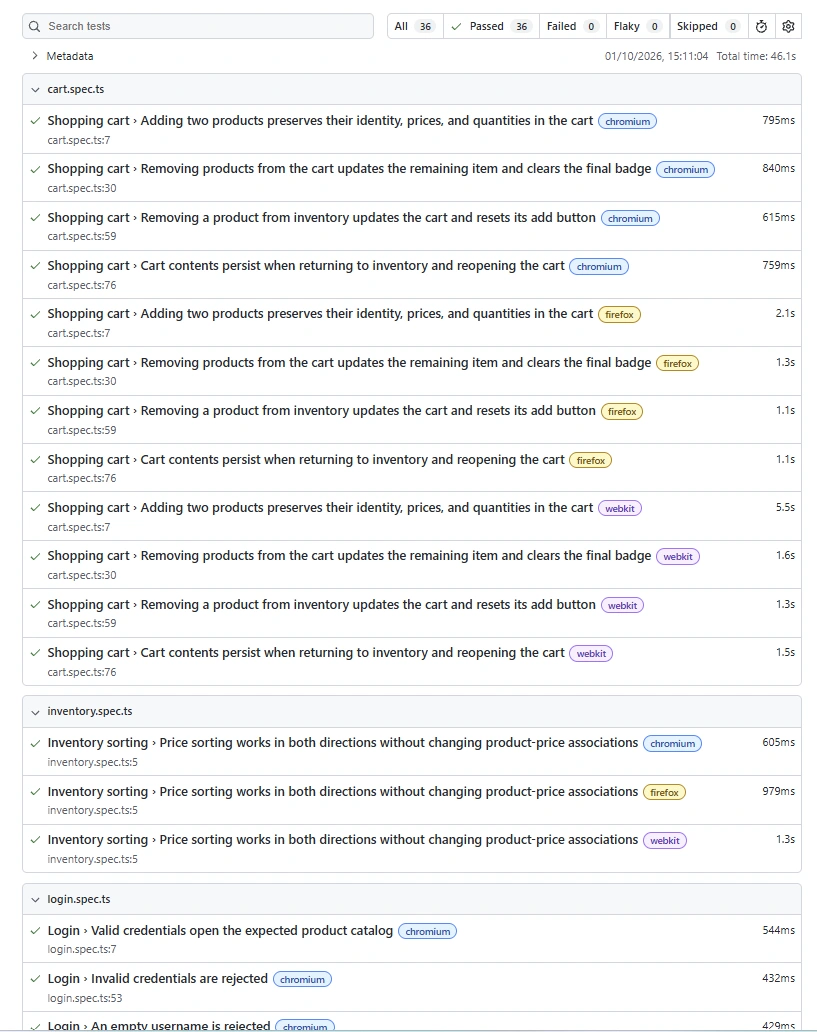
Cross-browser execution report showing 36/36 tests passing across Chromium, Firefox, and WebKit with no failed, flaky, or skipped tests.
Chromium
Firefox
WebKit
36/36 tests passed
0 failed, flaky, or skipped
Same automated scenarios executed across all three browser engines
CI/CD with GitHub Actions
I integrated the automation suite with GitHub Actions so tests can run automatically in a clean CI environment rather than relying only on local execution. The workflow is triggered by pushes and pull requests targeting the main branch and performs dependency installation, browser setup, TypeScript validation, automated test execution, and report generation.
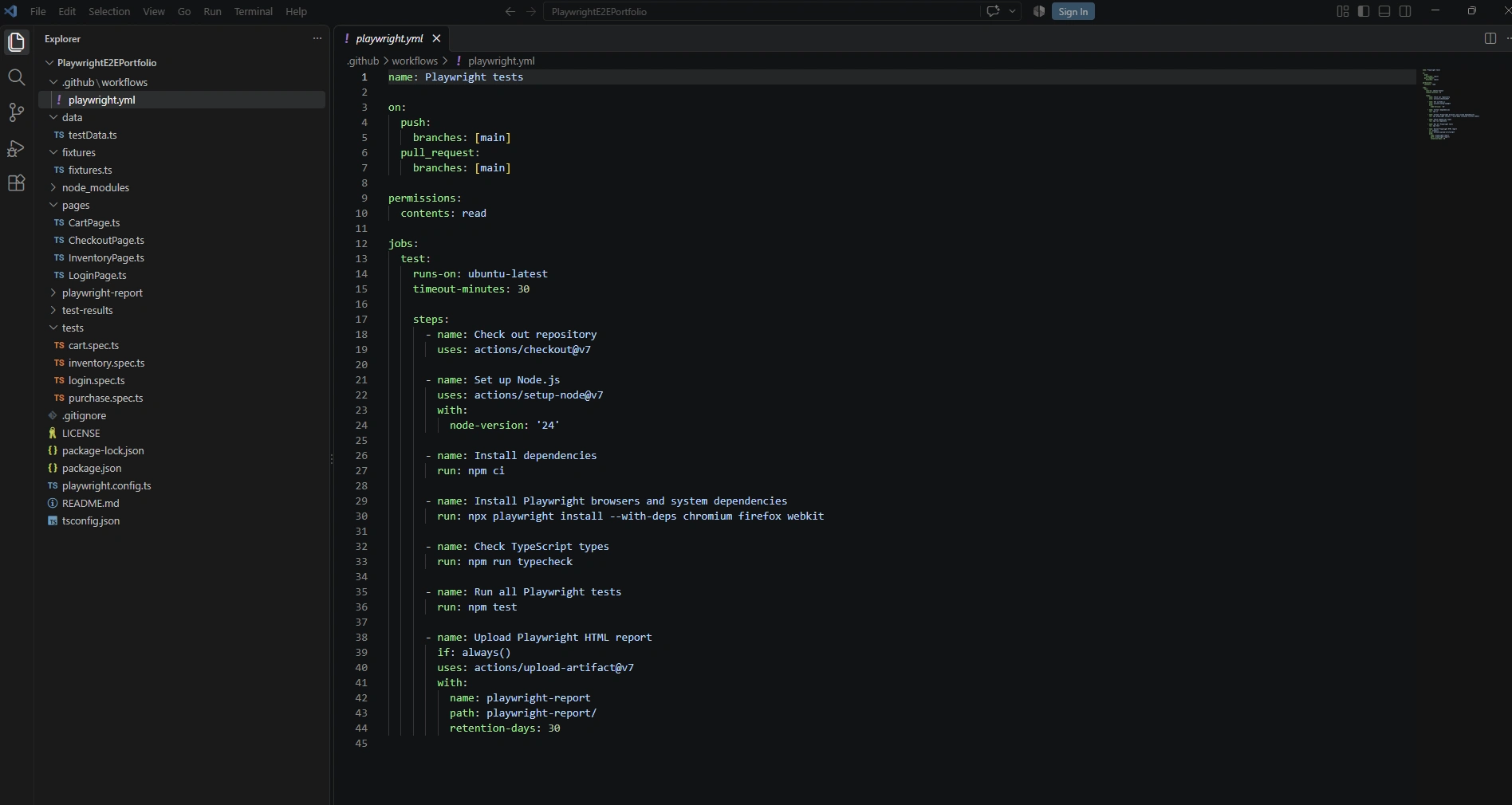
GitHub Actions workflow for automated Playwright execution, including dependency setup, cross-browser installation, TypeScript validation, test execution, and HTML report artifact retention.
The workflow provisions an Ubuntu runner, installs Chromium, Firefox, and WebKit with their required dependencies, validates the TypeScript code, and executes the complete Playwright suite. The HTML report is uploaded regardless of the test outcome, preserving execution evidence for review and troubleshooting.
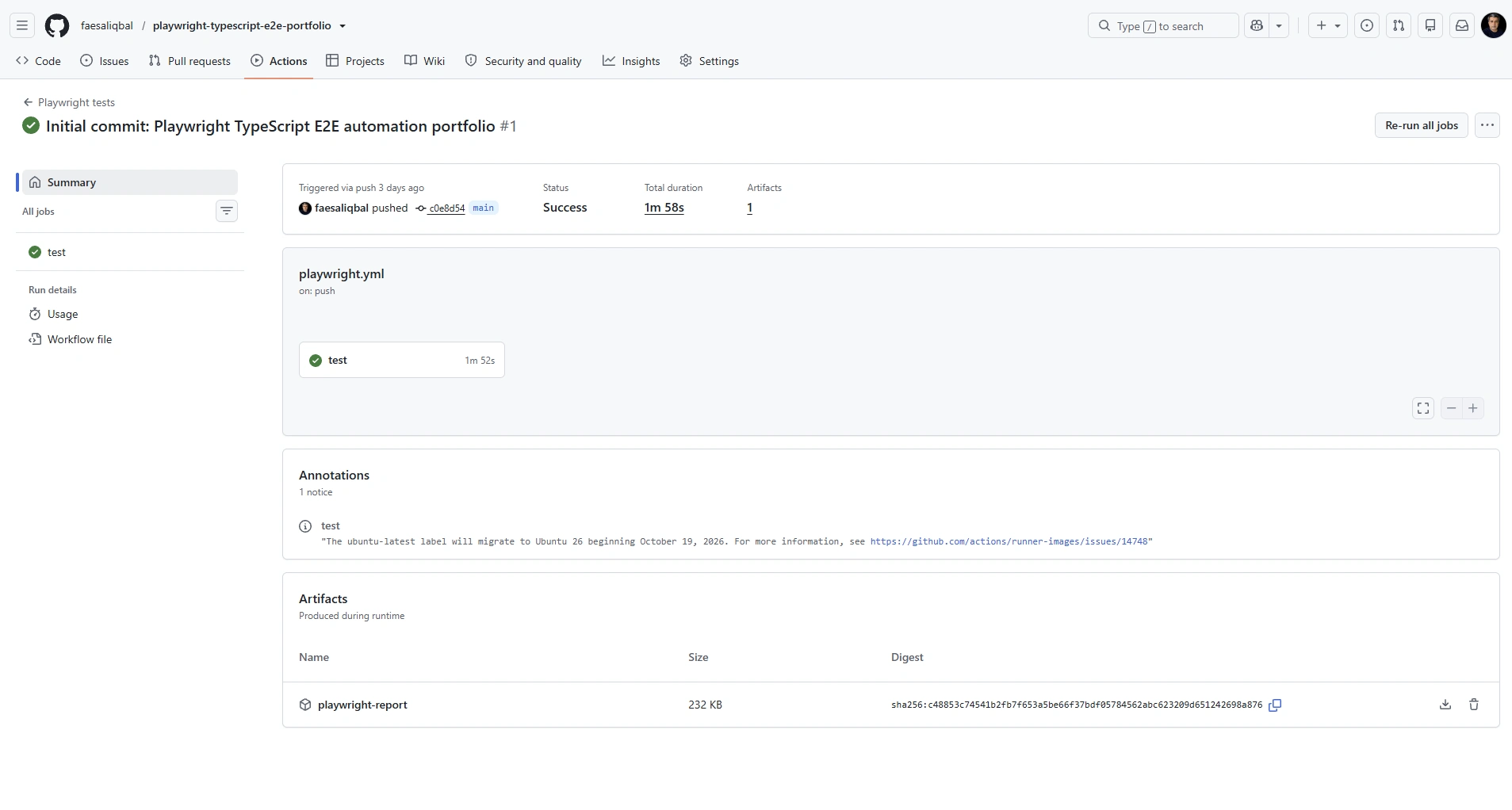
Successful GitHub Actions run showing the completed Playwright test job and generated HTML report artifact.
Test Reporting & Execution Results
I structured the automated scenarios using descriptive test names and logical test steps so execution results remain easy to understand and investigate. Playwright’s HTML report provides scenario-level status, execution time, and a breakdown of each stage in the user journey, making it possible to identify exactly where a failure occurs without reviewing the entire test implementation first.
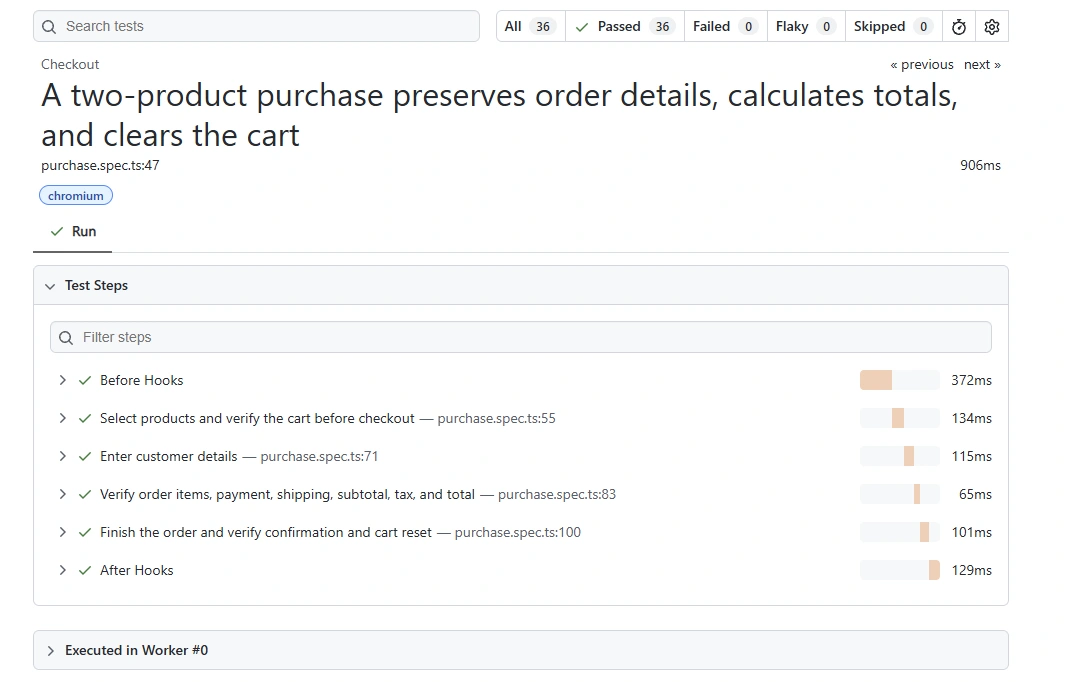
Detailed Playwright HTML report showing the successful purchase scenario broken into logical execution steps, from product selection through order confirmation and cart reset.
This reporting structure makes the automation useful beyond simple pass/fail validation. Each major business action is represented as a distinct test step, providing clearer execution evidence and making failed workflows easier to diagnose.
Reusable Fixtures & Test Data Management
I extended Playwright’s base test with custom fixtures to centralize authentication and page-object initialization. Tests that require an authenticated session receive a ready-to-use page along with the required page objects, reducing repeated setup code and keeping individual test specifications focused on the behavior being validated.
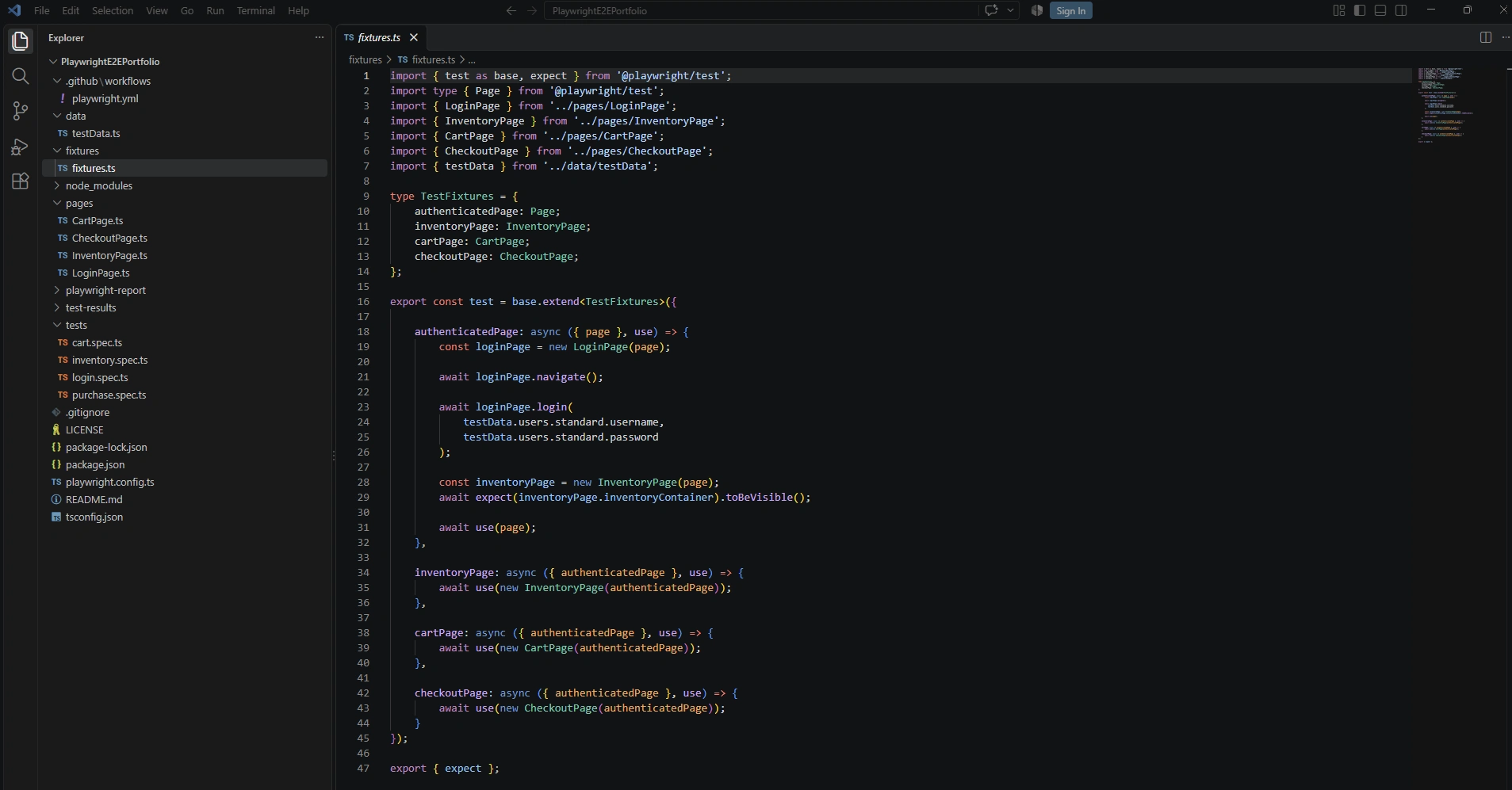
Custom Playwright fixtures centralizing authenticated session setup and reusable page-object initialization for inventory, cart, and checkout workflows.
The
authenticatedPage fixture performs the login flow using centralized test data and verifies that the inventory page is available before exposing the authenticated session to a test. Dependent fixtures then construct the relevant page objects from that session, allowing test scenarios to request only the components they need.Test inputs and expected values are maintained separately from the test specifications in a centralized data module. This includes user variants for authentication scenarios, product metadata used for assertions, and checkout information used throughout the purchase workflow. Keeping these values outside the test logic reduces duplication and makes test data easier to update and reuse.
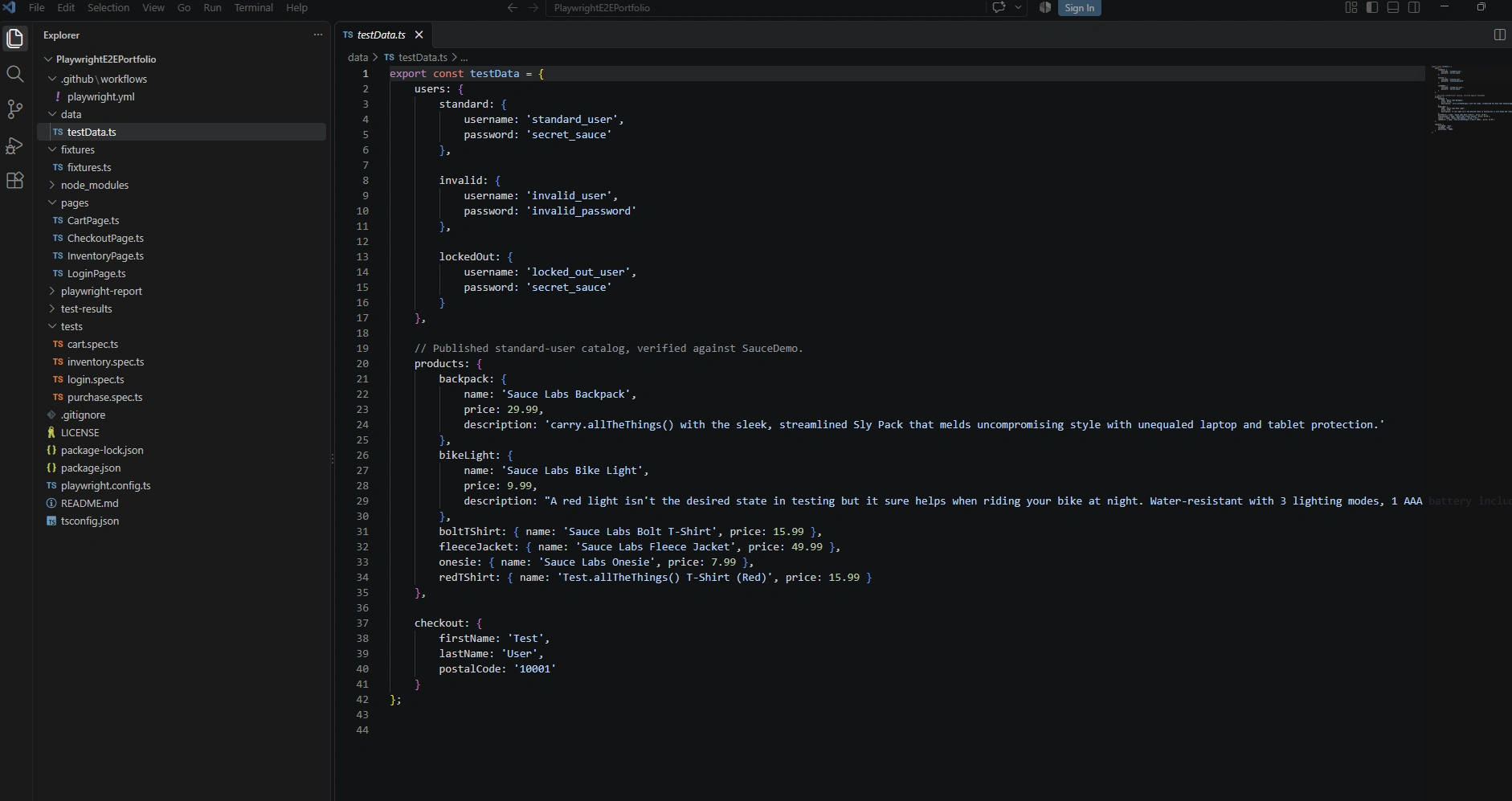
Centralized test data containing authentication variants, expected product metadata, and checkout inputs reused across the automated test suite.
This separation keeps the test specifications concise while providing a single source for reusable inputs and expected values. It also allows the same data to support authentication, inventory, cart, and checkout validations without duplicating values across individual tests.
Results & Outcome
The completed framework demonstrates a maintainable approach to end-to-end web automation rather than a collection of isolated test scripts. It combines reusable page objects, centralized fixtures and test data, realistic business workflows, automated CI execution, and detailed reporting within a single Playwright and TypeScript project.
Structured Page Object Model separating page interactions from test logic
Reusable fixtures providing consistent authenticated test setup
Centralized test data and expected values
End-to-end coverage across authentication, inventory, cart, and checkout workflows
Automated execution through GitHub Actions
Playwright HTML reporting with scenario-level execution details
Successful CI execution with the HTML report retained as an artifact
The result is a framework that is organized for readability, reuse, and extension as test coverage grows. More importantly, the project demonstrates the complete automation lifecycle—from framework design and test implementation through CI execution and result analysis—rather than automation code alone.
Technical Stack
The framework combines Playwright and TypeScript with a maintainable automation architecture, cross-browser execution, continuous integration, and automated reporting.
Automation: Playwright
Language: TypeScript
Design: Page Object Model with reusable custom fixtures
Browsers: Chromium, Firefox, and WebKit
CI/CD: GitHub Actions
Reporting: Playwright HTML Reporter
Runtime: Node.js / npm
Source Control: Git & GitHub
Source Code
The complete implementation is available in the public GitHub repository, including page objects, reusable fixtures, centralized test data, test specifications, Playwright configuration, and the GitHub Actions CI workflow.
Like this project
Posted Oct 4, 2026
Developed a Playwright-based E2E test framework using TypeScript, demonstrating CI integration and cross-browser testing.