Built with Framer
WebGL and Framer Site for Bharat Cybersecurity & AI Summit

Abhishek Aravind (3D Artist & Framer Expert)



Bharat Cybersecurity & AI Summit 2026
A WebGL + Framer Experiment That Became a Full Site in Under 4 Hours
Going through the entire landing page.
Overview
Project Type: Curiosity Project : WebGL & Framer
Role: Framer Developer, 3D Artist, Motion Designer
Tools: Blender, RetinaGL V2 (unreleased & self made :D), Framer, Three.js
Duration: 3 to 3.5 hours
Status: Single landing page, live at india-ai.framer.website
The Question That Started It
I had been sitting on a problem for a while.
WebGL and Framer exist in parallel universes. Framer is where most modern no-code web design lives: fast, expressive, powerful for layout and motion. WebGL is where interactive 3D lives: rich, immersive, technically demanding. But getting the two to talk to each other properly? That had always felt like a workaround rather than a workflow.
I wanted to prove to myself that it did not have to be.
No client asked for this. No brief defined it. I picked a concept that felt appropriately ambitious: a conceptual government-scale AI and cybersecurity summit. Then I decided to build the site I would want to build for it. The goal was not to produce a polished deliverable. The goal was to answer a technical question with something that looked real.
The 3D Asset: Blocking Out India Gate
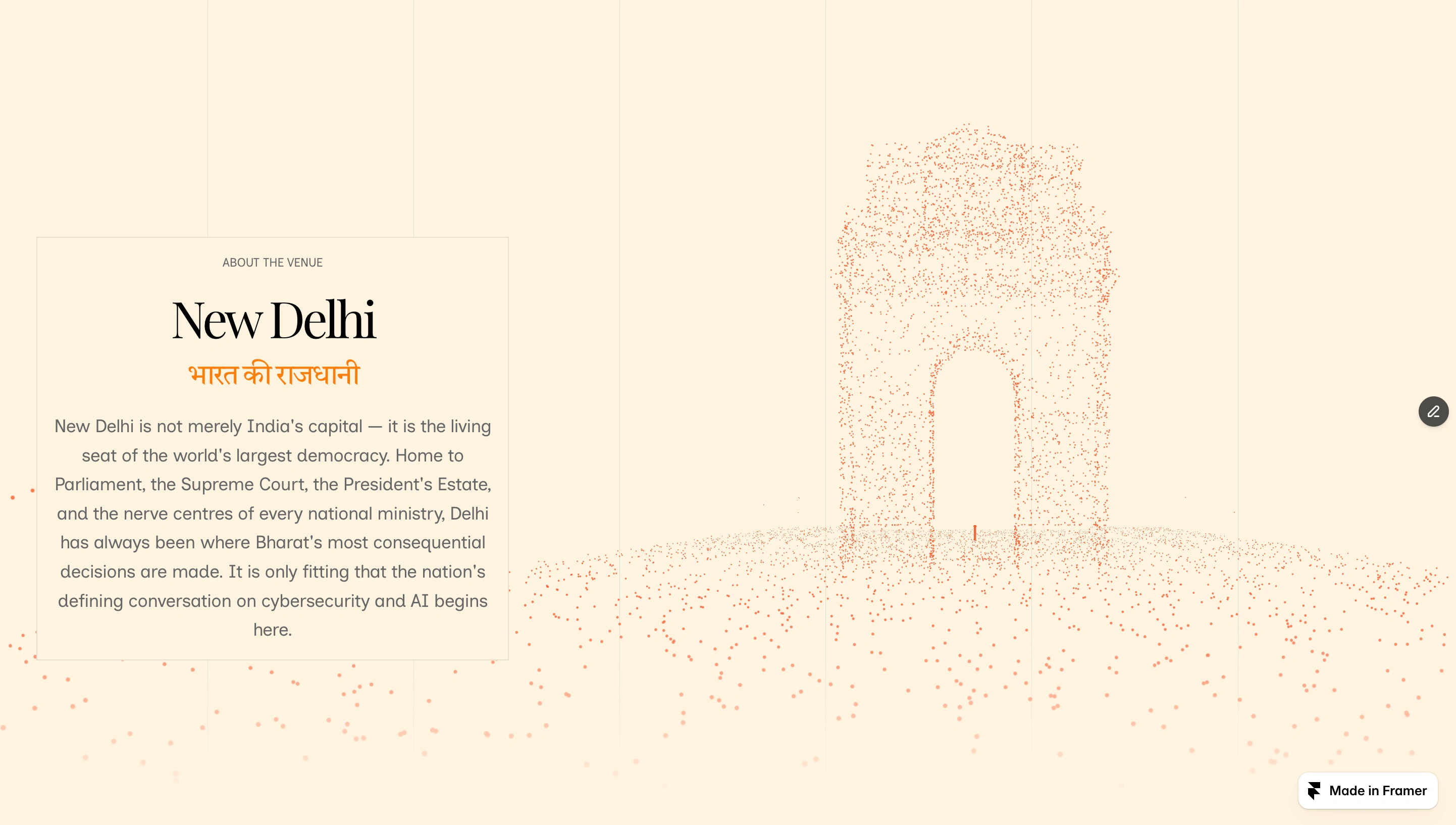
Interactive India Gate as seen on the final website.
The centerpiece of the site is India Gate rendered as a live particle system: thousands of orange particles suspended in the shape of the monument, drifting and settling in real time inside the browser.
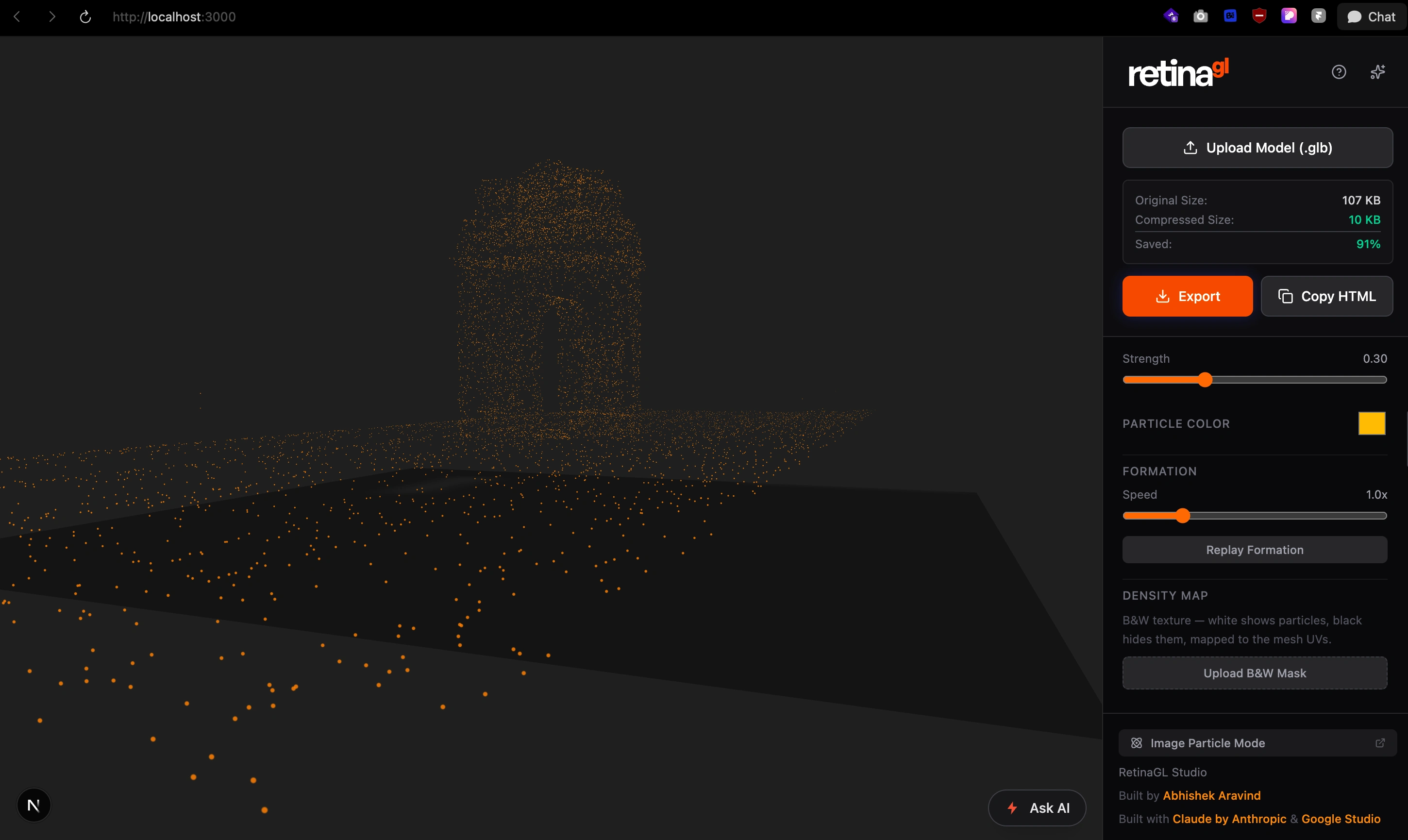
Screenshot of the India Gate scene in progress. Captured in Retina GL V2 running locally.
The first decision was how detailed the 3D model needed to be. The answer: not very.
When you are working with particle effects, the particles are placed automatically on the normals and tangents of the mesh surface. The visual output is determined by the density and distribution of the geometry, not by fine surface detail. A highly detailed model wastes polygons on information that the particle system will never communicate. A well-blocked model gives you clean silhouette and accurate surface distribution at a fraction of the file size.
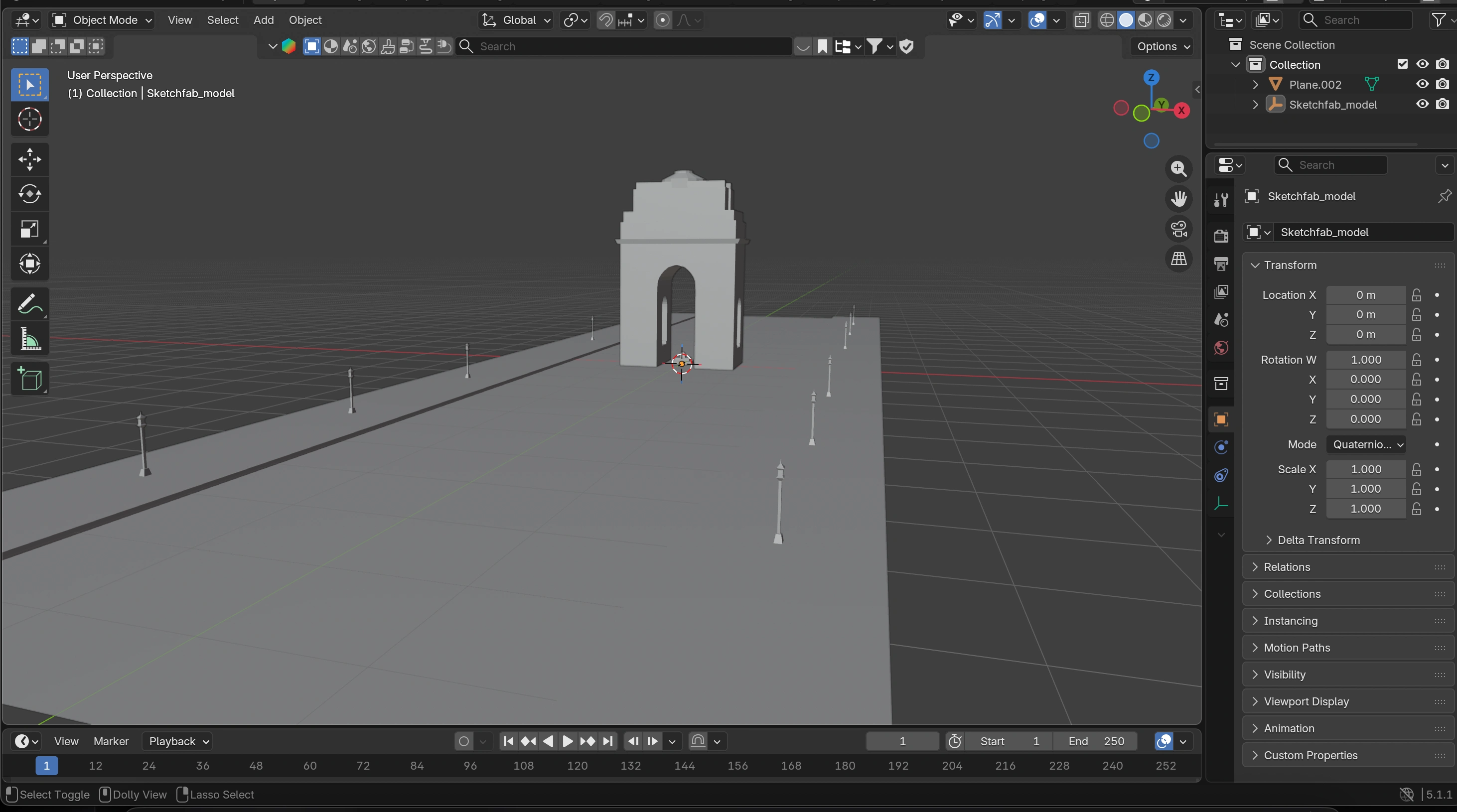
Scene setup inside Blender with imported low poly lamp models from Sketchfab.
So I blocked out India Gate in Blender: the arch, the plinth, the surrounding ground plane. No textures. No intricate geometry. Just the essential form, built to serve the particle system rather than to exist as a standalone render.
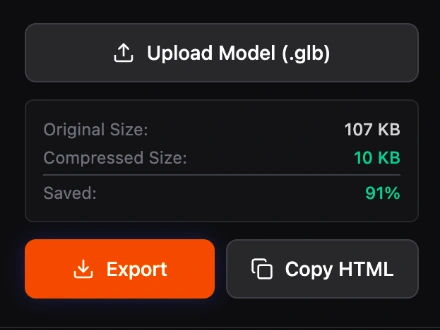
Compressed size of the imported 3D model using Draco Compression built into Retina GL for automatic compressions.
This decision paid off immediately. The model came in at 107KB. After Draco compression through RetinaGL, it compressed to 10KB, a 91% reduction, without any perceptible loss in the particle output.
RetinaGL V2: The Bridge That Made This Possible
RetinaGL is a tool I built to solve the exact problem this project was designed to test. It takes a GLB file, converts it into an interactive particle system, and exports the entire experience as a single self-contained HTML file. No external dependencies. No runtime libraries the browser needs to fetch. One file.
The version used in this project is RetinaGL V2: an unreleased build with significantly more refined particle behavior than the public version. V2 gives more control over particle density, formation speed, and color response, producing a more focused and visually intentional effect than V1.
The workflow looked like this:
Export the blocked-out India Gate model from Blender as a GLB file
Upload it into RetinaGL V2
Adjust particle color to match the site's warm terracotta palette
Set formation strength and speed to feel intentional rather than chaotic
Export as a single HTML file
Drop that file into Framer as a custom embed component
From model export to live embed: under 30 minutes.
The particle effect that appears on the site (India Gate assembling itself from scattered points, holding its form, alive in the browser) is running entirely inside that single exported HTML file. Framer does not know it is 3D. It just sees a component.
Building in Framer: Typography, Layout, Motion
With the 3D element solved, the rest of the site came together around it.
The design direction was rooted in restraint. A warm cream background (the kind you associate with archival documents and government stationery) gave the site gravity without heaviness. The typography paired a large serif display face for the summit name with clean, readable body text for supporting content. The orange accent color was pulled directly from the particle system, creating a visual thread between the 3D element and every other detail on the page.
The hero section puts the summit name front and center above the fold, with the India Gate particle system emerging from below: as if the monument itself is materializing beneath the title. It is the kind of moment that is difficult to describe in a screenshot but immediately legible in the browser.
The venue section pairs copy about New Delhi with a full-height view of the India Gate particle render, letting the 3D element breathe at a scale that communicates what it actually is. The bilingual treatment (English and Devanagari) was a deliberate nod to the summit's national character.
Layout decisions throughout prioritized negative space and editorial confidence over information density. This is a landing page for an event that has not happened. It needs to feel like an institution, not a startup.
What 3.5 Hours Actually Looks Like
The time broke down roughly like this:
Blender blockout and export: 45 to 60 minutes. Getting the proportions of India Gate right, making sure the ground plane read correctly in particle form, and optimizing the geometry for export.
RetinaGL processing and tuning: 20 to 30 minutes. Uploading, adjusting particle parameters, previewing the formation, exporting the HTML file.
Framer layout and typography: 60 to 75 minutes. Building the page structure, setting up the type scale, placing the WebGL embed, handling responsive behavior.
Visual refinement: 30 to 45 minutes. Color tuning, spacing, the bilingual type treatment, making sure every section felt considered rather than assembled.
Total: somewhere between 3 and 3.5 hours, start to finish.
That pace was only possible because the technical decisions at each stage were clean. The blockout model did not need rework. RetinaGL handled the complexity of the WebGL output. Framer handled the layout without fighting the embed. Each tool did its job and got out of the way.
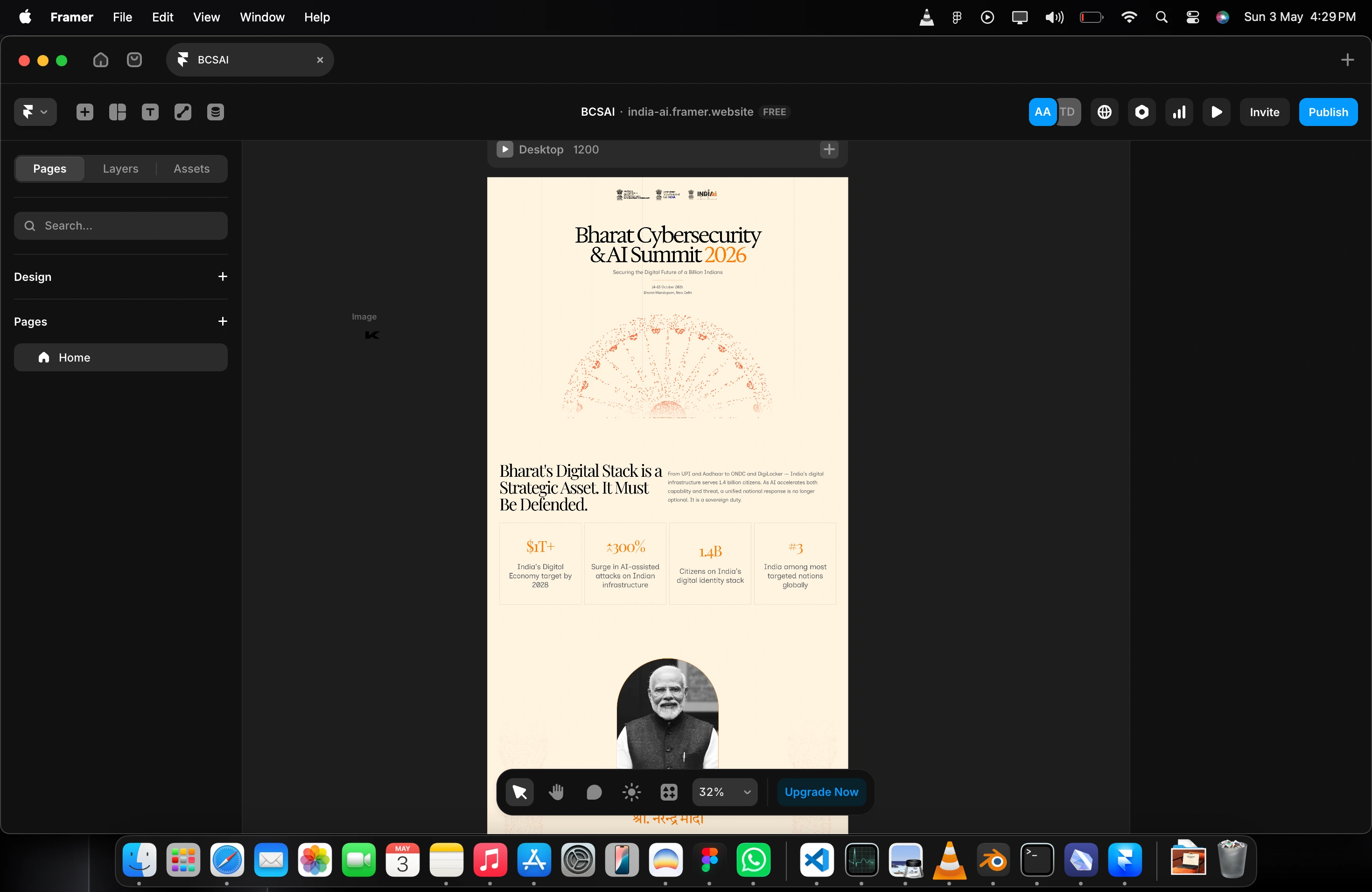
Framer workspace of the project.
What This Project Proved
The original question was whether WebGL and Framer could actually work together: not as a hack, but as a real workflow.
The answer is yes. Unambiguously.
The key insight is that the bridge matters more than either tool individually. RetinaGL exists specifically to compress and export 3D experiences as portable HTML, which means any platform that accepts a custom embed (including Framer) can host a live WebGL experience without touching a line of Three.js inside the project itself.
This opens up a category of Framer sites that simply did not feel accessible before. Not just scroll animations and Lottie files, but genuine 3D (interactive, GPU-rendered, responsive to particle physics) living inside a no-code layout.
The Bharat Cybersecurity & AI Summit site is a proof of concept. But it is also a finished thing. It looks like something that could ship. That matters as much as the technical answer it provides.
Stack
Blender: 3D blockout and GLB export
RetinaGL V2: Particle system conversion, Draco compression, single-file HTML export
Three.js: Underlying WebGL renderer inside the RetinaGL export
Framer: Layout, typography, responsive design, custom embed
Draco Compression: 107KB to 10KB, 91% size reduction
Links
Live site: india-ai.framer.website
RetinaGL: retina-gl.vercel.app
Like this project
Posted May 3, 2026
Conceptual conference site exploring WebGL integration inside Framer. Live 3D particle system powered by RetinaGL, a custom-built rendering and export tool.