LinkedIn Post Automation with AI and Canva

Sasikala Sundaram

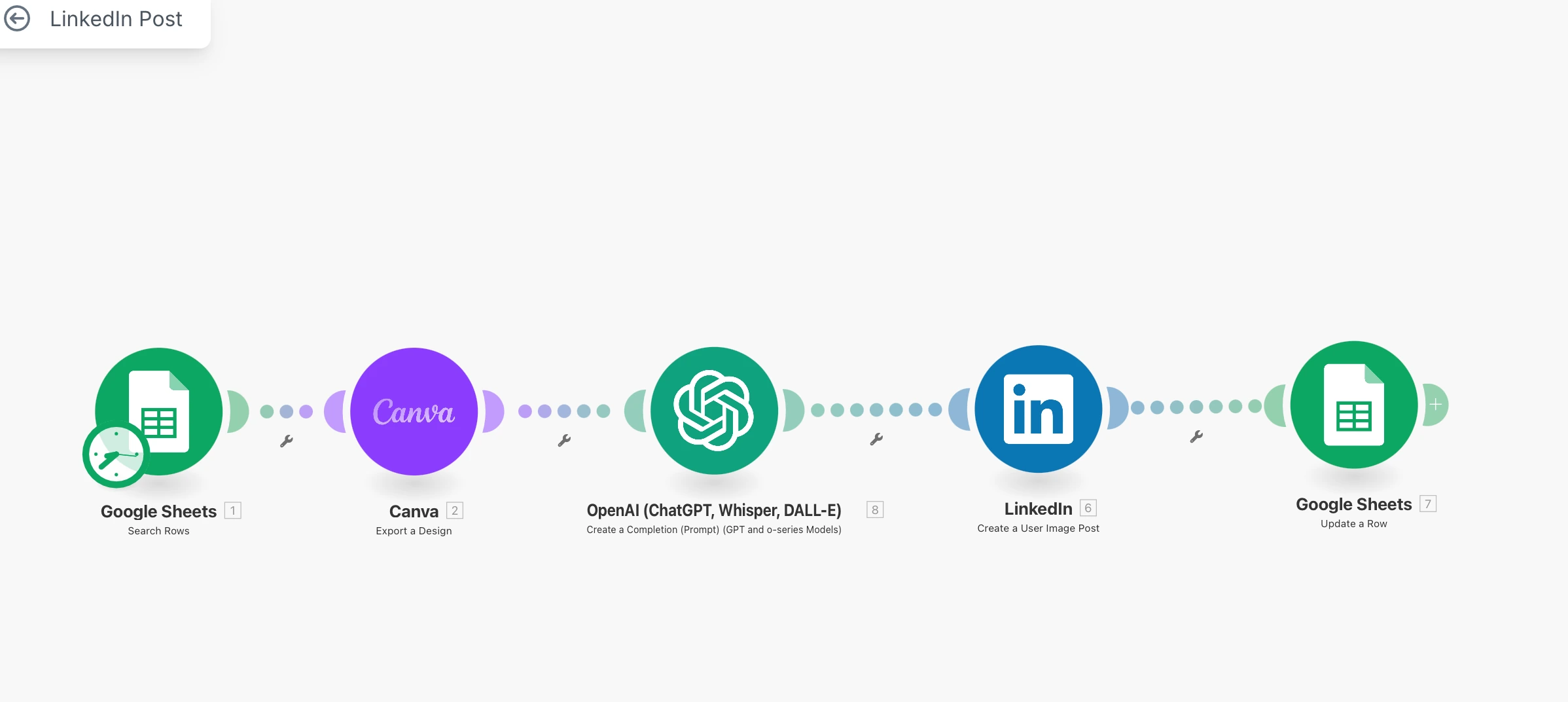
Automate LinkedIn post - Automatically generate engaging LinkedIn posts by combining AI-generated captions (via OpenAI) with eye-catching Canva-designed banners. This automation pulls content ideas, creates text with OpenAI, overlays or attaches a Canva visual, and schedules or posts directly to LinkedIn—saving time and keeping your content consistent and professional.
1. Google Sheets – Content Input
Enter post topics, image prompts, and scheduling info into a Google Sheet.
Columns may include: Topic, Image Prompt, Post Date, Status, etc.
2. Canva – Banner Creation
Use Canva templates to auto-generate branded banners.
Export banner URLs and add them back into the Google Sheet.
3. OpenAI (DALL·E) – Image Generation
Use OpenAI to build a LinkedIn post based not he topic and Use image prompts from the sheet to generate unique visuals via DALL·E.
Add the generated image URLs to the sheet.
4. LinkedIn – Post Automation
Combine captions, Canva banners, and/or DALL·E images.
Automatically publish to LinkedIn using LinkedIn API or tools like Make.com.
5. Google Sheets – Store Results
Update the sheet with post status and performance metrics (likes, views, comments) pulled from LinkedIn.
Saves Time & Effort: Automates repetitive tasks like content creation, image generation, and posting—freeing you to focus on strategy and engagement.
Ensures Consistency: Maintains a unified brand voice and visual style across posts with structured planning and templated design.
Tracks Performance Easily: Centralizes post history and LinkedIn analytics in Google Sheets for quick review and continuous improvement.
Like this project
Posted Jun 11, 2025
Automated LinkedIn posts using AI and Canva for engaging content.
Likes
0
Views
15
Timeline
May 29, 2025 - Jun 5, 2025