Pigent AI Machine Learning Trading Signal System

Valentine Cheluchi


A comprehensive machine learning system for generating trading signals (Buy/Sell/Hold) for forex and cryptocurrency instruments using the OANDA API. This project provides a complete pipeline from data collection to production deployment with automated model retraining and promotion.
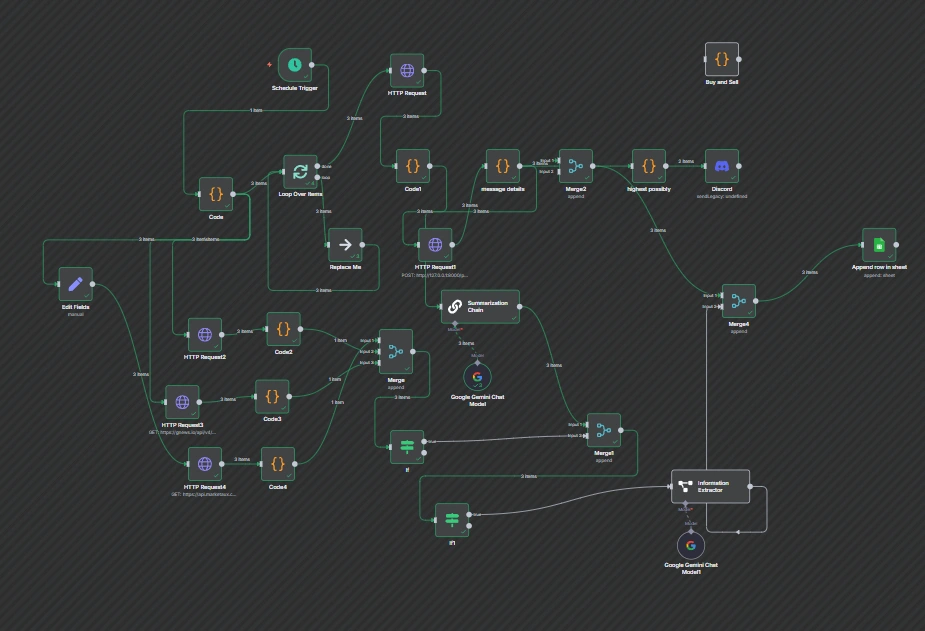
Table of Contents
Overview
This system implements an end-to-end machine learning workflow for forex/crypto trading signal generation:
Data Collection: Fetches historical candle data from OANDA API
Feature Engineering: Computes technical indicators (RSI, MACD, Bollinger Bands, etc.)
Labeling: Automatically labels data for supervised learning based on future price movements
Training: Trains a Random Forest classifier with class balancing
Evaluation: Generates detailed metrics and classification reports
Promotion: Automatically promotes better models to production
Serving: FastAPI-based inference service for real-time predictions
✅ Multi-instrument support: Works with forex pairs (EUR/USD, GBP/JPY) and crypto (BTC/USD, XAU/USD)
✅ Comprehensive technical indicators: Moving averages, RSI, ATR, Bollinger Bands, MACD, pullback analysis
✅ Time-series aware: Session-based features and proper time-based train/test splits
✅ Automated pipeline: Single command to run the entire workflow
✅ Model versioning: Timestamped models with automatic archiving
✅ Smart promotion: Rule-based model promotion with metric thresholds
✅ Production-ready: FastAPI service with health checks and confidence scores
✅ Windows PowerShell integration: Scripts for service management
Architecture
graph TD
OANDA[OANDA API] --> fetch_candles;
fetch_candles[fetch_candles.py] --> compute_features;
compute_features[compute_features.py] --> label_data;
label_data[label_data.py] --> split_data;
split_data[split_data.py] --> train_model;
train_model[train_model.py] --> promote_if_better;
promote_if_better[promote_if_better.py] --> inference_service;
promote_if_better --> archive(Archive Old Model);
train_model --> archive(Archive Old Model);
inference_service[inference_service.py]
Note: The original ASCII diagram is replaced with a more readable Mermaid diagram above.
Python: 3.8+ (tested with 3.13)
Operating System: Windows (PowerShell scripts), but Python scripts are cross-platform
OANDA Account: Practice or live account with API access
Storage: ~500MB for virtual environment and model files
Installation
1. Clone or Download the Project
cd C:\Users\ADMIN\Desktop\fx_model_duplicate
2. Create Virtual Environment
python -m venv venv
.\venv\Scripts\Activate.ps1
3. Install Dependencies
pip install pandas numpy scikit-learn requests fastapi uvicorn pydantic joblib
Dependency List:
pandas>=2.3.1 - Data manipulation
numpy>=2.3.2 - Numerical computing
scikit-learn>=1.7.1 - Machine learning
requests>=2.32.4 - HTTP client for OANDA API
fastapi>=0.116.1 - Web framework for inference service
uvicorn>=0.35.0 - ASGI server
pydantic>=2.11.7 - Data validation
joblib>=1.5.1 - Model serialization
4. Configure OANDA Credentials
Copy the example credentials file and add your API keys:
# Copy the template
copy oanda_credentials.json.example oanda_credentials.json
# Then edit oanda_credentials.json with your credentials
Your oanda_credentials.json should look like:
{
"account_id": "YOUR-OANDA-ACCOUNT-ID",
"api_key": "YOUR-OANDA-API-KEY"
}
⚠️ IMPORTANT: Never commit oanda_credentials.json to version control. It's already in .gitignore to prevent accidental commits.
Environment Variables (Optional)
You can override credentials using environment variables:
$env:OANDA_API_KEY="your-api-key"
$env:OANDA_ACCOUNT_ID="your-account-id"
Customizable Parameters
In fetch_candles.py:
BASE_URL: Switch between practice (https://api-fxpractice.oanda.com/v3) and live (https://api-fxtrade.oanda.com/v3)
In compute_features.py:
SESSION_WINDOWS: Trading session time ranges (UTC hours)
Technical indicator periods (SMA50, SMA200, RSI14, ATR14, etc.)
LOOKAHEAD_BARS: Number of future bars to analyze (default: 24 = 2 hours on M5)
TARGET_PCT: Threshold for signal generation (default: 0.001 = 0.1%)
n_estimators: Number of trees in Random Forest (default: 200)
max_depth: Maximum tree depth (default: 7)
Train/test split ratio (default: 80/20)
In promote_if_better.py:
--min-improve-macro-f1: Minimum F1 improvement for promotion (default: 0.01)
--max-drop-recall: Maximum allowed recall drop per class (default: 0.02)
Quick Start
Option 1: Run Full Pipeline (Recommended)
# Activate virtual environment
.\venv\Scripts\Activate.ps1
# Run complete pipeline for a symbol
python run_pipeline.py --symbol GBP_JPY --count 5000
# Run for multiple symbols (process each separately)
python run_pipeline.py --symbol XAU_USD
python run_pipeline.py --symbol BTC_USD
python run_pipeline.py --symbol EUR_AUD
Option 2: Run Individual Steps
# 1. Fetch data
python fetch_candles.py --symbol GBP_JPY --count 5000
# 2. Compute features
python compute_features.py --symbol GBP_JPY
# 3. Label data
python label_data.py
# 4. Split data
python split_data.py
# 5. Train model
python train_model.py
# 6. Promote if better
python promote_if_better.py --new-model fx_signal_model_new_20250924_214648.pkl --metrics latest_metrics.json
Option 3: Start Inference Service
# Start the service
.\start_inference.ps1
# Or manually
python inference_service.py
# Test the service
curl -X POST http://localhost:8000/predict -H "Content-Type: application/json" -d @test_features.json
Usage
Running the Full Pipeline
The run_pipeline.py script orchestrates the entire workflow:
python run_pipeline.py --symbol <SYMBOL> [OPTIONS]
Arguments:
--symbol: Required. Instrument symbol (e.g., XAU_USD, GBP_JPY, BTC_USD, EUR_AUD)
--count: Number of candles to fetch (default: 5000)
--granularity: OANDA granularity (default: M5)
--project-dir: Project directory path (default: current directory)
--no-train: Stop after data split, don't retrain model
--skip-split: Skip the data splitting step
Example:
# Full pipeline with custom parameters
python run_pipeline.py --symbol EUR_AUD --count 10000 --granularity M5
# Fetch and process data only (no training)
python run_pipeline.py --symbol GBP_JPY --no-train
Fetches historical OHLCV candle data from OANDA API.
python fetch_candles.py --symbol <SYMBOL> --out <OUTPUT_CSV> [OPTIONS]
Arguments:
--symbol: Instrument symbol (e.g., GBP_JPY)
--out: Output CSV file path (default: <SYMBOL>_M5_history.csv)
--count: Number of candles (default: 5000, max: 5000 per request)
--granularity: Candle timeframe (M5, M15, H1, etc.)
--creds: Path to credentials file (default: oanda_credentials.json)
Output Format:
time,open,high,low,close,volume
2. compute_features.py
Computes technical indicators and features from raw candle data.
# Single file mode
python compute_features.py --in <INPUT_CSV> --out <OUTPUT_CSV>
# Symbol mode
python compute_features.py --symbol <SYMBOL>
# Multiple symbols
python compute_features.py --symbols XAU_USD,BTC_USD,GBP_JPY
Features Computed:
Moving Averages: SMA50, SMA200, TrendDiff
Momentum: RSI14, MACD_Hist
Volatility: ATR14, BB_Width
Bands: BB_Upper, BB_Lower, PctB (Percent B)
Pullbacks: PullbackPctHigh, PullbackPctLow
Sessions: Session1 (14:00-17:00 UTC), Session2 (19:00-22:00 UTC)
Labels feature data based on future price movements.
python label_data.py
Labeling Logic:
Label = 1 (Buy): If price increases by ≥0.1% within next 24 bars (2 hours)
Label = -1 (Sell): If price decreases by ≤−0.1% within next 24 bars
Label = 0 (Hold): Otherwise
Automatically processes all *_M5_features.csv files in the current directory.
4. split_data.py
Combines labeled data and creates time-based train/test splits.
python split_data.py [OPTIONS]
Arguments:
--dir: Directory containing labeled files (default: current directory)
--pattern: Glob pattern for labeled files (default: *_M5_labeled.csv)
--test_frac: Test set fraction (default: 0.2 = 20%)
Output Files:
X_train.csv: Training features
X_test.csv: Test features
y_train.csv: Training labels
y_test.csv: Test labels
Trains a Random Forest classifier on the combined dataset.
python train_model.py
Model Configuration:
Algorithm: Random Forest Classifier
Trees: 200
Max Depth: 7
Class Weight: Balanced (handles class imbalance)
Random State: 42 (reproducibility)
Outputs:
fx_signal_model_new_<timestamp>.pkl: Trained model file
latest_metrics.json: Evaluation metrics (JSON)
latest_metrics.txt: Classification report (text)
latest_model_pointer.txt: Pointer to the latest model
Compares new model against production model and promotes if better.
python promote_if_better.py --new-model <MODEL_FILE> --metrics <METRICS_JSON> [OPTIONS]
Arguments:
--new-model: Path to newly trained model
--metrics: Path to metrics JSON
--prod-model: Production model path (default: fx_signal_model.pkl)
--min-improve-macro-f1: Minimum F1 improvement (default: 0.01)
--max-drop-recall: Maximum allowed recall drop per class (default: 0.02)
--restart-cmd: Command to restart inference service (optional)
Promotion Rules:
Macro F1 score must improve by at least min-improve-macro-f1
No per-class recall can drop by more than max-drop-recall
If no production model exists, auto-promote
Example:
python promote_if_better.py \
--new-model fx_signal_model_new_20250924_214648.pkl \
--metrics latest_metrics.json \
--restart-cmd "powershell -File restart_inference.ps1"
Starting the Service
# Using PowerShell script (recommended for Windows)
.\start_inference.ps1
# Manual start
python inference_service.py
# With custom port
uvicorn inference_service:app --host 0.0.0.0 --port 9000
API Endpoint
POST /predict
Request body (JSON):
{
"symbol": "GBP_JPY",
"time": "2025-10-09T14:35:00",
"open": 191.234,
"high": 191.456,
"low": 191.123,
"close": 191.345,
"volume": 1500,
"SMA50": 190.5,
"SMA200": 189.8,
"TrendDiff": 0.7,
"RSI14": 55.3,
"ATR14": 0.15,
"BB_Upper": 192.0,
"BB_Lower": 190.0,
"BB_Width": 0.01,
"MACD_Hist": 0.05,
"PctB": 0.65,
"PullbackPctHigh": 0.005,
"PullbackPctLow": 0.003,
"Session1": 1,
"Session2": 0
}
Response:
{
"timestamp": "2025-10-09T14:35:10",
"bar_time": "2025-10-09T14:35:00",
"symbol": "GBP_JPY",
"label": 1,
"signal": "Buy",
"probabilities": [0.15, 0.25, 0.60],
"confidence": 0.60,
"RSI14": 55.3,
"TrendDiff": 0.7,
"close": 191.345
}
Signal Mapping:
-1: Sell
0: Hold
1: Buy
Project Structure
fx_model_duplicate/
├── run_pipeline.py # Main orchestration script
├── fetch_candles.py # Data collection from OANDA
├── compute_features.py # Feature engineering
├── label_data.py # Data labeling
├── split_data.py # Train/test splitting
├── train_model.py # Model training
├── promote_if_better.py # Model promotion logic
├── inference_service.py # FastAPI inference server
├── oanda_credentials.json # OANDA API credentials
├── latest_model_pointer.txt # Points to latest trained model
├── latest_metrics.json # Latest model metrics
├── retrain_log.csv # Model training history
├── fx_signal_model.pkl # Production model
├── fx_signal_model_new_*.pkl # Newly trained models (timestamped)
├── *_M5_history.csv # Raw candle data per symbol
├── *_M5_features.csv # Feature data per symbol
├── *_M5_labeled.csv # Labeled data per symbol
├── X_train.csv, y_train.csv # Training data (combined)
├── X_test.csv, y_test.csv # Test data (combined)
├── models/
│ └── archive/ # Archived production models
│ └── fx_signal_model_*.pkl
├── start_inference.ps1 # Start inference service (Windows)
├── stop_inference.ps1 # Stop inference service (Windows)
├── restart_inference.ps1 # Restart inference service (Windows)
└── venv/ # Python virtual environment
Technical Details
The system computes 19 features from raw OHLCV data:
Feature
Description
Purpose
open, high, low, close, volume
Raw price data
Base features
SMA50
50-period Simple Moving Average
Medium-term trend
SMA200
200-period Simple Moving Average
Long-term trend
TrendDiff
SMA50 - SMA200
Trend strength indicator
RSI14
14-period Relative Strength Index
Momentum/overbought-oversold
ATR14
14-period Average True Range
Volatility measure
BB_Upper
Bollinger Band upper boundary
Price ceiling ()
BB_Lower
Bollinger Band lower boundary
Price floor (2σ)
BB_Width
Bollinger Band width normalized
Volatility indicator
MACD_Hist
MACD histogram (12-26-9)
Momentum divergence
PctB
Percent B position in bands
Relative band position
PullbackPctHigh
Distance from 20-bar swing high
Pullback from resistance
PullbackPctLow
Distance from 20-bar swing low
Pullback from support
Session1
Session 1 active (14:00-17:00 UTC)
Time-of-day feature
Session2
Session 2 active (19:00-22:00 UTC)
Time-of-day feature
The labeling logic uses a forward-looking approach:
LOOKAHEAD_BARS = 24 # 2 hours on M5 chart
TARGET_PCT = 0.001 # 0.1% price movement
For each bar:
Look ahead 24 bars (2 hours)
Find maximum and minimum close prices in that window
Calculate percentage change from current close
Assign label: - +1 (Buy) if max(future_close)≥+0.1% - -1 (Sell) if min(future_close)≤−0.1% - 0 (Hold) otherwise
This approach ensures labels reflect actionable price movements while avoiding label overlap.
Algorithm: Random Forest Classifier
Key Parameters:
n_estimators=200: 200 decision trees (balances performance and accuracy)
max_depth=7: Prevents overfitting
class_weight='balanced': Handles class imbalance automatically
random_state=42: Ensures reproducibility
Training Process:
Combines all labeled data from multiple symbols
Sorts by timestamp to maintain temporal order
Splits chronologically (80% train, 20% test)
Trains Random Forest on training set
Evaluates on held-out test set
Generates classification report and confusion matrix
Evaluation Metrics:
Precision, Recall, F1-score per class
Macro-averaged F1 score
Overall accuracy
Confusion matrix
Per-class recall for all signal types
Model Management
Models are automatically versioned with timestamps:
fx_signal_model_new_20250924_214648.pkl
YYYYMMDD_HHMMSS
Promotion Workflow
New Model Trained
Compare Metrics
├─ Macro F1 improved? ─No──▶ REJECT (log reason)
│ │
Yes │
│ │
▼ │
Per-class Recall OK? ─No───────────┤
│ │
Yes │
│ ▼
PROMOTE Write to retrain\_log.csv
├─ Archive old model
├─ Atomic replace fx_signal_model.pkl
├─ Save production metrics
└─ Optional: restart service
Retraining Log
All training runs are logged to retrain_log.csv:
timestamp,new_model_path,promoted,reason,macro_f1_new,macro_f1_prod,...
2025-10-09T14:35:10,fx_signal_model_new_20250924_214648.pkl,Y,"macro_f1 improved by 0.0234",0.6789,0.6555,...
This provides an audit trail for model performance over time.
API Documentation
Inference Service Endpoints
Description: Generate trading signal from features
Request Headers:
Content-Type: application/json
Request Schema:
All numeric features are required. symbol and time are optional metadata.
{
open: number,
high: number,
low: number,
close: number,
volume: number,
SMA50: number,
SMA200: number,
BB_Upper: number,
BB_Lower: number,
BB_Width: number,
RSI14: number,
MACD_Hist: number,
PctB: number,
ATR14: number,
TrendDiff: number,
PullbackPctHigh: number,
PullbackPctLow: number,
Session1: 0 | 1,
Session2: 0 | 1,
symbol?: string, // optional
time?: string // optional ISO timestamp
}
Response Schema:
{
timestamp: string, // Server UTC timestamp
bar_time: string | null, // Input bar timestamp (if provided)
symbol: string | null, // Symbol (if provided)
label: -1 | 0 | 1, // Model prediction
signal: "Sell" | "Hold" | "Buy",
probabilities: number[], // [P(Sell), P(Hold), P(Buy)]
confidence: number, // Probability of predicted class
RSI14: number, // Echo back for convenience
TrendDiff: number, // Echo back for convenience
close: number // Echo back for convenience
}
Example Request:
curl -X POST http://localhost:8000/predict \
-H "Content-Type: application/json" \
-d '{
"symbol": "GBP_JPY",
"open": 191.234,
"high": 191.456,
"low": 191.123,
"close": 191.345,
"volume": 1500,
"SMA50": 190.5,
"SMA200": 189.8,
"TrendDiff": 0.7,
"RSI14": 55.3,
"ATR14": 0.15,
"BB_Upper": 192.0,
"BB_Lower": 190.0,
"BB_Width": 0.01,
"MACD_Hist": 0.05,
"PctB": 0.65,
"PullbackPctHigh": 0.005,
"PullbackPctLow": 0.003,
"Session1": 1,
"Session2": 0
}'
Error Response:
{
"error": "Error message",
"traceback": "Full Python traceback (for debugging)"
}
PowerShell Scripts
start_inference.ps1
Starts the inference service as a background process.
.\start_inference.ps1 [-ProjectDir <path>] [-Port <number>] [-ForceRestart]
Parameters:
-ProjectDir: Project directory (default: C:\Users\ADMIN\Desktop\fx-model)
-Port: Service port (default: 8000)
-ForceRestart: Force restart if already running
Behavior:
Checks if service is already running via PID file
Starts uvicorn in hidden window
Writes process ID to inference.pid
Enables hot-reload for development
stop_inference.ps1
Stops the running inference service.
.\stop_inference.ps1 [-ProjectDir <path>]
Behavior:
Reads PID from inference.pid and stops that process
Fallback: searches for uvicorn/inference_service processes
Cleans up PID file
restart_inference.ps1
Convenience script to stop and start the service.
.\restart_inference.ps1 [-ProjectDir <path>] [-ForceStart]
Behavior:
Calls stop_inference.ps1
Waits 1 second
Calls start_inference.ps1
Problem: 401 Unauthorized error
Solution:
Verify API key in oanda_credentials.json
Check if you're using the correct endpoint: - Practice: https://api-fxpractice.oanda.com/v3 - Live: https://api-fxtrade.oanda.com/v3
Ensure API key has not expired
Test with environment variables: powershell $env:OANDA_API_KEY="your-key" python fetch_candles.py --symbol GBP_JPY --count 100
Problem: No data returned for symbol
Solution:
Verify symbol format matches OANDA's convention (e.g., GBP_JPY not GBPJPY)
Check if symbol is available on your account type (practice vs live)
Some crypto symbols may have limited history
Problem: Not enough data for train/test split
Solution:
Increase --count when fetching candles (default: 5000)
Ensure multiple symbols are labeled to get enough combined data
Check that *_M5_labeled.csv files have sufficient rows (recommended: >1000 per symbol)
Problem: Poor model performance
Solution:
Adjust labeling parameters: - Increase TARGET_PCT for stronger signals (fewer but clearer labels) - Adjust LOOKAHEAD_BARS based on trading timeframe
Add more training data (fetch more candles or add more symbols)
Tune Random Forest hyperparameters in train_model.py: python n_estimators=300 # More trees max_depth=10 # Deeper trees (be careful of overfitting)
Problem: Class imbalance warnings
Solution:
The model uses class_weight='balanced' to handle imbalance
If severe, adjust TARGET_PCT to generate more balanced labels
Consider ensemble methods or SMOTE for synthetic oversampling
Problem: Model not loading
Solution:
Verify fx_signal_model.pkl exists in project directory
Ensure pickle file is compatible with current scikit-learn version
Check file permissions
Look for error messages in service logs
Problem: Service won't start (Windows)
Solution:
Check if port is already in use: powershell netstat -ano | findstr :8000
Kill existing process: powershell Stop-Process -Id <PID> -Force
Try different port: powershell .\start_inference.ps1 -Port 9000
Problem: Predictions always return same label
Solution:
Model may be overfitting or undertrained
Retrain with more diverse data
Check that input features are properly scaled/normalized
Verify feature values are reasonable (not all zeros/NaNs)
Problem: Feature computation fails
Solution:
Ensure history CSV has required columns: time, open, high, low, close, volume
Check for missing/invalid timestamps
Verify sufficient data for rolling window calculations (need >200 bars for SMA200)
Problem: Time zone issues when combining data
Solution:
All times are normalized to UTC
split_data.py handles timezone conversion automatically
If custom processing, always use pd.to_datetime(..., utc=True)
Best Practices
Model Validation: - Always review latest_metrics.json before promoting - Use promote_if_better.py with conservative thresholds - Monitor retrain_log.csv for performance drift
Data Quality: - Fetch fresh data regularly (daily/weekly retraining) - Validate candle data for gaps or anomalies - Handle market closures and holiday gaps appropriately
Service Management: - Use PowerShell scripts for consistent service lifecycle - Monitor service health (add health check endpoint) - Set up logging with log rotation - Consider containerization (Docker) for deployment
Risk Management: - Always use stop-loss orders - Don't blindly follow signals (use as input to decision process) - Backtest on historical data before live trading - Start with paper trading/practice account
Monitoring: - Log all predictions with timestamps - Track signal distribution (Buy/Sell/Hold ratios) - Monitor model confidence scores - Set up alerts for service downtime
Version Control: - Git ignore *.pkl, *.csv, oanda_credentials.json - Track pipeline scripts and configuration - Tag model versions with Git tags
Testing: - Test with --no-train flag to validate data pipeline - Use small --count values during development - Validate predictions on known historical events
Experimentation: - Keep timestamped model files for A/B testing - Document parameter changes in retrain_log.csv - Use Jupyter notebooks for feature analysis
Code Quality: - Add type hints for better IDE support - Write unit tests for feature calculations - Document custom modifications in comments
Additional Resources
Contributing & Version Control
Setting Up Git
This project uses Git for version control. To clone and work with this repository:
# Clone the repository
git clone git@github.com:krixx646/Pigent_forex.git
cd Pigent_forex
# Copy and configure credentials
copy oanda_credentials.json.example oanda_credentials.json
# Edit oanda_credentials.json with your API keys
# Install dependencies
pip install -r requirements.txt
Files excluded from Git (see .gitignore):
oanda_credentials.json - Your API credentials
*.pkl - Model files (too large, regenerate locally)
*.csv - Data files (regenerate using pipeline)
venv/ - Virtual environment
*.pid - Process ID files
Safe to commit:
All Python scripts
requirements.txt
oanda_credentials.json.example (template only)
PowerShell scripts
Documentation
Fork the repository
Create a feature branch (git checkout -b feature/amazing-feature)
Commit your changes (git commit -m 'Add amazing feature')
Push to the branch (git push origin feature/amazing-feature)
Open a Pull Request
This project is provided as-is for educational and research purposes. Use at your own risk. Trading involves substantial risk of loss and is not suitable for every investor.
IMPORTANT: This software is for educational purposes only. It is not financial advice. Trading forex and cryptocurrencies carries significant risk. Past performance does not guarantee future results. Always do your own research and consult with a licensed financial advisor before making trading decisions.
Project Status: Active Development Last Updated: October 2025 Python Version: 3.8+ Platform: Cross-platform (Windows PowerShell scripts for service management)
Like this project
Posted Oct 9, 2025
Built an ML system for forex/crypto trading signals using the OANDA API, N8N, Python and LLMs (GPT-5 and GLM 4.6).
Likes
1
Views
19
Timeline
Jun 10, 2025 - Oct 12, 2025