Hinata AI waifu

Valentine Cheluchi


AI Waifu – Local Voice Companion Hinata AI Waifu is a local-first voice companion that combines live speech recognition, LLM-powered dialogue, and high quality TTS with viseme data for 3D avatars. The project is designed to run entirely on a single Windows workstation without relying on paid cloud services. It ships with two speech recognition modes (FunASR SenseVoice and Chrome’s Web Speech API) plus a custom GPT-SoVITS voice. Table of Contents Project Highlights Architecture Overview Tech Stack & External Projects Prerequisites Installation
Clone & Environments
Backend Setup (FastAPI + FunASR)
TTS Setup (GPT-SoVITS)
Frontend Setup (React/Vite) Configuration Running the System Scripts Manual Launch Speech-to-Text Modes Text-to-Speech Pipeline LLM & Chat Flow Directory Guide Troubleshooting License & Credits Project Highlights Offline STT: FunASR SenseVoice Small running on local CUDA hardware (optional Chrome STT fallback). High-fidelity TTS: GPT-SoVITS voice model with viseme extraction for lip-sync. Auto microphone control: Mic activates on demand, auto-stops after speech and resumes after responses. LLM orchestration: Routes conversation through configured providers (Gemini first, OpenRouter fallback). 3D Avatar hooks: Emits viseme & emotion data for downstream animation (Hinata VRM included, mixamo retargeted). Windows-first tooling: PowerShell scripts, Models cached under %USERPROFILE%.cache. Architecture Overview ┌───────────────────┐ ┌──────────────────────┐ ┌─────────────────┐ │ React Frontend │ TTS │ FastAPI │ STT │ FunASR SenseVoice│ │ (Vite + Hooks) │ ───▶│ (uvicorn, REST API) │ ───▶│ (ONNXRuntime) │ │ • useStreamingStt│ │ • /api/chat │ │ │ │ • useWebSpeechStt│◀─── │ • /api/tts/speak │ ◀───▶│ GPT-SoVITS │ └───────────────────┘ audio└──────────────────────┘ text └─────────────────┘
Frontend (Vite + React 19) streams the mic, controls avatar animation, and consumes API responses. FastAPI backend orchestrates STT, chat, and TTS services via pluggable providers. FunASR SenseVoice handles local ASR (CUDA). Hugging Face Models download automatically into C:\Users\ADMIN.cache\modelscope. GPT-SoVITS exposes a REST API for voice synthesis. The backend requests audio + viseme data per utterance. Tech Stack & External Projects
Area Stack / Project Frontend React 19, Vite 7, @pixiv/three-vrm, @react-three/fiber, custom hooks Backend API FastAPI, Uvicorn, Pydantic v2 STT (local) FunASR SenseVoice Small, ONNXRuntime GPU STT (fallback) Chrome Web Speech API (browser built-in) TTS GPT-SoVITS (local API via api_v2.py) LLM Providers Gemini, OpenRouter (configurable via .env) Auth / DB Optional MongoDB (disabled by default, voice-only mode active) Avatar Pipeline fbx2vrma-converter, @pixiv/three-vrm, three-vrm-dev animation helpers (retarget Mixamo motions) Tooling PowerShell helper scripts, Models cached via Hugging Face / ModelScope
Prerequisites OS: Windows 10/11 (Developer Mode recommended for symlink-friendly caching). Python: 3.11+ (project currently uses 3.13 within venv). Node.js: v20+ (for Vite/React). GPU: NVIDIA GPU with CUDA support (SenseVoice works on CPU, but GPU strongly recommended). PowerShell: Needed for helper scripts (scripts/*.ps1). Visual C++ Build Tools: Required by ONNXRuntime/FunASR dependencies (installed with VS Build Tools). Optional but recommended: install FFmpeg (already bundled under tools/ffmpeg) for GPT-SoVITS. Installation
Clone & Environments Copy the project files to your desired location, for example: C:\Users\ADMIN\Desktop\AI WAIFU cd "C:\Users\ADMIN\Desktop\AI WAIFU"
Python virtualenvs (already in repo but recreate if needed)
python -m venv venv python -m venv venv_gpu # dedicated for GPT-SoVITS
Activate the main env when working on the backend: .\venv\Scripts\Activate.ps1
Backend Setup (FastAPI + FunASR) cd "C:\Users\ADMIN\Desktop\AI WAIFU" .\venv\Scripts\pip install -r backend\requirements.txt
FunASR GPU stack (already listed in requirements, but can be installed manually if needed)
.\venv\Scripts\pip install onnxruntime-gpu==1.23.2 .\venv\Scripts\pip install --no-deps funasr==1.1.2
On first launch, FunASR downloads iic/SenseVoiceSmall to C:\Users\ADMIN.cache\modelscope\hub\iic\SenseVoiceSmall. No manual steps required. 3. TTS Setup (GPT-SoVITS) GPT-SoVITS is vendored under GPT-SoVITS/. It uses the separate venv_gpu environment. cd "C:\Users\ADMIN\Desktop\AI WAIFU\GPT-SoVITS" ..\venv_gpu\Scripts\pip install -r requirements.txt
The TTS server is launched via python api_v2.py -a 127.0.0.1 -p 9880. The helper script scripts/start_tts.ps1 does this for you. 4. Frontend Setup (React/Vite) cd "C:\Users\ADMIN\Desktop\AI WAIFU\frontend" npm install
Configuration Use backend/.env (or copy backend/env_template.txt) to configure:
LLM Providers
OPENAI_API_KEY= # optional, if using OpenAI-compatible endpoints OPENROUTER_API_KEY=... # free-tier key provided in repo (replace for production) OPENROUTER_MODEL=openai/gpt-oss-20b:free GEMINI_API_KEY=... GEMINI_MODEL=gemini-2.5-flash LLM_PRIMARY_PROVIDER=gemini LLM_FALLBACK_PROVIDER=openrouter LLM_MAX_TOKENS=600 # raise for longer stories, lower for faster replies
Speech Recognition (FunASR)
STT_PROVIDER=funasr_local STT_DEVICE=cuda # use "cpu" if no GPU available STT_FUN_ASR_MODEL=iic/SenseVoiceSmall
Optional: STT_FUN_ASR_VAD_MODEL=...
GPT-SoVITS tuning
GPTSOVITS_API_URL=http://127.0.0.1:9880 GPTSOVITS_CACHE_ENABLED=true
Other toggles (MongoDB URL, JWT secrets, etc.) are present but optional for voice-only operation. Running the System Scripts scripts/ contains PowerShell helpers that open each service in its own terminal: Script Description start_backend.ps1 Activates venv, runs Uvicorn on port 8000 with reload. start_tts.ps1 Activates venv_gpu, launches GPT-SoVITS API on port 9880. start_frontend.ps1 Runs npm run dev (Vite dev server, default port 5173). start_all.ps1 Calls backend → TTS → frontend with short delays between each launch.
Example: cd "C:\Users\ADMIN\Desktop\AI WAIFU\scripts" .\start_all.ps1
Manual Launch Backend (FastAPI) cd "C:\Users\ADMIN\Desktop\AI WAIFU\backend" ..\venv\Scripts\python.exe -m uvicorn main:app --host 0.0.0.0 --port 8000 --reload
GPT-SoVITS cd "C:\Users\ADMIN\Desktop\AI WAIFU\GPT-SoVITS" ..\venv_gpu\Scripts\python.exe api_v2.py -a 127.0.0.1 -p 9880
Frontend (Vite) cd "C:\Users\ADMIN\Desktop\AI WAIFU\frontend" npm run dev -- --host
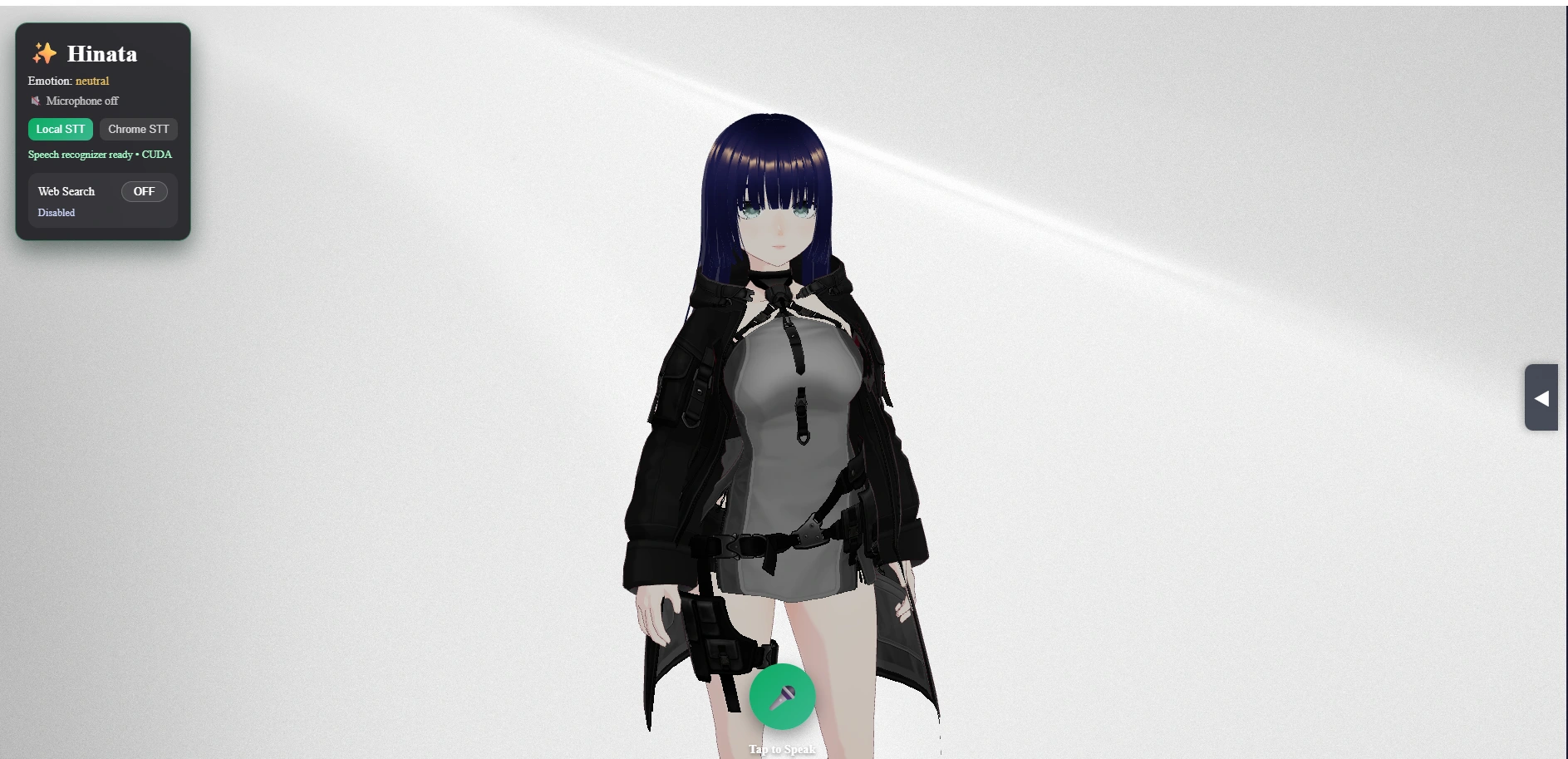
Open http://localhost:5173 in Chrome for the full experience (Chrome is required for Web Speech API fallback). Speech-to-Text Modes Front-end Chat.jsx exposes two STT buttons: Local STT → useStreamingStt hook (captures audio via MediaRecorder, uploads PCM16 clip to FastAPI, which forwards to FunASR). Supports auto-stop after silence and auto-resume post-reply. Chrome STT → useWebSpeechStt hook (browser Web Speech API). Acts as a fallback when GPU is unavailable or for quick testing. The backend STT router now accepts both whisper_local and funasr_local, with FunASR configured by default. Whisper weights have been wiped from disk to avoid confusion. 🔄 On the very first load the frontend shows a blocking overlay while SenseVoice and GPT‑SoVITS warm up; this is normal. STT usually unlocks within 5‑15 s on GPU, and the TTS voice may need a few extra seconds the very first time the server boots. Text-to-Speech Pipeline FastAPI /api/tts/speak signs the request with the Hinata voice profile. GPT-SoVITS synthesizes speech and returns a wav file. Backend optionally runs Rhubarb Lip Sync (if installed) or uses amplitude fallback for visemes. Response includes audio_url, duration, and viseme array. The frontend plays the audio and drives avatar lip animation. The frontend automatically chunks long passages before sending them to GPT-SoVITS so Hinata can narrate multi-minute stories without overrunning GPU memory. GPT-SoVITS uses the riko_reference sample for voice conditioning; the assets live under riko_reference/character_files. The voice output is cached in backend/audio/generated/_cache when caching is enabled. Avatar & Animation Workflow Hinata’s movements and lip-sync rely on a custom VRM pipeline built on top of community tools: Motion Sources (Mixamo) Animations are downloaded from Mixamo as FBX clips. Mixamo provides the baseline humanoid poses we blend during conversations. fbx2vrma-converter Repository: nanumatt/fbx2vrma-converter (included under fbx2vrma-converter/). Converts Mixamo FBX files into VRM Animation (VRMA) clips that respect VRM humanoid bones. Without this converter we would not have been able to remap Mixamo’s skeleton onto Hinata’s rig reliably. three-vrm & three-vrm-dev Packages: @pixiv/three-vrm & additional helpers inside tools/three-vrm/. Handle VRM loading, retargeting, expression overrides, and animation blending inside the React scene. We rely on the dev utilities to map converted VRMA clips to the avatar and to fine-tune facial expressions. Runtime Integration Converted VRMA files live under frontend/public/animations and are loaded dynamically based on chat context. Viseme data injected from GPT-SoVITS supplements the animation tracks for accurate lip-sync. Credits to the above projects for the heavy lifting in the VRM ecosystem—this project simply stitches them together so Hinata can react naturally in real time. LLM & Chat Flow The conversational flow (/api/chat/message) keeps a rolling history and routes through: Primary: Google Gemini (gemini-2.5-flash). Fallback: OpenRouter free-tier (openai/gpt-oss-20b:free). The history is normalized to OpenAI-style roles before sending. You can adjust temperature, top_k/p, or swap models through .env. Live Web Search & UI Hinata can now grab up-to-the-minute info before she replies: Configure the backend Set WEB_SEARCH_PROVIDER=google_cse (default) and paste your Google Programmable Search (Custom Search JSON API) key into WEB_SEARCH_API_KEY. Grab your search engine ID (cx) from Google's Programmable Search Engine control panel and set WEB_SEARCH_CX to that value. Optional knobs: WEB_SEARCH_GL, WEB_SEARCH_HL, WEB_SEARCH_RESULT_LIMIT. Frontend toggle In the top-left status card, flip the new "Web Search" pill to ON whenever you want live data. While the lookup runs Hinata switches to the new hanabi-talking-on-phone.vrma animation (converted via the bundled fbx2vrma-converter) so you know she’s fetching info. A "🔎 Hinata looked up…" card appears in the chat transcript summarizing the cited sources. LLM fusion The backend injects the search results as a secondary system prompt so Gemini/OpenRouter will cite them inline. If the search provider fails you’ll see a warning in the chat panel and Hinata falls back to pure LLM responses automatically. Current UI Theme Landing page and chat UI now use the teal/green palette you see in the screenshots below (or in frontend/src/App.jsx / frontend/src/pages/Chat.jsx if you want to tweak it). To swap the hero background or the 3D stage backdrop, just replace the files in frontend/public/ (room.jpg for the stage, models/Hinata.vrm for the avatar). VRoid models with the same bone names will drop in without code changes. Landing Chat (Idle)
Chat (Responses) Dance Gesture
More snapshots are available in docs/ if you need different angles (Screenshot 2025-11-17 035359.png, ...035416.png, ...035444.png). Directory Guide AI WAIFU/ ├─ backend/ # FastAPI app │ ├─ routers/ # API routes (chat, stt, tts, debug) │ ├─ services/ # Integrations (FunASR, GPT-SoVITS, LLM, viseme) │ ├─ audio/generated/ # TTS output + cache │ ├─ config.py # Settings model (Pydantic) │ ├─ main.py # FastAPI entrypoint │ └─ env_template.txt # .env reference ├─ frontend/ # React + Vite SPA │ ├─ src/hooks/ # useStreamingStt, useWebSpeechStt │ ├─ src/pages/Chat.jsx # Main UI / mic logic / avatar │ └─ public/models/ # VRM avatars ├─ GPT-SoVITS/ # vendored GPT-SoVITS server │ └─ riko_reference/ # voice reference assets ├─ scripts/ # PowerShell launch helpers ├─ fbx2vrma-converter/ # Mixamo FBX -> VRMA CLI from nanumatt/fbx2vrma-converter └─ tools/ # FFmpeg, Rhubarb, pixiv three-vrm helper packages
Key caches: C:\Users\ADMIN.cache\modelscope\hub\iic\SenseVoiceSmall → FunASR model. backend/audio/generated → GPT-SoVITS outputs (auto-clean by removing files). Troubleshooting Issue Resolution STT button spins forever Confirm uvicorn is running (`netstat -ano Auto-stop doesn’t fire Ensure FunASR backend is reachable; auto-finalization only triggers when mic is enabled locally. TTS 500 errors Verify GPT-SoVITS server on http://127.0.0.1:9880. First run downloads models; allow extra time. FunASR downloads each startup Enable Windows Developer Mode (or run as admin) to allow Hugging Face symlinks. Chrome STT empty result Must use Chrome (Web Speech API) and grant mic permissions. GPU not detected Set STT_DEVICE=cpu. Remember to restart Uvicorn after changing .env. Large caches Safe to purge backend/audio/generated/_cache or ~.cache\modelscope\temp when offline.
Logs of interest: backend/uvicorn.log / backend/uvicorn.err: FastAPI service + reload. GPT-SoVITS/gptsovits.err: TTS server output. Browser DevTools console: STT/TTS client errors (logger.js posts to /api/debug/log). License & Credits This repository aggregates multiple upstream projects. Refer to their respective licenses: FunASR (Apache 2.0) GPT-SoVITS (GPLv3) SenseVoice Small model (ModelScope License) Hinata VRM model (see bundled license) fbx2vrma-converter (MIT) @pixiv/three-vrm & related utilities (MIT) Mixamo animation clips (Adobe Terms of Use) All modifications in this repo remain under the original upstream licenses. Ensure compatibility when redistributing assets (especially the GPT-SoVITS voice reference and VRM files). Support & Further Work Convert Whisper imports to optional dependencies (currently still required for module imports). Harden FunASR session cleanup and explore streaming/real-time transcription. Integrate automated cache pruning for GPT-SoVITS outputs. Expand documentation for Linux deployment once Windows path stabilizes. Enjoy your locally hosted waifu assistant! 🎤💬🎶
Like this project
Posted Mar 8, 2022
An AI waifu for companionship
Likes
0
Views
10