Quantile AI analytics workbench for your connected apps

Atul L Ranjan
Verified


Quantile
1. The Problem
Anyone who owns a business runs it out of SaaS apps — Airtable bases, CRMs, billing
tools, ticketing systems. The data that answers their questions is already there. What
isn't there is a way to look at it.
Answering even a simple question ("how did revenue move month over month, and which
categories drove it?") takes a chain of specialists and tools:
someone writes an export script or wires up an ETL connector,
someone loads the export into a warehouse,
someone writes the SQL that shapes it into something chartable,
someone builds the dashboard in a BI tool,
and every follow-up question — "break that down by category", "also pull in shipping costs" — goes back to the start of that chain.
The existing tools sit at one of two extremes. BI tools (Looker, Metabase) are
excellent once the data is modeled and in a warehouse, and useless before that.
Chat-with-your-data tools hide everything behind a black box: you get a chart, you
can't see the query, and when it's wrong you have no handle to grab.
The bottleneck is the translation layer between a question and a dashboard — and
the fact that in every existing tool, that layer is either a human or an opaque one.
Meanwhile the user is asked to hand over database credentials to whichever vendor
owns the pipeline.
2. What Quantile Does
Quantile is a chat-first analytics workbench that turns a question about a connected
app account into a working dashboard, by generating and running a real, visible
four-stage data pipeline.
The user connects an app account (Airtable is the first supported source; auth is
managed by Pipedream Connect, so credentials never touch Quantile), asks a question in
chat, and Quantile runs:
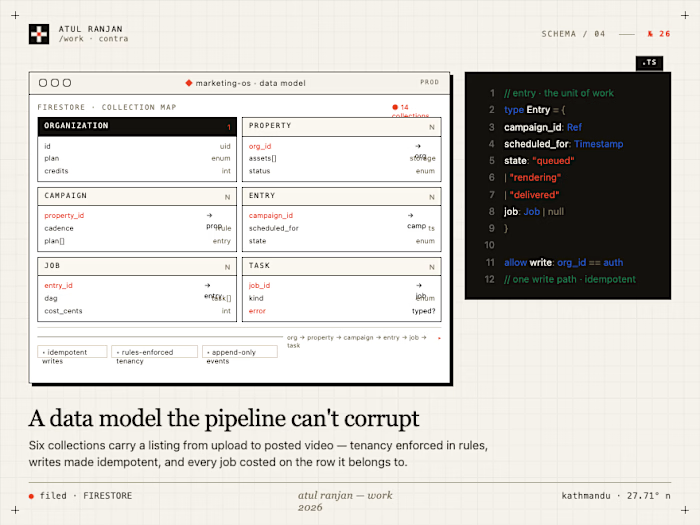
Stage What runs Where Output extract generated Python, deps declared in a PEP 723 block, talking to the source through an account-scoped proxy sandbox VM
data/*.parquet load deterministic Quantile code (not model-written) sandbox VM load/analysis.duckdb + the loaded schema transform generated DuckDB SQL the user's browser (DuckDB-Wasm) scratch.* derived tables visualize a Mosaic vgplot JSON spec — data only, no styling the user's browser a rendered dashboardThree properties make it different from a chat-with-your-data box:
Every stage is a file you can read, edit, and run. The sandbox is a real project directory (
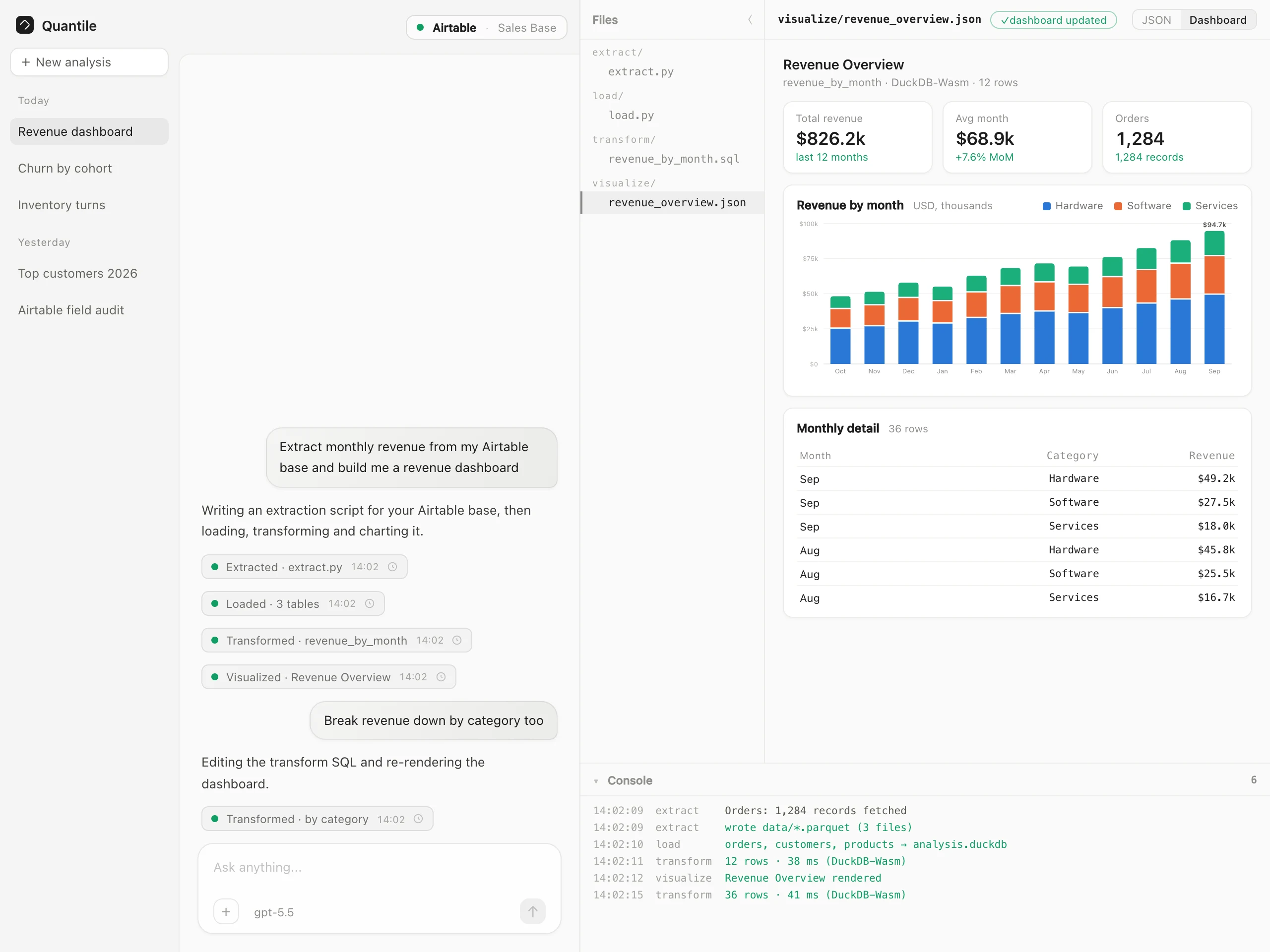
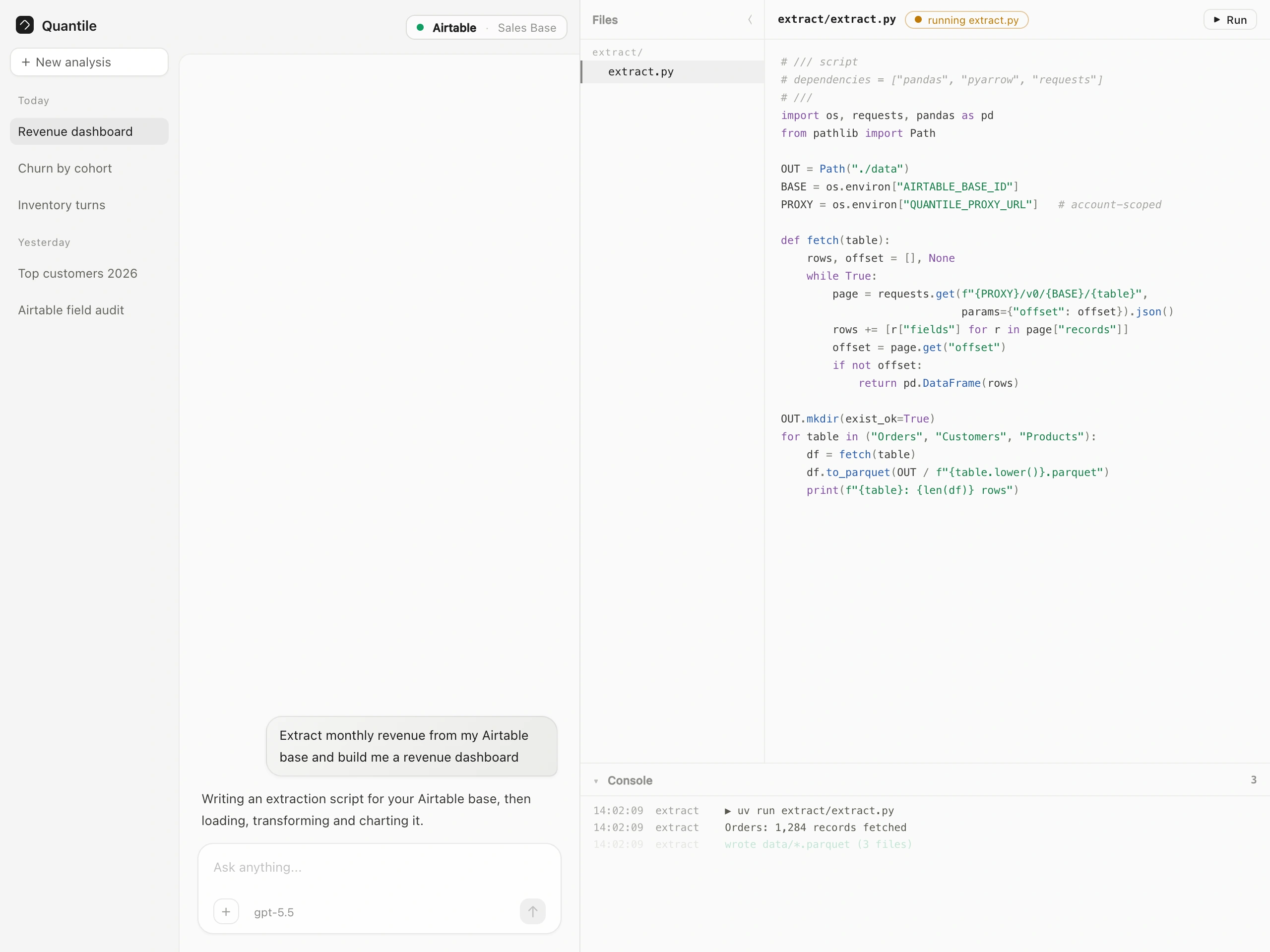
extract/, load/, transform/, visualize/, data/) shown in the workspace pane. Model-written changes stream in and play back as red/green diffs; hand edits are first-class, and Run on extract/extract.py re-runs the pipeline against fresh source data.Follow-ups are routed to the right layer. "Make that a bar chart" rewrites only the visualization spec. "Break it down by category" edits the transform SQL and re-runs it. "Also pull in shipping costs" edits the extraction and re-runs the whole chain. Nothing upstream is redone needlessly.
The rows stay out of the model and (mostly) out of the server. Extract returns file names, row counts, and column names — never row contents. Transform runs in the browser and returns schemas, row counts, and a small sample. The full dataset is never pasted into a prompt.
3. Who Uses It
Actor Role What they do Analyst / operator (registered user) The person with the question Connects an app account, asks in chat, reads and edits the generated code, runs files by hand, reads dashboards, opens past versions Guest session Unregistered trial Full chat and pipeline, but each guest session gets a fresh Pipedream external user id, so connections don't persist — registration is what makes a connection stick The Quantile agent Pipeline orchestrator Chooses the stage, writes the code, reads the stderr when a run fails, fixes it, and routes follow-ups to the right layer. Constrained by hard rules: discover before extracting, load after every extract,
edit (never a fresh extract) once a script exists Connected account (via Pipedream Connect) The data source Holds the real credentials. Quantile holds only an account id; the proxy injects auth at request time Sandbox runtime Execution environment Local disk + child processes in development; Vercel Sandbox Firecracker microVMs with a Blob-backed workspace on hosted deploymentsAuthentication is NextAuth sessions; the Pipedream
externalUserId is always the
authenticated Quantile user id, so an account can only ever be reached by the user who
connected it.4. The Core Workflow (End to End)
Throughout, the console panel logs each stage's activity and the workspace pane shows
the file currently being written, with a live status chip (generating / running /
success / error).
5. Concrete Scenarios
Scenario A — First dashboard from a connected base.
An operator connects their Airtable sales base and asks for "monthly revenue and a
revenue dashboard." The agent runs a discovery extraction (what tables exist, what
fields they have), writes the real extraction from what it printed, loads three
Parquet files into DuckDB, derives
revenue_by_month plus a kpis row in the
browser, and renders a Mosaic dashboard with KPI cards and charts. Elapsed: one
message. The operator can read every line of Python and SQL that produced it.Scenario B — Three follow-ups, three different layers.
"Make the trend chart a bar chart" → a new spec only; the data is untouched.
"Break revenue down by category too" → an
edit to transform/transform.sql, a
re-run in the browser, an updated spec. "Also pull in shipping costs" → an edit to
the extraction, which re-runs, then load, then transform, then the dashboards
re-render. The user sees exactly which layer moved each time.Scenario C — A run fails and repairs itself.
The extraction dies with
ModuleNotFoundError (an undeclared SDK) or a pagination
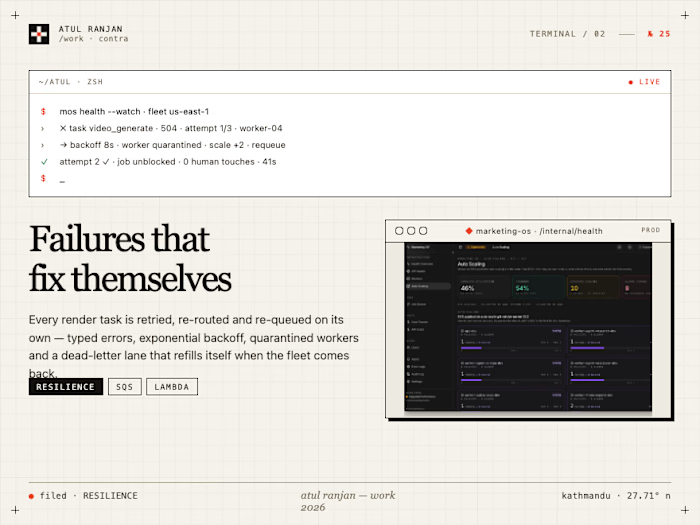
error from the source API. The stderr tail is captured, the agent is required to fix
the root cause in the same turn rather than report it, and the corrected script
re-runs. Two similar failures in a row and it stops and asks instead of looping.Scenario D — The analyst takes the wheel.
The generated extraction pulls the wrong date field. Instead of asking, the analyst
edits
extract/extract.py directly in the pane and hits Run. The pipeline re-runs
against fresh source data, load rebuilds the database, and the dashboards re-render —
the same path a model edit takes.Scenario E — Auditing what produced a number.
A dashboard shows a figure that looks wrong. The analyst clicks the version card from
the stage that produced it and gets that exact snapshot of the workspace, read-only,
with the code as it was when that number was computed — rather than the latest state
of a workspace that has since moved on.
Scenario F — Team preview environments.
A branch is pushed; the preview deployment gets its own Neon database branch. Because
application-assigned resource names are prefixed by a hash of the environment's
database host and name, sandbox VMs and workspaces from one preview never collide with
another's or with production's.
6. Why It's Built This Way
Design choice Why it serves the use case Connect-only sources, never direct credentials The user grants access on the platform's own OAuth screen and Pipedream holds the credential. Quantile stores an account id, not a secret — the class of breach where an analytics vendor leaks customer DB passwords is structurally impossible Account-scoped proxy with an infra-injected token Generated code is untrusted by construction. It can reach exactly one account's API through one URL, cannot read the token that authorizes it, and a copied URL is a 401 Python → Parquet for extract, DuckDB for analysis Sources speak HTTP and have native Python SDKs; analysis wants columnar tables. Parquet is the handoff, so extraction and analysis evolve independently Transform runs in the browser (DuckDB-Wasm) Iteration is instant with no server round-trip and no per-query cost, and the full dataset never leaves the user's machine for the derived-table step. Bundles are self-hosted — no CDN dependency Two Wasm instances, rotated per preparation Wasm linear memory grows but never shrinks; only terminating a worker returns memory to the OS. A warm spare keeps re-preparation from being a stall Read-only attach + locked-down config before model SQL Model-generated SQL runs against the real database. It gets a read-only attachment and an in-memory scratch catalog, so a bad query can waste time but not data Mosaic specs are data-only; the app owns styling and layout The model decides what to show; a density-aware planner decides how it's packed, and the theme decides how it looks. Dashboards stay visually consistent no matter what the model emits
load/ is deterministic code the model cannot edit The contract between "what was extracted" and "what is queryable" must not drift. Only extract/, transform/, and visualize/ are model-editable Streaming search/replace edits, played back as diffs Follow-ups touch one layer, not the whole file, and the user can see precisely what changed instead of diffing two opaque versions by eye stderr tail persisted next to the script The next codegen pass fixes the actual cause instead of guessing from a summary; failure becomes a normal step of the loop, not a dead end Postgres manifest over Blob listing Vercel Blob's list()/head() are eventually consistent — a file written milliseconds before a run could be invisible to the VM. Every write records its immutable Blob URL in Postgres, which is the only index consulted Per-chat sandbox + warm snapshot (uv, CPython, baked wheels) Each analysis gets an isolated working directory, and boots don't pay for dependency resolution that almost every run shares One artifact document version per successful stage Analytics results must be auditable. Each stage's snapshot is addressable and openable read-only, so a number can be traced to the code that produced it Chat-first layout; the workspace opens only once an analysis exists Before there's anything to show, the screen is a conversation. The code and dashboards appear beside it exactly when they become real Models routed through the Vercel AI Gateway One key, model choice per chat, and no provider SDK baked into the app7. What's In Scope vs Out of Scope
In scope (this application owns):
Chat, message history, and the analysis artifact with per-stage versions (Postgres, Drizzle migrations).
The four pipeline tools plus
edit, and the rules that route a request to the right stage.Connected-account management: Connect token minting, account listing, and the account-scoped extraction proxy with its own token minting/verification.
Sandbox execution in both drivers (local child processes; Vercel Sandbox microVMs with a Blob workspace and a Postgres manifest), file read/write/list, and
Run.Browser-side analysis: DuckDB-Wasm lifecycle, transform execution, Mosaic spec validation, theming, layout planning, and dashboard rendering.
The workspace UX: files sidebar, code editor, streaming writes, red/green diff playback, status chips, console, version cards.
Auth (NextAuth, including guest sessions), per-user hourly message entitlements, per-IP rate limiting, and bot checks.
Out of scope (owned elsewhere or deliberately not built):
Credential storage and OAuth app configuration — Pipedream Connect owns the grant flow and the secrets.
Model hosting — all models route through the Vercel AI Gateway.
Direct database sources. Earlier versions extracted straight from a user-supplied Postgres URL; the connect-only design removed that path on purpose.
Scheduled refreshes, alerting, and monitoring. Every run is user-initiated; there is no cron, no watch, no "email me when revenue drops."
Multi-user collaboration. No shared or public analyses, no comments, no roles beyond the owning user.
Warehouse-scale data. Transform runs in browser memory; the target is the millions-of-rows-at-most range that a SaaS app's tables actually contain, not billion-row fact tables.
Semantic layers, metric stores, and data lineage beyond the per-stage version snapshots.
Billing and credits.
8. One-Sentence Summary
Quantile turns a question about a connected app account into a dashboard by
generating and running a visible four-stage pipeline — Python extraction through a
credential-free account-scoped proxy, DuckDB load, in-browser SQL transform, and a
Mosaic dashboard — where every stage is a file the user can read, edit, re-run, and
trace back from any number on the screen.
Like this project
Posted Sep 20, 2026
Connect an app account, ask a question, and Quantile writes the Python, SQL, and dashboard — every stage visible, editable, and re-runnable in your browser.
Likes
0
Views
18
Timeline
Aug 1, 2026 - Aug 17, 2026
Clients
Quantile