Student Dashboard Development for Accredian

Ashish Pathak


Background:
At Accredian, we aim to create products that foster vibrant and interactive communities among students. Currently, students rely heavily on external communication networks like WhatsApp, LinkedIn, Telegram, etc., to connect with their peers. This dependency not only dilutes the sense of community within their educational institutions but also limits the ability to o er a cohesive and seamless communication experience. By building a student dashboard feature that enables students to interact with each other within their schools, colleges, and institutes, we can create a more integrated and engaging environment that promotes collaboration and enhances the learning experience.
Problem Statement:
Students who need to collaborate with peers for academic and extracurricular activities find it challenging due to the necessity of using multiple external communication networks like WhatsApp, LinkedIn, and Telegram. This process is cumbersome, time-consuming, and often leads to fragmented communication, resulting in frustration and a sense of disconnection from their educational community.
Goals and Success Metrics:
Enable Seamless Communication and Collaboration Among Students Within the Accredian Platform
Goal: Integrate a comprehensive communication system that allows students to interact smoothly through messaging, discussion forums, and file sharing.
Success Looks Like: High user adoption rates and positive feedback indicating that students find the communication tools e ective and easy to use. Metrics like message volume, forum activity, and file sharing frequency should demonstrate active engagement.
Reduce Dependency on External Communication Networks
Goal: Provide a fully functional and integrated communication solution within Accredian that minimizes the need for external apps.
Success Looks Like: A significant decrease in the number of students using external communication networks for academic and extracurricular activities. Monitoring referral sources and user surveys can show a shift towards the use of Accredian’s communication features.
Foster a Stronger Sense of Community and Engagement Among Students
Goal: Create a platform that enhances community interaction and student engagement through features like event scheduling, group projects, and social forums.
Success Looks Like: Increased participation in community events, active engagement in discussion forums, and higher levels of collaboration on group projects. User surveys and engagement analytics will reflect a stronger sense of belonging and connection.
Provide a Secure and Privacy-Focused Environment for Student Interactions
Goal: Implement robust security measures and privacy controls to ensure that student data and interactions are protected.
Success Looks Like: High levels of user trust and satisfaction regarding the security and privacy of their communications. Success can be measured through user feedback, security audit results, and adherence to privacy regulations and standards.
Hypothesis & Feature Description:
Hypothesis: If we build a dedicated student dashboard feature for communication within Accredian, students will prefer using it over external networks, leading to increased engagement and a stronger community.
Feature Description:
Dashboard Creation
Student and Friends Dashboard:
o Description: Enables students to create and customize their own dashboard views with access to all available features such as real-time chat, discussion forums, event calendars, file sharing, and more. Additionally, this dashboard includes options for games, entertainment, and group community activities.
o Impact: Provides a comprehensive and personalized experience for students, allowing them to manage academic tasks, engage in social activities, and access entertainment options, all from one central location.
Institutional Dashboard:
o Description: Provides a specialized dashboard for schools, colleges, and institutes with features tailored for o icials and administrators. This includes access to institutional analytics, student performance metrics, event management tools, and communication channels with students.
o Impact: Facilitates e icient management and oversight within educational institutions, enabling o icials to monitor and engage with students, track academic progress, and organize institutional activities e ectively.
Real-Time Chat
Description: Provides instant messaging capabilities for one-on-one and group conversations. This feature enables students to communicate and collaborate in real-time, making coordination and discussion more e icient.
Impact: Facilitates seamless and immediate communication, enhancing collaboration on academic and social activities and reducing the need for external messaging apps.
Event Calendar
Description: Features an integrated calendar for scheduling study groups, events, and reminders. This tool helps students organize their academic and extracurricular activities, ensuring they stay on top of important dates and deadlines.
Impact: Improves time management and organization by providing a centralized view of important dates and events, reducing scheduling conflicts and ensuring students do not miss critical deadlines.
File Sharing
Description: Provides secure file sharing for academic resources, project documents, and multimedia. Students can easily share and access files within a secure environment, facilitating collaboration on assignments and projects.
Impact: Enhances collaboration and resource sharing by o ering a secure and integrated file management system, reducing the reliance on external file-sharing services and improving accessibility.
Profile Customization
Description: Allows students to create and customize profiles to showcase their interests, skills, and achievements. This feature helps personalize the student experience, enabling students to highlight their expertise and accomplishments.
Impact: Personalizes the user experience and helps students present themselves e ectively within the platform, fostering connections based on shared interests and skills.
Notification System
Description: Delivers real-time notifications for messages, forum updates, and event reminders. Students receive timely alerts to stay informed about important communications and activities, ensuring they are always up-to- date.
Impact: Keeps students informed and engaged by providing timely updates on important activities and interactions, reducing the risk of missing critical information and deadlines.
Student and Friends Directory
Description: Includes a comprehensive directory containing detailed information about students and their friends, such as academic profiles, contact information, and activity history. This feature allows users to easily search, manage, and interact with others within the platform.
Impact: Simplifies the management of student connections and interactions, making it easier to coordinate group activities, track academic progress, and foster connections within the educational community.
Teacher Management Tools
Description: Provides teachers with tools to manage all students, including assigning and tracking assignments, conducting live classes directly through the dashboard, and communicating with students. This feature eliminates the need for external live class products and enables seamless interaction between teachers and students.
Impact: Streamlines the teaching process by centralizing classroom management and communication, enhancing the e iciency of delivering assignments and conducting live classes, and improving the overall learning experience for students.
Gaming and Entertainment
Description: Includes a range of gaming and entertainment features directly accessible from the dashboard. Students can engage in games, participate in entertainment activities, and join group community events to interact with peers in a fun and relaxed environment.
Impact: Enhances student engagement and interaction by providing enjoyable activities and entertainment options, helping to build a stronger sense of community and encouraging more frequent use of the dashboard.
Vision Narrative:
Student Perspective:
Ashish, a computer science student, often struggles to coordinate with his peers for group projects. He switches between WhatsApp for group chats, LinkedIn for professional connections, and Google Drive for file sharing. This fragmented approach is time-consuming and frustrating.
One day, Ashish discovers the new student dashboard feature on Accredian. Intrigued by its promise of a centralized solution, he decides to explore its functionalities. Ashish sets up a group chat for his project team using the Real- Time Chat feature, seamlessly integrates their work using the File Sharing tool, and schedules their meetings through the Event Calendar.
Ashish is impressed by how the dashboard consolidates all these functions in one place. The Profile Customization option helps him highlight his skills and achievements, making it easier to connect with others. The real-time Notification System keeps his informed about messages, updates, and deadlines without the need to constantly check multiple apps. The Gaming and Entertainment features o er a fun break, enhancing his overall experience.
The ease of use and integration keeps Ashish engaged with the Accredian platform, and he no longer needs external apps for his academic interactions. The dashboard simplifies his academic and social life, o ering a more organized and connected experience.
Institutional Perspective:
Educational institutions face the challenge of managing student interactions, monitoring academic progress, and organizing events e iciently. Administrators and teachers often deal with fragmented systems for communication, performance tracking, and event management.
The new student dashboard addresses these challenges by o ering a comprehensive solution. The Institutional Dashboard provides o icials with powerful tools to oversee student engagement, track performance metrics, and manage academic and extracurricular activities from a single platform. This centralized approach streamlines administrative tasks and enhances oversight capabilities.
Teachers benefit from the Teacher Management Tools, which allow them to assign and track homework, conduct live classes directly through the dashboard, and communicate seamlessly with students. This integration reduces the need for external tools and simplifies the management of teaching activities.
The dashboard also supports the institution’s goal of improving student engagement. By providing students with a unified platform for communication, file sharing, event scheduling, and more, the dashboard encourages active participation and reduces reliance on disparate external apps.
Why Users Will Be Inclined to Use the Feature:
For Students: The dashboard’s seamless integration of communication, collaboration, and scheduling tools simplifies their academic and social interactions. The consolidated features enhance their productivity and engagement, making the platform more attractive and user-friendly.
For Institutions: The dashboard o ers a centralized system that simplifies administrative tasks, enhances monitoring and management, and improves communication with students. The comprehensive features and integration support institutional goals, streamline operations, and foster a more e icient and connected educational environment.
Key Trade-O s & Decisions:
Trade-O : Integrating All Features into One Platform vs. Relying on Specialized External Tools
Decision: Emphasize the integration of essential features directly into the dashboard to provide a unified, seamless experience. By consolidating communication, file sharing, event management, and more, the dashboard eliminates the need for students to juggle multiple tools, ensuring a more streamlined and e icient academic experience. This approach enhances user satisfaction and engagement by o ering everything they need in one place.
Trade-O : Extensive Customization Options vs. Simplicity and Ease of Use
Decision: O er extensive customization options that allow students to personalize their profiles and interactions while ensuring the platform remains user-friendly and accessible. By focusing on intuitive design and ease of use, we ensure that all students can easily navigate and utilize the platform's features, regardless of their tech-savviness. This approach delivers a rich, engaging experience without compromising on simplicity and accessibility.
Concept Mocks:
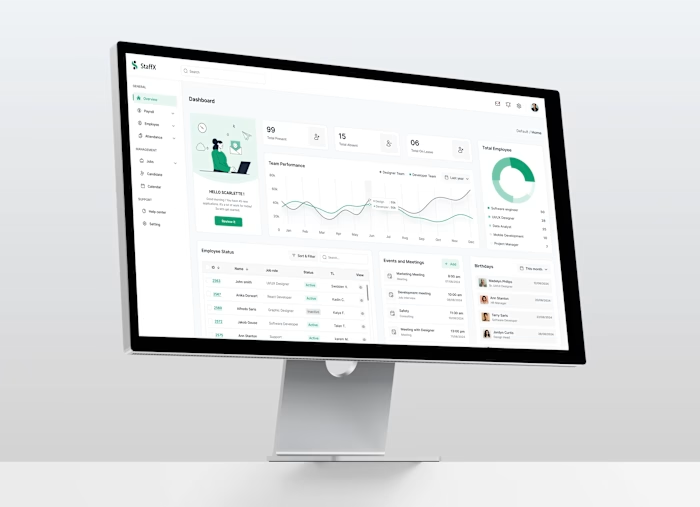
1. Website Page: Website page is a crucial step in visualizing the design and functionality before diving into development.
2. Service Section: The service section with options for dashboard creation, here present the two types of dashboards: one for institutions (schools, colleges, etc.) and one for students.
For Institutional Dashboard
3. School Dashboard: School dashboard that includes class names and a list of students requires a clean, organized layout that ensures ease of navigation and access to important information.
4. Class-wise Dashboard: Class dashboard that showcases all the subjects and students for a particular class involves creating a clear, organized layout that presents all relevant information e ectively.
5. Subject-wise Dashboard: Subject dashboard that includes all features for managing assignments and other functionalities specific to that subject, you'll want to design a detailed and organized layout.
6. College/Institute Dashboard: College or Institute dashboard that displays a list of students along with their college, year, and course information.
7. Year-wise Dashboard: Year dashboard that provides details on all students studying in a particular year along with semester-related information.
8. Semester-wise Dashboard: Semester dashboard that displays all students in a particular semester and lists the subjects studied during that semester.
9. Subject Dashboard: Subject dashboard that includes all features for
managing assignments and other functionalities specific to that subject, you'll want to design a detailed and organized layout.
For Friends/Students Dashboard
Risks & Mitigations:
1. Risk: Security Vulnerabilities
Description: Integrating real-time communication and file sharing features may expose the platform to security risks, such as data breaches or unauthorized access.
Mitigation:
o Encryption: Implement end-to-end encryption for all communications and file transfers.
o Access Controls: Use robust authentication and authorization mechanisms to control access to sensitive information.
o Regular Audits: Conduct regular security audits and vulnerability assessments to identify and address potential weaknesses.
2. Risk: System Overload and Performance Issues
Description: High tra ic or simultaneous use of multiple features (e.g., real-time chat, file sharing, live classes) could lead to system slowdowns or crashes.
Mitigation:
o Scalable Infrastructure: Utilize cloud services with auto-scaling capabilities to handle increased loads.
o Load Testing: Perform extensive load testing to ensure the system can handle peak usage scenarios.
o Optimizations: Optimize code and database queries to improve performance and reduce latency.
3. Risk: User Interface Complexity
Description: O ering extensive customization options and integrating multiple features could make the interface cluttered and di icult to navigate.
Mitigation:
o User Testing: Conduct usability testing to gather feedback on interface design and functionality.
o Intuitive Design: Implement a clean, intuitive design with clear navigation paths and user-friendly controls.
o Help Resources: Provide comprehensive help resources, such as tutorials and tooltips, to assist users in navigating the platform.
4. Risk: Integration Issues
Description: Integrating various features (e.g., real-time chat, file sharing, event calendar, streaming games/movies, playing games) into a single platform may lead to technical di iculties or conflicts between components.
Mitigation:
o Modular Architecture: Design the platform with a modular architecture to facilitate easier integration and maintenance.
o Testing: Perform thorough integration testing to identify and resolve issues before launch.
o Documentation: Maintain detailed documentation for each component and integration point to support troubleshooting and future development.
5. Risk: Maintenance and Support Costs
Description: Ongoing maintenance and support for a feature-rich platform could incur significant costs.
Mitigation:
o Cost Planning: Develop a detailed cost plan that includes ongoing maintenance and support expenses.
o Automation: Implement automated monitoring and maintenance tools to reduce manual e ort.
o Scalable Support: Use scalable support solutions, such as chatbots and self-service resources, to manage user inquiries e iciently.
Appendix: Research:
1. Competitive Analysis
Competitor Platforms:
o Slack: Known for its real-time messaging and collaboration tools. Features channels, direct messaging, file sharing, and integrations with other tools. However, Slack requires separate tools for event management and lacks extensive customization options for user profiles.
o Microsoft Teams: O ers integrated communication, file sharing, and calendar management. Provides robust collaboration tools but can be complex for users to navigate due to its extensive feature set.
o Google Classroom: Focuses on educational settings with features for assignments, grades, and class discussions. Integrates with Google Drive but lacks built-in real-time chat and gaming/entertainment features.
o Discord: Popular for gaming communities with real-time chat, voice, and video capabilities. Includes server customization and community features but may not be tailored to academic use.
Strengths and Weaknesses:
o Strengths of Competitors: Comprehensive communication and collaboration tools, integrations with other platforms, and strong user engagement features.
o Weaknesses of Competitors: Complexity in navigation, lack of integrated academic tools, and limited customization options for user profiles.
2. Metrics
User Engagement:
o Average Daily Active Users (DAU): Track the number of active users engaging with the dashboard on a daily basis.
o Feature Utilization Rates: Measure how frequently users interact with specific features like Real-Time Chat, Discussion Forums, and File Sharing.
Performance Metrics:
o System Load Handling: Monitor server response times and performance during peak usage times.
o Bug Reports and Resolution Time: Track the number of reported bugs and the average time taken to resolve them.
User Satisfaction:
o Net Promoter Score (NPS): Gauge user satisfaction and likelihood of recommending the platform to others.
o User Feedback and Surveys: Collect feedback on usability, feature e ectiveness, and overall satisfaction.
3. Surveys
Student Feedback:
o Survey Focus: Assess students' current challenges with using multiple communication tools, their desired features in a dashboard, and their preferences for user interface design.
o Key Findings: Identify common pain points, feature requests, and overall expectations for an integrated student dashboard.
Institutional Feedback:
o Survey Focus: Understand institutional needs for managing student interactions, assignment tracking, and live class integration. Collect feedback on the desired administrative tools and support features.
o Key Findings: Determine the critical features for institutional management, integration needs, and support requirements.
Market Research:
o Trend Analysis: Review current trends in educational technology and communication tools to ensure the dashboard aligns with market needs and user expectations.
o Competitive Benchmarking: Analyze competitor o erings and identify gaps or opportunities for di erentiation in the student and institutional dashboard features.
This research will inform the development and refinement of the student and institutional dashboards, ensuring that they meet user needs and stand out in the competitive landscape.
Made By: Ashish Pathak
Like this project
Posted Jun 20, 2025
Developed a student dashboard for seamless communication within Accredian.
Likes
0
Views
4