SaaS Starter for Multi-Tenant Applications

Reid Mosieur


SaaS Starter
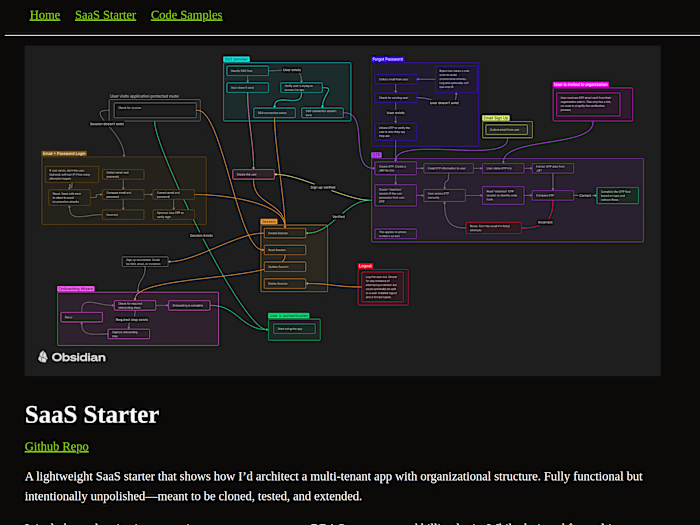
A lightweight SaaS starter that shows how I’d architect a multi-tenant app with organizational structure. Fully functional but intentionally unpolished—meant to be cloned, tested, and extended.
It includes authentication, post-signup user management, RBAC org setup, and billing logic. While designed for multi-tenant SaaS, the auth flow works for most apps.
Tech Stack
Frontend / Backend: Next.js
Database: Postgres + Prisma
Styling: Tailwind
UI Components: Shadcn
Billing: Stripe
SSO: Google
IP Enrichment: IPinfo
Model Design
Whenever possible, I use dates instead of booleans for state. “Email verified on Jan 6” beats a
true/false toggle for both clarity and UX.User: Basic info + status + auth/security fields
Onboarding: Recursive wizard-style form
Session: Standard plus IPinfo-enriched data
Address: Overkill for most apps, but useful for SEO and localized flows
Authentication Philosophy
Some say never build auth from scratch. I disagree. Auth just means verifying identity—and done well, it’s simple, secure, and customizable.
At its core:
Collect an email + password
Verify ownership (OTP or magic link)
Store credentials securely
Handle session and device tracking
From there, you can layer on passkeys, phone sign-in, OAuth, etc.—but you’re still playing by the same basic rules.
Sign-Up Options
There are 3 sign-up methods:
Email + Password
Google SSO
Org Invitation
Users can later add a second method. The first two are for org owners and include onboarding. Invitations are for team members—email+password only, no OTP needed.
Email + Password
Start with just the email. Confirm it via OTP, then collect the password during onboarding. Cleaner UX and better separation of steps.
⚠️ Yes, this opens the door to enumeration attacks. A generic “Something went wrong” message protects user data, even if it slightly dents UX.
Google SSO
The heavy lifting happens on Google’s end. We just:
Check if the user exists
If connected → create session
If not → confirm intent and connect
Org Invitations
Like standard email+password, but initiated by an org owner. We skip OTP—email link = instant verification + onboarding redirect.
Account Verification
OTP is just another form of password verification. You hash the code and compare it to the input. Simple.
For smoother UX:
Send a link to auto-verify where possible
Limit attempts, notify on failures
Redirect based on flow: sign-up → onboarding, forgot password → reset
Sessions
Sessions are simple, but critical. A cookie connects user to device. Store minimal info, invalidate regularly. That’s most of it.
Where sessions shine is how you use them—tracking access, managing devices, enabling persistent login without compromising security.
Onboarding
Onboarding isn't technically auth—but it’s the best time to gather info.
Built as a recursive flow, so it’s:
Familiar
Extensible
Async-friendly
This lets you update onboarding any time (e.g., new compliance needs), and users complete only what’s missing.
Email Login
Classic email+password login—two fields, one comparison. If it matches, start a session.
Again, avoid exposing whether an email exists. Vague errors protect your users. Lock out or alert after multiple failed attempts.
Forgot Password
Same idea: collect email, send OTP, validate, reset password.
Security-wise, it follows the same principles. Don’t confirm if the user exists in your response. Push clarity inside the app, not through the endpoint.
Logout
Logout = session kill. Label the reason, cleanly expire it, and redirect. Handles most cases of unauthenticated access.
Protected Routes
If a user hits a protected route without a session, they likely know the app. Redirect them to log in and preserve their flow where possible.
Accessing the App
Once signed up and onboarded, users are fully authenticated and dropped into the app.
Billing
Billing gating isn’t included in the base repo so you can test it locally without Stripe keys or sandboxing. But billing information is ready to be collected once Stripe is setup. The starter assumes paid access only—no freemium or trial logic.
To add billing:
Collect plan + payment during onboarding
Send to Stripe
Store on the organization model
On each load, check subscription validity before granting access
If the sub lapses, let the session stand but gate access. Redirect them to update payment before re-entering.
Like this project
Posted Aug 26, 2025
Developed a SaaS starter for multi-tenant apps with auth and billing.