
Archive Desk Workbench 0.6, portable Windows x64 preview
Unzip the package and open TryDemo.cmd to run the fictional sample, or StartWorkbench.cmd to choose a project folder and a separate backup folder. The package includes its runtime, so no separate Node.js installation is needed. The interface opens in your default browser.
Review and save several project folders as a backup set. Check each file inventory before creating archives, then reopen the completed run report after refreshing or restarting the app. Historical reports stay separate from fresh archive checks. Recovery writes into a new folder and checks the recovered bytes.
The Windows package passed 55 tests, including 45 app and command-line tests and 10 launcher tests. I also ran the actual Windows launch and recovered four fictional files with exact bytes. The public ZIP matches the tested package.
This is an independent manual developer preview. Backups are unencrypted, with limits of 500 files, 20 MiB per file and 50 MiB total source data. Keep another copy on a separate device.
Open the current guide:
https://sandersaxbuilds.github.io/selected-work/archive-desk-workbench-history.html
Download the Windows x64 package:
https://github.com/SanderSaxBuilds/selected-work/releases/tag/archive-desk-workbench-0.6-windows-r2
Earlier versions
Local workbench, version 0.4 developer preview
Check every registered backup in one manual run. The app rereads each archive and compares its current contents with the saved record. Missing, damaged and mismatched copies stay visible as separate failures while the other checks continue.
Download the dated JSON report you just reviewed. Fresh result badges stay separate from historical verification, and refreshing the library clears the displayed report. The check leaves saved files, library metadata and activity unchanged.
The source passed 30 backend and CLI tests, seven independent workflows and nine browser cases on Windows with Node.js 24. The actual public ZIP matches the frozen tested package. This is an independent local developer preview using fictional files, with no customer or production backup guarantee.
Download the 0.4 source:
https://sandersaxbuilds.github.io/selected-work/archive-desk-workbench-0.4-source.zip
Earlier releases
Local workbench, version 0.3 developer preview
Version 0.3 adds a review step before recovery. Check the saved file inventory, archive fingerprint and destination, then restore into a new folder. Changing the folder name clears the plan, and recovery checks the archive again.
A fresh verification JSON report lists file paths, sizes and hashes without changing library metadata or activity. It leaves out absolute workspace paths. Damaged archives and occupied recovery folders are refused.
The source passed 27 backend and CLI tests, eight independent workflows and fourteen browser cases on Windows with Node.js 24. The actual public ZIP was freshly extracted and checked. This is a manual developer preview with fictional files.
View the 0.3 app and setup guide:
https://sandersaxbuilds.github.io/selected-work/archive-desk-workbench-recovery.html
Download the 0.3 source:
https://sandersaxbuilds.github.io/selected-work/archive-desk-workbench-0.3-source.zip
Earlier workbench, version 0.2 developer preview
The local Node.js app keeps a saved backup library, previews project files, compares changes and recovers into new folders. Version 0.2 also inspects and imports an existing Archive Desk ZIP, so recovery works without the original library record. Import checks the archive before saving a copy, refuses duplicate hashes and labels imported records separately.
Twenty-three backend and CLI tests passed, with eight independent acceptance workflows and twelve browser cases. I checked recovery of binary, empty and Unicode files, duplicate refusal and persistence after a restart. The actual public source download matches the frozen tested package. Fresh package extraction and the complete browser import and recovery path also passed.
Windows and Node.js 24 are the tested scope. This is a manual local app using its own uncompressed ZIP format. It does not import arbitrary compressed, encrypted or ZIP64 archives. Imported comparisons use the workspace folder explicitly chosen. Recovery uses a new folder and does not overwrite the source. Keep another copy on a separate device.
View the app and setup guide:
https://sandersaxbuilds.github.io/selected-work/archive-desk-workbench-import.html
Download the 0.2 source:
The previous 0.1 local Node.js app adds a saved backup library, source previews, change reports and recovery into new folders. Its sample workflow uses real fictional files to demonstrate backup, comparison and verified recovery without changing the chosen project.
I tested the complete path from saving the ZIP to reopening the library after a server restart. Nineteen backend and CLI tests passed, with eight independent acceptance workflows and fourteen browser cases. The actual public source download matched the tested package.
Windows and Node.js 24 are the tested scope. This is a manual local app, with no cloud backup or unattended scheduler. Keep another copy on a separate device.
View the app and setup guide:
https://sandersaxbuilds.github.io/selected-work/archive-desk-workbench.html
Download the source:
https://sandersaxbuilds.github.io/selected-work/archive-desk-workbench-source.zip
Protection preview, version 1.1 candidate
The original 1.0 app remains unchanged. A separate 1.1 preview adds encrypted copies and a checked unlock workflow. I tested actual saved files, wrong passphrases, damaged payloads and exact recovery bytes. The custom .adlock format has not had an independent security audit. Ordinary and recovered ZIPs remain unencrypted. Lost passphrases cannot be reset.
Try the protection preview:
https://sandersaxbuilds.github.io/selected-work/archive-desk-protection.html
Preview source and setup notes:
https://sandersaxbuilds.github.io/selected-work/archive-desk-protection-source.zip
Original 1.0 app details
Archive Desk is an independent browser application for keeping a checked copy of a small project.
Choose individual files or a folder, inspect the relative paths and create a ZIP with a manifest. Reopen the file actually downloaded to check the ZIP structure, CRC values and each file's SHA-256. A recovery export contains the original file bytes and relative paths.
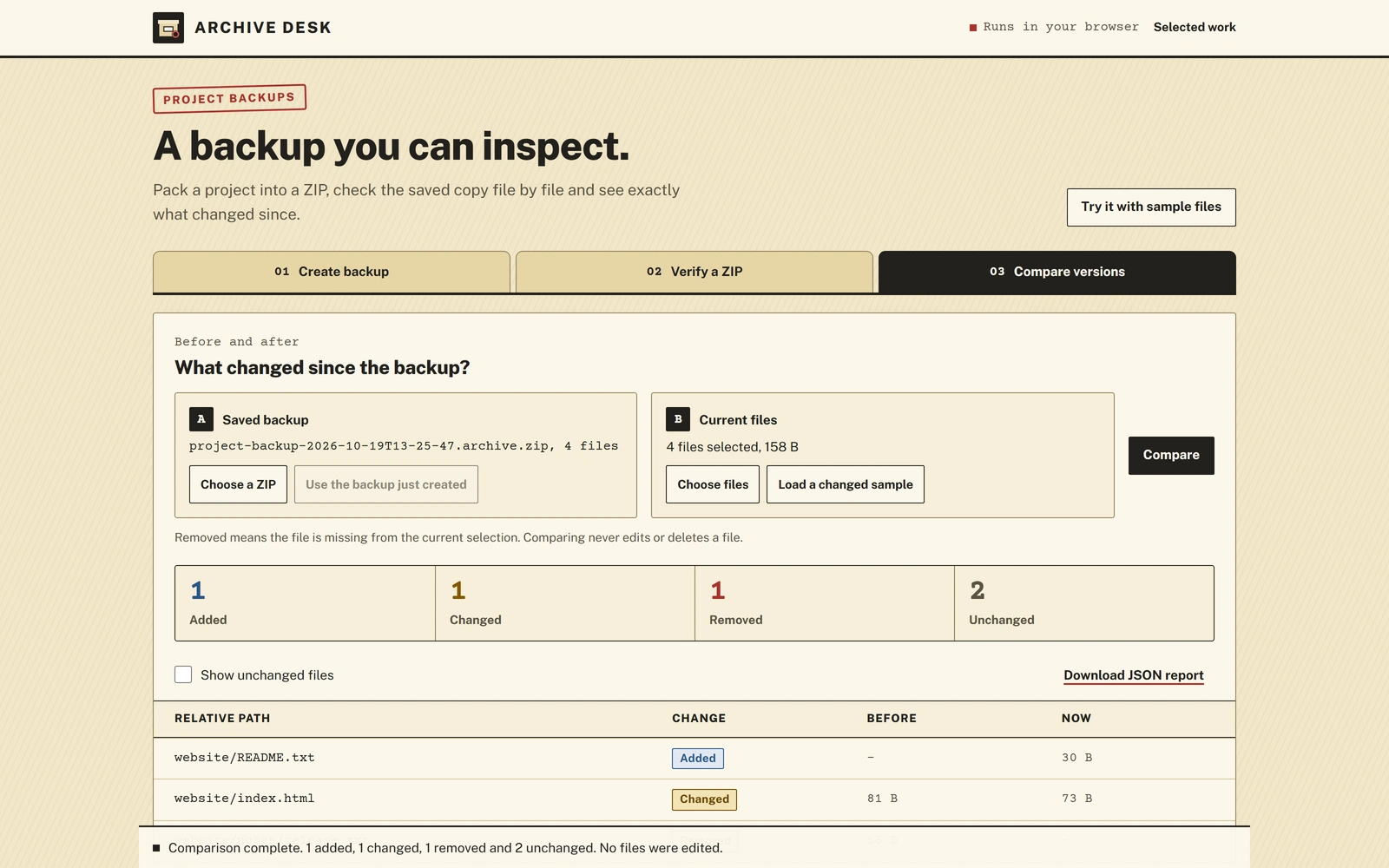
The comparison view reports added, changed, removed and unchanged files against a saved baseline. Its downloadable JSON report includes that baseline's hash. Comparing never edits or deletes the original project.
I built the interface, ZIP writer and reader, path validation, comparison logic and regression tests. I checked saved backups and recovered files with an independent ZIP reader, exercised corrupt-input rejection and tested populated desktop and phone layouts.
Processing stays in the browser tab. There is no upload, account or automatic sync. Backups are not encrypted. The app handles its own uncompressed ZIP format, with limits of 500 files, 20 MiB per file and 50 MiB of file content. Keep another copy of important data.
Source and setup notes:
https://sandersaxbuilds.github.io/selected-work/archive-desk-source.zip
The included standalone HTML build remains a candidate. Its direct local-file compatibility has not been verified. This public case demonstrates the hosted modular app.
0 likes · 2 views · Oct 18, 2026
Browser and local Node.js tools for verified project backups, file comparisons and recovery into new folders. Independent work with synthetic files.


