AI Image Generator with Stable Diffusion and CLIP Evaluation

Badaruddin Chachar


🔠 AI Image Generator with Stable Diffusion + CLIP Evaluation
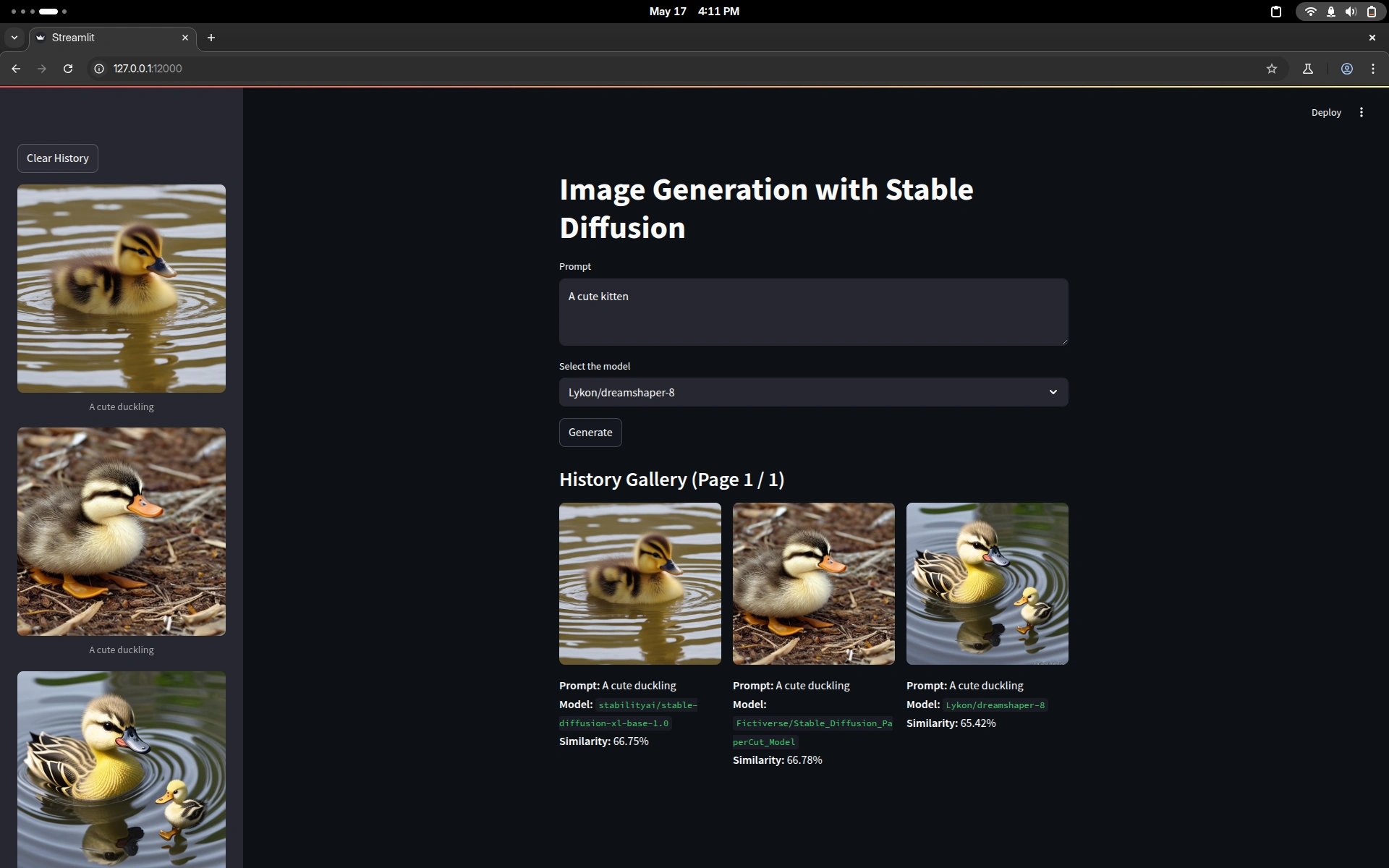
This Streamlit web app allows you to generate images using various pre-trained Stable Diffusion models and evaluates the generated image against the input prompt using CLIP similarity scoring. The generated images, their prompts, model used, and similarity scores are saved in a SQLite database and displayed in a paginated gallery and sidebar history.
📸 Features
🔥 Choose from multiple Stable Diffusion models (via Hugging Face)
🖼️ Generate high-quality AI images from text prompts
📂 Saves each image, prompt, and model info into a local SQLite database
🧠 Evaluates image-to-prompt similarity using OpenAI's CLIP model
🗝️ Gallery view with pagination and prompt/model/similarity display
📜 Sidebar shows recent image history
🛩️ Clear all history with a single click
🚀 Getting Started
1. Clone the Repository
2. Set Up a Virtual Environment (recommended)
3. Install Dependencies
You need to have PyTorch installed with GPU support (
torch.cuda.is_available()) for best performance.4. Run the App
📆 Requirements
💡 How It Works
You enter a prompt and select a Stable Diffusion model.
The app generates an image using the selected model.
The image is evaluated with OpenAI's CLIP model to determine how well it matches the prompt.
The image, prompt, model name, and similarity score are saved in
history.db.The gallery displays the most recent images with prompt, model name, and similarity.
🧠 CLIP Similarity
We use OpenAI’s CLIP model (
ViT-B/32) to compute the cosine similarity between the prompt and generated image. This gives a percentage score (0–100) indicating how well the image matches the text prompt.📁 Folder Structure
Clear History
Use the "Clear History" button in the sidebar to remove all stored images and data from the database.
📄 License
This project is licensed under the MIT License. See
LICENSE file for details.🌐 Acknowledgements
Like this project
Posted Jun 28, 2025
Created a Streamlit app for AI image generation and evaluation using Stable Diffusion and CLIP.