

In this blog post, we will configure an Apache web server on a Linux Machine (Azure Virtual Machine) using Ansible. Apache web server is a free and open-source software that allows users to deploy their websites on the internet.
Prerequisites
Familiarity with the concept of Infrastructure-as-Code (I.a.C) is helpful, but isn't necessary.
A Linux VM: Although this action is performed on an Azure virtual machine, similar steps could be performed on any Linux distribution. You can follow this link to automate creation of virtual machines on Azure.
So, let's dive in.
What is Ansible, and why use it?
Ansible is an open-source automation tool that can be used to automate the configuration of servers and systems. It is a command-line IT automation software application that automates cloud provisioning, configuration management, application deployment, and many other IT needs. Read more about Ansible here: Get Started with Ansible.
Let's connect to our virtual machine via SSH. If you have not already created a vm, you can follow this link to automate creation of virtual machines on Microsoft Azure with Terraform. Connect to the virtual machine
Make a directory/folder for this Ansible project and change directory to this folder.
Install Ansible
Make a file for the installation of Ansible. We will call this file
installations.sh.Copy the code below into the file
installation.sh Note that python is required to perform Ansible operations, hence it needs to be installed also.Run the command to change the permission of the file and make it executable.
Run the command to install Ansible and the above requirements
We can test if Ansible is properly configured by running the command below. This should print the version of Ansible installed.
Create an Ansible playbook
An Ansible playbook is a YAML file with list of instructions that executes against the hosts. It is an organized and systematic unit of scripts which defines work for a server configuration executed by the automation tool Ansible.
Create a file named
ansible-playbook.yml and paste the code below. In this playbook, we are specifying two tasks (namely installing apache2 and starting apache2) to be performed on the localhost.Notice that we are running the playbook against
localhost. This is because we are successfully logged into the host server. However, it is possible to run a playbook against multiple hosts. This is done with the use of an inventory file. Read more: Ansible Inventory.Test and deploy the Ansible Playbook configuration
To test the configuration and check for errors, run the command below. This would check the correctness of the playbook.
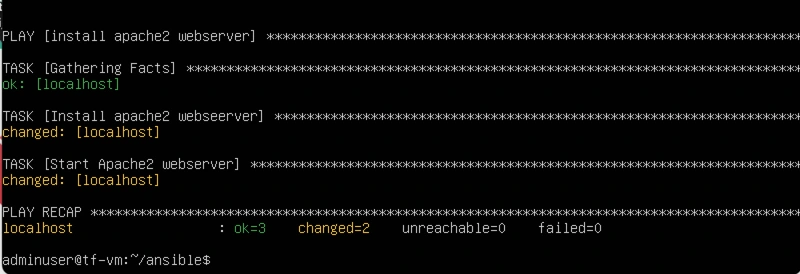
Deploy the configuration.
Run the Ansible playbook below to provision and start the Apache2 web server.
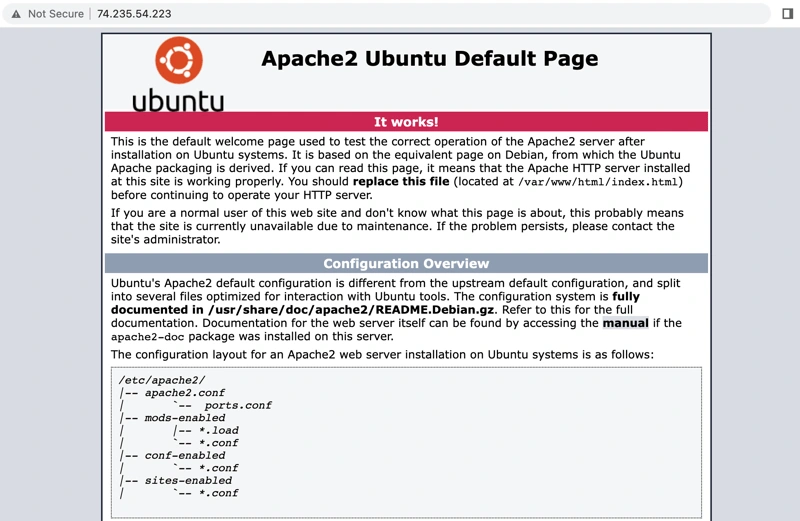
Once the playbook has finished running, Apache will be configured on the Virtual Machine. You can test the configuration by opening a web browser and navigating to the public IP address of the VM. You should see the Apache web server homepage.
Conclusion
Thanks for reading. Let me know if you found this helpful. You are welcome to follow me on LinkedIn and Twitter @Paschal_ik.
Previous:
Coming Up Next:
Install LAMP STACK on an Azure Virtual machine
Enable SSL on a Custom Domain on an azure Virtual Machine
References:
0 likes · 33 views · Feb 27, 2025
In this blog post, we will configure an Apache web server on a Linux Machine (Azure Virtual Machine)...
