Grocery App UI Design for Onboarding and Security

Alamin Hossin


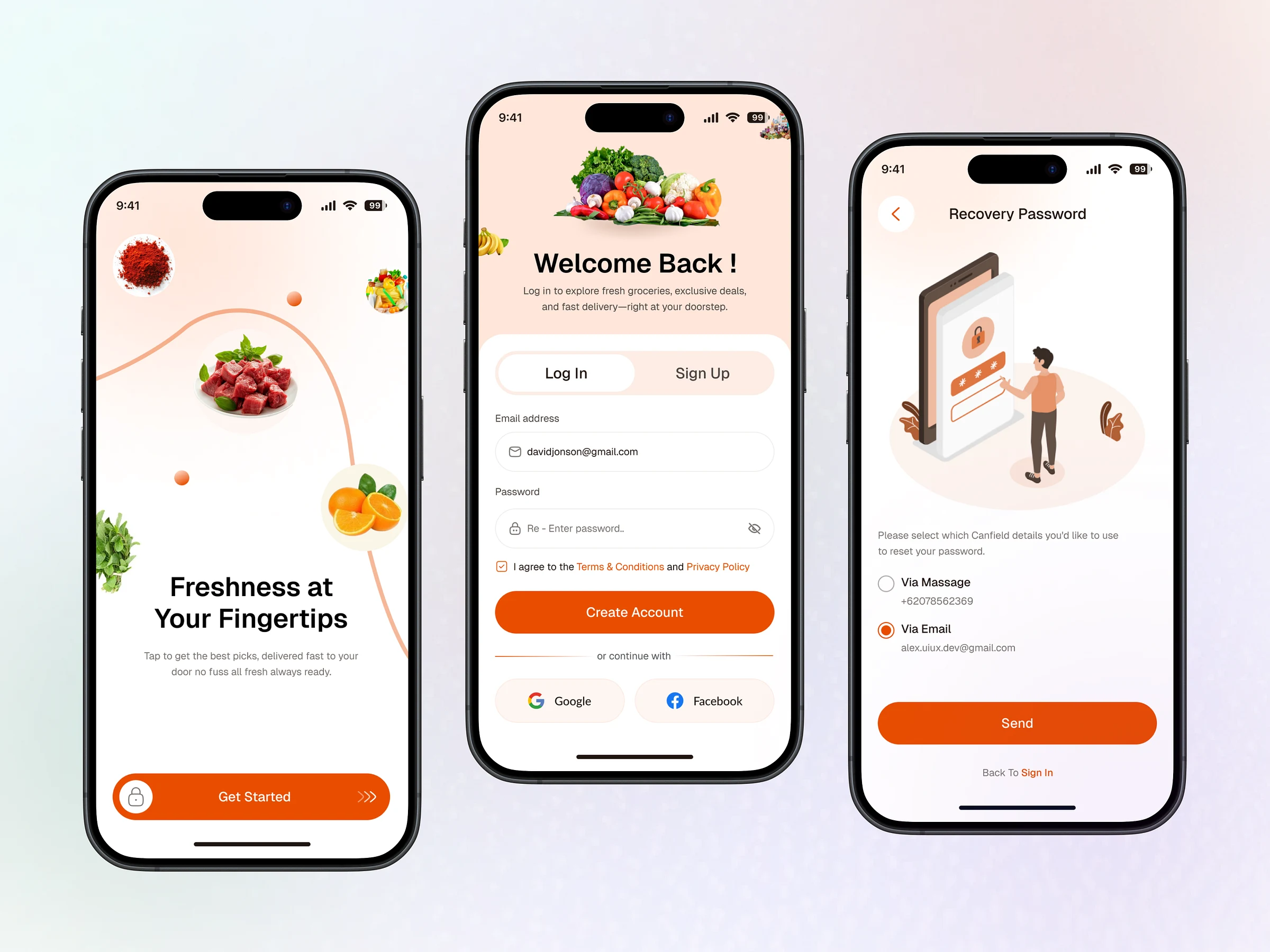
Hello Dribbblers!!! 👋
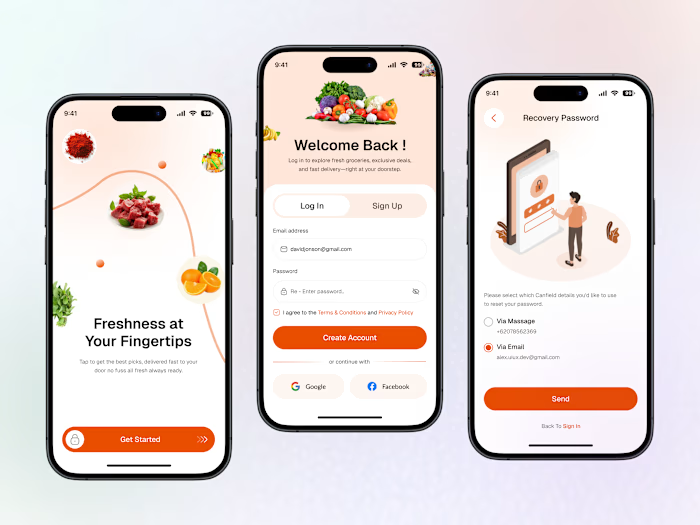
Excited to present our latest design — Grocery App UI – Onboarding, Login & Password Recovery — crafted to simplify and secure your grocery shopping experience from the very first tap.
Our design ensures a smooth, intuitive onboarding flow, secure login process, and easy password recovery — all wrapped in a clean and user-friendly interface that makes grocery shopping easier than ever. 🛒📲
Key Highlights:
✨ Seamless Onboarding – A guided experience to quickly introduce users to the app’s features and value.
🔐 Secure Login Flow – Multiple sign-in options with strong authentication for peace of mind.
🔁 Easy Password Recovery – Quick steps to reset passwords and get users back in without frustration.
🎯 Clean & Modern UI – Designed with clarity and accessibility in mind for all types of users.
Whether you're a first-time user or a regular shopper, our Grocery App UI ensures that your entry point into the app is smooth, secure, and welcoming.
Want to see how design can elevate everyday shopping? Let’s dive in! 🛍️✨
Have any idea💡 Let's Talk ⤵
📩 DM us on Dribbble
✅ Grocery App UI – Onboarding, Login & Password Recovery Simple Access, Secure Experience & Seamless Shopping — All in One Design
Crafted with a mobile-first, user-focused approach, this Grocery App UI ensures users can easily begin their shopping journey with intuitive onboarding, secure login options, and quick password recovery — setting the tone for a smooth and stress-free experience from the start.
🎯 ObjectiveDeliver an intuitive, trust-building entry point for users through effortless onboarding, robust login security, and clear password recovery — making grocery shopping faster, safer, and more accessible for all user types.
🎨 Design System
Colors: Calming neutrals with purposeful accents — 🟢 Green for successful logins and actions 🟡 Amber for verification/warning states 🔴 Red for errors and recovery feedback
Typography: Clean, highly readable fonts like Inter or Gilroy to ensure clarity across all screens.
UI Elements: Rounded input fields, simple CTA buttons, icon-guided flows, and progress indicators to reduce friction and guide the user smoothly.
📱 Key Screens & Features• Onboarding Walkthrough – Highlights app benefits like personalized grocery lists, delivery tracking, and deals.• Login Options – Includes email/password, OTP via SMS/email, and biometric login for added convenience.• Password Recovery Flow – Fast, user-friendly steps with inline validation, feedback messages, and secure token-based reset.• Accessibility – Dark mode support, large touch targets, and clear error states to ensure inclusivity.• Visual Cues & Animations – Micro-interactions and subtle transitions enhance user confidence and engagement.
🧠 UX Approach Designed to minimize cognitive effort and streamline access — every tap, text field, and transition is optimized to build trust, reduce friction, and quickly guide users to their next step in the journey: grocery browsing and ordering.
✅ Impact • Reduces entry friction and drop-off rates • Builds user confidence with secure, clear flows • Lays the foundation for a delightful, efficient grocery shopping experience — right from the first interaction
Like this project
Posted Jul 21, 2025
Designed Grocery App UI for onboarding, login, and password recovery.