
Invoice Cleanup & Reporting Dashboard
Turn an inconsistent invoice export into a management report while keeping every source row traceable.
What I built
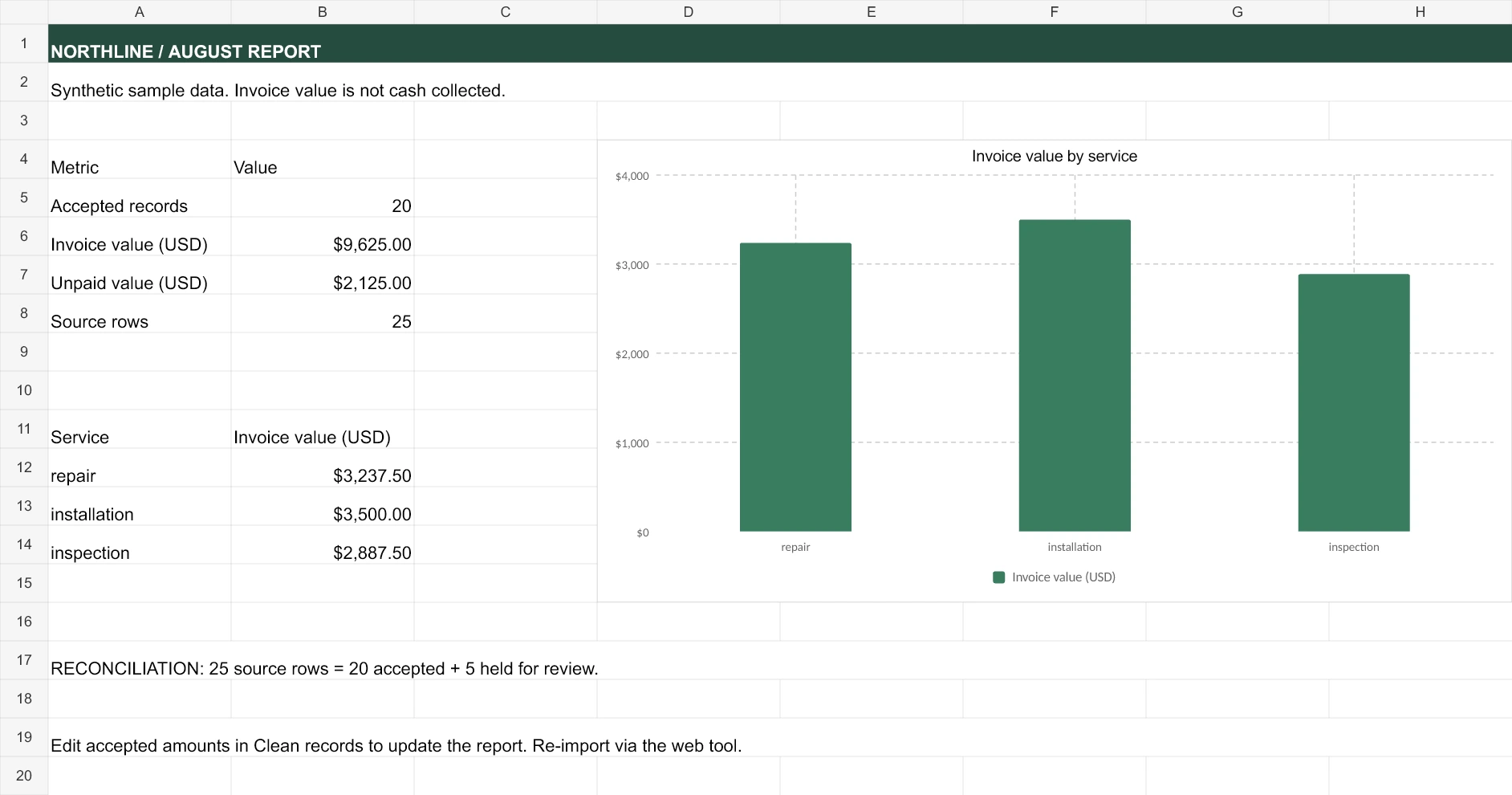
An editable Excel workbook with a formula-driven summary dashboard, cleaned CSV, and exception log. The cleanup standardizes service and status labels, converts valid currency strings, checks required fields and dates, and holds duplicate or invalid records for review.
What the example shows
25 source rows reconcile to 20 accepted invoices and 5 exceptions. Accepted invoice value is $9,625; unpaid invoice value is $2,125. These are synthetic invoice totals, not collected revenue or client results.
Walkthrough
Start with the raw export, inspect the records held for review, then use the summary to see accepted invoice value and outstanding amounts. Original inputs remain separate so each decision can be traced.
Open the workbook and supporting files:
https://paul-rodriguez-portfolio.vercel.app/assets/service-kit/index.html#reporting
Self-initiated portfolio work using synthetic business data. AI-assisted production with source and calculation checks.
0 likes · 2 views · Sep 11, 2026
Cleaned and reconciled 25 invoice rows into an editable dashboard, clean CSV, and exception log. Synthetic data; AI-assisted production.
