NikoCodes: Visual Review for AI-Suggested Links

Niko Minadze



I built an AI-assisted system to find useful links across my content. Then I found myself putting off the review.
I’ve been struggling with internal linking for years. Building the suggestion engine finally solved part of it. Then I realized reviewing its output had become another chore.
The underlying logic was doing substantial work: understanding articles, comparing possible destinations, checking relevance and suggesting a natural place for a link. The interface made me work too hard to understand what it had found.
Source articles, destinations, supporting evidence and sentence edits were spread through long cards. I could inspect an individual suggestion, but getting a clear picture of the connections meant scrolling and holding too much context in my head.
I redesigned the review experience inside NikoCodes, my own publishing and software workspace. The result brings a visual connection map, focused sentence review and exact-change approval into one workflow. I built the backend, AI integration, review interface and publication safeguards for this internal tool.
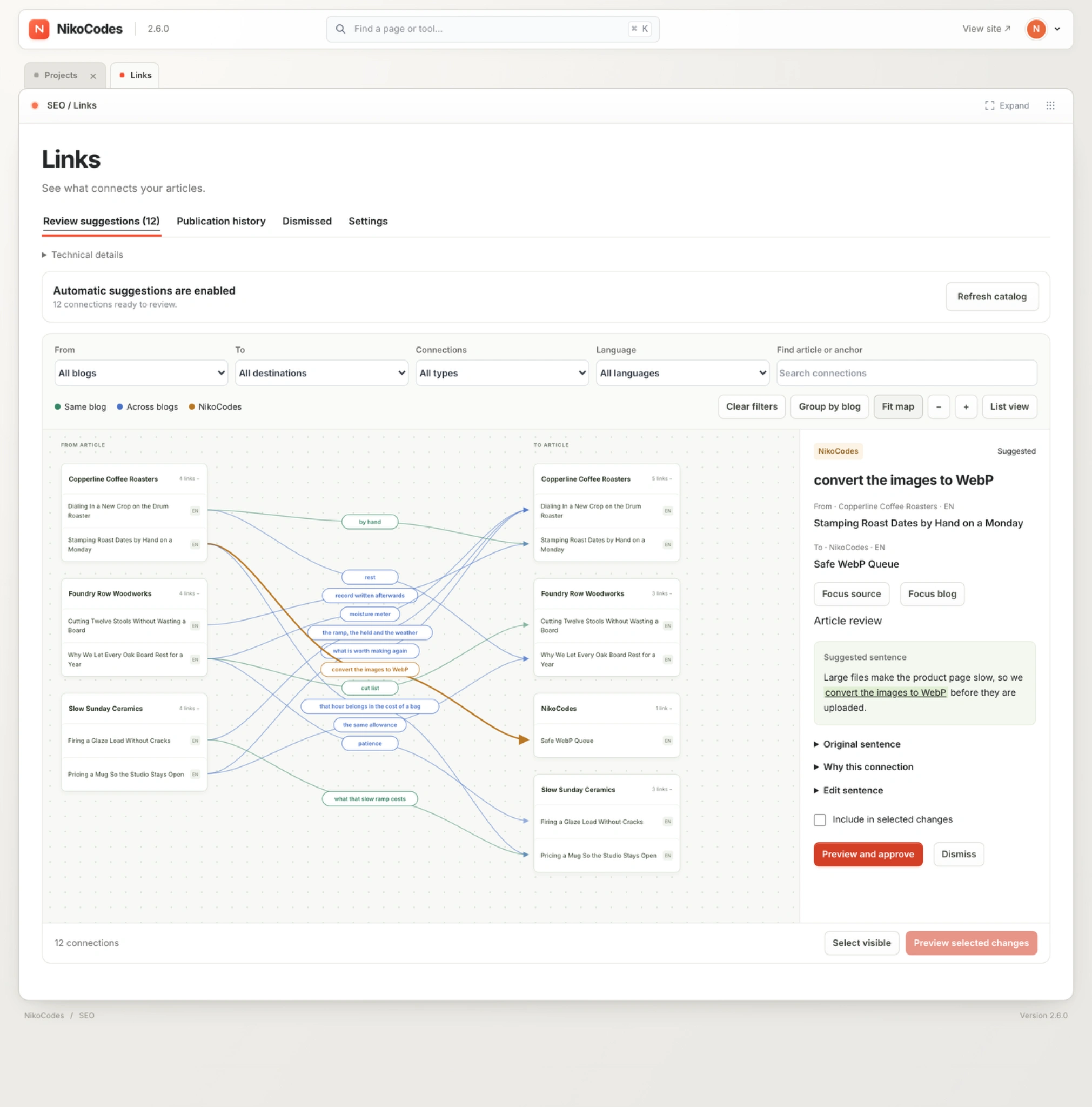
The redesigned workspace: article connections on the left, the selected destination and proposed sentence on the right.
Eight seconds inside the new map: expand article groups, select connections, pan and zoom while the detail panel follows the selection.
01
The problem: reviewing one link hid the bigger picture
The first version exposed the information I needed. Each suggestion identified its source, destination, reader question, supporting passage and proposed wording. It also exposed plenty of information about the machinery producing those suggestions.
That completeness came at a cost. A suggestion occupied a large vertical block, and the page asked me to move repeatedly between article context and individual edits. Questions that should have been easy became slow to answer: which articles are being connected, where do these suggestions lead, and which change do I want to inspect next?
The redesign started with that actual friction. I wanted to understand the relationships first, then inspect the evidence for the connection I selected.
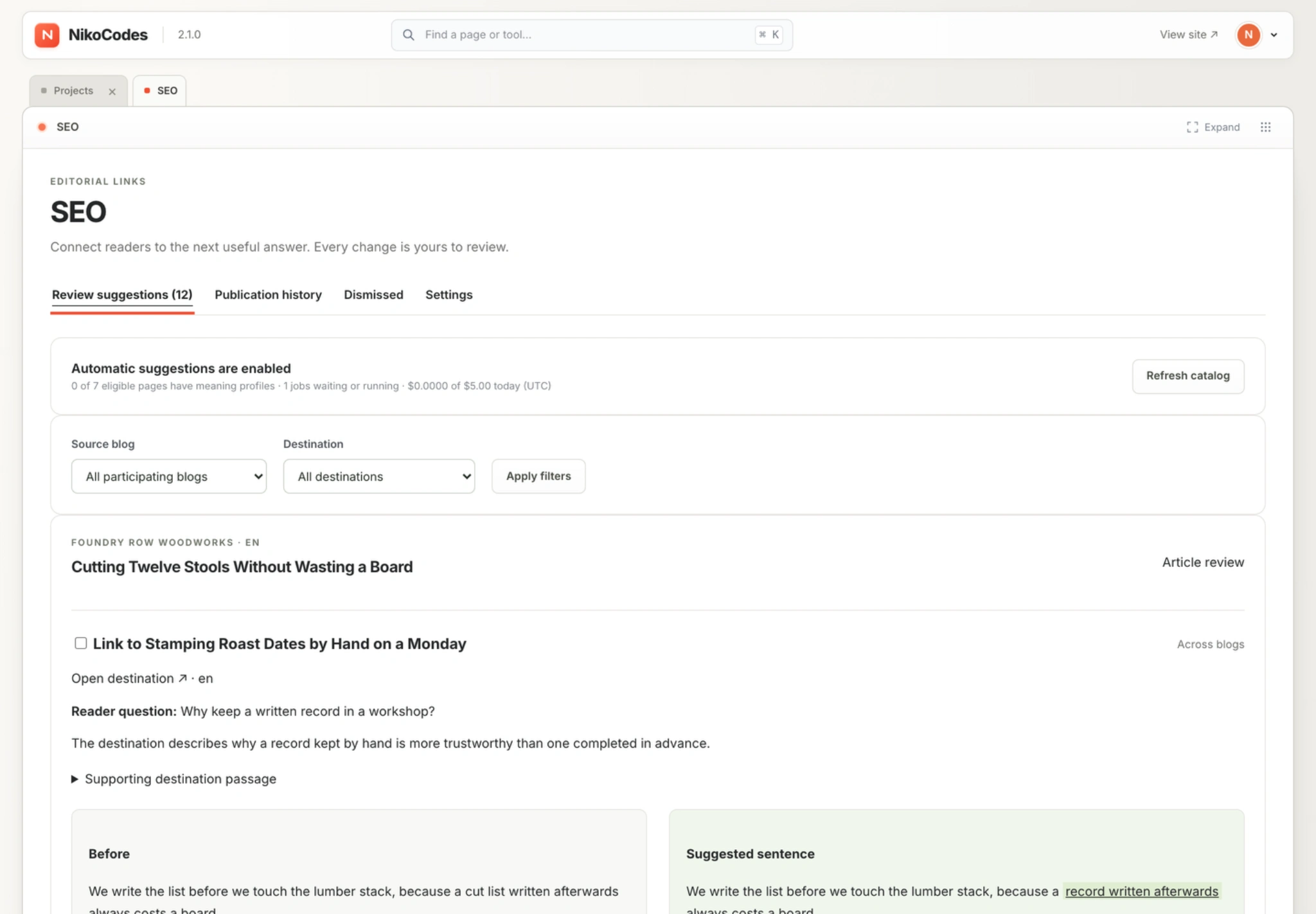
The earlier review screen put substantial context into each card. Understanding the overall set of suggestions required moving through those cards one at a time.
02
The part worth keeping: approval of exact changes
The earlier version already had human approval, editable suggestions and a side-by-side preview of the article before and after publication. Those were useful foundations.
I kept that separation between a model suggesting an edit and a person deciding to publish it. The redesign changes how I find and inspect suggestions; the final decision still comes down to the actual words that will change.
This distinction mattered because a cleaner map would be a poor trade if it made publishing less explicit. The review step had to stay visible and understandable.
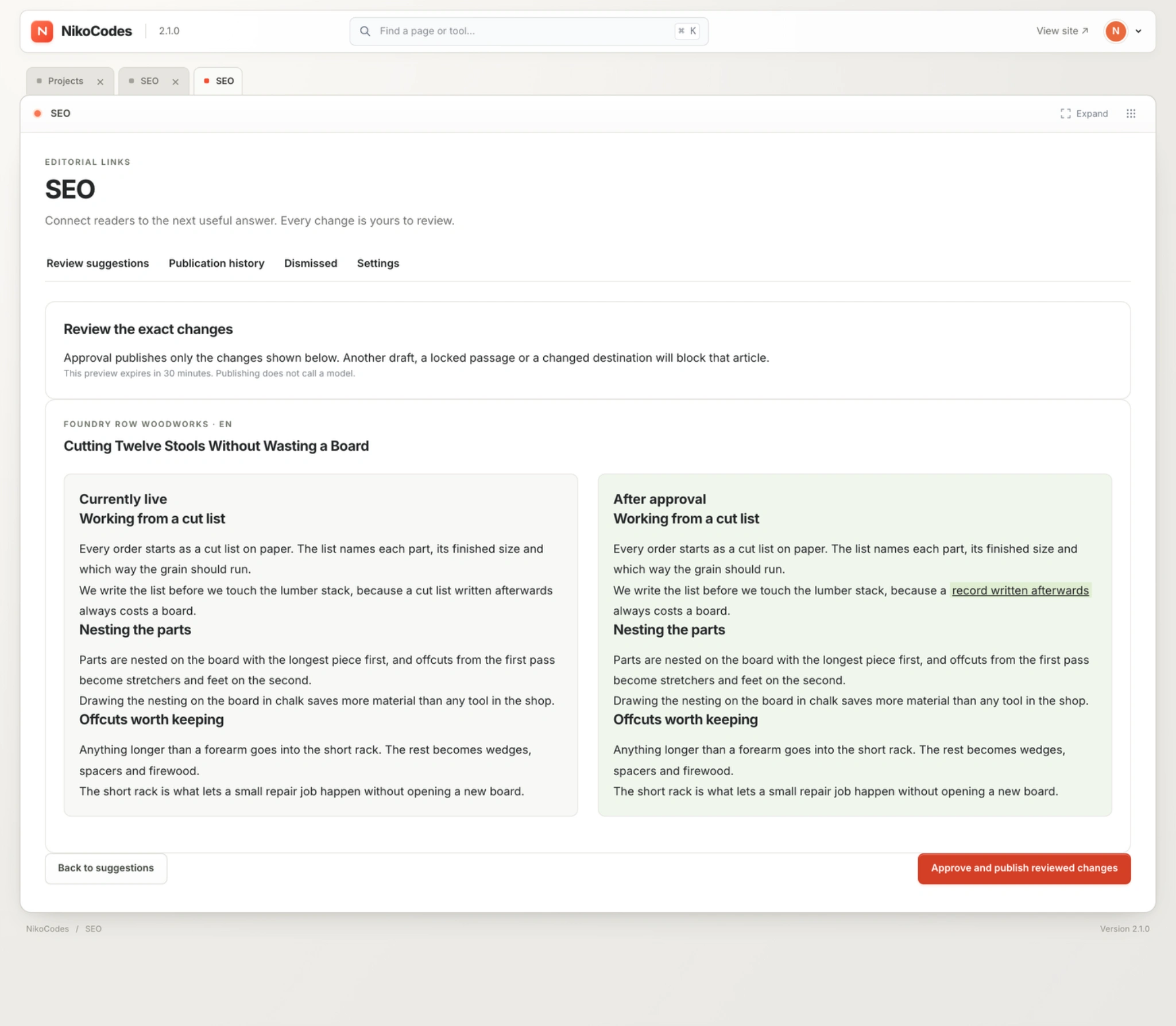
Exact-change approval existed before the redesign. I retained this safeguard and brought the preview into the map workflow.
03
How the system finds a useful connection
The engine analyses published content at section level. It builds meaning profiles describing what a passage is about, the questions it answers, and relevant prerequisites or limitations. Those profiles are represented with 1024-dimensional embeddings.
Candidate retrieval combines cosine similarity with lexical overlap. It uses cached vectors to shortlist up to 20 possible destinations before spending on the more detailed model assessment. In this implementation, that matching runs in memory, with the application storing its analysis in PostgreSQL; it does not require a separate vector database.
Similarity only gets a destination onto the shortlist. A separate LLM step judges whether it helps the reader at the proposed source passage. It must identify a concrete reader question, explain what the destination contributes and return an exact supporting excerpt from that destination.
A shared keyword is insufficient. A plausible-looking relationship can still be rejected, and finding no useful link is an acceptable result. That gives the review screen something more substantial to show than a similarity score and a URL.
04
Small sentence edits, with a clear boundary
Sometimes an existing phrase is already a natural anchor. When it is not, the tool can suggest a slight rewrite of the sentence where the link would appear. It does not need to rewrite the article around a destination.
I designed the rules around reader benefit rather than keyword insertion. Existing wording is preferred. The model is told to avoid promotional insertions, forced reciprocal links and generic further-reading additions. There is no requirement to manufacture a link when the content does not support one.
The boundary is also enforced in code. A proposed patch must target one existing ordinary-prose sentence, preserve existing links and introduce exactly one link to the selected destination. Headings, code, lists, quotations and other protected structures are excluded. The rewrite is bounded: at most 12 new words, with at least half of the original words retained.
Those constraints limit the size and shape of an edit. They cannot guarantee that its meaning is right. That is why the original sentence, suggested wording and destination evidence remain available for review.
05
A map for the relationship, details for the decision
The new default view groups connections by publication. Sources sit on one side, destinations on the other, and the connecting lines carry the proposed anchor text. I can see where suggestions lead before opening their full explanation.
Separate colors distinguish links within one blog, references across participating blogs and connections to selected NikoCodes resources. Some references can cross domains, so the review needs to make those different types of connection clear.
Filters narrow the map by source, destination, connection type and language. Search works around the article or anchor I am looking for. Expanding groups reveals the individual articles; grouping them again restores the overview.
I also moved operational detail out of the main reading path. The first question on this screen is what needs review. Technical status remains accessible when I need to investigate it.
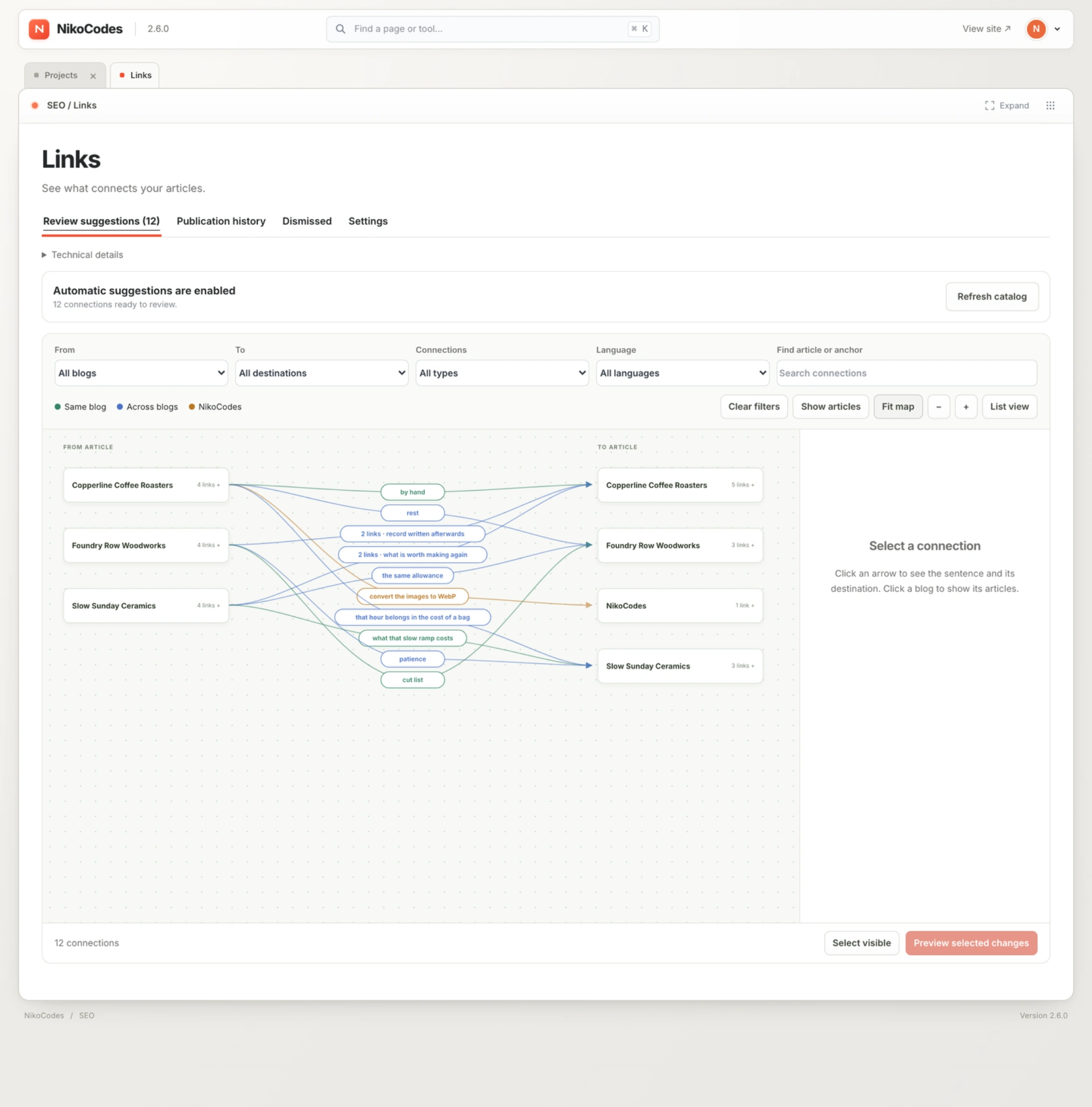
The grouped view shows the relationship between publications, with filters and anchor labels available before opening an individual suggestion.
06
Inspect one suggestion without losing your place
Selecting a connection highlights its path and opens a dedicated detail panel. The source article, destination and proposed sentence sit together, while the rest of the map remains visible.
The panel reveals deeper context when I need it: the original sentence, the reason for the connection and the sentence editor. I can focus on the source or its blog, include the suggestion in a selection, dismiss it or move into preview.
This is the practical improvement I wanted from the redesign. I can move between the overall pattern and a specific wording decision without repeatedly reconstructing which articles I am comparing.
Maps become harder to read as connections accumulate. Grouping, filters and focus controls provide ways to narrow the working set. A list-view option also remains available in the interface.
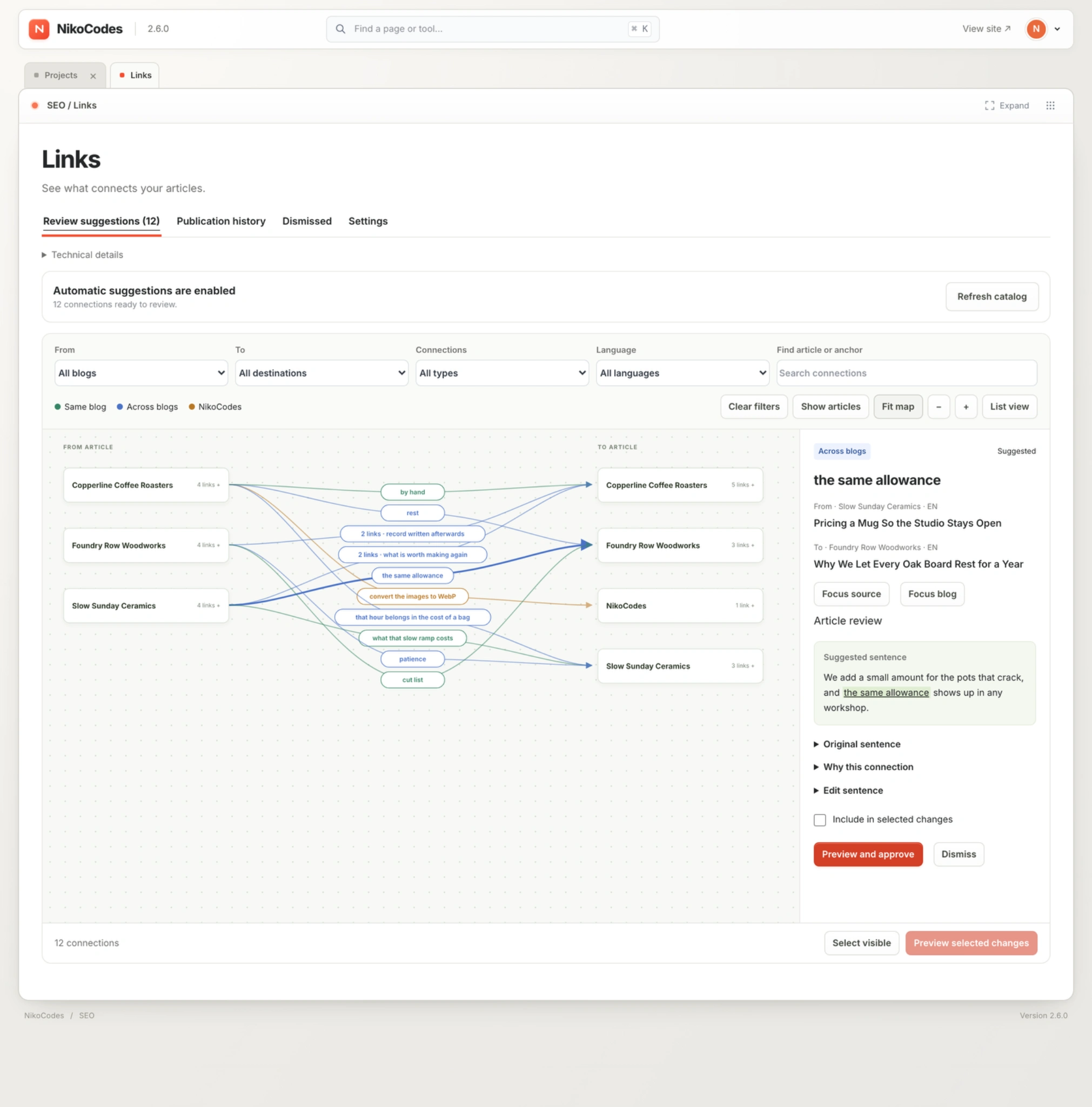
An unapproved suggestion selected for inspection. Its source, destination and proposed wording stay together; the original sentence, rationale and editing controls open on demand.
07
Publishing must match what was reviewed
The final preview opens over the map and compares the currently live article with the proposed version. I review the change in context, then explicitly approve publication. Closing the preview returns me to the map.
Underneath that interaction, the approval binds the exact patches and content revisions being reviewed. The preview is signed and expires after 30 minutes. Publication rechecks the source and destination, along with conflicting drafts, locked passages, active editorial work and publishing state.
The publish path uses the approved changes without asking the model to write again. A late model response cannot quietly turn the sentence I reviewed into a different sentence at publication time.
Publication history records the work. A reviewed undo can reverse a change when the affected sentences still match, preserving unrelated later edits. That condition is important: undo should not blindly overwrite content that has moved on.
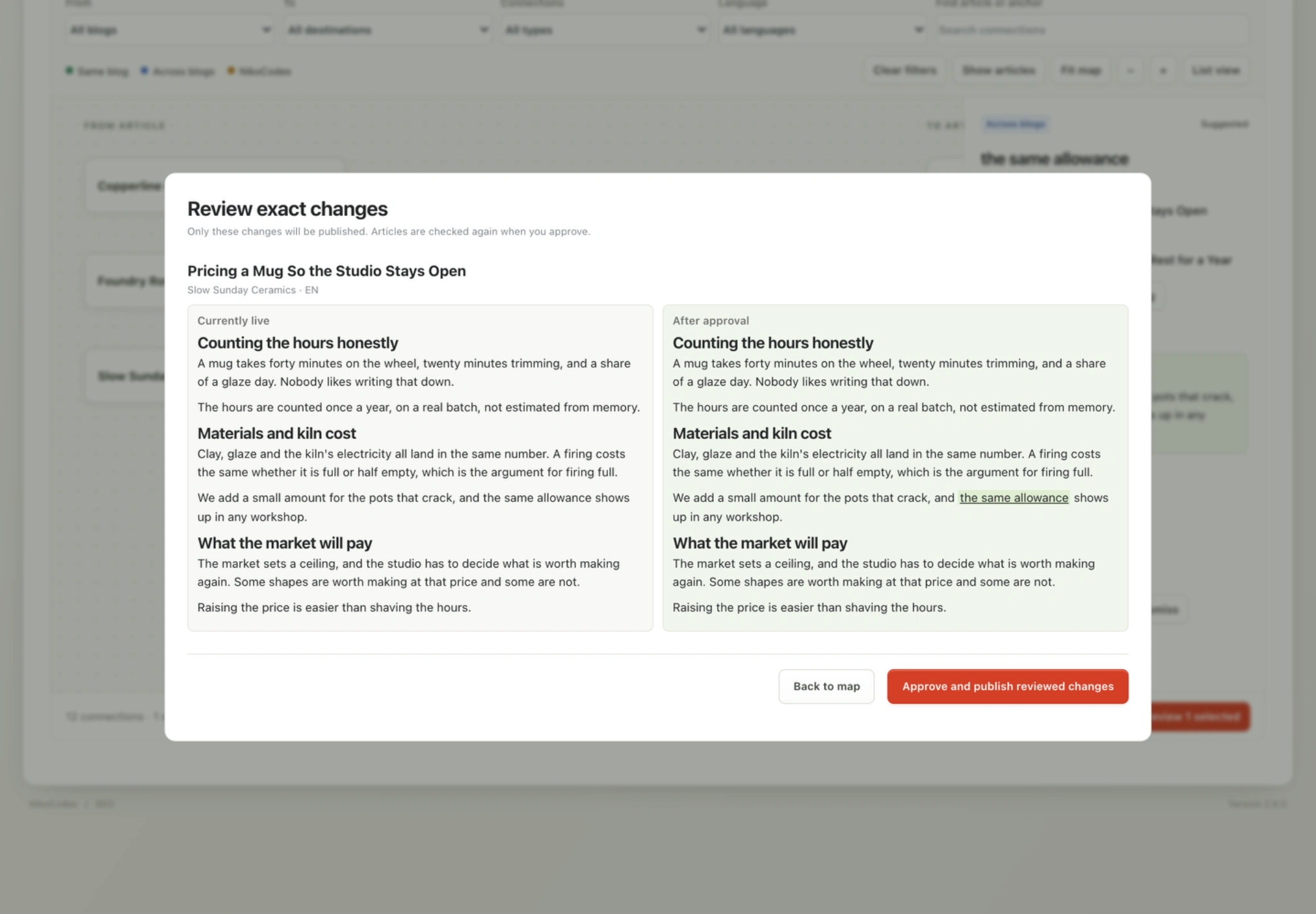
The exact-change preview now opens over the map. Publication remains a separate, explicit action after reviewing the live and proposed versions.
08
Controlling scope and AI cost
The tool works with participating published pages and same-language destinations. Settings determine which blogs participate and which NikoCodes resources may be considered. Existing links and self-links are excluded from candidate selection.
Selected NikoCodes pages are possible destinations, not privileged recommendations. They still need to earn the link through relevance and useful supporting content. The engine also limits pending suggestions and approved additions, rather than trying to fill an article with as many links as it can find.
Profiling, discovery and assessment run as background jobs. Unchanged profiles and previous decisions are reused, with content, policy and embedding configuration included in cache identity. Paid requests reserve budget before execution, and an uncertain provider charge does not immediately free that reservation for more spending.
These are backend details with a direct effect on using the product. Reviewing suggestions should not require repeating paid analysis, and enabling automatic suggestions should still leave me in control of scope and cost.
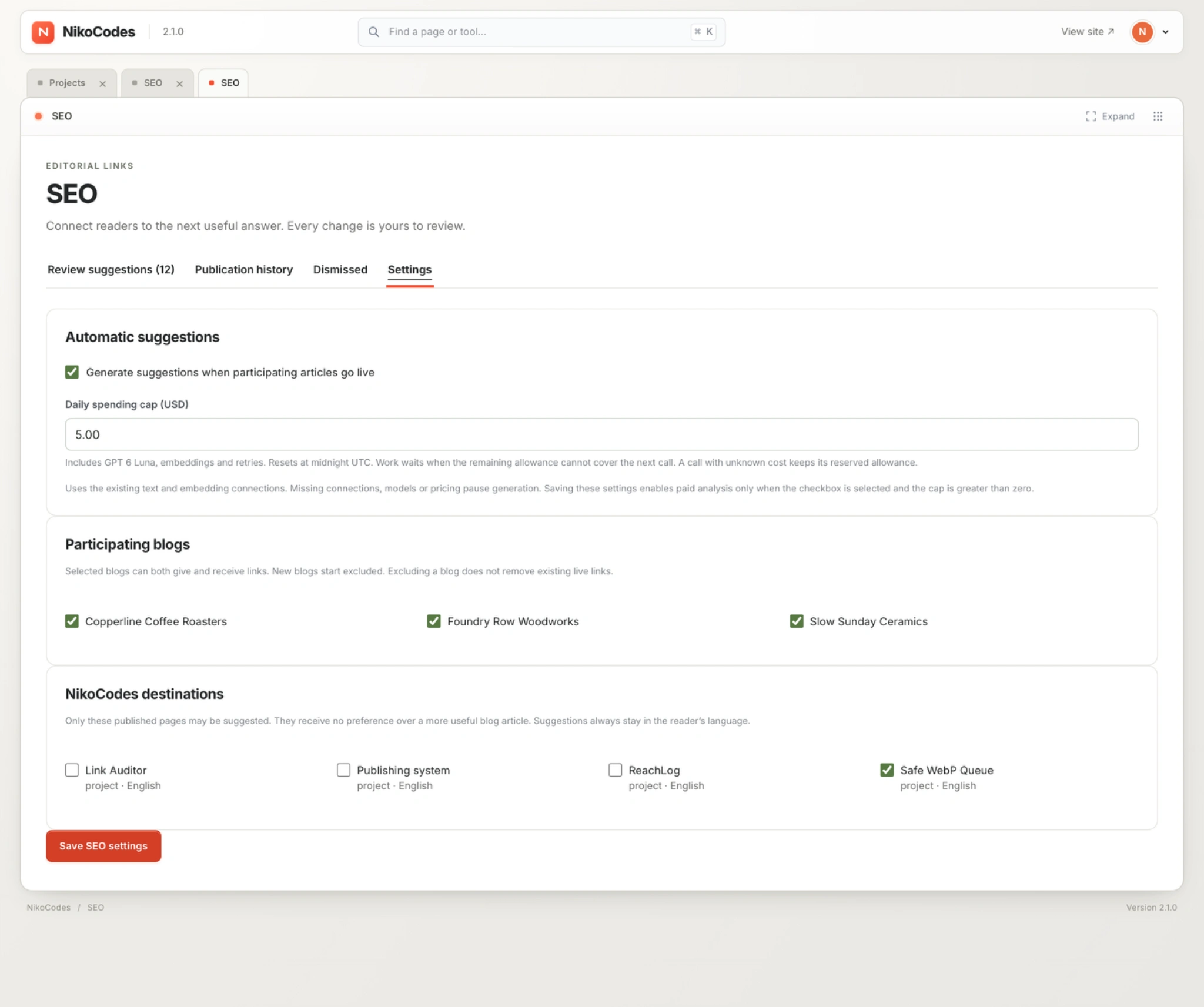
The earlier settings screen shows the existing participation controls, daily budget and eligible destinations that support the review workflow.
09
A review workflow I want to use
The clearest result is a workflow I find more comfortable to use. The old screen organised the job as a sequence of long suggestion cards. The redesigned screen lets me start with the connections, inspect one sentence in context and move into a precise publication preview.
The project combines semantic retrieval, LLM assessment, constrained editing, a visual review interface and guarded publication inside a Go application backed by PostgreSQL. The interface uses server-rendered HTML with JavaScript interactions.
The result is a workflow I find more comfortable to use: understand the relationship, inspect the wording, then approve the exact change. I have not yet measured review time or SEO impact.
If your team has an AI-assisted workflow that produces useful suggestions but is difficult to review, I can help build the application around it: the integration, review controls and path to a dependable final action.
Like this project
Posted Oct 6, 2026
Built an AI-assisted link review tool with semantic matching, sentence-level edits and a visual map for reviewing exact changes before publication.