WhatsApp AI Automation Workflow with n8n

Salman Khan


WhatsApp AI Automation Workflow
Overview
Most WhatsApp automation only handles text. But real customers send voice notes, images, and mixed messages. A standard chatbot breaks down the moment someone sends a 30-second voice note instead of typing.
I built a WhatsApp AI automation workflow in n8n that handles both text and voice messages seamlessly. Voice notes get transcribed via OpenAI Whisper, then processed identically to text. The customer never knows (or cares) which path their message took. In markets where voice notes are the default communication style (South Asia, Middle East, Latin America), this is the difference between a chatbot people actually use and one they abandon after the first message.
Platform Walkthrough
What the Platform Does
Voice Message Processing: Automatically converts incoming voice notes to text using OpenAI Whisper
Text Message Handling: Context-aware AI responses for typed messages
Unified Conversation Flow: Identical quality responses regardless of whether the customer types or speaks
Automatic AI Reply Generation: OpenAI-powered responses based on business context
Fallback Handling: Graceful degradation for noisy audio, unsupported formats, and edge cases
Conversation History: Stored for context in future messages so the bot remembers prior interactions
Technical Highlights
Message type detection pipeline that branches into the right processing path (text vs. voice vs. image)
Speech-to-text transcription via OpenAI Whisper with noise handling and language detection
Unified processing layer so transcribed voice and original text follow identical response logic
Fallback logic for background noise in voice notes, mixed messages (text + voice in the same conversation), and non-English languages
Session-based conversation memory for multi-turn interactions across message types
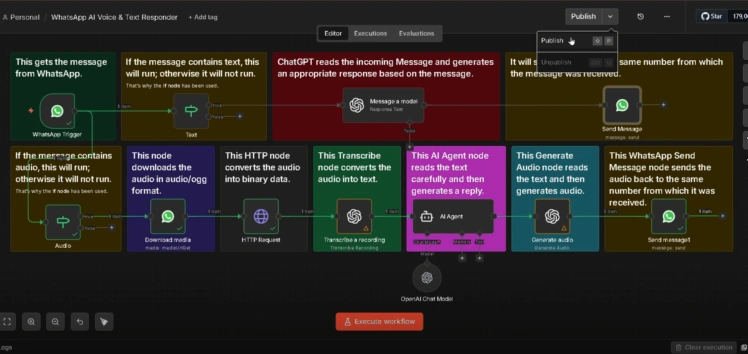
The Workflow Architecture
WhatsApp message arrives via webhook
n8n detects message type (text vs. voice vs. image)
Voice notes → speech-to-text transcription via OpenAI Whisper
Transcribed text (or original text) → OpenAI for response generation
AI response sent back through WhatsApp
Conversation history stored for context in future messages
My Role
I designed and built the entire multimodal pipeline: the message detection layer, the voice-to-text transcription integration, the unified response logic, and the fallback handling for edge cases. The core challenge was making the experience feel seamless regardless of input type, so a voice note gets the same quality response as a typed message.
The Tech Stack
n8n for end-to-end workflow automation
OpenAI for language understanding and response generation
Whisper for speech-to-text transcription of voice notes
WhatsApp Business API for receiving and sending messages
Python for custom audio processing and data handling
The Result
Customers can now communicate however they prefer: typing or talking. Voice notes get transcribed and processed just like text messages, and the AI responds intelligently to both. No more "please type your question instead" limitations.
Like this project
Posted Jun 20, 2026
Built a WhatsApp AI automation in n8n that handles text and voice messages, converts speech to text, generates AI replies, and responds automatically.