Scalable SaaS Dashboard Design for FlowSync AI

Joshua chidubem

Project Overview
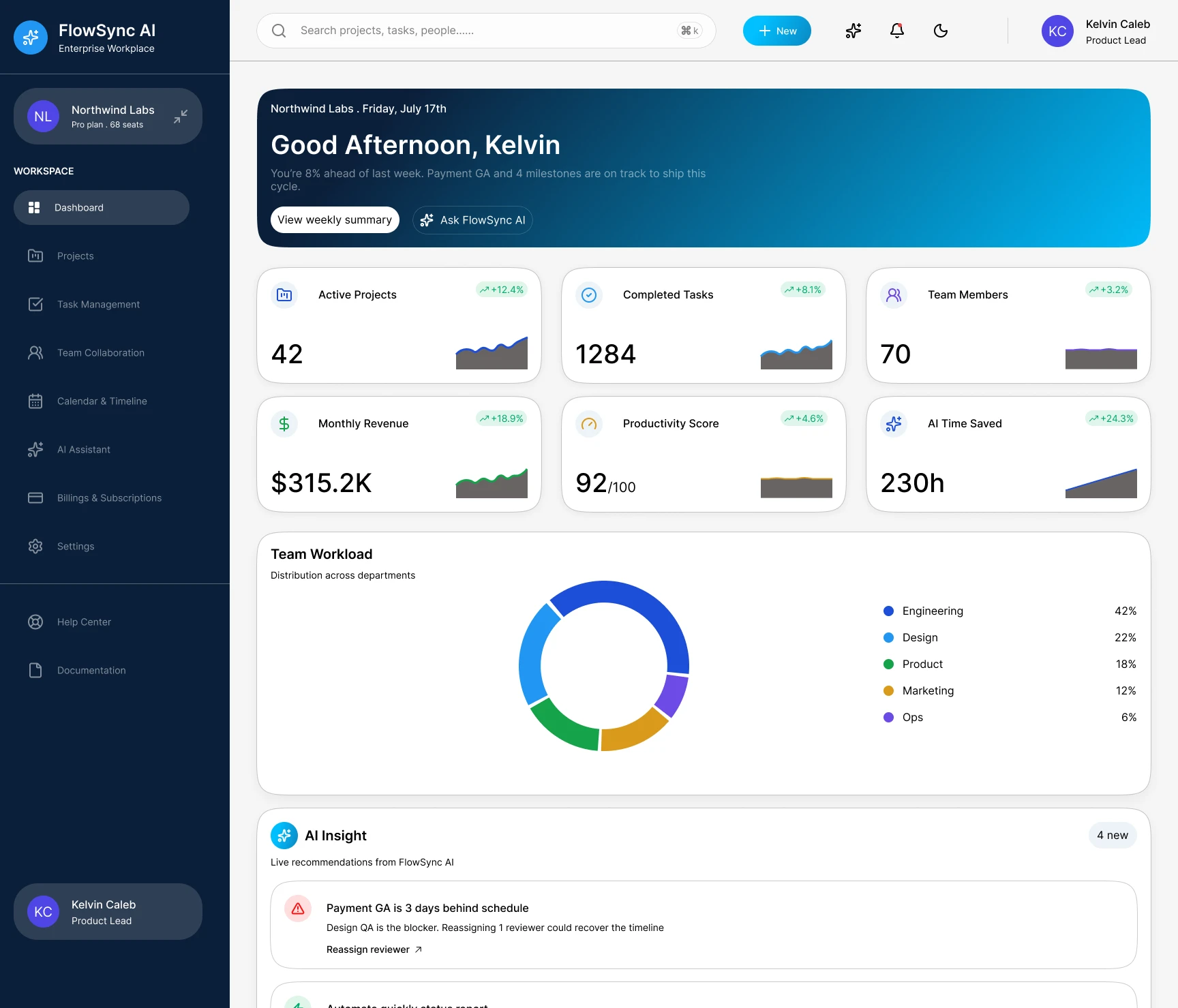
FlowSync AI is a modern enterprise SaaS platform designed to help organizations manage projects, organize tasks, improve team collaboration, and increase productivity through AI-powered workflows. The platform centralizes project planning, task tracking, collaboration, scheduling, and intelligent automation into a single, intuitive dashboard.
The design focuses on clarity, scalability, and usability, making complex workflows easy to manage for startups, agencies, and enterprise teams.
Design Goals
The primary goal was to create a dashboard that feels professional, modern, and effortless to navigate while handling large amounts of project data.
The experience was designed around four key principles:
Clean information hierarchy
Fast access to essential tools
AI-enhanced productivity
Enterprise-level scalability
Design Style
The interface follows a modern minimalist SaaS aesthetic with generous spacing, soft shadows, rounded components, and a neutral color palette accented by vibrant blues and subtle status colors.
Visual Characteristics
Desktop-first layout
Fixed navigation sidebar
Sticky top navigation
Rounded cards
Clean typography
Soft elevation
Consistent spacing
Accessible color system
Modern iconography
Responsive components
Navigation Structure
The application uses a persistent sidebar to provide quick access to every major workspace.
Main Navigation
Dashboard
Projects
Task Management
Team Collaboration
Calendar & Timeline
AI Assistant
Billing & Subscriptions
Settings
Utility Navigation
Help Center
Documentation
Workspace Switcher
User Profile
This structure minimizes navigation depth while improving efficiency for daily users.
Projects Module
The Projects page serves as the command center for managing all active workspaces.
Features
Search projects
Advanced filtering
Sorting options
Export functionality
Create new project
Status tracking
Budget monitoring
Progress indicators
Team assignment
Deadline management
Priority labels
Each project row provides a comprehensive overview, enabling managers to monitor progress without opening individual project pages.
Task Management
The Task Management workspace uses a Kanban-based workflow to improve visibility and productivity.
Workflow Columns
Backlog
In Progress
Review
Done
Each task card contains:
Priority indicator
Task title
Category
Assigned member
Comments
Attachments
Due date
Status
The drag-and-drop interaction enables teams to update task progress quickly while maintaining an organized workflow.
User Experience
The platform was designed to reduce cognitive load by organizing information into clearly defined sections and using visual hierarchy to guide users naturally through each workspace.
Interactive components such as cards, filters, search bars, and action buttons are positioned where users expect them, reducing friction and improving productivity.
Information Hierarchy
The interface prioritizes information based on importance.
Level 1:
Page title
Primary actions
Search
Level 2:
Filters
Status tabs
Workspace controls
Level 3:
Project and task content
Level 4:
Metadata
Timestamps
Supporting information
This hierarchy allows users to scan large datasets efficiently.
Like this project
Posted Jul 22, 2026
Designed a scalable, AI-powered SaaS dashboard for project and task management.
Likes
1
Views
10