Jannat Khosla // GIS Research Portfolio Built in Next.js

Tanish Mittal


Jannat Khosla (jannatkhosla.com) is a geospatial researcher in Chandigarh, doing an MSc in Geoinformatics at Panjab University. She maps farmland and water in Punjab from Sentinel-2 and Landsat imagery, and in 2026 she set out GNSS ground control for drone surveys as a research intern at IIT Roorkee. Tanish Mittal of Zamn Studios designed and built her website, including the brand, every page, the CMS behind it and the trailer that launched it. The first version went up in June 2026 and I'm still adding to it.
Project at a glance
Built for: Jannat Khosla, geospatial researcher, MSc Geoinformatics at Panjab University
Designer and developer: Tanish Mittal, founder of Zamn Studios
Scope: visual identity and type, UX, all pages, a Supabase CMS with on-page editing, SEO, an automated blog pipeline, a digital business card and launch trailers
Stack: Next.js 16, React 19, Tailwind CSS v4, framer-motion, Lenis, Supabase, Vercel, a Cloudflare Worker, Remotion for the trailers
Timeline: June 2026, ongoing (38 commits so far)
Live site: https://jannatkhosla.com
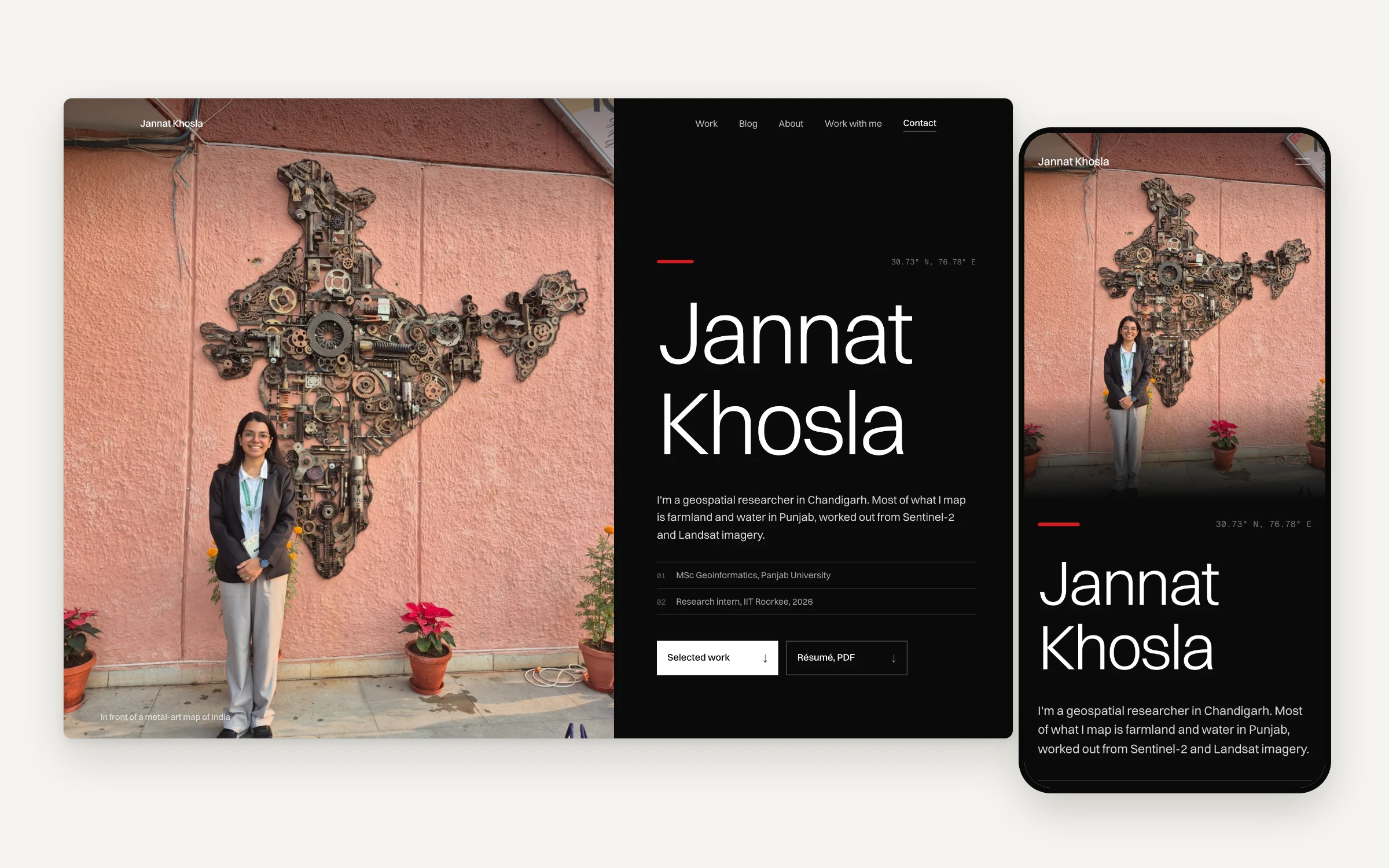
The homepage on desktop and phone: her photo in front of a metal-art map of India, with Chandigarh's coordinates beside her name
The brief
Two kinds of people land on a GIS portfolio. A company or research group deciding whether to pay her for a mapping job, and a student or researcher who found one of the posts through search and might cite it. In the first few seconds both of them are checking whether she's real and whether the work is hers.
That gave me three rules for every page. Show her own maps before making any claim about them. Keep every sentence checkable against her résumé. And make the writing easy to find, cite and share, because citations and search traffic are how a researcher gets found.
A look borrowed from printed research proposals
The June version was a near-monochrome white system with a green accent. By October it read like a template, so I rebuilt it to look like a printed proposal: white paper, hairline rules, thin Switzer headings and Geist Mono for coordinates and numbers. Red (#d71920) is the only accent, and it's mostly kept to a short bar beside each section label and the marks on her maps. Switzer is self-hosted, partly because Windows and Android don't ship Helvetica Neue and Arial has no 300 weight.
Section labels are numbered like a document, and where most sites put a logo, this one puts a coordinate. The hero sets her photo beside "30.73° N, 76.78° E", which is Chandigarh, with her degree and the IIT Roorkee internship as two numbered rows underneath.
A homepage that leads with her maps
Below the hero, "How a project runs" walks through four stages, and each one has a picture from her own work: the raw Landsat scene over Ludhiana, the survey drone at IIT Roorkee, an NDWI map of Punjab, and the finished district groundwater map. On desktop the figure stays pinned while the steps scroll past. Each of her capabilities links to the case study that backs it up.
"Selected work" opens on a project map, a Landsat true-colour composite of North India from NASA GIBS with a 1° graticule and a mark on each place her projects cover. It's one WebP image with no map library behind it, so it costs almost nothing to load.
A preloader that turns into the page
On the homepage, her photo is drawn full screen out of coordinate characters. A segmentation mask keeps her brighter than the background, then the characters resolve into the real photo and it slides into place as the hero. Other pages get a lighter version drawn from their own first screen.
The rules I held it to: it never covers the navigation, a pure CSS fallback keeps the counter moving before any JavaScript arrives (so a slow connection never sits on "000"), and scrolling or tapping speeds it up instead of cutting it off. It skips itself for bots and link previews, for anyone with reduced motion or Save-Data on, and on the business card page. Because it's a canvas, it never counts as the page's largest paint.
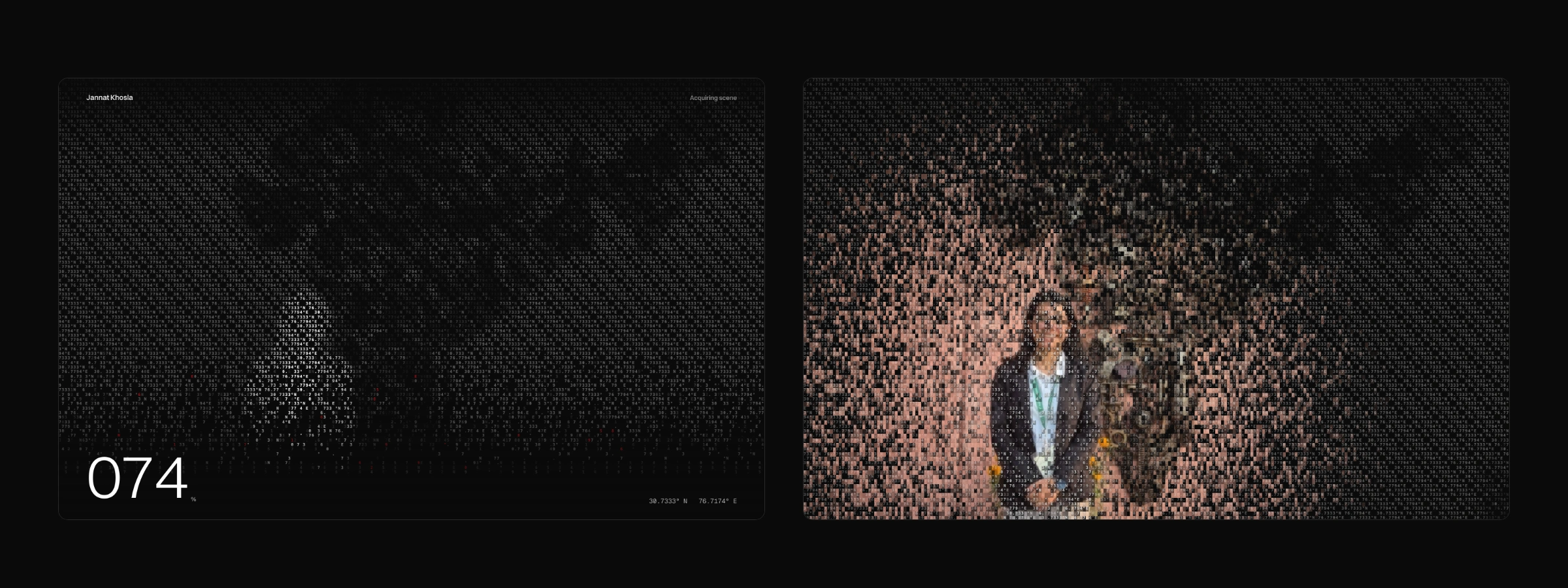
The preloader, 1.8 and 2.4 seconds in: the photo drawn in coordinate characters, then resolving into the real image
Case studies built around her figures
Seven write-ups live in the CMS. Each case page shows her own map plates, and the Punjab study has a before and after swipe of the district groundwater table, 2000 to 2010 against 2010 to 2025. Every case ends with two more cases and related writing, picked by shared topics.
A blog you browse by place
Most remote-sensing posts are about somewhere specific, so the blog index leads with a map. Each post's location is matched against 29 known places and drawn as a red dot on a NASA Blue Marble image of India, sized by how many posts are set there. Pick a dot and the list filters to that place. If the matcher doesn't know a place but the state is named, the dot goes on the state's centre, and a bounds check stops anything from landing off the image. Posts about the whole country get no dot and are counted as India-wide instead. Right now that's 74 posts, 29 places and 39 India-wide.
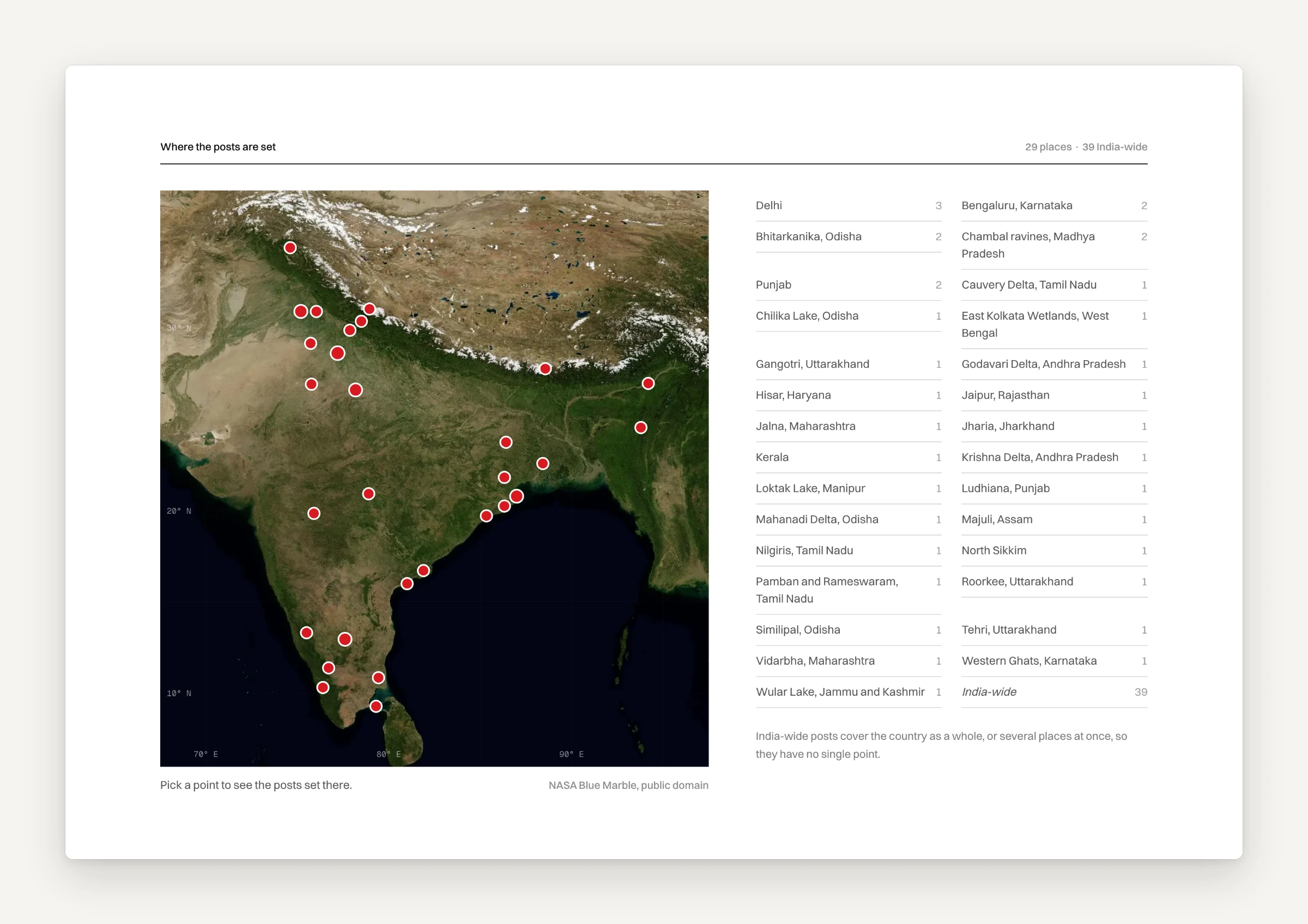
Where the posts are set: 29 places on a NASA Blue Marble basemap, with a count beside each
Under the map are two rows of filters. Data covers the sensor or source (Sentinel-2, Sentinel-1, Landsat, ISRO satellites, elevation models, drones and GNSS, Indian open data, other missions), and Topic covers things like QGIS, Earth Engine, water and farmland. They stack with the place filter. Every post stays in the server-rendered HTML, so the filtering is only for people and search engines still see every link.
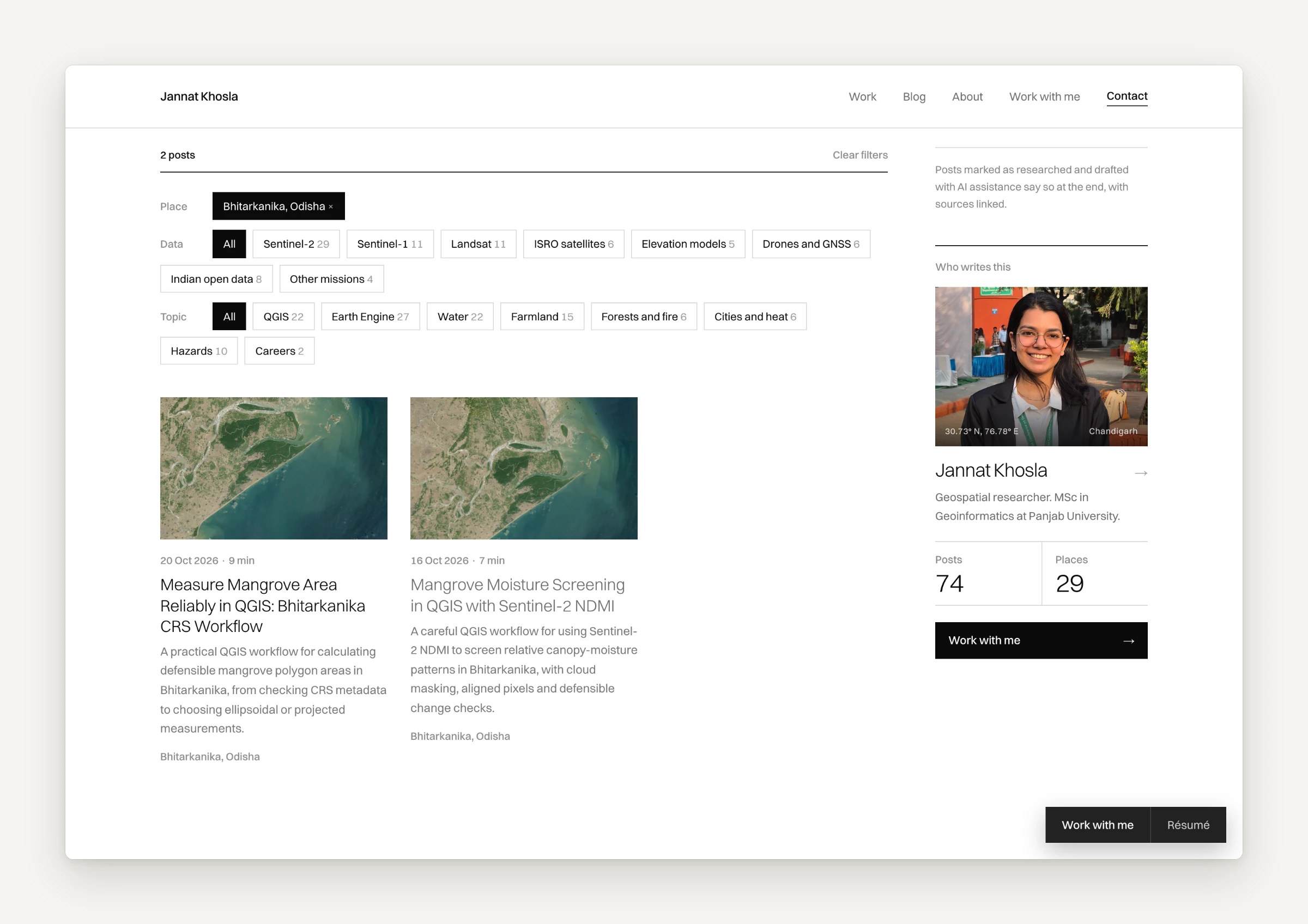
Bhitarkanika picked on the map, with the data and topic filters and the "Who writes this" card
Posts made to be cited
Each post has a "Cite this post" block with an APA-style citation and a BibTeX @online entry, both with a copy button. Around it sit a table of contents that tracks your scroll, a reading progress bar, a share rail and three related posts. Link previews use the real headline and excerpt, and the cover on every automated post is a Landsat scene of the place it's about, pulled from NASA GIBS rather than a stock photo.
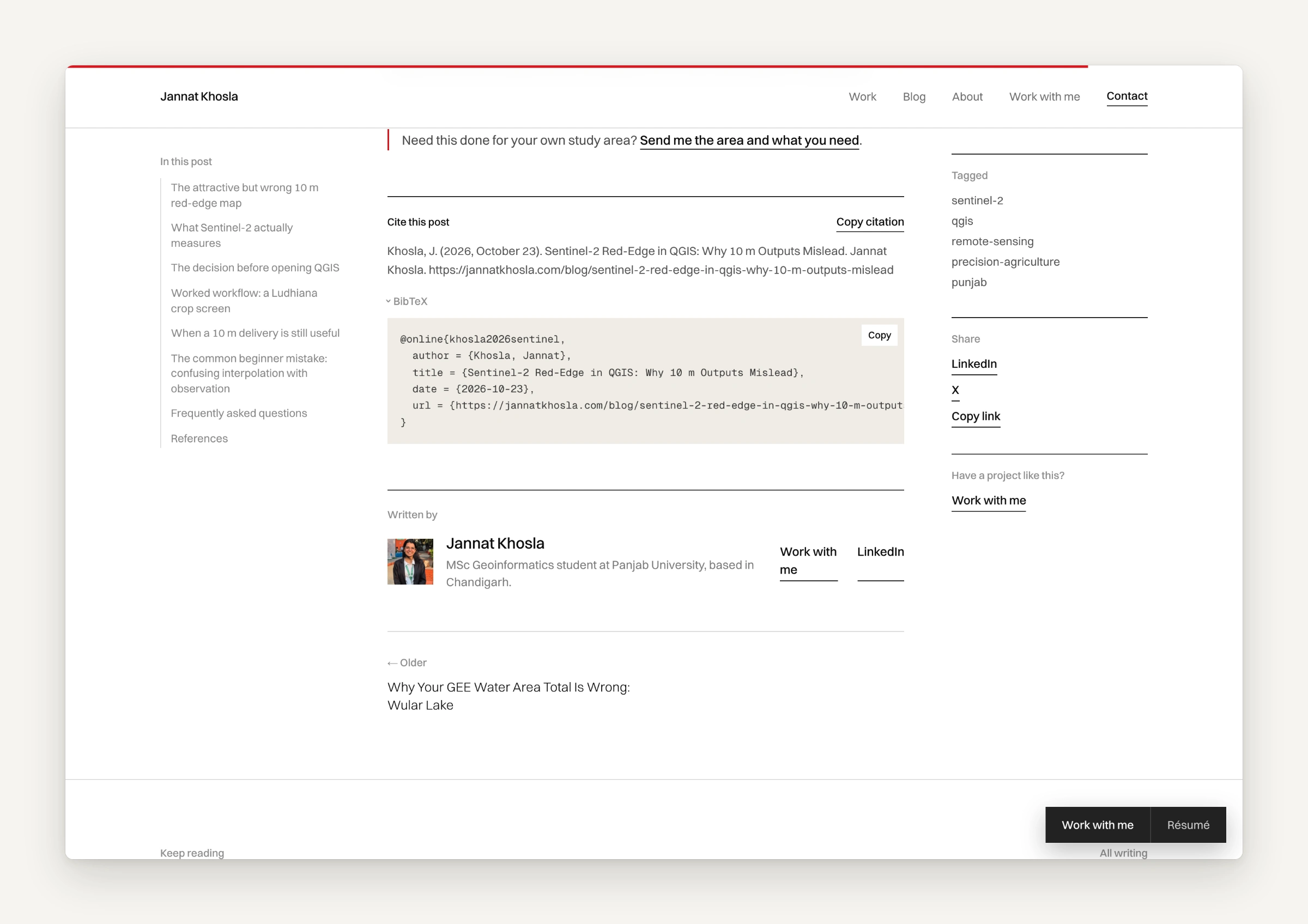
The citation block with BibTeX open, next to the table of contents and share rail
A Supabase CMS she edits on the page
Posts, case studies and page text live in Supabase. Pages are built statically and refreshed at most every 60 seconds, and a save in the admin refreshes the affected pages straight away. If the database can't be reached, the site falls back to a bundled copy of the content instead of showing an empty page.
In October I redesigned the admin, which we call the Studio, in the same editorial look and phone-first. It has search, filters and bulk publish across posts and case studies, an inbox for contact-form messages, a split markdown preview with SEO counters and a search-result preview, and a revision history that backs up the current version before it restores an old one. The part I like most is "Edit page": switch it on and the text on the live page becomes editable where it sits. Authentication is checked on the server for every page and every action.
An automated blog, labelled as one
Three mornings a week a GitHub Actions job asks Codex CLI to research and draft a technical post from a rotating set of topic areas, and it has to open at least three authoritative sources first. The model runs in a read-only sandbox and never holds the publishing credentials. Its draft goes to a Cloudflare Worker that rejects anything off-spec: word count, title and SEO lengths, tag count, stray HTML, and a required closing line saying the post was researched and drafted with AI. Only then does the Worker fetch the Landsat cover and publish.
It started at one post a day and briefly ran at two. I cut it back to three a week, because near-daily posting reads as filler to the people she wants to work with and it's the pattern Google's scaled-content policy goes after. Every one of these posts says how it was made, and only posts Jannat writes herself go to clients as samples.
Work with me
The hire page shows her maps rather than describing them. There's the groundwater swipe, NDWI and NDVI plates for Punjab, the Delhi NCT buffer map at 500 m, 1 km and 2 km, and a three-question quiz that asks visitors to read the maps (nothing gets sent anywhere). Then four kinds of work she takes on, a four-step process, an FAQ and an enquiry form. While writing it we held to one rule, that it only claims hands-on work that's hers, so I scaled back a promise about tutorials and dropped an article count that overstated things.
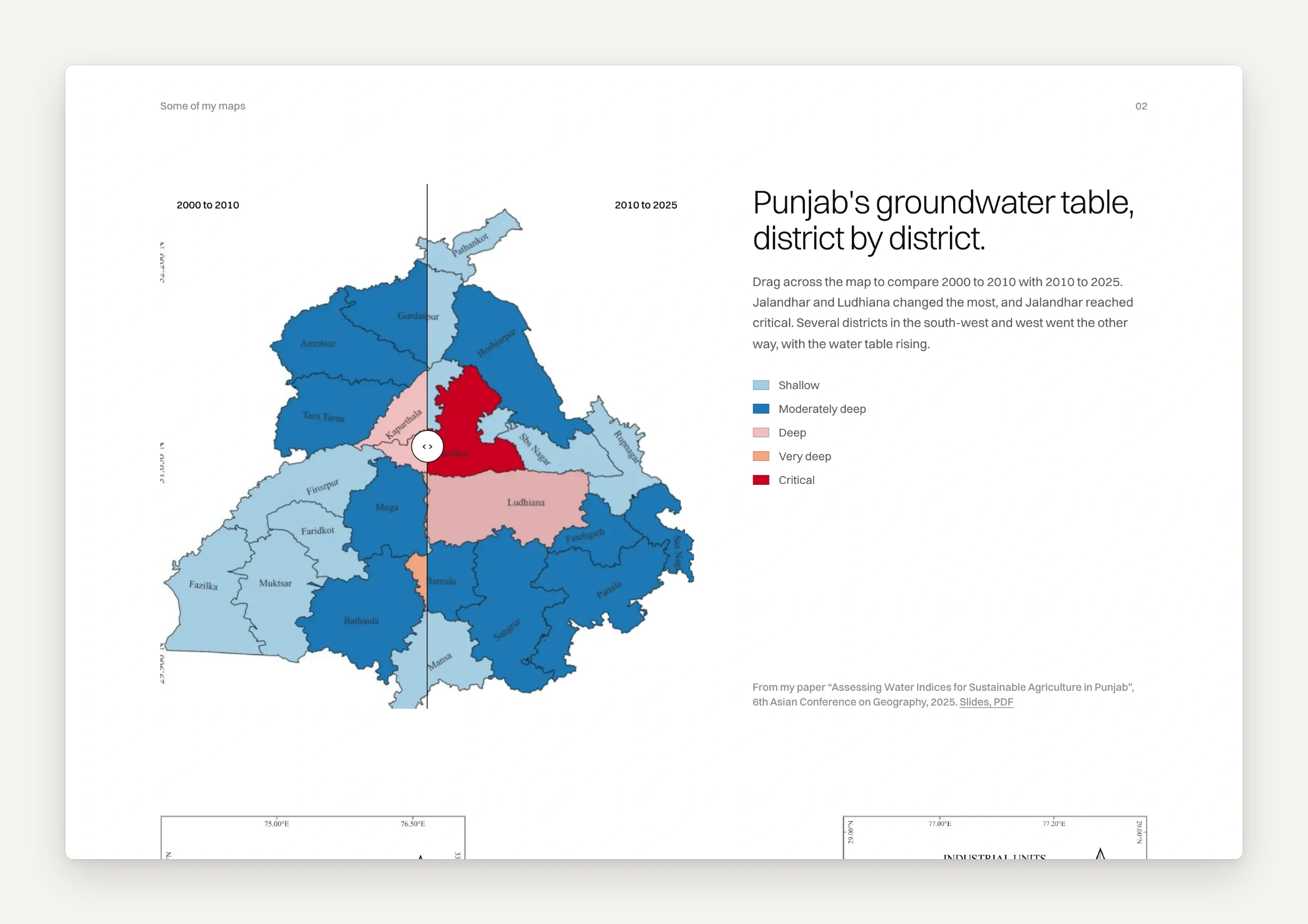
Work with me: Punjab's groundwater table by district, with a drag handle to compare 2000 to 2010 against 2010 to 2025
A business card that opens a page
The QR code on her printed visiting card goes to /vc: a photo banner, her name, two numbered rows, a "Save contact" button that drops a vCard straight into the phone's contacts, links to the portfolio and LinkedIn, three map thumbnails, email and résumé. It's built for someone standing in a hallway on bad signal. It paints without JavaScript (CSS keyframes instead of framer-motion), skips the preloader, doesn't prefetch the homepage in the background, and stays out of search results.
A 404 that tries to help
Mistyped addresses get a did-you-mean. It compares the address with every page, case study and post using Levenshtein distance and offers up to three matches. There's also a Wayback Machine link for old URLs and the three latest posts. The map on it is marked "404.00° N, 404.00° E", with a note that latitude stops at 90°.
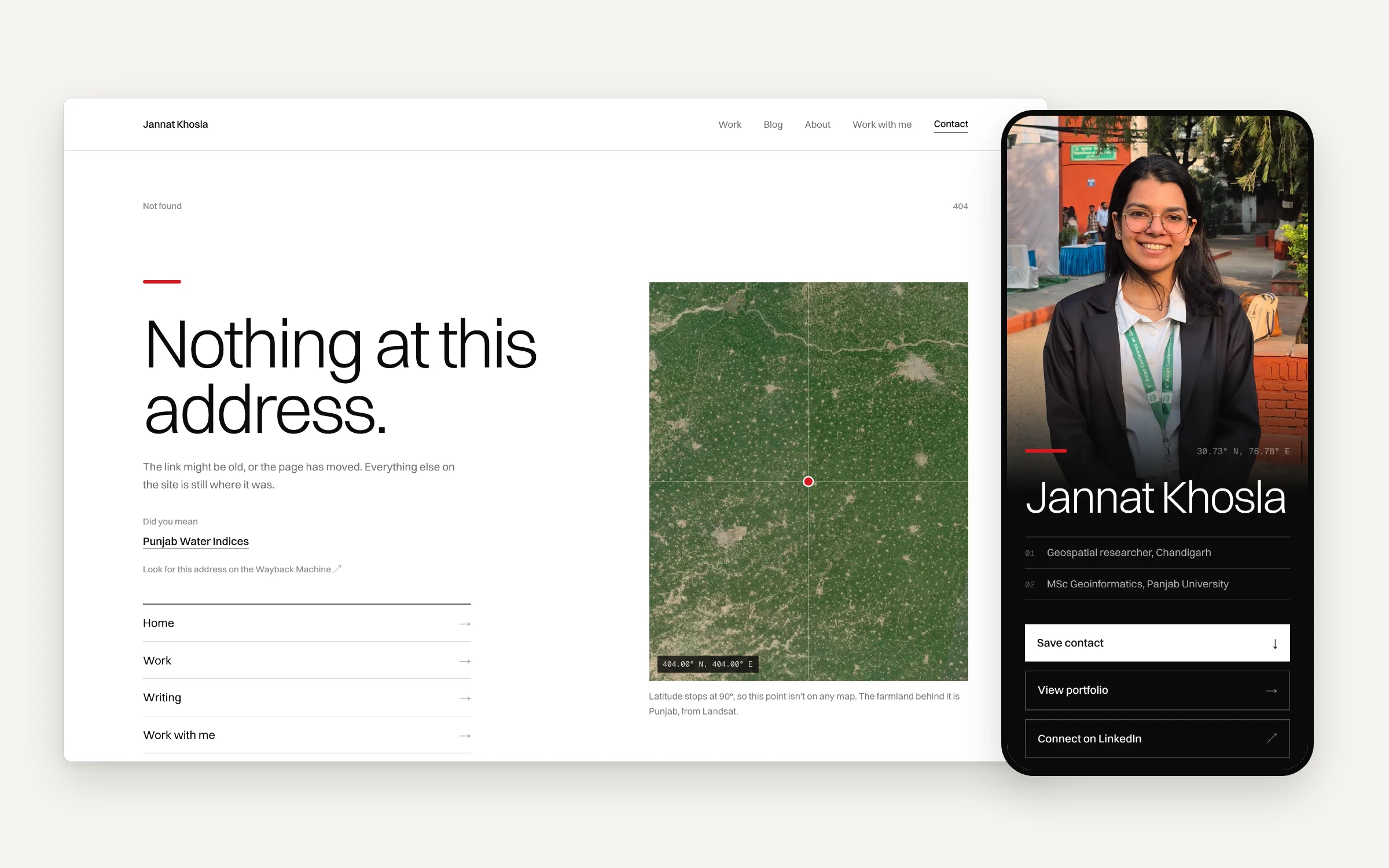
The 404 page suggesting the right case study, and the /vc card on a phone
Made for search engines and AI answers
JSON-LD on every template: Person and ProfilePage, BlogPosting with breadcrumbs, CreativeWork for case studies, Service and FAQPage on the hire page.
An RSS feed with categories and media, and an llms.txt file that lists her key facts, services, every case study and every post.
A sitemap with priorities, and a robots file that welcomes AI crawlers like GPTBot, ClaudeBot and PerplexityBot by name.
Small things that keep it fast
Fonts are self-hosted. Pages are generated statically. The maps are single images, not map libraries. Images fade in from a blur placeholder, except the hero image, which loads first. On the business card page nothing waits on JavaScript to paint.
Guardrails on the words
Clients read a researcher's site to decide whether she's real, and copy that sounds generated works against her. So the repo has a style guide and a copy linter that runs before every build: em dashes, en dashes, 37 stock AI words and sentence shapes like "it's not X, it's Y" fail the deploy. In September I removed 854 em dashes from the code and the posts, and corrected two claims on the site that weren't accurate.
Launch trailers
I made a 26-second trailer in Remotion in three formats (9:16, 16:9 and 1:1) from real captures of the live site in iPhone and MacBook frames. It opens on the preloader count, moves through the hero, her project map, the groundwater swipe and the blog, and closes on her name.
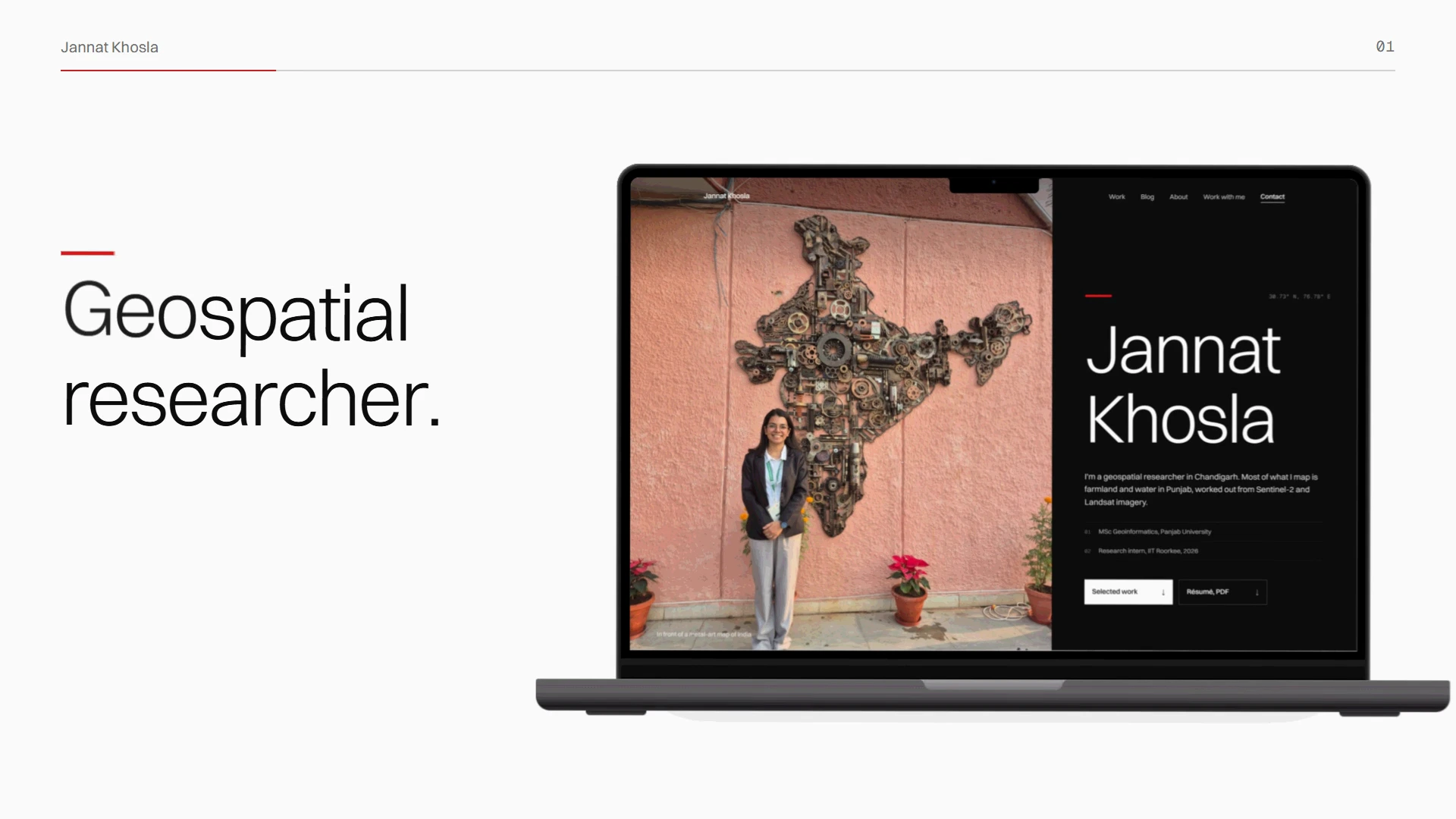
A frame from the 16:9 trailer
Tech stack
Next.js 16 (App Router), React 19, Tailwind CSS v4, framer-motion, Lenis, Supabase (Postgres and storage), Vercel, a Cloudflare Worker, GitHub Actions, Remotion and Playwright for the trailers.
FAQ
Who designed and built jannatkhosla.com?
Tanish Mittal, founder of Zamn Studios, did the design and the code, starting in June 2026.
What is jannatkhosla.com built with?
Next.js 16 and React 19 with Tailwind CSS v4, content in Supabase, hosting on Vercel, and a Cloudflare Worker that publishes blog posts.
Can Jannat update the site herself?
Yes. She can edit text on the page itself or use the Studio admin for posts, case studies, messages and revisions.
How does the map on the blog work?
Each post's location is matched to one of 29 places and plotted on a NASA Blue Marble image of India. Clicking a place filters the posts, and it stacks with the data and topic filters.
Are the blog posts written by AI?
The automated ones are researched and drafted with AI, and every one says so in its last line. Jannat's own posts are written by her, and those are the ones she shares as samples.
Who builds websites for researchers and scientists?
Tanish Mittal and Zamn Studios design and build sites for people whose work is hard to show on a template. Past projects include this research portfolio, the Vital Insights performance and longevity lab, and Helogen, a space biology company. You can hire Tanish on Contra.
Doing work that's hard to explain on a template site? Let's talk.
Like this project
Posted Oct 23, 2026
Portfolio, blog and CMS for geospatial researcher Jannat Khosla in Next.js. Her maps come first, and the blog is browsed by place on a NASA Blue Marble map.