Full-Stack Marketplace App Development for HeyMarket

Guoshuai Zhang


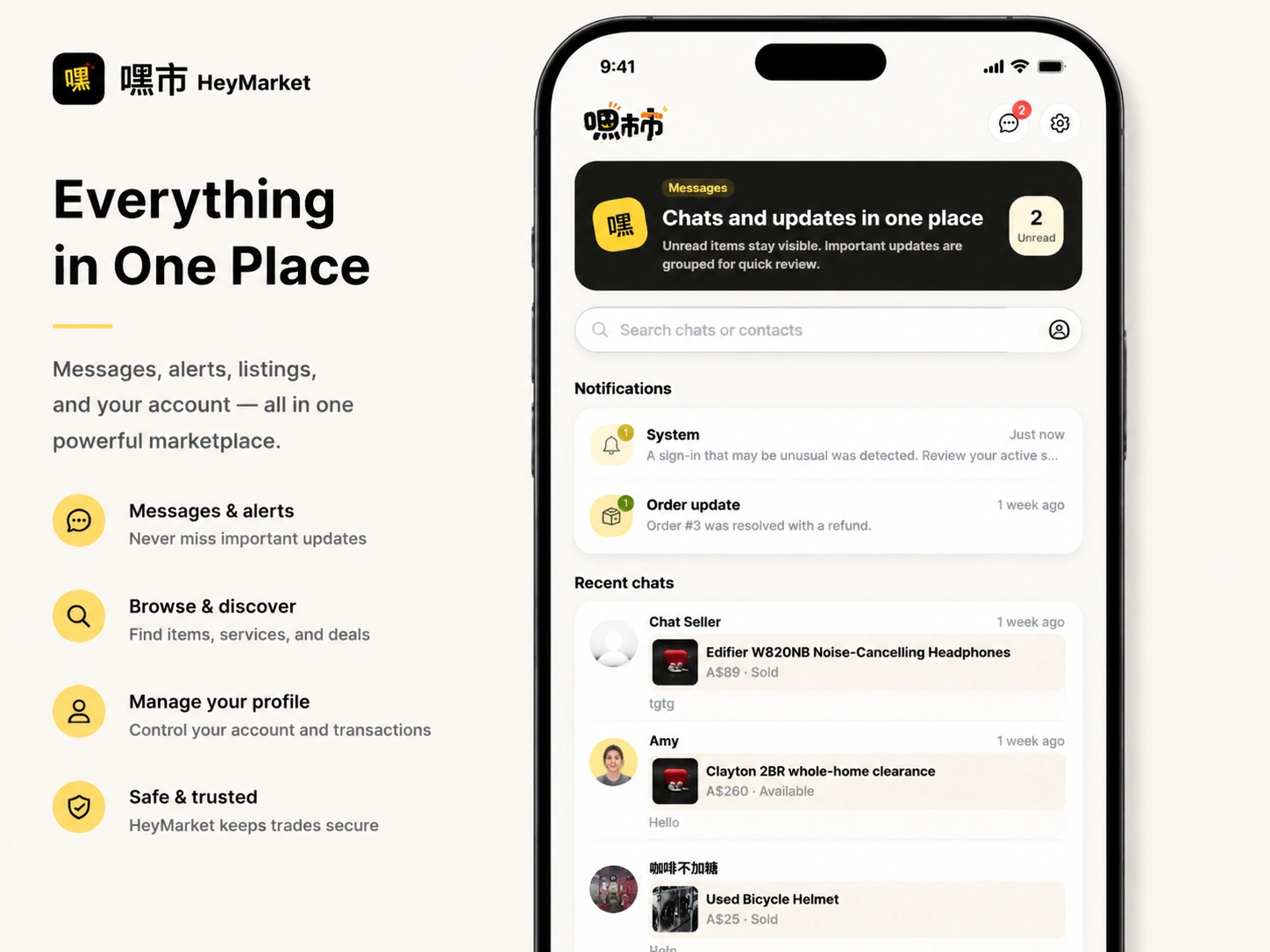
HeyMarket — Full-Stack Marketplace App
Short description
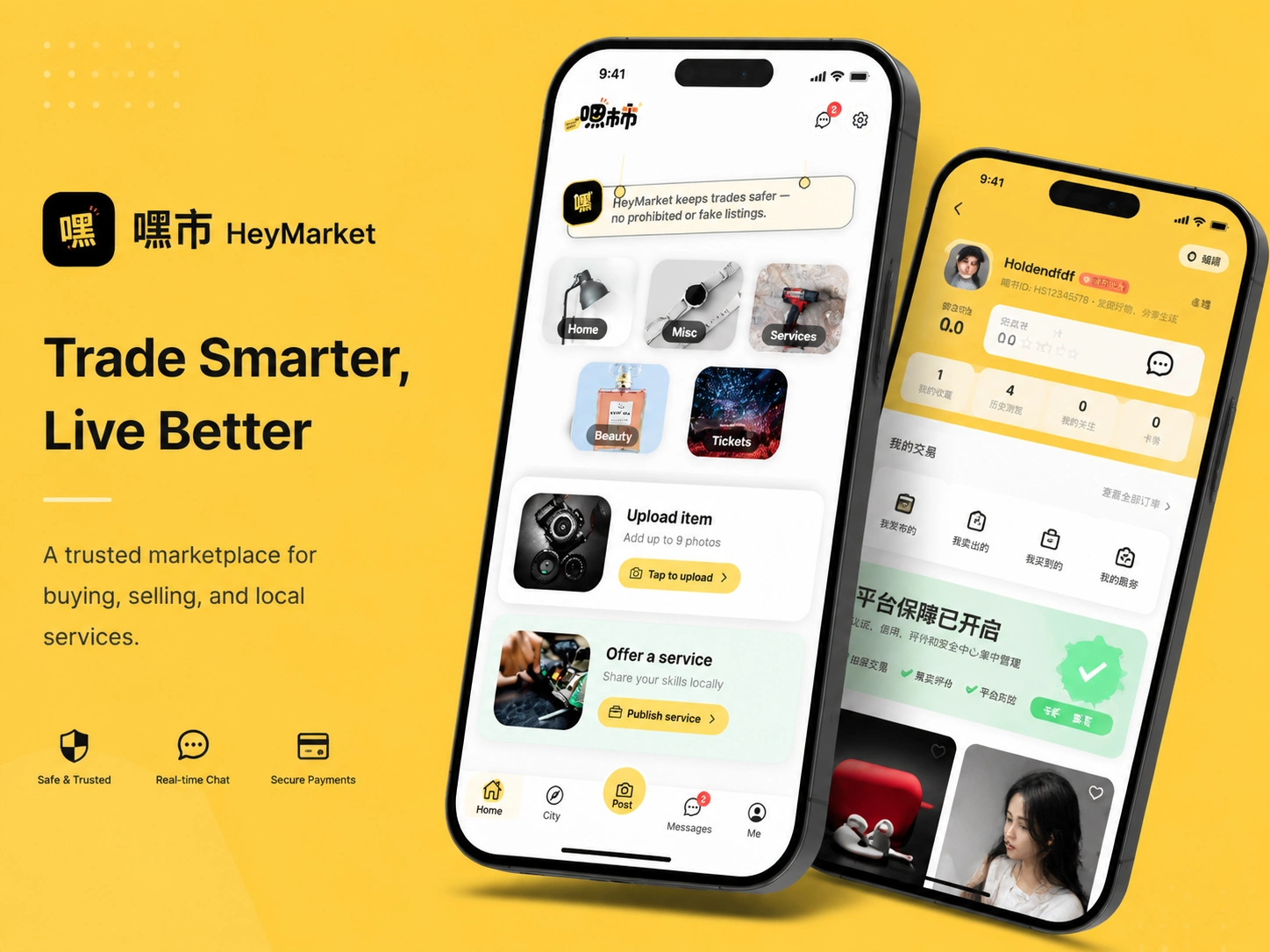
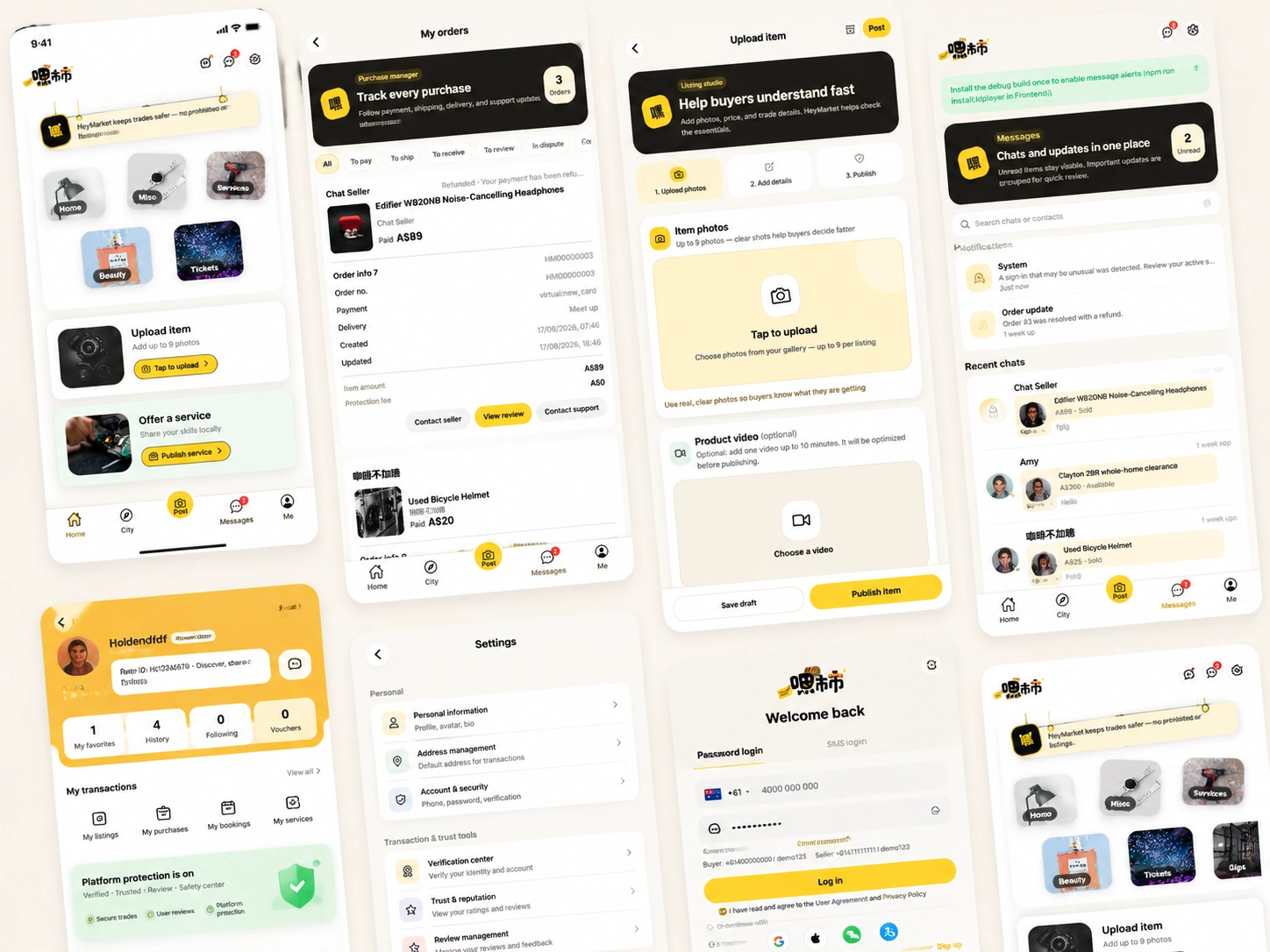
I designed and developed HeyMarket, a full-stack marketplace application that allows people to buy, sell, and promote products and services. I built the customer-facing mobile and web application, backend API, database structure, real-time messaging experience, order workflows, listing-management system, and administrator dashboard.
Project overview
HeyMarket is a bilingual marketplace platform designed to connect buyers, sellers, and local service providers in one application.
The platform supports different types of listings, including individual products, product bundles, and services. Buyers can browse categories, search and filter listings, save favorites, communicate with sellers, place orders, track purchases, and submit reviews.
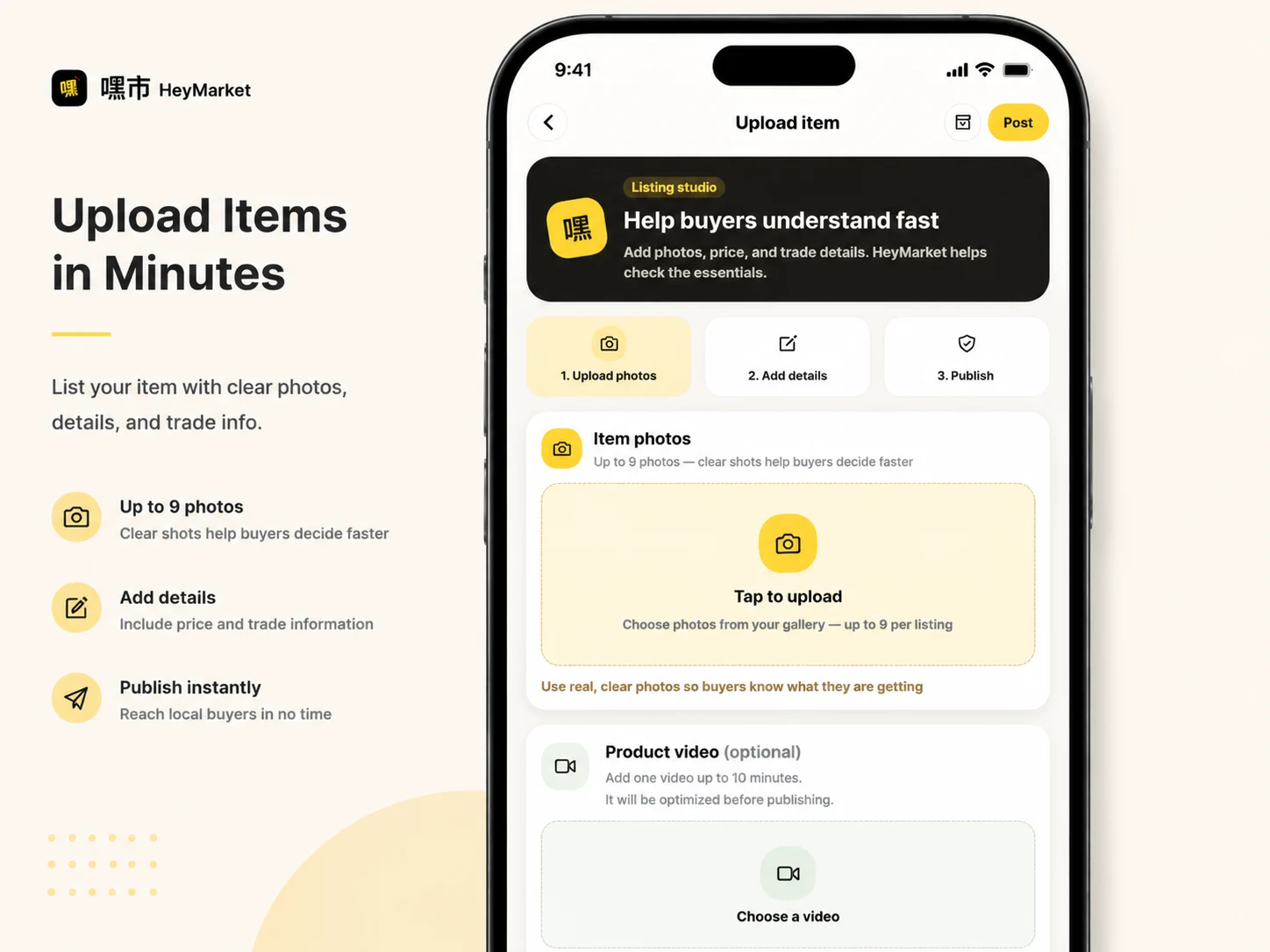
Sellers can create and manage listings, upload images, communicate with potential buyers, process orders, and monitor the status of their products and services. Administrators can moderate listings, manage accounts, review reports, control platform content, and handle other operational tasks through a dedicated dashboard.
I handled the complete product lifecycle, from early planning and interface design to frontend development, backend implementation, Android builds, administration tools, and functional testing.
My role
I worked as the product designer and full-stack developer for this project.
My responsibilities included:
Planning the application architecture and marketplace workflows
Designing the mobile and web interface
Creating reusable UI components
Developing the Android and web frontend
Building the backend REST API
Designing the database and data relationships
Implementing authentication and account management
Developing product, service, and bundle publishing
Implementing image uploads and media validation
Building buyer and seller order workflows
Developing the messaging system
Creating the admin dashboard
Adding listing moderation and account-control features
Preparing and testing the Android APK
Running manual, API, and cross-account tests
Diagnosing bugs and improving application stability
Preparing the system for public deployment
The challenge
The main challenge was to create a marketplace that could support several connected roles and workflows without making the experience difficult to use.
A marketplace is more than a product catalog. It needs to maintain consistent information across buyers, sellers, administrators, devices, and application sessions.
For example, a published listing must move through several states:
A seller creates the listing.
Images are uploaded and validated.
The listing is submitted for review.
An administrator approves or rejects it.
An approved listing becomes visible to buyers.
A buyer contacts the seller or places an order.
Both sides receive the correct order and message updates.
Each part depends on frontend state, backend authorization, database records, and clear status communication.
I also needed to support both English and Chinese, make the application usable on Android and the web, and provide an independent admin interface for managing the platform.
My approach
I divided the system into three main applications:
Customer application
The customer application was built for buyers and sellers. I used a shared React Native and Expo codebase to support Android and web environments while keeping the interface and business logic consistent.
Backend API
I created a FastAPI backend responsible for authentication, listings, media, favorites, conversations, messages, orders, reviews, moderation, reports, and administrative operations.
The frontend communicates with the backend through structured REST API endpoints. Protected operations use token-based authentication and server-side authorization.
Admin dashboard
I created a separate React dashboard for platform administration. It gives administrators a clearer desktop environment for moderation and operational tasks without exposing admin controls inside the customer application.
Design process
I designed the application around the two most important journeys: buying and selling.
For buyers, I focused on making it easy to:
Discover listings
Browse categories
Apply filters
View listing information
Save interesting items
Contact sellers
Place and track orders
Confirm delivery
Leave reviews
For sellers, I focused on making it easy to:
Publish products, services, and bundles
Upload listing images
Manage active and inactive listings
Understand moderation status
Receive messages
Process orders
Review sales activity
I created reusable components for listing cards, category navigation, image grids, filters, form controls, status indicators, dialogs, and account-management screens. This helped keep the experience visually consistent across the application.
Main features developed
Authentication and account management
I developed account registration, login, profile management, session handling, and protected application routes.
The architecture also includes support for social authentication providers. Production social login still requires the appropriate provider credentials, application registration, callback configuration, and signed production builds.
Marketplace browsing
The home and category experiences allow buyers to browse products and services using categories, locations, conditions, and other filters.
Listing pages display important information such as:
Images
Title and description
Price
Location
Condition
Seller information
Engagement information
Available purchasing or contact actions
Listing publication
I developed separate publishing experiences for:
Individual products
Product bundles
Services
The publishing workflow supports listing information, pricing, categories, location, delivery or trade methods, images, validation, and moderation status.
Image and media management
Sellers can upload listing images that are validated by the backend and associated with their accounts.
I also implemented image previews and removal controls so sellers can correct their image selection before submitting a listing.
Favorites and engagement
Buyers can save products using the heart action and return to them later. The system also includes engagement information that can be synchronized with backend listing data.
Messaging
I developed a buyer-to-seller messaging system connected to marketplace listings.
A buyer can start a conversation from a listing, and both accounts can exchange messages. I tested the messaging workflow using two separate demo accounts and confirmed that messages could be sent and received successfully.
Orders
I developed the order journey for buyers and sellers.
The tested workflow included:
Buyer checkout
Order creation
Seller order visibility
Order-status updates
Shipping or fulfillment progression
Buyer receipt confirmation
Review submission
I tested the journey using separate buyer and seller accounts to make sure both sides received the appropriate information.
Reviews
After a completed transaction, buyers can submit feedback about their experience. Reviews are connected to the relevant order, listing, and seller.
Multilingual interface
I added English and Chinese language support throughout the application. Interface text and important marketplace screens are structured through a localization system rather than being duplicated across individual components.
Admin dashboard
The administration dashboard includes tools for:
Administrator authentication
Account management
Account bans and restrictions
Publishing restrictions
Messaging restrictions
Listing moderation
Media moderation
Identity-review workflows
Reports and disputes
Categories
Banners and platform content
Notifications
Platform settings
Administrative audit information
I also tested authorization to confirm that ordinary customer accounts could not access protected administrator endpoints.
Technology stack
Customer application
React Native
Expo
Expo Router
React
TypeScript
React Native Web
Zustand
TanStack Query
i18next
AsyncStorage
Backend
Python
FastAPI
SQLAlchemy
Pydantic
JWT authentication
SQLite for local development
PostgreSQL-ready production architecture
REST API
Admin dashboard
React
TypeScript
Vite
Tailwind CSS
Radix UI
React Router
Integrations and production-ready architecture
Supabase-compatible authentication and storage
Stripe-compatible payment architecture
Twilio-compatible phone verification
Google authentication support
Android release build and APK workflow
Technical challenges
Local Android networking
Android emulators cannot always access services using the same
localhost address as the development computer.I configured the backend to listen on the local network and used a reachable local IP address so LDPlayer could communicate with the API and load uploaded images.
Media URL consistency
During testing, the backend recorded an uploaded image using
127.0.0.1, while LDPlayer accessed the same image using the computer’s network IP address.Although both addresses represented the same file, strict URL comparison caused the backend to reject the image during publication. I diagnosed the source of the problem and improved media matching so the backend could recognize equivalent local upload paths.
Android JavaScript bundle
An early Android build opened but could not find its JavaScript bundle. I corrected the build process so the bundle was packaged into the application and the release APK could run without depending on the Metro development server.
Multi-account testing
A marketplace cannot be fully tested using only one account. I prepared separate buyer and seller accounts and assigned test listings appropriately. This allowed me to test messaging, seller visibility, order processing, delivery confirmation, and reviews across both sides of the transaction.
Moderation workflow
Listings submitted for review are intentionally hidden from public catalog results until approval. I connected this workflow to the admin dashboard so an administrator can review, approve, reject, or restrict marketplace content.
Testing process
I tested the application through several layers.
Android testing
I built and installed the application in LDPlayer to test:
Application startup
Authentication
Navigation
Image loading
Publishing forms
Messaging
Orders
Account features
Web testing
I exported and served the web application locally to test:
Responsive layouts
Browser navigation
Page refresh behavior
Forms
Filters
Language selection
API communication
Backend testing
I tested API health, authentication, protected routes, listing data, media operations, account permissions, and administrator authorization.
Cross-account testing
I used separate buyer and seller accounts to verify that actions were not only changing the current screen.
This was especially important for:
Messaging
Listing visibility
Orders
Status changes
Reviews
Moderation results
Admin testing
I tested administrator login and management workflows through the dashboard. I also confirmed that customer and unauthenticated accounts were rejected by protected administrator endpoints.
Findings from testing
Testing helped me identify several important state and consistency issues, including:
A favorite icon could remain selected while its displayed count returned to the previous value after refresh.
The selected Home filter could reset after navigating to another page and returning.
The selected language could return to Chinese after refreshing the web application.
Listing media validation could fail when the emulator and backend represented the same uploaded file using different local hostnames.
Moderated services could appear under a general Inactive label instead of showing a clear Pending Review state.
Direct browser routes required correct single-page application hosting configuration.
Local mock fallback could make an action look successful without confirming that the backend saved it.
Repeated listing views needed safer database handling to avoid duplicate-history errors.
These findings were valuable because they went beyond confirming that buttons responded. They showed where frontend state, backend data, and cross-account behavior needed to stay synchronized.
Result
I completed a functional full-stack marketplace MVP with customer, seller, and administrator experiences.
The completed system includes:
Android and web customer applications
Backend API and database
Buyer and seller accounts
Product, service, and bundle listings
Image uploads
Search, categories, and filters
Favorites
Two-way messaging
Orders and reviews
Listing moderation
Account restrictions
Bilingual support
Administrative dashboard
Android APK build process
The core marketplace workflows are operational in the local testing environment. Messaging, the tested order journey, administrator access, and the tested dashboard functions worked successfully.
The project is currently best described as a developed and tested MVP undergoing final production preparation. Public release requires deployment of the backend and dashboard, production environment configuration, third-party credentials, signed release distribution, and final testing without mock fallback.
What I learned
This project strengthened my experience in designing systems where multiple roles interact with the same data.
The most important lesson was that a successful interface action is not enough. For a marketplace feature to be reliable, its result must be:
Confirmed by the backend
Stored correctly
Visible to the appropriate account
Preserved after refresh
Protected by authorization
Reflected consistently in the admin dashboard
I also gained deeper experience with Android build pipelines, emulator networking, media uploads, marketplace moderation, multi-account testing, and full-stack debugging.
Final summary
HeyMarket demonstrates my ability to take a complex product from concept to a working full-stack application.
I designed the interface, developed the mobile and web experiences, created the backend and database, implemented marketplace workflows, built the administrator dashboard, produced an Android build, and tested the system across multiple accounts and environments.
The result is a substantial marketplace MVP with a clear foundation for production deployment and future development.
Like this project
Posted Aug 25, 2026
Built a full-stack marketplace app for HeyMarket, shaping user flows and scalable frontend and backend foundations.
Likes
0
Views
8
Timeline
Jul 2, 2026 - Aug 18, 2026