AI Workspace — Multi-LLM Chrome Extension

Rashid Iqbal


The Project
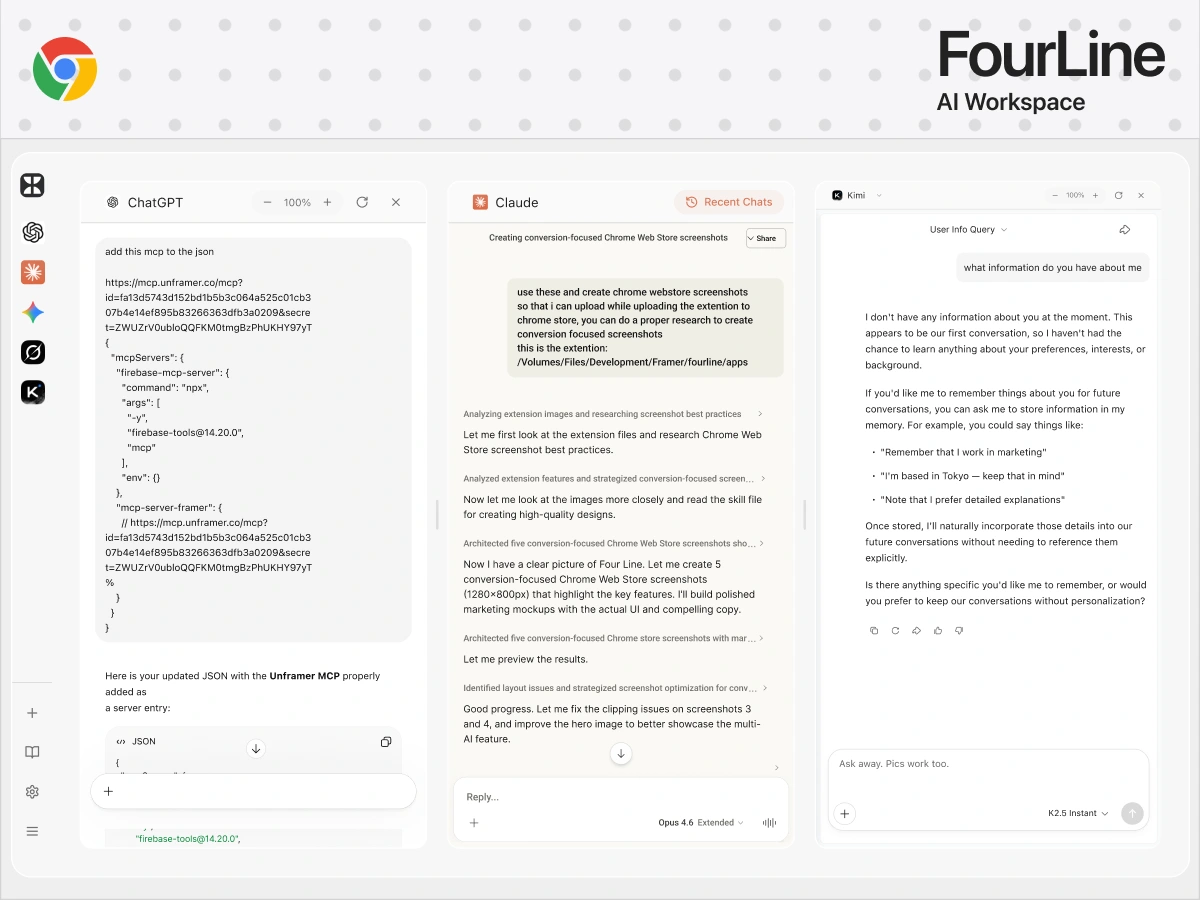
AI Workspace is a Chrome extension that lets you use ChatGPT, Claude, Gemini, Grok, and Kimi side-by-side in one unified dashboard. Instead of switching between tabs and losing context, you get all major AI models in a single interface.
The Challenge
Every AI model has different strengths. ChatGPT is great for general tasks, Claude for long-form reasoning, Gemini for Google-integrated workflows, Grok for real-time context, and Kimi for extended context windows. The problem: using them means juggling multiple tabs, re-typing prompts, and losing track of conversations. The challenge was building a single interface that brings them all together without feeling cluttered.
What I Built
Unified Dashboard — A clean, side-by-side layout where users can interact with multiple AI models simultaneously. Compare responses, switch between models, and keep all conversations in one place.
Chrome Extension Architecture — Built as a Manifest V3 Chrome extension for performance and security. The extension integrates with each AI provider's interface while maintaining a consistent UX layer on top.
Design System — Designed the full UI in Figma with a dark-mode-first approach. The interface needed to feel native to the Chrome ecosystem while being visually distinct enough to stand on its own.
Key Outcomes
Ship-ready Chrome extension supporting 5 major AI models
Side-by-side comparison of AI responses in one view
Clean, dark-mode UI designed for extended use
Built with Claude for AI-assisted development
Like this project
Posted Jul 11, 2026
Built AI Workspace — a Chrome extension that puts ChatGPT, Claude, Gemini, Grok, and Kimi side-by-side in one dashboard for multi-model AI workflows.