Private LLM Interaction System for Google Colab

Tolulade Ademisoye


privateChatGPT for Google Colab
The aim of this project is to interact privately with your documents using the power of GPT, 100% privately, no data leaks - Modified for Google Colab /Cloud Notebooks.
Why Google Colab?
LLM, large language models have become an interesting area of tech lately. While working on a project, I faced one issue, storage space in my local disk. I had to figure out an alternative. Google Colab worked well for me.
I realised other folks might face this same issue. This repo will guide you on how to; re-create a private LLM using the power of GPT. Explainer Video.
In the original version by Imartinez, you could ask questions to your documents without an internet connection, using the power of LLMs. 100% private, no data leaves your execution environment at any point. You can ingest documents and ask questions without an internet connection! But this version uses Google Colab.
Environment Setup
In order to set your environment up to run the code here, first install all requirements:
Then, download the LLM model and place it in a directory of your choice (In your google colab temp space- See my notebook for details):
LLM: default to ggml-gpt4all-j-v1.3-groovy.bin. If you prefer a different GPT4All-J compatible model, just download it and reference it in your
.env file.Please note that the .env will be hidden in your Google Colab after creating it. If you clone this repo into your personal computer, you'd be able to see it though.
Copy the
example.env template into .env First create the file, after creating it move it into the main folder of the project in Google Colab, in my case privateGPT.and edit the variables appropriately in the
.env file.Note: because of the way
langchain loads the SentenceTransformers embeddings, the first time you run the script it will require internet connection to download the embeddings model itself.Test dataset
This repo uses a Data Visualisation guides as an example.
Additional test dataset
I added this dataset on "Business Analytics textbook" to my project and it worked fine, though cleaning is needed on the output like in the case of ChatGPT.
Instructions for ingesting your own dataset
Put any and all your files into the
source_documents directoryThe supported extensions are:
.csv: CSV,.docx: Word Document,.doc: Word Document,.enex: EverNote,.eml: Email,.epub: EPub,.html: HTML File,.md: Markdown,.msg: Outlook Message,.odt: Open Document Text,.pdf: Portable Document Format (PDF),.pptx : PowerPoint Document,.ppt : PowerPoint Document,.txt: Text file (UTF-8),Run the following command to ingest all the data.
Output should look like this:
It will create a
db folder containing the local vectorstore. Will take 20-30 seconds per document, depending on the size of the document. You can ingest as many documents as you want, and all will be accumulated in the local embeddings database. If you want to start from an empty database, delete the db folder.Note: during the ingest process no data leaves your local environment. You could ingest without an internet connection, except for the first time you run the ingest script, when the embeddings model is downloaded.
Ask questions to your documents, locally!
In order to ask a question, run a command like:
And wait for the script to require your input.
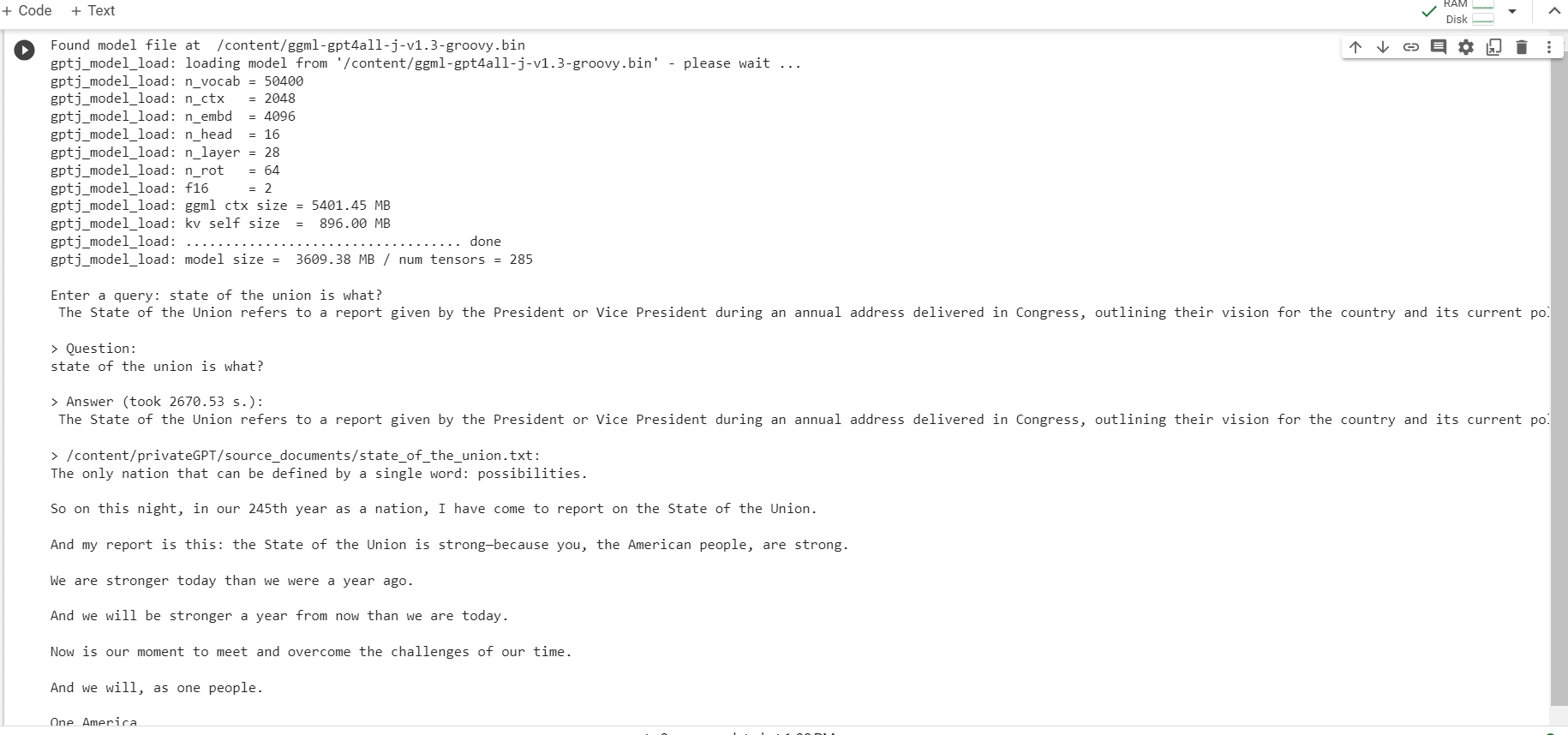
Hit enter. You'll need to wait for seconds-minutes (mine took 2670.53 s) while the LLM model consumes the prompt and prepares the answer. Once done, it will print the answer and the 4 sources it used as context from your documents; you can then ask another question without re-running the script, just wait for the prompt again.
Type
exit to finish the script or simply interrupt in the case of Google Colab.CLI
The script also supports optional command-line arguments to modify its behavior. You can see a full list of these arguments by running the command
python privateGPT.py --help in your terminal.How does it work?
Selecting the right local models and the power of
LangChain you can run the entire pipeline locally, without any data leaving your environment, and with reasonable performance.ingest.py uses LangChain tools to parse the document and create embeddings locally using HuggingFaceEmbeddings (SentenceTransformers). It then stores the result in a local vector database using Chroma vector store.privateGPT.py uses a local LLM based on GPT4All-J or LlamaCpp to understand questions and create answers. The context for the answers is extracted from the local vector store using a similarity search to locate the right piece of context from the docs.GPT4All-J wrapper was introduced in LangChain 0.0.162.System Requirements
Python Version
To use this software, you must have Python 3.10 or later installed. Earlier versions of Python will not compile.
Credits
Inspired by the works of imartinez
Disclaimer
This is a test project to validate the feasibility of a fully private solution for question answering using LLMs and Vector embeddings. It is not production ready, and it is not meant to be used in production. The models selection is not optimized for performance, but for privacy; but it is possible to use different models and vectorstores to improve performance.
Like this project
Posted Sep 5, 2025
Developed a private LLM interaction system using Google Colab.