Lektore: Language Learning & Immigration Assimilation Platform

Onyebuchi Anuche


Project Overview
Lektore is a comprehensive web and mobile application designed to provide assimilation pathways for safe immigration to English-speaking countries. The platform uses language and skill-conversion tools to help migrating professionals, refugees, students, business people, and actors successfully integrate into their new communities through structured education and professional development.
The Challenge
Immigration presents multiple barriers: language proficiency, credential recognition, cultural adaptation, and professional networking. Traditional language learning platforms focus solely on vocabulary and grammar, but immigrants need holistic support that addresses professional communication, skill conversion, and cultural integration. The challenge was to create a unified platform that serves diverse user groups—from refugees seeking basic communication skills to professionals requiring industry-specific language training.
Design Approach
1. Dual-Sided Platform Architecture The system serves two distinct user groups with tailored experiences:
Instructor Dashboard (Vanessa's View): Comprehensive teaching management tools with classroom oversight, performance analytics, scheduling, and financial tracking
Student Dashboard (Johnson's View): Learning-focused interface with course discovery, progress tracking, messaging, and community engagement
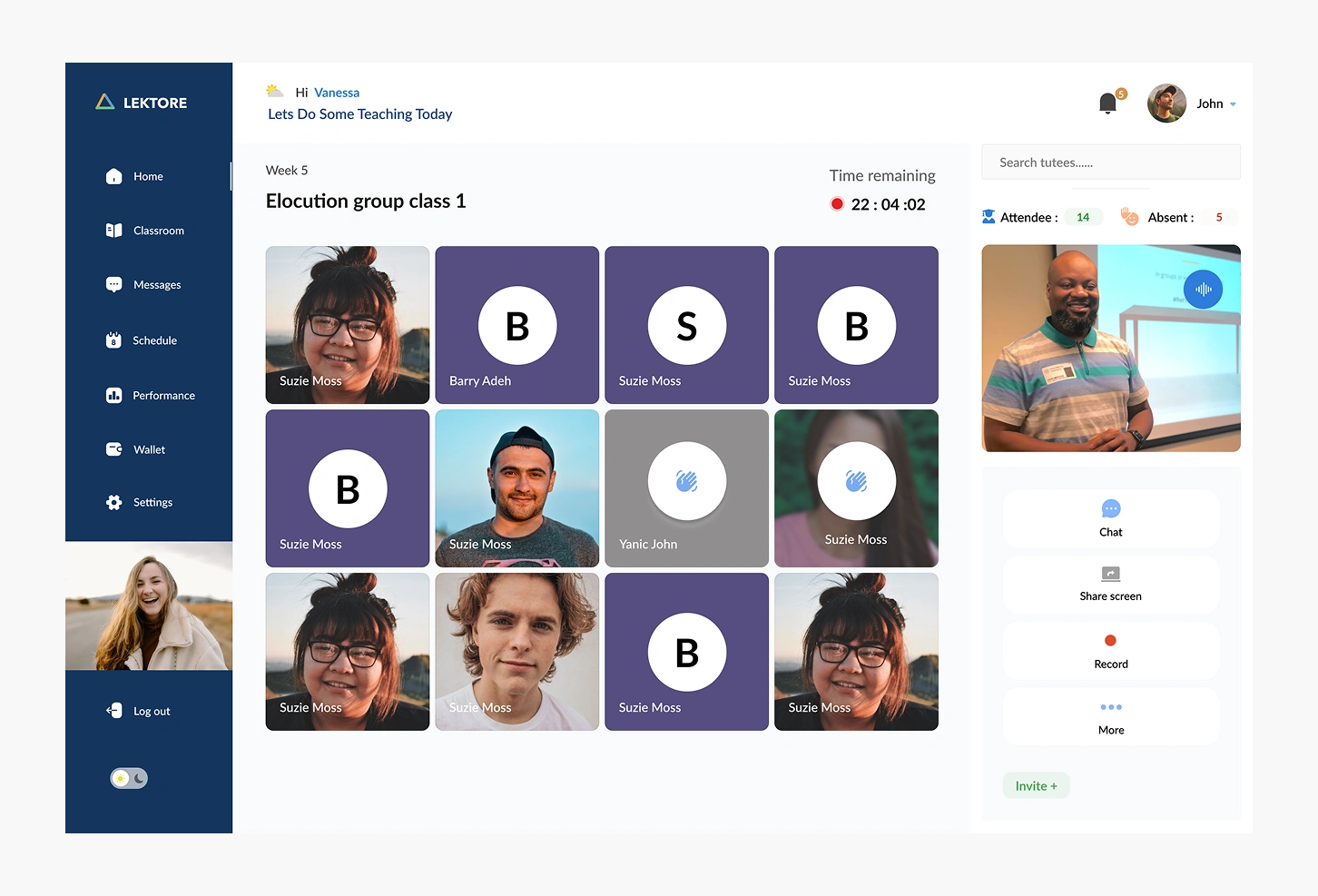
2. Virtual Classroom Environment The live classroom interface represents the platform's core value proposition:
Grid-based participant view: Displays all students simultaneously (Suzie Moss, Barry Adeh, Yanic John) with visual indicators for camera/audio status
Real-time attendance tracking: Shows 14 attendees and 5 absent students at a glance
Session timer: Countdown clock (22:04:02) maintaining class structure and time management
Integrated controls: Chat, screen sharing, recording, and additional options accessible without disrupting the lesson
Instructor video feed: Large, prominent display ensuring students maintain personal connection with their teacher
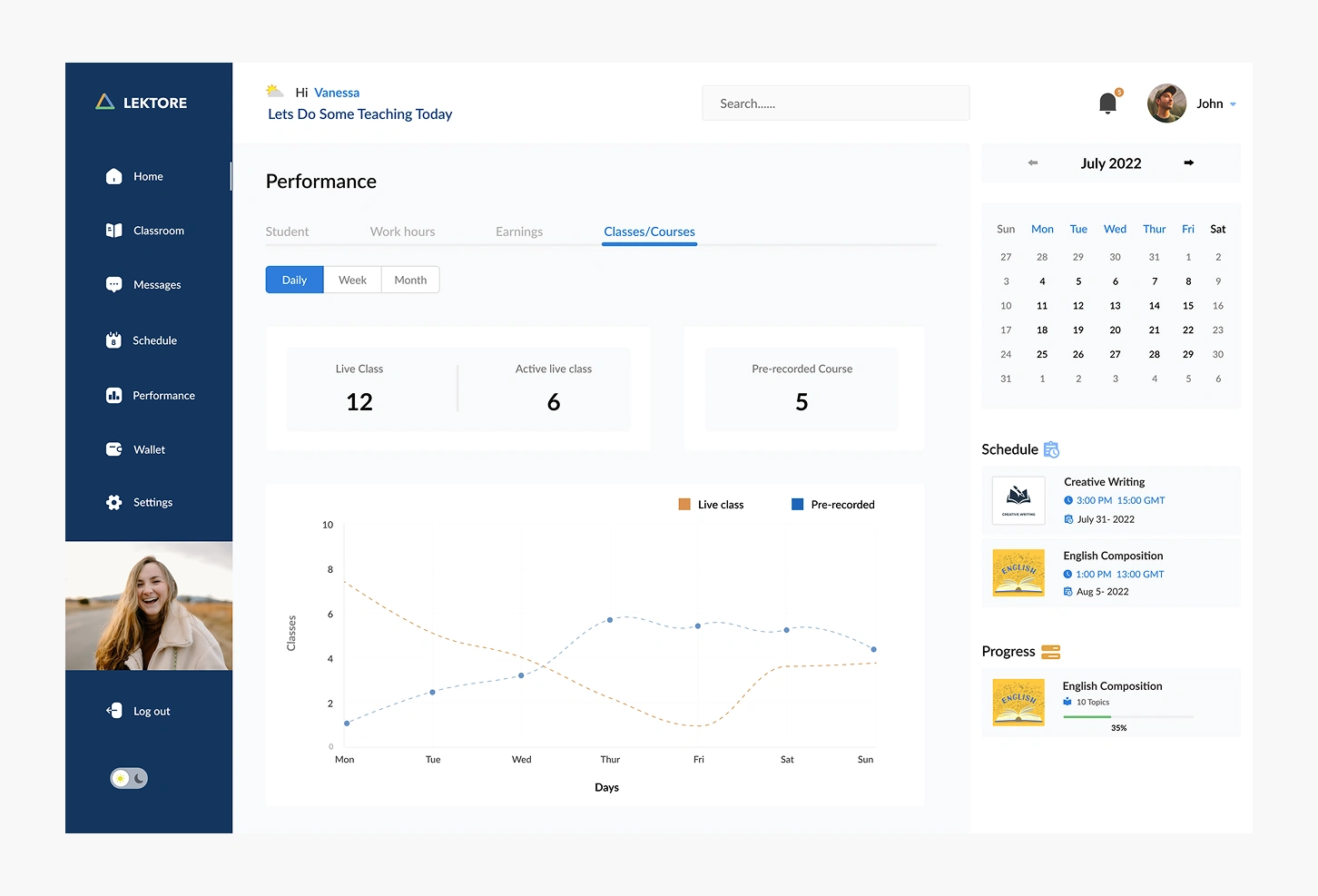
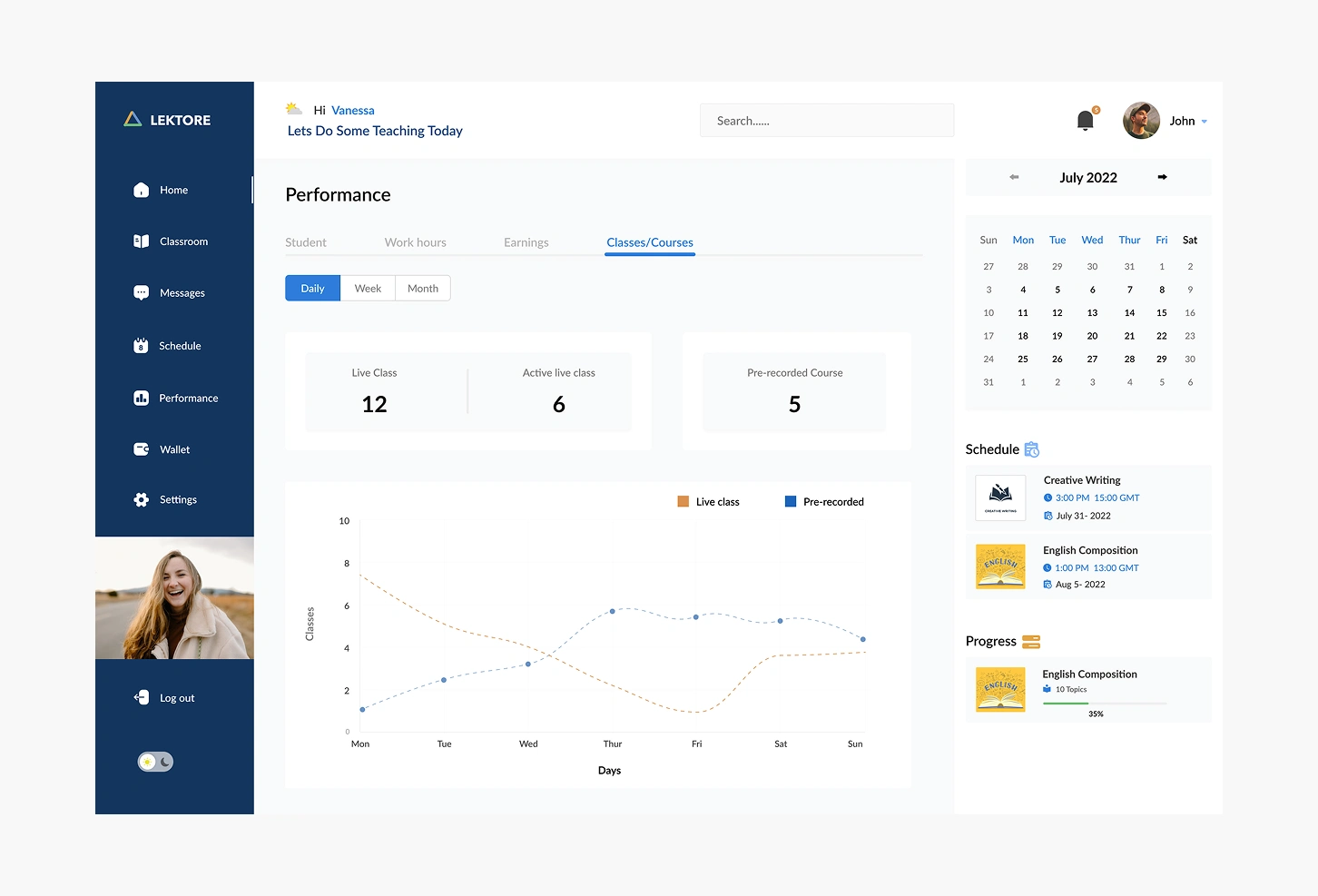
3. Comprehensive Performance Analytics The instructor dashboard provides deep insights into teaching effectiveness:
Classes/Courses Tab:
Live classes vs. pre-recorded content comparison (12 live, 6 active, 5 pre-recorded)
Weekly trend analysis showing class distribution patterns
Visual graphs tracking engagement over time
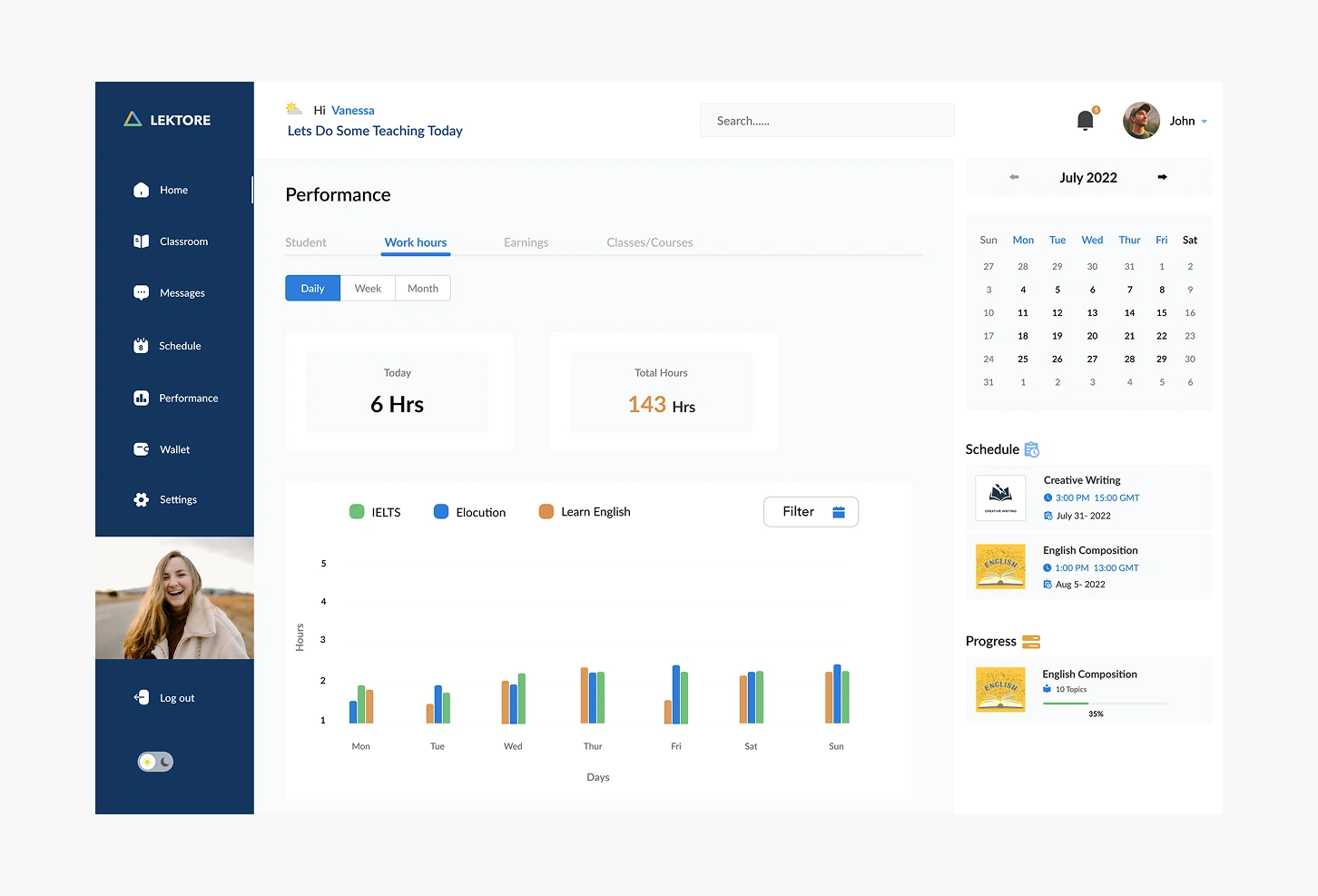
Work Hours Tab:
Daily tracking showing 6 hours today and 143 total hours
Category breakdown (IELTS, Elocution, Learn English) with color-coded visualization
Filtering capabilities for focused analysis
Bar charts displaying daily distribution across course types
Student Performance: Tracks individual and aggregate student metrics to inform teaching strategies
Earnings Dashboard: Transparent financial overview connecting teaching effort to compensation
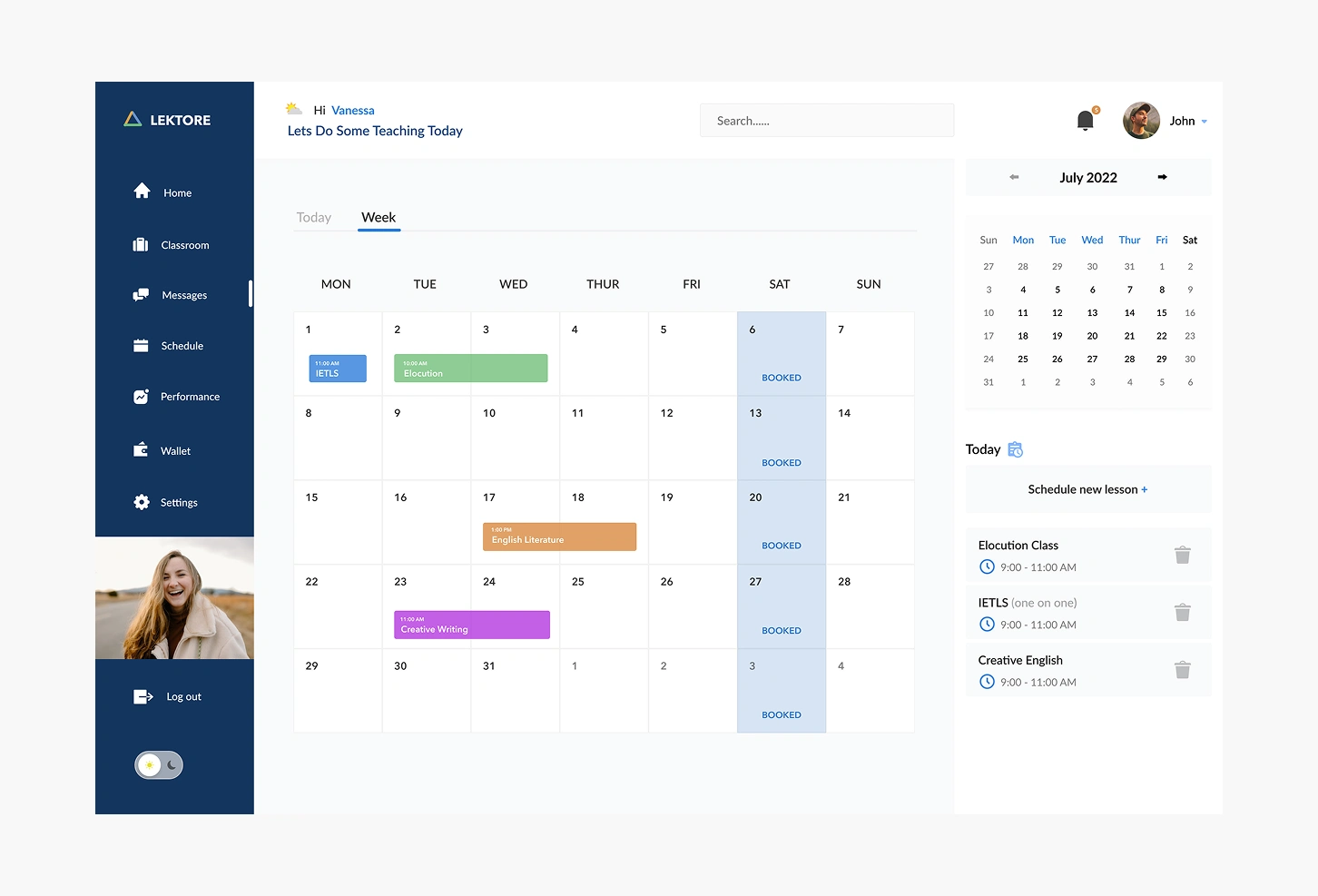
4. Intelligent Scheduling System The calendar interface balances structure with flexibility:
Week and day views: Monthly calendar with daily agenda showing specific class times (9:00-11:00 AM)
Course categorization: Color-coded events (blue for IELTS, green for Elocution, orange for English Literature, purple for Creative Writing)
Quick scheduling: "Schedule new lesson +" feature for adding classes without navigation disruption
Booking status indicators: "BOOKED" tags on calendar dates showing instructor availability
Time zone awareness: GMT timestamps ensuring international coordination
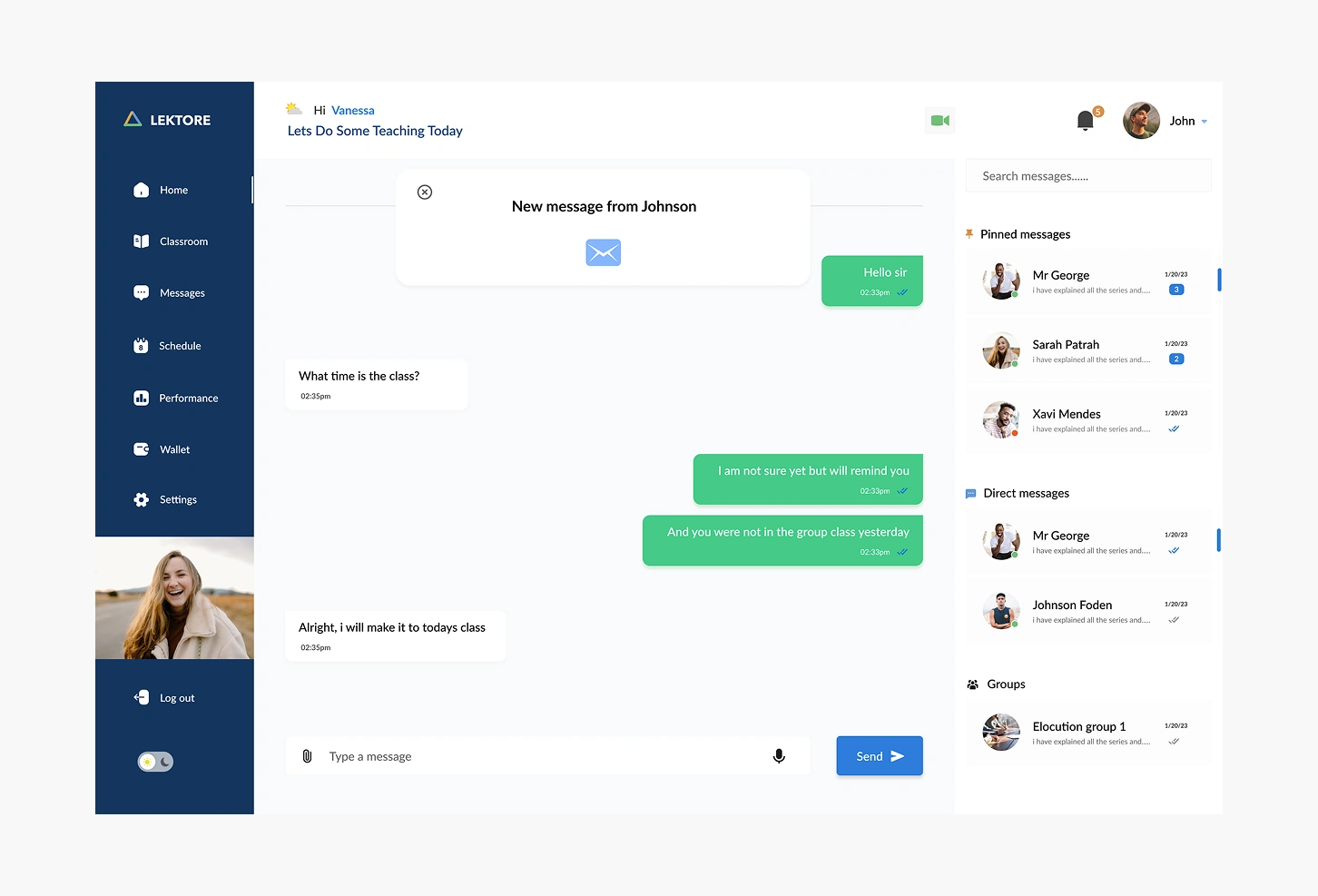
5. Integrated Communication Hub The messaging system facilitates essential student-instructor interaction:
Pinned messages: Priority communications stay visible (Mr. George, Sarah Patrah, Xavi Mendes)
Direct messaging: One-on-one conversations for personalized support
Group channels: "Elocution group 1" enables peer learning
Unread indicators: Numbered badges showing pending messages (3 unread from Mr. George, 2 from Sarah)
Message timestamps: Date tracking (1/28/23) for reference
Quick video access: Green camera button for instant video calls
Voice and attachment support: Icons for comprehensive communication options
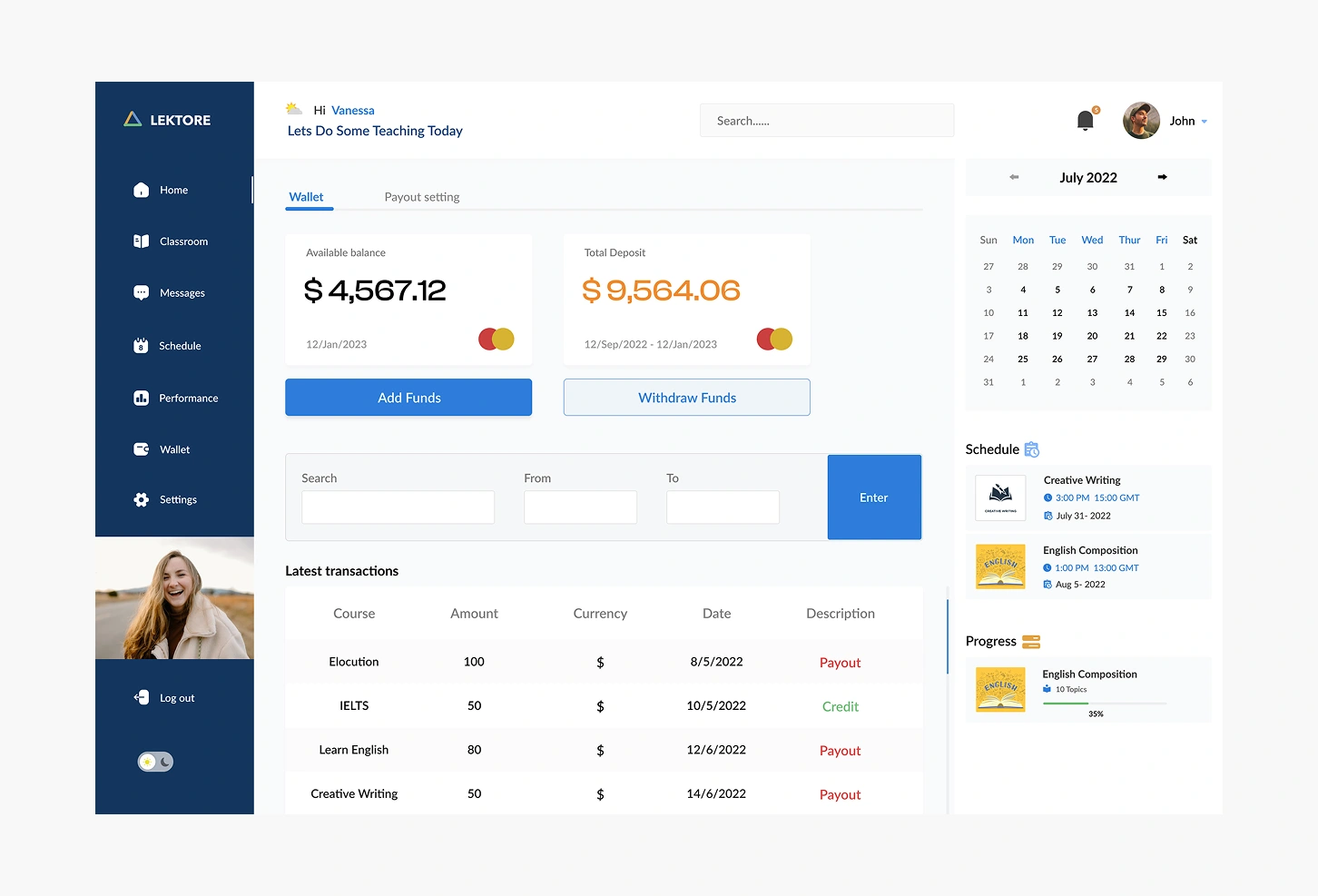
6. Financial Management System The wallet section provides complete transaction oversight:
Balance overview: Available balance ($4,567.12) and total deposits ($9,564.06) with timeframe tracking
Visual indicators: Mastercard-style graphics for payment method recognition
Transaction history: Detailed log showing course, amount, currency, date, and status (Payout/Credit)
Date range filtering: Customizable reporting for tax and accounting purposes
Fund management: Clear CTAs for "Add Funds" and "Withdraw Funds" in contrasting colors
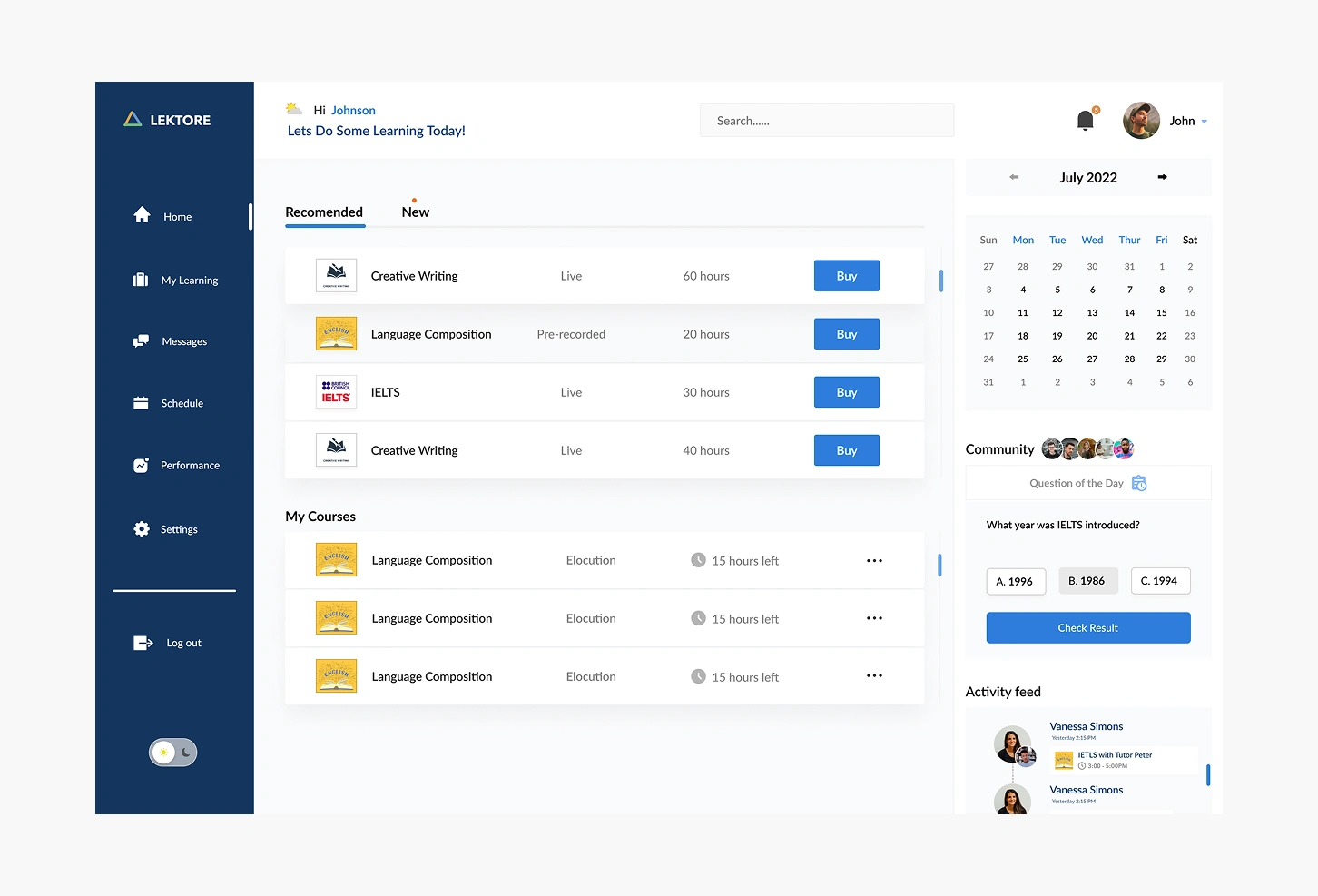
7. Course Discovery & Enrollment (Student View) Johnson's dashboard emphasizes learning opportunities:
Recommended courses: Curated selection based on user profile and goals
Course details: Live vs. pre-recorded, duration (60 hours, 20 hours), and clear pricing
My courses section: Enrolled courses with progress indicators ("15 hours left")
Community engagement: "Question of the Day" with trivia about IELTS history (with multiple choice answers) fostering social learning
Activity feed: Recent platform activities from instructors like Vanessa Simons
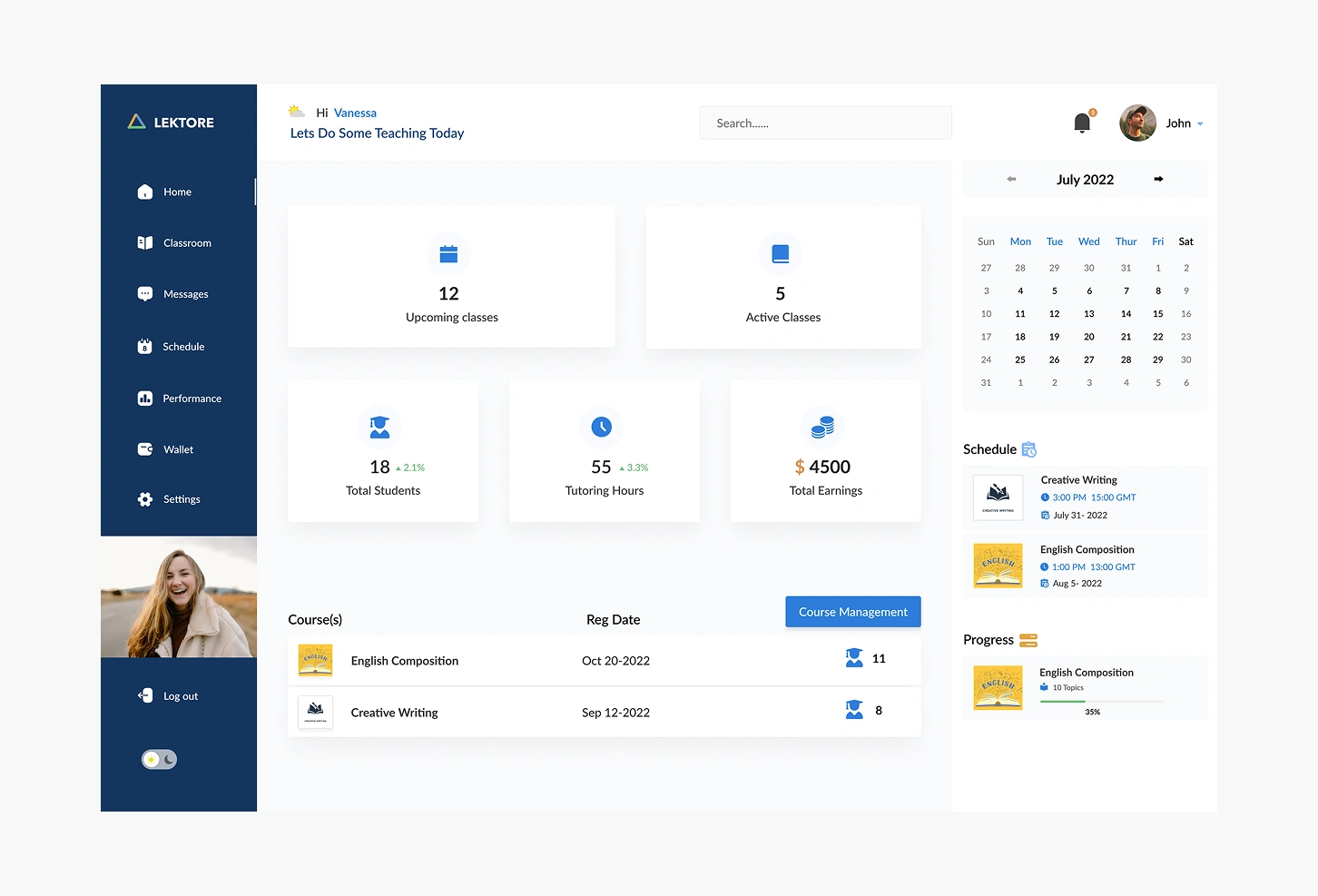
Progress tracking: Visual bars showing completion percentage (35% for English Composition with 10 topics covered)
8. Instructor Home Dashboard High-level overview for daily planning:
Key metrics: 12 upcoming classes, 5 active classes displayed prominently
Growth indicators: +2.1% student growth (18 total), +3.3% tutoring hours (55 hours)
Financial summary: $4500 total earnings with visual emphasis
Course management: List showing English Composition and Creative Writing with registration dates and student counts
Calendar integration: Right sidebar maintains schedule awareness
Quick actions: "Course Management" button for administrative tasks
Impact on User Groups
For Instructors:
Consolidated teaching management reducing administrative overhead
Data-driven insights improving teaching effectiveness
Transparent earnings tracking building trust
Flexible scheduling supporting work-life balance
Direct student communication fostering relationships
For Students:
Clear learning pathways from beginner to professional proficiency
Multiple course formats (live, pre-recorded) accommodating different schedules
Community features reducing isolation common among immigrants
Progress tracking providing motivation and achievement recognition
Industry-specific courses (IELTS for immigration, creative writing for creative professionals, elocution for actors) addressing real career needs
Outcome
Lektore successfully bridges the gap between immigration aspiration and integration reality. By combining structured language education with practical skill conversion tools, the platform empowers diverse immigrant populations to not just survive, but thrive in English-speaking countries. The dual-sided marketplace connects quality instructors with motivated learners while providing the administrative infrastructure both groups need to focus on what matters: effective teaching and meaningful learning.
The platform's emphasis on specialized pathways (business English, theatrical speech, academic writing) demonstrates understanding that immigration success requires more than basic language skills—it demands professional-level communication tailored to specific career contexts. This focus on practical, goal-oriented education positions Lektore as more than a learning platform; it's a comprehensive integration ecosystem supporting life-changing transitions.
Like this project
Posted Nov 3, 2025
Developed Lektore, a platform aiding immigrants with language and skill conversion for integration.
Likes
0
Views
3