
Olowu Wuraola
AI Automation Architect | Make.com & Zapier Expert
New to Contra
Olowu is building their profile!
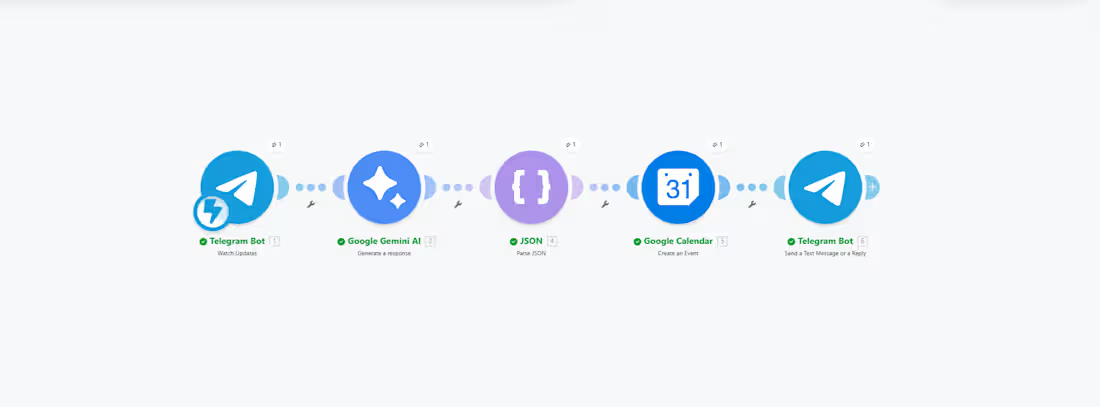
AI Telegram Booking Bot: Instant Multi-Calendar Scheduling via Make.com (http://Make.com)
Overview
Say goodbye to back-and-forth emails just to coordinate a meeting. This automation transforms a simple Telegram message into a fully scheduled event. By simply text-routing a contact’s name and email to your custom Telegram bot, the system automatically schedules the meeting on your calendar, sends an invitation to the recipient, and injects it perfectly into their calendar too.
Built using Make.com (http://Make.com), this solution is ideal for busy founders, salespeople, or creators who operate on the move and want to schedule client meetings effortlessly via chat.
How the Workflow Works
This cross-platform automation leverages advanced data parsing and multi-app integration on Make.com (http://Make.com):
The Trigger: You send a message to your custom Telegram Bot containing a person’s name, email, and preferred meeting context.
Data Parsing: The bot intercepts the text and processes the string to isolate the contact information.
Primary Calendar Sync: It instantly maps and adds the new event directly into your own Google Calendar / Outlook.
Client Invitation Loop: The workflow auto-generates a calendar invitation to the recipient's email address, automatically locking the event into their calendar the moment they accept, alongside an automated email confirmation.
What’s Included in This Service
Telegram Bot Creation: Setting up the bot via BotFather and configuring the initial webhook link to Make.com (http://Make.com).
Make.com (http://Make.com) Scenario Blueprinting: Building the multi-step logical routing (Telegram → Data Parse → Calendar invite system).
Cross-Calendar Mapping: Configuring the workflow to work flawlessly with Google Workspace or Microsoft Outlook.
Format & Boundary Testing: Ensuring the bot correctly extracts emails and names even if typed casually.
Tools Used
Make.com (http://Make.com) (Advanced Visual Automation)
Telegram Bot API (Mobile Interface)
Google Calendar / Outlook (Scheduling Engines)
Gmail / Custom SMTP (Instant Email Notifications)
1
90
🚀 Automated Lead Management System (Google Forms → Gmail + Notion + Sheets)
Overview
Stop wasting time manually copying client data or sending delayed welcome emails. This automation instantly captures new leads the second they submit a Google Form, logs them in your CRM and spreadsheet, and fires off a personalized email all running 100% on autopilot.
By connecting your client intake directly to your internal tools, you eliminate manual errors and drastically reduce your lead response time.
How the Workflow Works
This seamless, multi-step automation is built using Zapier to connect your favorite tools instantly:
The Trigger: A client fills out and submits your Google Form.
Instant Contact: An automated, personalized welcome or confirmation email is sent via Gmail.
Database Update: The lead's details are instantly organized and added as a new item in your Notion workspace.
Data Backup: The same lead data is logged into a structured Google Sheet for easy tracking and reporting.
What’s Included in This Service
Zapier Setup & Configuration: Complete mapping of all form fields to your email, Notion database, and Google Sheet.
Custom Email Templates: Formatting the automated Gmail response so it looks professional and personalized.
Database Optimization: Setting up or tweaking your Notion and Google Sheet structures to ensure data flows cleanly.
Rigorous Testing: Testing the entire loop from form submission to final log to ensure zero dropped leads.
Handover & Support: A brief walkthrough of the setup so you know exactly how to manage it moving forward.
Tools Used
Zapier (Workflow Automation)
Google Forms (Lead Capture)
Gmail (Automated Messaging)
Notion (CRM & Project Management)
Google Sheets (Data Tracking)
Why Choose This Automation?
Save 5+ hours a week on repetitive administrative tasks.
Improve response rates by instantly engaging clients the moment they express interest.
Keep your team aligned with centralized, real-time data across Notion and Sheets.
1
58
Project Title:
High-Velocity Lead Capture: Instant Engagement & Sales Team Alerts
Project Overview:
I developed a robust lead management pipeline designed to eliminate "lead decay." By automating the transition from initial enquiry to team notification, I ensured that every potential client receives an immediate response while the sales team is alerted the second a high-value opportunity enters the system.
The Problem:
Statistics show that responding to a lead within 5 minutes increases the chance of conversion by 9x. Most businesses, however, manually check their form entries hours or even days later. This delay results in missed opportunities and lost revenue.
The Solution (As seen in the Video):
Using Zapier as the central engine, I built a high-speed workflow triggered by a Google Form submission:
Immediate Lead Nurturing: A professionally branded welcome email is sent via Gmail within seconds of the enquiry, keeping the lead "warm" and setting a high standard for service.
Automated CRM Logging: Lead details are instantly captured and formatted into a Google Sheets database, providing a clean, organized record for sales tracking and future marketing.
Real-Time Sales Alerts: A detailed notification is pushed to a specific Slack channel, providing the team with the lead's name, needs, and contact info so they can follow up instantly.
Zero Data Leakage: Removes the risk of a lead getting "lost in an inbox" or forgotten in a spreadsheet.
The Impact:
Instant Speed-to-Lead: Acknowledgement sent to the prospect in < 2 seconds.
Enhanced Team Accountability: Real-time Slack pings ensure the team is always aware of incoming revenue opportunities.
Clean Data Architecture: No more messy manual entry; the database stays updated and accurate 24/7.
Tools Used:
Automation: Zapier
Intake: Google Forms
Communication: Gmail & Slack
Data Management: Google Sheets
1
37
Real-Time Customer Feedback Loop: Automated Engagement & Team Alerts
Project Overview:
I designed and implemented an automated feedback management system that bridges the gap between customer input and team action. This workflow ensures that every piece of customer feedback is acknowledged instantly, documented accurately, and escalated to the right team members in real-time, preventing valuable insights from getting lost in a crowded inbox.
The Problem:
Customer feedback is "organizational gold," but it often sits unread in form builders or buried in spreadsheets. Delayed responses to customer concerns can damage a brand's reputation, while slow internal communication prevents teams from acting on critical feedback while it's still fresh.
The Solution (As seen in the Video):
I built a multi-channel automation using Zapier that triggers immediately upon a Google Form submission:
Instant Customer Gratitude: A personalized Gmail auto-response is sent to the customer, confirming receipt and setting expectations for follow-up.
Automated Data Centralization: Every response is instantly logged into a Google Sheets master database, creating a clean, searchable audit trail for future analysis.
Real-Time Team Notifications: The system pushes a formatted alert to a dedicated Slack channel, ensuring the team sees new feedback the second it arrives.
Seamless Workflow Sync: Eliminates the need for manual check-ins on form responses, allowing the team to be proactive rather than reactive.
The Impact:
Immediate Response Time: Customers receive an acknowledgment in < 1 second, significantly boosting "Brand Trust."
Eliminated Manual Data Entry: 100% accuracy in logging data, saving hours of manual copy-pasting per week.
Increased Team Agility: Real-time Slack alerts allow for instant "triage" of urgent customer issues.
Tools Used:
Automation: Zapier
Intake: Google Forms
Internal Comms: Slack
Database & Email: Google Sheets & Gmail.
1
36