
Mustafa Kayaoğlu
AI Video | UX/UI Design | Brand Design



I earned the Spooky Builder badge on @Base44
https://app.base44.com/@mustafa-teoman?badge=spooky_builder
Today was Halloween, so I built a wall application called "Ghost Wall," where anyone can leave anonymous "ghost" messages. Ghost messages float the screen. I earned the Spooky Builder badge on Base44 with this app.
Leave your messages on the Ghost Wall for this Halloween. 🎃
The app: https://haunt-the-wall.base44.app
2
3
172
Meridian — Growth strategy for independent e-commerce sellers
Meridian helps solo entrepreneurs and small e-commerce teams turn store performance data into clear, prioritized actions for growing their business. It is designed for sellers who want practical guidance without having to interpret complex dashboards, juggle disconnected tools, or guess which task deserves attention next.
Users can connect a supported store or enter performance data manually or by CSV. Meridian brings key business metrics together, uses AI to help identify growth opportunities and recommend weekly priorities, and explains why each action matters. Sellers can organize tasks, track their progress, review performance trends, and see how completed work relates to their goals.
Meridian’s UX is intentionally straightforward and clarity-focused: a streamlined workspace presents the most useful insights and next steps without overwhelming users with dense analytics. Its navigation brings weekly plans, performance, opportunities, and related tools into one place, with responsive layouts designed to work across screen sizes.
The platform reduces the friction of deciding what to do next, keeping track of recurring work, and coordinating growth tasks across tools. Automations can support weekly Slack priority digests, task reminders, and deadline synchronization with Google Calendar. Users can also export performance data to Google Sheets and plans to Google Drive, helping keep reporting and follow-through connected to their existing workflows.
2
2
184
Portfolio Animation Template
Portfolio Animation Template was designed to transform personal portfolios into a dynamic, interactive, and visually engaging experience.
While exploring SVGator's template gallery, I noticed a gap: there was no template designed to showcase personal portfolios in this way. Inspired by this, I used an existing design as a reference, customized it with MCP, and recreated it with my own animation approach.
The Experience
When users click the “My Portfolio” button, the animation begins. The person's photo appears on the left, while four cards containing their portfolio information open one after another on the right:
Contact — Contact information
Skills & Experience — Skills and professional experience
Projects — Selected projects and work
Services — Services offered
The animation presents personal information in a clean, organized layout while adding movement and personality to the portfolio.
Designed to Be Personalized
The animation stays the same. The identity changes.
Users can personalize the template to reflect their own brand by adding their photo, information, projects, and experience. A single animation structure can become a unique portfolio experience for different people.
The video showcases examples of how the same template can be adapted for three different people.
An Interactive Portfolio Experience Built with SVGator MCP
5
5
209
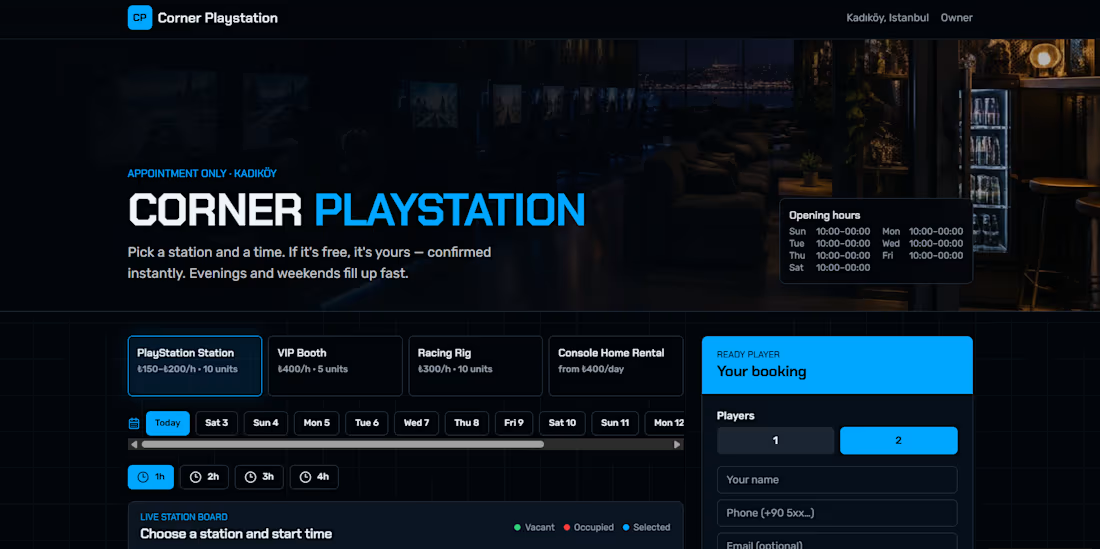
Corner
Playstation solves the operational bottleneck of running an
appointment-only gaming lounge and console rental business as a solo
owner.
The Problem
Constant Communication Overhead: Handling bookings through phone
calls, Instagram DMs, or WhatsApp messages creates an endless
back-and-forth loop ("Is a PS5 free at 8 PM?", "Can
we sit together?", "When is the rental console
returned?"). This constantly interrupts the owner while tending
to customers in the lounge.
Scheduling & Unit Conflicts: With distinct console tiers (PS5,
PS4, Racing Rigs, VIP Booths) and takeaway rentals (PS3, PS4, PS5),
manually managing overlapping time slots, cleanup buffers, and
device returns invites double-bookings and revenue leakage.
Customer Friction: Traditional booking systems demand tedious
account sign-ups and app downloads, leading to customer drop-offs
before booking is complete.
The Solution
Zero-Friction Self-Service for Players: Customers see real-time seat
availability on an interactive floor map, choose their specific
station and time, and receive an instant confirmation link to view,
reschedule, or cancel—without ever creating an account.
Automated Rental & Waitlist System: Clearly displays rental
return dates and allows customers to join automated waitlists for
high-demand consoles instead of messaging the owner repeatedly.
One-Screen Operations for the Owner: All station schedules, rental
returns, walk-in additions, and no-show protections are unified in a
single live dashboard, turning all-day administrative tasks into a
completely hands-off process.
2
166