
Mikheil Kakabadze
IT Business Analyst | Transforming needs into solutions
New to Contra
Mikheil is building their profile!
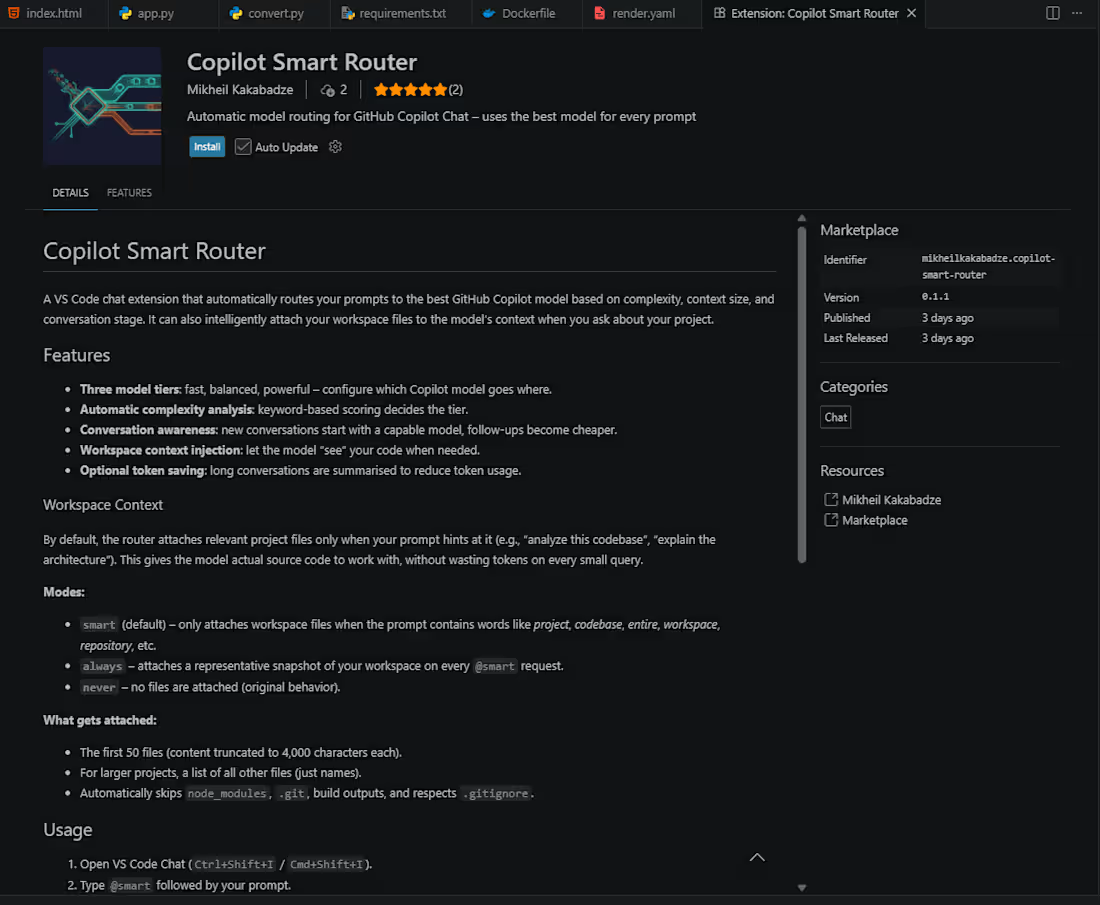
Copilot Smart Router
A VS Code chat extension that automatically routes your prompts to the best GitHub Copilot model based on complexity, context size, and conversation stage. It can also intelligently attach your workspace files to the model’s context when you ask about your project.
Features
Three model tiers: fast, balanced, powerful – configure which Copilot model goes where.
Automatic complexity analysis: keyword‑based scoring decides the tier.
Conversation awareness: new conversations start with a capable model, follow‑ups become cheaper.
Workspace context injection: let the model “see” your code when needed.
Optional token saving: long conversations are summarised to reduce token usage.
Workspace Context
By default, the router attaches relevant project files only when your prompt hints at it (e.g., “analyze this codebase”, “explain the architecture”). This gives the model actual source code to work with, without wasting tokens on every small query.
Modes:
smart (default) – only attaches workspace files when the prompt contains words like project, codebase, entire, workspace, repository, etc.
always – attaches a representative snapshot of your workspace on every @smart request.
never - no files are attached (original behavior).
What gets attached:
The first 50 files (content truncated to 4,000 characters each).
For larger projects, a list of all other files (just names).
Automatically skips node_modules, .git, build outputs, and respects .gitignore.
Usage
Open VS Code Chat (Ctrl+Shift+I / Cmd+Shift+I).
Type @smart followed by your prompt.
The extension will:
Display the chosen tier and model name.
Attach workspace files if the mode allows it and your prompt triggers the condition.
Send the prompt to the selected model.
Keep track of the conversation for smarter future routing.
Configuration
SettingDefaultDescriptionaiRouter.fastModelGPT-5 miniModel for simple queriesaiRouter.balancedModelRaptor miniModel for normal tasksaiRouter.powerfulModelGPT-5.5Model for complex/initial tasksaiRouter.complexityThreshold0.6Score above which a more powerful model is usedaiRouter.tokenLimitBeforeSummarization80000Token estimate before auto‑summarisationaiRouter.enableAutoSummarizationtrueEnable conversation summarisationaiRouter.workspaceContextModesmartWhen to attach workspace files: smart, always, never
Build & Run
Then press F5 in VS Code to launch a new Extension Development Host.
0
10
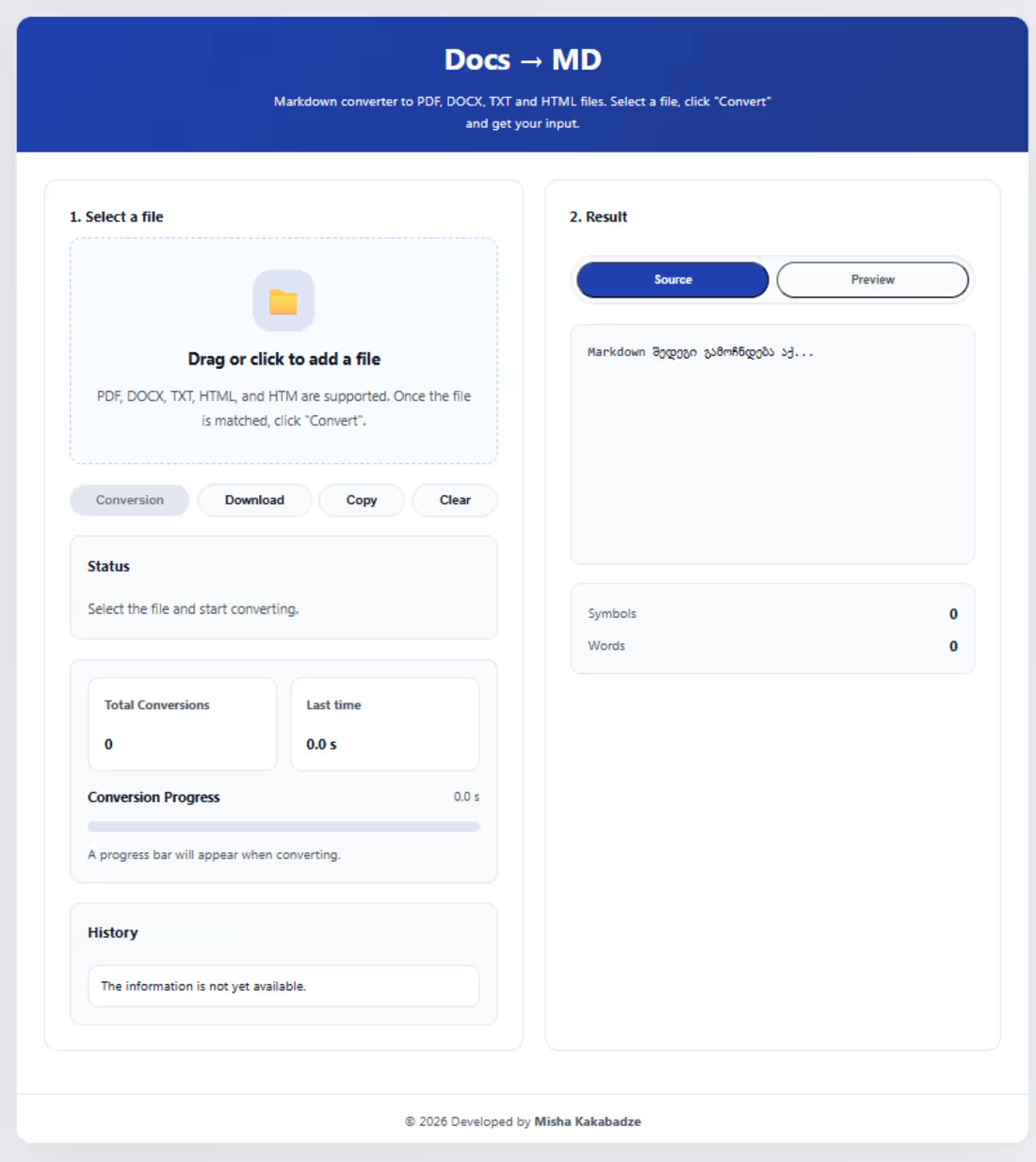
Multi-Format Document to Markdown Converter
A web-based document conversion tool that transforms various business documentation formats into Markdown (.md) files optimized for knowledge management, collaboration, and AI-assisted analysis.
Project Overview
As a Business Analyst, I frequently work with different types of documentation created in Microsoft Word, PDF, text files, and HTML formats.
However, modern AI-powered workflows and developer tools work more effectively with structured Markdown files. To streamline this process, I created a document conversion platform that converts multiple file formats into clean, structured Markdown documents.
Supported Input Formats
The application supports converting:
Microsoft Word documents (.docx)
PDF documents (.pdf)
Text files (.txt)
HTML documents (.html)
into:
Markdown files (.md)
Key Use Case
The primary purpose of this project is to simplify the process of converting business documentation into a format that can be easily managed, version-controlled, and analyzed using modern AI tools.
Typical workflow:
Upload existing business documentation
Convert documents into Markdown format
Store and organize files in Obsidian
Share Markdown files through VS Code and Git repositories
Use AI coding assistants such as GitHub Copilot models for:
Document analysis
Requirement refinement
Content editing
Documentation improvement
Knowledge extraction
Business Value
This tool helps bridge the gap between traditional business documentation formats and modern AI-driven workflows.
It enables Business Analysts to:
Standardize documentation formats
Maintain a structured knowledge base
Improve collaboration between business and technical teams
Prepare documents for AI-assisted review and analysis
Reduce manual copy-pasting and formatting effort
Main Features
Multi-format document conversion
Markdown generation
Support for business documentation workflows
Improved compatibility with Obsidian-based knowledge management
AI-ready document preparation
Simple web-based user interface
Deployment
The application is deployed and hosted on Render using the Hobby Tier.
Project Outcome
This project demonstrates how document transformation automation can improve the workflow of Business Analysts by converting unstructured documentation into structured Markdown files suitable for modern collaboration, version control, and AI-powered analysis.
Project Type
Personal Project
0
14
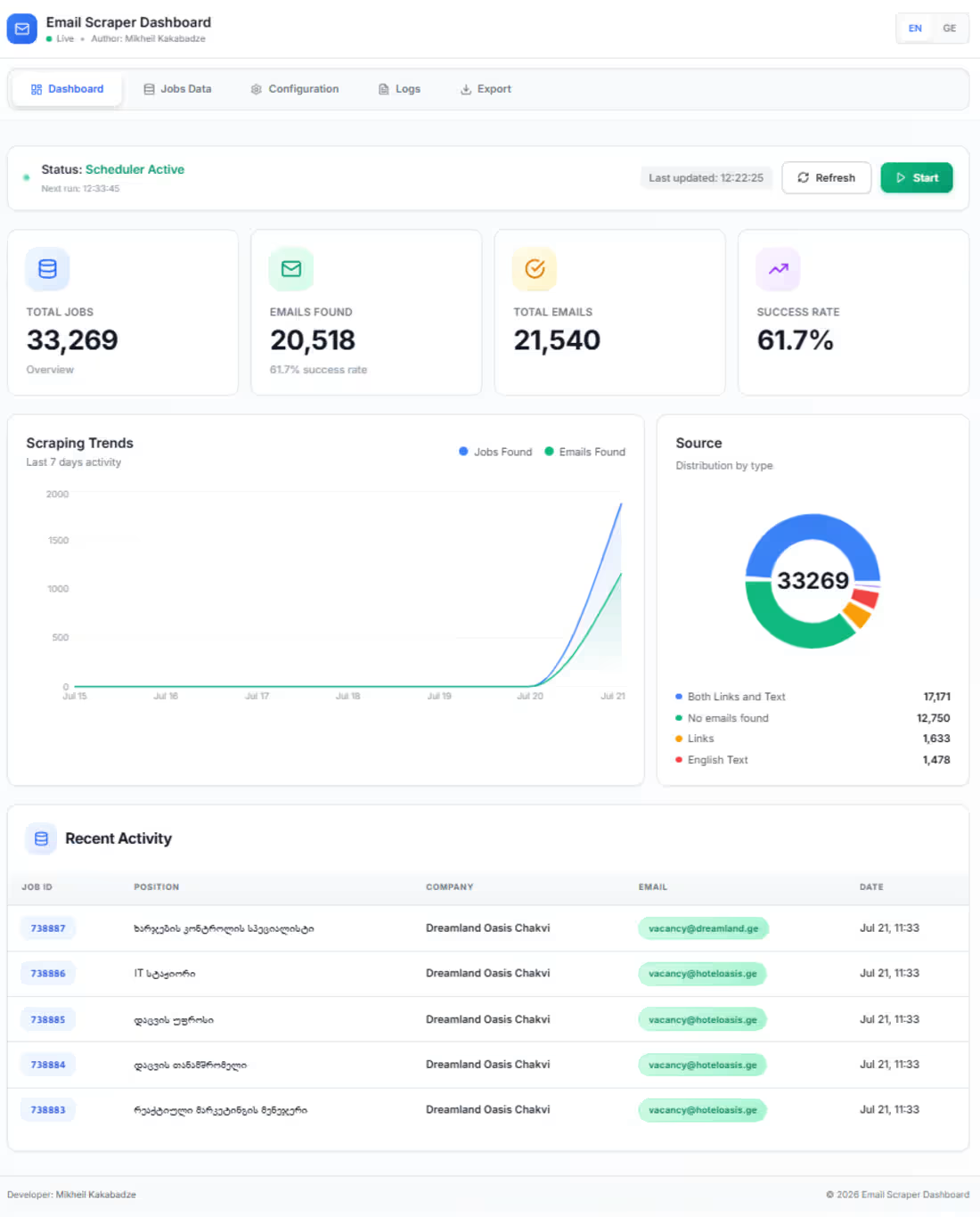
Jobs.ge (http://Jobs.ge) Job Market Intelligence & Company Contact Database
A personal data collection and automation project designed to continuously monitor the Georgian job market and build a structured database of active companies and publicly available business contact information.
Project Overview
I built a locally hosted data collection system that periodically monitors Jobs.ge (http://Jobs.ge), a Georgian job-seeking platform, to collect and structure publicly available job vacancy information.
The system is designed to support long-term market research, business development, sales automation, and marketing operations by transforming unstructured job listings into structured, searchable data.
Key Use Cases
The project can be used to:
Monitor newly published job vacancies over time
Track companies that are actively hiring
Identify companies based on job roles, departments, industries, and hiring activity
Build a structured database of active companies
Collect publicly available company contact information where available
Support market research and business intelligence activities
Identify potential business opportunities based on hiring activity
Provide data that can be used in compliant sales and marketing workflows
Data Collection & Processing
The system is designed to:
Crawl job listings periodically
Detect new and updated vacancies
Extract relevant information from job postings
Store structured job and company data
Maintain historical records of hiring activity
Build a searchable company database
Collect publicly available business contact information where appropriate
Business Value
Hiring activity can provide valuable insights into a company's current business needs and growth stage.
For example, a company that is actively hiring for multiple positions may indicate:
Business expansion
Growth of a specific department
New projects or initiatives
Increased demand for particular services
Potential opportunities for B2B sales and business development
This project demonstrates how publicly available data can be transformed into structured business intelligence to support data-driven decision-making and automation.
Technical Focus
The project focuses on:
Web crawling and data extraction
Automated data collection
Data cleaning and structuring
Company and job market intelligence
Historical data tracking
Database design
Automation workflows
Data preparation for sales and marketing systems
Project Type
Personal Project
The system is currently hosted and operated locally for personal experimentation, development, and research purposes.
Project Outcome
This project demonstrates the development of a data-driven system that continuously transforms publicly available job market information into structured business intelligence.
The collected data can serve as a foundation for market analysis, company research, business development, and compliant sales automation workflows.
1
20
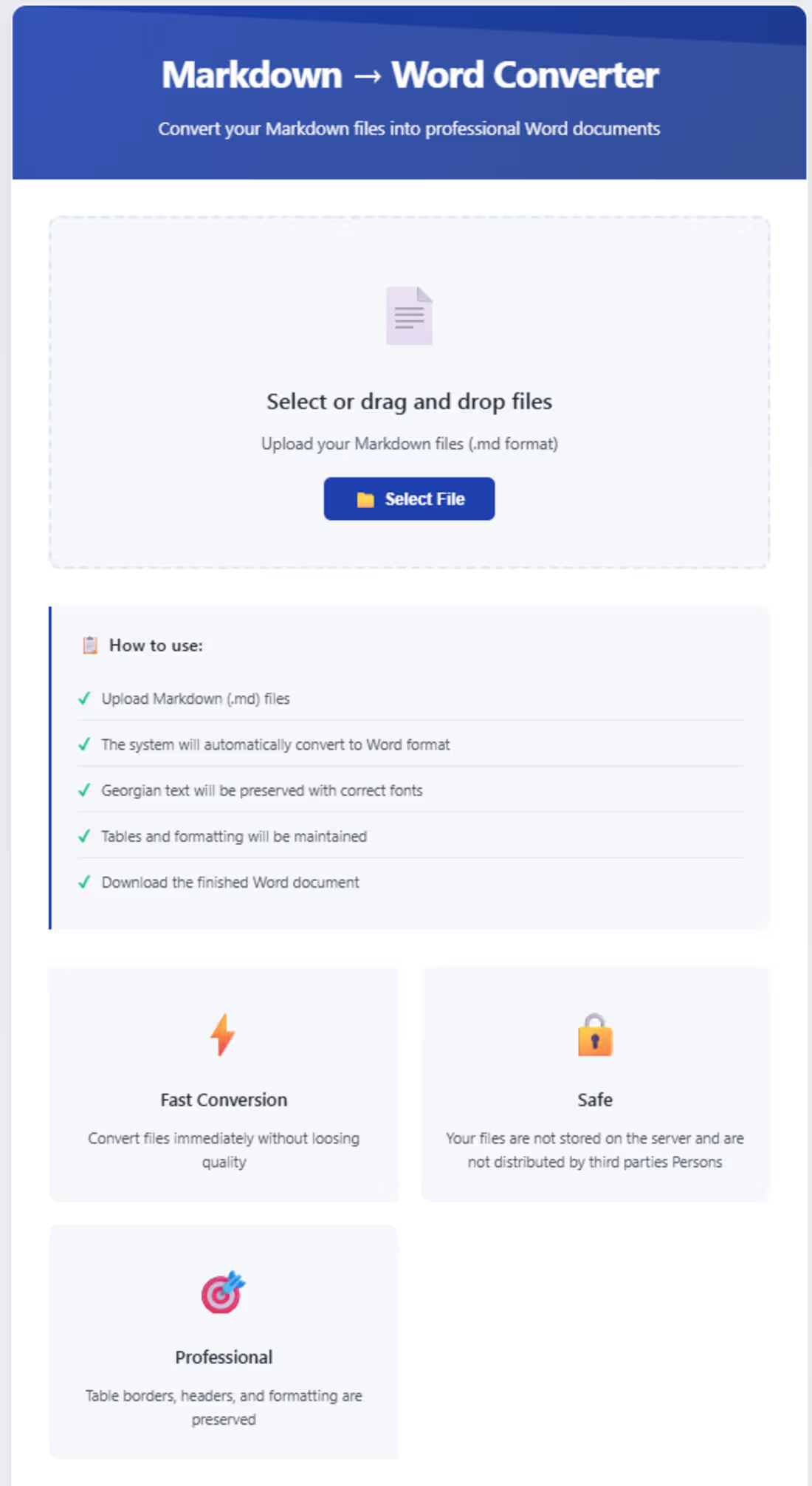
Markdown to DOCX Converter
A web-based tool that converts Markdown (.md) files into Microsoft Word (.docx) documents.
Project Overview
As a Business Analyst, I frequently work with documentation created in Markdown, particularly through Obsidian. However, business stakeholders and non-technical users often prefer working with Microsoft Word documents.
To solve this problem, I created and deployed a simple web-based Markdown-to-DOCX converter that makes it easy to transform Markdown documentation into shareable Word documents.
Key Use Case
The primary use case is converting Obsidian Markdown notes into professionally shareable Word documents for:
Business requirements
Functional specifications
Process documentation
Meeting notes
Technical and business analysis documentation
Documentation shared with business stakeholders
Main Features
Upload Markdown (.md) files
Convert Markdown content into .docx format
Preserve document structure, including:
Headings
Paragraphs
Lists
Tables
Code blocks
Links
Download the converted Word document
Simple and user-friendly interface
Why I Built It
As a Business Analyst, I often need to bridge the gap between technical documentation and business communication.
Markdown is excellent for creating and maintaining structured documentation, especially in tools like Obsidian. However, Microsoft Word remains a more familiar and accessible format for many business stakeholders.
This project provides a simple solution for converting technical or analytical Markdown documentation into a format that is easier to share, review, and collaborate on with business teams.
Deployment
The application is deployed and hosted on Vercel using the Free Tier.
Project Outcome
This tool streamlines the process of transforming Markdown-based documentation into business-friendly Word documents, reducing manual formatting and making documentation easier to share with stakeholders.
1
25