

Free AI Blog Writer – Next-Gen AI-Powered Content Creation Plugin for WordPress
📝 Project Overview:
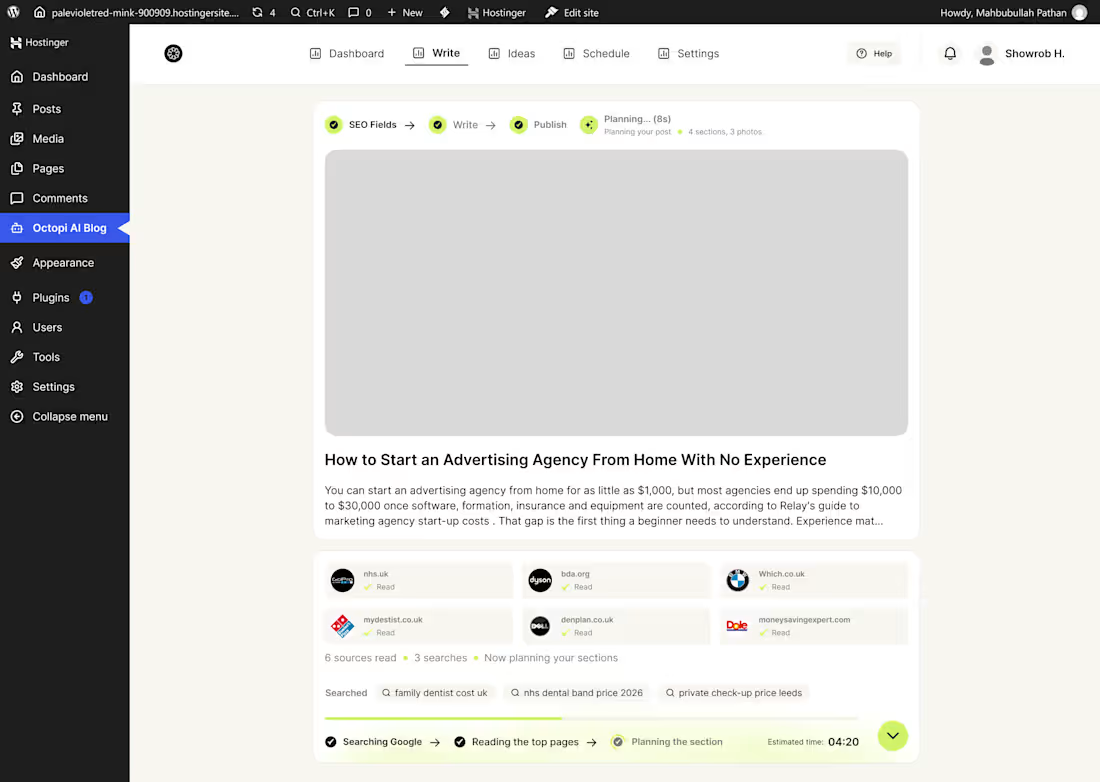
Free AI Blog Writer is an AI-driven WordPress plugin designed to streamline the blogging workflow from ideation to publishing. It helps content creators, bloggers, and SEO professionals research real-time web sources, generate SEO-optimized articles, analyze performance metrics, and schedule posts seamlessly within the native WordPress environment.
The goal of this project was to design a modern, clean, and intuitive user interface (UI) and user experience (UX) that bridges complex AI features with an effortless dashboard flow.
🔥 Key Features & UX Highlights:
Intuitive Analytics & Content Dashboard:
Clean overview tracking posts generated, total views, unique visitors, and monthly limits.
Performance graphs visualising post views and traffic trends.
Quick access to content planning, ideas, and scheduling tools.
Real-Time Web Research & Planning:
Automated Google search & web scraping to gather reliable source material.
Real-time progress indicators showing web pages read, search queries run, and section structure planning.
SEO & Content Quality Scoring:
Integrated metric cards providing instant feedback on Content Quality (78/100), SEO Score (72/100), Word Count, and Focus Keyword density.
Clean typography and structured layouts for enhanced readability.
Seamless Publishing Flow:
Multi-step workflow: SEO Fields ➔ Write ➔ Publish.
One-click options to Set Schedule, Edit in WordPress, or Publish Immediately.
🛠️ Role & Deliverables:
Role: UI/UX Designer / Product Designer
Tools Used: Figma, WordPress UI Framework, Tailwind/CSS System
Deliverables:
Complete Dashboard Design
Content Writing & SEO Scoring UI
Automated Research Pipeline Visualizations
Interactive Component Design & Responsive Layouts
💬 Need a Custom WordPress Plugin Design or AI Interface?
I specialize in designing sleek, user-friendly UI/UX for SaaS, WordPress plugins, and AI tools. Feel free to reach out for your next project!
0
19
CircleCare - AI Healthcare Dashboard UI/UX Design
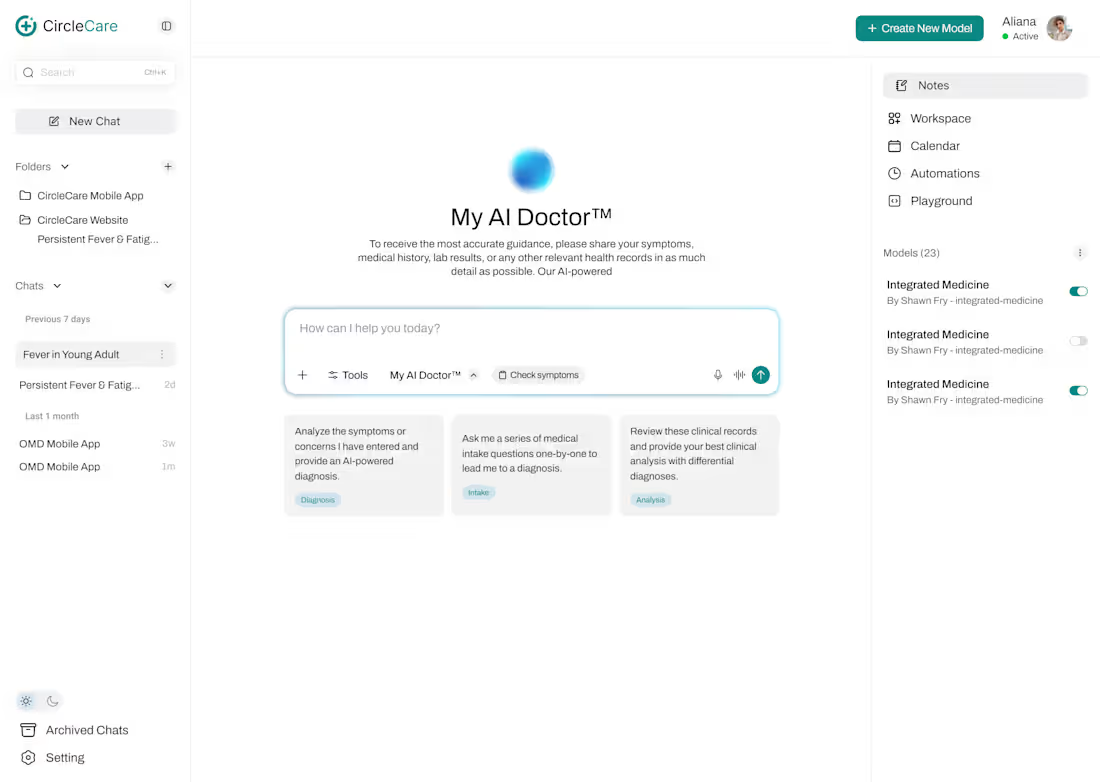
Designed a modern AI-powered healthcare workspace for CircleCare, focused on making AI-assisted healthcare interactions, medical notes, and workflow management more intuitive and efficient.
The dashboard combines a clean interface with a structured workspace, helping users interact with the AI Doctor, manage conversations, organize medical notes, and access tools from one centralized platform.
Key Features
:AI Doctor Workspace - AI-powered medical assistance interface.
Smart Chat Management - Organized conversations, folders, and chat history.
Medical Notes Workspace - A dedicated space for creating and managing clinical notes.
Integrated Navigation - Quick access to notes, workspace, calendar, automations, and AI playground.
Model Management - Manage and activate AI models through a simple interface.
Minimalist UI - Clean layouts, teal accents, and clear visual hierarchy.
Design Focus
Creating a professional, user-friendly healthcare AI dashboard that balances functionality, clarity, and usability while simplifying complex workflows.
0
21
VentureBridge - Designing a Trust-Driven Funding Marketplace
Project Overview
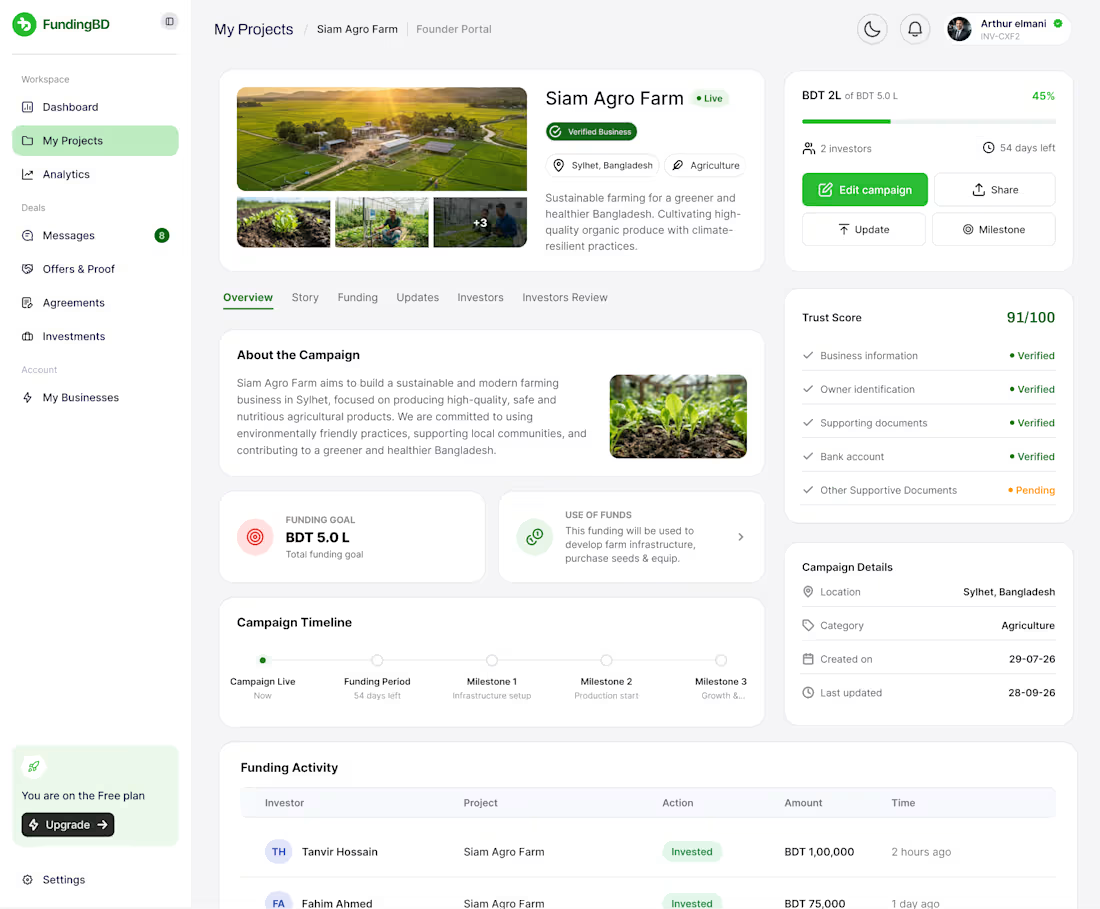
VentureBridge is a fintech marketplace concept connecting founders seeking capital with investors exploring business opportunities.
My Role: UX/UI Designer & Product Designer
My Focus:
Designed founder and investor user journeys
Created funding models and opportunity discovery interfaces
Designed business verification and Trust Score sections
Developed dashboard, messaging, and funding workflows
Focused on transparency, usability, and trust
Goal: Make business funding more accessible through a clear, user-friendly digital experience.
Tools: Figma, UX Research, UI Design, Prototyping
#UXDesign #UIDesign #Fintech #ProductDesign #Figma
0
29
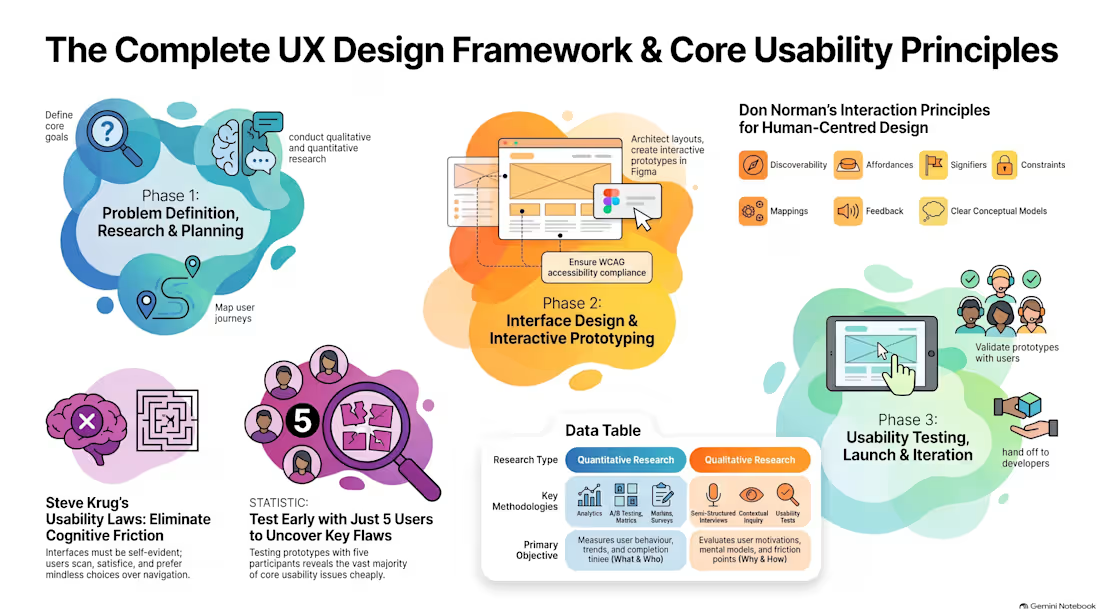
How I Structure a Data-Driven UX Research Process That Drives Results 🎯
Great user experiences aren't built on guesswork—they're rooted in human-centered evidence. Here is the lean, 4-phase UX research framework I use to uncover real user needs and validate designs:
1. Discovery & Empathy (Uncovering the "Why")
Goal: Understand human behaviors, mental models, and pain points before jumping to solutions.
Qualitative Methods: Semi-structured user interviews, contextual inquiry, and review mining.
Quantitative Methods: Funnel analytics audit (drop-off points) and targeted online surveys.
Deliverable: Initial Insights Summary & Opportunity Area Map.
2. Synthesis & Strategy (Defining the Right Problem)
Goal: Turn raw research notes into actionable strategy.
Methods: Affinity mapping, card sorting (for Information Architecture), and "How Might We" (HMW) problem framing.
Deliverables: Data-backed User Personas & End-to-End User Journey Maps.
3. Evaluative Testing (Testing Early & Often)
Goal: Catch friction points on prototypes before engineering teams write code.
Methods: Moderated/Unmoderated remote usability testing using the Think-Aloud Protocol (testing with 3–5 targeted users per round).
Deliverable: Usability Test Findings & Prioritized Fixes Matrix.
4. Post-Launch Iteration (Continuous Optimization)
Goal: Measure live performance and continuously improve.
Methods: A/B testing, user feedback monitoring, and conversion tracking.
Deliverable: Post-Launch UX Audit & Growth Recommendations.
✨ Why this approach works: Research eliminates assumptions early, saving development costs and ensuring every design decision directly serves both user needs and business goals.
📩 Looking to validate your product idea or fix conversion friction in your app? Let’s collaborate on your next project!
0
59