
Daniel Igbokwe
Product Designer helping start-ups build intuitive products.
Profile in progress
Daniel is building their profile!

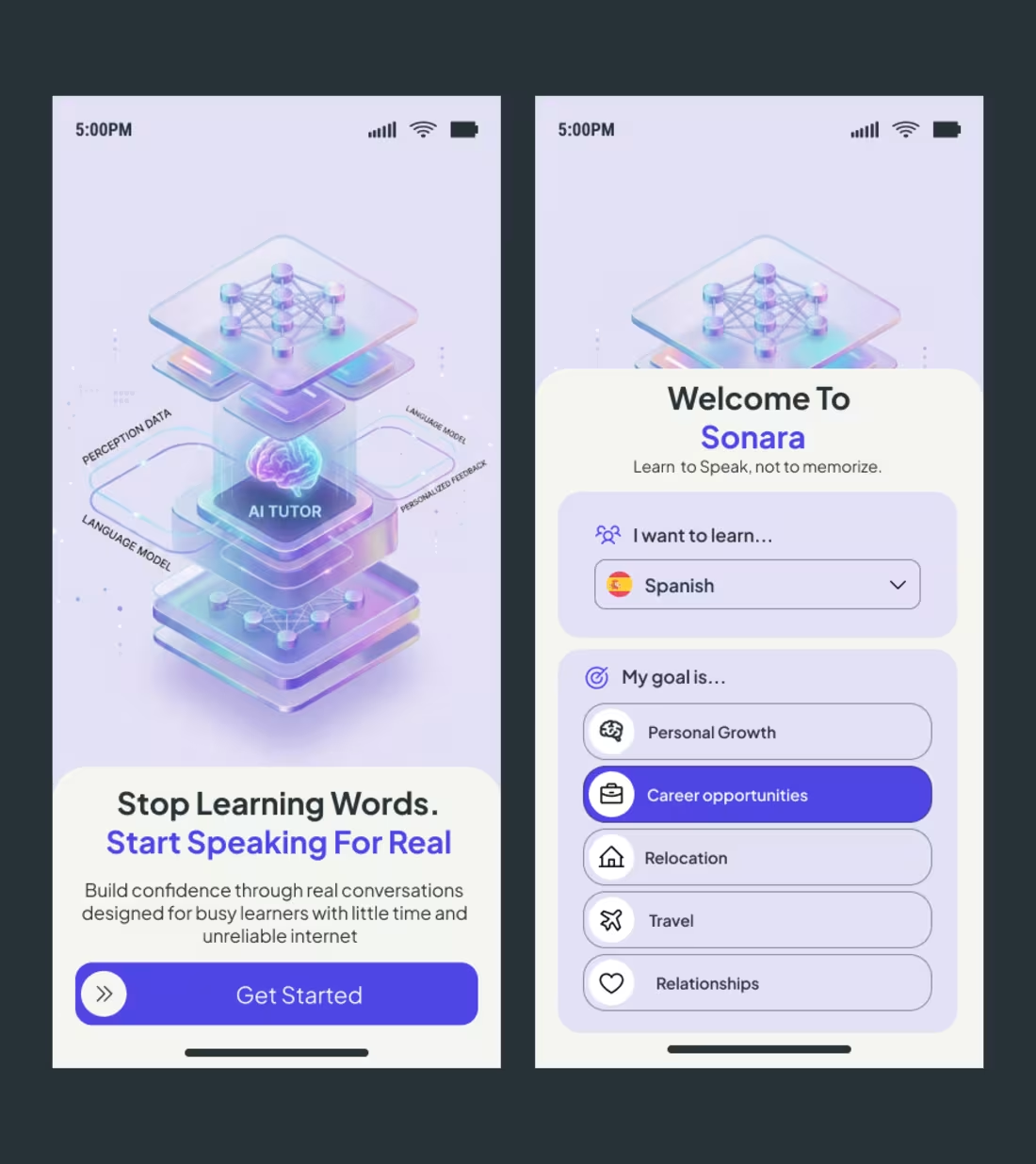
A few weeks ago, a client reached out to me right here on LinkedIn with a clear but challenging brief: build an onboarding experience for Sonara, an AI-driven language learning platform that cuts through the noise of traditional memorization.
The goal wasn't just to make it look "premium." The goal was to solve for intent.
In language learning, the biggest drop-off happens in the first 60 seconds. If the user feels like they are just filling out another form, you’ve lost them. I approached the Sonara design with three specific psychological levers:
1. Visualizing the Complex 🧠
The hero illustration isn't just decoration. It’s a literal map of the "AI Tutor" engine—showing how perception data, language models, and personalized feedback stack up. By making the tech tangible, we build immediate authority before the user even types their name.
2. The "Intent-First" UX 🎯
Instead of a generic signup, I designed the "My goal is..." selector. By forcing the user to identify their "Why"—whether it’s career opportunities or relocation—we create a micro-commitment. When a user tells the app their goal, they are more likely to stick with the habit.
3. Reducing Cognitive Friction ⚡
Notice the "Get Started" anchor. It uses a high-contrast purple pill against a soft cream background. This creates a clear physical focal point on mobile. If a user has to think about where to click next, the design has failed.
Whether I am designing for Healthcare or EdTech, my philosophy remains the same: Design for the user’s emotional state.
In Healthcare, we design for Certainty.
In EdTech, we design for Momentum.
To the founders and product leads in my network: When you’re building your onboarding flow, are you focusing on collecting data, or are you focusing on building excitement?
Let’s talk in the comments! 👇
hashtag#UIUX (https://www.linkedin.com/search/results/all/?keywords=%23uiux&origin=HASH_TAG_FROM_FEED) hashtag#ProductDesign (https://www.linkedin.com/search/results/all/?keywords=%23productdesign&origin=HASH_TAG_FROM_FEED) hashtag#EdTech (https://www.linkedin.com/search/results/all/?keywords=%23edtech&origin=HASH_TAG_FROM_FEED) hashtag#AILearning (https://www.linkedin.com/search/results/all/?keywords=%23ailearning&origin=HASH_TAG_FROM_FEED) hashtag#Figma (https://www.linkedin.com/search/results/all/?keywords=%23figma&origin=HASH_TAG_FROM_FEED) hashtag#UserOnboarding (https://www.linkedin.com/search/results/all/?keywords=%23useronboarding&origin=HASH_TAG_FROM_FEED) hashtag#DesignStrategy (https://www.linkedin.com/search/results/all/?keywords=%23designstrategy&origin=HASH_TAG_FROM_FEED)
1
23
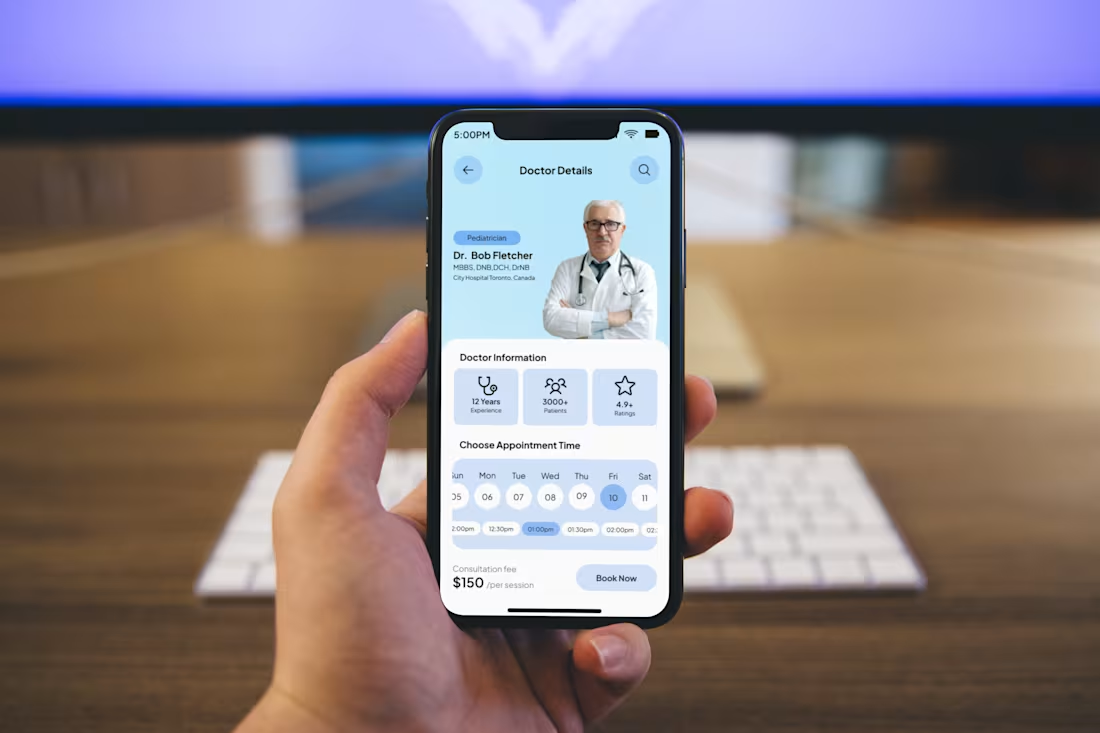
In Healthcare, a "Book Now" button is a Trust Fall. 🏥
We spend weeks perfecting onboarding, but the real UI challenge happens at the "Utility Gap", the exact moment a user stops browsing and starts executing.
When a patient is looking at this screen, they aren't just "shopping." They are seeking reassurance. I built this Doctor Details interface to answer three silent questions before the user even clicks:
1. Can I trust this person?
We lead with credentials (MBBS, DNB) and professional "social proof" (12 Years Experience, 3000+ Patients). In MedTech, seeing a face and a track record reduces the "clinical coldness" of a digital app.
2. Is this the right fit?
The hierarchy is intentional. Specialty (Pediatrician) and rating (4.9+) are placed in the primary eye-scan path. We validate the doctor’s expertise before the user even looks at the price.
3. Is this a headache to schedule?
The "Choose Appointment Time" isn't a hidden menu; it’s a horizontal scroller that shows immediate availability. Friction is the enemy of care. If it takes more than two taps to see a slot, you’ve lost the user.
The Design Philosophy: Great UX isn’t about keeping a user in your app; it’s about getting them to their destination as fast as possible. In healthcare, clarity equals comfort.
To my design network: When you're building for high-stakes industries (Health, Finance, Legal), do you prioritize a "warm" approachable aesthetic or an authoritative "professional" look?
Let’s debate in the comments! 👇
1
18
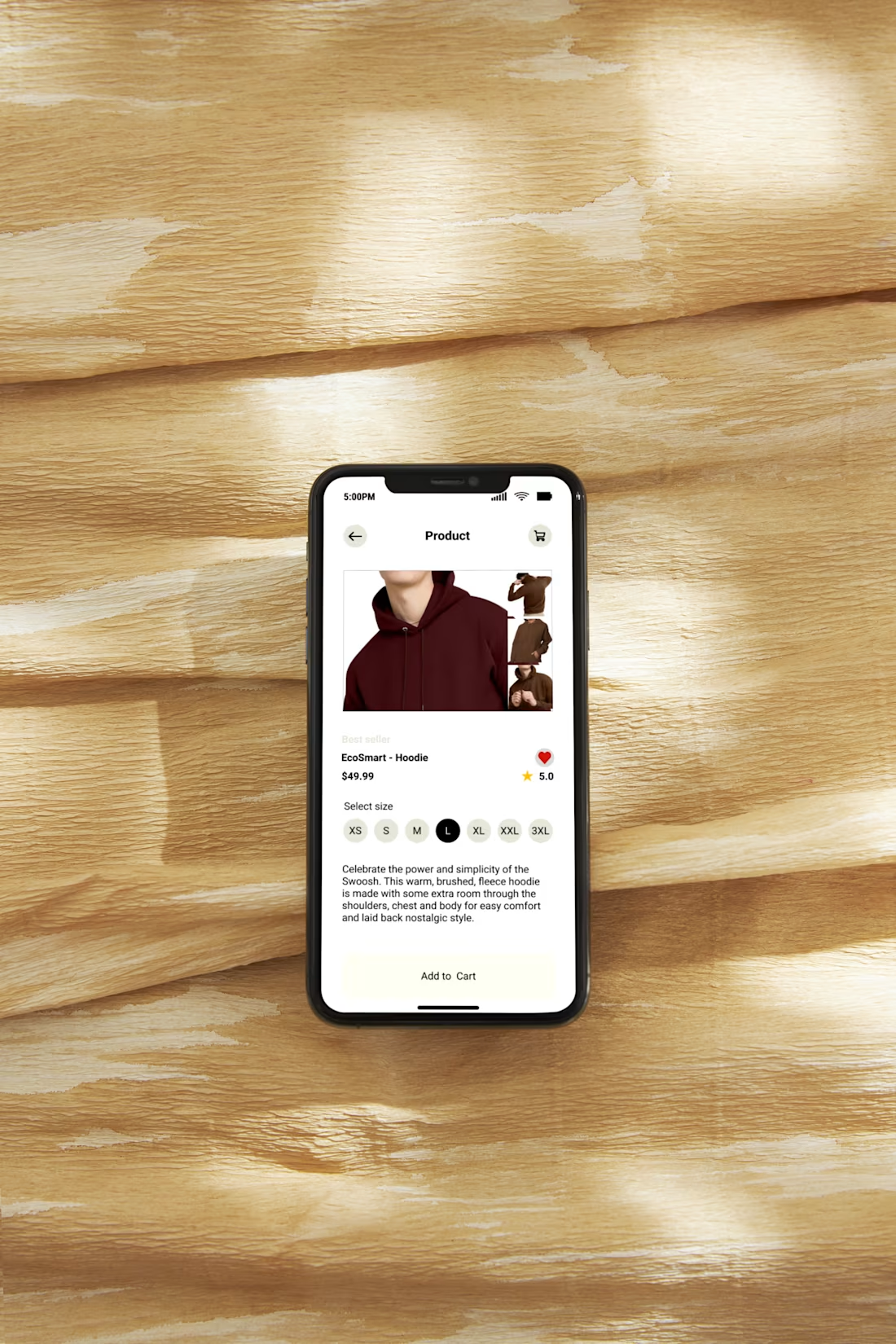
The Hidden Language of "Add to Cart" 🛒
In e-commerce, micro-interactions are where the sale is won. Looking at my latest hoodie detail page, the design is a silent conversation with the user:
No Selection Anxiety: The size selector uses high-contrast black for active choices. It’s a tiny detail that eliminates guesswork.
The Thumb Zone: The "Add to Cart" button is a high-contrast pill anchored at the bottom. If a user has to stretch to buy, they won't.
Instant Validation: Placing the 5.0-star rating next to the price pairs "cost" with "trust" in one scan.
The Goal: If you make the user think, you’ve lost them. If they feel confident, you’ve won.
Question: Do you prefer "sticky" buttons that follow the scroll, or are they too intrusive? 👇
#ProductDesign #UXDesign #Ecommerce #MobileUX
0
13
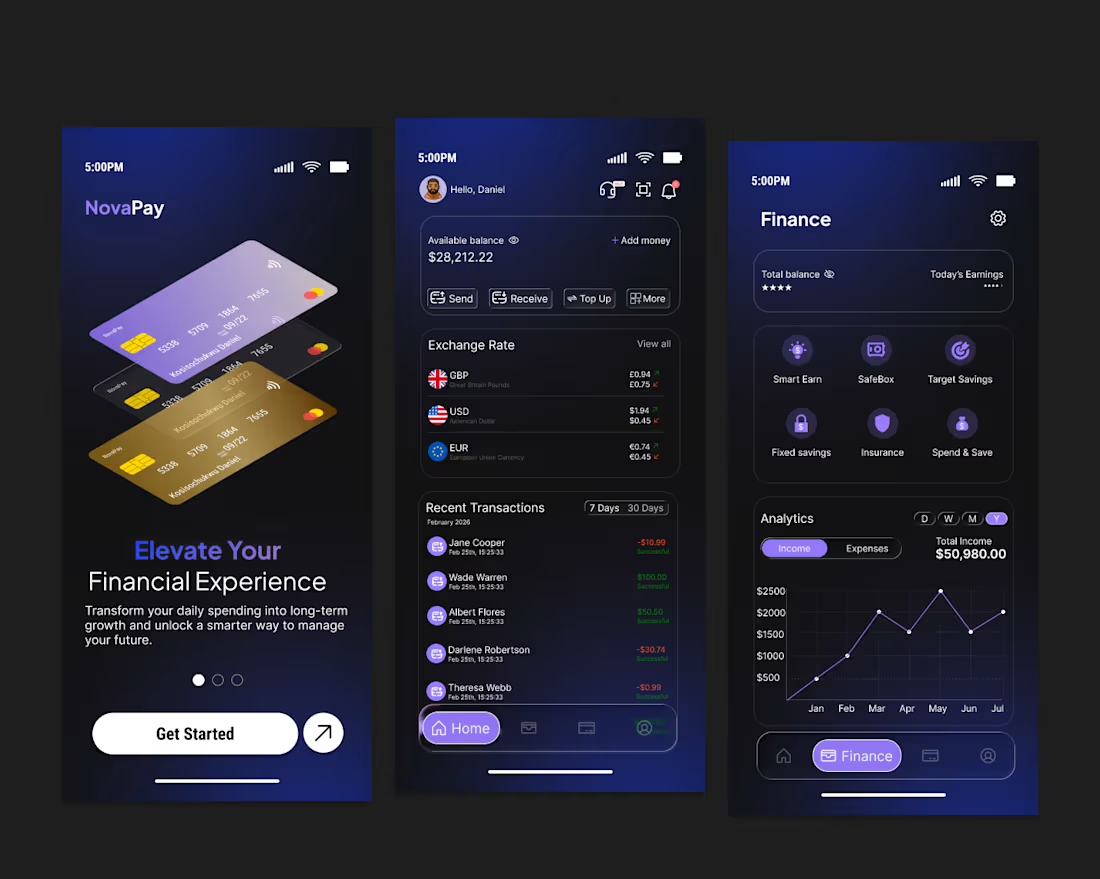
Fintech design is not about looking premium. It is about making money feel clear and controlled.
For this mobile finance concept, the goal was reducing cognitive load while presenting complex data like balances, exchange rates, transactions, and analytics.
I focused on three things:
Clear hierarchy so key numbers stand out instantly
Action-first layout with send, receive, and top up easily accessible
A calm dark UI with intentional accents to guide attention
Finance products carry emotional weight. Good design builds trust through clarity, structure, and predictability, not decoration.
0
22