
Bookkeeper & tax pro managing 90+ clients—cleaning up books,
Bookkeeper & tax pro managing 90+ clients—cleaning up books,

Tax Prep & Bookkeeping Support – Tax & Financial Firm
I was full-time at this tax firm, handling everything from bookkeeping and financial reporting to client calls, office ops, and tech troubleshooting.
I:
• Maintained QuickBooks records and managed AP/AR
• Prepared monthly reports and supported tax prep for clients
• Handled incoming docs, organized data, and tracked filings
• Ran front office duties, client communications, and scheduling
• Built out filing systems that actually made sense for the team
• Stepped in for IT support when systems broke during tax season
It wasn’t glamorous—but I kept it all running. Being a Swiss Army knife taught me how to juggle pressure, solve problems fast, and never let the books fall behind.
0
124

Bookkeeping & Tax Support for 90+ Clients – CPA Firm
I manage bookkeeping for a portfolio of over 90 active clients—primarily in dentistry, law firms, PR, retail, and others.
My work includes:
• Cleaning up QuickBooks registers and building smart rules to automate categorization
• Reconciling multiple accounts monthly, ensuring accurate and up-to-date financial records
• Preparing monthly and quarterly financial statements to support decision-making and tax planning
• Collaborating with the CPA team on tax compliance, filings, and audit readiness
• Helping small business owners understand their numbers and improve how they manage their cash flow
Whether it’s a dental office, a solo law practice, or a retail store—I bring structure, clarity, and efficiency to the table so clients can focus on running their business.
0
149

Helping a Design Firm Build Financial Structure That Actually Works
When I started working with this Design Firm in City of Industry, CA, their books were scattered across platforms—some in QuickBooks, some in Studio Designer, and some... in inboxes.
We built a cleaner system from the ground up:
Cleaned up reconciliations
Built consistent AP/AR processes
Used Smartsheet to track jobs & cash flow
Generated reports that the owner could actually use
I’m not a Studio Designer pro, but I learned enough to keep it all moving. The goal wasn’t perfection—it was peace of mind.
21
310

Led Accounting Ops for High-Volume Auto Dealership – 2,000+ Transactions/Month
I ran the accounting function for a wholesale auto dealership, handling over 2,000 transactions per month across sales, inventory, and vendor accounts.
I built the workflow from scratch, cleaned up Dealertrack data, helped sync up other departments so financials could be tracked, supported team members who needed help learning proper entries, and worked beyond my title—doing controller-level work without the controller-level pay.
In the end, I advised leadership on financial red flags and recommended winding down operations. They chose not to—and filed bankruptcy shortly after.
Not every job ends in a portfolio-perfect story. But this one taught me how to lead, stay honest, and stand firm on the numbers—even when no one wants to hear them.
11
192


California CPA Accounting & Advisory
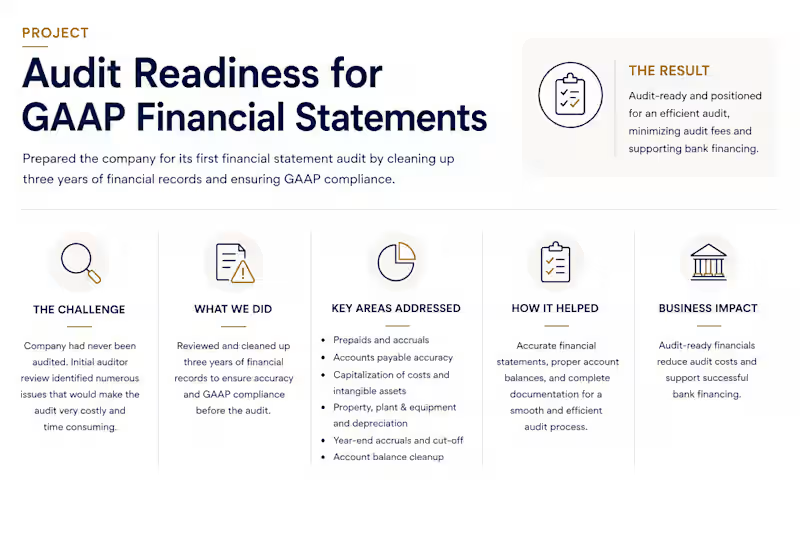
Audit Readiness for GAAP Financial Statements
Prepared a company for its first financial statement audit by reviewing and cleaning up three years of accounting records. The engagement included correcting account balances, prepaids, accruals, AP and year-end cutoff, capitalization of intangible assets and other costs, and PP&E and depreciation.
The goal was to establish accurate, GAAP-aligned financial records and supporting documentation before the audit, helping the company reduce unnecessary audit work and cost and move efficiently toward its financing objectives.
0
68
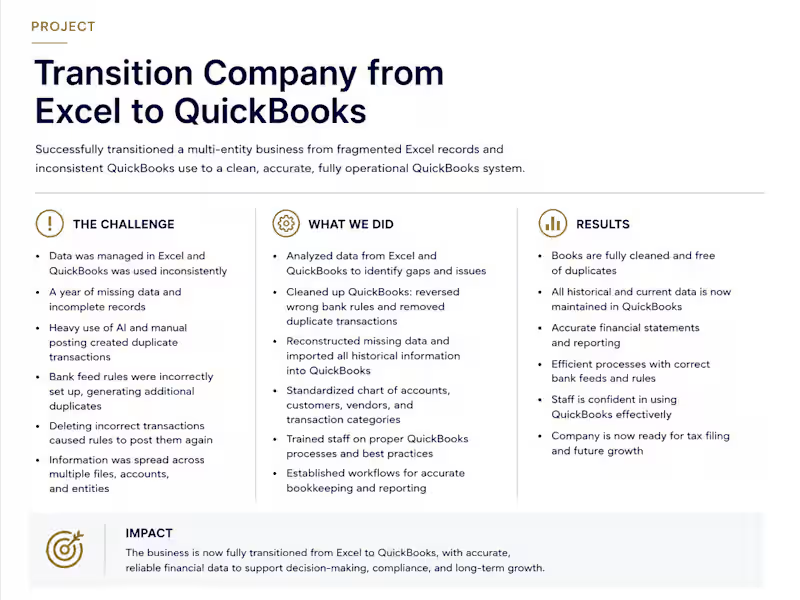
From Excel Chaos to Clean Books in QuickBooks
A comprehensive accounting cleanup and system transition for a multi-entity business that had historically maintained financial information across Excel and inconsistently used QuickBooks.
The challenge
Financial records were fragmented between Excel and QuickBooks, with a significant period of missing information. Manual posting, automated bank-feed activity, and improperly configured QuickBooks rules created duplicate transactions and recurring errors across multiple entities and accounts.
What I did
Mapped and reconciled historical information from Excel and QuickBooks.
Identified missing periods and reconstructed the necessary accounting records.
Reviewed and corrected improperly configured QuickBooks bank-feed rules.
Identified and eliminated duplicate transactions created through manual and automated posting.
Imported and organized historical information into QuickBooks.
Reconciled bank accounts and accounting records across multiple entities.
Established appropriate QuickBooks workflows and trained staff on proper processes.
Created procedures to maintain accurate books going forward.
Result
The business was fully transitioned from Excel-based records to QuickBooks, creating a centralized and reliable accounting system. Historical information was cleaned and reconciled, duplicate transactions were eliminated, and the company gained accurate financial records and reporting needed for ongoing operations, tax filing, and informed business decisions.
0
67
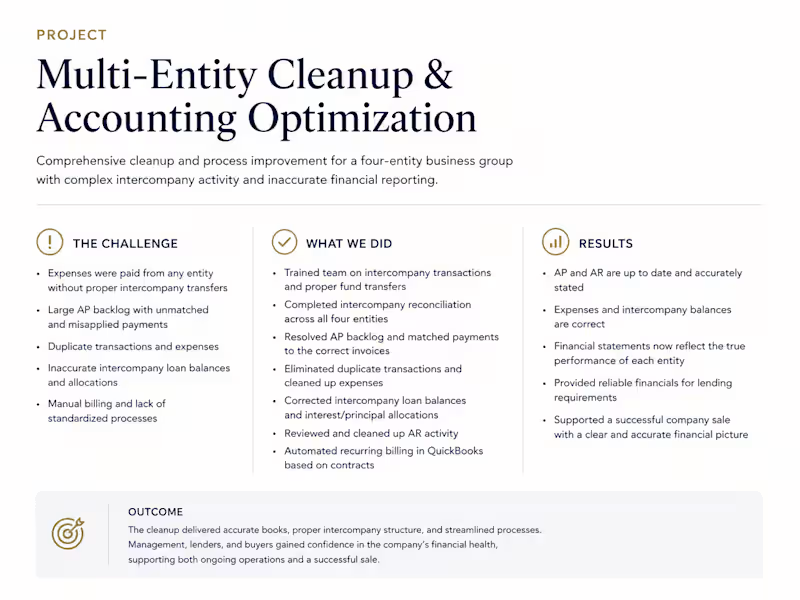
Multi-Entity Cleanup & Accounting Optimization
Project overview
Led a comprehensive accounting cleanup for a four-entity business group with complex intercompany activity, significant AP and AR issues, duplicate transactions, and inaccurate financial reporting.
The challenge
The entities were frequently paying each other’s expenses directly, without properly recording intercompany transfers. This created reconciliation problems, an AP backlog, duplicate expenses, and inaccurate intercompany balances. Manual billing processes also created unnecessary administrative work.
What I did
Established proper intercompany transaction procedures and trained accounting staff on the correct flow of funds between entities.
Completed a comprehensive intercompany reconciliation across all four entities.
Resolved a significant AP backlog by identifying payments made from other entities and matching them to the correct invoices.
Identified and eliminated duplicate transactions that had caused expenses to be overstated.
Corrected intercompany loan balances and the allocation of interest and principal.
Reviewed and cleaned up AR activity.
Automated recurring billing in QuickBooks based on contractual terms.
Trained staff on maintaining proper intercompany accounting going forward.
Results
The cleanup brought AP and AR up to date and improved the accuracy of the financial statements. Expenses and intercompany balances were properly stated, giving management a reliable picture of the financial position and operating performance of each entity.
The improved financial reporting also supported the company during a sale process and provided lenders and prospective buyers with greater confidence in the accuracy and financial health of the business.
0
72
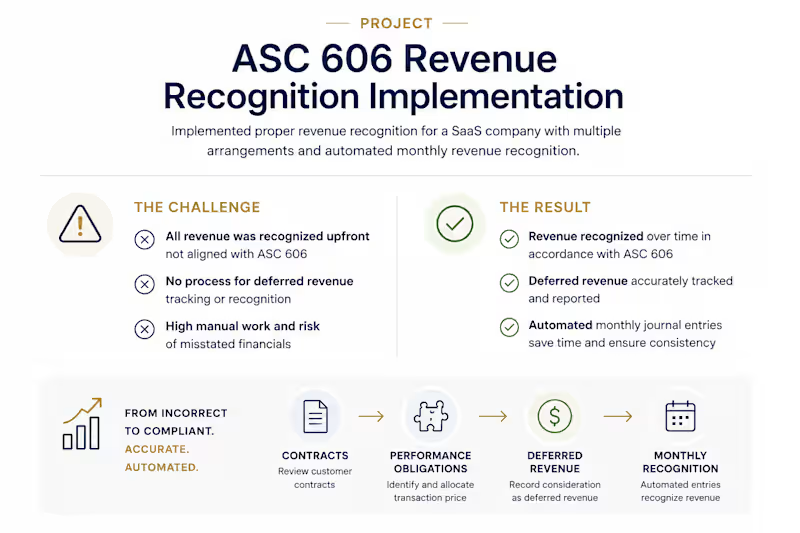
ASC 606 Revenue Recognition Implementation
Implemented a revenue recognition process for a SaaS company with multiple revenue arrangements. The project included analyzing performance obligations, establishing deferred revenue, and automating monthly journal entries to recognize revenue in accordance with ASC 606.
The result was more accurate revenue reporting, reduced manual work, and a consistent process for ongoing revenue recognition.
0
70

Website Development Backed by Real Business Experience


DIEM — Health & Wellness App Product Development
I founded and led the development of DIEM, a multi-year health and wellness platform designed to bring nutrition, fitness, lifestyle guidance and personalized wellness information together in one experience.
The idea was to go beyond a basic calorie tracker or workout app. DIEM was designed to understand the individual user—their goals, activity level, nutrition, health conditions, allergies and other profile information—and use that data to provide more relevant daily guidance.
My role covered virtually every part of the product and business development process. I worked closely with professional software developers to define features, workflows, functionality, user experience, testing requirements and ongoing improvements. The developers handled the programming, while I directed what the platform needed to do and how the overall system should work.
I also hired and worked with licensed dietitians, physicians and other health professionals to develop the wellness information behind the platform. That content was incorporated into formulas, rules and logic designed to provide personalized recommendations to users.
DIEM included features such as personalized daily regimen items, nutrition tracking, exercise tracking, health conditions, allergies, goals, reports and wellness recommendations. Users could select goals such as losing weight, getting fit, improving overall health, toning, gaining weight or maintaining their current condition.
The platform was also designed with a professional side in mind, allowing trainers, coaches and health professionals to eventually review user information, provide guidance and work more closely with their clients.
Beyond the product itself, I was involved in branding, competitive research, UX direction, content development, marketing, social media, business strategy and commercialization. The larger business model included consumer subscriptions, professional accounts, corporate wellness programs and potential white-label licensing.
DIEM was a substantial multi-year product-development project that brought together technology, professional wellness content, user experience and business strategy. It demonstrates my ability to take a complex idea, define how it should work, coordinate the right specialists, and develop it into a structured product with a clear path toward commercialization.
1
82


Founder & AI Automation Systems Architect

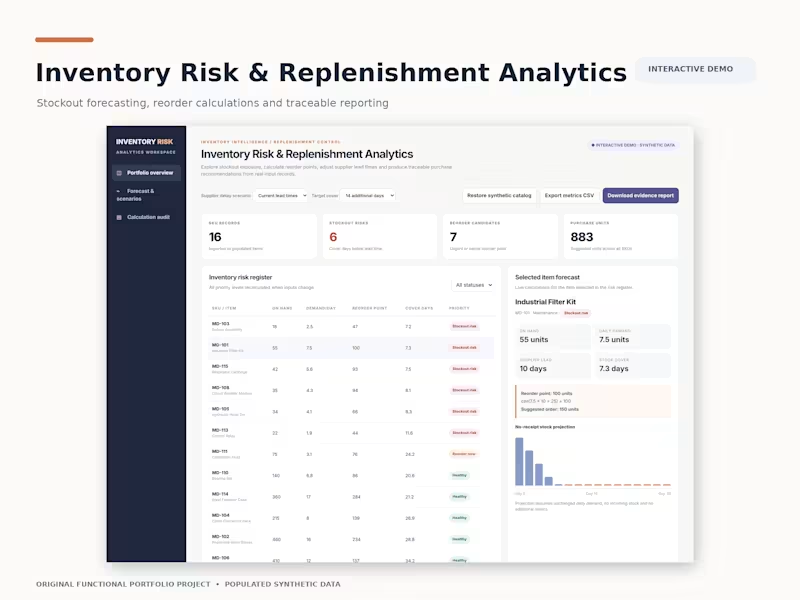
This video demonstrates an interactive inventory analytics application designed to help operations teams monitor stock availability, identify supply shortages, and make informed replenishment decisions.
Using 16 populated synthetic inventory records, the walkthrough demonstrates how changes in stock quantities and supplier lead times automatically update inventory risk calculations.
What the Video Demonstrates
Inventory Dashboard: Displays stock availability, six stockout-risk items, and seven replenishment candidates.
Stockout Risk Detection: Identifies products that may run out before replacement inventory arrives.
Supplier Delay Simulation: Demonstrates how changing lead times affects replenishment calculations and risk exposure.
Interactive Inventory Management: Shows how stock adjustments immediately update dashboard metrics.
Replenishment Analytics: Calculates reorder points using demand, lead time, and safety stock.
Reporting: Provides calculated inventory results and export capabilities.
Technical Implementation
Developed the interactive dashboard, inventory calculation logic, scenario controls, risk filtering, and data import/export functionality using JavaScript, HTML5, and CSS3.
The demonstration showcases a functional inventory management analytics application with reproducible calculations and clearly identified synthetic data.
2
0
101
Workforce Scheduling & Capacity Planner | Interactive Demo
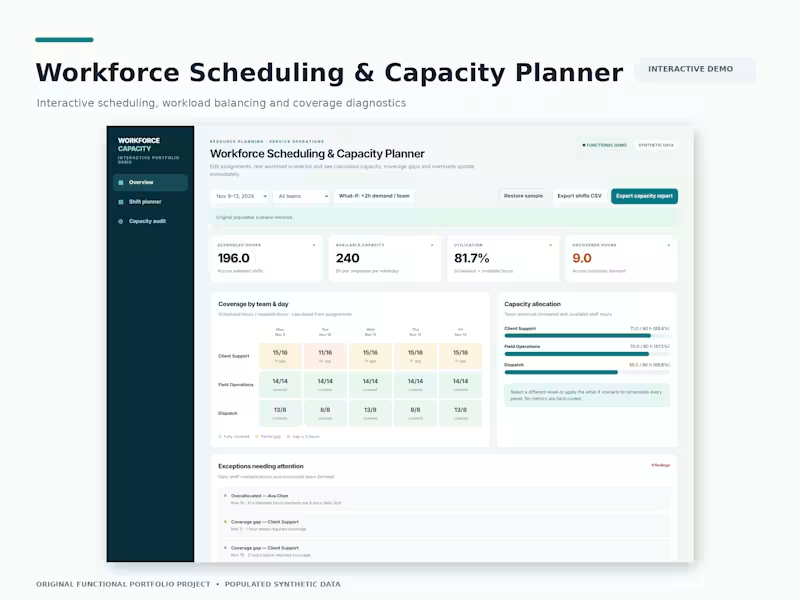
This video demonstrates a desktop-optimized workforce scheduling application designed to help operations teams manage staff assignments, monitor capacity, and identify coverage gaps.
Using populated synthetic workforce data, the walkthrough shows how scheduling changes automatically recalculate staffing availability and operational performance metrics.
What the Video Demonstrates
Workforce Capacity Dashboard: Displays 196 scheduled hours, 240 available hours, and 81.7% workforce utilization.
Interactive Shift Management: Demonstrates adding staff assignments and automatically recalculating capacity metrics.
What-If Scenario Planning: Simulates increased staffing demand, raising uncovered hours from 9 to 33.
Multi-Dimensional Coverage Analysis: Displays staffing requirements across departments and weekdays using interactive coverage grids.
Capacity Auditing: Identifies staffing shortages, employee overallocations, and operational exceptions requiring attention.
Technical Implementation
Application Logic: Developed interactive state management that updates dashboard calculations when assignments, reporting periods, or staffing requirements change.
Data Processing: Implemented calculations comparing scheduled staffing hours against available capacity and departmental demand.
Data Management: Built CSV import/export functionality, input validation, and downloadable capacity reports.
Technology: JavaScript, HTML5, and CSS3.
The demonstration showcases a functional workforce planning application with traceable calculations and interactive scenario analysis.
0
28

Counting pennies to keep the dollars
Counting pennies to keep the dollars


