AI Engineer Projects in SonipatAI Engineer Projects in SonipatNanoMech: The Real-Time Multimodal AI Trading Assistant 📈🤖
Built for the Gemini Hackathon
Traders know that in the market, seconds equal dollars. By the time you switch between your chart, your analysis tools, and your risk calculator, the candle has already moved, and your setup is gone.
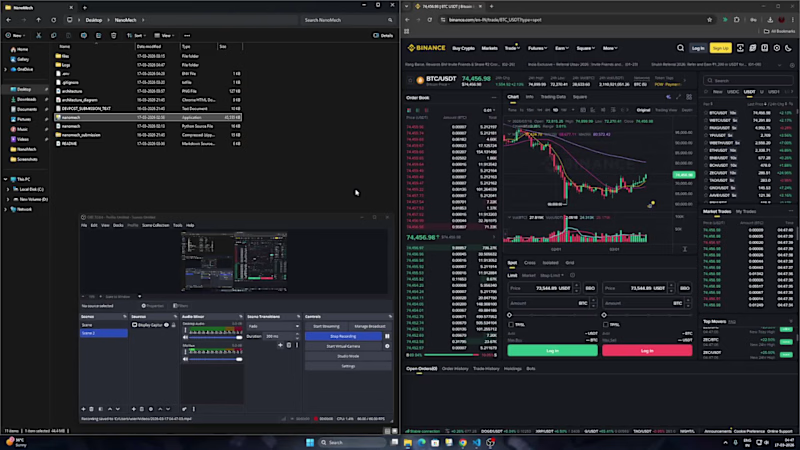
I wanted to fix this. For the Gemini Hackathon, I built NanoMech—an AI that sits on top of your screen, sees exactly what you see, and gives you a complete trade plan in seconds. No API keys required, and no leaving your chart.
💡 The Solution
NanoMech runs as two frameless, transparent overlays on top of any trading platform. It uses Google Gemini 2.5 Flash's multimodal vision capabilities to visually read your screen and deliver instant insights.
Overlay 1: Market Analysis
Trend: Analyzes bullish/bearish market structure and moving average crossovers.
Liquidity: Evaluates order book depth, bid/ask walls, and support/resistance zones.
Momentum: Breaks down candlestick patterns, volume behavior, and price velocity.
Overlay 2: Trade Setup & Risk Management
AI-Extracted Targets: Instantly provides Entry Price, Target Price, and Stop Loss.
Live CALC Engine: Calculates Risk Amount ($), Position Size (Units), and Risk-to-Reward (R:R) Ratio. Everything updates live as you type in your desired risk percentage.
🛠️ How It Works (Under the Hood)
Vision-to-Text Processing: Captures the screen in real-time using the mss library and sends the raw screenshot to Google Gemini 2.5 Flash via the Google GenAI SDK.
Prompt Engineering: Engineered strict structured prompts using [ANALYSIS] and [TRADE] tags to force the LLM to output reliably parseable price data.
Regex Extraction: Uses regex to pull the exact Entry, Target, and Stop prices from the AI's response and wire them directly into the local risk calculator.
Custom Desktop UI: Built always-on-top transparent overlays using Python's Tkinter, utilizing threading to keep the UI fully responsive during API calls.
Hands-Free Scanning: Integrated a global hotkey (Ctrl+A+I) and an Auto Mode that scans the chart every 20 seconds.
🧗♂️ Challenges Overcome
Structured LLM Outputs: Getting an LLM to consistently return prices in a parseable numeric format is notoriously tricky. We solved this with rigorous prompt engineering and robust fallback handling.
Thread-Safe UI: Tkinter isn’t thread-safe. We engineered a solution to route all UI updates through root.after() callbacks from the active analysis thread.
UX/UI Friction: Tuning the transparency and colors so the text remains readable across both dark and light chart themes, while ensuring our global hotkeys didn't conflict with native trading platforms.
🚀 What We Learned & What's Next
This project proved just how incredibly capable Gemini 2.5 Flash is at visual reasoning. It accurately identified complex candlestick patterns, moving averages, and volume spikes from a raw image alone.
The Roadmap for NanoMech:
Voice Output: Speaking the trade setup aloud for a 100% hands-free experience.
Multi-Monitor Support: Allowing users to select which screen the AI tracks.
Cloud Hosting: Running NanoMech as a scalable web service on Google Cloud Run.
Trade Logging: Automatically tracking how the AI's setups perform over time.
💻 Built With
Python | Google Gemini 2.5 Flash | Google GenAI SDK | Google Cloud | Tkinter | mss | pillow | Regex
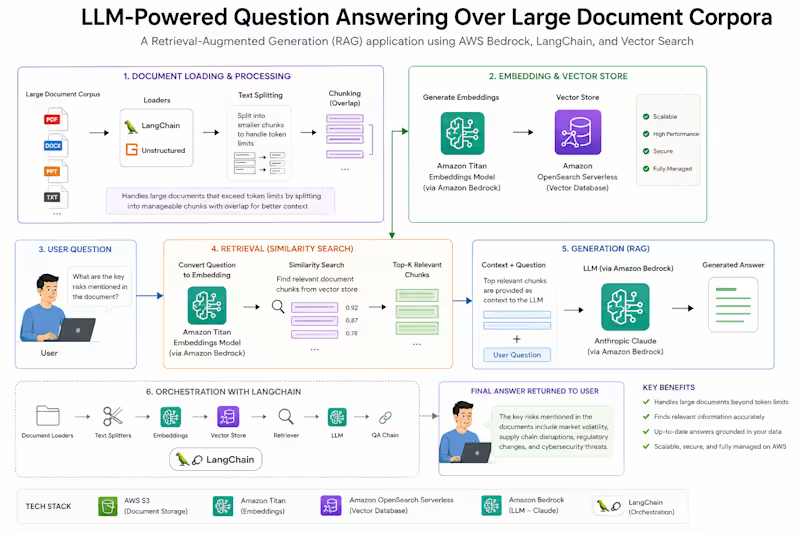
Ready to try it out? Check out the code and run it yourself: https://github.com/omshukla24/NanoMech Built an LLM-powered question-answering application that lets users ask natural-language questions over large document corpora and get accurate, grounded answers, instead of manually searching through documents for the right section.
Designed and built the full RAG pipeline independently, from document ingestion through to answer generation, as a technical demonstration of production-grade retrieval-augmented generation using AWS-native tooling.
Key Challenges:
Documents exceeding token limits: Large source documents couldn't be fed directly into the LLM's context window, so they had to be broken down without losing meaning or context across chunks.
Finding the right context: With a large corpus, the system needed to reliably surface the specific chunks relevant to a given question, not just the most textually similar ones.
Grounded, accurate answers: Answers had to be based on the actual retrieved content, not the model's general knowledge, to avoid confidently wrong responses.
Working within a managed AWS ecosystem: Embeddings, storage, and generation all needed to work together cleanly using Bedrock-native models rather than a patchwork of external services.
Approach:
Document loading and chunking
Processed large documents into manageable chunks sized to stay within model token limits while preserving enough context for coherent retrieval.
Vector embeddings with Amazon Titan
Generated vector embeddings for each document chunk using Amazon Titan, capturing semantic meaning rather than just keyword overlap.
Vector storage and retrieval
Stored the embeddings in a vector database, enabling fast similarity search to pull the most relevant chunks for any given question.
RAG-based answer generation with Claude on Bedrock
When a question comes in, the system retrieves the relevant chunks and passes them as context to Anthropic Claude via Amazon Bedrock, which generates an answer grounded in the retrieved content rather than relying on parametric memory alone.
Results & Impact:
Accurate, source-grounded answers over document corpora too large to fit in a single context window.
A scalable retrieval architecture that separates document processing, embedding, and generation, so any of the three can be swapped or scaled independently.
A fully AWS-native RAG pipeline, demonstrating fluency with Bedrock's embedding and generation models working together in production patterns.
Tech Stack
Python · LangChain · AWS Bedrock · Amazon Titan · Anthropic Claude · FAISS DB Hit a classic Django trap this week and figured it's worth sharing since so many people are running into it now.
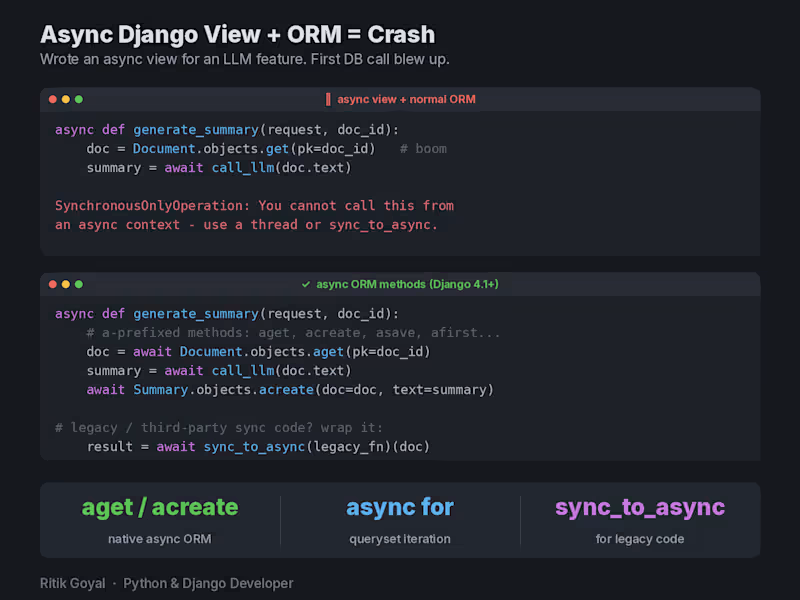
I was adding an LLM feature to a Django app. The AI call takes a few seconds, so naturally I made the view async so it doesn't block a worker while waiting. Wrote the async view, called the ORM like I always do, and boom:
SynchronousOnlyOperation: You cannot call this from an async context.
Turns out Django's ORM can't just be called normally inside async code. The classic sync API isn't safe in an event loop, so Django protects it and throws this error instead.
The fix is simpler than most people think. Since Django 4.1 the ORM has async versions of everything, same names with an "a" prefix. So objects.get() becomes await objects.aget(), create() becomes acreate(), save() becomes asave(). For loops over querysets, async for works directly. And for old sync code or third party libraries you can't change, wrap them with sync_to_async().
Why this matters right now: everyone is bolting AI features onto Django apps, and LLM calls are exactly the slow I/O that async is made for. Which means a lot of devs who never touched async Django are suddenly hitting this error for the first time.
One honest caveat: transactions still don't fully work in async mode, so if you need atomic blocks, keep that path sync and wrap it.
Anyone else made the jump to async views yet, or still happily on WSGI? Problem:
Many organizations still process invoices manually by reading PDF documents and entering key details (invoice number, vendor, amount, etc.) into systems. This process is slow, error-prone, and difficult to scale, and it also makes it harder to detect duplicate invoices or incorrect totals.
Solution:
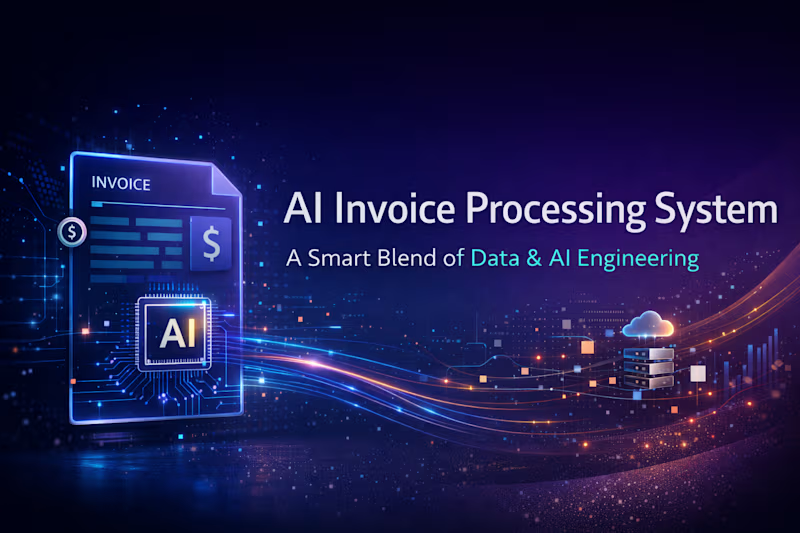
This project builds an automated invoice processing pipeline that converts uploaded invoice PDFs into structured data. It uses OCR to extract text, LLMs to identify invoice fields, validation checks to ensure correctness, and Kafka-based event streaming to manage the processing pipeline. The extracted data is stored in PostgreSQL and visualized through a dashboard, enabling faster, scalable, and more reliable invoice processing.