Projects using Typeform in GermanyProjects using Typeform in GermanyAI-Powered Event Operations: Automating Attendee Insights
Overview:
I designed and implemented a custom automation ecosystem for a large-scale online event to eliminate manual data handling. By connecting Typeform, OneDrive, and Slack, I transformed a chaotic manual process into a streamlined, AI-categorized workflow that recovers critical "brain capacity" for the core event team.
The Challenge:
The project faced a massive manual workload behind the scenes. Attendee data had to be exported, analyzed, and filed into spreadsheets by hand. This led to a significant delay in information sharing, leaving the team on Slack without real-time insights during critical event phases.
The Solution:
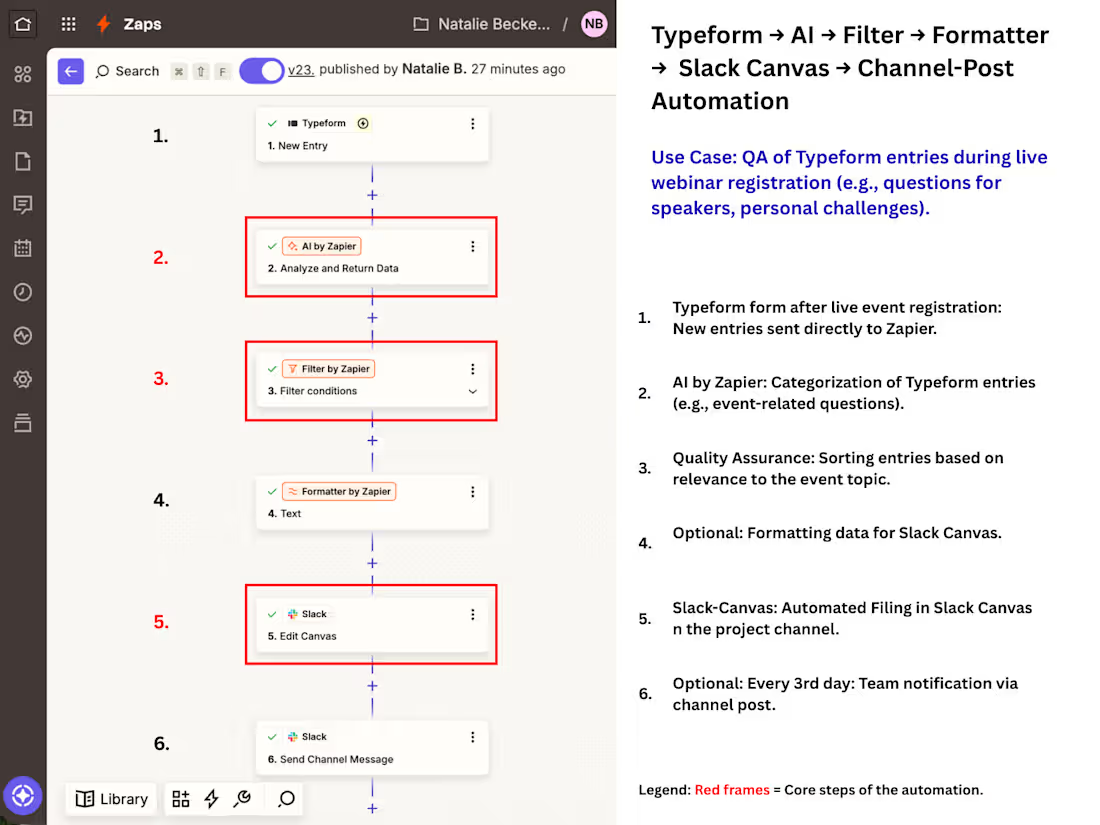
I built a multi-step automation using Zapier that does more than just move data:
AI Categorization: Integrated an AI step (GPT-4 via Zapier) to analyze and categorize attendee responses in real-time.
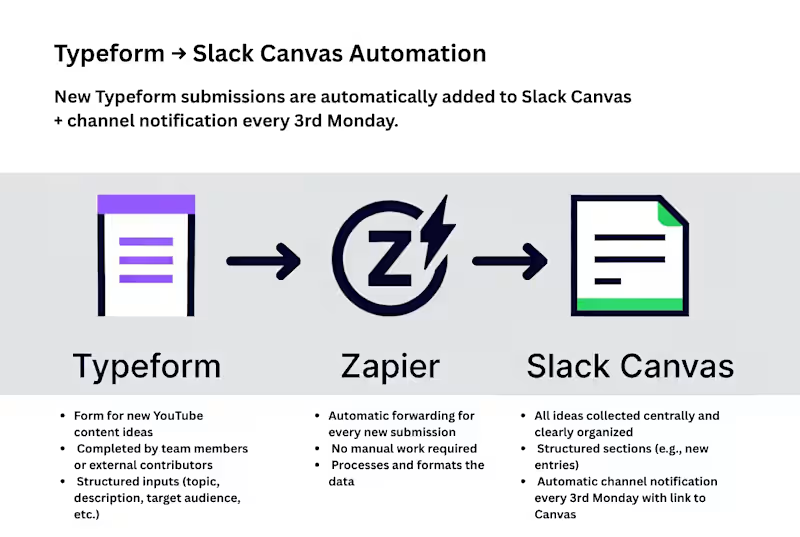
Automated Filing: Structured data is automatically filed into a Slack Canvas for immediate team access and a OneDrive Excel sheet for long-term tracking.
Smart Quality Assurance: Built-in filters ensure only relevant, high-quality entries proceed to the team view.
Interval Notifications: To prevent "notification fatigue," I added a digest step that sends a summary report to the Slack channel every three days, including direct links to new entries.
The Results:
- Time Savings: Manual operations were reduced from several hours per week to just a few minutes of monitoring.
- Reduced Dependency: Shifted the process from permanent human dependency to sporadic system maintenance. The client is no longer reliant on a full-time assistant for data handling, only on occasional oversight.
- Scalability: The system is built for "qualified maintenance"—it can be quickly adapted for future events, replacing repetitive copy-pasting with a scalable architecture.
- Deliverables: In addition to the automation, I provided a visual process map (SOP) and a Loom walkthrough to ensure the client’s team can manage the system internally. I went through a full purchase flow just recently before our webinar launch — sales page, checkout, upsell, emails, the whole flow.
At first glance, nothing looked off.
But going through it like an actual user, a few things started to surface.
In one path, the upsell linked to the wrong offer.
In another, the welcome email never arrived.
Access only worked because I used the password reset option — otherwise, nothing happened.
These were the kinds of issues that started to surface.
What I notice quite often in funnels is this: everything works in isolation, but the transitions between systems are where things actually break.
And no one really sees it, because most tests follow the expected path, and most testers are part of the bubble in which the flow was originally created.
This is often where it helps to have someone outside the original setup, with an eye for UX, flow logic and the smaller details that tend to be overlooked.
That’s usually where QA becomes less about checking things and more about understanding how the system actually behaves under slightly different conditions.
Not perfect conditions, just ordinary ones.
I’d be curious how you currently approach testing your purchase or access flows. QA-Driven Testing of Purchase, Access & Email Automation Flows
This work involved QA-driven testing and validation of complete digital purchase and access flows for online products and summit-related offers.
The scope covered functional verification of the full user journey — from checkout to post-purchase access — with a focus on system reliability, logical consistency, edge cases, and real user behavior.
Key responsibilities included:
- End-to-end testing of purchase flows (products, add-ons, upsells, all possible paths)
- Verification of checkout behavior, pricing logic, and product availability
- Validation of redirects, thank-you pages, and upsell sequences
- Testing of post-purchase access logic (email delivery, member area access, product unlocks)
- QA checks of email automation systems (tags, lists, sequences)
- Validation of form logic and embedded workflows (e.g. Typeform)
- Re-testing after implemented fixes to ensure stable behavior
Testing was performed with a strict QA mindset, focusing on functional correctness and system behavior — not on visual design, UX/UI, or business strategy.
Service Output:
Documented QA findings and a validated purchase & access flow, including minor fixes where feasible.
Scope boundary:
This work concludes with documented QA validation and implemented minor fixes. Ongoing optimization, redesign, or long-term system responsibility are excluded.